
Chutes AI Automation Setup in 2026: Steps, Limits, Fixes

Nov 11, 202616 min read
Chutes AI automation means a scheduler or workflow tool, such as Activepieces, sends an ordinary OpenAI-style request to Chutes on a trigger and writes the reply somewhere you can read it. Nothing about the model call is special, and that's the point.
To get there fastest, make four moves:
Call Chutes from workflow tools
- Create an API key in your Chutes account and store it in the workflow tool's secret store, not in the step itself, so rotating it later touches one place.
- Copy the model name exactly as the Chutes model listing writes it. A near-match is a different string, and the request fails.
- Point an OpenAI-compatible step, or a plain HTTP step, at the Chutes endpoint with that key and model name.
- Set the trigger, send the output to storage, and give the first run a generous timeout, because a model that has been idle can take longer to answer.
What you need before starting
If any "need" cell in the table is unmet, the run fails there and nowhere else. Three integrations carry the whole setup, and the table shows what each one does and what it asks of you.
| Piece | Role | What you configure | What you need |
|---|---|---|---|
| Chutes | Inference endpoint that answers the request | Base URL, model name, request body | An API key and a funded balance |
| Scheduler or workflow tool | Trigger that fires the call on a schedule or event | Schedule, HTTP or OpenAI-compatible step, secret, timeout | Somewhere to hold the key |
| Storage | Place the reply lands | Destination and file or row format | Write access from the workflow |
Check the balance first, because an empty one looks like a broken integration when it's an account state. Everything after this table follows the same order: key, model name, balance, cold start.

Read on 11 November 2026, the Chutes documentation is the source for everything here about keys, model names, balance and cold starts. Pricing and model availability change without notice, so confirm both against the live pages before you schedule anything unattended.
Everything below works on Activepieces' free plan. Start without code or a credit card.
Stage 1: create a Chutes account, API key and model
Create and store your Chutes API key
Sign up at Chutes, open the API keys page, create a key and copy it immediately, because you should treat it as shown once.
Paste it into your scheduler's or workflow tool's secret store, never into the workflow body, where it'd be copied into every exported run log.
Then fund the account before the first call, since an empty balance is one of the first things that stops an unattended job.
Pick a model from the official model list
Copy the model name character for character from Chutes' own list, because a near-miss name returns an error instead of a fallback. Then check price, because the spread between input and output is wide.
According to Chutes pricing, DeepSeek V4 Flash runs $0.44 to $1.32 per million tokens, so a long generated answer costs three times what the same volume of prompt does.
Gemma 4 runs $0.12 to $0.37, the same roughly threefold gap on a lower base, which suits high-volume jobs.
Look at the Qwen family and the gap widens:
- Qwen 3.8 spans $0.039 to $1.25, a gap of about 32 times, so a chatty reply costs far more than the prompt that triggered it.
- Qwen 3.5 spans $0.20 to $1.75, so output is nearly nine times the input rate.
- Qwen 3.6 spans $0.25 to $2, so output is eight times the input rate and the highest ceiling of the five.

Set max_tokens on every scheduled call. That is the practical rule: output is the expensive side, and an uncapped loop that rambles bills at the top of each range.
Test with one curl request
Run this once from a terminal before wiring anything into a scheduler. Set CHUTES_API_KEY to your key and CHUTES_MODEL to the exact name from the list.
curl https://llm.chutes.ai/v1/chat/completions \
 -H "Authorization: Bearer $CHUTES_API_KEY" \
 -H "Content-Type: application/json" \
 -d '{
 "model": "'"$CHUTES_MODEL"'",
 "messages": [{"role": "user", "content": "Reply with the word ok."}],
 "max_tokens": 16
 }'
If a JSON reply contains ok, the key, model name and balance all work. An authentication error points at the key, a model-not-found error at the name, and a payment error at the balance.
Stage 2: send your first automated request
Chutes API base URL, headers and body
Copy the values from the Chutes docs and the model catalogue rather than from memory, because a mistyped model ID returns a model-not-found error and a missing header returns an authentication error. The table below lists every field a minimal chat request carries.
| Field | Value | Required |
|---|---|---|
| Base URL | The inference host given in the Chutes docs | Yes |
| Authorization header | Bearer followed by your API key |
Yes |
| Path | /v1/chat/completions |
Yes |
| Model ID | The exact identifier shown in the Chutes model list | Yes |
messages |
Array of role and content objects | Yes |
max_tokens |
Upper limit on the length of the reply | No |
temperature |
Sampling randomness; lower values give steadier output | No |
stream |
Boolean; true returns the reply in pieces | No |
Set max_tokens anyway in anything unattended, since it caps how much balance one runaway reply can spend.
Using an OpenAI-compatible SDK
Because the endpoint follows the OpenAI chat format, you can use the official OpenAI client library and change two settings: the base URL and the API key. Everything else, including the messages structure and the response object, stays as the library already expects.
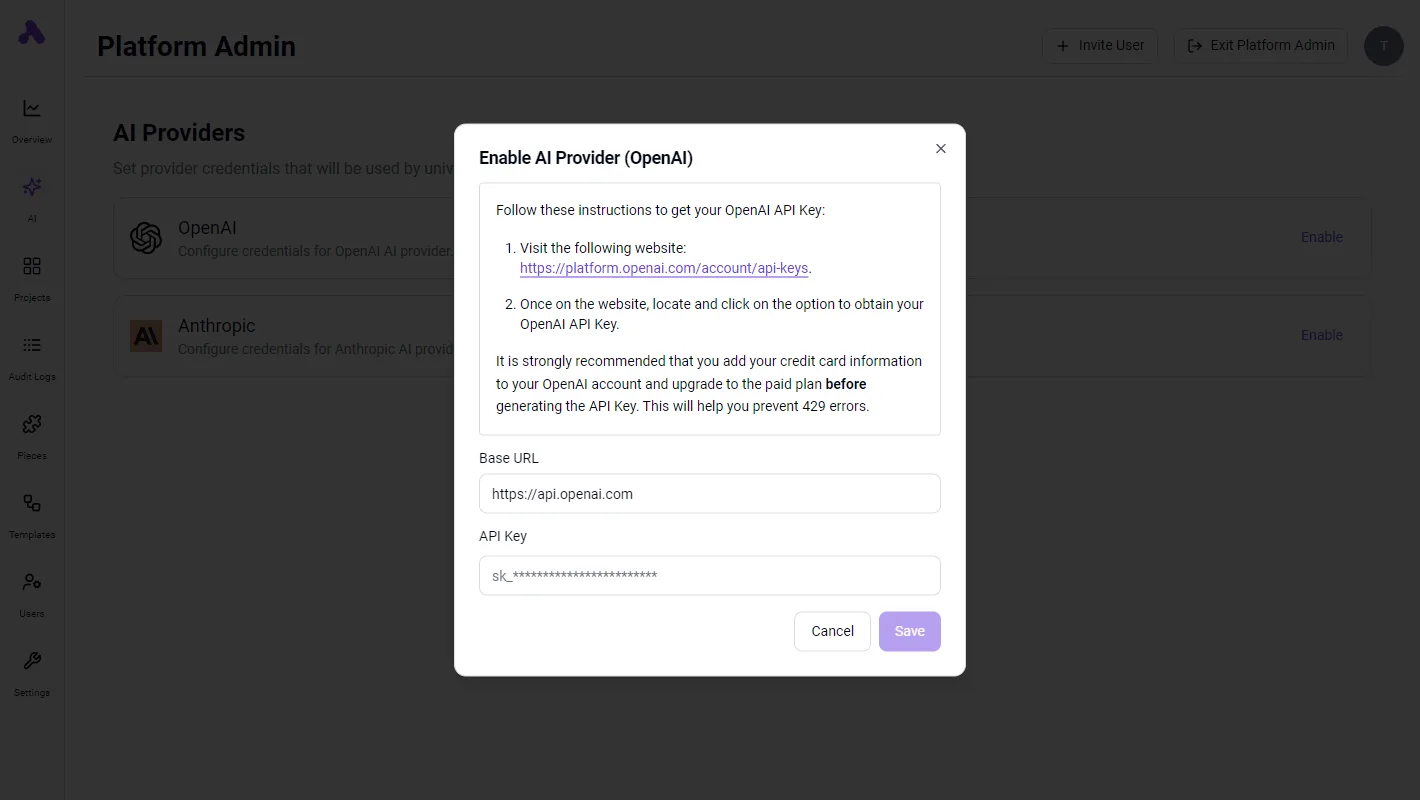
Read the key from an environment variable in your scheduler, not from the script, so a rotated key means one edit and no redeploy. If the call fails, the error class tells you which of the three checks to repeat.
Streaming versus non-streaming responses
Leave stream off for scheduled jobs. A cron task or workflow step wants one complete reply it can parse and pass on, and a single JSON object is far easier to validate than a series of fragments.

Turn stream on only when a person is watching text appear, such as a chat window.
When a stream is in play, failures look different too. A request can start returning text and then stop partway, so any code that consumes a stream has to handle an incomplete reply.
Easier to see it running than to read about it: set it up free, no card.
Stage 3: schedule it with a workflow tool
Schedule it by having a timer fire the same HTTP POST you just tested, with the same key and model name, then write the reply somewhere you'll actually look. The call doesn't change, only what triggers it and where the answer lands.
Set the frequency against your plan's request limit first. A schedule that fires faster than the limit allows won't fail loudly. It'll return rejections on some runs and succeed on others, and the gaps look like flakiness.
Option A: cron or a hosted function
If you already have a server, cron is the shortest path. One line fires a script that posts to the endpoint, and the key sits in an environment variable on that machine.
A schedule that fires faster than the limit allows won't fail loudly. It'll return rejections on some runs and succeed on others, and the gaps look like flakiness.
Retries are yours to write, so a failed run stays failed until you add a loop.
Take away the server and you have a hosted function (a small piece of code a cloud provider runs on a timer). It keeps the key in the provider's secret store and usually brings its own retry setting.

The cost is a deploy step and one more dashboard to check when a run goes quiet.
Option B: a workflow tool with an HTTP step
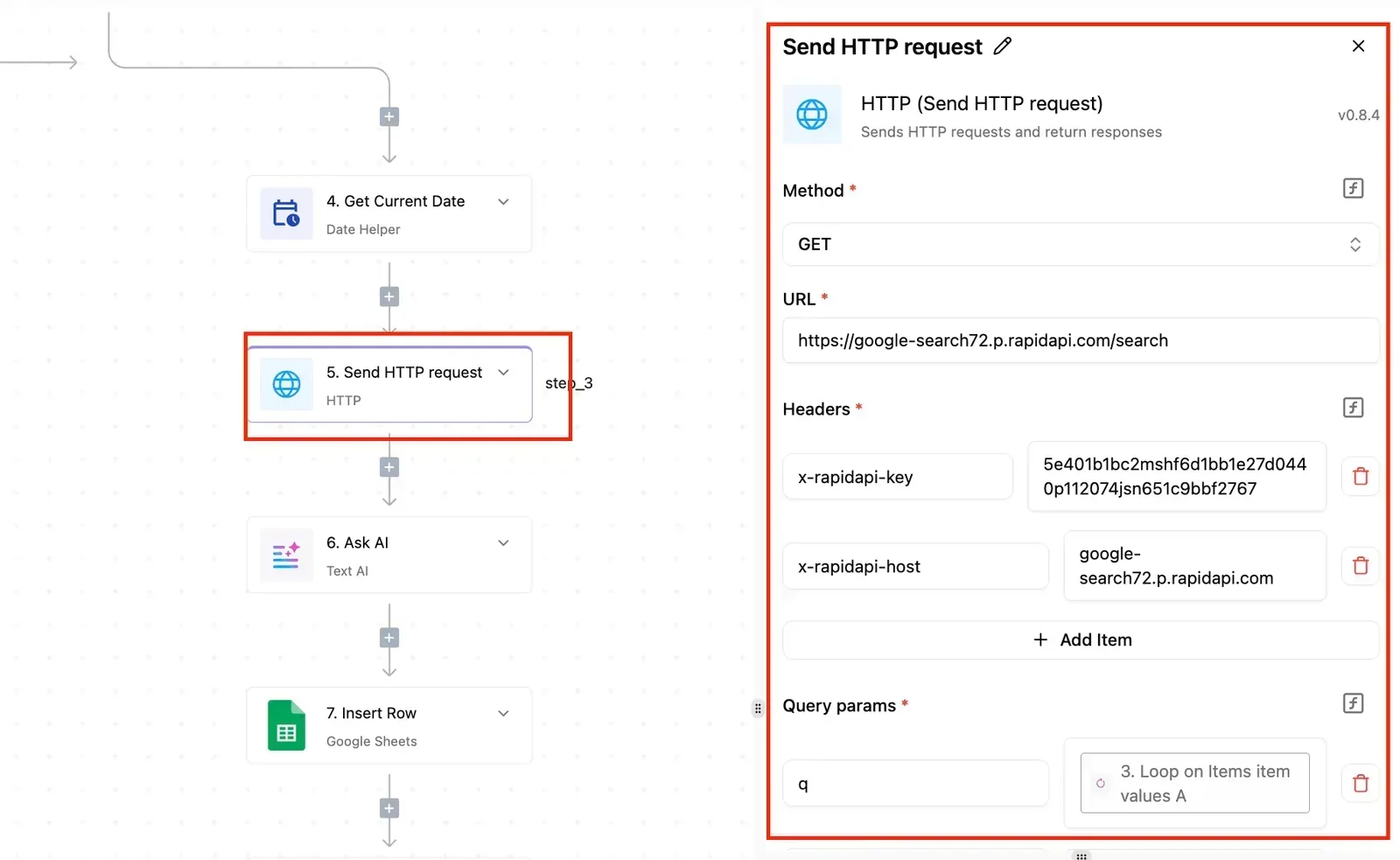
With a no-code workflow tool you get a schedule trigger, an HTTP step where you paste the endpoint, headers and JSON body, and a retry toggle on that step.
Put the key into the tool's connection or secrets store rather than into a file. That makes it quick to start and awkward to review, because the logic lives in screens instead of a diff.
Read the retry column most carefully: it tells you who is responsible when a cold start makes the first attempt fail.
| Approach | Setup time | Retry handling | Where the API key lives | Best for |
|---|---|---|---|---|
| Cron | Shortest if you own a server | None unless you write it | Environment variable on the host | One fixed job on a machine you already run |
| Hosted function | Moderate; needs a deploy | Often a platform setting | Provider's secret store | Code you want versioned without a server |
| No-code workflow tool | Short; fill in a form | Toggle on the HTTP step | The tool's connection store | Non-developers and multi-step flows |
Activepieces can be the scheduler here, with one caveat: it has no dedicated Chutes integration, so you reach Chutes through its generic HTTP step, the same request as the curl test.

That suits this job, because a platform that resells you a model has picked and priced it before you open the product, while here the model is whatever name you copied from the Chutes list and the spend lands on your own Chutes balance at Chutes' rates.
Bring-your-own-key starts on the $20 Plus plan, which includes 10,000 credits a month and counts a run as 1 credit however many steps it has, so cost doesn't increase with automation complexity, and MoneyGram, Moneypenny, Alan and FundingSocieties run Activepieces in production.
The Plus line on the pricing page lists bring-your-own AI keys at $0.007 a credit once you pass the 10,000, which is the rate to set against what a reselling platform charges for its own bundled model, so a customer can see whether bringing their own saves money.
In the JSON response, the reply text sits in the first choice's message content. Map that one field to a spreadsheet row or a chat message, and add a timestamp column. When a run goes missing, that column shows you the gap.
Troubleshoot Chutes errors and limits
Seven errors cover almost every Chutes failure, each with a single cause and a single fix. A scheduled job should treat only two of them as worth retrying.
The table pairs each error with its cause and fix, and says whether the official docs back the claim; take the unverified rows as things to test, not rules.
| Error | Cause | Fix | Source status |
|---|---|---|---|
| 401 | Missing, mistyped or revoked API key | Regenerate the key and resend it as a bearer token | Official docs |
| 402 | Account balance is empty | Top up, then rerun | Official docs |
| 404 model name | Model name does not match the listing | Copy the name exactly from the model page | Official docs |
| 404 wrong URL | Base URL or path is off | Point the client at the OpenAI-compatible base URL | Unverified |
| 429 | Too many requests | Back off and retry | Unverified |
| Cold start | Model not currently running | Raise the timeout, retry once | Official docs |
| Context length | Prompt plus output exceeds the model's window | Trim input or switch models | Unverified |
Retry only the 429 and the cold start. The rest fail identically every time, so retrying them just fills your log.
A 401 means the key's wrong; a 402 means the key's fine and the money's gone. Both stop a nightly job cold, and neither fixes itself. Alert on them instead of retrying.
Rate limits and 429 handling
On Base, the cap is 300 requests a day at $3 a month, as RPWithAI reports it, so requests over 300 a day will not be processed. Plus allows 2,000 at $10 and Pro 5,000 at $20.
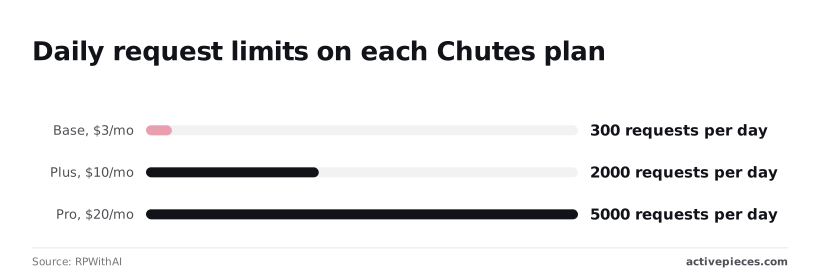
That's a third-party report, not the docs, so confirm it on your account page.
Base's 300 means a job firing every five minutes uses 288, leaving 12 for retries. Plus works out to about 83 requests an hour, and Pro to about 208.
Because retries count against the same cap, back off exponentially: wait 2, 4, then 8 seconds with a little random jitter, and stop after five tries.
Cold starts, timeouts and model names
After a model has gone idle, the first call is a cold start, and it's slower than every call after it. A client with a 10-second timeout will report a failure that was only waiting.
Set a generous timeout on the first call, and retry once before raising an alert.
What Activepieces does about this
The failures in this article come from a key in the wrong place, a model name that is nearly right, an empty balance and a first call that times out. Activepieces helps with the first and last of these by keeping the workflow plain.
It has no dedicated Chutes integration, so you build the call as an HTTP step carrying the same bearer header, path and JSON body as the curl test.
The key goes in a connection instead of the step, which means a rotation touches one place and the key stays out of exported run logs.
The model name is a single field you paste from the Chutes list, so a model change is one edit.
The balance problem is an account state, and Activepieces can't top it up. What it can do is make an empty balance visible.
Add a branch on the HTTP step that sends you a message when the response is a 401 or 402, and a quiet gap in your output becomes a notification. Those two errors are the ones not worth retrying.

Set the 429 and cold-start path to retry, with a long first-call timeout, and the table of seven errors above is mostly covered by one small flow.
Activepieces' core is open source under the MIT licence, so you can self-host it if the key and the run history have to stay on your own infrastructure. The hosted plans are the other route.
Bring-your-own-key starts on the $20 Plus plan with 10,000 credits a month, and a run counts as one credit however many steps it has, which means billing doesn't penalize workflow complexity. MoneyGram, Moneypenny, Alan and FundingSocieties run it in production.
Inference stays on your Chutes balance at Chutes' rates, which is the arrangement this article recommends.
Frequently asked questions
If the error isn't prompt length, the cause is usually one of four things people ask about first. The answers below follow Chutes' own documentation as checked on 11 November 2026, so confirm anything that affects your bill against the live pages.
Is Chutes AI free to use for automation?
Not reliably, so plan on a paid endpoint with a funded account. On a scheduled job that runs unattended, an empty balance is the worst thing to discover.
The call is rejected, the workflow records a failure, and nothing alerts you until someone reads the run history.
Check the pricing and account pages for any free allowance before you rely on one. Then add a failure notification to the workflow, so an empty balance shows up as a message and not as a quiet gap in your output.
Can Chutes replace the OpenAI API in an existing workflow?
Usually yes, because Chutes exposes an OpenAI-compatible interface. In most cases you change three things: the base URL, the API key, and the model name. The model name is where swaps break, since an OpenAI model identifier sent to Chutes won't match anything.
Copy the exact identifier from the Chutes model listing and paste it unchanged. Then test streaming and error handling separately, because a workflow that parses responses strictly can fail on small differences even when the basic call succeeds.
How to build integrations without native support?
Don't assume one exists. Search each tool's own app directory on the day you build, because those catalogues change.
Go the generic way instead: use the tool's HTTP request step, or its OpenAI-style step with a custom base URL, and point it at Chutes.
That keeps you independent of anyone's connector release schedule, and it means a model change is an edit to one field.
How do I keep my Chutes API key out of workflow logs?
Put the key in the platform's credential or secrets store and reference it from the authorization header. Never paste it into a prompt, a query string or a plain text field.
Run histories usually record inputs and outputs for every step, so a key typed into a visible field is stored with every run.
Once a key has appeared in a log, treat it as exposed: revoke it, create a new one, and check whether anyone with access to the run history could have copied it.
Give each workflow its own key where the account allows it, so one revocation doesn't stop everything else.


