
Self Host OpenCode 2.0: Setup Steps, Real Cost and Pitfalls

Oct 25, 202615 min read
OpenCode is an open-source AI coding agent that you run yourself, while the model behind it stays rented and billed per token, much like the way teams wire up self-hosted automation tools such as Activepieces to hosted services they don't control.

As of 2026-10-25, we found no official release called "2.0" in the changelog.
What it does is read your repository, propose edits, and run shell commands, with a terminal interface as its main face. The code is open source, so there's no license fee. The thinking is done by whichever model provider you connect.
Think of four parts, split by who runs what. The wrong assumption here costs money, because people see "self-hosted" and forget one part is still metered.
You host the OpenCode server and CLI, the config and auth store that holds your settings and provider credentials, and the machine they run on. You rent the external model API, which bills per token no matter where OpenCode lives.

OpenCode 2.0 and how self-hosting works
Where your risk sits follows from that split: a leaked key or a runaway loop lands on the rented part, and a careless permission lands on the machine you own.
You will see it in three places:
- One is a shared dev box that several people connect to
- Another is a CI job, or an MIT-licensed Activepieces flow that kicks off a run on your own provider key, so the model bill is yours to set and not a reseller's
- The third is a remote session, where the server runs on a distant machine and you attach from your laptop
Wherever it lands, the agent's reach changes. A shared box means shared credentials, so one person's mistake becomes everyone's incident. A CI job usually has write access to the repository, so a bad prompt can push a bad change.
You cannot pin to "2.0", because it is a label people use, not a version.
Before you install anything, read the changelog and the repository's releases page, then write down the exact version you deployed. If a support ticket arrives saying "it behaved differently after the update," that note is the only thing that lets you answer it.

Everything below works on Activepieces' free plan. Start without code or a credit card.
What a self-hosted OpenCode setup costs and requires
If you self-host OpenCode, the software costs nothing and the hardware little, so the real bill is model spend plus the hours someone spends keeping the box safe.
For one developer or five, the software fee is $0, because the project is open source. That means no seat count to negotiate. It also means no vendor to phone when an update changes behavior, which is why the version note above matters.
Model spend: the line that dominates the bill
$39 per million tokens is what a near-frontier model cost with GPT-4 in 2023, according to LLM Calculator, which meant organizations had to be selective about where they deployed models.
GPT-4o cut that to $8 in 2024, DeepSeek V3 to $0.52 in 2025, and DeepSeek V4 Flash to $0.14 in 2026, so per-token cost is much lower, though it still matters at scale.
Even at those prices the bill doesn't stay small, because an agent re-reads files and retries failed steps, so one runaway loop on an uncapped key can still cost more than the server for the whole year. Put a hard budget on every key.
You need one small machine that holds nothing else: no shared credentials, no production access, and restricted outbound traffic. I have no verified price for it, so I leave it unquoted. The cost that matters is what the agent can reach if it goes wrong.
The table shows what each setup charges on each line. The main thing to take from it is how many cells nobody can fill in without measuring your own usage.
| Setup | Software fee | Model spend per month | Server cost | Admin hours per month |
|---|---|---|---|---|
| Solo developer, self-hosted | $0 | Unverified; depends on usage | Unverified | Unverified |
| Five-person team, self-hosted | $0 | Unverified; multiplies with headcount | Unverified | Unverified |
| Hosted agent subscription | Unverified | Usually bundled; limits unverified | None | Unverified |
Run one week with budgeted keys and read the real usage before you trust any estimate, including mine.
The strongest case against self hosting OpenCode
Speed and upkeep costs of self-hosting OpenCode
Start with the speed: a hosted agent runs in minutes, while self hosting adds patching, authentication and uptime work, leaves the model bill unchanged, and puts a shell-capable agent on your hardware.
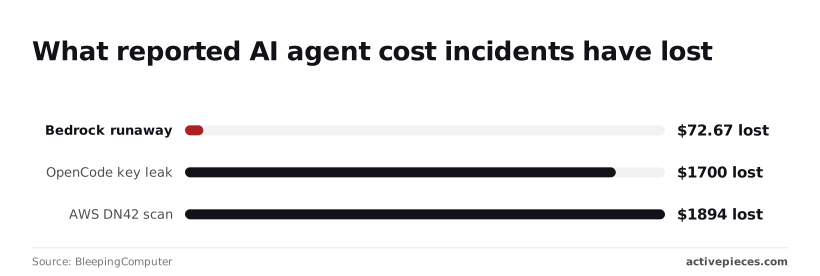
The runaway session was the smallest loss, and the exposed key and the network scan each cost far more.
In every case nobody was watching when the agent ran. The thesis would be wrong if a week of budgeted usage came in negligible and an isolated box needed no upkeep. I haven't seen that, but you should check it yourself.
What you host and what the config controls
The software is free. The model calls and the machine it runs on are not. OpenCode is an open source coding agent that reads your repository, calls a language model you choose, and runs shell commands and file edits on your behalf.
You host the server process that runs the agent and holds your session state. The client is whatever you type into, such as a terminal or a remote connection. The config file decides which model keys the agent can use and what it may run.
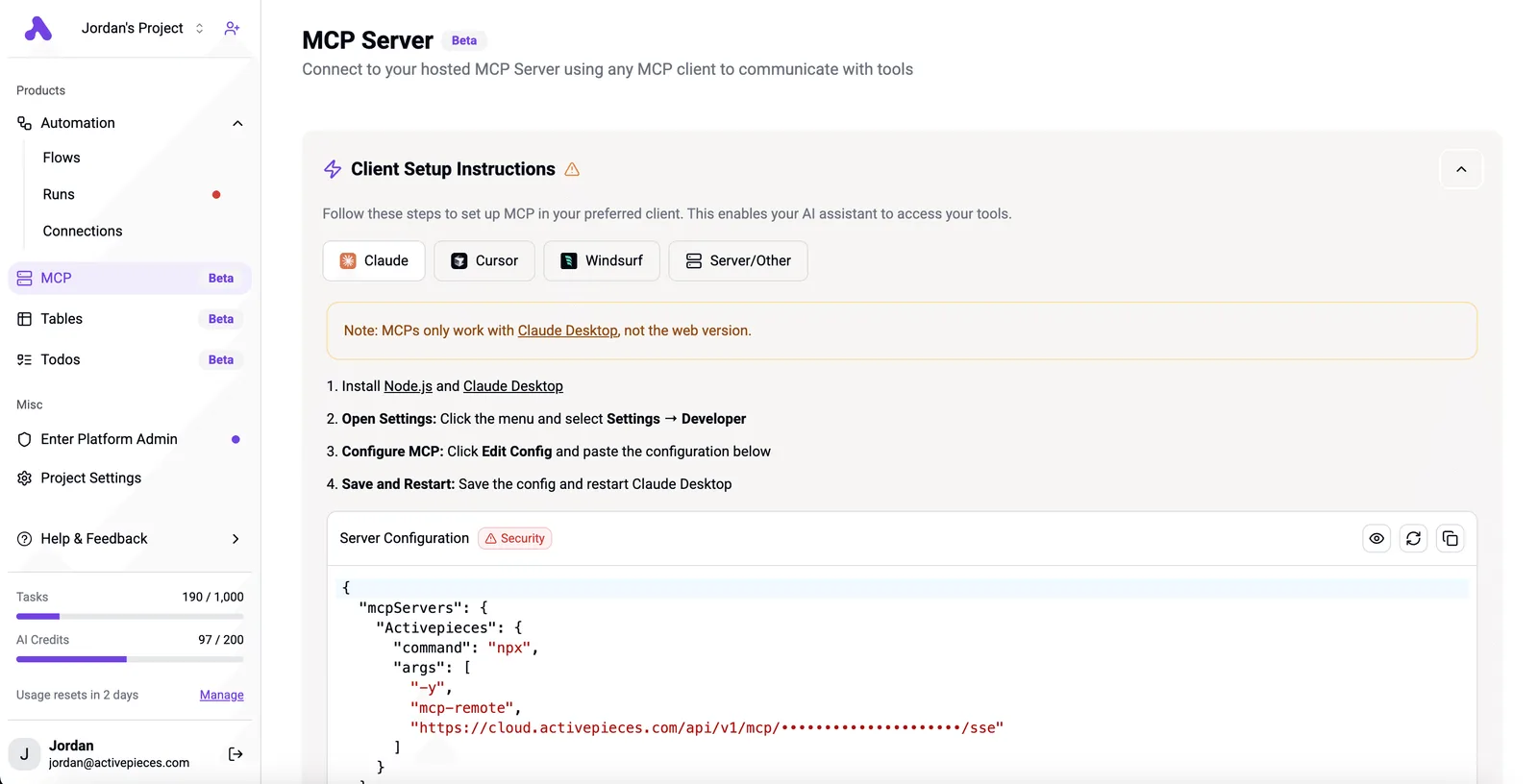
If someone else's key sits in that file, you've handed them your budget. Treat the config like a credentials file, because that's what it is.
Where it runs: shared boxes, CI and remote sessions
Convenient as a shared dev box is, one person's mistake lands on everyone's machine.
CI runs are the riskiest, because no human reads the commands before they execute. Remote sessions fall between the two. Wherever you run it, put it on a machine with nothing else on it, and give it a key with a spending cap.
Before you follow any guide, read the project's changelog and confirm which release your install matches. Defaults, config keys and server behavior can differ between releases, and a setup written for one version can quietly leave a door open in another.
Self-hosting advantages for control and cost
Your code and prompts stay on your own machine and every model key can carry its own cap, which is why self hosting wins.
That holds only if you set the cap and lock the server yourself, because nothing does it for you. The one exception is a team with nobody to own updates and key limits: a hosted service is safer there.
Your repository and prompts go only where you point them.
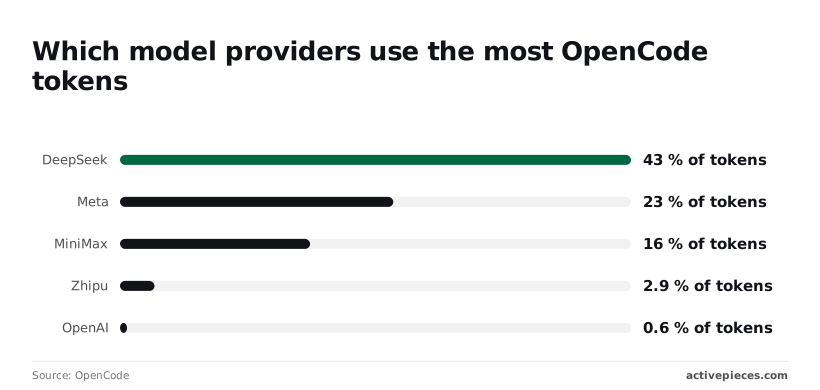
Providers are swappable, and OpenCode's usage data shows people use that freedom: DeepSeek takes 43% of tokens, Meta 23%, MiniMax 16%, Zhipu 2.9% and OpenAI 0.6%. Most traffic already runs on providers other than OpenAI, so you can move when a price changes.
$1,894 is what the AWS DN42 scan cost, according to BleepingComputer, so the owner of the exposed credentials faced a $1,894 bill. That's the price of an open door. Put the server behind a login and a private network before anything else.
Mistake: agent runs with credentials it should not have
When a key is exposed, that one leak can cost more than a normal month, and the same report puts the OpenCode key leak at $1,700.
Developers make it easy: 20% grant unrestricted access, 62% turned prompts off, and 97% of prompts get approved, leaving these systems defenseless, so any instruction will be executed. If you approve nearly everything, the prompt protects nothing.
Give the agent a scoped key and a box with nothing else on it.
If you approve nearly everything, the prompt protects nothing.
At $72.67, the Bedrock runaway was the smallest of the three losses, and it still came from a loop nobody was watching.
A cap on the key turns an unbounded bill into a bounded one, and a wrong guess about the cap costs you a stalled task instead of a surprise invoice.
Pin the version you tested, because a quiet upgrade can change a default. Back up the session store as well. Without a backup, a rebuilt box loses the history your team was relying on.
Easier to see it running than to read about it: set it up free, no card.
Run workflows around self-hosted OpenCode with Activepieces
Workflow automation's role in the process
Don't expect Activepieces to host OpenCode; it's a separate automation tool, run in production by MoneyGram, Moneypenny, Alan and FundingSocieties, that handles the workflow around it.
It starts runs from a ticket or schedule, posts results to Slack (one of the 744 integrations in its MIT-licensed monorepo), and holds a human approval before anything merges.
After a rebuild, that matters, because the flow lives apart from the box and your triggers and approvals don't vanish with it.
The free plan on Activepieces Cloud allows unlimited flows and 1,000 credits a month, and a run costs 1 credit however many steps it has, so credits still limit how often the automation around the agent fires.
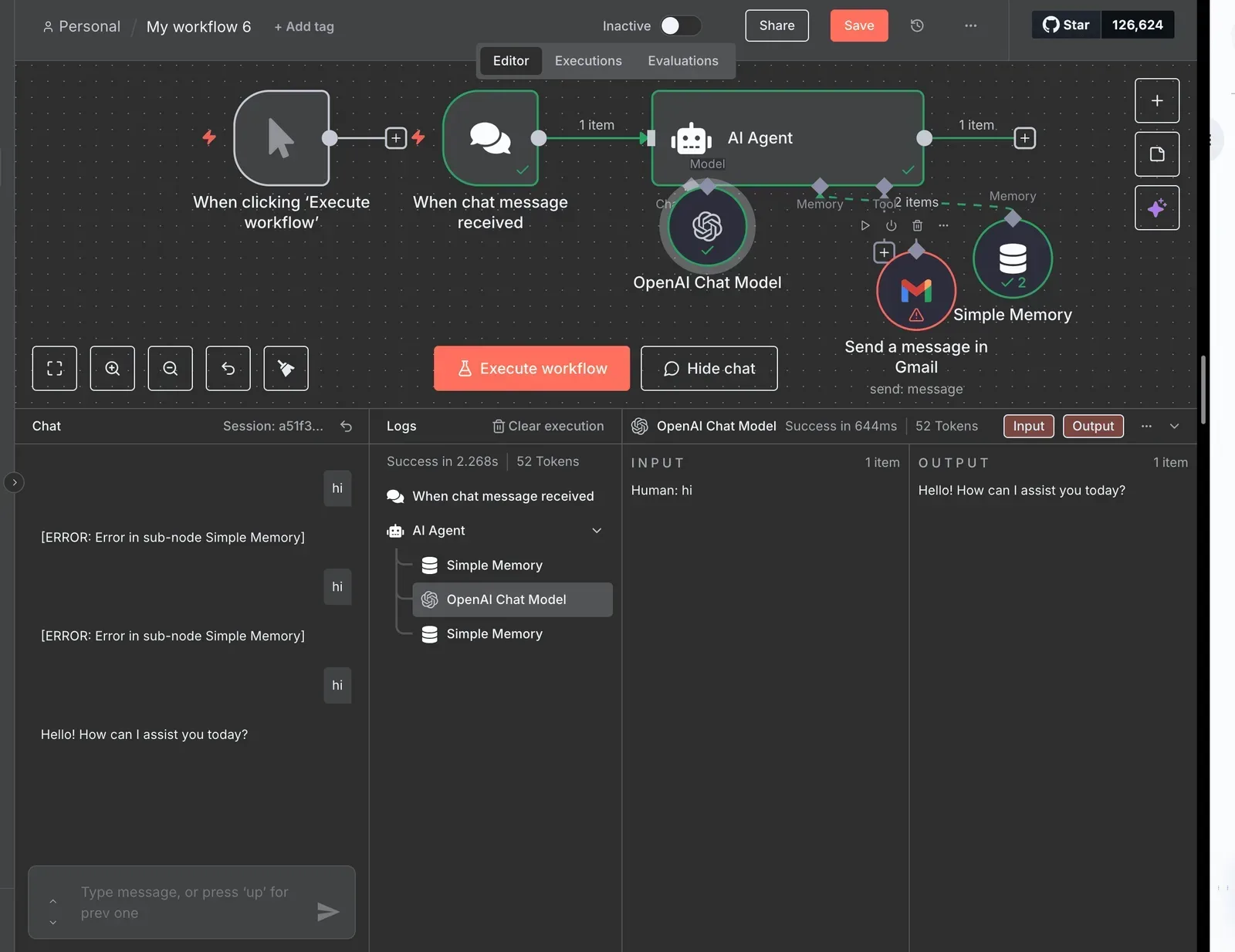
The flow calls an OpenCode server on a separate private network, and the output goes to a Slack channel and then a human approval step before merge.
Because a run is 1 credit however many steps it has, the call to the server and the Slack post cost 1 credit together, not one each.
Take from it that the agent never merges its own work, and the only thing crossing the network boundary is the request.
Read next to it, the flow shows where each piece of risk sits.
What you host and what the workflow calls
When a run goes wrong, the cost is the edits it makes with the access you granted. OpenCode is an open-source coding agent that reads a repository, proposes edits and runs commands, using whichever model key you give it.

You host the server that runs the agent, the client that talks to it, and the config that says which models and permissions apply.
Activepieces only calls the server. Put the model keys in that config, with a budget on each, so a looping workflow can't drain an account.
Activepieces has its own AI keys option from the Plus plan at $20 a month, but that is for steps inside its flows; the keys OpenCode uses stay in your config, on your provider bill, which means compromising your repository compromises your cloud credentials.
Where to start self-hosting OpenCode, or skip it
Teams run it on a shared dev box, in CI, or as a remote session they connect to.
Activepieces suits the recurring cases: a new bug ticket, a nightly dependency check.
Flows are unlimited on every plan, including free, but at 1 credit a run the free plan's 1,000 credits a month cover only 1,000 runs, so credits limit how often one fires.
If a workflow fires on every ticket, your model bill multiplies by every ticket, and the budgeted key is the only brake, so start with one ticket type.
On your own install, check the changelog before following any guide, including this one. Confirm which version you run, since config and server behavior may differ from older tutorials.
If you're one developer starting sessions by hand, skip Activepieces, even though the free plan costs $0 and includes 1,000 credits a month. Price isn't the obstacle: you gain nothing from automation until the same task recurs and someone else needs to approve it.
A Monday plan for standing up OpenCode safely
Do these seven steps in this order, because each one limits the damage if the next one goes wrong.
I would hand a new hire the order below, and it's built around the cost of a bad first day: an agent with open access and an unlimited key can do real harm before anyone notices.
- Confirm the version and install method in the current docs. Read the project's own install page, not a blog post or an old forum answer. A wrong install path means you debug the tool instead of testing it, and a stale guide can send you to a build that no longer matches the behavior you planned around.
- Isolate the machine. Use a dedicated virtual machine or spare box with nothing else on it: no personal SSH keys, no cloud credentials, no mounted shares. If the agent runs a destructive command, you lose a disposable machine, not a laptop.
- Put the server behind auth and a private network. Don't expose it to the open internet, even briefly. Require a login and reach it only over a VPN or private network. An open agent endpoint is a stranger typing commands on your box.
- Create a spend-limited key. Make a new model key for this box alone and set a hard monthly cap with the provider. A runaway loop then stops at the cap and doesn't become a surprise invoice.
- Pin the version. Lock the install to the exact release you tested. An automatic update can change behavior overnight, and you wouldn't know whether a bad result came from your task or from the upgrade.
- Test one low-risk repo. Pick a small internal project with no secrets, no production deploy hooks, and a working backup. If the agent makes a mess, the cost is an hour of cleanup, not an outage.
- Measure cost per task after a week. Divide the model spend by the number of finished tasks, counting the ones you threw away. That figure tells you whether this earns its place, and it's the number to bring to whoever must approve wider use.
The checklist above is deliberately boring. Once the week of measurements is in, you have a real cost per task to judge OpenCode against, which is the comparison the rest of this article depends on.
Questions about OpenCode self-hosting
Is there an official OpenCode 2.0 release?
Before you trust any article, this one included, check the project's own releases page, because a version label in a headline isn't proof of a tagged release.
If you install a build and the version it reports isn't the one you planned for, you've budgeted and secured the wrong thing. Record the exact version you run and test against that.
Can I run OpenCode with local models and no API bill?
Yes, if you point it at a model server on your own hardware that speaks a compatible API, though "no API bill" isn't "no bill".
You pay in hardware and electricity, and a small local model that fumbles tool calls costs you in retries and review time. Test it on a real ticket from your backlog before you commit.
Does self-hosted OpenCode send my code to a third party? It sends whatever the agent reads to the model provider you configured, so the provider is the third party, not OpenCode itself.
Assume wrong here and you paste proprietary code into a service your company never approved. Read the provider's data-handling terms, and if the code can't leave your network, use a local model.
Can several people share one OpenCode server? It can be done, but everyone on it should be treated as holding the same access.
The agent works with the server's files, credentials and model keys, so one person's careless prompt can touch another person's work or spend the shared budget. Without isolation you can verify yourself, give each person a separate box and a separate budgeted key.
How do I update a self-hosted OpenCode install?
Use the same method you installed with, and update a throwaway copy first.
You won't know whether a bad result came from the model or from the new build, which makes an update that changes behaviour mid-project a worse problem than an old version.
Pin the version in your setup notes, read the release notes before moving, and keep the previous version on hand so you can roll back.