Daytona Pricing 2026: Sandbox Costs and Free Credits

Nov 3, 202614 min read
If your sandboxes sit running without doing work, that idle time costs you more than the sticker rate.
Daytona bills for the compute a sandbox holds, metered per second across vCPU, memory and disk, and it offers free credits that cover testing, which is handy whether you're wiring up agents by hand or triggering sandbox runs from an automation tool like Activepieces.

What Daytona charges and what stays free
What Daytona is and how it bills
Daytona is sandbox infrastructure: isolated environments where code, often written by an AI agent, runs without touching your own systems.
The meter is the sandbox-second, not a task or a request. Three resources run on that meter:
- vCPU, the processing capacity allocated to the sandbox
- Memory, the RAM reserved for it
- Disk, the storage attached to it
For every second the sandbox exists in a billable state, each of the three is charged at its own per-unit-of-time price.
Because the clock follows the allocation rather than the work, a sandbox waiting on a user costs close to what one running a build does.
How we verified Daytona pricing and sources
Everything here was checked on 2026-11-03. Rates come from Daytona's own pricing page and documentation; some worked examples cite third-party sources.
Because the clock follows the allocation rather than the work, a sandbox waiting on a user costs close to what one running a build does.
If you are running this arithmetic for your own team, see what the same workload costs on Activepieces.
Daytona plans, rates and usage limits
You pay by the second for three resources, and those rates set your bill more than any plan fee: vCPU at $0.0504 per hour, memory at $0.0162 per GiB-hour, and disk at $0.000108 per GiB-hour.

This article doesn't reproduce the plan-level limits, because it has no confirmed documentation for them.
As of 3 November 2026, the rates below come from Daytona's pricing page. Tier prices, concurrency caps, storage allowances and support levels are left out rather than approximated.
Per-second compute, memory and storage rates
To show which resource drives the cost of an idle sandbox, the table converts each hourly rate into the per-second figure Daytona actually meters.
| Resource | Per hour | Per second |
|---|---|---|
| vCPU | $0.0504 | $0.000014 |
| Memory (GiB) | $0.0162 | $0.0000045 |
| Disk (GiB) | $0.000108 | $0.00000003 |
Size a sandbox by its CPU count first, because a vCPU costs about 3.1 times as much as a GiB of memory and roughly 467 times as much as a GiB of disk.

According to Github, a sandbox with 1 vCPU, 1 GiB of memory and 3 GiB of disk (an illustrative size, not a Daytona default) costs about $0.067 an hour.
Left running for a day with no work, that's about $1.61, so auto-stop is the cheapest saving available.
Two things couldn't be confirmed, the free credit amount and the startup programme terms, so they aren't stated. Treat any credit as a test budget measured in these per-second rates.
What Daytona costs at realistic usage levels
An always-on 2 vCPU / 4 GiB sandbox costs about $121 a month, so idle time is the largest cost you control. Split out, that is $73.584 for vCPU, $47.304 for memory and $0 for disk, according to Boxyard.
On a log scale, Agent37's chart compares developer testing, 100,000 one-minute runs at $276.00, and an always-on month at roughly $120.89 to $122.07.
For a solo prototype, a handful of short sessions a week costs cents, so the free credits cover it. One sandbox left running all month costs the full $120.888, which is why the idle interval matters more than anything you build.
For a small team with bursty agent runs, 100,000 one-minute runs add up to about 1,667 sandbox-hours. That's more than double the 730 hours in a month, which is possible because the runs overlap across parallel sandboxes.

At $0.1656 an hour for this size, that's the $276.00 for the batch.
Here, auto-stop doesn't save you, since the sandboxes were never idle. Per-run time is the lever, so trim startup and setup work inside each run.
Always-on sandboxes per user
At about $121 each, one persistent sandbox per user puts 50 users at roughly $6,044 a month. Auto-stop pays off most here, because users rarely work around the clock. Every hour a stopped sandbox isn't billed comes straight off that total.

Three things would overturn the idle-time conclusion. The first is run volume high enough that active seconds outweigh idle ones, as in the 100,000-run case.
The second is larger sandboxes, which scale the vCPU and memory lines. The third is disk usage beyond whatever allowance makes the $0 line true, which would put a third charge on the bill.
Hidden Daytona costs and limits that surprise teams
Past the three reversals above, the surprises are the charges and caps outside the headline per-second rate. These are what a stopped or archived sandbox still bills, how disk is metered, and which quotas stop you from scaling.
These defaults set your bill unless you configure otherwise:
- Auto-stop is on by default, with an inactivity timer, so a forgotten sandbox stops itself, but only after it has billed compute for the whole wait.
- A new sandbox gets a default size of vCPU, memory and disk, and every one you create meters at that size unless you ask for less.
- Disk is billed once you exceed the default allocation, so a large dependency cache or dataset adds a charge on top of compute.
- Stopped and archived sandboxes are billed differently, so the state you park a sandbox in changes what it costs while idle.
- A default quota caps total vCPU and storage across your account, which limits how many sandboxes can run at once.
Idle and stopped sandbox charges
Every second a sandbox is running, vCPU, memory and disk are metered, whether or not code is executing. Stopping releases compute, but the disk stays allocated, so a stopped sandbox is cheaper, not free.
Archiving moves it to cheaper storage, at the cost of a slower return. Shortening the auto-stop interval and archiving anything you won't touch soon is the cheapest discipline available.
Before the count looks large, a fleet of generously sized sandboxes can hit the ceiling, because the default quota applies to the sum of your sandboxes, not to each one.
Check what your tier allows before you size an agent workload around parallel runs.
Test outbound calls to your package registry and APIs on the plan you'll actually run, because network access can be restricted by tier.
Storage is retained, and billed, for as long as a sandbox exists in any state. Delete what you no longer need rather than leaving it parked.
Worth checking against a plan that does not meter every step: one credit covers a whole run on Activepieces.
The case for Daytona's cheap pricing
Put per-second billing next to free credits and sandbox cost becomes a rounding error beside token spend, so discipline about parked sandboxes matters less than the objection's critics claim.
Why Daytona pricing may not matter for agents
You pay for vCPU, memory and disk while a sandbox is running, and for reserved disk only while it is stopped. When a short agent task meters a few minutes, the model calls around it meter thousands of tokens at a far higher rate.
If sandbox compute is a small fraction of each run's total, trimming idle time saves a fraction of a fraction.
During the testing phase the free credits cover the cost, so you may never feel the meter before you know whether the product works.
Why idle time still decides the bill at scale
The objection holds per run and weakens per fleet. One tracked run, reported by Moltbook, spent 7 in 10 sandbox hours holding rather than working.

That's a single case, not a benchmark, but if it's typical, 70% of the metered seconds buy nothing, and that share multiplies with every sandbox you leave running.
To see how this looks in practice, take a queue dashboard such as Bull-Board. Across twelve queues it counts 132 active jobs against 284 waiting and 136 failed, so a large share of the work in flight isn't executing at all.
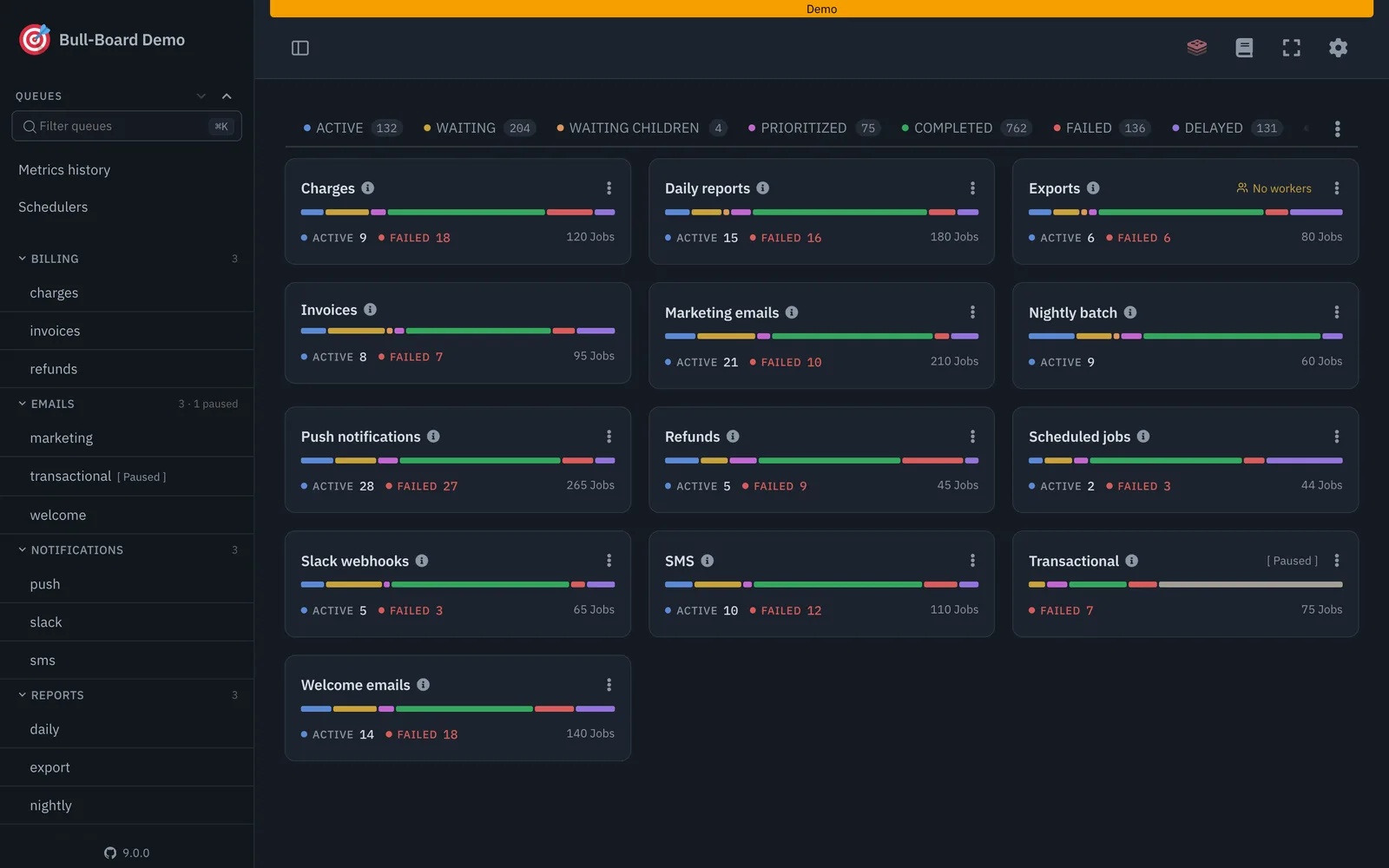
A sandbox attached to each waiting or failed job still meters while it waits.
Two measurements settle the argument. The first is your idle share of sandbox hours: if it sits near 7 in 10, the objection fails at scale.
The second is sandbox spend as a share of total cost per run: if it stays small even with that idle share included, the objection wins.
Daytona versus E2B, Modal and other sandbox alternatives
Since all four vendors meter compute by time rather than by task, the comparison that matters is what each one bills while a sandbox sits doing nothing. Run the same measurement on each before you trust any headline rate.
Rates, free credits and base fees compared
Several dollar figures can be confirmed, including E2B's always-on 2 vCPU/4 GB sandbox at $119.23, so that's the ceiling to compare against if you never stop anything. The table shows the metering unit and idle behavior for each vendor.
| Vendor | What is metered | Idle behavior |
|---|---|---|
| Daytona | Per second on vCPU, memory and disk | A running sandbox keeps billing until auto-stop fires |
| E2B | Per second on vCPU and memory | Always-on 2 vCPU/4 GB costs $119.23 |
| Modal | Per second of compute | Billed while the container runs |
| Vercel Sandbox | Usage-based compute time | Billed while the sandbox runs |
Take from it that the rate per second matters less than how fast each platform stops charging you. Check each vendor's pricing page for current free credits and base fees on the day you buy, because those change.

A cap on session length sets how often your code must checkpoint and restart. A concurrency cap sets how many parallel agents you can run before a plan upgrade.
Read both limits against your peak, not your average.
Long-lived agent sessions with bursty use favor Daytona, provided you enforce auto-stop. Short code-execution calls from an LLM suit E2B, where sessions start and end quickly.
Batch or GPU-adjacent jobs suit Modal, which is built around compute jobs. Teams already deploying on Vercel get the least integration work from Vercel Sandbox.
Choosing the right Daytona plan
Cap idle time first, then measure a week of real usage and price it. Daytona meters vCPU, memory and disk per second, so the plan matters less than how long sandboxes sit running unused.
Limits come first, so the week you measure reflects the discipline you intend to keep. The steps below go in order because each one makes the next one's data cleaner:
- Set an auto-stop interval on every sandbox, so a forgotten session stops accruing vCPU and memory charges on its own.
- Set an auto-delete interval, so stopped sandboxes stop accruing disk charges too.
- Log real sandbox minutes for one week: start time, stop time, and the vCPU, memory and disk size of each. Your own log beats any estimate of how you think you use them.
- Price those minutes with the rate table from the earlier section. Multiply each resource's seconds by its rate, then add them, so you see which of the three resources dominates your bill.
- Set spend alerts at the level where a runaway sandbox would hurt, so a mistake shows up as a notification instead of an invoice.
- Re-check the pricing page before committing. Rates and free-credit terms change, and your calculation is only as current as the numbers you fed it.
Once you have a week of logged minutes priced, the free credits become a real test: you can tell whether they cover your actual pattern or only a lighter one.
Orchestrate sandbox runs from triggers
Scheduled or event-driven work is the cleanest way to keep minutes down. When a sandbox starts on an event and stops when the job ends, it has almost no idle time.
A workflow automation tool can call Daytona's API to create a sandbox on a timer or when an event arrives, run the job, and tear it down. That moves auto-stop from a safety net to a backstop, and your logged minutes should show the difference.
What Activepieces does about idle sandboxes
Idle time is the cost you control, and the surest way to cut it is to make sandbox lifetime follow the job.
In Activepieces, a webhook or schedule starts a flow that calls Daytona's API to create the sandbox, runs the work, and deletes it in the last step. Auto-stop stays on as the backstop and stops being the main defence.
The step people forget is the failure path. A run that errors halfway leaves a sandbox metering vCPU and memory until the timer fires.
Give the flow a branch that deletes the sandbox on failure, and a retry that recreates it, and the failed jobs stop leaving billed sandboxes behind.
A flow costs 1 credit per run however many steps it has, so a separate teardown and error branch adds nothing to the bill. The free plan allows unlimited flows, and the Community Edition is MIT-licensed, so you can self-host the orchestration.

MoneyGram and Moneypenny run Activepieces in production.
Frequently asked questions
Is Daytona free to use?
Not indefinitely: new accounts get free credits that are enough to test with, and after that you pay for the vCPU, memory and disk seconds your sandboxes consume.
Run your actual workload against the credits and read the usage figures before you decide anything, since they cover a real evaluation. A sandbox left running burns through the same credits as one doing work.
Does Daytona charge for stopped sandboxes?
Stopping ends the compute meter, vCPU and memory, but a stopped sandbox still holds its disk, and disk is a metered resource too. Check the current pricing page for exactly what a stopped sandbox is billed for.
The cheap states are the ones further along the lifecycle: archiving moves a sandbox out of active storage, and deleting ends every charge. If you rarely return to a sandbox, set auto-archive and auto-delete so you aren't paying for disk you have forgotten about.
Can I self-host Daytona instead of paying for cloud?
Yes. Daytona is open source, so you can run it on your own infrastructure instead of paying its per-second rates.
You then pay a different bill: servers or cloud instances that cost money whether or not sandboxes are busy, plus the engineering time to operate, secure and upgrade the platform.
Self-hosting comes out cheaper only if your sandboxes keep that hardware well utilized. Spiky or light usage usually favors the managed service.
How often does Daytona change its pricing?
No published schedule exists for Daytona's pricing changes, so don't build a budget on today's rates staying fixed. Treat the pricing page as the source of truth and re-read it before any renewal or scale-up.
The more durable protection is your own record of usage per sandbox: if rates change, you can reprice your real workload in minutes rather than guessing.
Related reading
Running the numbers
See what the same workload costs here.
Free forever plan, and every paid plan self-hosts at no extra cost.
See pricing Talk to sales