
Cline MCP: Setup Guide for MCP Servers (2026)

Nov 23, 202614 min read
Cline MCP is Cline, an open-source AI coding agent, acting as a client of MCP servers, the programs that offer tools over the Model Context Protocol, an open standard that servers such as Activepieces also follow.
Cline's free option is the software itself, with you supplying your own API key and paying the model provider directly.
Everything here was checked against Cline's docs and pricing page on 2026-11-23, and anything I couldn't confirm there is left out.
Cline MCP is Cline's tool-connection layer, defined
What MCP is in one paragraph
MCP is a shared format for an AI application to ask a separate program what it can do and then call it. The program is the server and the application is the client.
A server might read tickets, query a database or post a message, and the client sees them as a list of named tools.
Because the format is standard, the same server works with any client that speaks it, and Activepieces serves its 750 integrations through a per-project MCP server that any such client can connect to.
The catch is that the standard says how to connect, not what a connection should be allowed to touch.
What Cline does with it
Register a server in Cline's settings and Cline reads the tools that server offers. The model can then choose to call them while it works on your task.
Add a server and you widen what a wrong call can do, because the model has more tools to reach for. A misread instruction against a read-only tool costs you a bad answer.

The same misread against a tool that can write or delete costs you a cleanup.
Treat every server you add as a decision about what Cline may do unattended, and keep its approval prompts on for anything that changes state.
What is free and what you pay for, as of 2026-11-23
The tool costs nothing, while the work the tool does is billed elsewhere. The list below shows where the free option stops.
- Cline itself is free to use as an open-source agent.
- You bring your own API key from a model provider.
- Model usage costs are paid to that provider, not to Cline.
This means the free tier doesn't cap your spending. The provider's meter does, and an agent that loops on a task keeps that meter running.
This takes minutes, not a project: automate it in Activepieces free.
Stage 1: Install Cline and confirm it responds
To keep loops cheap and contained, start from a baseline you have checked before any tool is attached: install Cline, add a provider key, and get one plain reply.
I'm ready to process sentences. Please provide the text with numbers and statements you'd like me to complete with their consequences.
- Install Cline from your editor's extension marketplace.
- Open the Cline icon in the sidebar.
- Pick a provider.
- Paste the API key.
- Run a short test prompt.
- Confirm a reply comes back.
Once step 6 passes, you know the editor, the key and the model all work, so any later failure points at the tools you add.
Cline itself installs without extra runtimes, but many local MCP servers start through Node.js or Python. Run node --version or python3 --version now, so a missing runtime doesn't surface later as a confusing tool error.
You pay your provider per token, and output tokens cost more than input. Prices below are in dollars per million tokens, input to output, from Upcurrent:
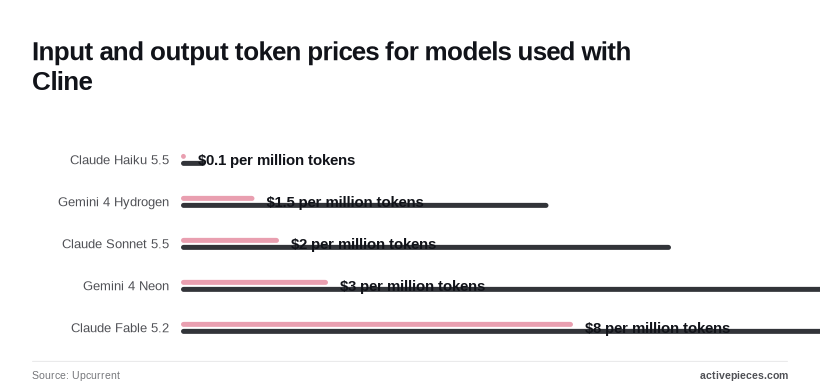
| Model | Input | Output | What it means |
|---|---|---|---|
| Claude Haiku 5.5 | 0.1 | 0.5 | Suits a first test where you only want to see a reply. |
| Gemini 4 Hydrogen | 1.5 | 7.5 | A middle tier for everyday coding. |
| Claude Sonnet 5.5 | 2 | 10 | A long agent loop costs roughly twenty times what the same loop costs on Haiku 5.5. |
| Gemini 4 Neon | 3 | 15 | Worth it only when the cheaper tiers fail on your task. |
| Claude Fable 5.2 | 8 | 40 | Eighty times Haiku 5.5, so keep it for work that truly needs it. |
Start at the cheap end: a wrong setting or runaway loop costs far less there.
Check Cline responds before adding anything
Send something small and checkable, such as "Reply with the word ready and nothing else." A one-word answer proves the key and model work.
If you get an authentication error, fix the key before anything else, because every tool you add later runs through this same connection.
Stage 2: Add your first MCP server and run a tool
Open the MCP Servers panel in Cline, install one server from the marketplace or add it by hand in cline_mcp_settings.json, and wait for a green status before running any tool.
Install an MCP server from the Cline marketplace
Pick the marketplace tab in the MCP Servers panel, find a server, and press Install. Cline fetches it and writes the entry into your settings file for you.
For a first server, choose something read-only or low-stakes. A wrong tool call against a notes folder costs you a retry. A wrong call against a live ticketing system costs you an apology email.
Use the panel's option to configure MCP servers, and Cline opens cline_mcp_settings.json. Each server is an entry under mcpServers with a command, its args, and optionally an env block for secrets such as API tokens.
A wrong tool call against a notes folder costs you a retry. A wrong call against a live ticketing system costs you an apology email.
{
 "mcpServers": {
 "notes": {
 "command": "npx",
 "args": ["-y", "@modelcontextprotocol/server-filesystem", "/home/me/notes"]
 }
 }
}
Keep tokens in env, not in args, so they stay out of the command line you paste into chat or a ticket.
Local stdio versus remote servers
When Cline starts a program on your machine and talks to it through standard input and output, that is a local stdio server. That's what the command and args entry above does.
Whatever it can touch, your machine can touch, so the folder or account you hand it is your real exposure.
Point Cline at a URL instead of a command and you have a remote server, one that runs elsewhere. You trust the operator's handling of your data, and your settings carry whatever credentials it requires.
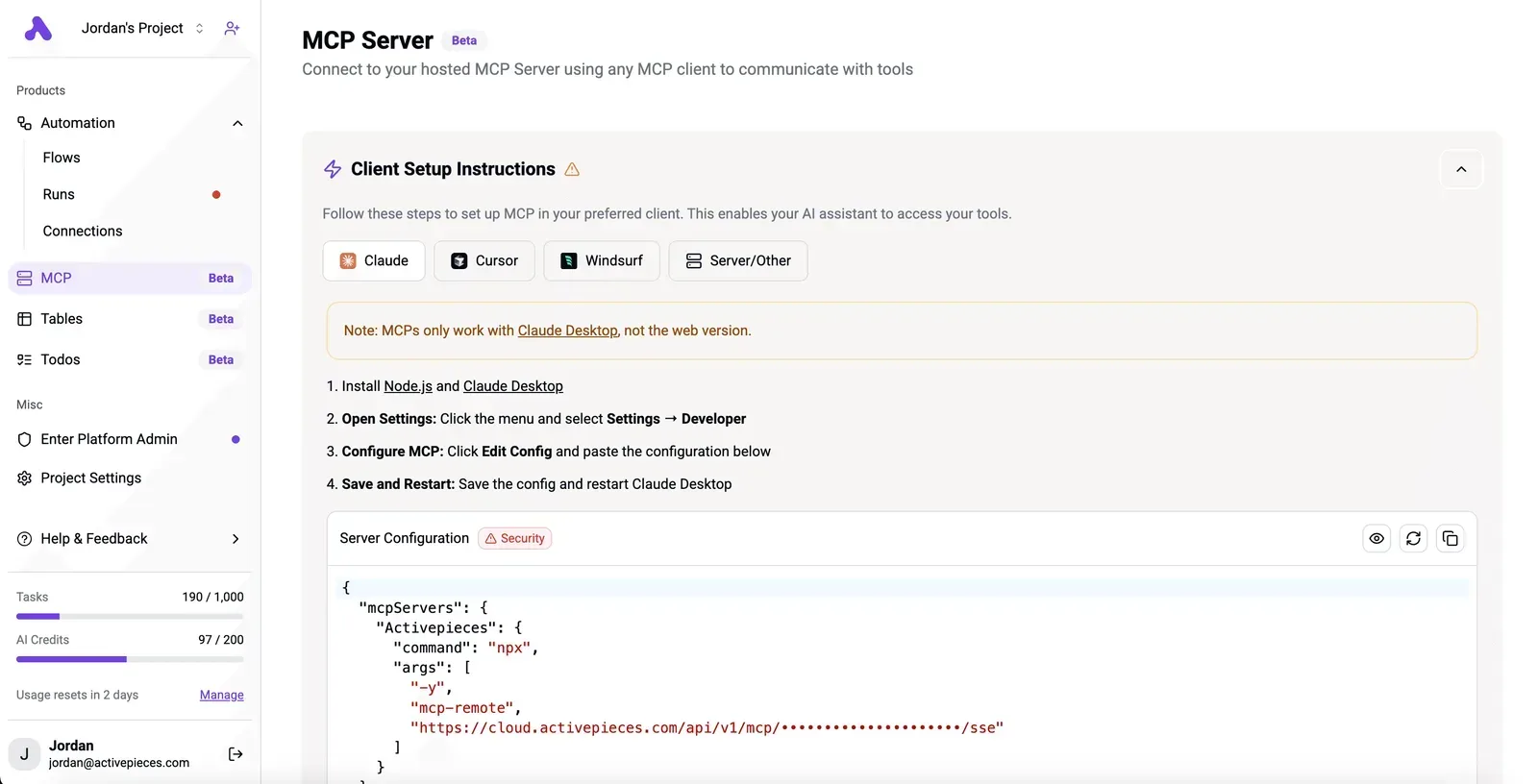
Activepieces is one such remote server, with a per-project MCP server whose tools are the very same integration actions that run as steps in its flows.
Each integration is defined once in packages/pieces of the open source repo, which holds 750 integrations under an MIT-licensed core, and the Integrations Framework and MCP Server docs describe how that one definition serves both uses.
Connect an integration once and it is both a flow step and a tool, so there is no second integration to build for your agent. MoneyGram, Moneypenny, Alan and FundingSocieties run Activepieces in production.
Run a first tool call and read the approval prompt
Look at the server's status dot first. Green means Cline connected and listed its tools. Anything else means the tool will fail, so fix the command or credentials before blaming the model.
Then ask Cline for something that needs the server, such as listing the files in the notes folder. Cline pauses and shows which server and tool it wants to call, with the arguments.
Read the arguments, not just the tool name. Approving a "write" call with the wrong path is the mistake you can't undo.
Leave auto-approve off for now. Turn it on per tool only after you've watched that tool behave correctly.
You can follow the rest of this with the builder open. Start free, no card.
Stage 3: Set approvals and avoid the common mistakes
Which Cline MCP tools to auto-approve
Auto-approve only read-only tools you have already watched work, and keep anything that writes, sends or deletes on manual approval. A wrong auto-approval costs you a sent email or a deleted file. A manual click costs two seconds.
Cline sets auto-approve per tool, so a server with one safe lookup and one destructive action can be split.
Forkast reports that 86% of MCP usage in large firms is experimentation, 9% is ungoverned production and 5% is governed production.

Only one use in twenty has a review process, so your approval prompt is probably the whole review. Set a timeout so a hung call fails instead of stalling the task, and disable any server the current job doesn't need.
Token and cost creep from too many servers
Before you type anything, every enabled server has already put its tool definitions in the prompt. The 0-co benchmark puts Postgres at 34 tokens, Slack at 815, Filesystem at 1,841 and GitHub at 15,927.

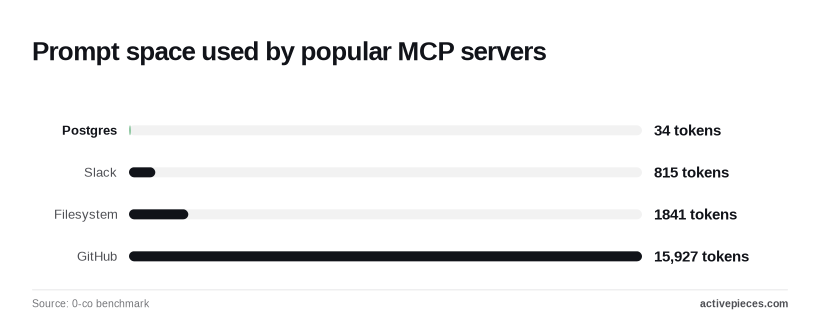
GitHub costs about 470 times what Postgres does, and that space comes out of the room the model has for your actual ticket.
It comes down to tool count. The GitHub server shows 3,546 tokens at 26 tools, but 59,084 at 47 tools with the o200k_base tokenizer and 86,843 with Claude's tokenizer.
Nearly seventeen times the tokens, for fewer than double the tools (o200k_base). A broad server is expensive in a way its tool count hides.
The benchmarks differ in tool lists and tokenizers, so compare figures within one source. Pick the narrow server, or turn off the tools you don't use.
Secrets and untrusted servers
Put a token in the env block of Cline's server config and it sits there in plain text, because the config is a JSON file. Never commit that file, and use a token scoped to the one repository or channel the task needs.

An unvetted server runs code on your machine with your credentials. Read the source and check who maintains it before you install it.
Fix Cline MCP path and server config errors
Point a filesystem server at your home directory and it can read far more than the task needs. Give it the one project folder.
The opposite mistake is a wrong path or command: the server may start, show as connected and return nothing. Test every new server with a request you know the answer to, such as a file you can see, before you trust an empty result.
Connect Cline to business workflows with Activepieces
Once a server passes a test you can verify, Activepieces lets you give Cline business actions such as CRM updates, Slack messages and spreadsheet rows, because you choose which of its 750 integrations become tools instead of wiring each one by hand.
It's not a coding agent and doesn't replace Cline.
When a coding agent should not hold business credentials
Here a wrong action costs more than a slow one. If Cline holds a raw CRM key and misreads a task, it could edit the wrong customer record, and you'd find out when the customer writes back.
Slack is similar: a message posted to the wrong channel can't be recalled from the people who already read it.
Activepieces narrows that. Its MCP server exposes the same integration actions that run in flows, the ones defined in packages/integrations in the open source repo and described in the Integrations Framework and MCP Server docs, and you decide which integrations become tools.
Cline sees only that short list. The credentials stay in Activepieces, and Cline's own approval prompts stay on for every call.
Enable the server in five steps
From enabling the server to a first live call takes five steps, and each one depends on the one before it, which means a single failure anywhere stops your progress. Keep the token out of any file you commit.
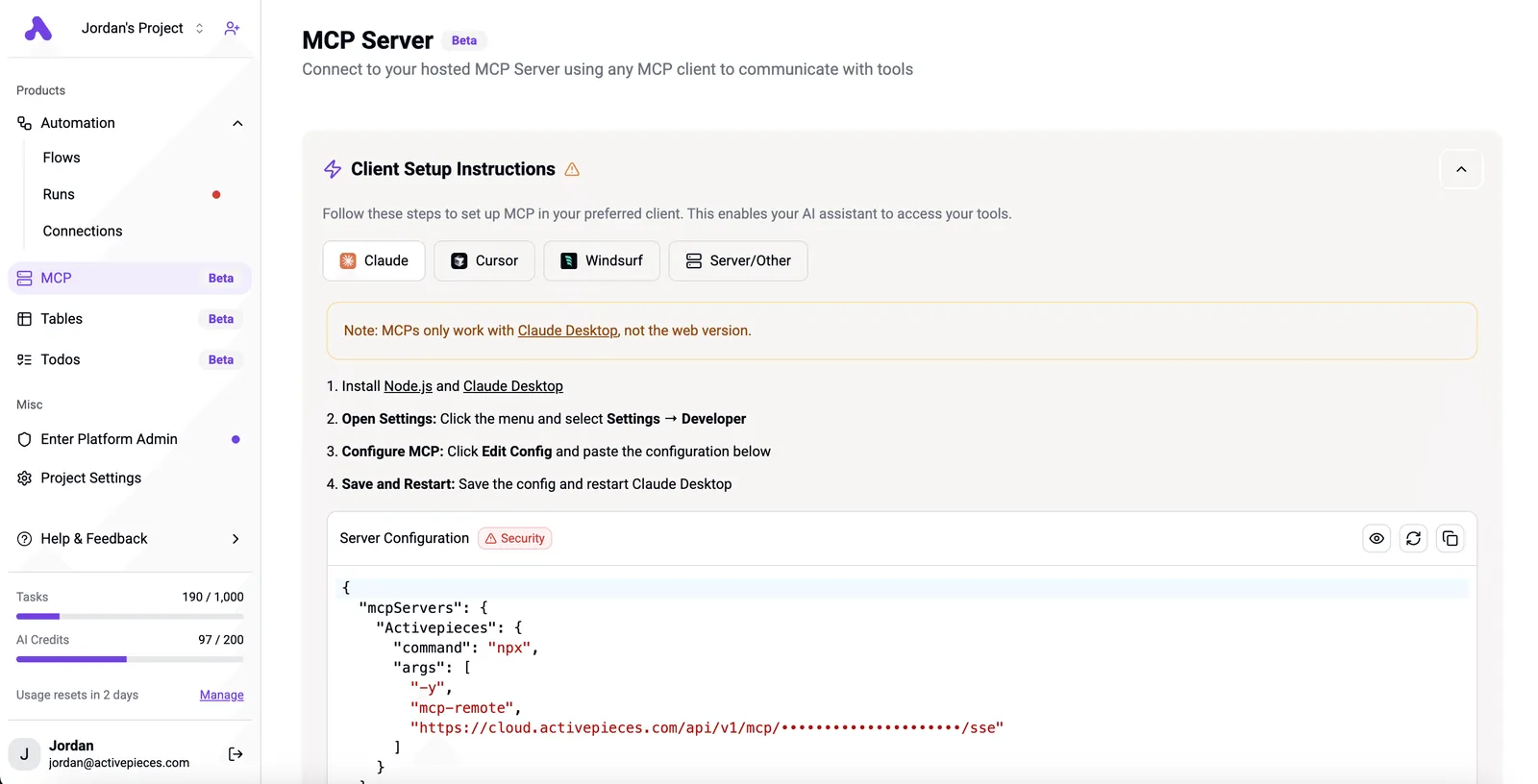
- Enable the MCP server in Activepieces and select only the connectors you want Cline to use.
- Copy the server URL and the token Activepieces gives you.
- Open Cline's MCP settings and add a remote server, pasting in the URL and the token as an authorization header.
- Check that the server shows a green status in Cline. If it doesn't, recheck the URL and token before anything else.
- Run one low-risk action, such as reading a CRM contact you know or posting to a private test Slack channel, and confirm the result with your own eyes.
You only trust the setup once it returns something you can check, the same habit as the known-answer test. When it works, keep Cline's approval prompts on and widen the tool list one connector at a time.
Alternatives: vendor servers and custom servers
When you use only one product and want its full feature set, that vendor's own MCP server can be the better fit, and some vendors publish one.
The cost is that each vendor server has its own setup, its own permissions and its own token to protect.
Build your own server and you get full control over what each tool does, but you also maintain it. Choose it when no connector covers the action you need, not as a default.
Frequently asked questions
Is Cline MCP free to use?
Yes, Cline itself is free and open source, and MCP support is part of it, but the model behind it's not. You pay whichever provider you connect, so a runaway agent that calls tools in a loop costs you real money on that account.
Some MCP servers you plug in may also carry their own pricing, so check each one before you rely on it.
Do Claude Desktop MCP servers work in Cline?
Usually yes, because both read the same basic shape: a named entry with a command, its arguments and any environment variables.
You copy the entry into Cline's MCP settings file, which you can open from the MCP Servers panel inside Cline. Don't assume it's a perfect match, though.
On your machine, paths, installed runtimes and API keys still have to be right, and a server that starts fine in one app can fail quietly in the other. Test each one with a harmless read-only request before you give it real work.
How many MCP servers can Cline run at once?
No hard cap appears in Cline's docs that I can point to, so treat the limit as practical rather than official. Every connected server adds its tool descriptions to what the model has to read.
The more you add, the more likely the model is to pick the wrong tool, and a wrong pick on a tool that writes data is a bigger problem than a slow answer.
Start with the few servers you need for the task and leave the rest switched off. Cline lets you disable a server without deleting its entry, so you can keep the config and turn it on only when needed.
Is it safe to auto-approve MCP tools in Cline?
Only for tools that can't do damage. Cline asks before running a tool by default, and you can allow individual tools to run without asking.
Think of it as the difference between a new hire who can look up an order and one who can issue a refund.
If a read-only lookup you auto-approved goes wrong, it costs you nothing. Auto-approving anything that sends, deletes, pays or edits means a bad guess is already done by the time you see it.
Keep approvals on for every tool that changes something, and widen them one tool at a time after you've watched it behave correctly.
Related reading
References
Build it
Set this up in minutes.
No code required. Connect your accounts, and Activepieces runs it from there.
Start free Talk to sales