
Tailscale MCP Servers Explained: One Exposed Tool Server

Nov 11, 202614 min read
An MCP server on Tailscale is an ordinary Model Context Protocol server, much like the ones Activepieces exposes to agents, that listens on a tailnet address rather than a public one. Only devices enrolled in that network can connect to it.
Tailscale MCP Defined: Private Reach for Agent Tools
Private isn't the same as safe.
What Tailscale does and doesn't control for MCP
Which devices can reach a server's address is the only thing Tailscale decides. It is a network layer. It says nothing about which tools on that server a given caller may use, or what credentials those tools hold.

Look for a Tailscale-published MCP server in the sources this article draws on and you won't find a confirmed one, so I treat "Tailscale MCP" as a deployment pattern, not a product.
One illustrative scenario runs through the rest of the integration. I invented it for explanation, and it's not drawn from a real client: a small operations team runs one MCP server that holds:
- a ticketing login
- a file-store key
- a database account
Each of those is a liability line, and the question throughout is who can reach which one.
How a request travels over the tailnet
The illustration below sets two arrangements side by side. In one, the server is exposed to the public internet and reached from a single laptop. In the other, the same server sits inside a tailnet boundary and is reached by three labelled devices.
On the public side, anyone who finds the address can attempt a connection.
On the tailnet side, a request starts on an enrolled device, travels through an encrypted tunnel, and arrives at the server's private address. Strangers never see a listening port. That's a real reduction in exposure.
What follows is the part the boundary doesn't address. Each of the three devices, by default, can still reach the server and everything it holds.
A compromised laptop or a misconfigured agent inherits the whole toolset. Access rules and scoped credentials contain that.
Serve versus Funnel: private or public
There are two ways to publish a local service with Tailscale, and they carry opposite exposure. Serve shares a service only with devices on your tailnet. Funnel routes it to the public internet.
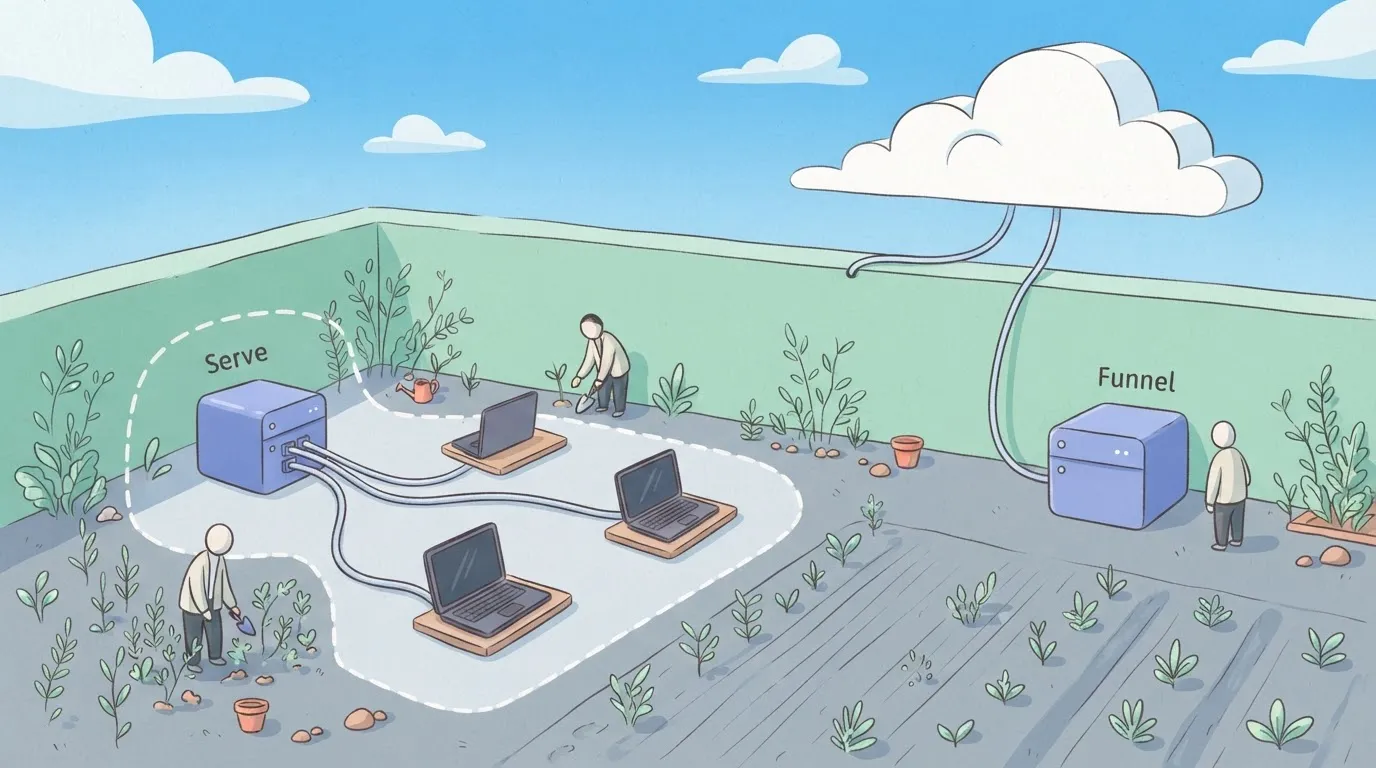
For an MCP server holding live credentials, Serve is the setting that keeps the arrangement private. Funnel reverses it, and the tailnet then offers no protection at all.
With 747 integrations available to an agent as tools, Activepieces puts that same decision in front of you at every new connection. The question is who is meant to reach this, and what may they do once they arrive?
Everything below works on Activepieces' free plan. Start without code or a credit card.
One exposed MCP server timeline
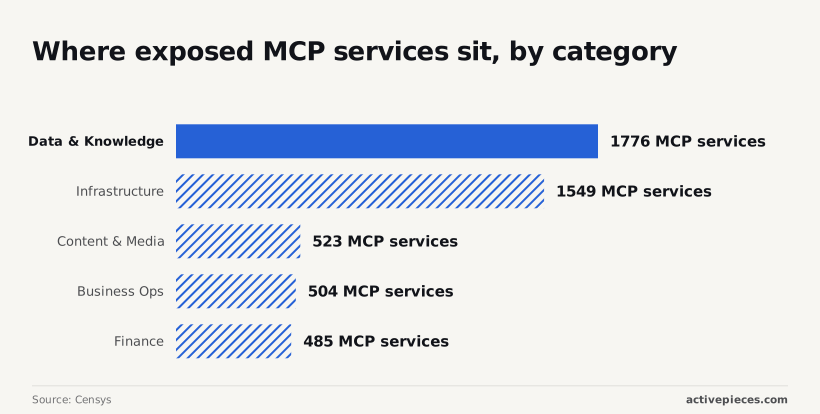
Nothing in the network objects when a device never meant to reach the server calls a tool it should never have held. That is how an open MCP server fails, plainly. Counts from Censys put the following:
- Data & Knowledge first at 1,776 services, so the likeliest exposed server is one that hands over records
- Infrastructure follows at 1,549, meaning the machinery itself is within reach
- According to Censys, Content & Media (523) mostly risks altered published material
- Censys reports that Business Ops (504), Finance (485) and Commerce (448) are smaller, but each touches money or customers, so one stray call costs more than the count suggests
Exposed MCP server incident, step by step
Picture a server that holds a database credential and a ticketing token, on a tailnet that allows every device. The incident below is illustrative.
At 02:10 an alert fires on a write to the ticketing system. The source is a contractor's laptop, which has never written to that system before. The alert is the only control that worked.
Nothing was malicious. The contractor was testing an agent. It found the server because the tailnet rules let every device see it.
It then used the database credential to update records and the ticketing token to change tickets. The rules permitted every call, so the logs record valid activity, and the damage was still real.
The sequence below gives the order.
- 02:10: the alert fires on the unexpected ticketing write.
- 02:25: the team traces the run to the contractor's laptop agent.
- 02:40: the team cuts the server from the tailnet.
- 02:55: the team revokes the database credential and ticketing token.
- 03:15: the team lists the changed records from the logs.
- 03:30: the team restores the agent with access scoped to the tools it needs.
So that no further calls could land while the tokens were being replaced, the cut came before the revocation.
Cost of an exposed MCP server incident
Because the rules above were missing, the agent held every credential the server held. The cleanup therefore has to assume every one of them was used.
The cost lands in five places (engineer hours, records changed, tokens rotated, customers notified, agent downtime), and most of it falls on people who never touched the server.
There are no confirmed numbers for this incident in this article, so it doesn't invent any. Each row below states what the scenario figure is made of and who pays it. The "illustrative" column marks every entry as a scenario, not a measurement.
Read the table as a list of liability lines: the bill is set by how many tools the agent could reach, not by how many it actually used.
| Cost | Scenario figure | Who bore it | Label |
|---|---|---|---|
| Engineer hours | Every hour spent reconstructing which calls the agent made, since access was never logged per tool | Security and platform engineers, pulled off planned work | Illustrative |
| Records changed | Every record the agent could write to, until a review proves it did not | Data owners, who must verify each system by hand | Illustrative |
| Tokens rotated | Every credential the server stored, not only the ones misused | Whoever owns each connected service | Illustrative |
| Customers notified | Anyone whose data sat in a system the agent could reach | Support and legal teams, then the customers | Illustrative |
| Agent downtime hours | The period the agent stays off while credentials are replaced | The teams that depend on its output | Illustrative |
Look at two rows in particular. Rotation and notification scale with what was reachable, so a narrower scope shrinks both before any incident occurs.
Downtime is the only row the business sees directly, and it's the one that tempts teams to restore broad access quickly.
Easier to see it running than to read about it: set it up free, no card.
Tailnet controls who, not what
Nothing stopped it at the network, because the tailnet controls who can reach the server, not what they may do once connected.
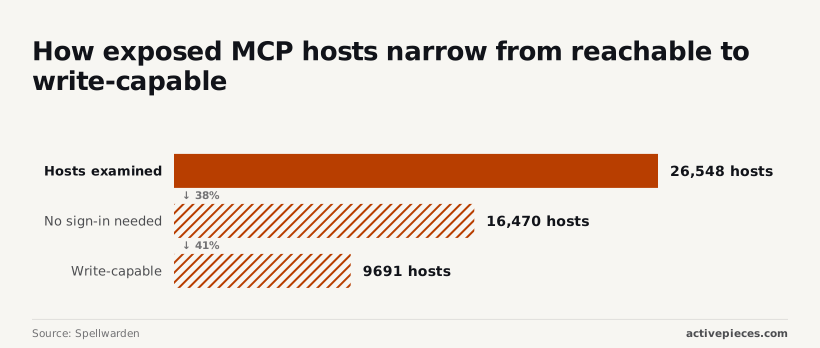
Of the 26,548 MCP hosts Spellwarden examined, 16,470 needed no sign-in, and 9,691 exposed write-capable tools. So about 62% let anyone list their tools, and more than a third could change something, so attackers could map and modify most systems.
Five causes explain how a private network ends up in that position:
- A private network is not authorisation.
- The access rule allows all by default.
- A contractor laptop carries no tag.
- One broad database credential sits behind the server.
- Nothing limits each tool to read or write.
Under Tailscale's default access rule, every device can reach every other. An untagged contractor laptop therefore arrives with the same reach as an engineer's workstation, and the server can't tell them apart.

Tags and a narrowed rule are what turn "on the network" into "allowed to call this tool."
An agent built on a bare SDK has code to run but no role and no audit trail, and Activepieces treats it as a user instead: RBAC, SSO and SCIM govern which connections it may use, the same model that governs your staff, and the enterprise RBAC documentation sets out access policies that apply to what an agent may connect to, not just what a person may open.
Its run detail view lists every tool call within an agent step as a separate entry, each with its own input and output, rather than one opaque result. MoneyGram, Moneypenny, Alan and FundingSocieties run Activepieces in production.
It only earns a place if agent calls should run approved workflows over MCP.
One credential behind every tool
In 7.8% of MCP server builds, Island found code execution, and in 40.6% a tool touching sensitive data, meaning nearly half the examined builds lacked adequate isolation from either uncontrolled code execution or unguarded data access.

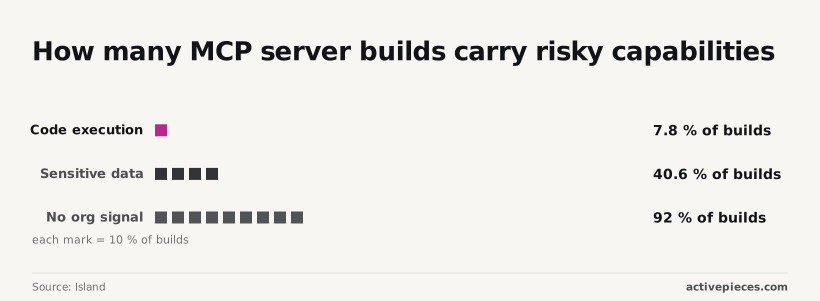
A build with either capability is one whose credential deserves the closest scrutiny.
The same research found 92% of builds carried no organisational signal, meaning nothing in the build shows who owns it or whether anyone approved it.
Put one broad database login behind such a server and every connected device inherits the whole database. Give each tool its own credential, limited to read or write on the tables it needs, and a stolen session loses most of its value.
Serve and Funnel confused in setup
Get the two mixed up during setup and a private server becomes a public one without any visible error. Tailscale Serve publishes a service to the tailnet only. Funnel publishes it to the public internet. Confirm which was used before anything else is checked.
Tailscale access rules and plan limits for MCP
To close the gap, write a grant that names specific users for the server's tag and nothing broader. Your plan decides how much of that you can enforce and audit afterwards.
Access rule written for the server
When every device on the tailnet can reach the server, every tool it holds is one more liability line, all carried at once. Scoping starts by tying the server to a tag, so the rule follows the machine rather than whoever set it up.
Follow this order; no step substitutes for the one before.
- Tag the server.
- Write a rule naming users for that tag.
- Read Serve identity headers.
- Issue read-only credentials.
- Log every tool call.
- Rotate keys.
Steps one to three decide who may connect, and the identity headers let the server see who each caller is instead of trusting the network.
Scoped credentials and logging for MCP servers
Permitting a user doesn't make them safe, because the agent acts with whatever the server's credentials allow. Read-only credentials mean a wrong or manipulated instruction can't delete or send anything.
Permitting a user doesn't make them safe, because the agent acts with whatever the server's credentials allow.
Logging each tool call, with the caller's identity attached, gives you a record to review. Rotation limits how long a leaked key stays useful, so schedule it rather than waiting for an incident.
What it costs: Tailscale plans checked 11 Nov 2026
I have no confirmed figures to give you, so this section quotes no prices. Plans change, so read the pricing page on the day you buy.
Judge each tier by three questions: does it support the access rules you need, how much activity history does it keep, and how many people can be named in a rule?
A plan that can't answer all three leaves you unable to prove who reached the server.
Confirm the tag exists, the rule names people rather than "everyone," and the credentials are read-only. Then check that the log is being written and that a rotation date is on the calendar.
Where Activepieces Fits Around MCP Servers
Built as workflows, any of Activepieces' 747 integrations can be offered to agents over MCP, and MCPs are included on the free plan, so integrations aren't gated behind a paywall. The operational point is what the agent receives.
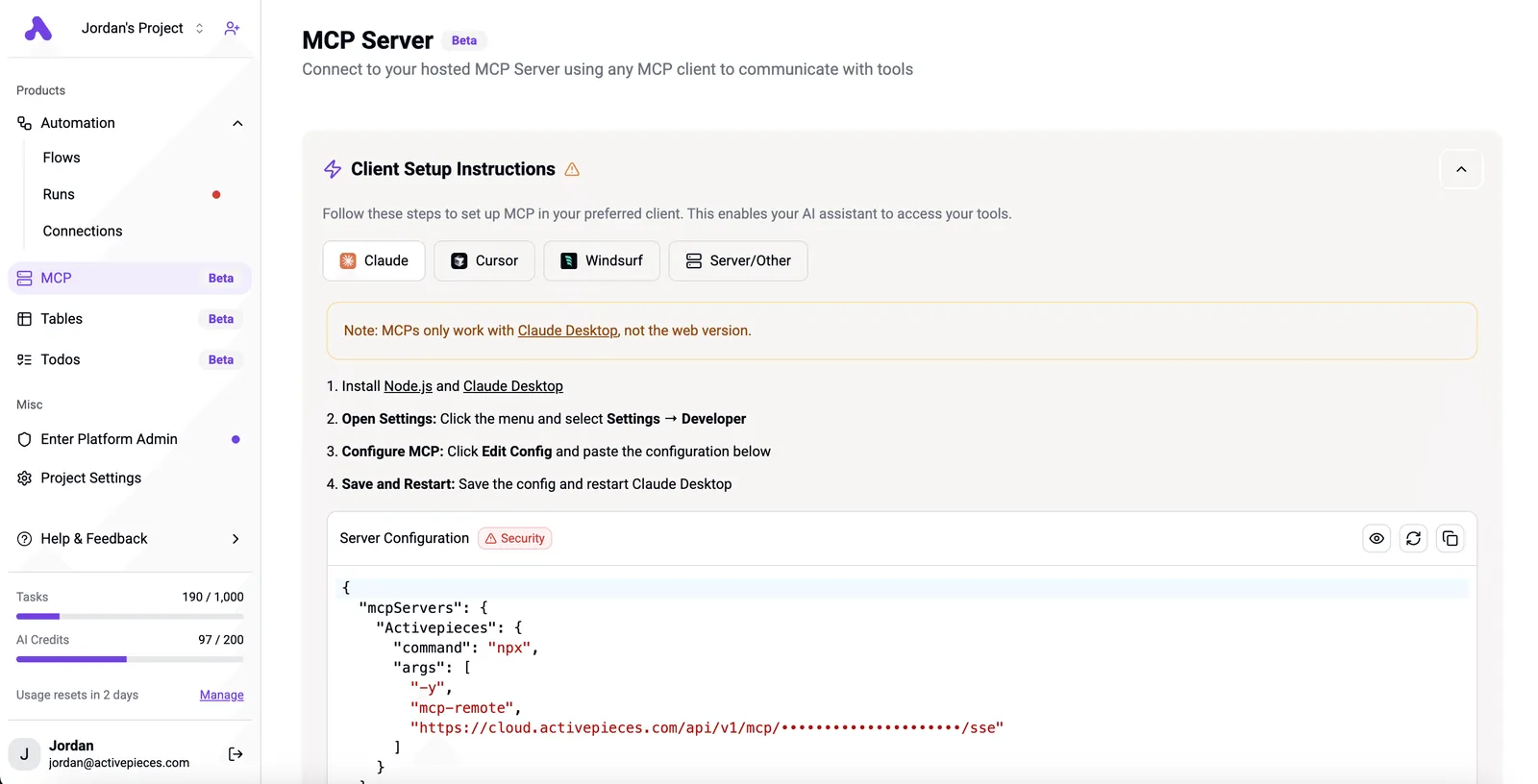
Instead of a server holding a broad credential for a ticketing system, a mailbox or a database, the agent invokes a workflow someone has already reviewed.
If an agent is manipulated or simply wrong, it can still only trigger what a reviewer approved. The workflow defines what happens, which fields it accepts and which account it acts as.
That shrinks the set of actions it can take, which is the containment this article has argued for.
User permissions don't govern device access
It's not a network control, and the boundary matters. Its SSO and roles, available from the Team plan at $200 a month, govern who may use Activepieces, which means access control requires a paid subscription.
They don't decide which devices on your tailnet may reach the MCP endpoint. That remains the job of Tailscale access rules.
If every device can reach the endpoint, every device can ask for every approved workflow, and a well-scoped workflow behind an open door is still an open door.
Nor does Activepieces help if your need is plain private reachability, such as a laptop reaching a server at home.
Tailscale already does that, and adding a workflow layer, even the MIT-licensed core, would be one more connection to maintain and one more place for credentials to sit.
Treat it as a new liability line that has to earn its place. It's worth adding when an agent needs to act on outside systems and you want each action defined in advance.
Each workflow then needs its own scoped credential, a named owner and an entry in the same log and rotation schedule as everything else.
Frequently asked questions
Is there an official Tailscale MCP server? Not one this article relies on. Tailscale's product is the network, and MCP traffic crosses it like any other.
Treat any MCP server that manages Tailscale as third-party code unless the vendor documents otherwise, and review it as you would any dependency that holds credentials.
Is Tailscale MCP free to use on the Personal plan? Tailscale doesn't bill MCP as a separate item, because it sees ordinary tailnet traffic.
What you pay for is the plan, and its limits and terms change, so check the current pricing page before you build on it. The cost that matters is the server's own: its hosting and the credentials it holds.
Can I use Tailscale Funnel for a remote MCP server?
Technically yes, but it's the wrong default. Funnel publishes a service to the public internet, so every tool the server holds is reachable by anyone who finds the address. That's the opposite of the containment this article argues for.
If you must use it, put real authentication in front of the server and give it only narrowly scoped credentials, on the assumption that someone will probe it.
Does Tailscale encrypt MCP traffic end to end?
Between tailnet devices, yes: traffic is encrypted from one node to the other. That protects the connection and nothing else. The MCP server still sees every request in plaintext, and so does the agent.
Whether a given call should have been allowed is not something encryption tells you. Funnel traffic is a different case, because it arrives from the public internet rather than from an authenticated device.
Do I still need OAuth on an MCP server inside a tailnet?
Yes, wherever the server acts on behalf of different people or reaches different systems. Tailnet membership tells the server which device is calling, not which user, and not which tool that caller should be allowed to use.
Access rules narrow who can reach the server. OAuth, with scopes, narrows what each caller can do once connected. Drop the second layer and every device on the tailnet inherits everything the server holds.