
ConvertKit Pricing 2026: Plans and Costs Compared

Oct 22, 202613 min read
Kit sells three plans, Free, Creator and Creator Pro.
The two paid plans are priced by subscriber count, so the price on the card is only where your bill starts, and it moves every time your list grows, which is worth remembering if you ever wire up an Activepieces flow that pulls in new subscribers automatically.

This table reflects the plan structure as of 22 October 2026, and Kit can change it without notice.
ConvertKit plans and current pricing
What ConvertKit and Kit mean
ConvertKit is the email marketing product built for creators such as writers, course sellers and podcasters.
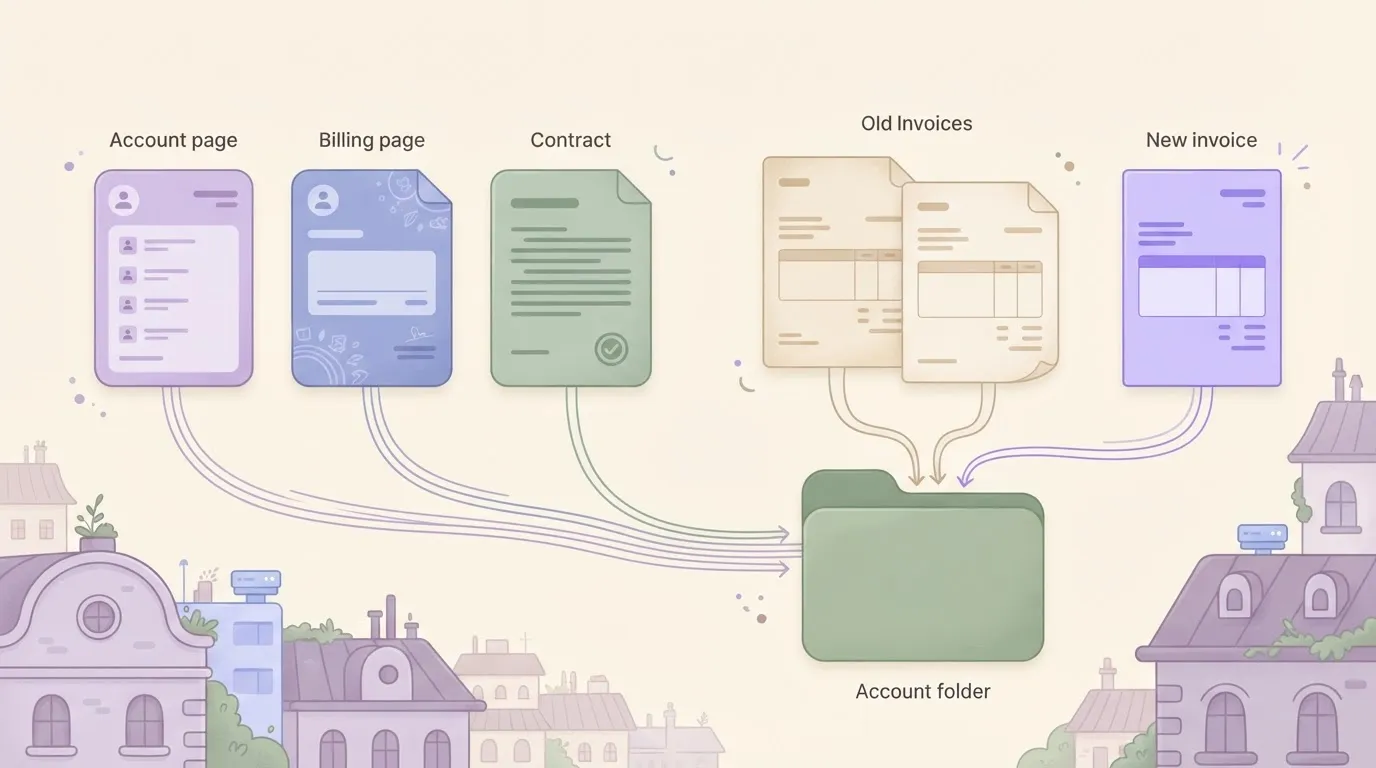
When the company rebranded it as Kit, nothing split in two. The two names point at the same account, the same billing page and the same contract. Older reviews and invoices say ConvertKit, current ones say Kit.
Plan table: Newsletter, Creator, Creator Pro and free
Kit's free tier is the plan the company labels Free. The table below puts it beside the two paid plans so you can see which limits you give up by staying free and what each upgrade costs you in structure.
The money columns say "set by subscriber count" because the monthly figure depends on where your list sits that day.
| Plan | Monthly price | Annual price | Subscriber limit | Included features | Usage limits |
|---|---|---|---|---|---|
| Free | No charge | No charge | Capped at a ceiling Kit sets | Landing pages, forms, broadcast emails, selling digital products | Fewer automation tools than paid plans |
| Creator | Set by subscriber count | Set by subscriber count, discounted against monthly billing | Tiered; price steps up as the list grows | Everything in Free, plus automations, sequences and integrations | Cost rises with each subscriber tier |
| Creator Pro | Set by subscriber count | Set by subscriber count, discounted against monthly billing | Tiered; price steps up as the list grows | Everything in Creator, plus advanced reporting and growth tools | Cost rises with each subscriber tier |
Confirm the current figures at kit.com/pricing before you enter a card number, since that page, not this table, is what you're billed against.
If you are running this arithmetic for your own team, see what the same workload costs on Activepieces.
Kit pricing at 1,000, 5,000 and 25,000 subscribers
Billed against that page, Kit costs $39 to $79 a month at 1,000 subscribers, $89 to $139 at 5,000, and $199 to $279 at 25,000, with the lower figure in each pair being Creator and the higher Creator Pro.

At 1,000 subscribers the bill is $39 to $79 a month, or $468 to $948 over a year on monthly billing. That's a real cost for a list that may earn nothing, and the free tier exists for exactly this reader.
At 5,000 the range is $89 to $139 a month, roughly $1,068 to $1,668 a year. The Creator price rose $50 while the list grew fivefold, so the jump is gentle. The gap between the two plans widened from $40 to $50.
Kit pricing for an established 25,000-subscriber list
At 25,000 you pay $199 to $279 a month, which is $2,388 to $3,348 a year. Cost now tracks audience size alone, whether or not those people buy.
A cheaper rival's pricing page, shown below, lays out four tiers at $0, $25, $150 and a custom quote, priced by usage rather than by how many people are on your list.
Kit's ladder doesn't offer that flat step. At this size, ask whether your revenue per subscriber justifies paying for every inactive address.
Kit annual billing versus monthly pricing
Read the yearly totals above as the ceiling, because they assume twelve monthly payments. Paying annually up front can lower that total, but the discount isn't in the figures here, so read it off the checkout page rather than assuming it.
The trade-off is that you commit a year of cash before knowing whether the list will earn.
Hidden costs and limits for Kit users
Prepay a year and five charges and limits still remain that the headline price never mentions, and each one bites after you've committed. These are the ones to check before paying:
- Commerce fee of 3.5% + $0.30 per sale: - Automations and sequences available on paid plans only
- One extra team seat on the Creator plan
- Subscriber counting rules that set your bill
- Integration limits on what Kit can pass to other tools
Before renewing, check the count: your bill follows the number Kit counts, not the number you believe you have.
If you stay on the free tier, there is no welcome series to turn a signup into a buyer, because Free can't run automations or sequences.
On Kit, 3.5% plus $0.30 means $65 gone from $1,000 if that money arrives as 100 sales of $10, according to Creator Marketplaces. Rivals cost more on the same sales:
- beehiiv Lite takes $118
- Patreon Standard takes $159
- Substack takes $166
- Gumroad takes $209

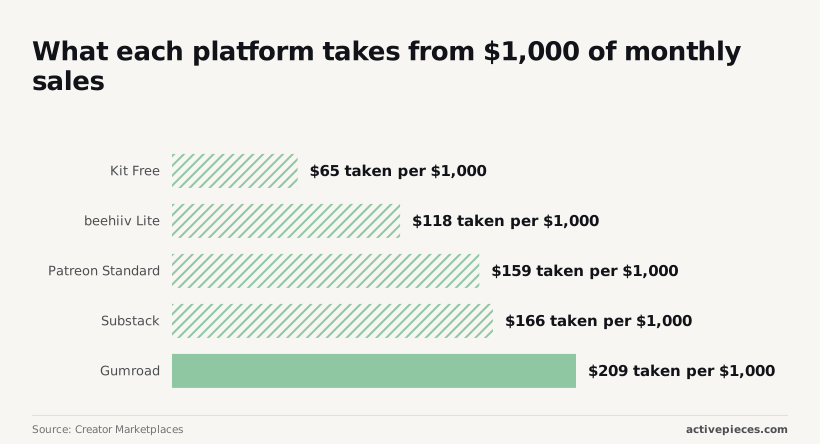
Kit is the cheapest of the five, but the flat $0.30 hurts most on low-priced items, so test your own average sale before assuming that margin holds.
Before you migrate, list the tools your checkout, community and analytics depend on, because integration limits cap what Kit can pass to your other software. Anything Kit can't send directly becomes manual export work, and that cost recurs every month.
If the gap is a subscriber or purchase record that has to reach a CRM, a spreadsheet or Slack, Activepieces covers it on a free plan of 1,000 credits a month, and its pricing page charges 1 credit per flow run however many steps the flow contains.
A ten-step flow that logs a sale, updates the CRM and posts to Slack costs the same as a two-step one, whereas Zapier's pricing page bills per task and Make's bills per module.
The strongest case against Kit's price
Against Kit, the strongest case is that its bill climbs with every subscriber, rivals undercut it at some list sizes, and its design and store tools stay plain.
Kit pricing after the free plan's 10,000 limit
At subscriber 10,001 the invoice starts, whether or not the list has earned anything, because Kit's free plan stops at 10,000 subscribers.
A skeptic reads that as a cliff: the free tier covers a hobbyist, the paid tier charges the same hobbyist as if they were a business.
The comparison below sets Kit's Creator plan against Mailchimp's Essentials plan at two list sizes.
Take from it that neither tool is cheaper everywhere, so the price case turns on your list size, not on a brand.
| Plan | 5,000 subscribers | 25,000 subscribers |
|---|---|---|
| Kit Creator | $89 a month | $199 a month |
| Mailchimp Essentials | $75 a month | $270 a month |
At 5,000, Mailchimp is the cheaper bill. Kit overtakes it only as the list grows, so a creator with a small, non-earning list pays a premium for tools they may never open.
Kit's plain design and limited email templates
Then there is what you get for that money. Kit's emails lean toward plain text and simple layouts, and its template choices are narrow.
A creator who sells physical or branded goods, and wants a polished catalogue-style email, will find the editor thin and the store tools lighter than a dedicated ecommerce platform's.
That gap is a cost too. Every hour spent working around the editor, or exporting data to a tool that handles design better, is a charge the subscription price never shows.
None of this refutes Kit. It sets the bar: the tool has to earn its place through revenue from the list, which is the test the rest of this article applies.
Worth checking against a plan that does not meter every step: one credit covers a whole run on Activepieces.
Kit versus Mailchimp, beehiiv and MailerLite on price
Kit costs more than MailerLite at both list sizes, and it only repays the difference when the list is already producing sales or sponsorship income.
The table below ranks the four on relative position rather than quoted prices, because all four vendors reprice their tiers often. It shows that the gap widens as the list grows, and that the free plans differ mainly in what they withhold.
| Price at 1,000 subscribers | Price at 10,000 subscribers | Free-plan limit | Automation access | Creator monetisation tools | |
|---|---|---|---|---|---|
| Kit | Upper-middle | Upper end, rising steadily with list size | Capped list, with core creator features included | Visual automations, strongest on paid plans | Built-in product sales, paid newsletters and sponsor network |
| Mailchimp | Middle | Climbs sharply with contact count | Small cap that has been tightened before | Broad, but aimed at general marketing | Store integrations, little creator-specific tooling |
| beehiiv | Middle, set by feature tier | Middle to upper, set by tier as well as list size | Capped list, with some growth tools held back | Available, with fuller access on higher tiers | Ad network and paid subscriptions, mostly on paid tiers |
| MailerLite | Lowest of the four | Still the cheapest | Capped list, with basic features included | Solid on paid plans, thinner on free | Paid newsletters and basic selling, fewer native options |

Read the free-plan column as a list of tripwires.
A creator who earns nothing from the list should stay on the free tier of whichever tool fits, or move to MailerLite.
Where Kit's price still pays off
Kit holds up for creators who sell their own products or take sponsorships, because selling and list management sit in one account.
The alternatives push that work into integrations, and an integration is another login, another bill and another place for a failed sale to go unnoticed.
When the list earns money, the premium over MailerLite is a small cost against that exposure. When it doesn't, the same premium is a monthly charge for nothing you use.
Deciding whether Kit's cost fits your revenue
Pay for Kit only if your list earns enough per subscriber to cover a bill that grows with every address you add; otherwise stay on the free plan or move to a cheaper rival.
EmailCloud puts lists at the following rates:
- coaching and course lists at $3 per subscriber a month, so those creators have the most room to absorb Kit's premium
- SaaS and software lists sit at $2, which still leaves room but makes the price per subscriber worth checking
- E-commerce lists earn $1.50, so Kit has to save you real work to be worth it
- Affiliate lists earn $1
- media or publishing lists earn $0.50, which means the bill takes the largest share of revenue exactly where each subscriber is worth the least
Side by side in the chart, those five list types make a ceiling. Read it that way: the single condition that flips the verdict is whether a subscriber earns you more each month than they cost you on Kit.
On Monday, do these in order:
- Re-check kit.com/pricing for your current list size, since the tiers move and last year's number may no longer apply.
- Remove inactive subscribers. Every dormant address you keep is billed as if it were a customer.
- Test the free plan against what you actually send. If it covers your forms, sequences and sends, you have no reason to upgrade yet.
- Compare annual against monthly cost at your pruned list size, so you pay for the list you have, not the one you had in March.
- Map the integrations you need, including your payment processor and your course or checkout tool, and confirm each one works on the plan you are considering.
What Activepieces does about this
The problem in this article is that Kit's bill follows list size while its integrations stop short of where a creator's sales data has to go. Activepieces addresses the second half of that.
It is a flow builder that moves a subscriber or purchase record from Kit into a CRM, a spreadsheet or Slack. Its pricing doesn't depend on how many people are on your list.
The free plan gives you 1,000 credits a month, and a flow run costs 1 credit however many steps it has.
A creator selling a $10 product 100 times a month is nowhere near that ceiling, so the glue between Kit and your other tools can cost nothing while the list is still proving itself.
Check Activepieces' integrations catalogue for the Kit connection before you build, and fall back on a webhook or HTTP step if you can't find it.
The core is open source under the MIT licence, so you can self-host it and take the run limits out of the equation.
That suits the reader the article keeps returning to, someone who may leave Kit or stay free and shouldn't have to rebuild their automations each time they switch.
Frequently asked questions
Is ConvertKit the same as Kit? Yes. Kit is ConvertKit's new name, and it's the same company, product and account system.
If you signed up as ConvertKit, your login and subscribers carried over. Older tutorials and reviews under the ConvertKit name still describe the same tool, though their screenshots and plan names may be out of date.
Does Kit still have a free plan? Yes, but it has a subscriber ceiling, and the tools that make a list earn money sit mostly on the paid tiers. Check the current limits on the pricing page before you build on it.
A free plan you outgrow without noticing becomes a paid plan on the day your list crosses the line, and the bill starts then.
Can I cancel Kit or downgrade at any time? You can change or cancel from the billing settings of your account, with no contract to negotiate.
Downgrading to a lower plan can switch off automations or sequences, and your list has to fit the lower plan's subscriber limit.
Cancelling mid-term on an annual plan is governed by the refund terms in force when you paid, so read them before you click.
Does Kit charge for unsubscribed contacts?
If someone has unsubscribed, they shouldn't count toward your tier, since pricing follows the subscribers you can actually email. Inactive people who never unsubscribed are different.
They stay on the list and stay in the count until you remove them. That's why cleaning the list can lower your bill, and why leaving it alone means paying to email addresses that no longer read you.
Is there a discount for annual billing?
Yes, Kit discounts annual billing compared with paying month to month. The exact saving depends on your plan and changes over time, so read it off the pricing page at checkout.
Pay annually only when your list size and your revenue from it are stable, because the discount isn't worth much if you outgrow or abandon the plan within the year.
Related reading
References
Running the numbers
See what the same workload costs here.
Free forever plan, and every paid plan self-hosts at no extra cost.
See pricing Talk to sales