
CRA Six-Year Retention: Making Approvals Audit-Ready
CRA record-keeping mandates require businesses to store six years of approval data. These strategies help you build an audit-proof digital archive.

Covers workflow automation in fintech risk operations: regulatory citations, approval bottlenecks, and their downstream business impact.
ContributorSeptember 24, 202615 min read
This article was researched and fact-checked by an advanced research system.
The Canada Revenue Agency (CRA) requires businesses to maintain accessible records for six years, a mandate that places significant pressure on digital approval workflows. To ensure compliance, organizations must move beyond simple email confirmations and adopt structured systems that capture immutable timestamps and authorization metadata.
When teams implement automated logging, perhaps by utilizing a workflow engine like Activepieces to sync data, they create a reliable trail that withstands the scrutiny of a formal audit.
Ultimately, the goal is to transform fleeting internal communications into permanent, verifiable assets that satisfy regulatory standards without disrupting daily operations.
The CRA six-year retention requirement defined
Six years is the minimum period the Canada Revenue Agency (CRA) mandates that you maintain all records and supporting documents. This period begins from the end of the last tax year to which the documents relate.
This legal requirement ensures that auditors can verify every deduction you've claimed and every credit you've applied against original evidence during a retrospective audit.
When you fail to produce these records, the result is often the immediate disallowance of expenses. This leads to unforeseen tax liabilities and interest penalties that can destabilize your cash flow years after a project closes.
Defining CRA supporting documents
Any record that verifies the information contained in your financial books counts as a supporting document, including digital logs generated by automated workflows. While traditional receipts and invoices are the standard, the CRA also scrutinizes the logic behind how data moved between systems.
A robust automation platform handles your expense approvals while ensuring the specific version of the logic used at the time of the transaction becomes a supporting document.
Without a version-controlled history of these automations, an auditor can't confirm that the business rules you applied five years ago complied with the tax laws in effect at that time.
When the CRA retention period begins
Only at the end of the tax year in which the record was relevant does the statutory retention period begin, rather than the date of the document's creation.
This distinction is critical because it extends the actual lifespan of a file well beyond its calendar age.
The following timeline illustrates how a single transaction in Year 0 creates a chain of liability that persists through Year 6.
[Timeline Placeholder: Year 0 followed by Years 1-6 with 'Retention Required' badges, ending in 'Safe to Dispose']
Because the disposal milestone links to the filing date, you may store a record created in January for nearly seven years. This occurs because the clock doesn't start until the end of the fiscal year in which the document reaches its legal shelf life.
Electronic vs. paper record standards
The CRA treats electronic records with the same legal weight as paper documents, provided they remain in an accessible and readable format. To satisfy an auditor, your digital storage must meet specific criteria:
- You must maintain the software required to view the records or migrate the files to a standard format to prevent technical obsolescence.
- A documented audit trail preserves the integrity of the data by showing who accessed or modified the records.
- A medium that allows for reliable retrieval stores the records. A proprietary vendor UI that could be discontinued is a significant compliance risk.
When a cloud-based automation tool shuts down or changes its interface, you may lose the ability to demonstrate your business logic, rendering your electronic records incomplete and legally insufficient.
Everything below works on Activepieces' free plan. Start without code or a credit card.
Why digital approvals often fail CRA audits
Without the contextual metadata required to prove a transaction was authorized by a specific individual at a specific time, digital approvals fail Canada Revenue Agency (CRA) audits.
Without a persistent link between the authorization and the exact state of the record being approved, a "Yes" in a database is merely a claim rather than evidence.
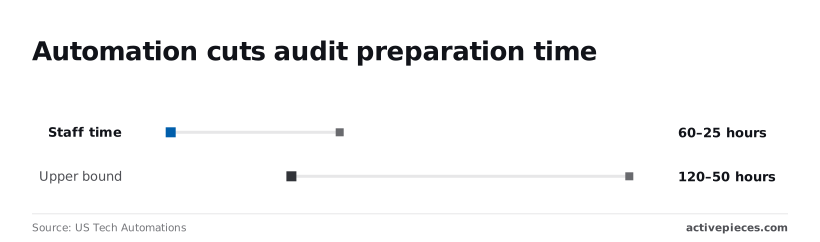
According to US Tech Automations, moving toward automated, metadata-rich workflows can reduce staff time per engagement from 60 hours down to 25 hours, allowing your team to reallocate over a week of labor to higher-value advisory services, which means your firm can pivot from reactive compliance to proactive client strategy.
Without a persistent link between the authorization and the exact state of the record being approved, a "Yes" in a database is merely a claim rather than evidence.
This allows your senior accountants to focus on complex tax positions rather than manual document retrieval, effectively doubling your capacity for high-value strategic analysis.
The trap of the 'silent' approval
When a system records a status change (such as moving a bill from "Pending" to "Approved") without capturing the environmental data that justifies the action, you have a "silent" approval. For an auditor to verify compliance, the system must export a packet containing:
- The unique User ID of the approver
- The high-resolution timestamp of the action
- The specific version of the document reviewed
These three elements establish the "who, when, and what" that prevents a taxpayer from claiming an approval was applied to a different version of a contract.
Missing details cause the upper bound of audit preparation time to swell from 50 hours to 120 hours as your staff is forced to reconstruct paper trails from memory and email archives, so your team loses nearly two full weeks of productivity to administrative recovery.

Why Slack and Teams approvals fail compliance
Authorizing a capital expenditure via a Slack or Microsoft Teams message creates a compliance gap. These platforms often treat the approval as a text string rather than a structured record.
If the message is deleted or the user account is deactivated, the link to the authorization is severed, leaving the transaction unsubstantiated during a CRA review.
The problem with ephemeral audit logs
Many SaaS platforms purge their internal audit logs after 30 or 90 days, meaning the evidence of an approval disappears long before a tax audit begins years later.
Relying on a vendor’s internal UI for compliance history is a liability. If the log isn't exported to a version-controlled repository, you lose your ability to prove that internal controls were followed during the fiscal year in question.
The ROI of automated audit readiness
By automating the collection of compliance evidence, you transform the audit process from a reactive search for documentation into a continuous verification of internal controls.
When logic is stored in a version-controlled repository rather than a vendor’s dashboard, you avoid the "compliance tax" of manual retrieval, where high-salaried engineers spend weeks reconstructing historical workflows for a regulatory examiner.
Modern infrastructure addresses this by syncing flows directly to git and promoting them through Release Management, ensuring that every approval logic change is versioned and reviewed like software rather than just saved in a private history.
This makes promotion to production a deliberate, audited step across both self-hosted and cloud environments, as detailed in the Git Sync documentation for the underlying open-source core.
Comparing storage architectures
The effectiveness of this transition depends on the chosen storage architecture, as demonstrated by the differences in how long and how well data remains accessible for examination.
| Record-Keeping Method | Data Durability (6+ years) | Searchability | CRA Compliance Level |
|---|---|---|---|
| Manual Spreadsheets | Low; files are often overwritten or lost during staff turnover | Minimal; requires manual filtering across disjointed files | Non-compliant for high-risk financial reporting |
| Native ERP Logs | Moderate; most systems purge detailed activity after one to two years | High for recent events, but limited for historical trend analysis | Partially compliant, requiring manual exports for long-term audits |
| Automated Audit Warehouses | High; immutable storage ensures records survive vendor migrations | Superior; allows for cross-system queries and instant report generation | Fully compliant with multi-year retention mandates |
By centralizing these records in an automated warehouse, you move away from the fragility of spreadsheets and the short-term memory of enterprise resource planning (ERP) systems.
This architecture allows your compliance team to focus on remediating control gaps rather than simply proving that the gaps were monitored.
Once the data layer is secured, you can begin to address the specific technical requirements for maintaining this portability across different cloud environments.
Easier to see it running than to read about it: set it up free, no card.
Standardizing the approval workflow for long-term storage
To satisfy a regulatory auditor, an approval must be inextricably linked to the specific version of the invoice or contract it authorized. It must be rendered tamper-proof and remain retrievable even if the original software vendor is decommissioned.

A proprietary "Approved" status field in a cloud-based procurement tool is insufficient. This status often lacks a verifiable link to the document state at the moment of signing.
If the tool is replaced or the subscription lapses, the evidence of that specific financial control effectively vanishes, leaving you unable to prove compliance during a look-back audit.
Storing approvals outside vendor platforms
Standardizing the approval requires moving the record of the decision from a siloed database to a portable, immutable format.
When an authorization lives exclusively within a vendor’s user interface, the context of the decision (who saw what version of the file) is obscured by the platform's internal logic.
Every agent decision and workflow step in Activepieces is captured in the Run Details and Debugging UI, providing a per-step trace that exports directly to external SIEMs via audit logs and event streaming.

This ensures that an agent's judgment is recorded alongside deterministic steps, creating a unified record that companies like MoneyGram and FundingSocieties run in production.
Storing audit logs independent of vendor apps
Separating the audit trail from the application ensures that a system failure or a change in the vendor’s data retention policy doesn't result in the loss of critical compliance evidence.
Modern audit requirements often demand that the proof of a control's execution survives the lifecycle of the software that executed it.
To ensure this survival, the approval process must be mirrored to an external, immutable storage layer that remains independent of the source application's uptime or licensing status.
Modern audit requirements often demand that the proof of a control's execution survives the lifecycle of the software that executed it.
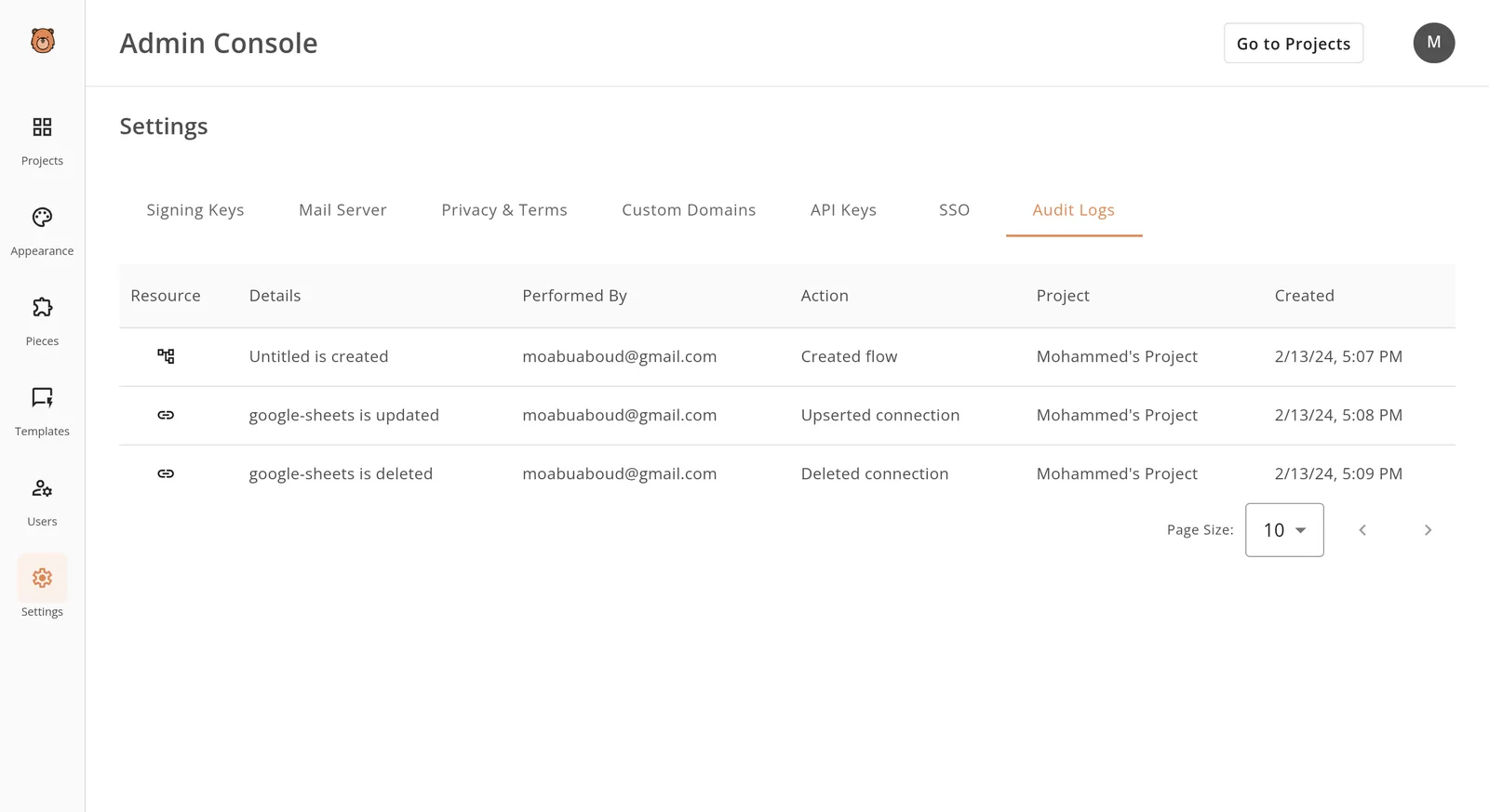
- Hash the original document to ensure immutability.
- Capture the approval event with metadata.
- Bundle the document and metadata into a PDF/A file.
- Cryptographically sign the bundle to prevent post-facto alteration.
This process transforms a transient database entry into a self-contained legal record. Consequently, you can migrate to new enterprise resource planning tools without the high cost and risk of complex data migrations for historical records.
Automating the archival trigger
The archival process must be triggered automatically upon the final approval step to eliminate the risk of human error or intentional omission during high-volume periods.
If a compliance officer has to manually export records at the end of the quarter, the delay introduces a window where records can be altered or lost.
This leads to "material weakness" findings in internal audits. Automating this handoff ensures that the moment a contract is finalized, its immutable audit package is pushed to long-term storage, providing an immediate and verifiable paper trail for every transaction.

Automating CRA compliance with Activepieces workflows
Activepieces reaches across 735+ integrations to extract ephemeral approval signals from communication tools and commits them to a permanent, queryable data warehouse. This ensures that the evidence required for a Canada Revenue Agency (CRA) audit isn't trapped in a chat history.
The evidence is instead stored in a format that remains accessible long after a vendor’s specific interface has changed or a user account has been deactivated.
Syncing Slack approvals to secure databases
To capture the exact moment a stakeholder provides a digital sign-off on a security patch or system change, the platform monitors specific channels in the Slack communication tool.
By automatically mapping these messages to a structured database like PostgreSQL, the system creates a link between the human decision and the technical deployment.
This automation removes the risk of a compliance officer missing a manual entry, which would lead to a "failure to document" finding during a formal review.
[IMAGE PLACEMENT: Activepieces flow run showing "Revoke Token" success]
This granular view of the execution ensures that an auditor can verify that the technical handshake with the external service actually occurred as intended. The auditor can see the specific details of the execution rather than just a policy claim.
Generating immutable PDF audit trails
Immediately upon completion of a flow, Activepieces aggregates metadata from disparate sources, such as the developer who initiated a pull request and the manager who approved the release, into a single, unalterable document.
Because these documents are generated and pushed to a locked storage bucket right away, the integrity of the record is protected against retroactive tampering.
This creates a chronological history that satisfies the requirement for non-repudiation in high-stakes regulatory environments.
Version-controlling automation workflows with GitHub
The tool allows your team to export its entire automation logic as code. This code can then be stored in a version control system like GitHub.
Treating the automation flow as code means that every change to a compliance process is tracked, reviewed, and attributed to a specific author.
This prevents "configuration drift," where a well-intentioned adjustment by a sysadmin inadvertently breaks a regulatory requirement without leaving a trace of why or when the change happened.
The Monday morning audit readiness checklist
The speed at which you can transition from receiving a formal notification to securing a verifiable data set is what defines audit readiness.
When a regulatory body like the IRS or a local tax authority initiates an inquiry, the immediate priority isn't analysis, but the enforcement of a "litigation hold" across all automated systems.

In environments where logic is trapped in a vendor’s proprietary dashboard, this process is often delayed by the need to hunt for specific toggle switches or hidden retention settings.
This increases the risk of accidental data purging during the discovery phase. You must execute a standardized response protocol to mitigate the risk of a "spoliation of evidence" finding.
Such a finding can lead to unfavorable inferences or heavy fines regardless of the underlying tax accuracy.
Immediate response protocol
The following sequence establishes the immediate perimeter for the audit, ensuring that no automated cleanup routine destroys the records required for the defense:
- Locate the formal Notice of Assessment.
- Identify the specific tax years under review.
- Freeze all automated deletion policies for those years.
- Export the current configuration state of all relevant financial workflows.
This checklist is the operational bridge between a legal demand and technical compliance. Once these safeguards are active, the focus shifts from data preservation to the integrity of the logic itself.
If the automation logic is stored in a version control system like GitHub, the "Export" step is a simple matter of tagging a commit.
UI-based tools require manual screenshots or proprietary exports that may not be readable by third-party auditors. The ability to produce these records within the first day of an inquiry signals to the auditor that you maintain a high level of control over your digital infrastructure.
Frequently asked questions about CRA records
Do I need to keep records if I close my business?
Even if a business ceases operations, maintaining accessible records remains a legal requirement for several years following business dissolution.
This ensures the Canada Revenue Agency (CRA) can verify past tax obligations during a wind-up audit. The responsibility for record retention typically falls to the former directors, which means personal liability exists if documentation is discarded prematurely.
Because a vendor’s user interface (UI) usually becomes inaccessible once a subscription is canceled, you must export your automation logic and execution logs into a portable, version-controlled format before closing the account.
Failing to do so leaves the directors unable to prove the integrity of their automated financial flows, potentially leading to the personal assessment of unpaid corporate taxes.
Can I store CRA records on a US-based cloud server?
Provided you ensure the records remain available for inspection by Canadian officials upon request, the Canada Revenue Agency (CRA) generally permits the use of foreign servers. However, you must maintain a copy of the records in Canada if the primary server is outside the country and the CRA cannot access it.
This requirement underscores the necessity of data portability. If your approval logic is locked in a US-based SaaS platform that does not support external backups, you may find yourself in technical violation of these access rules during an audit.
By using an automation layer that pushes logs to a local, version-controlled repository, you maintain the required domestic accessibility regardless of where the primary application is hosted.