Customer Health Score Automation: 2026 Setup Guide

Nov 24, 202616 min read
Two things decide this choice: where your usage, support and billing signals live, and who'll keep the scoring weights current once the launch excitement fades.
Customer health score automation is the practice of combining usage, support and billing signals into a weighted score for each account, then updating that score and triggering follow-up actions automatically, using either a dedicated customer success platform or a general automation tool.
Customer health score automation means turning those signals into a per-account score and routing it to someone who acts on it.
Activepieces can run that loop as a scheduled flow without a dedicated platform, reading signals from any of its 750 integrations, and every plan, including free, allows unlimited flows, so free users never hit workflow limits that force them to upgrade.
Read the table as six checks, each set against the answer it points to. If most rows land on one side, that side is your default.
Criteria: Data Location and Who Maintains It
| Criterion | What to check | Points to platform when | Points to workflow when |
|---|---|---|---|
| Data location | Do signals sit in one system or several? | One system already feeds it | Scattered across tools you already use |
| Cleanliness | Are account IDs and usage fields consistent? | Yes, with few gaps | No, so start with a few fields |
| CS team acting on scores | Is someone assigned to respond? | A team with dashboards in daily use | Alerts to a channel or owner suffice |
| Scoring setup | Who builds the first model? | You have admin time to configure it | A few weighted rules fit on one page |
| Published price | Can you budget before a sales call? | A quote fits your budget | A list price you can model |
| Weight owner | Who retunes when scores stop matching churn? | A named admin | A named person who edits the flow |
Look closer at three of those rows, because they carry most of the weight.
When signals already sit in a clean, connected source, a platform earns its price. If usage is in a product database and billing in another system, you pay for ingestion work before anything is scored.
A workflow reads from wherever the data already is, so messy sources cost you only the fields you choose to use.
144 accounts per CSM at low touch, 49 at mid touch and 22 at high touch: those are the figures Gainsight reports. At 22 accounts, a person can read a score and pick up the phone.

At 144, nobody reviews scores one by one, so the score has to trigger an automated step or it goes unread. At 49, a dashboard starts to pay for itself.
A team with no CSM capacity gets a score that nobody acts on, whichever tool produced it.
Weights drift. Each retune is labor, and someone's budget absorbs it. If a shared admin account quietly carries that work for several teams, one team is subsidizing the others. Name the owner and price their hours before comparing tool fees.

This takes minutes, not a project: automate it in Activepieces free.
Gainsight for dedicated admin teams
Nowhere do the owner's hours cost more than on Gainsight. Its scorecards and workflow suite reward a dedicated admin and clean usage data, and waste both when either is missing.
You build a scorecard from weighted measures such as logins, open support tickets and a change of executive sponsor. They're pulled from your CRM (the system holding accounts and contracts), your product usage data and your support desk.
Each measure needs a mapped field, so a score is only as trustworthy as the weakest feed behind it.
When a score moves, workflows fire: a task for the account manager, an email, a renewal alert. Someone has to maintain that mapping and those rules, and that salary is a separate line from the license.
What buyers pay
Because Gainsight doesn't publish a price list, the best evidence is what buyers paid.
According to Vendr, the chart below shows annual contract prices of $13,525 to $182,022 across 379 Gainsight purchases, against $18,821 to $128,773 across 102 ChurnZero purchases, meaning your contract will be custom-quoted based on your implementation scope.
At medians of $49,500 and $44,213, a typical Gainsight buyer is near $50k a year before the admin's hours, so you're committing to staffing alongside the software cost. The wide spread means modules and seats move your bill more than the vendor name does.
With a median price near $50k, the question becomes what that spend returns, which means ROI justification must drive your buying decision. SaaS Capital's retention benchmarks give retained revenue by contract size:
| Contract size | Gross retention | Net retention |
|---|---|---|
| Under $12k | 90% | 98% |
| $12k–$25k | 91% | 103% |
| $25k–$50k | 91% | 102% |
| $50k–$100k | 90% | 104% |
| $100k–$250k | 91% | 102% |
| Over $250k | 95% | 106% |
At 90–91% in every band up to $250k, gross retention shows that a bigger contract doesn't stop churn by itself. What changes is expansion.
Under $12k, net retention never reaches 100%, so a platform costing around $50k is chasing a book where each saved account is small.

From $12k upward, net retention passes 100%, and a scorecard that flags upsell as well as risk has revenue to find. Above $250k, the 95% floor means the downside is smallest, but each lost account is large enough to justify a person watching it.
When your accounts mostly sit above $50k, usage data already lands cleanly in one place, and a CS team will act on every score, Gainsight pays. You need all three, or the investment won't return.
It's overkill if your book is mostly sub-$12k accounts or nobody owns the data feeds, so you're really buying a data infrastructure project, not a customer success tool. This reflects the figures as checked on 24 November 2026.
ChurnZero for prepared CS teams
If you run a mid-size CS team that already sends clean product usage into ChurnZero and has people ready to act on health scores, it suits you. For anyone else it's the wrong buy as of 24 November 2026.
ChurnZero tracks usage in real time and rolls events into health scores you configure. It fires automated plays (a task, an email, an alert to the account owner) when a score moves.
The case for watching usage at all is cost. CloudRatings puts the CAC ratio for a new logo at 1.78 to 2 dollars, against 0.61 to 1 dollar for expansion.

Winning a stranger costs roughly twice what growing an existing customer does, and expansion runs at about a third to a half of the acquisition price. A score that catches a slipping account early protects the cheaper revenue.
Gainsight setup and ongoing maintenance effort
Expect the effort to sit in scoring. You decide which usage events count and how much each weighs, so the score is only as good as the events feeding it.
If your product emits patchy events, you pay a platform licence to score noise. Other data, such as CRM and support records, arrives as feeds someone must keep working.
Price it the way you'd price a retainer. The licence is one line, but the person who tunes the scores and runs the plays is usually the larger one.
Across a whole book of business, the accounts that generate clear signals end up carrying the cost of those that generate none.
Compare that with a general automation tool's project settings, shown below. The only capacity control on the General tab is Max Concurrent Jobs, left at Default (5), which caps the project at five flows running at the same time.
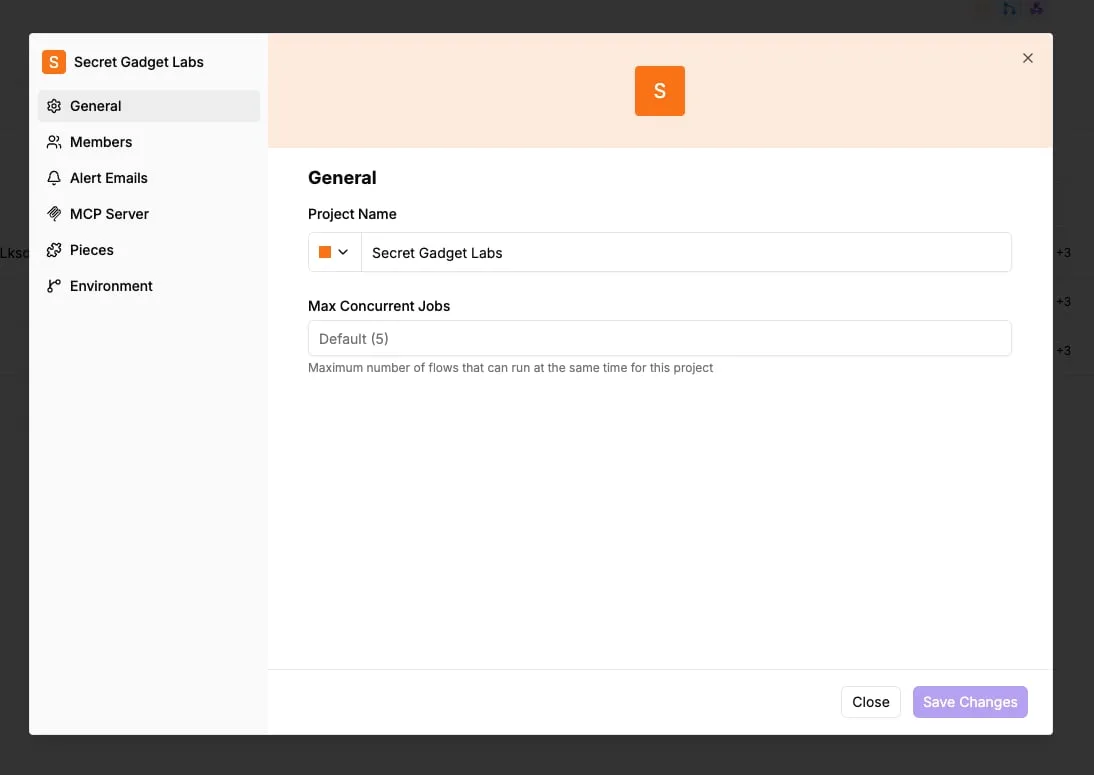
Because a nightly scoring run is one flow, five at once leaves room for the rest of the project's automations. At that scale, capacity is a number you read off a settings page, not a contract you negotiate.
Where ChurnZero stops short is the data and people you must bring. It's the wrong buy in three cases:
- Your usage data lives in spreadsheets or an export you assemble by hand, not in events sent continuously from the product.
- No one owns the scores weekly, so plays fire into an inbox nobody works.
- Your CS team is small enough that a scored list in a shared sheet, refreshed on a schedule, would already cover every account it can personally call.
In any of those, buying the platform first means paying for scoring you can't yet feed or act on.
For that third case, Activepieces runs a weekly scoring workflow over your CRM, billing and support apps, any of its 750+ integrations. It is not a customer success platform and has no built-in health dashboard, so the weights are yours to own.
The first version doesn't need a builder, though. Describe the weekly scoring process in the built-in chat, naming those three apps, and what comes back is a published flow in your account, the same kind of artifact someone would otherwise wire by hand.
It sits under the same RBAC and audit logs as every other flow, and each execution leaves a run trace you can open and read. MoneyGram and Moneypenny run Activepieces in production.
You can follow the rest of this with the builder open. Start free, no card.
ClientSuccess for small unified teams
For a small CS team that already has account data in one place and people ready to act on it, ClientSuccess is the lighter option: a customer success platform that combines health scoring, renewal tracking and playbooks.
That's the buyer the previous section's warning leaves standing. Scoring is configured around inputs you supply, such as CRM fields, billing and renewal dates, support activity and product usage.
The setup is quicker than on the larger platforms, but it doesn't clean those inputs. If usage data is patchy, the score is patchy, and a score nobody trusts gets ignored within a quarter.

Against the larger platforms, ClientSuccess gives up depth: expect less room for elaborate multi-source scoring models and heavy customization. For a team of a few CSMs, that's often a fair trade.
Gainsight fit by accounts per CSM
Whether you need it at all comes down to portfolio shape, because accounts per CSM set how much of the scoring a human can act on:
110 accounts in SMB, 35 in mid-market and 10.5 in enterprise: that is how many one CSM carries, as the chart shows.
A CSM holding 110 small accounts can't review each score by hand, so for that segment the value sits in automated playbooks and renewal reminders, which a workflow tool can also trigger.
The half account in the enterprise figure means two CSMs share one account, and at that ratio a CSM already knows the customer without a dashboard.
The next question is where a platform earns its fee. Mid-market, at 35 accounts, is the middle case: a score helps with triage, but only if the data feeding it is reliable.
If your portfolio is mostly SMB, a platform's cost lands on your lowest-revenue accounts, and those accounts quietly subsidize the attention the enterprise accounts get. Price that before you sign.
On cost, we didn't confirm a published list price for ClientSuccess as of 24 November 2026. Ask for a quote and compare it against what you'd spend maintaining a scored workflow.
When any of these is true, a workflow tool is the better buy:
- Your usage data lives in a product database or warehouse that nobody has cleaned.
- You have fewer than a couple of dedicated CSMs, or none.
- You need a score and an alert, not a renewal pipeline and playbook library.
When nobody on staff owns the platform's configuration, a workflow tool is also the better buy. In that case you're paying for a system that drifts out of date.
Activepieces
Run it on a schedule and the score stays fresh at low cost: a workflow pulls usage signals, weights them in a code step, writes the result to your CRM, and alerts someone when an account drops.

The generic build: signals, weights, CRM, alerts
Break the build into four parts. Signals come from wherever usage already lives: a product database, the support inbox, billing.
Weights are a few lines of code that turn those signals into one number. The CRM gets a score field it can sort and filter on. An alert fires only when the number falls, so people read it.

You will not find a health dashboard or a built-in score model in Activepieces. The weekly scoring flow is one run, which is 1 credit however many steps it has, so the free plan's 1,000 credits a month covers it.
What you do own is the weights, and someone must revisit them when the signals stop predicting churn.
If nobody on your team'll do that, you're back to a stale score, just a cheaper one.
The build ends in one workflow that runs every week:
- A schedule trigger starts the run.
- Steps pull each signal for every account.
- A code step applies the weights and produces the score.
- The score is written to the CRM field, with last week's value kept alongside it.
- A branch compares the two. If the score dropped, a message goes to the account owner in chat.
If you run this for several clients in one shared workspace, track usage per client. Otherwise your busiest client's runs quietly cross-subsidize the rest, and nobody sees it until the invoice.
For what each tool charges for, whether you can host it yourself, and where it fits, see the table. Read the limit column first, since that's where the maintenance burden lands.
| Tool | Price | Self-hosting | Strength | Limit | Best for |
|---|---|---|---|---|---|
| Activepieces | Free to self-host; paid cloud plans | Yes, open source | Cheap to run, code step for custom weights | No scoring features; you build and maintain them | Teams with one technical owner |
| Zapier | Paid tiers priced by task volume | No | 9,000+ connectors, so an obscure app is probably already covered | Costs climb as weekly runs multiply across accounts | Non-technical teams with many apps |
| Make | Paid tiers metered by usage | No | 3,000+ connectors, enough for a mainstream stack; visual branching | Check that your odd tools are on the list | Teams that want visual control |
| n8n | Free community self-host; paid cloud priced by executions | Yes, under a fair-code license | Deep code and data handling | Needs more technical upkeep | Teams with a developer |
Pick on where your data lives and who'll maintain the weights. If the answer to the second question is nobody, none of these four fixes that.
Activepieces is the better choice for a small team that wants a working account-health process without hiring a builder, judged on how directly a plain-language description becomes something running.
You describe the process in the built-in chat, it publishes a live flow in your account, and the run trace shows exactly what happened, so you can check the signals, the weighting step, the CRM score field and the drop alert for yourself.
A team that already has an engineer who wants to hand-build and own every step may find the comparison closer, but for someone who would rather describe the job than staff it, that checkable, published result is what decides it.
Steps to choose health score automation
Start by finding out whether anyone is actually going to act on a score, because that decides everything after it.
The five steps below take you from that question to a decision you can defend on an invoice, and the order matters: each step makes the next one cheaper, so deviating from the sequence leaves savings on the table.
- Pick three signals you trust, measures you'd stake a renewal call on, such as logins by seat, a key feature used, or support tickets opened. If you can't name three, you have a data problem, and no platform'll cure it. It'll only display the gaps in a nicer dashboard.
- Write down how many customers you score and how many people'll work the list. A short list for one person is a view, not a program. The ratio tells you whether a platform's seat licenses and onboarding are spread across enough people to earn their cost.
- If your three signals already sit in one clean source and a CS team is waiting to use the output, a platform is justified. If the signals live in separate tools and one person'll check them weekly, a scored workflow on a general automation tool does the same job without a per-seat contract.
- Backtest the score against last quarter's churn by running your weights over the accounts as they looked a quarter ago, then compare the flagged list with who actually left. If the score would've missed most of the departures, fix the signals before you spend anything. A score you haven't tested is a guess with a color attached.
- Put one person's name beside the scoring rules, with a date to review them. Weights drift as your product and customers change. If nobody owns them, the score decays quietly and the team keeps trusting it, which is the most expensive way to be wrong.
A score you haven't tested is a guess with a color attached.
Notice where the cost lands in that sequence. Steps one and four cost you time and nothing else, and they're the ones that tell you whether you're buying software or buying a spreadsheet's worth of confidence.
Finish them before you take a single demo call, because a vendor's trial'll flatter whatever data you hand it.
Related reading
References
Build it
Set this up in minutes.
No code required. Connect your accounts, and Activepieces runs it from there.
Start free Talk to sales