
What Is Data Automation? Definition, Benefits, and Use Cases
Learn all you need to know about data automation, from what it is and how it works, to its main benefits, components, and more.

Jan 22, 202614 min read
You're here because something around data stopped being simple.
Manual data handling doesn't fail all at once. It fails slowly. Over time, you end up double or maybe triple-checking every result you get.
At some point, checking numbers stopped taking five minutes. A report needed a fix, then another.
To make your life easier, you want to use automation to replace handoffs between tools with data workflows that move information the same way every time. And you need this guide to learn more about it.
In this article, you'll learn how data automation works, which data types you can automate first, and what benefits you get.
TL;DR
- Data automation replaces manual data work with systems that move and prepare information consistently.
- Teams automate structured, semi-structured, and unstructured data using ETL pipelines.
- Benefits include faster processing, fewer errors, lower costs, and more reliable numbers.
- Common use cases include lead nurturing, sales research, expense tracking, and reporting.
- Platforms like Activepieces help teams build and maintain these workflows at scale.
Everything below works on Activepieces' free plan. Start without code or a credit card.
What Is Data Automation?
As you manage data, you get a file from an app, another file lives in a sheet, and you have to line things up by hand.
Data automation removes that back-and-forth by setting up a system that runs the same steps every time. It typically functions as a pipeline that moves raw data from its source to a final destination.
So how does that actually happen day to day? Most teams follow a simple structure. The framework for this is ETL: Extract, Transform, Load.
First, systems pull records from tools or files. Next, values get cleaned so formats match. After that, results get sent into a storage system, such as a data warehouse or cloud lakehouse, where you can review them.
From there, automated workflows handle the full data lifecycle, connecting data workflows, such as from data collection to data preparation, so information stays ready when questions come up.
Types of Data You Can Automate
You can automate data types, such as:
Structured Data Automation
Structured data automation fits cases where information follows rules, such as a spreadsheet where every column has a label like "Date" or "Price," and every row sticks to that setup.
A pipeline can move each value with precision because every field has a known place.
For you to understand it better, let's see this retail example:
- Step 1: A customer buys a shirt. The register records "Item_ID 123, Qty 1, Price 20."
- Step 2: The system updates your inventory and reduces your stock by one.
- Step 3: When your stock drops under 10, an email goes to your supplier.
Pretty convenient, right?
You can also use this setup for bank matching, stock updates, sales dashboards, and audit records.
Semi-Structured Data Automation
Semi-structured data automation works with information that has hints of order.
Some of the typical formats under here are:
- JSON
- XML
- Emails mix headers
Automation handles this by storing entries first, then shaping them later. AI helps match fields when one system uses "User_ID," and another uses "CustomerID." Other tools also flatten nested values so reports stay readable.
As formats change, systems adapt without rebuilds, which saves setup time and avoids constant fixes.
Unstructured Data Automation
Unstructured data automation deals with content that has no fixed layout. Text files, scanned pages, audio clips, images, and videos live here.
Older setups required you to read everything and type results into tools.
Modern systems, on the other hand, read meaning rather than layout. AI can scan contracts for risky terms, review support tickets to spot intent, tag images, and turn meetings into summaries with action items.
Once systems process your data, you gain access to details that were never available in reports before, so you get clearer answers and fewer blind spots.
Benefits of Data Automation
When you implement data automation, you'll get these benefits:
Reduction in Processing Time
Handling vast data volumes coming in from disparate sources isn't an easy task and could lead to human error. With automated data collection, records move the moment they appear.
As soon as the data appears, digital pipes move it forward. Automation software doesn't get tired, doesn't need coffee, and operates even when you sleep. It can further process large sets together.
These systems also take care of routine and repetitive tasks like format fixes or basic checks.
You free your team from data drudgery and give time back for work that needs judgment.
Cost Efficiency
Even a tiny error, such as entering "10" instead of "100" or spelling a name three different ways, can create dirty data that leads to:
- Shipping errors
- Billing issues
- Bad forecasts
Automating data processes cuts that risk by removing repeated typing and manual checks. Systems follow rules every time, which reduces the error margin in manual data entry processes.
Besides that, using predictive analytics for optimizing inventory and logistics prevents overstock and late deliveries. Cloud costs also drop when systems shut down unused resources on their own. Returns stay measurable.
In fact, according to IDC, businesses often see $3.50 back for every dollar spent on AI and automation.
Better Customer Experience
Waiting for answers creates frustration. But through automation, the moment a customer submits a query, systems scan the message, identify intent like "Where is my order," and pull tracking details from logistics tools.
Workflow automation tools can handle basic data-related tasks before a person joins the conversation. Address updates sync automatically. Order changes reflect everywhere without follow-ups.
Data automation enables faster responses and fewer repeat contacts.
Improved Data Quality
Quality drops when people touch the same records many times. Automation reduces that risk through real-time data validation.
Systems also clean data as it moves. Formats align so that every date follows the format "YYYY-MM-DD," phone numbers include country codes, and currencies convert to USD using live rates.
Other automation platforms use fuzzy matching to spot when "John Smith" and "J. Smith" point to the same person. Records merge automatically, which prevents duplicate emails or double-counting sales.
Over time, you build high-quality data you can trust. Data quality management shifts from cleanup to prevention. That process delivers data integrity that manual work can't maintain, and meetings stop turning into debates over whose numbers are correct.
Easier to see it running than to read about it: set it up free, no card.
Common Components of the Data Automation Process
Most systems follow a sequence:
Data Integration
Data integration fixes the problem of numbers living in different places. Integration connects those systems so data flows stay consistent.
That consistency leads to accurate data you stop questioning. No more checking three dashboards to confirm which numbers count.
When systems talk to each other directly, reviews focus on results rather than where numbers came from.
How Activepieces Approaches Data Integration Differently

Activepieces is an open-source automation platform that connects apps, moves information between them, and supports advanced logic.
Unlike basic integration tools, Activepieces treats integration as part of a larger automation system that you can extend over time.
Below is what Activepieces offers:
Open Source and Self-Hosting Control
Activepieces is an open-source core, so you have full visibility into how flows work.
You can even self-host Activepieces on your own servers, which makes sure that sensitive data never leaves your infrastructure. This setup is important when you have financial records, customer details, or internal systems that can't sit on third-party clouds.
Built-In Data Management With Tables
Activepieces includes built-in tables for data management. These tables store records directly inside the platform, which removes the need for extra databases in many workflows.
You can use them to track states, store reference lists, and keep context between steps.
Designed for Multiple Data Sources
Most workflows pull from multiple data sources. Activepieces connects those systems inside a single flow, so updates stay in sync. Once connected, automated data integration moves records as events happen.
As of now, you can connect with 610 pre-built pieces, such as:
- Spreadsheets and databases: Google Sheets, Airtable, Microsoft Excel 365, Oracle Database, DataFuel, and MySQL.
- Cloud storage: Amazon S3, Google Cloud Storage, and Azure Blob.
Controlled and Reliable Data Access
Data access controls limit who can view or change flows, which protects your data as your team grows. Your developers can extend logic with TypeScript pieces, while non-technical users adjust steps without breaking systems.
Protect critical workflows as more people get involved. Control data access with Activepieces!
Data Extraction
Data extraction handles the grabbing step. Instead of logging into portals on Monday mornings to get the numbers, systems automatically pull records and extract data.
AI agents can now, in addition, look at screens like you would, notice layout changes, and adjust without a developer stepping in. Optical character recognition (OCR) can read scanned invoices or photos and pull fields like "Total Amount Due" with high accuracy, too.
The data extracted no longer hides inside files or old tools. Dark data moves into systems where it supports real decisions.
Data Transformation
Data transformation prepares records so reports make sense. Systems transform data by aligning formats and values.
For example, "NY," "New York," and "n.y." all become "New York." Numbers convert to the same units as well.
As data flows through, the system checks a zip code and adds local weather or time zone. Advanced checks spot outliers. If daily revenue sits near 5,000 and one entry shows 5,000,000, the system flags it before reports break.
Data Loading
Data loading places prepared records where you work. That often means loading the prepared data into a data warehouse or business intelligence tool used for reporting.
Lakehouse setups also store messy inputs and clean outputs together, which supports AI and machine learning.
Loading happens in small updates or real time, so charts stay current. When a column changes, systems adjust tables automatically.
Data Analysis
Data analysis turns stored records into explanations. Dashboards refresh on their own. Alerts trigger when values shift outside normal ranges. Deeper logic drills down automatically.
After the system analyzes data, it can alert you and say, "Berlin sales dropped due to shipping delays rising by 40%."
These data analysis processes reduce the time spent hunting for reasons. Patterns surface without someone asking the right question first, so your decisions rely on clear signals.
Common Data Automation Use Cases
Below are some data automation workflows you can implement today using Activepieces.
Lead Nurturing
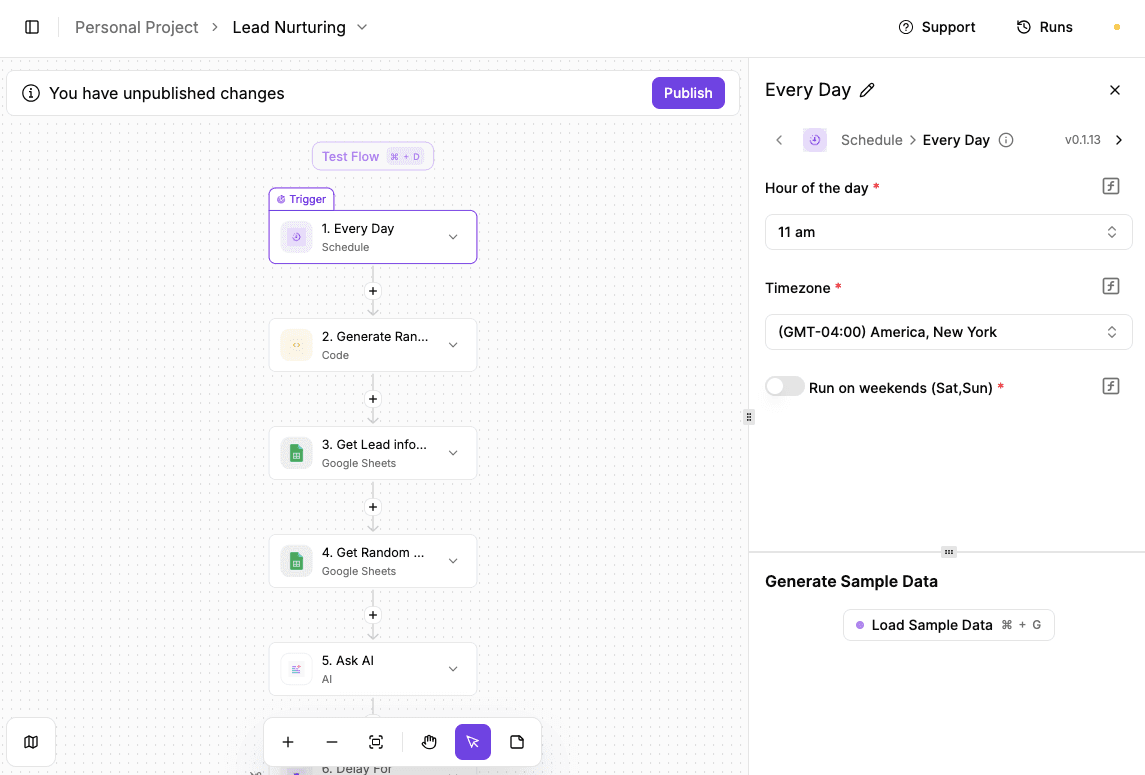
Lead nurturing usually breaks down when follow-ups turn into reminders that feel cold or forced. Sending the same message again and again rarely keeps anyone engaged.
A better approach shares something useful at the right moment and keeps the conversation warm without manual effort.
The flow below uses scheduled triggers, spreadsheets, and AI to send thoughtful content to leads while everything runs in the background.
Here's how to set it up:
- Create a schedule trigger that runs once a day, such as 11:00 a.m. That trigger starts the flow automatically, so no one has to remember to send anything.
- Add a code step that creates a random number. Use the AI assistant to write it if needed. That number controls which leads and which articles get picked.
- Use the random number to pull one row from a lead spreadsheet. Each run reaches a different person without manual sorting.
- From another sheet, use the same number to grab one article or resource. Fill that sheet with content worth sharing.
- Add an AI text step that drafts a short, friendly email mentioning the article and inviting a reply.
- Use the random number again to delay the send time by a few minutes so emails don't arrive at the same time every day.
- Connect the email step, run a test, review the output, then turn the automation on.
Try this template: Lead Nurturing
Automatic Scraping of Company Information Before Call

Sales teams often spend too much time hunting for company details. With automation, all the necessary information is collected, organized, and ready before the first call, helping sales reps offer tailored pitches every time.
The flow below streamlines the process by pulling relevant details ahead of meetings, so you never go into a conversation blind.
Here's how to set it up:
- Set a scheduled trigger to run once per day at a time that fits the team's routine. Each run prepares research for upcoming meetings without manual effort.
- Insert a "Date Helper" step to pull the current date. That keeps calendar lookups aligned with the correct day and avoids pulling the wrong events.
- Connect Google Calendar and retrieve all events scheduled for that date. Event titles and descriptions often include company names or website links, which act as inputs for research.
- Add an "Ask AI" step and pass in the event details. Prompt the model to find recent company updates, common pain points, and relevant trends tied to the business.
- Finish with a Google Docs step. Create a document for each meeting, name it after the event, and insert the AI research so reps walk into calls fully prepared.
Try this template: Automatic Scraping of Company Information Before Call
Expense Tracker
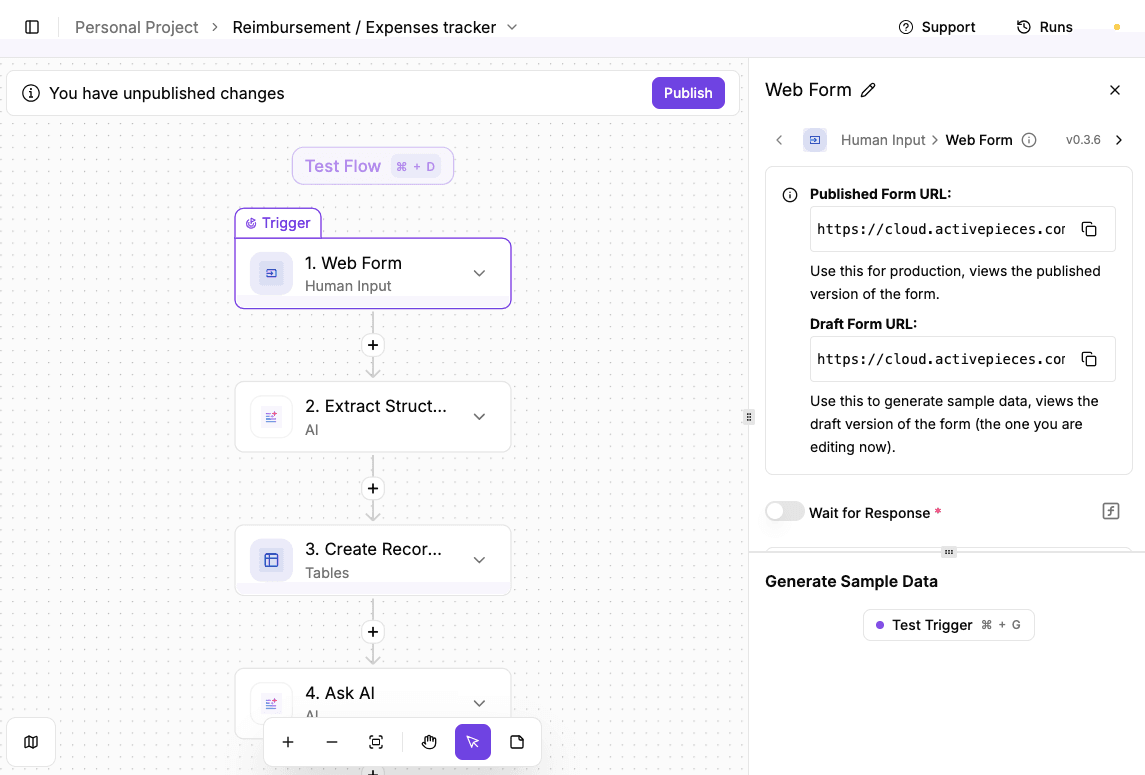
Expense tracking usually falls apart once receipts pile up. Data automation removes that chore by letting receipts log themselves the moment someone uploads them.
The flow below handles uploads, reads receipt details, assigns categories, and stores everything in one place.
Here's how to set it up:
- Create a custom web form inside Activepieces. Add a name field and a file upload field for receipts. Every time someone submits the form, the flow starts automatically.
- Users enter their name and upload a receipt image or PDF. Once submitted, the automation begins without extra clicks.
- Add an AI step with optical character recognition. That step reads the receipt and pulls details like:
- Store name
- Purchased items
- Total amount
- Pass the extracted items into another AI step that assigns a category. Use a simple list such as electronics, food, travel, or personal care. Adjust categories based on how expenses need to be tracked.
- Add an insert row step for Google Sheets. Map each extracted value to a column such as name, store, category, amount, and date.
- Run a test submission, confirm the row appears correctly, then turn the flow on. Receipts now log themselves without manual expense tracking.
Try this template: Expense Tracker
Create Maintainable Data Automation Systems With Activepieces
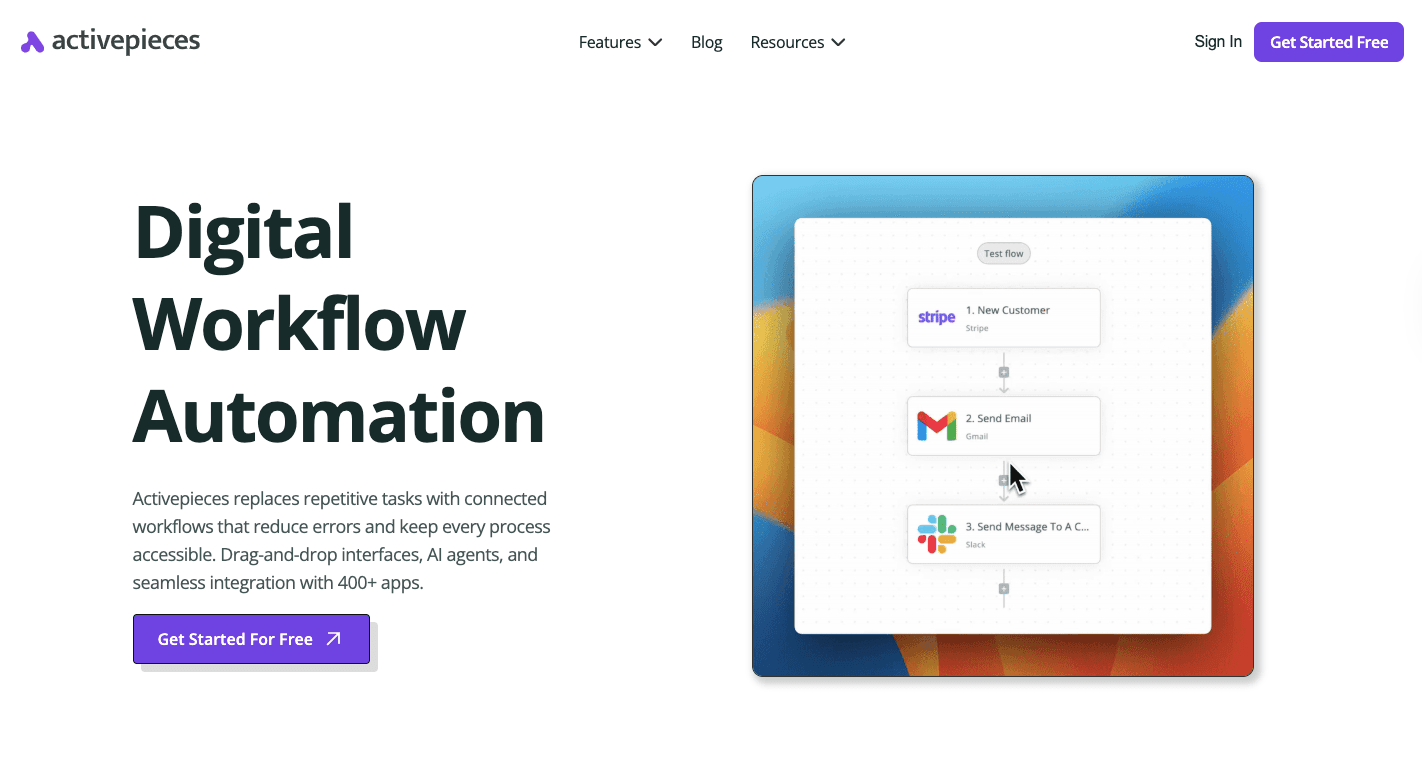
Activepieces supports a successful data automation strategy by keeping every step visible from start to finish. Logic runs top to bottom, so you see what happens and where to adjust it.
Automation doesn't remove people completely. Some data tasks still need review before action. Activepieces supports human intervention with approval steps, delays, and input points built directly into a flow.
You can further self-host Activepieces, which protects data security and keeps records inside internal systems. Flows update records as events happen, so you always get up-to-date data.
For free, you can start automating your data with the Standard plan. Then, you only pay $5 per active flow per month.
FAQs About Data Automation
What are the four types of automation systems?
Most automation falls into rule-based, AI-driven, event-driven, and scheduled systems. Together, these form practical data automation solutions for different workloads.
What is an example of automated data?
A purchase updates reports the moment it happens. The record moves through a data pipeline without manual exports.
What do data automation specialists do?
They build and maintain flows that move and prepare information. Their work connects data engineering with daily use and fixes cases where components of your data operations are consistently failing.
What are some data automation tools?
Platforms like Activepieces, warehouses, and schedulers support teams and data scientists by keeping information ready.
What are the common data automation challenges?
Poor inputs, changing formats, and weak monitoring cause most failures.