
DeepInfra Pricing 2026: Per-Token Rates by Model

Nov 7, 202614 min read
Pick a model and you have picked a rate; your account does not set it.
DeepInfra bills text models per million tokens and image and speech models per unit of output, so even a workflow built in a tool like Activepieces inherits whatever rate the model you choose carries. Two models on the same page can differ several-fold per call.
DeepInfra is a hosted inference API that serves open-weight models behind an OpenAI-style endpoint, with no servers for you to run.
DeepInfra pricing today: every model and rate
The one-table price list, checked on a stated date
Checked against deepinfra.com/pricing on 2026-11-07, the table shows how the site meters each model family. Only the rates I could confirm are filled in, and the rest are marked, so read the current rate on the page before you budget.
| Model | Input | Output | Cached input | Unit |
|---|---|---|---|---|
| Llama 3.1 8B | Not confirmed in this check | Not confirmed in this check | Only where the page shows it | Per million tokens |
| Llama 3.3 70B Turbo | Not confirmed in this check | $0.32 per 1M (2026-11-07) | Only where the page shows it | Per million tokens |
| DeepSeek-V4.1-Flash-1017 | Not confirmed in this check | Not confirmed in this check | Only where the page shows it | Per million tokens |
| DeepSeek-V4-Pro (0813) | $1.30 per 1M (2026-11-07) | Not confirmed in this check | $0.10 per 1M (2026-11-07) | Per million tokens |
| Image models | Not token-based | Per generated image or output size | Not applicable | Per image |
| Audio models | Not token-based | Per audio duration | Not applicable | Per second or minute |
Treat the cached-input column as a check you run per model, since a blank there means you pay the full input rate.
If you are running this arithmetic for your own team, see what the same workload costs on Activepieces.
Free tier, rate limits and account tiers
The docs describe the limits your workflow runs under, but they give no confirmed figures for the free credit or the upgrade thresholds.
Default rate limits and how they rise
When a workflow fans out across one popular model, it hits the cap sooner than the same traffic spread over several models. The docs describe limits as a per-model concurrency cap, not a single account-wide ceiling.

As your spend grows, limits rise, but there's no table of spend thresholds. At the limit, DeepInfra refuses or delays extra requests rather than silently queuing them, so your client has to handle it.
Put retries with backoff in the caller so a refused request becomes a short delay instead of a failed run.
DeepInfra prepaid balance, invoicing and spending caps
I couldn't confirm a tier table, invoicing terms or spending-cap controls on the pages, and DeepInfra bills pay-per-token against usage. Without a documented cap, only your balance and your own code limit a runaway loop.
Put your own ceiling in the workflow, such as a maximum token count per run and a daily call budget. Ask DeepInfra support in writing whether invoicing or hard caps are available for your account.
**Without a documented cap, only your balance and your own code limit a runaway loop.
Batch, cached-token and dedicated GPU discounts
You can pay less than the list price in three documented ways: cached input rates, a batch interface, and dedicated GPUs billed by the hour. It documents no volume or commitment discount beyond those.
| Discount | Saving | Requirement | Best-fit workload |
|---|---|---|---|
| Cached input | DeepSeek-V4-Pro-0813 cached input at $0.10 per million tokens vs $1.30 uncached | Repeated prompt prefixes that hit the cache | Agents and chat with a long, stable system prompt |
| Batch API | 20% off | Work that can wait for asynchronous results | Evals, backfills, bulk classification |
| Dedicated GPU | Priced not per token | Steady traffic that keeps the hardware busy | Sustained high-volume serving of one model |
| Volume or commitment discounts | None documented | Not applicable | Not applicable |
Cached input pricing
Thirteen to one: that is the gap between $0.10 and $1.30, so on a prompt-heavy workload caching is the biggest lever on the page.
If your prompts vary at the start, your hit rate falls, and you pay the full rate without any warning. Put the stable material (instructions, tool definitions, reference documents) first and the changing user content last.
You give up immediacy for the 20% cut from batch processing, and that trade is why it's modest, so services requiring speed stay on pricier real-time options.
Once you move to a dedicated GPU instance, you stop paying per token and rent the hardware by the GPU-hour.
It pays off only when traffic is steady enough to keep the card busy; spiky workloads are better on per-token billing.
Example monthly DeepInfra bill for a support bot
Before launch, you can write a support bot's cost down as a chain of multiplications, which is why per-token billing suits it.
Support bot workload and token assumptions
With a customer-support assistant handling 50,000 conversations a month, any error in your per-conversation estimate is multiplied 50,000 times.
Count the system prompt and retrieved help-article text as input, because they are resent every turn and usually outweigh the customer's own words. Count the reply as output, which is billed at a higher rate than input.
Follow these steps:
- Set the tokens per conversation, summed across every turn.
- Multiply by 50,000 conversations to get monthly tokens.
- Split that total into input, output and cached input tokens. Cached tokens are the repeated prompt prefix, and they only count if the model you pick offers a cached rate.
- Multiply each bucket by the model's per-1M-token rate for that bucket.
- Sum the buckets, then repeat for a small, a mid and a large model.
Monthly cost on a small, mid and large model
Replies are the smallest bucket by volume but the most expensive per token.
My assumptions are 1,000 output tokens and a 3,000-token stable prompt prefix per conversation. Across 50,000 conversations that is 50 million output tokens and 150 million prefix tokens a month.
On the mid tier, Llama 3.3 70B Turbo at $0.32 per million output tokens puts the reply bucket at $16 a month.
On the large tier, the 150 million prefix tokens on DeepSeek-V4-Pro-0813 cost $195 at the $1.30 uncached rate and $15 when the cache hits. I didn't confirm a small-model rate or the remaining buckets, so I'm not putting a total on those tiers.
Hidden costs and limits that move the bill
When a timeout resends a long prompt, you are billed twice for one answer, and that is the line item that bites first. Rate limits are the second.
If a traffic burst hits a ceiling, you either queue customers or add retry logic, and both cost you in latency or tokens.
Third is long conversations, because history grows each turn and input cost climbs faster than the turn count suggests.
Worth checking against a plan that does not meter every step: one credit covers a whole run on Activepieces.
DeepInfra against Together AI, Fireworks and Groq
On Llama 3.3 70B output, DeepInfra's Turbo variant is the cheapest of these four at $0.32 per million tokens.
I judged each provider on the same six points, using one model so the price comparison isn't apples to oranges:
- Llama 3.3 70B output price per million tokens
- Free tier
- Rate limits
- Batch or cached discount
- Dedicated option
- Model breadth
Side-by-side on identical models
Only in one column, the output price, is every figure public and comparable.
| Provider | Llama 3.3 70B output price | Free tier | Rate limits | Batch/cached discount | Dedicated option | Breadth |
|---|---|---|---|---|---|---|
| DeepInfra (Turbo) | $0.32 per 1M | not published | not published | not published | not published | not published |
| Groq | $0.79 per 1M | not published | not published | not published | not published | not published |
| Fireworks | $0.90 per 1M | not published | not published | not published | not published | not published |
| Together AI | $1.04 per 1M | not published | not published | not published | not published | not published |
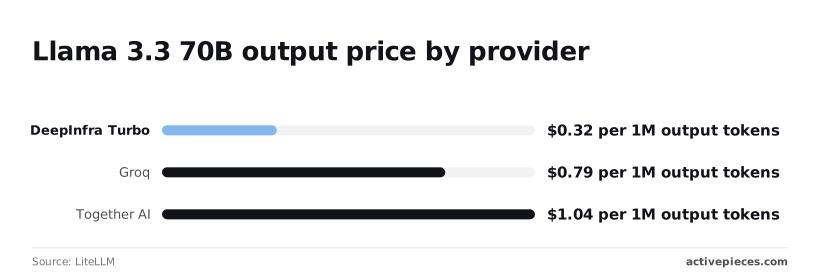
At 100 million output tokens a month, a workload costs roughly $47 more on Groq at $0.79, which is about 2.5 times DeepInfra's rate, so annual costs on Groq run about $564 higher. Fireworks at $0.90 adds about $58 on the same volume.
Together AI at $1.04 adds about $72, more than three times DeepInfra's rate.
Where each rival is better than DeepInfra
On this model's output price, none of them is. The $0.32 figure is the lowest, and Groq at $0.79 is the closest.
If a rival holds an advantage, it has to come from the other five columns: limits, discounts, dedicated capacity, guarantees. Those are exactly the cells I couldn't fill from public pages.
Before you move a workload for a few cents per million tokens, get the rate limit and the batch terms in writing.
Verdict and Monday steps for choosing DeepInfra
DeepInfra, unless you need guaranteed throughput or enterprise contract terms, because those are the two places a rival offers something a per-token price list doesn't.
On guaranteed throughput, Together sells provisioned capacity, while DeepInfra's pay-per-token plan runs on shared rate limits. If a launch spike can't be queued or throttled, reserved capacity is the thing you're paying for.

On enterprise terms, a negotiated contract with committed service levels is a different product from a price list. If your legal team asks for those terms, a per-token plan has nothing to put in front of them.
I'm not naming a latency winner, because I found no sourced figures to support one. Measure it yourself in step 2.
- Re-check the pricing page for the exact models you'd call. Rates change, and the cached and batch discounts only matter if your traffic qualifies.
- Run 100 real prompts, taken from your own logs, through DeepInfra and one rival. Compare cost per finished answer and the slow tail of response times, not the average on a vendor page.
- Set a spend cap before any production key goes live. A runaway retry loop on a per-token plan is a bill, not an outage.
- Optionally, wire the API into a workflow so the comparison runs on a schedule instead of by hand.
Calling DeepInfra's API from an Activepieces workflow
You can call DeepInfra from a workflow with a plain HTTP request step. Send a POST to the chat completions endpoint listed in DeepInfra's documentation.
Put your API key in a stored connection rather than in the step itself, and pass the prompt and model name in the body.
That makes the checklist repeatable. Point the same step at a second provider, log the response time and token counts to a sheet, and you have a standing comparison instead of a one-off test.

What Activepieces does about this
The gap this article keeps returning to is that DeepInfra's price list says nothing about what a run costs, which model it went to, or whether a rate limit cut it short. Activepieces is the layer where you can close part of that gap yourself.
A workflow can
- call DeepInfra's OpenAI-compatible endpoint with your own key
- record the token counts and status code from every response
- route each request to a small, mid or large model according to rules you write
The per-conversation arithmetic from the support-bot section then comes from your own logs.
On cost, the one figure we can point at is this. On the $20-a-month Plus plan, bring-your-own-key makes every AI step 1 credit, and the token charge lands on your DeepInfra invoice at the rate you read off their page.
Activepieces adds a flat step cost and leaves the per-token rate alone, so the cached and batch discounts described above apply exactly as DeepInfra publishes them.
The guarantees DeepInfra doesn't give you stay missing, and a workflow doesn't supply them. What it can do is build the habits the verdict asked for.
Put retries with backoff after a refused request, add a step that stops a run past your token ceiling, and send a daily total to a sheet or a message so a runaway loop shows up the same day instead of on the invoice.
Pointing the same step at a second provider turns the 100-prompt comparison into a scheduled job.
Activepieces is open source under the MIT licence for its community edition, so you can self-host it and keep the workflows and the stored API key on your own infrastructure. That matters if the data questions in the FAQ are what's holding you back.
It does not replace the written terms on rate limits, invoicing or caps that you still need from DeepInfra support.
Activepieces is the better choice for teams that want to keep their AI strategy in their own hands and need to see what each run costs, because bring-your-own-key on the $20-a-month Plus plan makes every AI step 1 credit and leaves the per-token charge on your DeepInfra invoice at the published rate.
It does not resell you a model, so cached and batch discounts apply as DeepInfra publishes them, and your own logs supply the token counts, status codes and routing rules that a price list leaves out.
It cannot replace the written terms on rate limits, invoicing or caps that you still need from DeepInfra, but on the criterion of control over model choice and cost visibility, it gives you more of both.
Frequently asked questions
Is DeepInfra free to use? Not as a permanent free plan; DeepInfra bills per token, so anything free is a promotional credit rather than a tier.
Treat any credit as a way to run your test workload, and don't build a production budget on it. Check your dashboard for what your account actually holds.
Does DeepInfra charge for failed requests? Billing follows tokens processed, so a request rejected before the model runs has nothing to charge for. One that dies partway through a long generation is murkier, because input tokens may already have been consumed.
Log token counts and status codes on every call, then reconcile them against the invoice. That log also settles any dispute with a vendor.
Is DeepInfra's API compatible with the OpenAI SDK?
Yes, it exposes an OpenAI-compatible endpoint, so you can usually switch by changing the base URL, the API key and the model name. That makes migration cheap in either direction.
Run your real prompts through before you cut over, not just a hello-world, because compatibility covers the common chat and embedding calls. Newer or vendor-specific parameters may not be supported.
Can I host my own model on DeepInfra?
Yes, it offers custom deployments, but this is a different billing model from the per-token catalogue. A model you host yourself runs on GPUs reserved for you, so you pay for time rather than tokens.
That helps at steady, high volume and hurts when traffic is spiky, because idle hours still cost money.
Ask for current terms and availability before planning around it.
Does DeepInfra train on my data?
On training, DeepInfra's published privacy position is that it doesn't train on API inputs and outputs, and it describes limited retention of request data. Read the current privacy policy and terms yourself rather than relying on a summary, including a FAQ like this one.
If your contract requires written guarantees, such as deletion timelines or a data processing agreement, get them in writing. This is the area where a published policy and a signed commitment aren't the same thing.
Related reading
References
Running the numbers
See what the same workload costs here.
Free forever plan, and every paid plan self-hosts at no extra cost.
See pricing Talk to sales