
Streak API: Keys, Rate Limits and Pricing (2026 Guide)

Nov 2, 202614 min read
The Streak API is Streak's REST API for CRM data inside Gmail (pipelines, boxes, contacts), authenticated by an API key.
This guide was checked on 2026-11-02, and every claim comes from Streak's documentation, pricing page and changelog, so anyone wiring it into a workflow tool such as Activepieces can trace each statement back to its source.
Streak API usage in production is the practice of authenticating with an API key and calling Streak's endpoints for pipelines, boxes and contacts within the rate limits and access that your plan tier allows.
The Streak API in Plain Terms
What the API does and who it's for
It's for whoever owns the integration when it breaks, usually an operations lead or a developer paged when a sync stops. The calls are simple, but the assumptions behind them decide whether the integration holds up.
The list below shows what the API exposes or expects of you; each item is a design constraint.
- REST requests over HTTPS
- API key authentication, so the key's owner determines what the integration can see
- CRM data that lives inside Gmail, not in a separate system
- Boxes, the unit of work, which sit inside pipelines
- Access and limits that depend on your plan, as listed on the pricing page
Who holds the key, which pipelines can it reach, and what happens when the person who created it leaves?
The rest of this guide takes those questions in turn, whether the caller is a script or Activepieces, whose MIT-licensed core makes the same calls from a no-code flow.
Use the version the current documentation presents for the endpoints you need, and record that choice where your team can find it.
Then read the changelog before each release of your own integration, because a version that works today can still be deprecated, and a deprecation only looks like an outage if nobody was watching for it.
Where Streak's pages give no figure, this guide gives none and tells you to confirm it in the docs.
If you are running this arithmetic for your own team, see what the same workload costs on Activepieces.
Streak API Access, Keys and Pricing by Tier
For access, the current docs say an individual user generates the key and sends it by HTTP Basic authentication, while your tier sets the seat price and the documented limits stay soft.
When the person who generated the key leaves, the automation stops, and whoever gets paged at 2am will be hunting for a departed employee's login.
A user generates each key in their own Streak settings, and the docs have you send it as the Basic username, so the key belongs to a person. Decide who owns the key before you create it.

Streak API pricing per seat and rate limits
You budget by seat count, because Streak's pages show no per-call charge. The table shows seat price and documented limit per tier as of 2026-11-02.
| Tier | Annual $/user/month | Monthly $/user/month | Documented rate limit |
|---|---|---|---|
| Pro | 49 | 59 | No hard limit; 10 req/s courtesy |
| Pro+ | 69 | 89 | No hard limit; 10 req/s courtesy |
| Enterprise | 129 | 159 | No hard limit; 10 req/s courtesy |
Ask Streak support before committing, because this guide could not confirm which tiers include API access. Also, annual billing on Enterprise saves $30 per user per month, which is $360 a year per seat.

Documented rate limits and where docs are silent
Treat 10 requests per second as a ceiling for your polling loop, because nothing guarantees Streak will tolerate more. It is a courtesy figure, not a contract, and the docs give no daily cap.

Elsewhere, limits follow the tier. HubSpot, a separate CRM, allows 250,000 calls per day on Free/Starter, so a small account can exhaust a day's quota on a chatty sync.
Step up to Professional and the allowance is 650,000, and Enterprise 1,000,000. That's four times the entry allowance, and it shows why you should ask Streak in writing whether any such step exists.
Streak API Endpoints and Models Available
When a sync breaks, whoever is paged will usually be debugging box calls, because boxes dominate the Streak API: SKMTC's catalogue counts 17 operations on boxes, against 12 each for contacts and organizations, 10 for pipelines and 8 for webhooks.
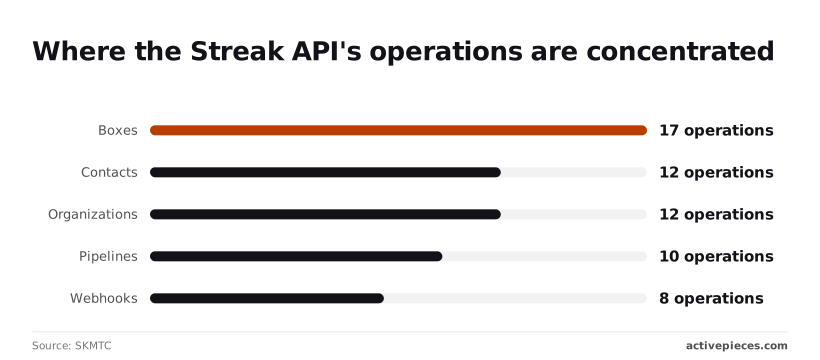
The table shows where the surface area sits, so read the operations column as a map of where your code will grow.
| Object | Purpose | Operations | Gotcha |
|---|---|---|---|
| Boxes | The records you work in | 17 | Nearly everything attaches to a box, so store box keys |
| Contacts | People | 12 | Separate from organizations; linking is your job |
| Organizations | Companies | 12 | Same operation count as contacts, same linking burden |
| Pipelines | Workflow containers | 10 | Changes here affect every box inside |
| Webhooks | Event notifications | 8 | Someone must own registration and cleanup |
One edit can break every box in the pipeline. Pipelines carry 10 operations, which means schema changes are a real API surface, so decide who may edit stages and fields before automation depends on them.
Design around the box key from day one, since tasks, comments and files hang off it.
You can model people and companies independently, because contacts and organizations each have 12 operations. That also means duplicates and orphaned links are yours to prevent.
Eight webhook operations cover registration and management. Treat them as an owned asset with a named maintainer, because a silently dead subscription is exactly what sends you back to polling.
A Minimal Working Streak API Request
Start with one authenticated GET to the pipelines endpoint; that is a working Streak request. The API key behind it should belong to a named person, not to whoever set it up first.
To get the key, open your Streak account settings; the endpoint and auth scheme are described at https://streak.readme.io/reference.
Send the key as the Basic-auth username with an empty password:
curl -u YOUR_API_KEY: https://www.streak.com/api/v1/pipelinesBack comes a list of pipeline objects. Trimmed, it looks like this:
[
 {
 "pipelineKey": "PIPELINE_KEY",
 "name": "Sales",
 "stageOrder":
 }
]
If you get an authorization error here, fix the key before touching anything else, because every later call depends on it.
To read boxes, put the pipeline key in the path, because boxes live under a pipeline:
curl -u YOUR_API_KEY: https://www.streak.com/api/v1/pipelines/PIPELINE_KEY/boxesTo create one, send a PUT to the same path with a name:
curl -u YOUR_API_KEY: -X PUT \
 -H "Content-Type: application/json" \
 -d '{"name": "Test box"}' \
 https://www.streak.com/api/v1/pipelines/PIPELINE_KEY/boxes
Back in the response is a boxKey for the new box.
Reuse the keys from the response
Copy pipelineKey from the first response and boxKey from the second, and store them with the key's owner, not in a chat thread.
Every later call is addressed by these identifiers, so a box you can't find again by key is a box your automation can't update.
Make the same call from a visual flow builder and it leaves a run record with an HTTP step, its Authorization header in the input, and a 200 in the output.
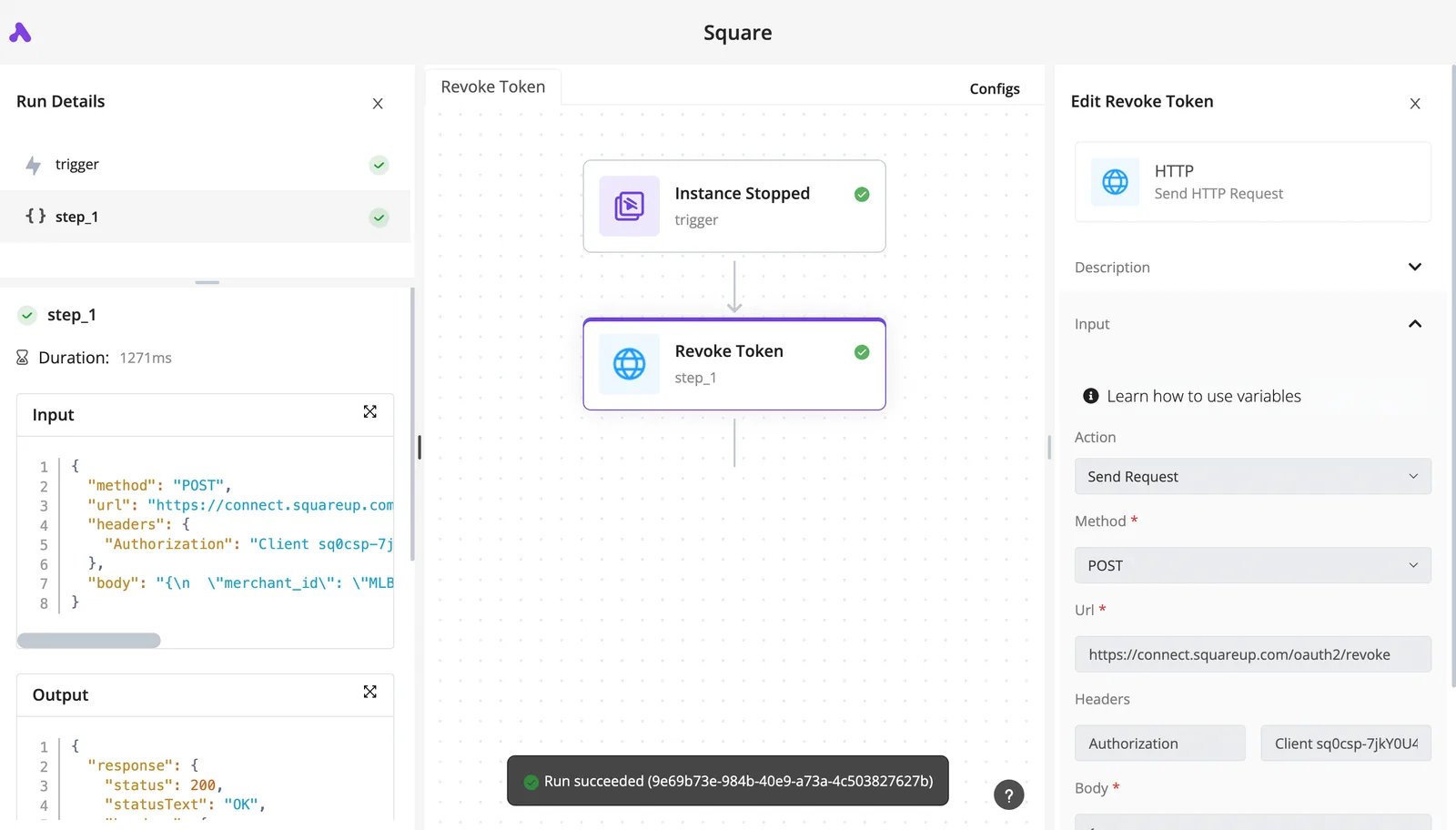
Worth checking against a plan that does not meter every step: one credit covers a whole run on Activepieces.
Common Streak API Errors and Production Limits
The keys you just saved are also where the first 2am page begins. If you are paged, expect one of a short list of credential, key, polling or webhook mistakes, each with a known fix.
The table below shows each symptom with its cause and fix, and whether the guidance comes from the docs or from field experience; start with the rows matching your alerts.
| Symptom | Cause | Fix | Source |
|---|---|---|---|
| 400 | Request sent over http, not https | Use https everywhere | Field experience |
| 401 | Missing or wrong API key in basic auth | Reissue the key, send it as the username | Docs |
| 404 on a real record | Wrong key type, such as a pipeline key in a box path | Log every key's type before calling | Docs |
| 429 | Loop fetching boxes one by one | Back off, batch, cache | Field experience |
| Stale data | Cached reads never invalidated | Expire on a timer or webhook | Field experience |
| Missing records | Pagination ignored | Follow pages until exhausted | Field experience |
| Silent gaps | Webhook receiver was down | Reconcile with a periodic read | Field experience |
| Empty fields | Field name used instead of field key | Look up keys from the pipeline | Docs |
When a 401 comes back, the key is wrong; a rejected request on a record you can see in the UI usually means the key belongs to a user without access. Decide who owns that user before launch, because a departed employee's key fails quietly.
Almost always, a 429 comes from fetching boxes in a loop. Retry with growing, randomized delays, cache what rarely changes, and stop the loop when errors repeat.
Streak is box-centric, so a 404 or empty field is usually a wrong key, a field name where a key belongs, or an ignored page.
Use webhooks to remove most polling, but remember they can miss events. Keep a slow reconciliation read so a downed receiver doesn't become silent data loss.
Connecting Streak to Other Apps with Activepieces
If a Streak box change must reach Slack, Google Sheets or a billing app and you don't want to host a receiver, Activepieces suits the case.
It changes nothing about Streak's authentication or limits, and its integrations are open to inspection: the community integrations folder of its MIT-licensed monorepo on GitHub holds the source for each one, so Streak's triggers and actions can be read there rather than taken from a feature list.
When a workflow beats a script
Someone is paged when a forwarder fails, and with a hosted workflow that's whoever owns the Activepieces account, not whoever last touched a server.
The free plan allows up to 5 users on that account, so ownership can sit with a small team rather than one person's login. That's the real argument for it: no code to deploy, patch or monitor, and failed runs sit in a visible log.
When a transient failure hits, the retry-enabled HTTP step handles it before it becomes the silent loss the reconciliation read exists to catch.
What the task metering costs
The cost is metering. Activepieces' pricing page lists 1,000 tasks per month on the free tier against 100 at Zapier, a competing automation service.
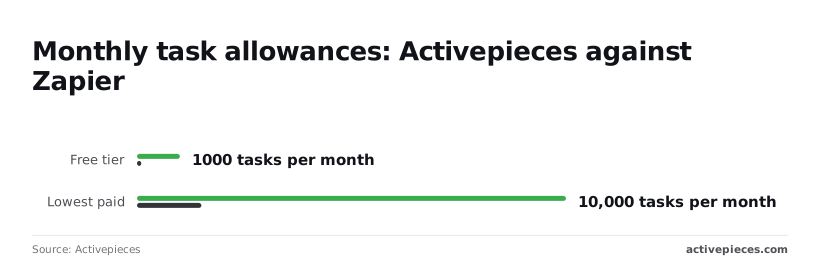
Fan one box out to three apps and each update spends several tasks, so 1,000 covers a modest pipeline and not a busy one.
The lowest paid tier lists 10,000 tasks against Zapier's 1,500, so check your update volume against that ceiling before you commit.
If your volume is high or the logic is branching and stateful, a short script you own is the better choice, but then you also own the pager.
Checking the Streak integration yourself
Activepieces counts its 746 integrations directly from the packages/integrations/community folder of its MIT-licensed open-source monorepo on GitHub, so a Streak integration's triggers and actions are readable in source, not just in a marketing list.
This guide hasn't confirmed the current Streak triggers and actions as of 2 November 2026. Check whether it offers a trigger on box changes or only actions.
If a trigger is missing, the HTTP step can call Streak's API directly with the same API key, so the access rules and rate limits you designed around still apply.
Initial Streak API setup
Start by settling who owns the key and which plan it sits on, because that person gets paged when the sync stops at 2am on a Tuesday. The list below runs in the order that avoids rework: each step depends on the one before it.
- Confirm the plan tier and name the key's owner, so access and escalation are decided before anything runs.
- Write down the limits the docs state for that tier, and keep the page reference beside them.
- Run the smallest request that returns real data, to prove the key and the tier behave as documented.
- List the specific boxes and pipelines the automation needs, so you never pull more than the job requires.
- Use webhooks wherever the docs offer them, and poll only where they don't.
- Add backoff on rate-limit responses and log every request with its status, so a failure leaves a trail.
- Put a recurring docs and changelog re-check on a calendar with a named owner.
Choose a workflow when the job is a trigger followed by a few steps and someone other than the author must read or fix it. Choose a script when you need loops across many boxes, custom retry rules, or tests.
The deciding question is who will maintain it, since a script nobody else can read becomes a single point of failure.
Compare the integration's available triggers and actions against your box list from step four before building. Anything it lacks falls back to a direct API call, which means your logging and backoff from step six matter even in a no-code flow.
Frequently asked questions
Each answer below says who owns the risk, because these are the ones that matter to whoever gets paged when the integration fails.
Is the Streak API free to use? Access and limits depend on your plan, so confirm what your tier includes on Streak's pricing page and in the API docs before you build.
The cost is rarely the invoice. A tier that restricts access or volume fails in production, at the worst hour, and someone has to know which plan the account is on.
Does the Streak API support OAuth?
Check the current docs before assuming otherwise: the documented method is an API key sent with basic authentication.
A user generates the key from their own Streak settings, and it acts with that user's permissions. When that person leaves or loses access to a pipeline, the integration breaks with them.
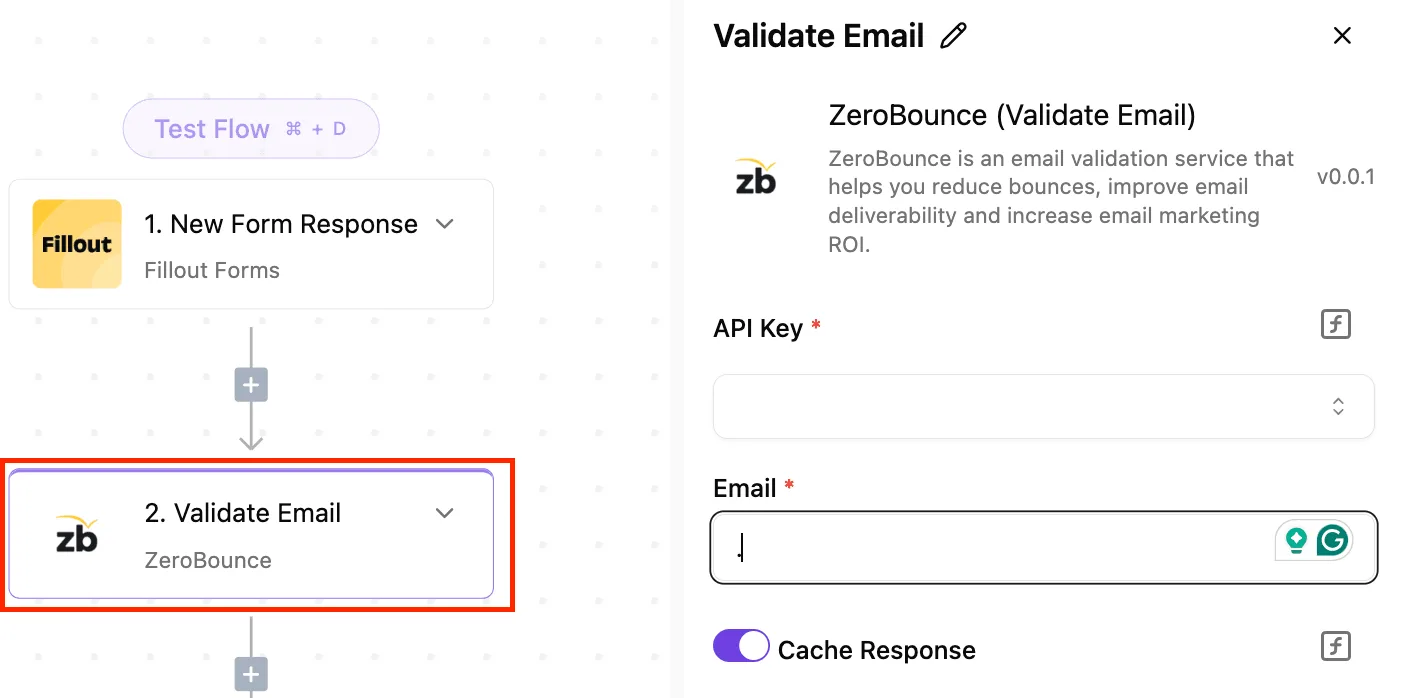
Record who owns the key and use a dedicated service account where your policy allows.
Webhooks instead of polling
Can I get Streak changes without polling? Yes. Streak documents webhooks, and they're the better starting point than a polling loop.
Polling consumes your request budget and invites throttling, and Streak doesn't give a single hard-limit figure you can plan around. Treat limits as real, back off on errors, and ask Streak support about higher volume before you need it.
Exports and what the key can see
Can I export all my boxes through the Streak API? Generally yes, within what your key can see. Because the model is box-centric, you list boxes by pipeline and page through the results, not by pulling one global dump.
Anything outside the key owner's permissions won't appear, so a "complete" export can silently be partial. Reconcile counts against the Gmail view.
Why does the API return data I can't see in Gmail? Gmail shows a filtered presentation, while the API returns the underlying records, including fields and stages your current view hides.
Two users can also see different data under different permissions, which means the same query might return different answers depending on who runs it. Compare the key owner's access with your own before calling it a bug.
Related reading
References
Running the numbers
See what the same workload costs here.
Free forever plan, and every paid plan self-hosts at no extra cost.
See pricing Talk to sales