
How Does the Square API Work? Keys, Limits, Errors

Nov 1, 202614 min read
The Square API is a set of REST endpoints for payments, customers, catalog items, orders and inventory, and because it's plain REST, it can be called from custom code or from automation tools such as Activepieces.

You need a free developer account to call it, and fees apply to payments you process, per Square's docs (checked 2026-11-01).
Payments, Customers and Catalog are one system, because each hands the next an ID and each write expects an idempotency key.
Square's REST API for commerce
What the Square API lets you do
You create and read payments, store customer profiles, and manage catalog items and prices. Tips arrive on the payment record, so they are queryable.
Square Insights ranks average tips by seller type: Beauty & Personal at 20.7%, Food & Beverage at 17.6%, Services at 17.3% and Retail at 14.9%, which means a retail seller should expect significantly lower tip rates than beauty professionals.
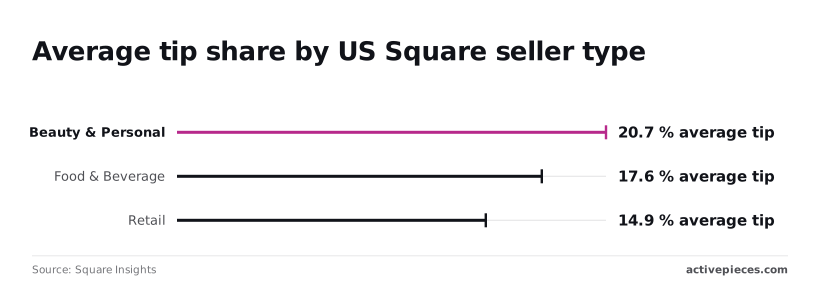
A report that assumes one tip rate across a mixed catalog will be off by almost six points between the top and bottom sellers.
Payments, Customers and Catalog compared by object and scope:
| API | Main object | OAuth permission family |
|---|---|---|
| Payments | Payment | PAYMENTS_READ / PAYMENTS_WRITE |
| Customers | Customer | CUSTOMERS_READ / CUSTOMERS_WRITE |
| Catalog | CatalogObject | ITEMS_READ / ITEMS_WRITE |
Because Square grants scopes per API, a token that can charge a card can't necessarily read the customer it charged.
Neighbouring APIs: Orders, Inventory, Webhooks
When a payment needs to point at what was bought, it references an order by its order ID, and orders hold the line items and totals. Inventory counts key on catalog object IDs, so a renamed or recreated item silently breaks stock tracking.
Because Square grants scopes per API, a token that can charge a card can't necessarily read the customer it charged.
Webhooks push events to your endpoint, which lets you stop polling. Because webhooks can redeliver, your handler needs the same idempotency discipline as your writes.
This takes minutes, not a project: automate it in Activepieces free.
Get your Square API credential
Before any webhook subscription or write call, you need a credential.
Getting one takes six steps in the Developer Console, with no paid plan required to create the account, application or sandbox, so you'll need to work through multiple configuration stages before you can start testing.
Square charges its normal processing fees only when real payments run in production.
A sandbox token works, you paste a production token into the wrong environment, and the first live call fails with an authentication error.
- Create a Developer account at developer.squareup.com by signing in with a Square account.
- Create an application in the Console. Its application ID ties together the credentials, webhook subscriptions and OAuth settings.
- Copy the sandbox access token from the application's credentials page, with the Console set to Sandbox.
- Choose scopes. For OAuth, list the permissions your app requests, such as payments, customers or catalog read and write, and request only those.
- Switch the Console to Production and copy the production access token into your deployment config. Keep it separate from the sandbox token.
- Move to OAuth if the app acts for sellers other than you.
With the credentials in hand, the next question is which kind you need.
Square personal access token for your own account
For your own Square account, the Console issues a personal access token, in both sandbox and production. It carries your account's access rather than a narrowed scope list, so a leaked token exposes everything that account can do.
Store it as a secret, never in client code, and use it for internal tools and scripts where you are the only seller.
When another business's data is involved, a personal token is the wrong instrument. Each seller authorizes your app through the OAuth flow, and your app receives a token limited to the scopes it requested.
Because that token can expire, plan for refresh handling and store tokens per merchant. The OAuth documentation covers the flow and the scope list.
Sandbox and production use separate tokens, separate data and separate IDs, so a customer ID or catalog object ID from one environment won't resolve in the other. Never copy IDs across environments.
A minimal working Square request, end to end
To prove the whole chain, make three calls against the sandbox host: create a customer, pay with that customer's ID, then list the catalog.
Send the same Square-Version header and the sandbox token on every one, so you can trace a response that changes later to a version change rather than to your code.
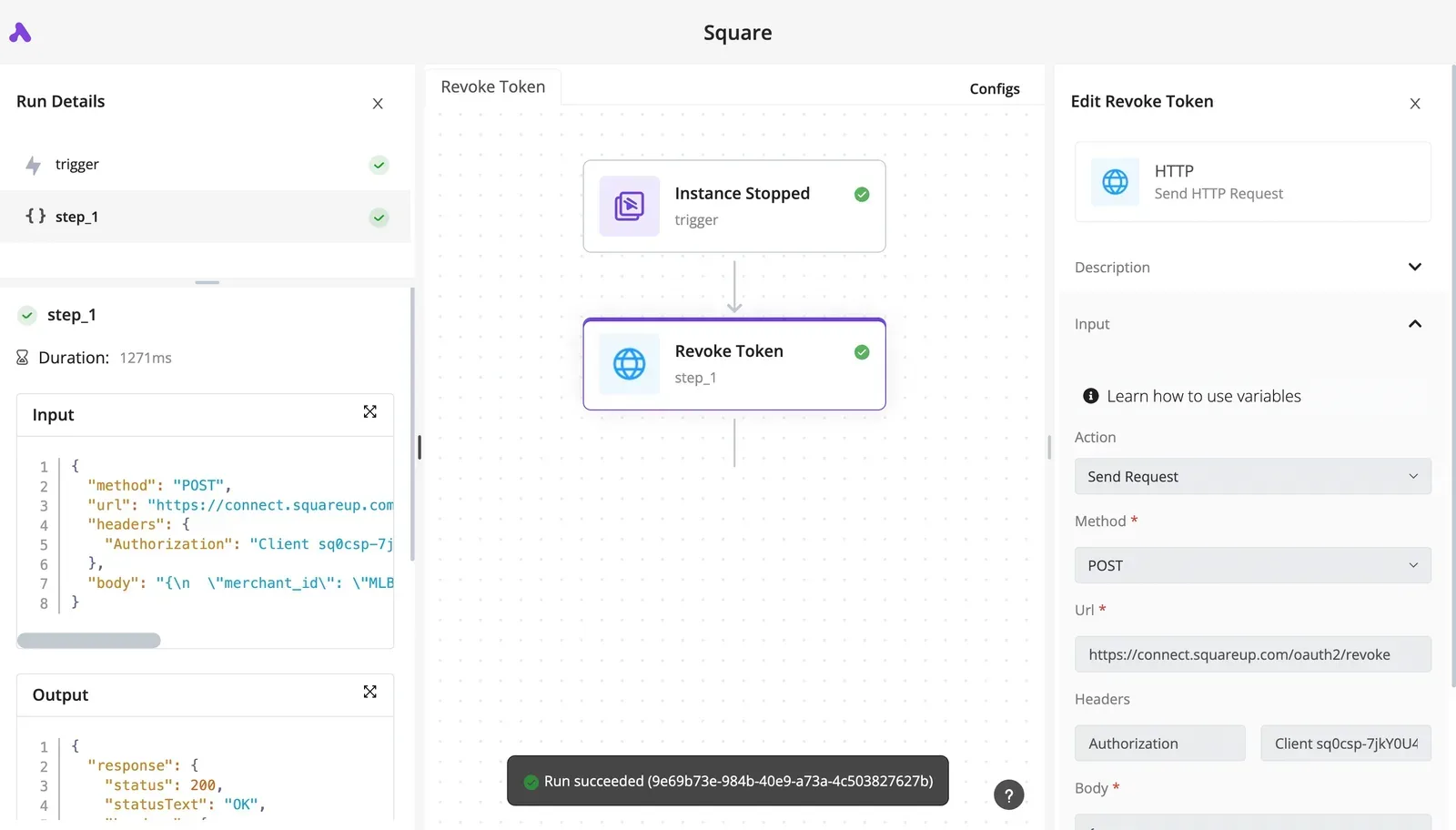
The run record below shows one authenticated POST to Square's host, with the Authorization header in the input and a 200 "OK" in the output.
POST to /v2/customers with a given name, family name or email. The response carries an id, and that value is the join key for everything after it.
Store it immediately. A payment that later needs a customer_id has nowhere to get one if you discarded it. Field details are in the Create Customer reference.
Take a payment with an idempotency key
POST to /v2/payments with four things: a source_id, an idempotency_key, an amount_money object, and the customer_id from the previous step. In sandbox, use Square's documented test card nonce as the source.
Generate the key once per intended charge, not once per attempt. A retry after a timeout then returns the original result instead of charging twice, while a fresh key on each retry is exactly how duplicate charges happen.
The Create Payment reference lists every accepted field.
List catalog objects with the Square API
GET /v2/catalog/list returns catalog objects, each with its own id. Those IDs are what orders and line items reference, so copy them from this response rather than typing them.
A typed ID that's wrong fails at order time, far from where the mistake was made. Paging and type filters are in the List Catalog reference.
If all three return success with the sandbox token, the sequence is still unfinished until it passes with production credentials.
You can follow the rest of this with the builder open. Start free, no card.
Square's pricing and rate limits
Nothing is billed per API call; Square charges per processed payment, so the production cutover changes your costs only when real money moves. Rate limits and bulk caps are a separate constraint.
Pricing per unit: API calls versus processed payments
Budget against the high end until your plan is confirmed, because sandbox payments carry no fee and won't show you this cost. The table shows the fee range for each way of taking a payment, with the plan setting the low and high ends.
| Channel | Low | High | Note |
|---|---|---|---|
| In-person | 2.4% + 15¢ | 2.6% + 15¢ | API access is separate |
| Online | 2.9% + 30¢ | 3.3% + 30¢ | API access is separate |
| Invoice | 2.9% + 30¢ | 3.3% + 30¢ | API access is separate |
Because of the fixed 30¢ on online and invoice payments, a $5 charge loses a larger share than a $500 one.
Documented rate limits and the 429 response
When Square throttles you, it returns HTTP 429. Treat that as a signal to retry with backoff. Reuse the same idempotency key so the retry can't create a second payment.
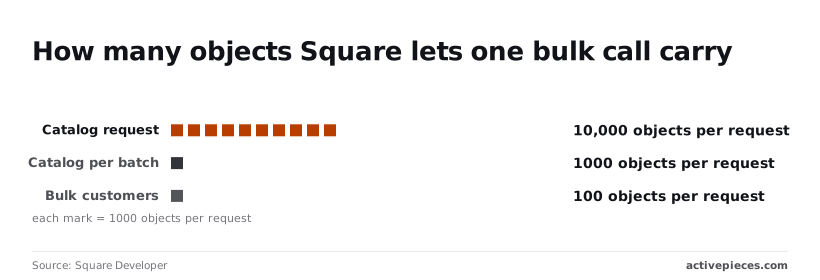
A big import hits the per-call cap first. Catalog's batch upsert accepts 10,000 objects per request in total, split into batches of 1,000 objects each.
A 25,000-item import therefore needs at least three requests, and each request needs its own idempotency key. Bulk customer calls accept only 100 objects per request, so importing 5,000 customers takes 50 calls.
If a Square call you need has no ready-made action, Activepieces has a way round it: you can build the missing integration privately on your own instance, with no vendor release to wait for.
It starts from 746 integrations, counted straight from the open source monorepo on GitHub, and roughly 60% of them were contributed by the community, meaning most integration options come from community developers rather than from Square's own engineering efforts.
Where Square doesn't publish a number
You won't find a fixed requests-per-second figure in Square's documentation that I could verify for the endpoints in this article. Any number quoted elsewhere is unconfirmed, so don't hard-code one into a scheduler.
Build for the 429 instead: back off, retry with the same key, and log each throttle event. Your production logs will then show the real ceiling for your account, which no published page can.
Square's API reliability and infrastructure
Reasonable as the objection sounds, it fails in production because the costliest Square errors return success first and surface later, as money, drift or missing records.
Square ships official SDKs, a sandbox and thorough reference docs. Request shapes are typed, and failed calls return structured errors.
A team can reasonably say it will build the happy path, read each error as it arrives and fix it then. For a single-location shop with modest volume, that works for a long time.
Square API mistakes that pass in sandbox
Each failure below passes in the sandbox, and each one breaks a rule the objection assumes you'll learn from an error message. No error message ever arrives.
- A payment retried after a timeout without the same idempotency key creates a second charge.
- An unpinned API version lets behavior change under code that hasn't changed.
- A catalog sync that skips pagination reads the first page and calls it complete.
- A webhook delivered twice is processed twice, because nothing recorded the first event.
Count the releases and the version risk becomes measurable. Square's changelog shows 31 releases by gap length. Two came within 14 days of the previous one and one within 15–21 days.
Thirteen landed 22–28 days apart and nine 29–35 days apart, so 22 of 31 followed a roughly monthly rhythm. Three arrived after 36–43 days and three after 44 or more.
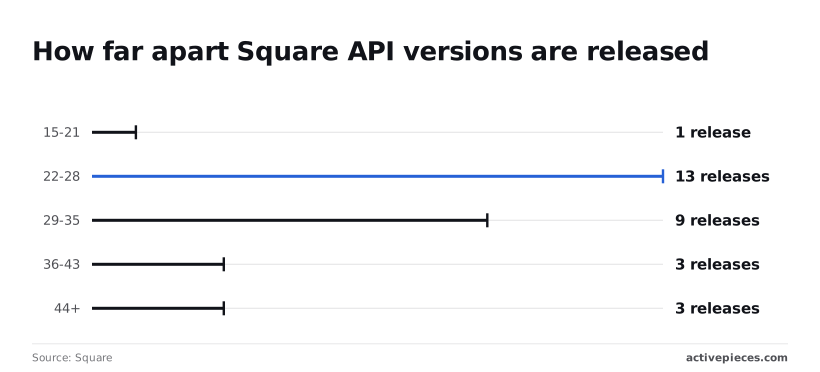
About every four weeks, an unpinned integration meets a new version, because the cadence is monthly. The long gaps mean a team can go six weeks or more without a change, learn that nothing moves, and relax just before the next one.
Because delivery is repeated and result sets are paged, a test with five items and one event never exercises duplicate webhooks or skipped pagination.
Troubleshoot common Square API errors
When a Square call fails, the cause is usually one broken link: a token, a scope, a key or an ID that doesn't match the request carrying it. The table pairs each failure with its usual cause and the fix Square's developer docs describe.
| Error code | Typical cause | Documented fix |
|---|---|---|
| 401 | Expired, revoked or wrong-environment access token | Refresh the OAuth token, or use the token that matches the sandbox or production host |
| 403 | Token lacks the permission scope for the endpoint | Re-authorize the seller with the missing scope |
| 400 idempotency reuse | Same idempotency key sent with a different request body | Generate a fresh key for each new operation; reuse a key only to retry an identical request |
| 404 | ID belongs to another seller or environment, or was deleted | Confirm the ID came from the same account and environment |
| 429 | Request volume exceeded the limit | Retry with exponential backoff |
| Card decline | Issuer or card problem, returned as a payment method error | Ask the buyer for another payment method; do not retry blindly |
| Webhook signature failure | Signature checked against the wrong URL or a re-serialized body | Verify against the exact notification URL and the raw body |
Read the table by where the failure happens. The first two reject you at the door, the next three reject the request itself, and the last two aren't your code's fault at all.
Square doesn't accept the token: that is a 401. A 403 means it accepts the token but the seller never granted that permission. A sandbox token sent to production fails as a 401 even when the code is correct.
When a key is reused for a different payload, the 400 appears. The usual pipeline fault is a key generated once per session instead of once per operation.
Store the key with the order or payment record, so a retry resends the same body under the same key.
On a 429, stop sending, wait, then retry with growing delays. Retries are safe only because the idempotency key is unchanged, which is where the shared rules matter.
Route a decline to the buyer, because it is a valid answer, not an outage. For webhooks, Square retries deliveries that aren't acknowledged, so return a success response quickly and deduplicate by event ID.
Call the Square API without code using Activepieces
The same retry-and-deduplicate discipline carries into Activepieces, a no-code flow builder with an MIT-licensed core that you can run on your own infrastructure.
Its Webhook trigger receives Square's events, and its HTTP step calls any Square endpoint with the same headers and idempotency keys you'd send from code.
What does the Square integration cover
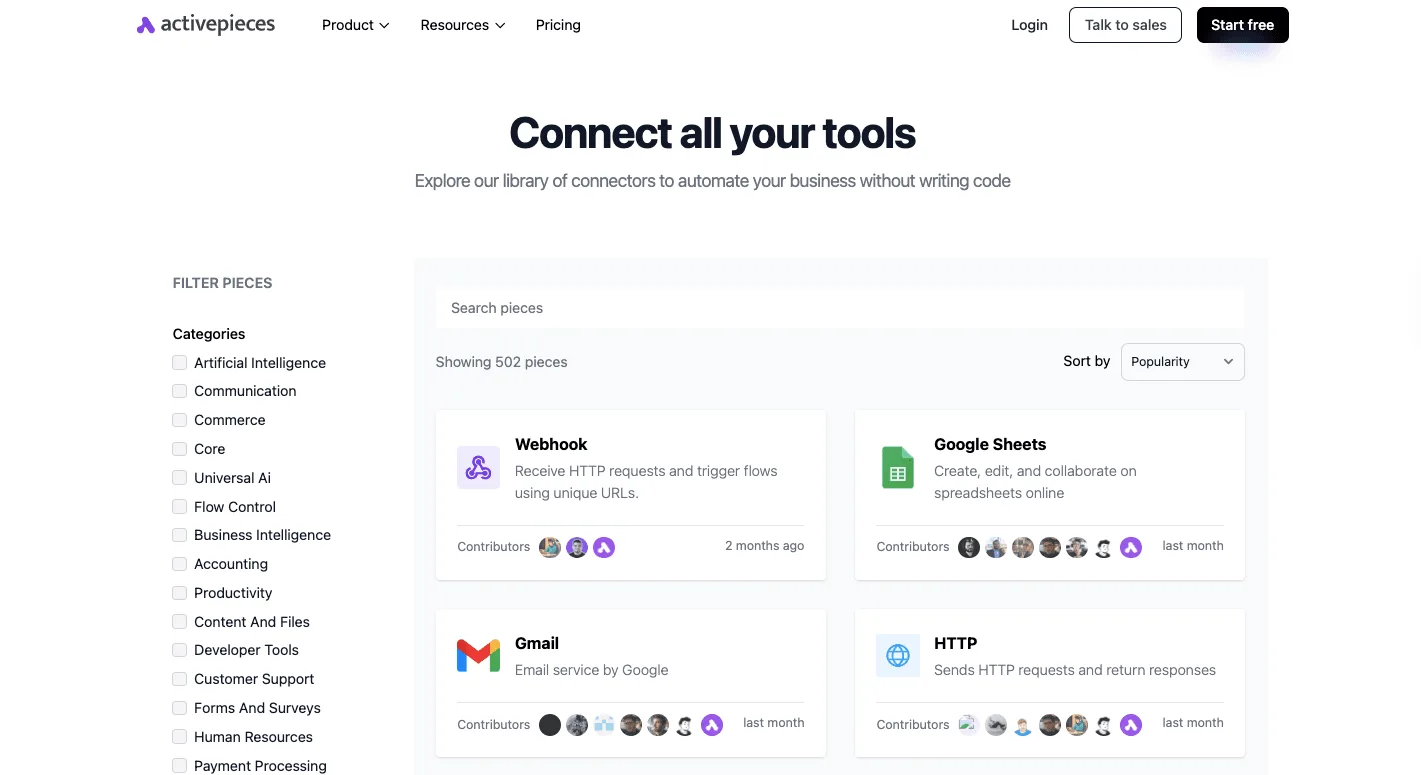
Activepieces assembles flows from "integrations", each a packaged connector. Beside categories such as Commerce and Payment Processing, the library page shows Webhook and HTTP among the general-purpose integrations, so you can see which building blocks exist before committing to a design.
Flows are unlimited on every plan, including free, so keeping a separate sandbox flow and production flow costs nothing extra.
Open the Square integration's action list in your own workspace and compare it against the endpoints your flow needs. An integration covers the calls its authors wrapped, and anything outside that list is a gap you'll find mid-build unless you check first.
Authentication happens once, in the connection, so every step in the flow reuses the same credential instead of each carrying its own.
Calling other endpoints with the HTTP step
When the integration lacks an action, the HTTP step sends the request directly. You set the method, the URL, the authorization header and the body, which means you also set the Square-Version header and the idempotency_key field yourself.
The step won't add them, and a flow that omits them fails the way a script does: duplicate charges on retry, or behavior that shifts when Square's default version moves.
When you need transactional logic across several calls, heavy batching, or tests that run on every commit, code is still better. A visual flow is harder to diff and review than a pull request.
- Create a sandbox application in the Square Developer Dashboard and build the flow against its credentials only.
- Pin
Square-Versionon every HTTP step so an upstream default change cannot alter your responses. - Generate an idempotency key per logical operation, and reuse it when a step retries.
- Point Square's webhook subscription at an Activepieces Webhook trigger, return success first, then deduplicate by event ID.
- Re-verify every rate limit and quota against Square's current developer docs before moving to production.
Related reading
References
Build it
Set this up in minutes.
No code required. Connect your accounts, and Activepieces runs it from there.
Start free Talk to sales