
Exa 3.0 Workflow Setup for Agents, One Stage at a Time

Nov 12, 202614 min read
An Exa 3.0 workflow is one authenticated search request that returns page contents in the same response, then gets built up one stage at a time, whether you wire the stages together in code or in a Activepieces flow.
"3.0" is a label to verify, not a version to assume.
An Exa 3.0 workflow setup is the process of configuring an authenticated Exa search request that returns page contents in a single response, then adding stages such as filters, content options and error handling one at a time while checking each against Exa's documented limits and error codes.
Exa 3.0 is available through the API, so treat it as the current API.
Exa 3.0 workflows and requirements
What Exa 3.0 documentation says about workflows
If an article, video or forum answer says "3.0" and gives you a parameter name, check that parameter in the API reference before you build on it.
You can chain several of Exa's documented endpoints:
- Search, which takes a query and returns ranked results, with an option to return page contents in the same call.
- Contents, which fetches text for URLs you already have.
- Find similar, which starts from a URL instead of a query.
- Answer, which returns a generated response with citations.
Only the first is on the fastest path. Send one search call with the contents option set and you skip a second round trip.
Add the other endpoints only when a stage needs them, and confirm each one's current name and parameters in the API reference.
- An Exa account and an API key from the dashboard.
- The key sent as a request header, never pasted into a URL or committed to a repository.
- An HTTP client or Exa's official SDK, whichever your language supports.
- A place to run it: a script on your machine, or Activepieces, where you can build the search-and-contents flow yourself or ask the built-in chat for it. Either way you get an ordinary flow in your account, under the same RBAC and audit logs as any other, and every run leaves a trace anyone can read.
- The rate limits and error codes page open in another tab.

Most of the failures later in this article trace back to a documented limit or error code that someone skipped. Read the page now, while nothing is broken.
Everything below works on Activepieces' free plan. Start without code or a credit card.
Exa 3.0 workflow setup in five working stages
You get from nothing to a pipeline in five stages, and each one ends with a call that works before you add the next. Run them in order, and when a call fails you'll know which stage broke it. The prerequisites are short:
- An Exa account, which is where the dashboard and API keys live
- An API key, sent in the
x-api-keyheader on every request - An HTTPS client such as curl or the exa-py library
- The
/searchendpoint, which finds pages - The
/contentsendpoint, which fetches the text of pages you already have URLs for - The $10 monthly free credit, so every stage below can be tested without a card, though a loop that runs unattended can spend it faster than you expect
The five stages in order
Stage 1: Create the API key
Stage 1: create the API key in the Exa dashboard and store it in an environment variable, not in the script.
If the very first call is rejected, a missing or misspelled header is the first thing to check, because Exa authenticates through the x-api-key header.
You have a working stage when a request with the key is accepted and the same request without it is refused.
Stage 2: Run the first search
Stage 2: run the first search. Send a POST to /search with a JSON body containing query. Leave everything else at its default.
The response comes back as a results list with a title and URL for each hit. At this point you have links and no page text, which is the gap Stage 3 closes.

Stage 3: Return page contents
Stage 3: return page contents. Add the contents object to the same /search body, for example asking for text, and each result now carries its page text.
This is one call, not a search followed by a fetch. Reach for /contents only when you already hold URLs from somewhere else.
Keep your result count modest while testing, because returning text on every result consumes more of your credit than bare links.
Stage 4: Filter results
Stage 4: filter results. Narrow the same request one parameter at a time: includeDomains to restrict sources, startPublishedDate to cut off older pages, and category to pick a content type.
Add one filter, rerun, and confirm the results changed.
Parameter names and accepted category values are the details most likely to shift between versions, so confirm each against Exa's current reference.
Stage 5: Pass results to the next step
Stage 5: pass results to the next step. Read results as a plain list and hand each item's URL, title and text to whatever comes next, whether that's a summarizer, a database write or a model prompt.
Keep the handoff dumb: pass the fields through unchanged and do your transformation in the next step, so a bad output can be traced to one place.
Exa limits and errors that break a workflow
When a call fails, a dumb handoff pays off, because Exa's error codes tell you which stage broke. Exa's error codes page, checked 2026-11-12, groups failures under a handful of HTTP statuses, and most of the tags sit under 400.
401 Unauthorized carries 1 documented tag, so a rejected key has one cause to check: the key itself. 403 Forbidden carries 5, so a key that authenticates can still be refused for several separate reasons.
Read the returned tag before rotating the key, or you'll replace a working credential and keep the failure.
Rate limits and retries
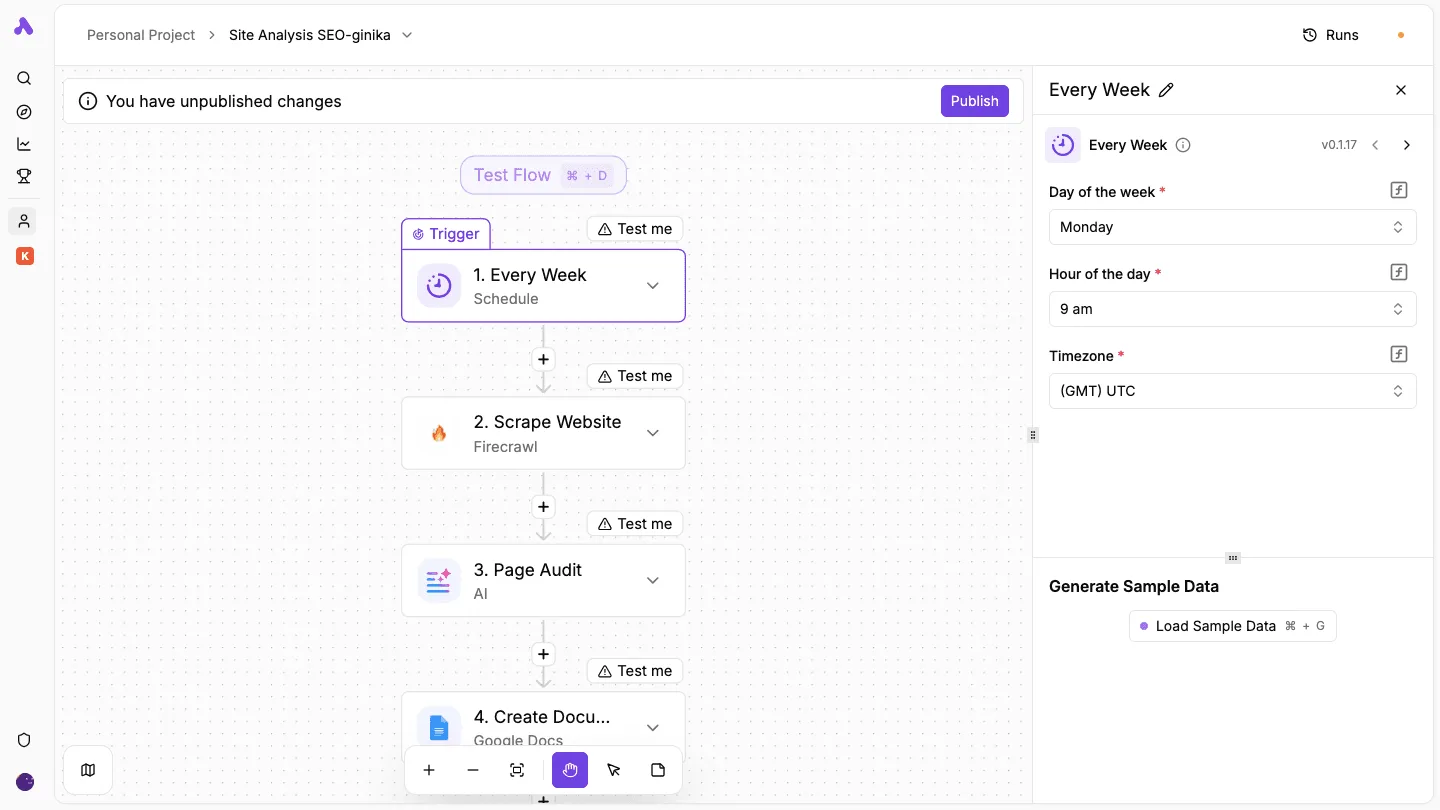
Because the schedule trigger fires every Monday at 9 am UTC, every search step in the weekly flow below starts in the same minute.
That screenshot shows a four-step flow: a weekly trigger, a scraping step, an AI audit and a document write. Take from it that scheduled runs arrive in bursts, and bursts are what rate limits punish.
I have no per-endpoint request figure I can verify here, so none appears in this article.
Read the current numbers from Exa's own rate limit documentation before sizing a batch. Retry a rate-limited call with a pause, and stagger the trigger time.
Parameter and result-count limits
400 Bad Request carries 8 documented tags, the most of any status, which means a developer must weigh more potential causes when debugging a 400 error than for any other HTTP status.
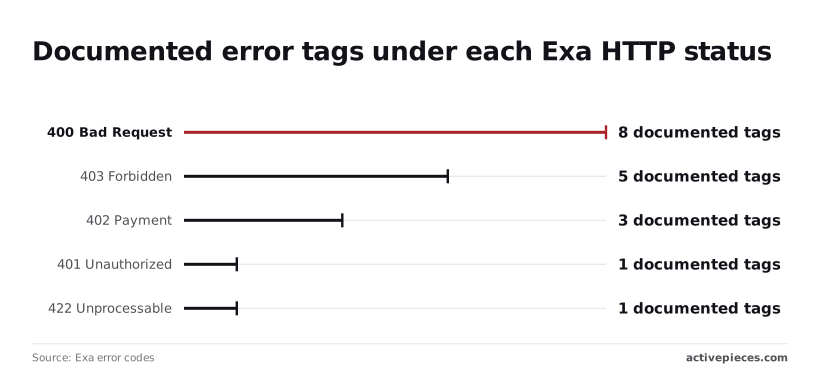
That makes a malformed request the likeliest failure in a new workflow, and one tag doesn't tell you which of the other seven you avoided.
422 Unprocessable carries 1 tag: the request parsed, but a value was rejected.
Fix both by sending the smallest request that works, then adding one parameter at a time. Result-count and content caps aren't tabulated in the figures I confirmed, so check them against the docs.
When credit runs out, the failure is 402 Payment, which carries 3 documented tags and its own causes, not a variant of rate limiting.
The fix differs too: waiting and retrying won't help, and the account needs funding. A retry loop that treats 402 like a throttle will keep failing silently each week.
| Failure | Trigger | Response | Fix |
|---|---|---|---|
| Auth | Bad or missing key | 401 or 403 | Read the tag, then fix the key or permission |
| Bad parameters | Malformed or rejected value | 400 or 422 | Strip the request back and rebuild |
| Rate limiting | Burst of calls | Throttle response | Pause, retry, stagger |
| Insufficient credits | Balance exhausted | 402 | Add credit; don't retry |
Easier to see it running than to read about it: set it up free, no card.
Which Exa plan fits you
Start on the Lite search type at $4 per 1,000 requests, and move up only when the results force you to, meaning you spend nothing on premium search power until you actually need it.

These rates come from Usagepricing, checked 2026-11-12. They're per-request rates, not seat plans, so every monthly figure below is request volume multiplied by rate.
Which Exa plan for solo testing
At $4 per 1,000 requests, a solo builder running 1,000 test searches in a month pays $4 on Lite, making early experimentation financially negligible.
Lite is the cheapest type, not the most capable. That is the catch. If your results come back thin, Fast and Auto both cost $7 per 1,000, so the same 1,000 searches become $7.
Lite is the cheapest type, not the most capable. That is the catch.
Which Exa plan for a team of five
If five people run 1,000 searches each, that makes 5,000 requests a month. On Lite that's $20, and on Auto at $7 per 1,000 it's $35.
The $15 gap is small, which means the choice should follow result quality, not budget. Pick Auto if your team can't tolerate misses, and Lite if speed of iteration matters more.
Team of 25 with SSO or admin needs
At 1,000 searches each, 25 people make 25,000 requests. That's $100 on Lite, $175 on Auto, or $300 on Deep at $12 per 1,000.
Settle SSO, admin controls and seat floors with Exa directly before you commit. The published per-request rates don't cover them, and the request cost won't be the part that changes your bill.
Heavy API volume
At 100,000 requests a month, Lite costs $400, Fast or Auto cost $700, and Deep costs $1,200, turning the technical choice of search tier into one with genuine budget consequences.
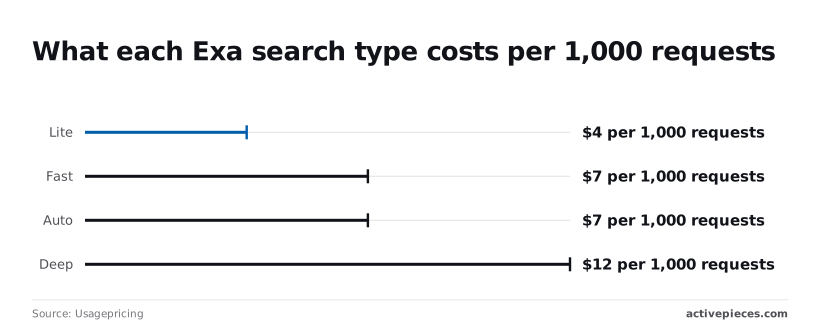
At this volume a single search-type decision moves the bill by $800 a month, a difference that becomes nearly $10,000 annually if you select the wrong tier.
Run Lite as the default, send only the queries that need depth to Deep, and measure the split before you scale.
If 10% of 100,000 requests go to Deep, you pay $360 for those and $360 for the Lite remainder, $720 in total instead of $1,200.
Running Exa on a schedule with Activepieces
When the same Exa query has to run every day or every week with no code, Activepieces earns its place. The results have to land in a sheet, Slack or an inbox.
It also makes every run a billed request, so the schedule is a cost setting as much as a convenience.
Setting the schedule
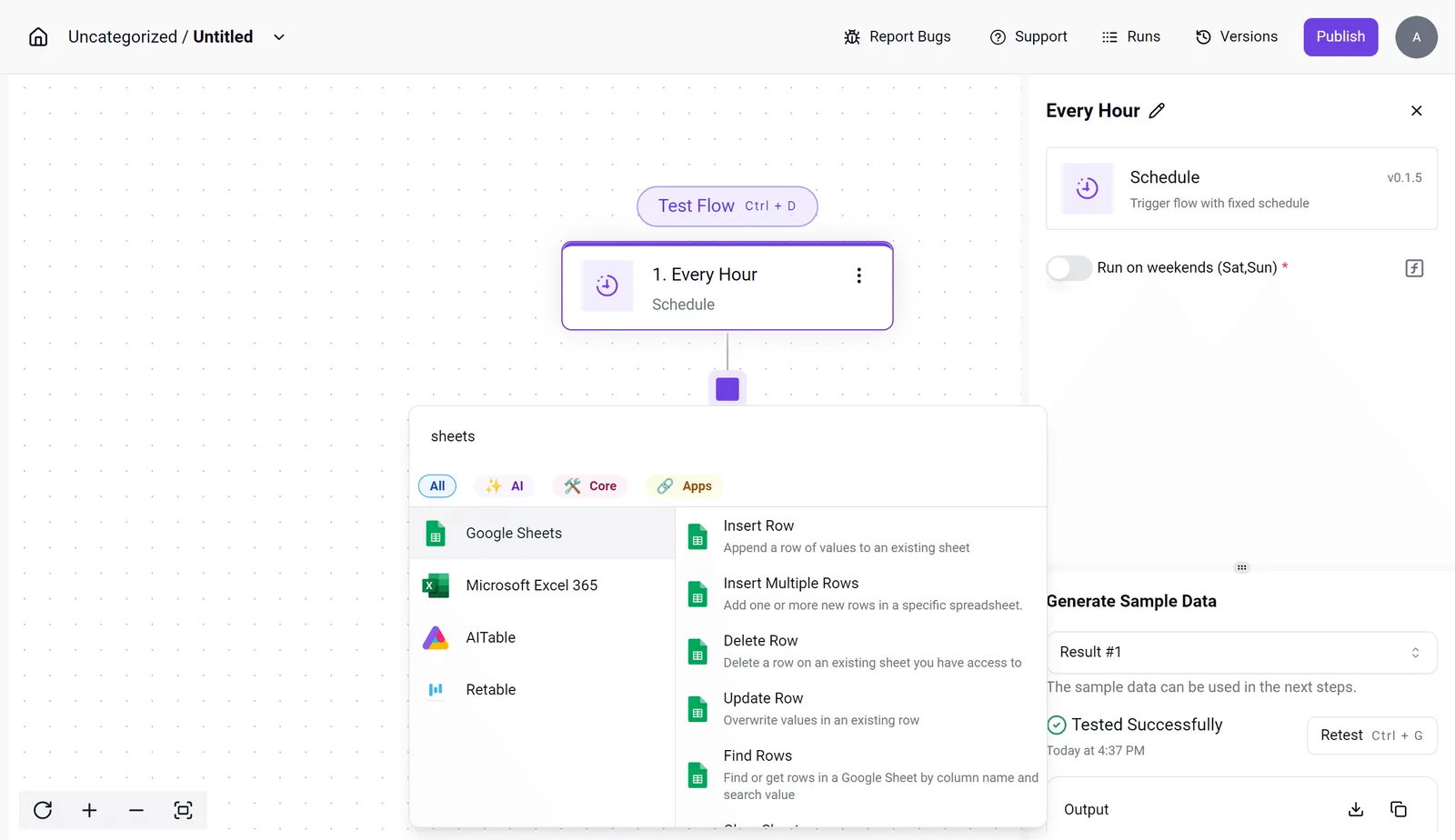
Look at the trigger first. The Schedule step in the flow builder offers an "Every Hour" interval, and the settings panel beside it has a "Run on weekends" toggle.
Left on, an hourly schedule keeps searching through Saturday and Sunday when nobody reads the output. Each of those runs is a call at whatever search type you chose in the previous section.
A flow built with Deep and left on a short interval spends the money you just saved by routing to Lite.
In the screenshot, the trigger is selected. The integration selector is open on the spreadsheet integrations, with Insert Row, Insert Multiple Rows, Update Row and Find Rows listed.
The settings panel shows a successful "Generate Sample Data" test. That successful test is the checkpoint to wait for before you turn anything on.
Build in this order:
- Add the Schedule trigger and pick the slowest interval that still answers your question: daily or weekly, not hourly.
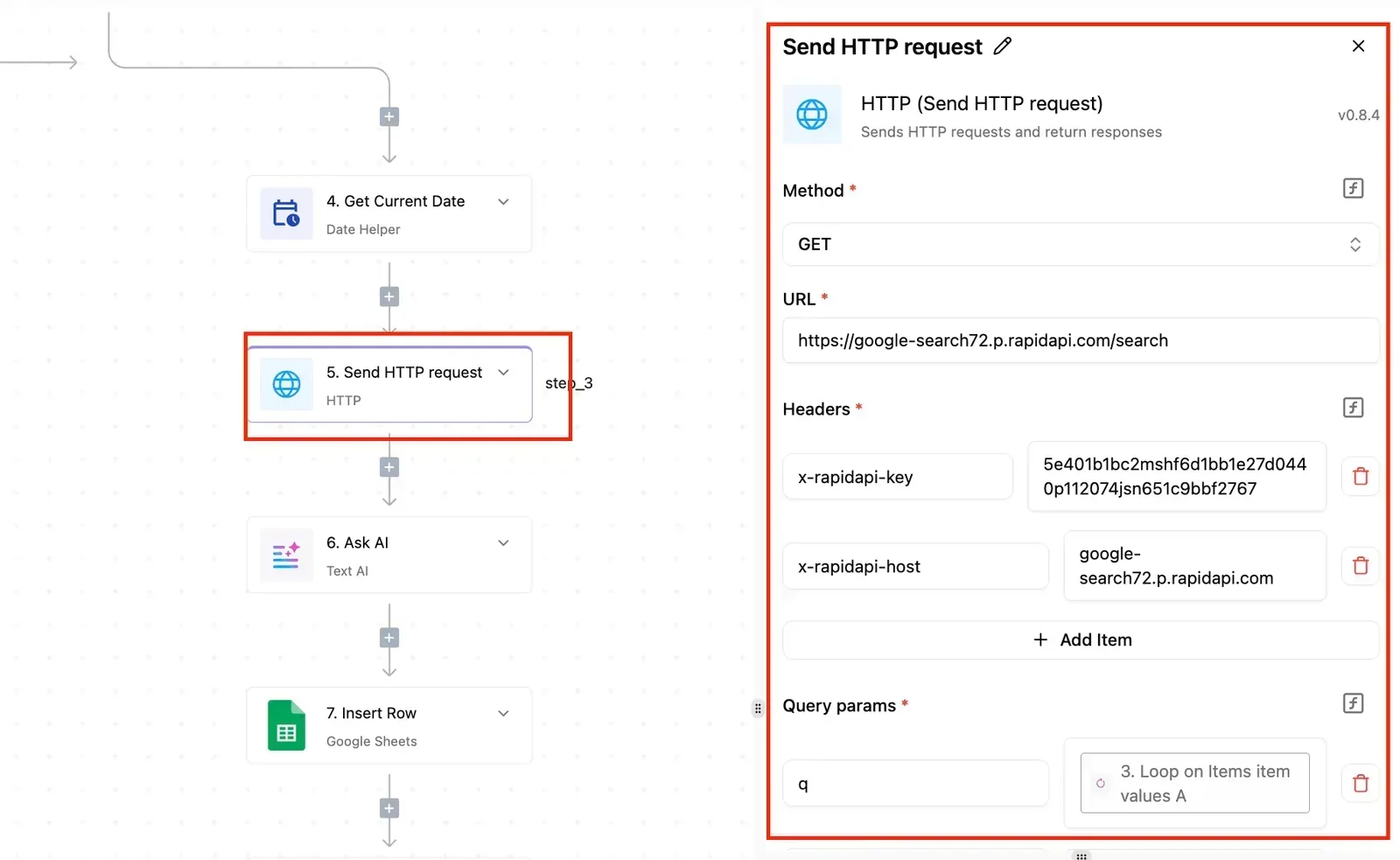
- Check the catalog for the Exa integration and read its list of actions before designing around it. If it has no search action that returns contents, use the generic HTTP integration to call Exa's search endpoint with your API key in the request header.
- Set the query, the search type and the contents option once, then run the test and read the sample data.
- Add the destination step, such as Insert Multiple Rows for a sheet, and test again before publishing.
When a script beats an Exa workflow
Sometimes a script is the better choice. If you already have a server, a cron entry or a CI job, and one person owns the query, a short script that calls Exa and writes a file is simpler.
With a script there is one fewer account to authenticate, one fewer place for the API key to live, and no flow editor to open when a run fails.
Choose Activepieces when the people who change the query or read the results aren't the people who maintain scripts.
It has 747 integrations, with unlimited flows on every plan including free, and its schedule trigger and sheet steps run that same Exa query without anyone maintaining code.
Frequently asked questions
Is Exa 3.0 a separate product from Exa?
No. Exa 3.0 is the current generation of the same Exa search API, so you use one account, one API key and one dashboard.
Where a request shape or parameter differs from older examples you find online, Exa's own documentation decides which is right. Treat blog snippets written for earlier versions as suspect until you have checked them against it.
Is there a free tier for testing an Exa workflow?
Yes, Exa gives new accounts a free monthly credit allowance, and it's enough to build and test the single-call workflow in this article.
Read the current amount from your dashboard or Exa's pricing page rather than from a third-party summary, because allowances change. A test script that loops over a large list can still burn through the credit in one afternoon.
Why does my Exa search return empty or irrelevant results?
Usually the request is narrower or vaguer than you meant. Check these in order:
- Filters: domain lists, date ranges and category restrictions can exclude everything that would have matched.
- Query style: Exa responds better to a plain description of the page you want than to a string of keywords.
- Contents: if you didn't ask for contents in the call, results come back as links with no text, which looks like emptiness.
- Errors: an authentication or limit error is a failed request, not an empty result. Read the status code before you rewrite the query.
Remove filters one at a time and rerun the same query. The change that brings results back is the culprit.
How do I avoid hitting Exa rate limits?
Send fewer, larger calls rather than many small ones. Ask for contents in the search call itself instead of making a second request per result. Cache queries you repeat, and cap how many results you request to what you'll read.
When you do get a rate-limit response, wait and retry with increasing delays instead of resending at once. Your plan's actual ceilings are listed in Exa's documentation, so check them before you size a batch job.
Where do I see my Exa usage and remaining credits?
In your Exa dashboard, signed in to the account that owns the API key you are calling with. If the numbers look wrong, first confirm you aren't looking at a different account or a second key.
To settle a disagreement between your own call counts and the billed figure, go to Exa's docs, which describe what each usage view reports.