
Final Cut Pro Automation: Tools and Methods (2026)

Nov 16, 202616 min read
Because Final Cut Pro has no macro recorder, automation means Apple's own hooks (Shortcuts, Compressor, FCPXML, Workflow Extensions, custom command sets) plus tools that work on files around the app, such as Activepieces, which can react when a file lands in a folder.

Final Cut Pro automation is the practice of reducing repetitive editing, import, and export work by using Apple's supported hooks (Shortcuts, Workflow Extensions, FCPXML, Compressor, and custom command sets) together with file-level tools that run outside the app.
Automating Final Cut Pro with official tools
What counts as Final Cut Pro automation
A client asks you to turn forty interview clips into labelled, exported proxies every Friday. You won't record that as a macro.
You'll chain a few sanctioned hooks and let file-level tools handle the rest, whether that is a folder watcher or a script.
The hooks only reach as far as Apple lets them, so know where each one stops before you promise a client anything.
Shortcuts, Compressor, FCPXML and extensions compared
On a small budget, cost matters:
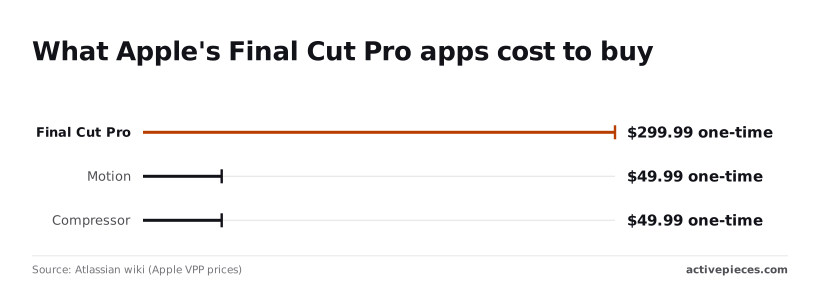
- Final Cut Pro is $299.99 one-time
- Per Atlassian wiki's Apple VPP pricing, the education bundle is $199.99, which saves $100 for eligible students and teachers
- Atlassian wiki's Apple VPP pricing puts Compressor at $49.99, about a sixth of the editor's price, and it's the cheapest route to unattended batch exports
- Motion's also $49.99, but it's for building titles and effects, not automation
Read the table as a ladder: the more control you get inside the timeline, the more upkeep you take on. It shows how far each route reaches into an open project, what it costs you in setup, and what tends to break after an update.
| Route | Control inside a project | Setup effort | What breaks on updates |
|---|---|---|---|
| Shortcuts | Low: app-level actions, not timeline edits | Low | Actions may change; retest after major releases |
| Compressor | None on the timeline; handles exports and encodes | Moderate | Presets and destinations need rechecking |
| FCPXML | High: describes events, clips and timelines | High; needs code | Schema versions move on; older files may import differently |
| Workflow Extensions | Medium: a panel inside the app | High; developer work | Must be rebuilt against new releases |
| Custom command sets | Keystrokes only, no logic | Low | Shortcut conflicts after updates |
For most small shops, that points to Shortcuts and Compressor first, with FCPXML reserved for jobs that need real timeline control.
Check again before you commit a client's budget: prices and route descriptions were checked on 16 November 2026, and prices change and update behaviour varies by release.
Everything below works on Activepieces' free plan. Start without code or a credit card.
Numbered steps that automate Final Cut Pro today
Work through these in order, because each one feeds the next: Apple gives you four official steps that remove most repetitive work from Final Cut Pro.
Open Final Cut Pro > Commands > Customize. Search for the command you repeat most, then assign a key.
Start with the ones you reach through menus on every project: marker types, blade and trim variants, and your share action. Fixing these first costs you an hour and pays back on every edit after.
Step 2: Save presets, templates and a default export
Build your look once, then save it as an effects preset from the Inspector so it applies in a single click. Keep a blank project with your titles, audio roles and timeline settings as a template to duplicate instead of rebuilding.
Then go to Final Cut Pro > Settings > Destinations, add your export, and set it as the default. After that, one command sends every project out the same way, which is what keeps a client's deliverables consistent.

Step 3: Batch export through Compressor
Before you budget for it, check Compressor's current price, since it is sold separately from Final Cut Pro. Send projects there with File > Share > Add Destination, or choose a Compressor destination you've already set up.
Queue several jobs in one batch with your settings attached.
Then set up a watch folder, so any file dropped into it is encoded automatically. This is where Final Cut Pro stops being the bottleneck: renders run in the background while you keep cutting.
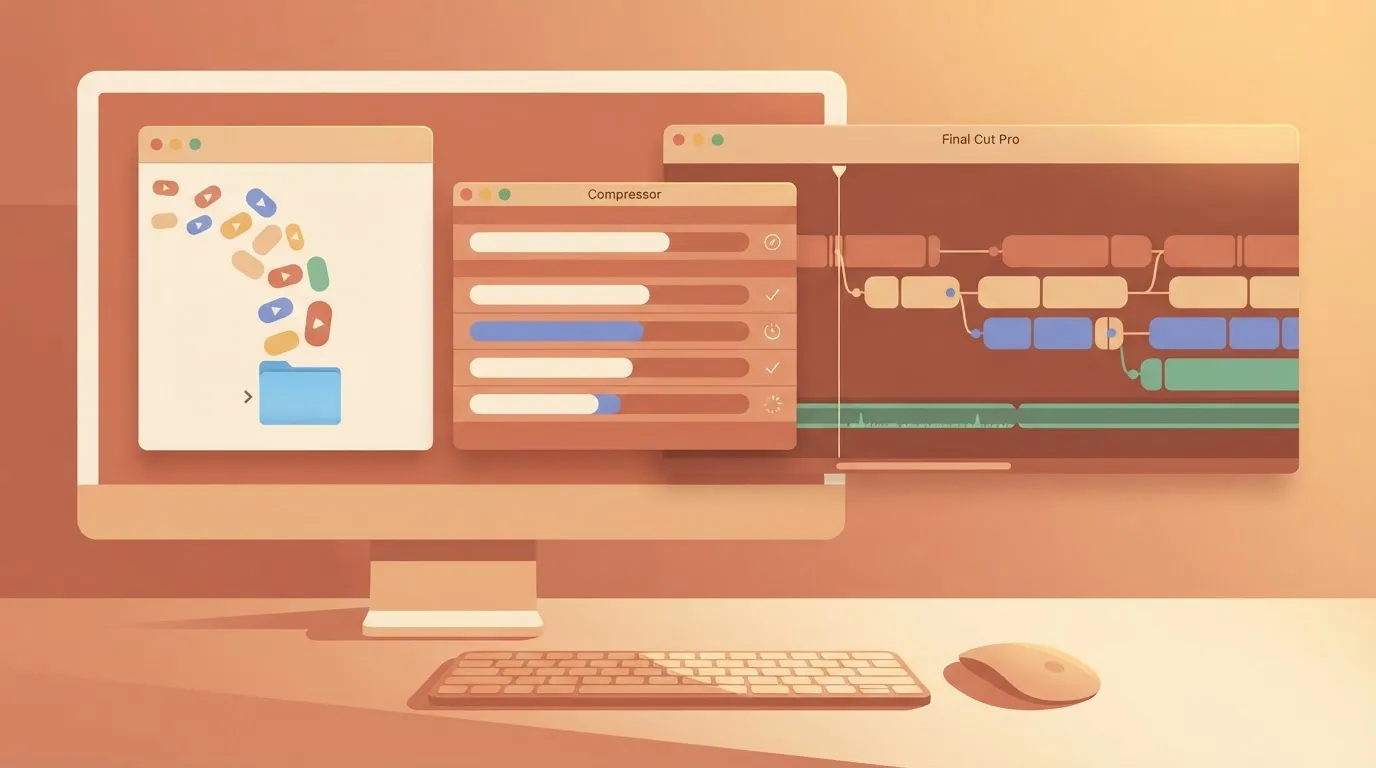
Step 4: Trigger work from the Shortcuts app
Open the Shortcuts app and look for Final Cut Pro's own actions, then chain them with Mac actions such as moving files, renaming them or showing a notification.
Because the actions sit outside the editor, you can start them from the menu bar, a keyboard shortcut or a folder rule.
From the other direction, the screenshot below shows the same idea.
A workflow tool's setup panel offers tabs for Claude, Cursor, Windsurf and other clients, numbered steps for installing Node.js, a warning that its MCP connection works only with Claude Desktop, and the JSON block that registers the server.
Take from it that outside tools can call your file-level automation, so long as you check each client's support first.
Why Final Cut Pro resists automation
You can't build anything that runs inside the app, because Final Cut Pro has no scripting API and no macro recorder.
Once you decide what belongs in files, you've got to admit the objection is right. The case against automating it rests on four points, and each one holds.
- Final Cut Pro has no scripting API and no macro recorder, so there's nothing to call and nothing to record.
- Driving the interface with GUI scripting breaks whenever a panel moves, a window changes size or an update renames a menu item.
- FCPXML, Final Cut's XML interchange format, round-trips a project but doesn't let you operate on the app itself.
- Adobe's Premiere Pro and Blackmagic's DaVinci Resolve both offer real scripting, so an editor who needs it can fairly choose them.
If your shop needs in-app scripting, that's a legitimate reason to pick a different editor. If you're staying on Final Cut, the answer is to use the few official hooks and keep the rest outside the app, in four steps.
Bind any command to a key in Final Cut's command editor. This is the nearest thing to a macro you get, and it's stable because it uses a supported feature rather than a simulated click.
Bind the repetitive actions first, then let a keyboard tool chain keystrokes if you must.
From one project to the next, presets for effects, titles and export settings carry your decisions. A saved default export means a delivery is a single command rather than a dialog of choices you might get wrong at the end of a long day.
Jobs go to Compressor, Apple's companion encoder, without the editor sitting open on a timeline. Send the project there once, and the queue, the settings and the output folders become something a file-level process can watch and repeat.
Don't try to rebuild the editor's missing macro engine in Shortcuts, Apple's automation app. It can start Final Cut actions and the file work around them, so use it as the trigger that connects the app to folders, scripts and Compressor.
Why automating around Final Cut Pro still works
The repetitive jobs (exporting, ingesting, relinking) run on files outside the timeline, where Apple's hooks are documented and stable. That is why automating around the app works.
Documented limits of Final Cut Pro automation
None of them lets you script a cut. The hooks are narrow by design: Shortcuts exposes a fixed set of actions, FCPXML describes a project but not editing behavior, and Compressor handles output.
Disk space is the limit that bites first. Camera Data Calculator puts 4K ProRes at 0.9 to 9.5 GB per minute, so one hour of the heaviest flavor is over half a terabyte, and a watch folder on a small drive will fill mid-batch.
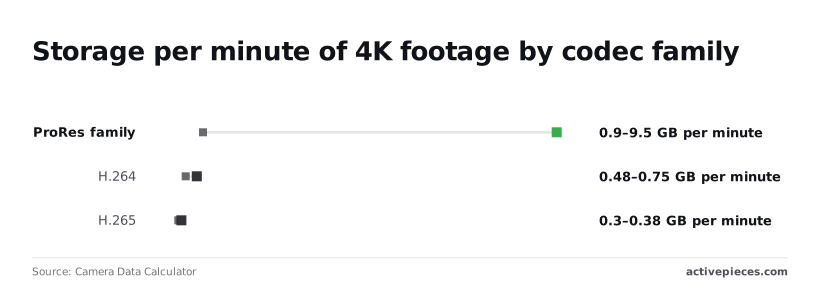
At 0.48 to 0.75 GB per minute, H.264 is why delivery batches fit on modest drives. H.265 at 0.3 to 0.375 GB per minute is lighter still, so a queue of those exports leaves room for the next one.
When an export or a batch fails, check the cheap explanation first. This table maps the five most common failures to their likely cause and the fix Apple's documentation points toward.
| Problem | Likely cause | Fix from Apple's docs |
|---|---|---|
| Failed export | Destination volume full or disconnected, or a damaged source clip | Free space or choose another destination, then re-export or send the project to Compressor |
| Watch folder not triggering | The automation watching the folder isn't attached, or the file was still copying | Re-attach the folder action or Shortcut, and trigger only after the copy completes |
| Relink error | Media was moved, renamed or sits on an unmounted drive | Mount the drive, then use Relink Files from the File menu |
| FCPXML version mismatch | File written by a newer app version than the one importing it | Update Final Cut Pro, or export the FCPXML in an older version from the source app |
| Missing Shortcuts action | App or macOS older than the release that added the action | Update Final Cut Pro and macOS, then reopen Shortcuts |
Fix the storage and path problems first. They account for most of the failures, and they're the cheapest to rule out.
If a job needs frame-level judgment, it belongs in the timeline. If it needs the same output from a hundred files, leave Final Cut Pro out of it. Hand batch transcoding to Compressor, and move generated edits through FCPXML scripts.
Easier to see it running than to read about it: set it up free, no card.
Automating the work around Final Cut Pro with Activepieces
Inside Final Cut Pro, Activepieces can't touch the timeline, the library, or any menu; its 750 integrations, counted from the open source monorepo, all connect to services around the app, which means FCP users have 750 external destinations they can reach with Activepieces.
It's a workflow automation service that can run steps before a file reaches Final Cut Pro or after it leaves.
Everything outside the app is where the sprawl comes from: a folder watcher, an agent that drafts the delivery note, a shared table of clients, an AI chat, a notification, each usually from a different vendor.
Activepieces covers all of it in one product (the workflows, the agents, the shared tables, the chat, MCP tools and approvals), so when a delivery goes missing there is one audit log to read, and the same product handles SSO, SCIM, custom RBAC, environments and git sync for whoever builds the flows.
Buy those integrations separately and you carry six vendors, six bills and six places to prove what happened. MoneyGram, Moneypenny, Alan and FundingSocieties run it in production.
Example Final Cut Pro client delivery workflow
Think of a client who delivers footage into a shared drive and expects a rough cut back by morning.
Activepieces can watch that drive, rename the clips to your convention, drop them into the right project folder, and message the editor. Every plan, including free, allows unlimited flows, so each client can have a flow of its own.
After export, it can upload the finished file, post the review link, and log the delivery in a spreadsheet. Everything in between stays with Compressor, Shortcuts, and FCPXML scripts.
What each plan allows
Because the allowance is counted in credits, the plan sizes decide how many of those jobs you can afford.
What it should tell you is that the jump between tiers is steep, so a small studio is choosing between a free plan and a modest paid one, not climbing a gentle ladder.
Three services are plotted in the chart, each with its free tier alongside its first paid tier.
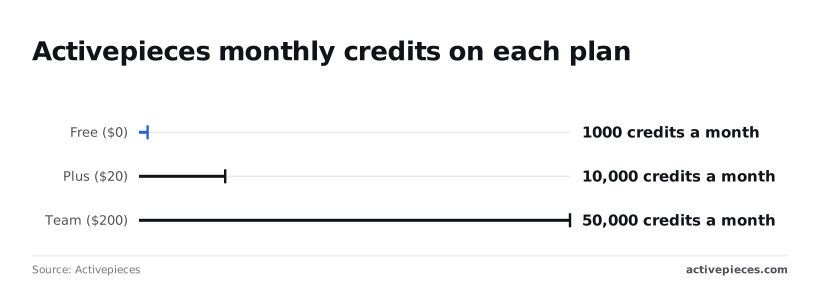
1,000 credits a month is what Free gives you, which covers a handful of daily deliveries but not a busy ingest folder.
Plus, at $20, gives 10,000 credits, enough for a small team running several automations all month, so you won't need to buy more mid-month.
Team, at $200, gives 50,000, which only makes sense once many editors share the same pipelines.
Check the page again before you commit, because these allowances change.
Where workflows go wrong
Run a six-step flow forty times a day and the free allowance is gone in about a week.
That is the documented limit that matters, the monthly credit count above, because each step in a flow spends credits. Count steps per run before you build, not after the bill arrives.

Most often, a trigger fires on a file that's still copying. Large camera files arrive in integrations, and the flow grabs a half-written clip.
Add a delay step, or have the camera-side tool write a small marker file once the copy finishes, and trigger on that instead.
The second is a flow that quietly runs out of credits mid-month; set a calendar reminder at the halfway point to check usage.
When to use something else
Switch when the job lives inside the app or inside the encoder.
Batch transcoding belongs to Compressor, and anything that needs to act on a project belongs to Shortcuts or a generated FCPXML file.
Keep Activepieces for the handoffs on either side, where its MIT-licensed core can run on your own infrastructure, and the pipeline stays dependable.
Your daily Final Cut Pro workflow
Start with one task you repeat every day.
Build outward from it in the order below, and leave outside tooling until last, because only then do you know what it must handle.
A client who needs the same social cutdowns every morning is a better test than any demo, since you'll feel at once whether the setup saves time.
Work down the list below without skipping ahead, since it runs from the cheapest, safest change to the one that carries real upkeep.
- Audit one repeated task by watching yourself do it for a day and writing down every click, menu and file you touch. The repeated parts are your automation candidates. Skip anything that needs judgment, because nothing here will make that call for you.
- Set command shortcuts: open the Command Editor and assign keys to the steps from your audit, starting with the ones you reach through menus. This is the only layer that lives entirely inside the app, so it costs nothing to try and nothing to undo.
- Set the default share destination by building the export you actually deliver, with its format, resolution and file naming, and mark it as the default. Every export is then one keystroke, and nobody on the team picks settings by hand.
- Add a Compressor watch folder, pointed at the folder your exports land in, with the encode settings you need attached. Finished masters are then transcoded into delivery files without anyone opening Compressor, and a bad export shows up as a file that never appears.
- Decide on an outside delivery workflow by looking at what happens after the files exist: renaming, uploading, notifying the client. If a person does it by hand every day, a file-level script or automation tool earns its place here. If it happens once a week, it doesn't.
- Set a re-check reminder for each release, as a recurring calendar entry tied to every Final Cut Pro update. Shortcuts actions, share settings and FCPXML behavior can shift between versions, so run your one audited task end to end after each update before you trust it with client work.
Frequently asked questions
Can Final Cut Pro run AppleScript?
Not in any way you can build a workflow on. Final Cut Pro doesn't offer a scripting dictionary for AppleScript to drive its editing, export or library functions.
What people do instead is UI scripting through System Events, which clicks menus and buttons as a person would. It works until a window moves, a menu is renamed or a dialog appears that you didn't plan for.
For a client deliverable due in the morning, I wouldn't trust it. Keep scripts on the files around the app, and use FCPXML when you need to hand the app structured work.
Does Final Cut Pro have a macro recorder?
No. Final Cut Pro doesn't have a built-in recorder that captures a sequence of edits and plays it back.
You can customize keyboard shortcuts, and the official Shortcuts app covers some tasks. A third-party macro utility can also press keys for you.
That last option's the same fragile approach as UI scripting, only easier to set up. Use it for small conveniences at your own desk, not for anything that's got to run when you're not watching.
Can Final Cut Pro export on a schedule without me at the Mac?
Not by itself. The app has no scheduler, so an unattended export has to be built from the integrations around it.
Hand the finished work to Compressor; that is the reliable pattern. It can pick up files from a watch folder and apply a saved setting, and macOS can start your job at the hour you choose.

The Mac's still got to be awake, logged in and have the media available.
Test that setup with a throwaway project before you promise anyone an overnight turnaround.
Do Final Cut Pro automations break after updates?
Some do, and the ones that fail are the ones that depend on how the app looks.
When an update moves a menu item or changes a dialog, a UI script or key-press macro can break.
Official hooks tend to hold up better, but they aren't immune. FCPXML has versions, so a file your tools write for one release may need adjusting for another.
Read the release notes before each update. Keep the old version's installer or a backup of your library until your automations have run cleanly on the new one. Never update in the middle of a delivery week.