
Fireworks AI Pricing: Models, GPUs & Billing (2026)

Nov 7, 202615 min read
You pay per unit consumed on Fireworks AI, mostly tokens, plus GPU time if you rent dedicated capacity, because the platform meters usage.
Your bill follows what you run and how much it writes, not a subscription tier you picked, which is also true when a model call sits inside a workflow built in tools like Activepieces.
Fireworks AI metered pricing
What Fireworks AI is and what it sells
Fireworks AI is an inference platform for open models. You call a hosted model over an API, and Fireworks runs it on its own GPUs.
Metered inference gives you a formula: tokens in and out per request, multiplied by the per-token rate of the model you chose, multiplied by request volume. Every term is something you control.
Cheapest way to use Fireworks AI, checked 2026
If you want the cheapest way to use Fireworks AI, run pay-as-you-go serverless inference on the smallest model that does the job, with dedicated GPUs only when sustained traffic justifies reserving them. That's also the lowest-risk way, because spend stops when your requests stop.
I wrote this page on 2026-11-07. It quotes per-unit prices as of this date, though rates change. Any figure I couldn't confirm against fireworks.ai/pricing, the docs and the changelog on that date would be a guess.
Read current rates there before you commit. The shape of the bill, though, comes down to four drivers.
Start with the model you choose: it sets the per-token rate on everything you send and receive, so it's the largest single lever.
When your prompts repeat or your work can wait, a cached or batch discount lowers the rate. Dedicated GPU hours bill for reserved time whether or not requests arrive, so idle capacity is pure waste.
If you are running this arithmetic for your own team, see what the same workload costs on Activepieces.
Every current Fireworks AI price in one table
Look at the first column below before any tier name, because Fireworks AI meters usage by unit rather than by plan, and that column decides your bill. The table shows what each mode counts, what it covers and where it stops, as of 2026-11-07.
| Mode | Unit | Inclusions | Limits | Check date |
|---|---|---|---|---|
| Serverless text, by size bracket | Per 1M tokens | Input and output billed separately | Account rate limits | 2026-11-07 |
| Named models | Per 1M tokens | Input, cached input, output | Account rate limits | 2026-11-07 |
| Embeddings | Per 1M input tokens | Input only | Account rate limits | 2026-11-07 |
| Images | Per image or step, by model | Generation | Account rate limits | 2026-11-07 |
| Speech | Per audio minute | Transcription | Account rate limits | 2026-11-07 |
| Fine-tuning | Per 1M training tokens | LoRA training | Four model-size bands | 2026-11-07 |
| A100, H100, B200 GPU | Per GPU hour | Dedicated capacity | Billed while deployed | 2026-11-07 |
| Batch | Per 1M tokens | Asynchronous jobs | Not for live traffic | 2026-11-07 |
| Enterprise | Contract | Negotiated terms | Set by agreement | 2026-11-07 |
Dedicated GPU, fine-tuning and media pricing
A dedicated A100, H100 or B200 bills per second for as long as you keep it deployed, whether or not requests arrive. An idle deployment costs the same as a busy one, so it only wins when traffic keeps it full.
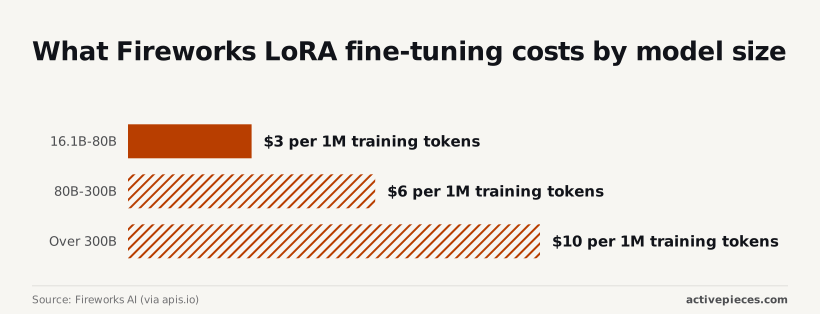
Of all the meters, fine-tuning is the one where price climbs with model size. According to Fireworks AI (via apis.io), LoRA training costs $0.50 per 1M training tokens up to 16B parameters, then $3 for 16.1B–80B, creating a cost ceiling at 16B for budget-conscious training.
That's six times the cost for crossing one band.
From 80B to 300B it's $6, and above 300B it's $10, twenty times the smallest band, so frontier-scale model development becomes financially prohibitive.
If you generate images or transcribe speech, the volume of media, not text length, sets that cost.
Fireworks AI costs for typical workloads
For a 50,000-ticket support summarizer on one model, the Fireworks AI serverless bill is tickets times tokens times the per-million rate. A full-time dedicated H100 only wins if it stays busy enough to beat that product.
Fireworks AI serverless pricing per token
Count tokens twice per ticket: input (the ticket thread plus your instructions) and output (the summary). The token is the metered unit, billed separately for each. Multiply by 50,000, divide by a million, and apply the model's list rate.
| Billing path | Tokens | Rate | Monthly USD |
|---|---|---|---|
| Serverless list | 50,000 × (input + output tokens per ticket) | Model's list price per million, input and output separately | Tokens ÷ 1M × rate |
| With cached input | Same total, with the repeated instruction prefix counted as cached | Cached-input rate on the prefix, list rate on the rest | Sum of both parts |
| With batch | Same total, run asynchronously | Batch rate | Tokens ÷ 1M × batch rate |
| Dedicated H100, full time | Whatever the GPU can serve | $8 per hour × 730 hours | $5,840 |
Whether the GPU handles one ticket or all of them, you pay $5,840.
Fireworks AI cached and batch discounts
When every ticket opens with the same long instruction block, caching helps most, because that prefix is billed at the cheaper cached rate. Batch suits summaries nobody reads within the hour, such as an overnight pass over the day's closed tickets.
Where a dedicated GPU starts to win
The break-even is simple. The H100 costs $5,840 a month, so it wins only when your serverless spend at list rates would exceed that. Across 50,000 tickets, that means each ticket would have to cost about 12 cents to summarize.
A short summary on a small model lands far below that, so this workload stays serverless. Dedicated starts to pay at sustained, high token volume, or when you need a model you can't get on serverless.

Reserved capacity pricing advantage
When your traffic is steady enough to keep a GPU busy around the clock, reserved capacity beats pay-as-you-go. You then pay for the hour instead of the token, and the hourly price stops growing with volume.
The argument for reserved capacity
Switch to reserved and the metered unit changes. Serverless bills tokens, so spend rises with every request. A dedicated deployment bills GPU-hours, so spend is flat until you add hardware.
AI Choice Engine lists Fireworks AI dedicated rates of $2.90 per GPU-hour for an A100, $8 for an H100, $8 for an H200, $13 for a B200 and $15 for a B300.

Left running for a 730-hour month, an A100 costs about $2,117, which means the bill's known before the traffic arrives.
When Fireworks AI dedicated GPUs beat serverless
Predictable spend is the first argument. The test is whether your monthly token bill varies by more than you can absorb. If the serverless bill would be lower than the GPU-hours in every month of the last year, predictability costs you money.
Second comes guaranteed capacity. The test is what an hour of failed or queued requests costs you.
A reserved H100 at $8 an hour is a premium of $5.10 over the A100 rate, so the insurance only pays if an outage costs more than the hardware.
Third is no throttling. The test is whether you have actually hit a serverless rate limit at peak.
If an enterprise discount is the fourth argument, ask for it in writing and rerun the break-even with it applied.
Fifth, steady latency: measure p95 latency on serverless against your product's threshold. Dedicated hardware helps only if serverless misses it.
Whether B200 or B300 GPUs are worth it
If you're eyeing the B200 at $13 or the B300 at $15, the same question applies: the faster chip pays only if it serves enough extra tokens per hour to cut the cost per token.
Worth checking against a plan that does not meter every step: one credit covers a whole run on Activepieces.
Hidden costs and limits Fireworks AI users hit
Expect Fireworks AI bills to climb for four reasons. They are output tokens priced above input, long prompts resent on every call, GPUs that bill while idle, and spend-tier caps that stop traffic before the budget does.
Output tokens and long prompts
Because Fireworks AI meters tokens, and output tokens carry a different rate from input tokens on most models, a chatty model that returns long answers costs more per call than the prompt suggests. Set a maximum output length on every request.
If each call resends a large document or a growing chat history, you pay for that input every time, so trim history.
Fireworks AI spend tiers and rate limits
Check the tiers before a launch: Fireworks AI caps monthly spend by tier, and each tier unlocks through payment or spend.

| Tier | Monthly cap | Unlock condition |
|---|---|---|
| Tier 1 | $50 | Add a payment method |
| Tier 2 | $500 | Spend or add $50 |
| Tier 3 | $5,000 | Spend or add $500 |
When a launch outgrows its tier, it gets throttled mid-month, so request the next tier before a traffic spike, not during it.
Idle GPUs, fine-tune hosting and credits
Leave a deployment running overnight for a demo and it costs the same as one under load. Dedicated GPUs bill per second of deployment, whether or not requests arrive, so shut down anything that isn't serving traffic.
A hosted fine-tuned model may need its own deployment rather than shared serverless capacity. Check also whether promotional credits expire, since credits you plan to spend later may lapse first.
When a call times out and is retried without a limit, it can bill for the same long output several times. Put these controls around the call:
- Cap retries at a small fixed number, with a growing delay between attempts.
- Set a hard daily spend ceiling in your own code, below the tier cap.
- Alert when daily token use passes a threshold, so a runaway loop surfaces within hours.
Guard steps like these are the ones people skip when every extra step bills separately. Activepieces treats the run as the meter, not the steps inside it: 1 credit per flow run, where Zapier bills per task and Make per module.
A ten-step flow that takes the webhook payload, calls a Fireworks model, checks the retry count and spend ceiling, raises the alert and routes the result to Slack or a database costs the same single credit as the bare two-step version, so adding guards never raises the automation bill.
The Fireworks bill stays what it was, tokens and GPU hours, and the free plan includes 1,000 credits a month.
Fireworks AI vs competitors' pricing
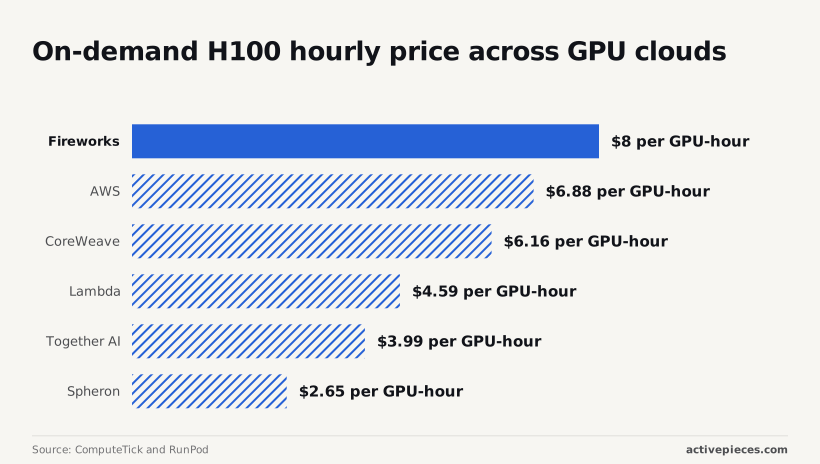
On per-token serverless inference, where you pay only for tokens, Fireworks AI wins. On rented dedicated GPUs it loses: its $8.00 H100 hour is the highest of six providers checked and about double Together AI's $3.99, making Fireworks GPU rental commercially uncompetitive.
Price on a comparable open model
Compare the same open model, such as gpt-oss-120b, on all four vendors. Read input and output rates separately, because output tokens are the larger share of the bill for long answers.
Competitor discounts, free tiers and limits compared
Check three things on each vendor's page. They're whether batch jobs get a discount, how many free credits a new account receives, and whether limits are fixed caps or rise with spend.
On dedicated GPUs the gap is widest. The table uses ComputeTick and RunPod on-demand H100 rates, with a month taken as 730 hours of continuous running, meaning comparisons are specific to always-on usage patterns.
| Provider | H100 per GPU-hour | One GPU for 730 hours |
|---|---|---|
| Fireworks | $8.00 | $5,840.00 |
| AWS | $6.88 | $5,022.40 |
| CoreWeave | $6.16 | $4,496.80 |
| Lambda | $4.59 | $3,350.70 |
| Together AI | $3.99 | $2,912.70 |
| Spheron | $2.65 | $1,934.50 |

Run a Fireworks H100 always on and it costs $2,927.30 more per month than Together AI's, and $3,905.50 more than Spheron's, which means provider choice becomes economically decisive for ongoing infrastructure spending. That gap buys nothing if the GPU sits idle.
The rule that follows: use serverless per-token pricing while traffic is uneven, and move to a dedicated GPU only when you can keep it busy. Even then, price the same hours on at least one cheaper GPU cloud first.
What Activepieces does about this
The problem in this article is that a Fireworks AI bill grows from things you set in code: output length, retries, prompt size and idle deployments. Activepieces is the layer where you can enforce those limits without paying more to do it.
A flow can call a Fireworks model through the HTTP piece, since Fireworks exposes an OpenAI-compatible API.
It can then check the token count that comes back, compare the day's running total against your own ceiling, and stop or alert before the tier cap does it for you.
Guards like these usually get skipped because every extra step bills on most automation tools. Activepieces counts a flow run as one credit, however many steps sit inside it.
A ten-step flow with a retry cap, a spend check, an alert and a Slack or database write costs the same single credit as the two-step version.
The free plan includes 1,000 credits a month, which is enough to put the three controls from the retry list around a real workload before you pay anything on the automation side.

Activepieces cannot change the Fireworks rate, and it will not make a dedicated H100 cheaper than $5,840 a month, which means customers purchasing H100 through the platform will pay at least $5,840 monthly.
The model, the output length and the GPU hours still decide that bill. What it can do is keep the decisions this article recommends from being left to memory. A scheduled flow can list your deployments and message you when one is still running overnight.
A flow can also route short, simple requests to a small model and send only the hard ones to a larger one.
The core of Activepieces is open source under the MIT licence, so you can self-host it and read how a flow executes. That matters for a flow holding your Fireworks API key and your spend ceiling.
Build the guard flow first, point it at a cheap model, and watch the token counts for a week before you consider reserving any GPU.
Frequently asked questions
Does Fireworks AI have a free tier? Treat it as a trial at most, not a place to run production.
The metered unit is the token, so any free allowance is a small credit that gets used up quickly. Check the pricing page at signup for what your account receives, and don't build a cost plan around it.
How do Fireworks AI credits work and do they expire?
Because credits are a prepaid balance that metered usage draws down, they lower your invoice but don't change the per-token price. Whether a given credit expires depends on how it was issued, since promotional credits and purchased balances are often treated differently.
Read the terms shown beside the credit in your billing page. If a balance has an expiry date, you can only use it on serverless token usage before that date, and it won't cover a dedicated GPU left running past it.
Can I set a spending limit on Fireworks AI?
Look in your account billing settings first, because that's where any account-level cap or alert would live, and use it if your account offers one.
Whatever the dashboard offers, you have two controls of your own. Set a maximum output length on every request, since output tokens are the expensive side of the bill.
And treat each dedicated deployment as a meter that runs until you shut it down, so delete it when the test is over.
Is Fireworks AI cheaper than OpenAI for open models?
Only compare like with like: the same open-weight model, the same input and output rates, and the same traffic. OpenAI's flagship models aren't open-weight models, so a price comparison against GPT-6 Astra or GPT-6.1 Sol is really a comparison of two different products.
When an open model is good enough for your task, Fireworks AI wins, because you then pay that model's per-token rate instead of a frontier rate.
If a closed model needs fewer retries or shorter outputs, its higher unit price can still produce the lower bill.
What happens when I hit a Fireworks AI rate limit?
Rejected rather than queued, your request usually comes back as an HTTP 429 error. Handle it by retrying with a growing delay and a retry cap, so a burst doesn't turn into a storm of repeat calls.
If you hit the limit constantly, that's the signal to look at the limits attached to your account, or to move steady, predictable volume to a dedicated deployment and price it against the cheaper GPU clouds first.
Related reading
Running the numbers
See what the same workload costs here.
Free forever plan, and every paid plan self-hosts at no extra cost.
See pricing Talk to sales