Gamma Automation: How to Use the API (2026 Guide)

Nov 18, 202616 min read
Getting started with Gamma automation
What the API does
Generating a deck from a trigger means calling Gamma's generation API. The trigger can be a new row, a form submission or a CRM stage change, and the call goes either directly or through a connector such as Activepieces that calls it for you.

Gamma automation is the practice of creating presentations programmatically by sending a request, with your content and settings, to Gamma's generation API, either directly or through a connector, so that a deck is produced without anyone opening the editor.
The fastest working setup is one test request that returns a deck, followed by the trigger.
This section was checked against Gamma's own docs on 18 Nov 2026. By the end of the article you'll have a trigger producing a deck from your own input. You'll also have a way to see it when it fails.
The API takes text and generation options, and returns a finished presentation. That's the whole contract, and it's narrower than the word "automation" suggests.
When a connector's action list says "Create presentation", the action only works if your account has API access, enough credits and input within the documented limits.
The API takes text and generation options, and returns a finished presentation. That's the whole contract, and it's narrower than the word "automation" suggests.
If one of those is missing, the call fails and the failure shows up as an error response, not as a deck.
Anything beyond generation stays unconfirmed until you find it in the API reference. Editing an existing deck in place, or reading back what a teammate changed, are the kinds of actions people assume exist because the app does them.
Check the reference for each one before you build a workflow around it.
Choosing a Gamma API integration route
The table below puts the three routes side by side on the four things that decide which one you start with. Read it as a trade: the less code you write, the less you see when a request fails.
Where a cell says "check", the answer sits in Gamma's current plan and API pages, not in this article.
| Route | Setup time | Gamma plan needed | Level of control | How failures become visible |
|---|---|---|---|---|
| Connector | Shortest: authorize, map fields, run | Whichever plan Gamma's API docs require; check before you connect | Lowest: only the options the connector exposes | Often a generic step error; you may have to open the run log to find the real message |
| Direct API | Longer: key, request, handling the response | Same API access requirement as above | Highest: every documented parameter is yours | Full status codes and response bodies, which you log yourself |
| Workflow tool (Activepieces, MIT-licensed core, for example) | Middle: build a flow, then add the Gamma step | Same API access requirement as above | Medium: the trigger and branching are yours, the Gamma step is limited to what it exposes | Per-run history showing which step failed and with what input |
All three routes depend on the same plan access, so the plan question comes first. The route only changes how much of the failure you get to read. Pick the connector to prove the idea, the direct API when you need parameters the connector hides.
Four things, in this order of likelihood to stop you:
- A Gamma plan that includes API access, confirmed on Gamma's pricing and API pages.
- An API key generated from your account settings.
- Enough credits for the test deck, since a generation that can't be paid for returns an error and nothing else.
- Input that fits the documented limits, so start the test with a short paragraph, not your full source document.
Once those four hold, send one request by hand. If it returns a deck, the trigger is the only part left to build.
This takes minutes, not a project: automate it in Activepieces free.
Five stages from API key to automated deck
Gamma API automation stages in order
Each stage below leaves something working, so a failure points at one stage rather than at the whole build.
Think of the numbered diagram here as a checklist that runs in order: confirm a paid plan, create a key, send POST /v1.0/generations, poll the status, open the deck link. Skipping the first stage is how a correct request comes back as an error.
Before you write any code, check Gamma's API documentation for which plans include API access (stage 1). If your plan isn't on that list, every later stage fails with a valid-looking request and an authorization error.

Credits are drawn from the same account, so check the balance now too.
Creating a Gamma API key and first request
If you paste the key into a workflow step as plain text, it ends up in run logs and shared exports. So in stage 2, create the key in your Gamma account settings and put it in your connector's secret store or an environment variable.
The key is what the X-API-KEY header carries in stage 3.
In stage 3, send POST /v1.0/generations with the X-API-KEY header and a JSON body containing inputText, textMode and numCards. Keep inputText short and numCards low, so a mistake costs few credits.

A success returns a generation ID, not a deck. If you get an error instead, read its message: it names the plan, credit or input-limit problem directly.
Stage 4: retrieve the finished deck
Poll the generation's status endpoint with the same header and the ID from stage 3.

Polling every 5 seconds therefore means roughly four checks for a typical deck, and a request still pending long after that is worth investigating rather than waiting out.
When the status reads completed, the response carries the link to the deck. Open it and confirm the slides match your input.
Once stages 3 and 4 work, wrap them in a trigger (stage 5): a schedule, a form submission or a new row in a sheet.
Map the trigger's text into inputText and leave textMode and numCards fixed until the first unattended run succeeds. Only then vary them per run.
Fixing Gamma API errors and limits
Nearly every failed Gamma API call traces to one of seven causes, and each is fixed in the request or the account, not in your automation logic.
The table below pairs each error or limit with its cause and fix. Read the last column first: it marks where the docs give no answer, so you know where to test rather than search.
| Symptom | Cause | Fix | Source | Docs silent? |
|---|---|---|---|---|
| 400 | A parameter value is not one the API accepts | Compare each value to the accepted-values reference | Gamma Developers docs | No |
| 401 | Bad key, or a plan without API access | Regenerate the key; confirm the plan includes the API | Gamma Developers docs | Partly |
| 402 | Credits exhausted | Top up, or pick a cheaper image model | Gamma Developers docs | No |
| Rate limit | Too many requests too fast | Queue runs and retry with a delay | Gamma Developers docs | Yes, no figure here |
| Input 1-400,000 characters | Text outside the allowed length | Trim or split the source | Gamma Developers docs | No |
| Cards 1-100 on Pro | Requested more cards than the plan allows | Lower the card count | Gamma Developers docs | Partly |
| Slow generation | Long input, many images | Poll for completion rather than waiting | Gamma Developers docs | Yes |
In a connector's error log, a 401 and a 402 look alike, so read the status code before changing anything.
A 401 means Gamma rejected the key or your plan. Test with a single request first: if it fails there, the connector isn't the problem. Check plan access before regenerating keys, because a fresh key on an ineligible plan fails identically.
Gamma API credits, rate limits and input caps
When a 402 comes back, the balance is empty, and image models are the main lever on spend.
Flux 1 Quick, Flux 2 Fast and GPT Image Mini Low cost 2 credits per image, as does one more model, so four models sit at the cheap end.
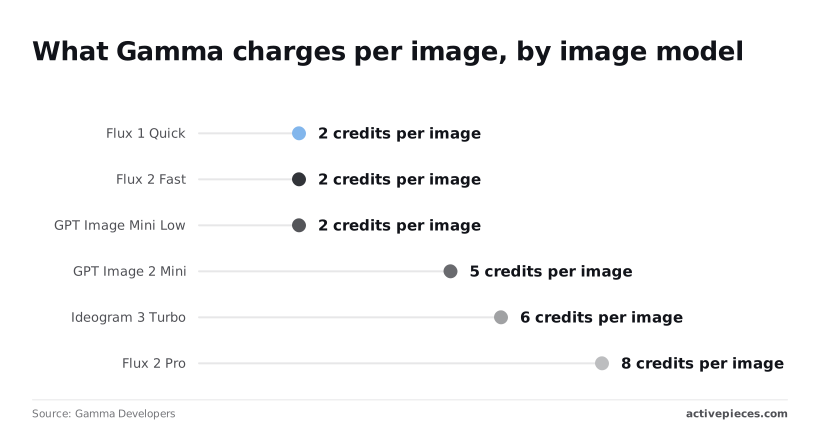
GPT Image 2 Mini costs 5, Ideogram 3 Turbo 6, and Flux 2 Pro 8, as do two others.
An empty field fails as surely as an oversized one, because the input cap is 1 to 400,000 characters. Pro caps decks at 100 cards. I found no rate-limit figure to quote; space your triggers and watch for failures.
If a 400 comes back, it almost always means a value that isn't in the accepted list, such as a misspelled image model name. Copy values from the reference rather than from memory.
Slow generations aren't errors: the docs give no timing, so build the workflow to poll for completion instead of assuming a fixed wait.
You can follow the rest of this with the builder open. Start free, no card.
Running Gamma generation from Activepieces workflows
The polling loop doesn't call for a specialist; describe it in Activepieces' built-in chat instead: send a form's text to Gamma's generation API, poll until the status reads completed, then pass the link along.

What comes back is a live flow in your account, the same artifact a builder would have wired by hand around an HTTP step, so your RBAC and audit logs apply to it like any other flow.
Its run history shows which step failed, readable by anyone on the team, and MoneyGram, Moneypenny, Alan and FundingSocieties already run Activepieces in production.
It fits one narrow case, a form, CRM or sheet event that should produce a deck without anyone opening Gamma.
When to add a workflow tool for Gamma
Add it only when something outside Gamma starts the job. Activepieces has 750 integrations, counted from its open source monorepo, so the form, CRM or spreadsheet that starts the job is likely already among them.
If you generate decks by hand, or one script already calls the API, a workflow tool adds a second place for the request to break.
I wouldn't assume a ready-made Gamma action exists in the integration list. Check the list before you build, and if there isn't one, the HTTP step does the job because Gamma's generation API is an ordinary request.

The cost is that you own the request body. Any mistake in plan access, credits or input limits shows up in your run log rather than in a friendly dialog.
Setting up the HTTP request and failure branch
The screenshot below shows what you are building toward, using a different API. A trigger step feeds one HTTP request step, which sends a POST to Square's OAuth revoke endpoint.
The configuration panel exposes the method, URL, an Authorization header and a body, and the run panel shows both steps green with "Run succeeded". Gamma's step has the same parts, with Gamma's URL, key and body.

- Choose the trigger (form, CRM or sheet) and connect it, then run the flow once and check the run history to confirm the Gamma step received what you expected.
- Add an HTTP step. Copy the method, URL, authentication header and body fields from Gamma's docs. Map your trigger fields into the input text, and leave out any parameter you can't find in the docs.
- Send one test run and read the step's Output JSON. A rejected request will say why there, usually a plan, credit or input-length problem.
- Add a check after the HTTP step. If the response shows an error, route to a branch that notifies you with the error text. Without it, a failed generation looks like a finished run.
- On success, add a polling step that re-checks until Gamma reports completion, as covered above, then send the link by email or chat.
A green checkmark only says the request was accepted. Open the Output JSON before you trust it.
What to do on Monday morning with Gamma
Pick one deck you already rebuild by hand on a schedule, because the Stage 3 test only proves something when it runs on real content. The six steps below take you from that deck to a setup that fails loudly instead of quietly:
- Pick one repeatable deck, such as a weekly report, and write down its input.
- Run the Stage 3 test with that real content, then read the Output JSON.
- Set a credit budget from Gamma's pricing page, and choose a cheaper image model for the first month so a looping trigger can't spend more than you planned.
- Add a failure alert that reaches a person, not a log nobody opens.
- Name the owner of the API key, so that someone's departure can't silently kill the automation.
- Recheck Gamma's docs monthly for changes to plan access, credits and input limits.
Generation is the supported action: you send content and options, and Gamma returns a deck. Treat anything beyond that, such as editing a deck you built earlier, as unsupported until the docs list it or a test request succeeds.
A connector's dropdown can show a field the underlying API never accepted, so the docs outrank the interface.
| Route | What you own | Where it breaks first |
|---|---|---|
| Connector | Field mapping inside someone else's module | A field the module does not expose |
| Direct API | The HTTP request and key storage | Plan, credit or input-limit errors in the response |
| Workflow tool | A trigger plus the steps after it | A trigger firing on bad data, or a step that reports success on a failed generation |
For a first test, the direct request is usually the right choice, because you want the route with the fewest moving parts that still reaches your trigger.
Most failed first attempts trace back to one of these being missing:
- A Gamma plan that includes API access
- An API key stored somewhere other than a shared document
- Enough credits for the test and the image model you chose
- Input text within the documented limits
- A destination for failure alerts
Check the first, third and fourth against Gamma's own docs and pricing page before you write any trigger. If the test request is rejected, the error message will usually name the one you skipped.
Frequently asked questions
Someone sends a request and gets back a refusal that has nothing to do with their payload. Each of these questions starts there.
Is Gamma's API available on the free plan?
Yes: API access is available on all plans, including Free, though limits differ, so a free account's plan limits are worth checking when a request is rejected.
On a free account, a connector can still show its Gamma action, and the action then fails at run time. Seeing the action in a menu doesn't prove your plan can call it. Read the plan comparison on Gamma's pricing page before you build anything.
Can Gamma automatically update an existing deck?
The generation API is documented as creating a new deck on each call, not editing one in place. So a "refresh the weekly report" automation produces a fresh deck with a fresh link every run.
Unless you store the returned link somewhere your team looks, such as a spreadsheet row or a channel message, people keep opening last week's version. If Gamma's docs add an edit endpoint, that changes this answer, so check them.
Does Gamma automation work with Zapier or Make?
Yes, both automation platforms offer Gamma connectors, and both do the same job as a direct API call. The connector sends the generation request with the fields you fill in. It's therefore bound by the same plan, credit and input limits as your own script.
When a Zap or scenario run fails, you are usually looking at the API's error message passed through, so open the run history and read the response body before changing the workflow.
How many credits does one generated deck use?
It depends on the deck, and Gamma's pricing and credits documentation is the only place to get the current numbers. Cost varies with how much you generate and with which image model you choose, since some image models cost more per image than others.
When a trigger fires on every new row, it can drain a monthly balance faster than a person clicking "generate" ever would. Run the test request, check the balance afterward, and multiply by your expected volume before you switch the trigger on.
Can I automate export to PDF or PowerPoint?
Yes, in the sense that the generation request can ask for a file export alongside the deck, and the response returns a link to download it. Check the current API reference for the exact parameter name and the formats it accepts.
The export link is the output you pass to the next step, such as emailing a client or filing it in a folder. Treat that link as something to fetch promptly, not a permanent address, unless the docs say otherwise.
Related reading
References
Build it
Set this up in minutes.
No code required. Connect your accounts, and Activepieces runs it from there.
Start free Talk to sales