
Gemini 4 Carbon Pricing: Costs and Limits in 2026

Nov 16, 202614 min read
The sticker price is only half the estimate. Google sells its consumer plans at $0, $4.99, $19.99 and $199.99 a month, and itemizes what each includes.
Understand Gemini 4 Carbon plans and limits
viz type=stackrank title="Monthly price of Google's consumer Gemini plans" unit="$ per month" source="Google - https://gemini.google/subscriptions"99.99 a month for Ultra, the top tier, so the plan you need sets the bill." Ultra (top): 199.99 AI Pro: 19.99 AI Plus: 4.99 Free: 0
It doesn't publish the usage limits that decide whether you hit a wall mid-month, which matters most if you plan to run the model inside automations built with tools like Activepieces, where a quiet cap can stall a workflow without warning.
When you need the strongest reasoning in Google's lineup, you reach for Gemini 4 Carbon, its flagship model.
Gemini 4 Carbon plans, prices and usage limits
| Plan | Price | What's included | Usage limits | Source |
|---|---|---|---|---|
| Free | $0 per month | Google Account access, 15 GB of storage across Gmail, Drive and Photos | Unpublished | |
| Google AI Plus | $4.99 per month | Itemized on Google's page | Unpublished | |
| Google AI Pro | $19.99 per month | Itemized on Google's page | Unpublished | |
| Google AI Ultra | From $99.99 per month | Itemized on Google's page | Unpublished | |
| API intro | Not on the subscriptions page | Not covered there | Unpublished | None found |
| API from Dec 1 | Not on the subscriptions page | Not covered there | Unpublished | None found |
Prices and plan limits checked against docs.claude.com and claude.com and openai.com and gemini.google on November 16, 2026.
If the two API rows look blank on price, that's because the subscriptions page doesn't cover them. Treat that as a reason to ask before you build on them, not as a sign they're free.
Activepieces runs every AI step at 1 credit when you bring your own AI key, from the $20-a-month Plus plan up, and the token cost goes to your own provider bill.
Those two API rows are the ones to settle first, because automated calls are where overruns start.
I read every price above from Google's subscriptions page on 16 November 2026. Where that page gave no figure, the table says so.
If you are running this arithmetic for your own team, see what the same workload costs on Activepieces.
Usage caps that stall work
This modelled team found the limit the way most teams do: when the work stopped.
What follows is a constructed scenario, not a report of a real company, and it carries no figures because I've confirmed none.
What the team budgeted
In the budget there was one line for five people on one shared subscription: the headline price for the plan. That number looked fair.
Nobody opened the fine print on usage, so nobody asked what the plan counted, who it counted for, or how often the count reset.
The budget said what the plan costs to hold, not how much work it lets five people do before it stops.
First Gemini 4 Carbon usage cap refusal
The first sign was small. One person's request sat on a spinner and then came back with a refusal. They assumed a glitch and tried again. A minute later a second person hit the same wall, then a third.

Everyone had started work at about the same hour, and the combined morning load used up a single shared allowance before the first coffee break was over.
Five ordinary mornings added together were enough.
The illustration below shows five desks, five paused requests, and one meter at full.
(The illustration sits here.)
How the team responded to the usage cap
They did what a homeowner does when the water is already on the floor: they stopped the leak first and planned second.
Someone checked the account's usage screen to learn what they had consumed and when it would reset. Someone else sorted the tasks into those that could wait and those that couldn't.
Only then did they fix the budget. They compared a typical week of real work against the plan's stated limits and priced the extras the plan offered for going over.
Then they set a spending cap and a usage alert below the point where work stops.
Do those checks before the first overrun and they cost an afternoon; do them after and they cost a morning of idle desks, plus the same afternoon. The lesson is the order.
What that month cost at realistic usage
Once the intro offer ends, the same month of work costs twice as much: on a sample workload, $131 becomes $262, and nothing about the usage changed.
Gemini 4 Carbon budget versus actual cost
From 1 December those rates become $4 and $20.
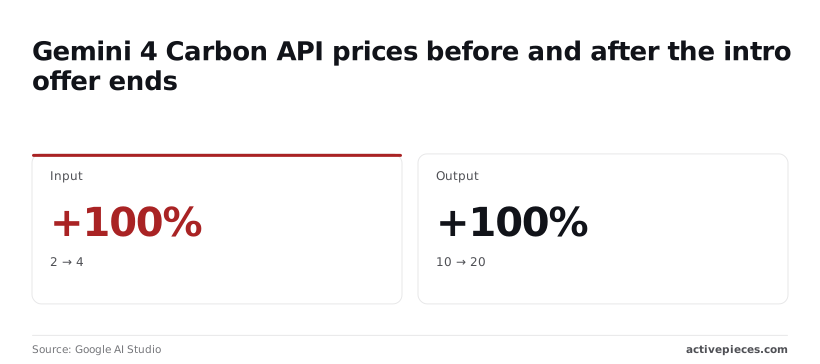
So a budget written at the intro rate is half the bill you'll actually get.
I chose the sample month for illustration: 40 million fresh input tokens, 10 million cached input tokens and 5 million output tokens.
At the $2/$10 intro rate it costs $131 (40×2 + 10×0.1 + 5×10 = 80 + 1 + 50), so the budget matches the bill.
At the $4/$20 rates from 1 December the same month costs $262 (40×4 + 10×0.2 + 5×20 = 160 + 2 + 100), which is $131 more than a budget set at the intro price.
Cost per seat at light, normal and heavy use
If you want per-seat cost on the API, it's tokens used times rate, so it climbs in a straight line with usage until a long prompt crosses into a higher rate tier.
A heavy user who generates twice the output of a normal one costs twice as much, and every million output tokens moves from $10 to $20 on 1 December.
Measure a few real seats for a week before you set the budget. Guessing one average figure hides the heavy users who drive the overrun.
Staff hours lost to usage cap stalls
When a cap cuts requests off mid-month, it stops work as well as spending. Each blocked request means someone waits, retries or switches tools, and that time is paid for in wages.
Work out how many people depend on the service, and how long they'd sit idle before anyone raised the cap. That's the cost of setting no cap, and it usually exceeds the extra spend the cap would have allowed.
Worth checking against a plan that does not meter every step: one credit covers a whole run on Activepieces.
Hidden costs and limits behind the overrun
Your bill is decided by rules the headline price leaves out: how much you can use before pricing changes, what gets metered separately, and what the vendor never writes down. Those gaps are where an uncapped account gets expensive.
Your bill is decided by rules the headline price leaves out: how much you can use before pricing changes, what gets metered separately, and what the vendor never writes down.
Usage and rate limits
Long prompts are the usual trap: past a certain length, many providers charge a higher rate on both what you send and what comes back. The page that shows the base price may not say where that line sits.
Rate limits, the ceiling on how fast you can send requests, are often unpublished or tied to an account's history. Your own limit shows up when requests start failing, usually during your busiest hour.
Metered and add-on charges in Gemini 4 Carbon
When a feature sounds like part of the product, it's often billed on its own meter. Storing frequently reused prompts so they load faster can carry an hourly storage fee.
Web search built into a model is commonly charged per batch of queries, on top of the text you pay for. If an agent searches on every turn, that line can outgrow the model charge.
When the discount window closes, your bill rises with no change in your usage, so introductory pricing deserves the same suspicion. Put the end date in your calendar the day you sign up.

Seat minimums, contract terms and region limits
With a seat minimum, you pay for a floor of users even if only a few log in. Annual terms lock in a commitment, so an overrun can't be fixed by cancelling mid-year.
Some features are offered only in certain regions, and moving workloads to a permitted one can change the rate or add a fee. These terms live in the order form or the docs, not on the pricing page.
Before you commit, ask the vendor in writing which limits are unpublished, which features carry their own meter, and when any introductory rate ends. A vendor who won't answer has told you something about what your first overrun will look like.
Compare Gemini 4 Carbon against alternatives
Right now, Gemini 4 Carbon is the cheapest of the three. Its rate is an introductory one that doubles on 1 December, so budget against the doubled price, not the one on the page today.
Price and limits side by side
Per the published API rates, Gemini 4 Carbon runs $2 to $10 per million tokens. Claude Opus 5.5 runs $4 to $20, and GPT-6 Astra runs $10 to $50.
| Model | Price per 1M tokens | What the maker positions it for |
|---|---|---|
| Gemini 4 Carbon | $2 – $10 (intro rate) | Strongest reasoning, Google's flagship |
| Claude Opus 5.5 | $4 – $20 | Long-running agentic coding and knowledge work |
| GPT-6 Astra | $10 – $50 | Complex reasoning and coding, OpenAI's flagship |

I have no confirmed per-seat prices, usage caps or overage terms for these three, and the table covers API rates only, so ask each vendor for them in writing before you commit.
Gemini 4 Carbon price versus Opus and GPT
After the doubling, it lands at $4 to $20, identical to Opus 5.5. Anyone who picked Gemini purely on price then has no price reason left to stay.
At two and a half times either rival, Astra stays the most expensive, so it only makes sense if your work needs what it does best and you've tested that.
For a small team running a short project, Gemini wins if you finish before the change. For steady, long-running use, treat Gemini and Opus as equals on price and choose on fit. Choose Astra only on evidence.
Vendor benchmarks for Gemini 4 Carbon and rivals
I have no confirmed benchmark figures for these three, so I won't quote any. Vendor benchmarks measure tasks the vendor chose, and your work may look nothing like them.
Run twenty of your own real tasks through each model and price the results. That test costs a few dollars and can save you from a wrong choice that costs far more.
Fix usage surprises with Activepieces and a Monday checklist
Once you've run that test, the fix is three rules and one weekly check. Buy the plan for your peak, set a spend cap, and get warned before you hit a limit.
Spend cap rules for Gemini 4 Carbon teams
Pick the plan by your busiest week, not your average one. An average hides the spike, and the spike's what triggers the overage charges.
Set a spend cap wherever the vendor offers one, so a runaway month stops at a number you chose instead of a number you discover on the invoice.
Then set alerts at 70 and 90 percent of each limit. The first gives you time to decide whether to upgrade or slow down. The second tells you the decision is overdue.
Create custom usage alert workflows
If the usage endpoint you need to read has no connector yet, Activepieces can have AI build that integration and keep it inside your own instance, so no vendor release stands between you and the alert.
The catalogue is 750 integrations, counted straight from the open source monorepo, and roughly 60% of them were contributed by the community.
Set a daily or weekly schedule trigger. Add a step that asks the vendor's usage endpoint for your current numbers, where the vendor exposes one.
Add a condition that compares usage to your limit. Send a Slack message or an email when it passes your threshold.
Be clear about what this doesn't do. It doesn't lower any price or raise any limit. If a vendor shows usage only on a dashboard, with nothing a workflow can read, you'll have to check by hand or copy the figures in yourself.
What to do on Monday
The whole routine, in order:
- Pull last week's peak usage for every metered item on your plan.
- Pick the plan by that peak, not the average.
- Set the spend cap.
- Set alerts at 70 and 90 percent of each limit.
- Write down who owns each alert, by name.
The last step matters most. An alert that reaches a shared inbox and belongs to no one gets read by no one, and you pay for that silence at the end of the month.

Frequently asked questions
Is there a free Gemini 4 Carbon plan?
Don't assume one. Carbon is Google's flagship reasoning model, and whether a free tier includes it is something only Google's pricing page can settle. Free tiers often carry the lighter models and leave the strongest one for paid plans.
Look at the model list under the Free plan itself, not at the plan's name. Building a workflow on a tier that turns out not to include Carbon costs you a rewrite, and that's the expensive way to find out.
Does Gemini 4 Carbon charge per API call?
Usually not per call. Model APIs are typically metered by tokens, the small chunks of text the model reads and writes.
A single call can be cheap or costly depending on how much you send and how much comes back. Long documents and long answers drive the bill, not the call count.
Check which unit Google's pricing page uses for Carbon, then multiply it against your own typical request. Flagship reasoning models can also spend extra output on thinking you never see, so test with a small batch before trusting an estimate.
How often does Gemini 4 Carbon pricing change?
There's no schedule you can count on. Prices, introductory rates and plan limits get revised when a vendor releases a new model or reshapes its plans, and an introductory price can end without much fanfare.
Treat the price you saw as a snapshot. Note the date you checked it, and look at the pricing page again before you renew or scale up usage. A promotional rate that quietly expires is a bill that jumps with no change on your side.
Can I switch plans mid-month without losing usage?
That depends on how the plan is billed, and the billing terms are where to read it. Some plans credit what you've used and prorate the difference. Others reset the counter on the switch, or only apply the change at the next billing date.
Before you upgrade in a hurry because a limit is close, read the plan-change terms. Then set a spending cap, so a mid-month scramble doesn't turn into an overrun nobody was watching for.
Related reading
References
Running the numbers
See what the same workload costs here.
Free forever plan, and every paid plan self-hosts at no extra cost.
See pricing Talk to sales