
Gemini 4 Neon MCP: Setup Guide Without Prod Risk (2026)

Nov 21, 202615 min read
Gemini 4 Neon MCP means connecting a Gemini model, through an MCP client such as Activepieces, to Neon's MCP server. The assistant can then run SQL, create branches and inspect schemas from plain-language requests. Neon's server doesn't care which model sits on the other end.

What Gemini 4 Neon MCP is and does
What Model Context Protocol and Neon's MCP server are
An AI client needs a standard way to call outside tools, and that is what Model Context Protocol (MCP) is. Neon's MCP server exposes its Postgres database as those tools.
One naming trap: Neon is also the name of a Gemini model, Gemini 4 Neon, so "Gemini 4 Neon MCP" can be read two ways. Here, Neon's the database company.
Three parts make up this setup, and the table shows where each name is confirmed. Only one of them's a Gemini name, and that's the one to check against Google's pages.
| Part | What it is | Its role in this setup | Where the name is confirmed |
|---|---|---|---|
| Gemini model | Google's language model, for example Gemini 4 Hydrogen | Reads your request and decides which database action to take | Google's subscriptions page |
| Neon MCP server | Neon's MCP endpoint for its Postgres service | Runs the SQL, branch and schema operations | Neon docs |
| MCP client | The app that hosts the chat and connects to the server | Carries the model's tool calls to Neon and returns results | Neon docs |
Prices and plan limits checked against docs.claude.com and claude.com and openai.com and gemini.google on November 21, 2026.
You can test the chat side without paying for a seat. Google AI Studio lists Gemini 4 Hydrogen on the free plan at $0 a month with a Google Account, so the real cost decision sits on the database side.
How a prompt becomes a database change
I typed: "Show me the tables in the staging branch and tell me which ones have no index on user_id." The model turned that into a schema inspection, the server ran it, and the answer came back as a sentence.

When you ask for a new column, writes follow the same path: the model proposes SQL, the client sends it, and Neon executes it against whatever branch the connection points at. Which branch that is matters more than anything else here.
What teams use Gemini and Neon MCP for
Break a throwaway branch and it costs nothing, so prototyping is the easy win. Migrations are riskier: the assistant can draft and apply schema changes, but you should review them before they run.
Debugging is the quiet favorite, because "why is this query slow" becomes a question you ask rather than an investigation you run.
If you'd rather not retype the prompt, Activepieces can run it on a schedule: it has a Postgres connector among its 750 integrations (so you can probably connect to your existing stack) and the free plan allows unlimited flows.
This takes minutes, not a project: automate it in Activepieces free.
What Gemini and Neon MCP cost and require
Past the free plan, you need a Neon project with credentials and a Gemini 4 model. The token bill runs from $1.50 to $20 per million depending on the model, so which model you select determines your budget.
These figures come from vendor pages dated 21 November 2026.
Neon side: plan, project and API key or OAuth
You need a Neon project and one of two ways to authenticate: OAuth through your browser, or an API key. I'd use a key tied to a throwaway project, because a leaked key then exposes test data rather than production.

I couldn't confirm plan limits for Neon Free or Neon Launch, so the table marks them rather than guessing.
Google side: client, model and token pricing
You need an MCP-capable Gemini client and a model. Google's AI Studio guide lists Gemini 4 Hydrogen at $1.50 input and $7.50 output per million tokens. That makes it the cheap option for routine queries.
At $3 in and $15 out, Gemini 4 Neon, the model and not the database, costs twice as much for the same chat.
On Carbon, the sources disagree. The guide lists $2 input and $10 output, but also shows $4 and $20 from 1 December, by which date costs increase for at least one model.
Check Artificial Watch and you get the same $10 and $20 output figures, so the prices are independently confirmed. Anything budgeted on the listed price doubles ten days from now.
Only the input and output columns are safe to budget on, because every cached-token price and every plan limit is unconfirmed. The table below sets the three models and the two Neon plans side by side.
| Item | Input $/1M | Cached | Output $/1M | Plan limits |
|---|---|---|---|---|
| Gemini 4 Hydrogen | 1.50 | Not confirmed | 7.50 | Not confirmed |
| Gemini 4 Carbon | 2 listed; 4 from 1 Dec | Not confirmed | 10 listed; 20 from 1 Dec | Not confirmed |
| Gemini 4 Neon | 3 | Not confirmed | 15 | Not confirmed |
| Neon Free | Not applicable | Not applicable | Not applicable | Not confirmed |
| Neon Launch | Not applicable | Not applicable | Not applicable | Not confirmed |

What a month of light use costs on published figures
I assumed 2 million input tokens and 0.5 million output tokens a month, which is a few dozen chat sessions. On those figures Hydrogen costs $6.75 and Gemini 4 Neon $13.50, which means Neon costs exactly double what Hydrogen costs.
At the listed price Carbon is $9, and $18 after 1 December, which means anyone deploying past 1 December will pay double the starting rate. Database plan costs aren't included, since I couldn't confirm them.
Connecting Gemini to Neon MCP in four stages
Cost aside, the setup is four stages, and each one ends with something you can check before moving on. The sequence below shows the order and where each check sits, so if Gemini fails to connect you'll know which stage to go back to.
Because each stage depends on the one before it, the stages after the figure are written in order.
Stage 1: create a throwaway Neon project and branch
Start with a project that holds nothing you'd miss, plus a branch named something obvious like dev-sandbox. Copy in a small slice of sample data, not a dump of production.
Then create an API key, limited to this project if your plan lets you, and keep it out of any file you commit.
Once you can see the branch in the Neon console with a few tables in it, this stage is done.
Stage 2: add the Neon MCP server to Gemini CLI settings
Open the Gemini CLI settings file and add an mcpServers entry named neon. Point it at Neon's hosted MCP endpoint and pass the key as an authorization header.
Use the exact URL from Neon's current MCP docs, not one from a blog post, mine included. Once the file saves and parses as valid JSON, this stage is done, because a stray comma here produces confusing errors later.
Authenticating Gemini CLI and checking Neon MCP tools
Restart Gemini CLI so it reads the new entry, then run its /mcp command. You should see neon marked as connected, with a list of tools underneath. Look for names like list_projects and run_sql.
If the server shows as disconnected, the key or the header format is the usual cause. If it connects but lists no tools, restart again before debugging anything else. Once the tool list is on screen, this stage is done.
Stage 4: run a read-only query, then a branch change
Type this into the chat: "List my Neon projects, then on the dev-sandbox branch run a SELECT that counts the rows in each table. Don't change anything." Gemini should call list_projects, then run_sql, and show you the SQL it ran before or alongside the answer.
Read that SQL. It's your only real confirmation that "read-only" meant read-only.
Once that works, ask it to create a new branch from dev-sandbox and make a small schema change there. The change lands on the copy, and your main branch never sees it.
You can follow the rest of this with the builder open. Start free, no card.
Mistakes that put a Neon database at risk
Read the tool split first and the pattern shows: almost every mistake here is a scoping error. Neon's MCP server exposes 16 read-only tools, 11 reversible writes and 2 irreversible ones, per Marchward.
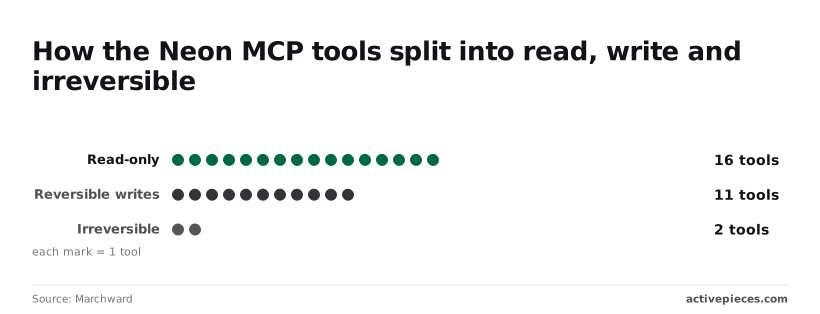
Most prompts can't hurt you, but the two tools that can't be undone sit one loose sentence away from the other 27.
Read the six mistakes that follow as settings to check before the first real prompt; each pairs an error with its consequence and the fix from Neon's docs.
The subsections group them by cause: where the connection points, who is allowed to approve, and what you actually read.
Connecting to production instead of a branch
I typed "clean up the unused columns on orders" into a chat box once. The only thing between that sentence and a live table was which connection string I'd pasted.
Point the server at your production branch and that's a real command on real data. Neon's docs describe the MCP server as a development tool, so point it at a branch and run migrations there first. A migration run directly, with no branch, has no rehearsal.
Leave an old connection string in your client settings and it keeps aiming at last quarter's target, the same harm stale config causes, so re-read it whenever a project changes.
** A migration run directly, with no branch, has no rehearsal.
Over-broad credentials and auto-approved tool calls
If you use a full-access API key, any tool call can use everything the account can do, including the 2 irreversible ones. Use the narrowest key the docs allow, ideally one tied to a single project.
Then leave manual approval on. Auto-approving tool calls removes the one moment you could've said no, and with 11 writes available, that moment is where a bad prompt gets caught.
Because plain language is vague and the assistant writes SQL from it, "Remove the test users" can become a delete with a loose filter. Read the statement before approving it, especially anything that writes.
Ignoring the docs' dev-only guidance is the same habit at a larger scale, because it treats a convenience as permission.
Confirm the connection string points at a branch, not production, and replace any full-access key with the narrowest one available. Switch auto-approval off for every tool.
Run every migration on a branch before it goes anywhere else, and read each generated statement before you approve it. Re-check your client config after any project change.
Where Activepieces fits around Neon MCP
Where the job repeats, Activepieces fits: a fixed query on a schedule, run over a connection string you control, on an MIT-licensed core, while Neon MCP stays for questions you type once.
When a scheduled workflow beats a chat prompt
I'd type "how many signups failed overnight, and post it for the team." Asked once, that's a fine chat question. Asked every morning, it costs tokens and attention each time, and it depends on someone remembering.
It also hands a language model fresh latitude over your database on every run.
A script holding a Neon connection string has code to run and nothing around it: no role, no tenant, no record of what it did.
Whatever reads your database on a schedule should be treated as a user, not as code, and Activepieces does that by putting the flow under the same RBAC, SSO and SCIM that govern your staff, so those controls decide which Neon connection it may use.
MoneyGram, Moneypenny, Alan and FundingSocieties run it that way. Its Postgres connector takes an ordinary Neon connection string, and the run detail view lists each tool call separately with its own input and output, so you can read the exact SQL afterward.
It doesn't replace Neon MCP.
Write the query once, review it once, and it just runs; MCP can't do that. Nobody can phrase a prompt differently on a tired Monday and change what it touches.
When the job is one-off and exploratory, it belongs in chat; anything repeated or unattended belongs in a workflow. The table shows which tool takes which job.
| Task | Neon MCP in chat | Activepieces Postgres workflow | Which suits it |
|---|---|---|---|
| Ad hoc schema question | Ask in plain language, get an answer | Overkill for a single question | Neon MCP |
| One-off branch migration | Works, on a branch you review | Nothing to repeat | Neon MCP |
| Nightly query | Someone has to remember to type it | A schedule trigger runs it, and a run is 1 credit however many steps it has | Activepieces |
| Threshold alert | A chat session can't watch anything | Run the query, then branch on the result | Activepieces |
| Results to Slack | Copy and paste by hand | A Slack step posts the output to a channel | Activepieces |
Where a person is present to read the output, chat is quicker. Where nobody is, you want something fixed. The split follows who is in the loop.
Setting up a Neon query on a schedule
Because the scoping happens before the workflow exists, the order matters.
- In Neon, create a dedicated Postgres role with read-only access to only the tables the report needs, and point that role at a development or read-replica branch if you can, not at production by default.
- In Activepieces, add a Postgres connection using that role's Neon connection string.
- Start the flow with a schedule trigger.
- Add a Postgres step with the query written out in full.
- Add a condition if you want an alert.
- Add a Slack step that posts the result.
If the role can only read, a mistake in the query can't write anything. That's the scoping the rest of this article is about, applied to a job that no chat prompt can reach.
Frequently asked questions
Whenever someone sets this up, five questions come up, and each has a short answer.
Does Gemini 4 exist, and does Neon MCP need it?
Gemini 4 is a Google model family, with Argon, Carbon, Hydrogen and Neon variants, but Neon MCP doesn't need it. The server speaks the Model Context Protocol, so any capable assistant that supports MCP can drive it.
If you search for one, expect results about the other, because the overlap in names is a coincidence: Gemini 4 Neon is a Google model, while Neon the database is a separate company's product.
Is Neon MCP safe to use on production data?
Not by default, and I wouldn't point it at production at all. The server acts with whatever access the connected account has, so a loosely worded prompt can run a real change.
Aim it at a throwaway branch with a restricted role, keep it read-only wherever you can, and make any schema change on production go through your normal review and migration process. That's the scoping the rest of this article covers.
Can I use Neon MCP on the free Neon plan?
Generally yes, and the free plan is the right place to try it. The server talks to your account, and a small project with a disposable branch is enough to learn how prompts turn into queries.
From time to time Neon changes plan limits, so check its pricing page before you rely on a particular allowance. For anything serious, the cost worth watching is the time you spend reviewing what the assistant did, not the plan fee.
How is Neon MCP different from a normal Postgres connection?
With a normal connection, the SQL you wrote is what runs, while Neon MCP lets an assistant decide what to run from a plain-language request. It also exposes project-level actions such as creating branches, which a plain connection string never could.
That convenience is also the risk. With a normal connection, you read the statement before it executes. With MCP, you can end up reading it afterward unless you set up approvals.
Neon MCP does work with clients other than Gemini. Because it follows the open protocol, any MCP-capable editor or assistant can connect to it, including ones built on Claude or OpenAI models.
The setup details differ by client, but the scoping advice doesn't: whichever assistant you pick, give it a branch and a limited role, not the keys to everything.
Related reading
References
Build it
Set this up in minutes.
No code required. Connect your accounts, and Activepieces runs it from there.
Start free Talk to sales