Gemini 4 Neon: Speed, Accuracy and Cost Tested

Nov 19, 20269 min read
Google DeepMind released Gemini 4 Neon. It's a Gemini 4 family model built for fast end-to-end tasks, the kind of work people increasingly chain together in automation tools like Activepieces. Everything here was checked against Google's announcement post the same day.
Google released Gemini 4 Neon on 2026-11-18
What Google announced about Gemini 4 Neon
Treat only three facts from the post as settled. Each one tells you something about where the model sits, and none of them tells you how it performs.
- Maker: Google DeepMind.
- What it's: a Gemini 4 family model aimed at fast, end-to-end tasks.
- Rollout date as stated: 2026-11-18, checked on 2026-11-19.
From the maker and the family you learn who stands behind it and where it sits in a lineup you may already know.
The "fast end-to-end tasks" framing tells you what Google wants it judged on, which is a claim to test and not a result.
You cannot tell from those three facts whether it costs less, runs faster or gets more answers right than the model your workflow uses today.
We rely on two sources here, Google's announcement and our own small test. The announcement covers what the model is and when it shipped, and the test covers how it behaved in our workflow.
We stay inside those two. Whichever builder your automations run in, the practical step's the same: take the maker's facts as given and let your own runs settle the rest.
Everything below works on Activepieces' free plan. Start without code or a credit card.
What matters when choosing new models
For an automation team, a new model matters only as one swappable step in a workflow. It earns its place on cost per task, speed per task and accuracy against a known answer.
Take the one spec the maker publishes for every contender, the context window, which is how much text a single step can read in one call.
According to the Google AI Studio docs, Gemini 4 Neon and Anthropic's Claude Fable 5.2 both hold 1,000 thousand tokens, so neither can take a longer document than the other.
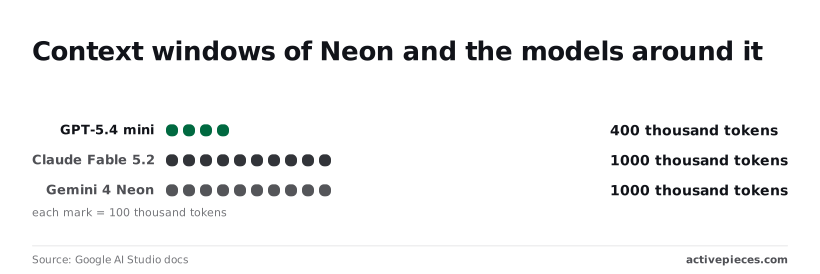
5 percent is all OpenAI's GPT-6.2 Sol offers at 1,050 thousand, and that is too small a gap to pick a model on. GPT-5.4 mini holds 400 thousand, so any task with inputs beyond that needs splitting before it reaches the step.
Because input size mostly won't separate these models, the choice rests on three questions you can measure in your own runs:
- What does one completed task cost, in dollars, across a batch of 100 real inputs?
- How many seconds does one task take from request to usable answer?
- What share of outputs match a result your team already knows is correct?
Run the same batch through the model already in the workflow and through Neon, and the three numbers will show whether a swap pays off.
What is measurably new in Gemini 4 Neon
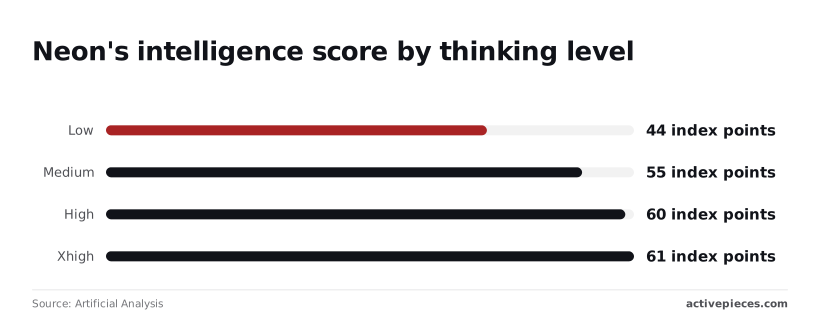
Three numbers are measurable today, and only one of them comes from outside Google: Artificial Analysis scores Neon at 61 index points at xhigh.
Gemini 4 Neon capabilities and published figures
On Google's own description, Neon is a Gemini 4 family model with frontier-level intelligence and fast end-to-end task completion for software engineering, knowledge work and science.
That's a claim, so your batch has to test it. The table shows where each figure comes from, and every "not stated" is a cell your own run must fill.
| Figure | Source link | Date |
|---|---|---|
| Capability claim | 2026-11-19 | |
| Intelligence Index 61 at xhigh | Artificial Analysis | not stated |
| Speed | — | — |
| $3 input, $0.15 cached, $15 output per 1M | 2026-11-19 |
Gemini 4 Neon thinking levels and price
The step from high to xhigh adds one point, so check whether that point's worth the extra reasoning on your bill.
If a document needed chunking on GPT-5.4 mini's 400K, it may fit in one request, since Neon's context window is 1M tokens.
Five times: that is how far output at $15 per 1M sits above the $3 input rate, so long answers drive cost more than long prompts.
Cached input at $0.15 is a twentieth of the input rate, which rewards a fixed prompt prefix reused across a batch.
Easier to see it running than to read about it: set it up free, no card.
How to use Gemini 4 Neon in Activepieces
A scheduled flow's the natural way to run the fixed-prefix batch the cached rate rewards, and Activepieces has a Google Gemini integration.
What shipped and how to use it
In the Activepieces catalog, the Google Gemini integration is listed as generating text, images, video and speech, with 11 actions and 0 triggers.
With no triggers, the integration can only do work once something else starts the flow, so you always pair it with a schedule or an app event.
We have no release date or pull request to cite. That means we can't say when Neon support landed, and the catalog page doesn't confirm that Neon appears in the model choices. Check the model field inside the action before you plan around it.
Picture an hourly Schedule trigger with the next-step picker open on spreadsheet apps, which is what the builder below shows. That's the shape of a batch job: a clock starts it and a sheet feeds it.
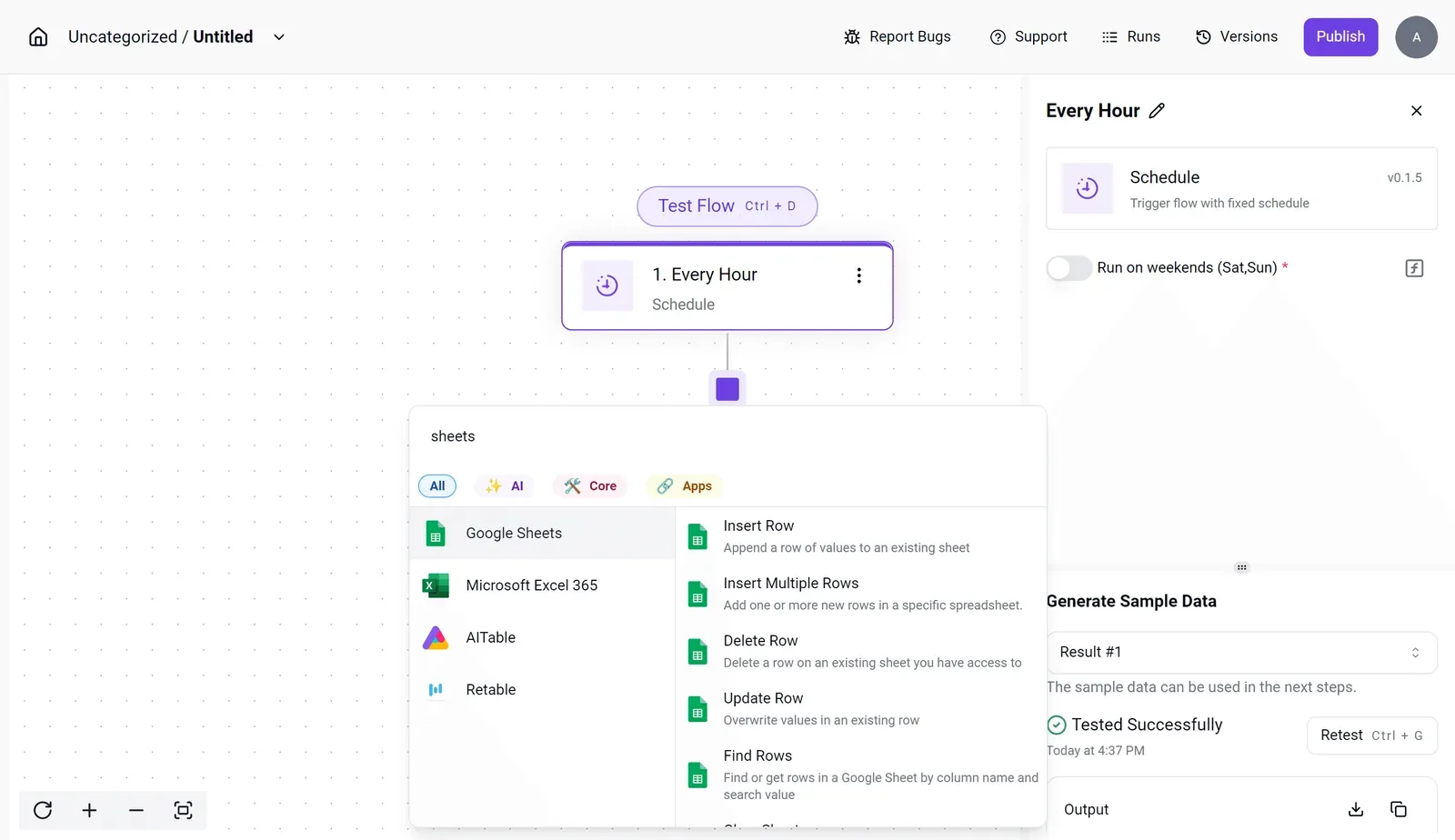
Build yours in this order:
- Add a Schedule trigger at the interval your batch needs.
- Add a spreadsheet step, such as Find Rows, to pull the items.
- Add a Google Gemini action, connect your key, and pick Neon if it's listed. If it isn't, leave your current model in place.
- Write results back with Update Row.
Run the same sheet through both models and compare the outputs side by side.
MoneyGram, Moneypenny, Alan and FundingSocieties run Activepieces in production.
Gemini 4 Neon vs GPT-5.4 mini results
We did exactly that on 2026-11-19: three automation tasks, both models, each answer checked against a known correct one.
The three tasks and the test setup
Sorting a support ticket, pulling fields from an invoice and summarising an email thread: those were the tasks. Both models were called through OpenRouter, a service that puts them behind one interface, so the harness was identical.
We used default settings, which means Gemini 4 Neon reasons before it answers. That choice matters for speed, as the results below show.
Three tasks is a small sample, so read this as indicative, not as a benchmark.
Results, speed and cost per task
Even though it got all three right and GPT-5.4 mini got two, Neon took longer and cost far more per task, so the accuracy gain has to be worth the price.
Neon got 3 of 3 correct with a median of 6.4 seconds and $0.0083 per task. openai/gpt-5.4-mini got 2 of 3 with a median of 1.0 second and $0.000153 per task.
If a person is waiting on the answer, the flow will feel it, because Neon was about six times slower. It was also roughly 54 times more expensive: about $8.30 per thousand tasks against about $0.15.
One extra correct answer in three is a reason to test further on your own sheet, not a verdict. What follows is deciding how much a wrong answer costs your team.
What Gemini's cost and speed mean
Priced against what a wrong answer costs you, Gemini 4 Neon's the expensive, slower option. It cost far more per task and ran about six times slower than GPT-5.4 mini in our test.
Google's launch post lists output prices per million tokens of $4.50 for GPT-5.4 mini, $10 for GPT-6.2 Sol, $15 for Gemini 4 Neon and $40 for Claude Fable 5.2.

Neon therefore sits mid-pack, at more than three times mini's price and well under Fable's.
Roughly 54 times: that's the measured cost gap, far wider than the 3.3 times the list prices imply. Price per token isn't the whole bill, because what you pay also depends on how many tokens each task consumes.
At 1,000 tasks a day, that's about $8.30 against about $0.15.
Then there is the speed gap: a person waiting on a 6.4-second answer notices it, and a one-second answer disappears into the work.
Neon only earns that premium if it's meaningfully more accurate on the tasks where mistakes cost you.
What to watch as Neon launches
Watch for any change to Neon's price or documented behavior, because either one moves the premium you just weighed against accuracy. Then rerun one real workflow on your own data.
**Neon only earns that premium if it's meaningfully more accurate on the tasks where mistakes cost you.
On 2026-11-18 Google released Gemini 4 Neon and positioned it within the Gemini 4 family. Beyond that, we have only the maker's own description, so treat claims about speed or accuracy as Google's, not ours.
Next month, a cost comparison you run today may not hold, because launch-week pricing and limits are the likeliest things to shift.
Gemini 4 Neon sources and when checked
Three pages are worth a standing slot in your Monday checklist, and each tells you something different.
Check Google's announcement page for edits to the capability claims or new caveats added after launch, which would change what you can assume. Check Google's pricing page for any change to the per-token rates or tier names, since that changes your cost per run.
Check the docs changelog for new model versions, deprecation notices or behavior changes, any of which could break a prompt you already tuned.
This week, pick one workflow where a wrong answer costs you. Run it through Neon and your current model on the same inputs, and have the person who owns it grade the outputs.