
GitHub Copilot Pricing 2026: Plans, Credits and Costs

Oct 28, 202616 min read
Pay the monthly fee and all you have bought is a seat.
Copilot comes in several plans, and what you actually spend depends on how many AI credits your work uses, which is easy to miss if you only ever count the requests your team makes by hand and not those fired off by automations built in tools like Activepieces, so compare plans by allowance and overage, not by headline.
GitHub Copilot pricing today in one table
Direct answer and check date
GitHub Copilot is GitHub's AI coding assistant. It suggests code as you type, answers questions in chat, and can take on multi-step tasks in your editor and on GitHub.
I wrote this on 28 October 2026. I'm leaving dollar amounts out on purpose, because quoting a price I haven't confirmed would be worse than leaving it blank. Read the exact figures off GitHub's pricing page before you commit.
The table shows:
- Who each plan is for
- How it's billed
- Where the usage ceiling sits
Take from it that the plans split into two groups: individual plans (Free, Pro, Pro+ and Max) and organization plans (Business and Enterprise). Within each group, the main thing you buy is a bigger allowance of premium requests.
| Plan | Who buys it | Billing | Premium requests and chat | Key inclusions |
|---|---|---|---|---|
| Free | One person | No charge | Smallest allowance, capped | Basic completions and chat for trying it out |
| Pro | One person | Individual subscription | Larger monthly allowance, extra requests billed | Full completions and chat, agent features |
| Pro+ | One person | Higher individual subscription | Bigger allowance for heavy model use | Wider model choice |
| Max | One person | Top individual tier | Largest individual allowance | Built for daily agent-heavy work |
| Business | A team | Per seat, per month | Per-seat allowance, admin-managed | Team policies and central management |
| Enterprise | A company | Per seat, per month | Per-seat allowance, admin-managed | Business features plus deeper organization controls |

Prices and plan limits checked against docs.claude.com and claude.com and openai.com and gemini.google on October 27, 2026.
Read the allowance column first. A plan that runs out mid-month turns into a metered bill, which is where most surprises come from.
How Copilot premium requests and model multipliers work
Use a more capable model, such as for an agent task or a chat with a top-tier model, and that is one premium request. Each model carries a multiplier, so a heavy model can count as several requests at once.

The cheapest way to burn through your allowance is to leave the most expensive model switched on for routine work.
If you are running this arithmetic for your own team, see what the same workload costs on Activepieces.
What each Copilot plan includes and leaves out
Match the plan to how much work you hand the model:
- Free and Pro cover occasional help
- Pro+ and Max cover agents running all day
- Business and Enterprise add the controls a team needs
When a steady builder hits Free's ceiling, the work stalls mid-task. Free is a trial, not a working plan, because its allowance is that small.
Pro is where a solo developer who uses Copilot for completions and the odd chat can stay without worrying about the meter.
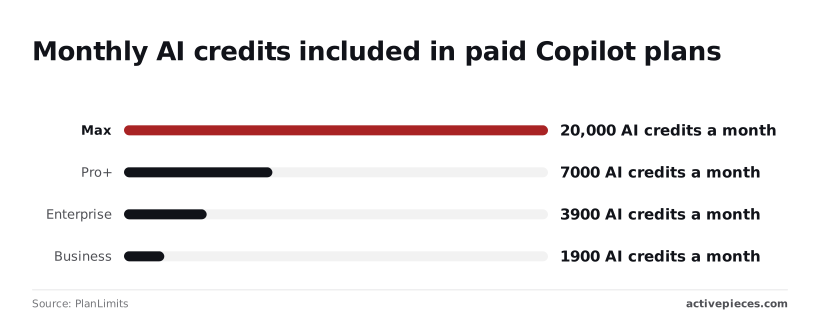
Run long agent sessions and credits become the whole story. Pro+ includes 7,000 AI credits a month, so there is real room before overage charges start.
Max includes 20,000, nearly three times that, which matters only if your agents run most of the working day. Below that level, Max is paying for headroom you won't touch.
Copilot Business and Enterprise pricing for organisations
At 1,900 credits a month for Business and 3,900 for Enterprise, roughly double, both tiers sit below Pro+'s 7,000, so an individual on Pro+ gets more credit than an Enterprise seat.
You aren't buying credits at these tiers. You're buying admin controls, data-handling terms and indemnity against IP claims, and heavy users on a team should expect to pay for extra usage.
At 1,900 credits a month for Business and 3,900 for Enterprise, roughly double, both tiers sit below Pro+'s 7,000, so an individual on Pro+ gets more credit than an Enterprise seat.
The fit, by user type:
- A hobbyist belongs on Free, and the deciding limit is the small allowance, which is fine for trying it out.
- A solo developer belongs on Pro, because it covers everyday completions and chat at the lowest paid tier.
- An agent-heavy developer belongs on Pro+, where the 7,000 credits decide the fit.
- A team belongs on Business, where central admin controls and data handling matter more than credits.
- An enterprise belongs on Enterprise, where the larger 3,900-credit allowance sits alongside the strictest controls.
What Copilot costs at realistic monthly usage
What moves your bill is which model does the work and how much text it writes back, far more than the plan name.
Take from it that the fee is the flat part, and overage is where the bills pull apart.
Start with the rates, because those workloads differ in model choice. Output is the expensive side of every model.
Asking questions and accepting suggestions, a hobbyist can stay on a light model such as GPT-6 Luna; the older GPT-5 mini was listed at 0.25 to 2 dollars per million tokens, input to output.
That's the cheapest rate in the set, so occasional use rarely strains the allowance and the bill stays at the plan fee.
Copilot Pro+ cost for daily agent-mode use
Because it plans and edits files on its own, agent mode writes far more than it reads. Haiku 5.5 costs 0.10 to 0.50 dollars per million tokens for prompts up to 100K tokens, and Sonnet 5.5 costs 2 to 10.
Both charge several times as much for output as for input, so a long agent session costs mostly what it writes.
At 4 to 20 dollars, Opus 5.5 costs roughly sixteen times the GPT-5 mini input rate and ten times its output rate.
A developer who defaults to Opus all day will see the credits run out well before the month does, and overage becomes the larger part of the bill.
Twenty-seat team on Business vs Enterprise
Twenty seats means each person's habit multiplied by twenty. If most seats stay on the cheaper models and a few reach for Opus 5.5, the plan fee still dominates.
If everyone defaults to the top model, overage arrives across all twenty seats at once. Before choosing between Business and Enterprise, check which model each person actually uses, because that decides the bill more than the tier does.
Uncovering costs and limits that trigger upgrades
Expect to be pushed up a tier by one of three limits: premium requests running out, Enterprise requiring a separate GitHub plan, or free access depending on eligibility you can lose. Each starts with the model choice, because the heavier models count for more.
Copilot premium request limits and overage budgets
Per GitHub's documentation, each plan includes an allowance of premium requests, and different models consume it at different multipliers. A heavy reasoning model can use up the allowance several times faster than a light one.
Once the allowance is gone, one of two things happens. If an administrator set an overage budget, you keep working and pay per request.
If no budget exists, premium models stop until the allowance resets. Doing nothing therefore costs you a stalled afternoon, and setting a budget costs you an open-ended bill. Set a ceiling on purpose.
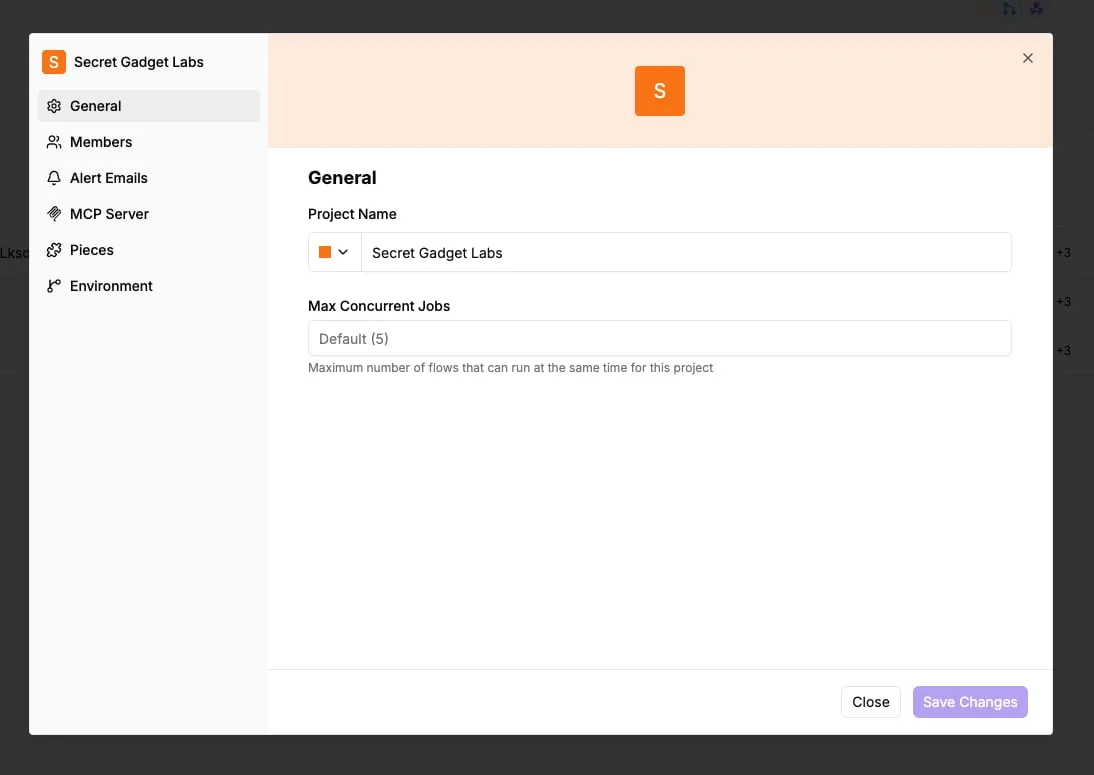
Look at a settings screen from a different tool and the same kind of default appears. Its concurrency field reads "Default (5)", a cap you inherit unless you go looking.

In Copilot too, the ceilings sit in settings, and nobody chooses them until the work queues up behind them.
The automation you build around Copilot shouldn't punish you for splitting work into smaller steps.
Activepieces' pricing page lists 1 credit per flow run, so a ten-step flow costs the same as the two-step shortcut it replaced, where Zapier bills per task and Make per module.
Copilot Enterprise requirements and free plan eligibility
You cannot buy Copilot Enterprise on its own. GitHub's documentation says it requires an organization on GitHub Enterprise Cloud, so the real price is the Copilot seat plus the platform seat underneath it.

If your team is on a lower GitHub plan, the upgrade is two purchases, and the platform one is easy to miss when comparing headline prices.
If you have free access, including Pro for verified students, teachers and open-source maintainers, it depends on GitHub continuing to recognize you as eligible.
When verification lapses or your status changes, the free plan ends and you go back to paid pricing. Check how your access is verified before building a workflow on it.
Worth checking against a plan that does not meter every step: one credit covers a whole run on Activepieces.
Comparing Copilot with Cursor, Claude Code, and Windsurf
Even when your access checks out, that is only half the decision, because all four tools meter your work differently, and Copilot's flat monthly fee is the one that hides its meter best.
Price and allowance table
Read the table below for how each plan charges, what the monthly fee actually buys, and how tightly it ties you to one editor.
Take from it that every plan is a flat fee plus an allowance, and that the real difference is what happens when the allowance runs out. I've left exact dollar figures out because they change often.

Read the vendor's pricing page on the day you subscribe.
| Plan | Monthly price | Included usage | How overage is charged | Editor lock-in | Check date |
|---|---|---|---|---|---|
| Copilot Pro | Flat monthly fee | A monthly allowance of premium requests | Extra premium requests billed individually, if you allow it | Low: works inside several common editors | Vendor page, day you subscribe |
| Cursor Pro | Flat monthly fee | A monthly allowance of model usage | Extra usage billed at model rates if you turn it on | High: it is its own editor | Vendor page, day you subscribe |
| Claude Pro/Max with Claude Code | Flat monthly fee, higher tier for heavier use | Usage limits that reset on a schedule | Wait for the reset, or move up a tier | Low: runs from the terminal and alongside editors | Vendor page, day you subscribe |
| Windsurf Pro | Flat monthly fee | A monthly allowance of credits | Buy more credits | High: it is its own editor | Vendor page, day you subscribe |
Nobody on the first two rows has a hard stop. You have a meter that keeps running.
Where Copilot is cheaper and where it isn't
When your work is light, short exchanges and completions, Copilot is cheaper, because those barely touch the premium allowance.
It costs more when you lean on agent-style sessions, where one task fires off many premium requests and the allowance drains in days. Doing nothing about that means a surprise bill or a stalled afternoon.
Count your heaviest week of requests first, then pick the plan.
Automating work around Copilot with Activepieces
Once you know your heaviest week, the next question is how much of the surrounding busywork is landing on Copilot's meter when it never needed to.
Triage, notifications and usage reporting are routine workflow jobs, and Activepieces, an MIT-licensed automation platform with 746 integrations including GitHub, can handle them without spending a single premium request, so even free-tier users get these essential automations.
GitHub chores worth automating around Copilot
None of these three chores needs an AI model to do the thinking, yet they tend to eat a team's attention around Copilot.
- Issue triage: when someone opens a GitHub issue, a workflow can label it, assign it, or route it by rules you set, so a person isn't sorting the queue by hand.
- Pull request notifications: a workflow can post to a Slack channel when a pull request opens or needs review, so reviewers see it without checking GitHub all day.
- Usage-alert reporting: a scheduled workflow can send a weekly usage-report message to Slack, so a spike in premium requests gets noticed before it shows up on the invoice.
A GitHub issue is opened, a triage step sorts it, and the flow then splits into a Slack channel message and a weekly usage-report message.
Copilot sits beside the flow as its own box, connected to nothing. Take from that the division of labor: the automation moves information between people, and Copilot stays where you use it to write and review code.
That separation matters for the bill. Rule-based sorting and messaging done inside Copilot would be a use of your allowance for work a plain workflow does reliably.
Activepieces doesn't replace Copilot, and it doesn't do what Copilot does. It takes the chores off the same meter, running from an MIT-licensed core with unlimited flows on every plan, free included.

Pricing automation workflows by step
Running the triage, notification and reporting flows above on Activepieces is priced on its own plan, separate from anything you pay GitHub. A triage flow with a label, an assignment and a Slack post costs the same 1 credit as a single step.
The free plan includes 1,000 credits a month and unlimited flows.
Set those 1,000 credits against the number of runs you expect, because the cost of doing nothing here is real: someone's hours spent sorting issues by hand, and premium requests spent on work that never needed them.
Checking your Copilot plan on Monday morning
Doing nothing costs you in the same two ways, paying for seats nobody opens and for premium requests nobody needed, so start by reading what last month actually looked like. Five steps, in this order, will tell you what to keep and what to cut:
- Download last month's premium-request usage report from your billing page, so you're working from what happened rather than what you remember.
- Set the overage budget, the spending cap for requests beyond your plan's allowance, so a busy week can't turn into a surprise invoice.
- Match seats to actual use by comparing each person's requests against the plan they sit on.
- Downgrade idle seats, or remove them, since a seat that logged almost nothing is a fee for nothing.
- Re-check the pricing page before renewal, because allowances and prices can change between one term and the next.
What you do with the results depends on which plan you're on.
On Free and Pro, if the report shows you rarely touch the premium models, stay put. If you keep hitting the allowance, compare the cost of overage against the next tier before you pay it request by request.
Unless your report shows steady, heavy use of the premium models, Pro+ does not pay off. If your usage looks like Pro with a few busy days, set the budget and drop back.
On Business and Enterprise the waste hides in seats. Sort the report by person, and move the light users down or off. Keep the overage budget set at the organisation level, so one person's long agent sessions don't drain a shared pool unnoticed.
Frequently asked questions
After the first surprise bill, most budget questions turn up, and these are the ones the sections above leave open.
Is GitHub Copilot free for students and open-source maintainers? Yes, for people who qualify. GitHub gives verified teachers and maintainers of popular open-source projects free access to the Pro plan, while verified students get the free Copilot Student plan.
You apply and GitHub checks eligibility, so don't assume approval. Keep a paid plan or the free tier as a fallback until you hear back.
Does GitHub Copilot offer a free trial? GitHub has offered a limited free trial of the individual paid plan, and it also has a free tier with tight monthly limits.
Trial terms change, so read the sign-up page before you enter a card. If you're testing, run your heaviest real task during the trial. A light afternoon of autocomplete tells you nothing about premium request burn.
Can I pay for Copilot annually to save money?
Individual plans can be billed yearly, and that usually works out cheaper than twelve monthly payments. The saving only covers the base price, though.
Extra premium requests are billed on top either way, so a yearly plan does nothing for a heavy agent user who keeps exceeding the allowance. Pay yearly only once a few months of bills show your usage is steady.
What happens when I run out of premium requests?
It depends on the overage budget. With no budget set, the costlier models stop working until the allowance resets, and you're left with the included ones.
With a budget set, requests keep going and you're billed per request until you reach the cap. Doing nothing means either a stalled afternoon or an open-ended bill, so set the budget on purpose.
Is Copilot Business worth it over individual Pro plans? For a team, usually yes. Business gives you one invoice, central control over which models people can use, and the organisation-level budget described above.
Separate Pro plans leave you with several small, unmonitored allowances. For one person working alone, Business adds cost without adding anything you'd use.
Related reading
References
Running the numbers
See what the same workload costs here.
Free forever plan, and every paid plan self-hosts at no extra cost.
See pricing Talk to sales