
Google Analytics Pricing in 2026 Is Free Until You Hit 360

Nov 24, 202614 min read
According to Kasatria, standard Google Analytics 4 is free, and teams that pipe its data into other tools, such as through a workflow builder like Activepieces, pay nothing extra for the analytics itself.
Analytics 360, the paid tier, is sold on a quote with no public list price, as checked on 24 November 2026.
The bill most teams meet is a set of limits on what the free product keeps, shows and lets out.
What Google Analytics 4 is
Every interaction, from a page view to a purchase, is recorded as an event with parameters attached in Google Analytics 4, Google's event-based measurement product for websites and apps. Reports are built from those events.
The free tier has no seat charge and no per-event invoice, so a small business can run it indefinitely without a budget line. The cost appears when a team needs something the standard property restricts. Those restrictions are:

- How long Google retains detailed event data, which decides whether you can compare this year's behavior against last year's in custom analysis.
- Thresholds that withhold rows in small audiences, so a report can come back with gaps exactly where the segment is most interesting.
- Sampling on large or complex queries, which means two analysts can get slightly different answers to the same question.
- API quotas, which cap how hard a dashboard or script can poll before Google refuses requests.
- Export to a warehouse, which determines whether raw events leave Google at all and how completely.
How we verified Google Analytics pricing figures
I read each limit in this article on Google's own documentation and pricing pages on 24 November 2026, and the later sections cite the page behind every figure. Google negotiates Analytics 360 pricing per customer, so Google publishes no monthly amount for it.
Of all the limits teams route around, export is the one they route around most often.
Activepieces counts a flow run as 1 credit however many steps it has, so a ten-step export into a spreadsheet or CRM costs what a two-step hack would, where Zapier bills per task and Make per module.
Compare all Google Analytics plans, prices and limits
Put the two plans side by side and the clearest difference is the per-property ceiling on dimensions and audiences: standard GA4 costs nothing, and Analytics 360 has no published price, which means you're comparing on ceilings.
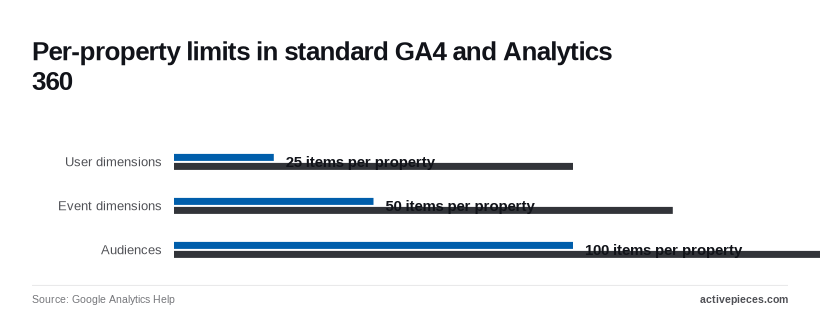
Per property, according to Google Analytics Help, it allows:
Once a property reaches the cap, adding a new dimension means retiring an old one.
Analytics 360 (quoted)
Look at Google's help page and you find 360's limits but no price, so any cost comes from a sales quote, not a rate card.
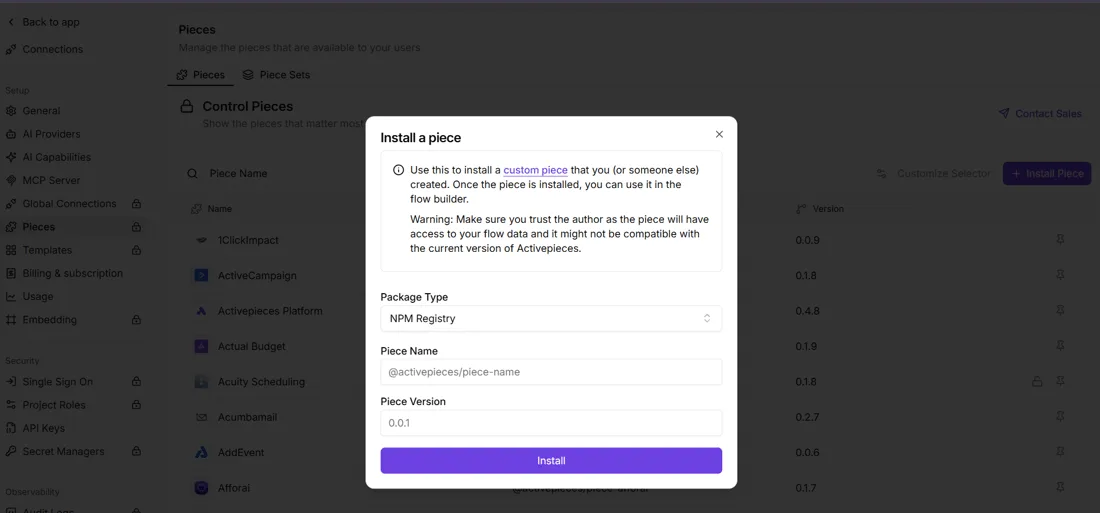
In return, 360 raises user dimensions to 100, event dimensions to 125 and audiences to 400, which means you can support more complex tracking. That's four times the user dimensions, two and a half times the event dimensions and four times the audiences.
Google Analytics limits by plan
Read the bottom three rows as the headroom you gain, and the price row as the reminder that the upgrade is a negotiation, so you can push back on the initial ask.
| Item | Standard GA4 | Analytics 360 |
|---|---|---|
| Price | $0 | Quoted by Google; no list price on the page cited |
| User dimensions per property | 25 | 100 |
| Event dimensions per property | 50 | 125 |
| Audiences per property | 100 | 400 |
Prices and plan limits checked against docs.claude.com and claude.com and openai.com and gemini.google on November 23, 2026.
Before opening a sales conversation, check your own counts, since most properties never come near these ceilings.
If you are running this arithmetic for your own team, see what the same workload costs on Activepieces.
What Google Analytics costs at real traffic sizes
Whatever the size, the GA4 property costs nothing. What rises with traffic is the BigQuery bill, the labour spent working around limits, and eventually the case for Analytics 360.
At this scale the monthly bill is zero. The free export to BigQuery, Google's cloud data warehouse, fits comfortably inside its free allowances for storage and queries, so a small site rarely sees a charge.
The cost is time: someone has to configure events and conversions properly, and that effort is the only real spend.
Google Analytics costs for mid-size products
Here the property's still free, but BigQuery becomes a line item. Storage grows with every day of exported events, and each dashboard refresh or analyst query is billed by data scanned.
Budget for someone to build partitioned tables and scheduled summary tables, which keep that bill predictable. Without that, a single careless query over the full history is the usual source of a surprise invoice.
Google Analytics costs for high-volume businesses
At this volume the export is where the pressure lands. The standard property caps how many events the daily export carries, so a business above that line loses completeness in the warehouse, and every downstream number inherits the gap.

When the export cap bites, that is the practical trigger for pricing 360, which raises the limits but is sold on a contract quote rather than a public rate. Treat the quote, plus BigQuery, as the true comparison against a paid alternative.
Hidden limits of free Google Analytics
None of the limits below appear on an invoice, yet they decide whether a report can be trusted and how much engineering time goes into the property.
Seven things make up the hidden cost of the free tier: retention, thresholding, sampling, "(other)" rows, custom dimension caps, the export cap and implementation labour.
Data payment for free Google Analytics
Even with a named owner and a workaround for every known limit, the sharpest critic argues the price was never zero, only paid in a currency the invoice doesn't list.
The data-as-payment objection
Because you hand over behavioral data, Google Analytics 4 costs nothing, and that trade carries three bills of its own.
Even with a named owner and a workaround for every known limit, the sharpest critic argues the price was never zero, only paid in a currency the invoice doesn't list.
First, sampling and thresholding degrade the numbers you make decisions on. Sampled explorations return estimates, so a small conversion lift may be noise.
Thresholding withholds rows when a report could identify individual users, so the segment you most wanted to inspect may be the one that vanishes.
Second, the compliance paperwork lands on you, not on Google. Collecting analytics on EU visitors means consent banners, a lawful basis, and a defensible answer on cross-border transfers. European regulators have scrutinized these transfers, and the exposure sits with the site owner.
Third, caps on retention, quotas and export push large sites toward Analytics 360, where the price is a negotiated contract rather than a rate card.
Why free Google Analytics still suits most teams
A business with modest traffic rarely sees sampling distort a decision, because the standard reports are unsampled and the quotas are sized well above its needs. Thresholding mostly bites when you slice small audiences, which you can avoid by choosing coarser dimensions.
Any analytics tool that sets identifiers or processes visitor data needs the same consent and transfer review, so compliance work is not unique to Google.
Weigh that against a paid platform, whose recurring bill buys relief from limits this team may never reach.
Under two conditions the claim fails. At very high event volume, quotas and export limits become daily constraints, and 360 or a warehouse-first alternative is the rational purchase.
Where strict data residency is a legal requirement, a free tool whose processing you can't pin to a jurisdiction isn't a bargain at any price. Outside those two cases, free holds.
Worth checking against a plan that does not meter every step: one credit covers a whole run on Activepieces.
How Google Analytics pricing compares to alternatives
On price GA4 wins outright: it costs $0 at 100k pageviews, and the cheapest paid alternatives start at $15 to $42 a month, so GA4 remains free at the volume most businesses operate within.

The table shows that gap, and the price you pay for ownership or a lighter product.
| Tool | Monthly price at 100k pageviews |
|---|---|
| GA4 | $0 |
| Fathom | $15 |
| Plausible | $19 |
| Matomo Cloud | $42 |
Per Global Rating, the spread between the cheapest and dearest paid option is $27 a month. A team that picks one of these for data-ownership reasons isn't making a budget decision at this size.
At $19 a month, Plausible's entry plan buys a clean, cookie-light dashboard with no sampling to explain to stakeholders.
Matomo Cloud's $42 is more than double that, so it has to earn the premium through the controls you need. Both beat GA4 where you must answer to a privacy reviewer about who holds the data.

At the top end, the higher Plausible plans matter more. Per Replastats, Starter is $169 a month, Growth $254 and Business $339, so each tier upgrade costs roughly eighty-five dollars more than the one before.
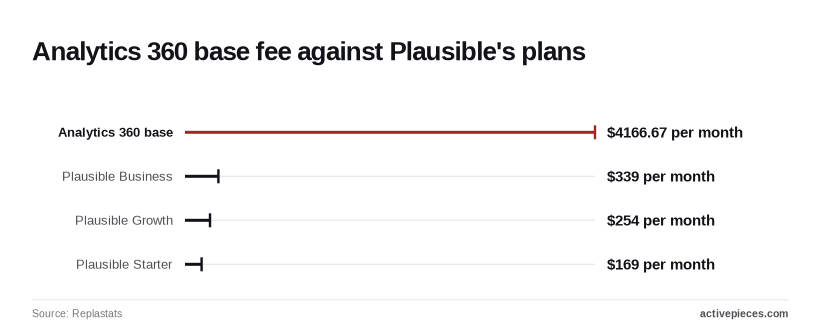
According to a 360 reseller order form from the Orange County Comptroller, Analytics 360's base fee is $4,166.67 a month. Even Business costs roughly one-twelfth of that. A team that moves to 360 only to escape GA4's limits should price Plausible's top plan first.
PostHog as a Google Analytics alternative
Because it's a product analytics tool, not a pageview counter, PostHog sits apart from the others. I have no verified price for it at 100k or 10M events, so I won't rank it against the figures above.
Where PostHog beats GA4 is in tying events to individual users' behavior inside an application. If that's your need, price it from PostHog's own page and compare it to GA4's $0 plus the cost of your workarounds.
Compare Adobe Analytics with 360, not with free GA4. I have no verified Adobe price, so the only fixed comparison point is 360's $4,166.67 monthly base fee. Ask Adobe for a written quote against that number before treating it as the enterprise default.
What to do about Google Analytics costs
Work through six checks in order, and pay for 360 or an alternative only if a limit you measured is still blocking a decision after the free fixes.
- Read your event volume. Open the last full month of event counts in GA4. If you're far below the quota and export ceilings, the later limits are unlikely to bind and you can skip most of the rest.
- Set retention to 14 months. In Admin, under data settings, change event data retention. The default is shorter, so until you change it, explorations quietly lose the history you need for year-over-year comparisons.
- Test thresholding. Run your most-used report with and without a narrow filter, and compare the totals. Rows that disappear mean small segments are being hidden, so try switching the reporting identity before concluding you need a paid tier.
- Decide on BigQuery export. Linking it keeps raw events outside the retention window and removes most reporting-interface limits. It also moves cost into Google Cloud, so link it only if someone will query the data.
- Set a Cloud billing alert. Create a budget with email notifications on the project that receives the export. A runaway query then shows up as a warning rather than as a surprise invoice.
- Apply the rule. If steps 1 to 5 leave a measured limit that blocks a decision, such as data you can't export or segments you can't see, price 360 and one alternative against it. If nothing is blocked, stay on standard GA4.
Google changes quotas and defaults without much notice, so confirm the current figure on the vendor page before you commit budget.
What Activepieces does about this
The limit teams most often work around is export, and that is where Activepieces fits.
It is an automation tool that moves data between GA4, a warehouse, a spreadsheet or a CRM, and it counts a flow run as 1 credit however many steps the flow has. A ten-step export costs what a two-step hack would.
Zapier bills per task and Make per module, so on those tools the same workaround grows more expensive with every step you add.
That matters for the argument here. If the blocker is a small, specific gap, such as a daily report pulled through the Data API or a summary pushed to a sheet, a flow can often close it without a 360 contract.
It will not lift a property cap or raise a quota, so it does not replace 360 when the limit is a ceiling on the property itself.
It does let you test whether the limit you measured is really blocking a decision before you ask Google for a quote.
Every workaround has upkeep, and Activepieces is built so that upkeep stays with you. The source is open on GitHub, and a self-hosted install keeps the flows and the credentials they use inside your own infrastructure. That is relevant to the residency question above.
On the Integrations page an administrator can add a package by registry, name and version, so a connector your team needs does not wait on a vendor.
I have no verified Activepieces price or named customer to put beside these claims, so check the credit count and the licence terms on the product's own pages before you budget around them.
Frequently asked questions
Is Google Analytics 360 worth it for a mid-size company?
Usually not, unless a specific limit in standard GA4 is already blocking work you can name.
Standard GA4 covers most mid-size needs, so 360 pays off only when you hit its ceilings: sampling on large queries, quota exhaustion, short retention, or a need for a contractual SLA.
Budget against a sales quote, since Google doesn't publish a 360 price. Before you ask for one, write down which limit failed and what it cost you.
Is Google Analytics legal to use in the EU?
It can be, but legality depends on how you configure and govern it, not on the product alone.
Several European data protection authorities ruled against Universal Analytics over transfers of personal data to the United States. GA4 changed its IP handling and Google has since adopted new transfer frameworks.
You still need a lawful basis, a consent mechanism where required, and a data processing agreement. Have counsel review your setup, because regulators interpret this differently by country.
Can I export Google Analytics data without paying?
Yes, the BigQuery export link is available to standard GA4 properties without a Google Analytics fee. The catch is that BigQuery bills separately for storage and queries, and streaming export adds cost beyond the daily batch.
Through the interface and the Data API, exports are also free, but they're subject to quotas and thresholds. If you need unsampled, row-level data, the BigQuery route is the one to plan around, along with a cost alert on the project.
What happened to Universal Analytics and its pricing?
Google retired Universal Analytics and replaced it with GA4, which is why older guides and price comparisons no longer apply. Standard Universal Analytics was free, and its paid tier was Analytics 360. That paid tier carried over as GA4's 360 edition.
Anything you didn't export before the shutdown may be unavailable, since historical data from the old system was not migrated automatically. If you inherit an old account, check what remains before you assume it's recoverable.
Related reading
References
Running the numbers
See what the same workload costs here.
Free forever plan, and every paid plan self-hosts at no extra cost.
See pricing Talk to sales