
Freepik MCP Server: How to Install It for Claude

Nov 13, 202612 min read
The Freepik MCP enables a Large Language Model (LLM) to treat a massive external media library, which can be further automated through workflows built with Activepieces, as local, functional memory rather than a disconnected database.
The Freepik MCP is an implementation of the Model Context Protocol that allows AI agents to search, preview, and download millions of high-quality images and vectors directly within their native workflow.

By implementing the Model Context Protocol (MCP), a standardized open standard for connecting AI models to data sources, you can grant an agent the ability to browse, select, and retrieve high-resolution files without manual uploads.
Bridge LLMs with creative assets
The role of Model Context Protocol in AI creative work
Instead of writing bespoke integration code for every new tool an AI uses, developers can now rely on the Model Context Protocol as a universal interface.
In a creative context, Docs notes that this protocol allows a model like Claude Fable 5.2 to maintain a persistent state while navigating visual repositories.
The protocol uses a standardized client-server architecture to ensure that the LLM understands the specific capabilities and schemas of the creative toolset immediately upon connection.
According to Docs, the diagram below illustrates the flow. A user prompt enters the system, Claude Sonnet 5.5 processes the intent through the Model Context Protocol plug-in, and the engine queries the Freepik library to return specific assets.
What assets the Freepik MCP can actually access
Direct programmatic access to a vast repository of professional-grade visual content is provided by the Freepik MCP. This includes vector graphics and icons for scalable interface design, high-resolution stock photography for marketing layouts, and PSD templates for structured document editing.
How the connection differs from a standard API call
In contrast to standard REST APIs, the MCP connection allows the model to self-correct its queries based on the results it sees.
A platform that runs as a per-project MCP server allows Claude, Cursor, or Windsurf to build and modify these automation flows directly through the open protocol.
By providing the model with full CRUD control rather than a static chat interface, your coding assistant becomes your automation builder, where every change is visible in the tool calls and run traces.
- The model receives a high-level creative brief.
- The MCP exposes the Freepik search tool as a native function to the model.
- The model executes iterative searches, refining tags based on visual descriptions until the asset matches the brief's aesthetic.
- The model pulls the asset into the context window for further transformation or placement.
This takes minutes, not a project: automate it in Activepieces free.
Setting up the Freepik MCP in Claude Desktop
Configuring the Model Context Protocol (MCP) within Claude Desktop requires modifying the local configuration file. This defines the specific executable and environment variables the model needs to communicate with external APIs.

Obtaining your Freepik API credentials
Accessing the visual library through an automated agent requires a dedicated API key from the Freepik Developer Portal, which acts as the authentication token for every asset request.
Configuring the mcp-server-freepik environment
Adding a JSON block to the claude_desktop_config.json file finalizes the integration and tells the application how to launch the Freepik server process.
Configuring the Node.js client setup
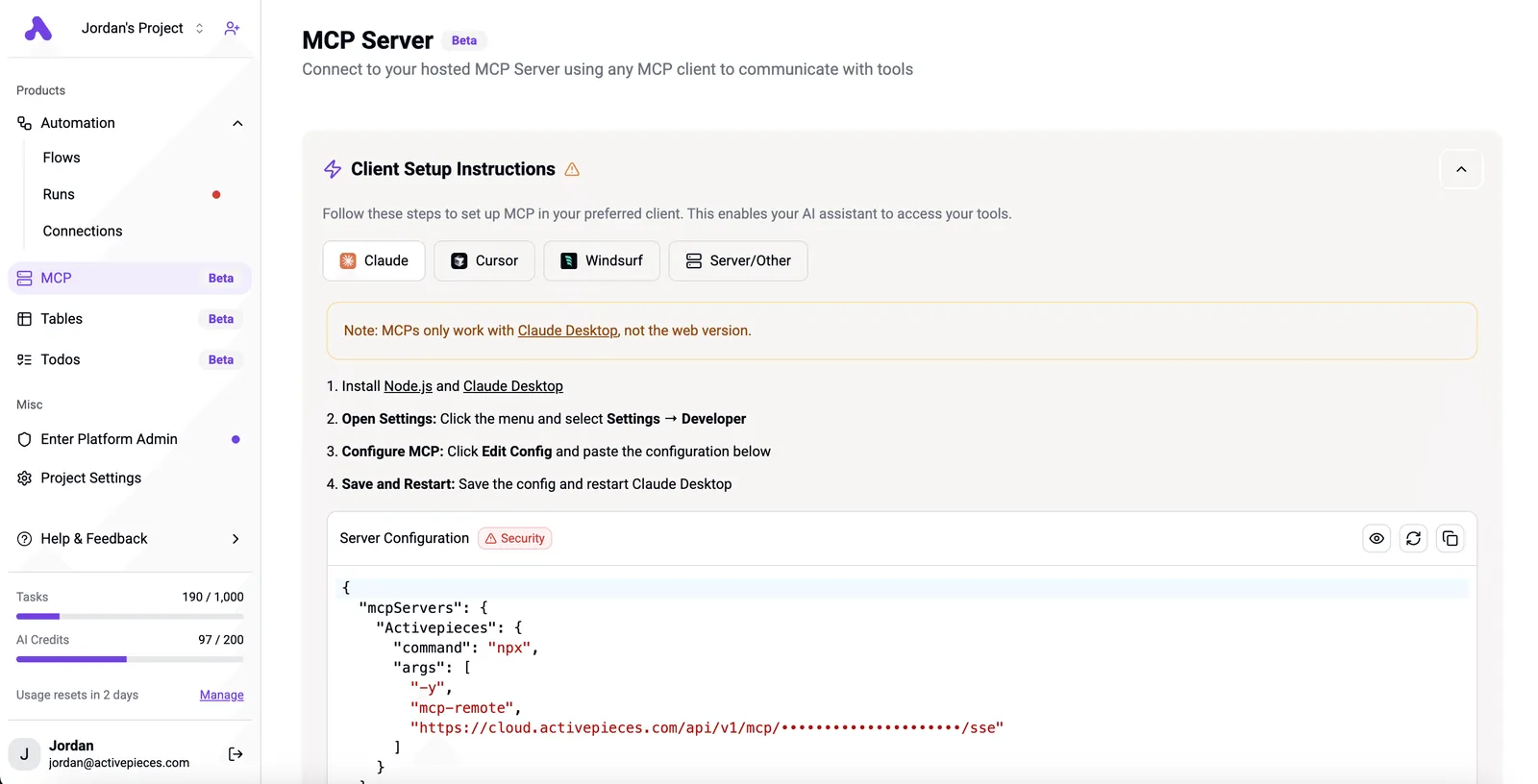
The following interface shows the exact configuration parameters required to map the local Node.js environment to the remote Freepik endpoints.
The main panel shows the MCP Server section marked as Beta, with Client Setup Instructions below. Four setup tabs are visible: Claude, Cursor, Windsurf, and Server/Other. There's a note stating that MCP custom connectors are available on Claude, Cowork, and Claude Desktop alike, not just the desktop app.

Installation steps
Below are four numbered setup steps for installing Node.js, opening Settings, configuring MCP by editing config, and saving/restarting.
The bottom section displays Server Configuration code with a JSON configuration block showing "mcpServers" settings for the remote host with command "npx" and args including "mcp-remote" and an API endpoint URL.]

Verifying the server command
The configuration displayed above ensures that the npx command correctly targets the mcp-server-freepik package and injects your API key as an environment variable.
Testing the Freepik MCP with Claude prompts
Validation involves asking the model to perform a multi-step search and retrieval task. When using high-reasoning models like Claude Fable 5.2, you can provide complex instructions such as "Find three minimalist vector backgrounds for a fintech app and show me the previews."
The model confirms a successful connection by listing specific asset IDs and rendering thumbnails directly in the chat window, proving that the MCP server correctly translates natural language into structured API queries.

The trade-off between automated search and manual curation
Automated search through the Model Context Protocol (MCP) reduces the cognitive load of asset discovery, but it introduces a layer of processing latency that manual browsing avoids.
Manual search versus MCP for visual style
Manual search provides instantaneous visual feedback. When you search the Freepik web interface, you utilize pre-attentive processing to discard irrelevant styles in milliseconds.
An LLM lacks this immediate visual shorthand. It must instead wait for the full JSON payload to return from the API before it can begin evaluating whether the assets meet your intent.
Semantic gaps between prompts and stock assets
The primary technical hurdle in MCP-driven workflows is the semantic gap between your descriptive prompt and the keyword-based indexing used by stock asset databases. Platform reports that because models like GPT-6 Astra interpret requests through high-dimensional embeddings, they may request "solitude" or "industrial decay."
These terms might not exist in a contributor's tag list. This misalignment can lead to the following outcomes.
The agent returns technically high-quality assets that fail your brand's unspoken stylistic requirements.
Prompt injection or "hallucinated" search parameters cause the API to return empty sets, forcing the model into an expensive retry loop.
The model prioritizes the first available match rather than the best aesthetic match to satisfy the tool-calling completion requirement.
The following table compares the operational impact of these two discovery methods.
| Metric | Manual Freepik Web Search | MCP-Driven Agentic Search |
|---|---|---|
| Search Latency | Low: Instantaneous visual scanning and filtering. | High: Dependent on model reasoning and API round-trips. |
| Curation Control | High: Human intuition identifies nuanced brand fit. | Moderate: Limited by the model’s ability to describe aesthetics. |
| Risk Profile | Low: Direct oversight prevents off-brand asset selection. | Moderate: Risks prompt injection or irrelevant asset billing. |
Prices and plan limits checked against docs.claude.com and openai.com and gemini.google on November 12, 2026.
Why direct integration wins for high-volume production
Direct MCP integration becomes the superior choice when the bottleneck shifts from selection quality to the sheer volume of assets required for dynamic environments.
Ai finds that in a programmatic advertising or large-scale web development context, you can use Gemini 3.8 Flash to populate hundreds of unique landing pages with relevant iconography.
Direct MCP integration becomes the superior choice when the bottleneck shifts from selection quality to the sheer volume of assets required for dynamic environments.
Every connector in Activepieces is automatically exposed as an agent tool, meaning the same Freepik action used in a structured flow is instantly reachable as a schema on the MCP server.
This eliminates the need for a second migration or separate catalog, as teams like MoneyGram and FundingSocieties run these unified workflows to bridge AI intent with production-ready execution.
You can follow the rest of this with the builder open. Start free, no card.
Manage Freepik API pricing and limits
The Freepik API structures access through a tiered system that dictates whether an LLM can operate autonomously in a commercial environment or must remain restricted to sandboxed prototyping.
Free tier constraints and attribution requirements
The Free tier is a functional proof-of-concept for testing tool-calling logic. This tier mandates clear, visible attribution for every asset used.
For users on the ChatGPT Free plan, this creates a "double-bottleneck" where both the model's intelligence and the asset provider's throughput are strictly capped.
Freepik Premium subscription and commercial rights
Upgrading to a Premium subscription removes the attribution requirement and grants full commercial usage rights.
This is the baseline requirement for production-grade agents built on high-reasoning models like Gemini 4 Carbon.
Freepik API rate limits for AI agents
Rate limits define the actual velocity at which an agent can iterate. The Freepik API tracks usage via daily request limits (RPD), which scale significantly between tiers.
| Endpoint | Free Tier RPD | Premium Tier RPD |
|---|---|---|
| ai-powered-search | 5,000 | 100,000 |
| ai-image-to-prompt | 2,000 | 100,000 |
| resources-search | 10,000 | 250,000 |
| download-asset | 50 | 2,000 |
The ai-powered-search endpoint allows 100,000 RPD for Premium users compared to a lower limit for Free users. The ai-image-to-prompt endpoint also provides 100,000 RPD for Premium users while restricting Free users to a lower volume.
This massive ceiling for Premium users ensures that a high-volume agent running on Claude Haiku 5.5 can perform thousands of searches per hour. Achieving this high-frequency reliability requires the orchestration layer to handle token bucket logic and back-off strategies to stay within the Premium RPD.
Automating creative pipelines with Activepieces and Freepik
Activepieces provides the MIT-licensed core to move Freepik assets from a chat interface into production environments without requiring custom Node.js boilerplate for every new API endpoint.
While an MCP allows Claude Sonnet 5.5 to browse the Freepik library, it can't natively manage the stateful retry logic needed when a cloud storage bucket is temporarily unreachable.
Activepieces bridges this by providing a visual graph where a model’s JSON output triggers a sequence of authenticated actions across 748 integrations.
Connecting Claude's output to cloud storage
Activepieces uses a webhook trigger to receive image URLs from Claude Sonnet 5.5. Mapping the "Download URL" property from the Freepik MCP response to an Amazon S3 or Google Drive "Upload File" integration creates a permanent record of the creative session.
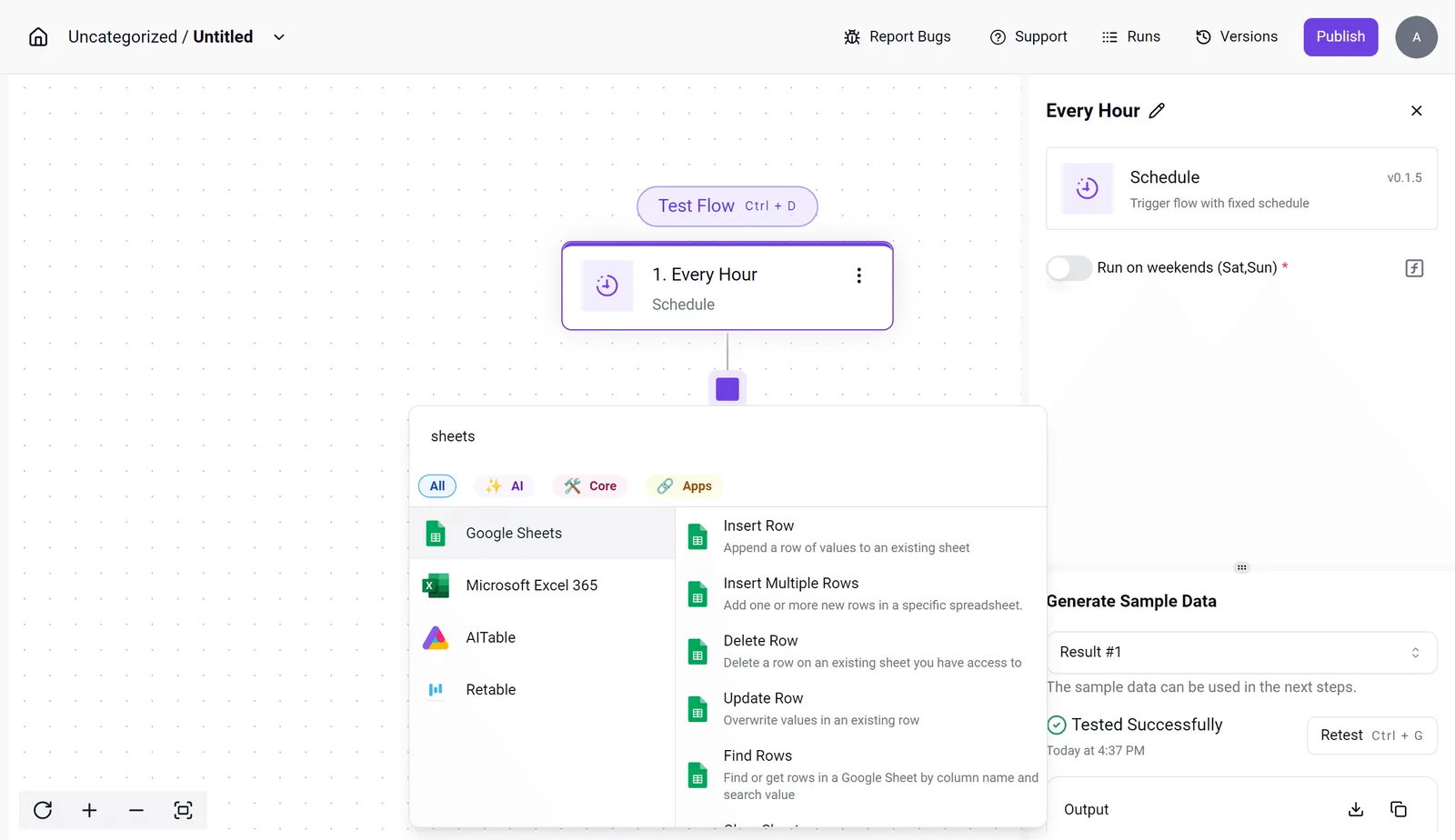
Building a 'Search to Slack' approval workflow
The Activepieces flow builder allows you to insert a human-in-the-loop step between the AI’s asset selection and the final publication. This capability is part of the same platform that has earned 25,505 GitHub stars by enabling users to mix agentic judgment with deterministic rules.
This configuration ensures that every hour, the system checks for new assets in a tracking sheet and pushes them to a Slack channel for stakeholder review.
By using the "Find Rows" action in the integration selector, the workflow identifies unapproved assets and presents them to a creative director. This person can then trigger the next stage of the pipeline with a single emoji reaction.
Batch processing creative assets for social media teams Manila
For distributed teams, such as social media managers in Manila, Activepieces automates the high-volume resizing and distribution of Freepik assets across multiple platform-specific folders.
A single "Loop" integration in Activepieces can iterate through a list of image IDs provided by Claude Fable 5.2.
It sends each to a transformation service like Cloudinary or Bannerbear before uploading the final versions to a shared Dropbox.
Frequently asked questions about Freepik MCP
Why is my Freepik MCP not showing up in Claude?
When the underlying configuration file contains syntax violations that break the parser, Claude Desktop fails to initialize the Model Context Protocol (MCP).
These failures typically stem from four specific formatting oversights.
- Missing trailing commas between server definitions.
- Unescaped backslashes in Windows paths.
- Smart quotes instead of straight quotes.
- Incorrect nesting of the
mcpServersobject.
Correcting these structural errors ensures the runtime can map the tool definitions to the actual environment variables. Once the syntax is validated, a full restart of the Claude Desktop application is mandatory to reload the configuration into memory.
Can I use Freepik MCP with ChatGPT or Gemini?
MCP support works through an open protocol across multiple platforms, including Claude, Cursor, and Windsurf. This means the direct Freepik plugin architecture doesn't yet exist as a first-party integration for OpenAI or Google models.
To use the asset library with GPT-6 Astra or Gemini 3.8 Flash, you must deploy a custom bridge or middleware.
Does the MCP allow for direct image editing?
The Freepik MCP is a discovery and retrieval engine rather than a vector manipulation tool. While you can use Claude Opus 5.5 to search for specific layers or styles, the protocol returns asset links and metadata.
Is an API key required for the Freepik MCP to function?
A valid Freepik API key is the only way to authenticate requests and access the premium asset library through the MCP. Without this credential defined in your environment variables, the server will return 401 Unauthorized errors.
Build it
Set this up in minutes.
No code required. Connect your accounts, and Activepieces runs it from there.
Start free Talk to sales