
Google BigQuery Pricing Explained: 2026 Cost Guide

Oct 28, 202615 min read
Before you look at any rate, know that BigQuery bills compute and storage separately.
Compute costs per TiB scanned (on-demand) or per slot-hour (editions), and storage costs per GiB-month, which is why teams that load data through workflow tools such as Activepieces still need to track the two lines independently.
Pricing follows the bytes a query reads, not the rows it returns, so a list rate means little until you know your scan volume.
Understand BigQuery's compute and storage pricing
| Line | Price | What it includes | Limits |
|---|---|---|---|
| On-demand query | $6.25 per TiB scanned | Shared slot pool, no commitment | Billed on bytes read; 10 MB minimum per table referenced |
| Standard edition | $0.04 per slot-hour | Autoscaling slots, billed per second | Capped at 1,600 slots; no commitment discounts |
| Enterprise edition | $0.06 per slot-hour | Autoscaling plus baseline slots and commitment discounts | You pay for slots allocated, whether or not queries use them |
| Active logical storage | $0.02 per GiB-month | Tables or partitions modified in the last 90 days | Billed on uncompressed size |
| Long-term logical storage | $0.01 per GiB-month | Same data after 90 days unmodified | Any edit moves the table back to the active rate |
| Active physical storage | $0.04 per GiB-month | Compressed size, including time travel and fail-safe | Cheaper only if your compression ratio beats 2:1 |
| Long-term physical storage | $0.02 per GiB-month | Compressed size after 90 days unmodified | Same compression caveat |
| Free tier | $0 | 1 TiB of queries and 10 GiB of storage per month | Resets monthly; unused allowance does not roll over |
| Ingestion | Batch loading free; streaming inserts $0.01 per 200 MB | Loading from Cloud Storage costs nothing | Streaming is billed per row volume, so high-frequency pipelines add up |
Prices and plan limits checked against docs.claude.com and claude.com and openai.com and gemini.google on October 28, 2026.
Because its rate is double the logical rate, physical billing only pays off on well-compressed data. Compute is the line that moves most, and region moves it further.
What the BigQuery free tier covers monthly
1 TiB of query scanning and 10 GiB of storage are free each month. At the US rate that's worth at most $6.25 of queries, and one unfiltered scan of a 1.5 TiB table uses it up.

A scheduled workflow, built in any scheduler, that scans 2 GiB every hour runs 720 times a month. That's about 1.4 TiB, so it exits the free tier on its own.
How the on-demand price changes by region
Put the dataset in a different region and the on-demand price changes with it. Tecyfy lists Tokyo at $5 per TiB, 20% below US (Iowa) at $6.25. London is $7.81 and Sydney $8.13, about 25% and 30% above Iowa.
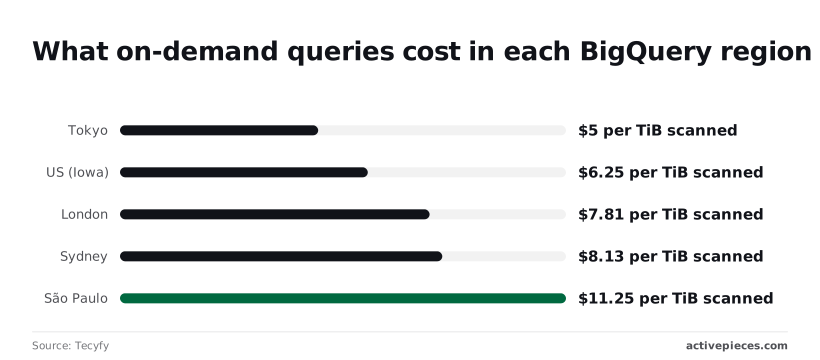
At $11.25, São Paulo is 80% above Iowa and 2.25 times Tokyo. The same 100 TiB monthly scan therefore costs $500 in Tokyo and $1,125 in São Paulo. Choose the region before loading data, because moving a dataset later means paying to copy it.

If you are running this arithmetic for your own team, see what the same workload costs on Activepieces.
Step 1: Estimate what your queries really scan
Before you run anything, the query editor in the BigQuery console shows how many bytes a query will process. That figure, not the row count or the runtime, is what on-demand pricing meters.
Read the BigQuery dry-run estimate in the console
Paste your query into the editor and look at the top right of the query pane. A validator message appears there once the SQL parses, reading "This query will process X when run."
Treat it as the upper bound for that query's bill. Multiply the estimate by the on-demand rate per unit scanned and you have the cost of one run.
Total 30 days of BigQuery usage with INFORMATION_SCHEMA
That estimate only covers one query, while your history covers the whole bill. The INFORMATION_SCHEMA.JOBS view records every job in a region, including the bytes actually billed, so you can total real usage by user:
SELECT
 user_email,
 SUM(total_bytes_billed) AS bytes_billed
FROM `region-us`.INFORMATION_SCHEMA.JOBS
WHERE creation_time >= TIMESTAMP_SUB(CURRENT_TIMESTAMP(), INTERVAL 30 DAY)
 AND job_type = 'QUERY'
GROUP BY user_email
ORDER BY bytes_billed DESC;
Swap region-us for the region you chose when loading data, because the view only returns jobs from the region you name.
Use total_bytes_billed, not total_bytes_processed: the billed column already includes the small per-query minimum, so a flood of tiny queries shows up at its true cost rather than looking free.
Why LIMIT and column choice change the bill differently
Append LIMIT 10 to SELECT * to "keep it cheap" and you still pay for the whole table. Adding LIMIT trims the rows returned. It doesn't reduce the bytes billed, because BigQuery still reads every selected column across the full table before applying the limit.
Where you do save is in the columns you choose. BigQuery stores data by column, so naming only the columns you need means the others are never read. Filtering on a partitioned column can cut the scan further, since BigQuery skips whole partitions.
Step 2: Price two real workloads on each model
Price each workload by multiplying its monthly scanned TiB by the on-demand per-TiB rate, then ask whether a slot reservation would cost less than that product. For the startup it almost never will. For the 50-person company it often will.
Startup BigQuery pricing at 5 TiB scanned monthly
At 5 TiB scanned a month against 1 TiB stored, the startup pays almost entirely for scanning. Scanning is the metered unit, so compute is the bill and storage is a rounding error.
The 50-person company: 200 TiB scanned a month
At 20 TiB stored and 200 TiB scanned, 40 times the startup's scan volume, the 50-person company's on-demand cost is the scans times the rate, and one careless query is now a real line item.
With a steady daytime load, the company fits a slot baseline, with autoscaling for peaks.
Compute dominates, so the cheaper compute model sets the total, and predictability is high on slots because you know the slot-hour charge in advance.
Find the break-even between on-demand and slots
Work out the break-even with one division. Take the monthly cost of the slot baseline you'd need, divide by the on-demand rate per TiB, and you get the scanned TiB at which the two models cost the same.
If your measured scans sit well above that number month after month, capacity wins. If they sit below it, or swing wildly, on-demand wins.
Check storage separately
Check storage separately. Physical billing charges a higher rate per GiB but counts compressed bytes, and it also bills the time-travel and fail-safe copies that logical billing includes.
Whether it wins depends on your table's compression ratio, so look at your own tables' logical and physical sizes before switching.
Both teams can land on the cheaper model and still get a surprise bill if nothing limits a runaway query. That is the part the list price hides, and it is the problem the next step solves.
Worth checking against a plan that does not meter every step: one credit covers a whole run on Activepieces.
Step 3: Cap spend and avoid the costs people hit
Cap spend with five controls applied in a fixed order, because a single unbounded query on a large table can cost more than a month of normal use.
What runaway bills have looked like
In the FinOps Foundation's (source), one incident cost RisingWave $9,847.24.
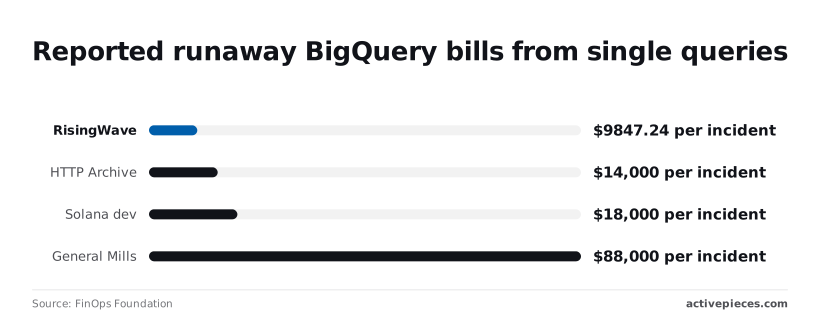
HTTP Archive reached $14,000 and a Solana developer $18,000.
Even larger companies aren't protected by scale: General Mills reached $88,000.
Apply the five safeguards in this order, from cheapest per query to broadest per project:
- Dry-run the query to see the bytes it would scan before it runs.
- Set maximum bytes billed on the job, so a query over the limit fails and isn't charged.
- Require a partition filter on the table, so BigQuery rejects queries without a date or key filter.
- Set a project custom quota for daily query bytes, which stops total scanning once the day's allowance is spent.
- Create billing budget alerts at 50%, 90% and 100%, so you're not surprised when you approach your spending limit.
A Cloud Billing budget notifies you but doesn't stop anything.
By the time the 100% email arrives, the spend has already happened, so the 50% and 90% thresholds are the useful ones.
**A Cloud Billing budget notifies you but doesn't stop anything.
A scheduled Activepieces workflow can run the INFORMATION_SCHEMA.JOBS query above, compare daily bytes billed with a threshold and message the team on Slack or email.
The run is the meter there, not the steps inside it: 1 credit per run, so splitting the check into ten small, testable steps costs the same as one lumpy query-and-alert step. Zapier bills per task and Make per module, which taxes exactly that discipline.
Hourly, that's 720 runs and 720 credits a month, inside the free plan's 1,000.
Hidden line items: ingestion, egress, time travel, editions
Not every charge comes from scanning. Streaming inserts incur an ingestion charge, whereas batch loads on shared capacity don't, so a streaming pipeline adds a cost that scan limits never catch. Egress applies when data leaves Google's network or crosses regions.
If you pay for physical storage, time travel and fail-safe storage count toward bills. Under capacity pricing, editions bill slot-hours, and autoscaling adds slots when load rises, so a busy day raises the bill.
Limits that stall queries rather than raise the bill
Go over maximum bytes billed and the query returns an error. A custom quota blocks every further query in the project until it resets, including the ones your dashboards depend on.
After six hours of execution, a single query also stops. Set these so that a stalled job is a visible, cheap failure and not a surprise invoice.
BigQuery pricing compared with Snowflake, Redshift and ClickHouse
BigQuery is the cheapest of these warehouses when your queries scan little data and the dearest when they scan a lot.
Billing unit and idle cost side by side
Because the billing unit, not the headline rate, is what your usage multiplies, the table names what each vendor meters.
| Billing unit | Idle cost | Predictability | |
|---|---|---|---|
| BigQuery | Bytes scanned (on-demand) or slot-hours (capacity) | No compute charge on-demand; storage still bills | Low on-demand, high with capacity |
| Snowflake | Credits per second a warehouse runs | None once the warehouse suspends | Medium: follows warehouse runtime |
| Redshift Serverless | RPU-hours (Redshift Processing Units) | None when no queries run | Medium: a maximum capacity setting bounds it |
| ClickHouse Cloud | Compute time while the service runs, plus storage | Depends on your idling settings | Medium: follows runtime and scaling |
The consequence: BigQuery on-demand is the only one of the four whose bill moves with data scanned rather than time running.
Where BigQuery is cheaper and where it is not
The 100 TB cost ranges
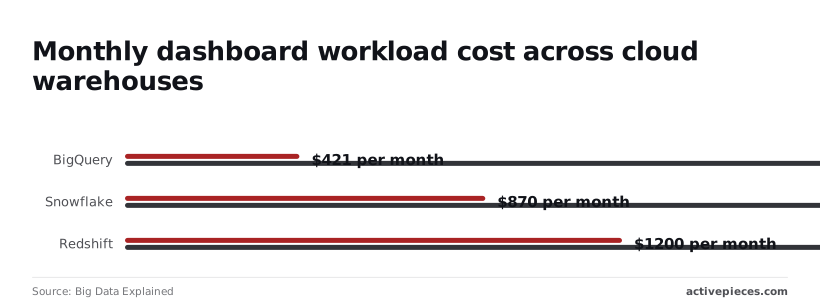
On Big Data Explained's 100 TB cost comparison, BigQuery's monthly bill runs from $421 to $4,267. That's a tenfold spread on one platform. Its low end is the cheapest figure in the comparison and its high end the dearest.
Snowflake's range is $870 to $2,940 and Redshift Serverless's is $1,200 to $3,360. ClickHouse Cloud has no figure in that comparison, so I make no claim about where it lands.
What the BigQuery cost ranges tell you
Two things follow. First, the crossover: BigQuery undercuts both rivals at the light end, where its $421 is less than half Snowflake's $870.
It loses to both at the heavy end, where $4,267 is $1,327 above Snowflake's ceiling, which means you can't determine which vendor is cheaper without knowing your workload size.
Second, the narrower ranges of the other two tell you something. Snowflake spans about $2,070 and Redshift Serverless about $2,160, while BigQuery spans $3,846.
A rival's bill widens less because it tracks runtime, which you can bound with suspend timers or a capacity cap. BigQuery's tracks scan volume, which a single careless query can inflate.
If your scans are small and stable, on-demand BigQuery is the cheap option. If a few dashboards or ad hoc users scan wide tables, price the capacity model against Snowflake and Redshift Serverless before committing, using your measured scan volumes, not the list price.
What Activepieces does about this
The article's argument is that you measure scans and cap spend before you pick a billing model, and the measuring is the part people skip because nobody owns it. Activepieces is where we'd put that job.
A scheduled flow runs the INFORMATION_SCHEMA.JOBS query from Step 1, compares the day's total_bytes_billed with a threshold you set, and posts to Slack or email when the number crosses it.
It covers the gap the Cloud Billing budget leaves, since a budget notifies you after the spend has happened and a daily check on bytes billed catches a heavy user while the day is still running.

The billing arithmetic matters here, because a monitoring flow that costs more than it saves defeats the purpose. Activepieces meters per run, at 1 credit, and not per step or per task.
A flow that queries BigQuery, sums by user, branches on the threshold and formats a message costs the same one credit as a flow that does it all in a single step.
Run hourly, that is 720 runs and 720 credits a month, inside the free plan's 1,000. You can split the check into small steps you can test one at a time without the bill rising.
Two limits are worth stating.
The flow tells you and does not stop anything, so it sits beside the controls in Step 3 and doesn't replace them: maximum bytes billed on the job, a required partition filter, and a project custom quota remain the hard stops.
And it only reports what your query asks for, so the region in the FROM clause has to match where your data lives or it will report on nothing.
Activepieces is open source under the MIT licence, and the community edition can be self-hosted if you'd rather the billing metadata never leave your own infrastructure.
The practical order is the article's: dry-run to estimate, total your last 30 days to get a real scan volume, then schedule that same query so the number you used to choose between on-demand and capacity keeps being checked after you've chosen.
Frequently asked questions
Is Google BigQuery free to use?
Partly: BigQuery has a monthly free allotment of query processing and storage, and a sandbox that needs no billing account. Both are metered in bytes, so a few small tables cost nothing, but one wide-table dashboard can use up the free query allotment.
In the sandbox, tables also have a limited life, which makes it a place to test, not to run production.
Do failed queries or cached results cost anything?
Neither costs anything under on-demand pricing. A query that fails isn't billed, and a repeat of an identical query is served from cache at no charge while the underlying tables are unchanged.
Don't build a budget on cache hits, though. Any change to the source tables, or any query using non-deterministic functions, forces a fresh scan, and a dashboard that refreshes live data will rarely benefit.
Adding LIMIT to a query doesn't reduce the bytes scanned on on-demand, so it doesn't reduce the bill.
Can I switch between on-demand and editions pricing later?
Yes. Billing model is set by how projects are assigned: a project with no reservation assignment runs on-demand, and assigning it to a reservation moves its queries onto slot capacity. You can reverse that by removing the assignment.
The catch is commitments. Autoscaled slots can be added and dropped as you go, but a slot commitment binds you for its term. Test the move on one project with your measured scan volumes before committing capacity you may not fill.
Does BigQuery charge for copying or deleting tables?
Deleting tables is free, and a table copy within the same location carries no charge for the copy job itself.
What you pay for is the storage the new table occupies, so copying a large table doubles that part of the bill until you delete one version.
Copying across regions is different, because moving data between locations can incur network transfer charges. Check the pricing page for your source and destination before scripting bulk copies.
How do I get an alert when my BigQuery spend jumps?
Create a budget in Cloud Billing and attach alert thresholds, scoped to the project or the BigQuery service. Budgets notify you but don't stop anything, and billing data arrives with a delay, so a runaway query can finish before the alert fires.
For a hard stop, set custom quotas on bytes scanned per day, per project or per user, which reject queries once the limit is hit. Use the budget to tell you what happened and the quota to limit what can happen.
Related reading
References
Running the numbers
See what the same workload costs here.
Free forever plan, and every paid plan self-hosts at no extra cost.
See pricing Talk to sales