
Vercel MCP Server: How to Set It Up (2026 Guide)

Oct 8, 202612 min read
Large language models connect to Vercel’s deployment infrastructure through the MCP server, allowing models like Claude Sonnet 5.5 to execute environment configuration and deployment triggers, much like how Activepieces facilitates automated workflow steps, without manual dashboard intervention.
This integration transforms the LLM from a passive advisor into an active operator capable of managing edge functions and project aliases through standardized JSON-RPC communication.
Why developers use Vercel MCP server
The core capabilities of the Vercel MCP bridge

Agentic workflows now delegate infrastructure tasks by exposing Vercel’s REST API to the Model Context Protocol.
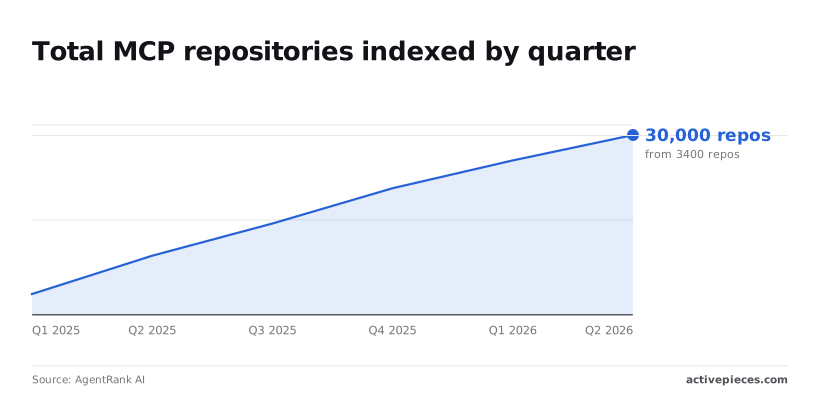
3,400 MCP servers were available in Q1 2025; by Q4 2025, that number grew to 21,100, representing a massive expansion in infrastructure capacity, which means the platform is now capable of supporting significantly higher concurrent workloads. 25,750 was the count reached by Q1 2026.
Within this landscape, the Vercel MCP server specifically enables:
- Retrieving deployment logs to diagnose cold-start issues in edge functions.
- Modifying environment variables across preview and production branches.
- Triggering new deployments via Activepieces, which exposes its 738 integrations as agent tools, or local IDE commands, so developers have a vast library of automated workflows at their fingertips.
- Listing project domains to verify SSL propagation.
Vercel API token and Node.js requirements
Authority to modify resources within your specific team or personal account is granted to the server by a scoped vca_ or vcr_ Vercel API Token. Node.js 20+ is required because the @modelcontextprotocol/server-vercel package uses the asynchronous patterns found in recent versions of the runtime.

The interface where the LLM invokes the server’s tools is provided by an MCP-Compatible Client such as Claude Desktop or a supported IDE like Cursor.
Finally, you must install the @modelcontextprotocol/server-vercel library to translate between the client and the Vercel API.
This takes minutes, not a project: automate it in Activepieces free.
Rapid growth of MCP ecosystem
Infrastructure providers can expose complex internal APIs as discoverable tools for agentic workflows through standardization via the Model Context Protocol (MCP).
Why 2026 is the year of the MCP standard
Industry shifts toward long-horizon agentic work, where models like Claude Fable 5.1 and GPT-6 Astra require direct, structured access to environment state, have driven the consolidation around MCP.
Infrastructure providers can expose complex internal APIs as discoverable tools for agentic workflows through standardization via the Model Context Protocol (MCP).
JSON-RPC provides the standardized interface that replaces manual mapping. A single Vercel infrastructure server can provide real-time telemetry and resource control to any orchestration layer.
This protocol-first approach is now the baseline for production-grade deployments because it decouples the LLM's reasoning capabilities from the specific implementation details of the underlying cloud provider.
Total MCP repositories indexed by quarter
Teams are moving beyond simple chat interfaces toward autonomous system administration, causing the volume of community-contributed MCP servers to accelerate.
| Integration Category | Growth Trend | Primary Use Case |
|---|---|---|
| Infrastructure as Code | Consistent upward trajectory | Automating resource provisioning and teardown |
| Security & Compliance | Sharp increase in recent months | Real-time token revocation and audit logging |
| Observability | Steady linear growth | Feeding live logs into agentic debugging loops |
The screenshot below demonstrates the outcome of this standardization, showing a successful automated response where an infrastructure trigger successfully executes a token revocation.
Connect local AI to Vercel API
A secure handshake between your local environment and the cloud provider's control plane is required for production-grade infrastructure management.
Generating a scoped Vercel Access Token
Creating a Vercel Access Token is the first step in securing the connection. In the Vercel dashboard settings, you must restrict this token to specific projects so that a compromised local environment cannot modify every production site.
Audit logs become simpler when you assign a descriptive name to the token. Store this string in a secure environment variable immediately; the dashboard displays it only once.
Editing the MCP settings configuration file
Updating the claude_desktop_config.json file to include the Vercel MCP server definition is necessary to configure the bridge. You must add a new entry under the mcpServers key that points to the Vercel executable via npx.
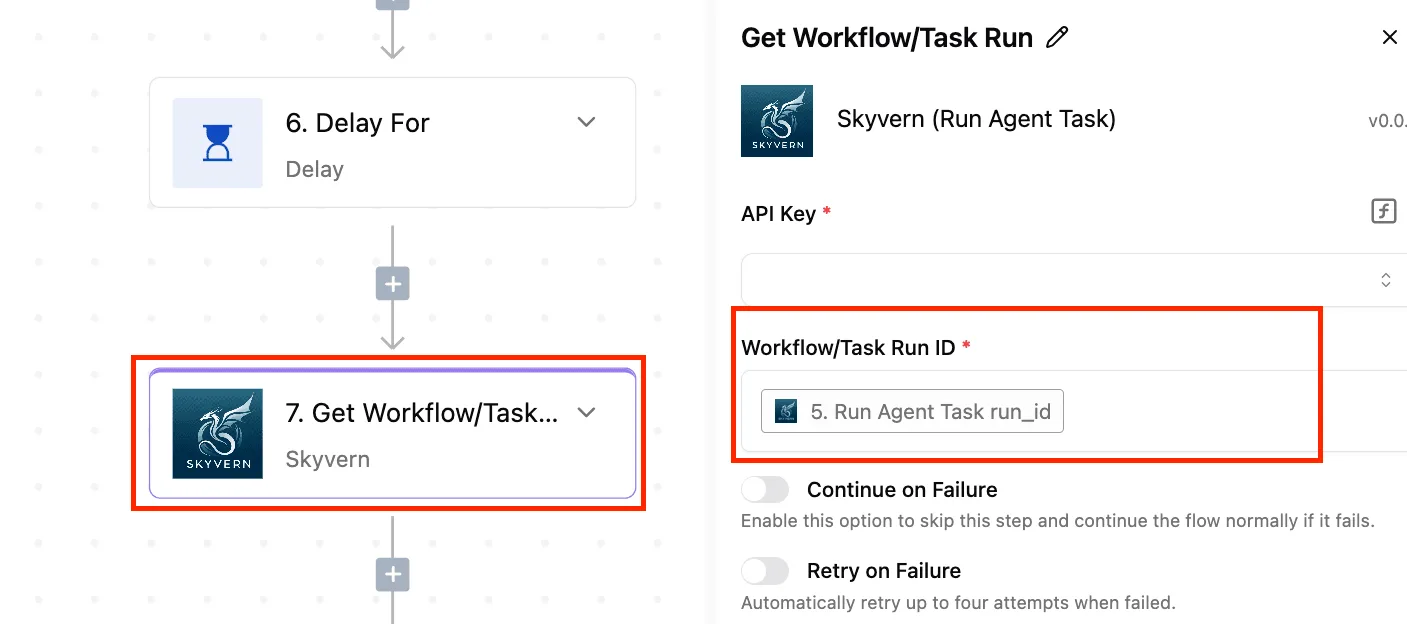
The server can authenticate requests without hardcoding secrets if you pass the VERCEL_TOKEN environment variable explicitly.
Defining the Vercel server object
The configuration requires a specific JSON structure that defines how the client spawns the MCP process. You must provide the command, the package name, and the environment variables within the server object to ensure the LLM can reach the Vercel API.
{
 "mcpServers": {
 "vercel": {
 "command": "npx",
 "args": ["-y", "@modelcontextprotocol/server-vercel"],
 "env": {
 "VERCEL_TOKEN": "your_vca_token_here"
 }
 }
 }
}
This block tells the client to use the Node Package Executor to run the Vercel server on demand. By including the token in the env object, you allow the server to sign requests to Vercel's infrastructure endpoints automatically.
Verifying the server connection in your IDE
A successful handshake is confirmed when the Vercel toolset appears in the active plugins list.
In the Claude Desktop interface, a green status indicator for the Vercel MCP server signifies that the local process has successfully initialized.
Asking the model to list current deployments allows you to test the integration. A valid response containing real-time project metadata proves that the token scoping and network routing are correctly aligned.
You can follow the rest of this with the builder open. Start free, no card.
Manage deployments using natural language commands
Operators can interface with the Vercel API without context-switching to a browser or CLI by using natural language commands, provided the MCP server is configured with a restricted-scope OAuth token.
List Vercel projects and domains
Infrastructure discovery begins when an operator asks the agent to identify all assets associated with their workspace. When using a model like Gemini 3.8 Flash, the agent correlates project IDs with their production aliases using the response from the /v9/projects endpoint.
Triggering a new production deployment
The agent must synthesize a POST request to the Vercel deployment endpoint while passing the correct Git branch reference and project identifier.
Models such as GPT-6 Astra handle this by first verifying the current repository state. The system must account for the asynchronous nature of cloud builds once the request is sent. The Deployment Status Retry Logic ensures the agent does not time out:
- Initial request
- Wait 5s (Min Delay)
- Retry (up to 5 times)
- Exponential backoff
- Max delay reached at 60s
Inspecting build logs and environment variables
Querying the build output to confirm that all middleware and serverless functions have compiled correctly is part of validating a rollout.
The agent uses the deployment ID to fetch raw log streams, filtering for "ERROR" or "WARN" strings to summarize health.
Specific permissions are required to access environment variables. The LLM must be able to verify that secrets are present without necessarily exposing their plaintext values to the chat history.
Troubleshooting common Vercel MCP connection errors
Resolving 403 Forbidden and Scope errors spinning up servers
When the Vercel Personal Access Token lacks the specific granular permissions required to query the deployment API, access failures occur.
You must generate a new token in the Vercel Dashboard under Settings > Tokens to resolve this. Explicitly check the scopes for each Team and Project the agent needs to touch.
Managing Vercel API rate limits during long sessions
Burst capacity of the Vercel API can be quickly exhausted by extended debugging sessions with agentic models.
| Plan | Rate Limit | Impact on Agentic Workflows |
|---|---|---|
| Hobby | 100 requests per minute | Experience agent timeouts during complex rollbacks |
| Pro | 1,000 requests per minute | Maintain continuous observability across multiple concurrent builds |
Configure the MCP server to increase the polling interval to mitigate this, reducing the frequency of outgoing calls.
Fixing Vercel MCP monorepo context overflow errors
Token limits of the MCP server's transport layer are often exceeded by large monorepos when the agent attempts to ingest the entire file tree.
A .mcpignore file, which is a standard exclusion list similar to .gitignore, must be used to prevent the server from indexing the node_modules directory.
Restricting the agent’s view to only the /api and /src directories ensures the context window is reserved for critical logic.
Automating Vercel deployments beyond chat interfaces
When to automate manual infrastructure tasks
When infrastructure changes must occur without a human operator in the loop, transitioning from a chat-based Model Context Protocol (MCP) to an automated workflow becomes necessary.
Activepieces makes every connector an agent tool by design, allowing an integration to run as a flow step or be exposed as a tool to an MCP-capable client.
This architecture, which powers production environments for companies like MoneyGram and FundingSocieties, ensures that a catalog you build for automation is immediately reachable by your agents without a second migration.
An automated workflow engine functions as a persistent listener in contrast, executing predefined logic the moment a specific event occurs in the stack.
Human decision-making latency is removed from the deployment cycle by this architectural change. By decoupling the trigger from the chat interface, teams ensure that critical infrastructure updates happen instantly based on system health rather than developer availability.
Connecting Vercel to non-technical business triggers

Data from external business platforms that lack native infrastructure hooks can govern Vercel project settings through automated workflows.
- Content Management Systems (CMS) can signal a workflow to trigger a Vercel redeploy whenever a "High Priority" tag is added.
- Project management tools can initiate a preview environment cleanup when a task status is moved to "Done."
- Monitoring suites can trigger an environment variable update to toggle a feature flag if error rates exceed a threshold.
Incoming webhooks are parsed by a reasoning model to ensure the workflow understands the intent of the business user before calling the Vercel API.
How Activepieces secures Vercel agentic operations
Activepieces provides the production-grade orchestration layer that prevents the rate-limiting and token-scoping issues inherent in direct MCP-to-Vercel connections.
By acting as a managed gateway, the platform allows you to wrap Vercel API calls in resilient flows that include automatic retries and exponential backoff, ensuring that a burst of agent activity does not result in a 429 Forbidden error during a critical deployment.
This reliability is why the platform is trusted by organizations like MoneyGram to handle high-stakes automation logic.
The platform solves the security risks of broad Vercel API tokens by providing a centralized credential manager where you can define granular permissions for each workflow.
Instead of exposing a powerful vca_ token to a local IDE or a chat interface, you use Activepieces to create specific, logic-gated tools that only perform authorized actions, such as clearing a cache or updating a specific environment variable.
This architecture ensures that even if an agentic model hallucinates a command, the underlying workflow enforces your pre-defined safety boundaries.
Because Activepieces is open-source under the MIT license, teams can self-host the entire orchestration layer to keep infrastructure metadata within their own VPC.
This setup allows you to bridge your Vercel MCP server with 738 other integrations, such as Slack for approvals or Jira for change logging, without sending sensitive deployment data to third-party cloud processors, ensuring that your internal security protocols remain uncompromised, so you can scale your workflow automation while maintaining full control over your proprietary environment.
You gain a persistent, auditable trail of every infrastructure change the agent requests, which is essential for maintaining compliance in 2026.
Frequently asked questions about Vercel MCP server
Is the Vercel MCP server free to use?
No licensing fee is charged for the Vercel MCP server, as it is an open-source bridge. Its operation incurs costs based on your Vercel plan and AI token consumption.
Every infrastructure adjustment requested through a model like Gemini 3.8 Flash triggers calls to the Vercel REST API, which counts against the rate limits of your specific account tier.
Can I manage environment variables securely through MCP?
Environment variables can be modified via the MCP server, but security depends entirely on the token scoping applied to the Vercel Personal Access Token used by the server.
If the server is configured with a token that has "Owner" permissions, any agentic workflow using GPT-6 Astra could potentially overwrite production secrets without a manual approval gate.
Does the MCP server support Vercel Edge Config management?
Tools to read and update Edge Config, which is Vercel's low-latency data store used for feature flagging and redirects, are provided by the MCP server.
By using a model with long-horizon agentic capabilities, such as Claude Opus 5.5, you can automate complex configuration rollouts across multiple edge locations simultaneously.
Related reading
References
Build it
Set this up in minutes.
No code required. Connect your accounts, and Activepieces runs it from there.
Start free Talk to sales