
Activepieces White Label Pricing: Cost by Plan (2026)

Oct 27, 202614 min read
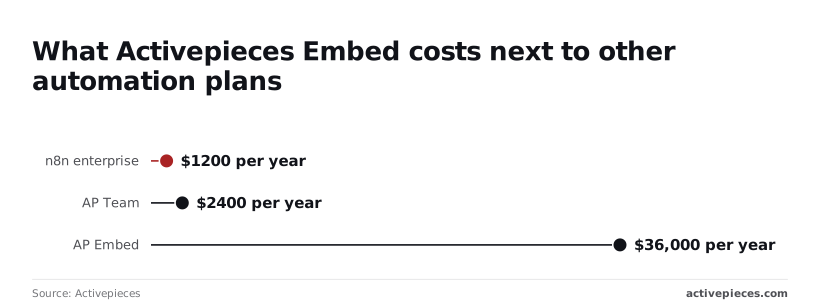
Activepieces white label starts at $36,000 a year on the Embed tier, and no Free, Plus, Team or Community Edition plan includes it.
Activepieces white label is the practice of running the Activepieces automation builder under your own brand, embedded inside your product so your customers build and run workflows without seeing Activepieces.
The prices below hold as of 27 October 2026, so confirm them against the Activepieces pricing page before you write a budget line.
White label's running the Activepieces flow builder under your own brand, inside your own product, so your customers build automations without seeing Activepieces. The Embed tier puts 760+ integrations behind one SDK inside your product.

The constraint is that Activepieces licenses this as embedding, from $36,000 a year, which locks white-label functionality behind costs most small companies cannot sustain.
Activepieces white label costs from $36k a year
Team, at $200 a month, gives you the builder under Activepieces' name, which is no use if your customers must never see it, so Team cannot serve white-label needs.
What each plan includes for a white-label need
| Plan | Price | Monthly credits | Users | SSO | White-label embedding |
|---|---|---|---|---|---|
| Free | $0 | 1,000 | See pricing page | No | No |
| Plus | $20 a month | 10,000 | See pricing page | No | No |
| Team | $200 a month | 50,000 | 25 | Yes | No |
| Ultimate | Quoted by sales | Quoted by sales | Quoted by sales | Via sales | No |
| Embed | From $36,000 a year | Quoted by sales | Quoted by sales | Via sales | Yes |
| Community Edition | Free | Not applicable (self-hosted) | Not applicable | No | No |
Team costs $2,400 a year at $200 a month, so Embed's 15 times that. Credits beyond a plan's allowance, per SourceMyAI, cost $0.007 each, so 10,000 extra credits is $70, which makes overage a small line next to the licence.

The cheaper automation products, Pipedream Connect at $1,188 a year and n8n enterprise at $1,200, show the size of the gap, but price is not the lock-in to worry about.
Every Activepieces plan can run on Activepieces Cloud or on your own servers, and it is the same product either way.
Self-hosting runs through Docker, Compose or Kubernetes on the same codebase as the managed cloud.
Embed costs about 15 times Team. That difference buys the right to put the builder in front of your customers under your brand, and nothing cheaper on this list confers that right.
If you run automations for your own team and nobody outside sees the builder, the Community Edition's enough. Once your customers need to build flows in your product, it's not.
Sales doesn't publish a price for Ultimate or for a self-hosted paid licence, so none appears here. Four things move a quote:
- Users: how many people build or administer flows.
- Credits: expected monthly volume across your customers.
- Deployment: your cloud or self-hosted, and any network limits on it.
- Support: the response level you need.
Bring those four numbers to the call. For self-serve plans, use the pricing page. For Embed, Ultimate, self-hosted enterprise or SSO beyond Team, use the sales form.
If you are running this arithmetic for your own team, see what the same workload costs on Activepieces.
Three automation builder embedding routes
Before you request a quote, decide which of three routes you are buying. An embed licence covers only one of them.
Build, buy an embed, or link out
Building means your engineers write the canvas, the execution engine and the connectors. Buying means a vendor's builder runs inside your interface. Linking out means customers click through to a separately branded portal. The table compares them on the four things that usually decide it.

| Route | Time to launch | Cost | UI control | Maintenance |
|---|---|---|---|---|
| Build yourself | Longest; the engine comes before the first workflow | Highest up front, plus a recurring share of the build every year | Total | Yours: every connector, every API change |
| Buy an embedded tool | Short; integration work, not product work | Licence fee, lower engineering spend | High, within what the SDK or iframe exposes | Shared: the vendor ships the engine, you own the integration |
| Link out to a portal | Shortest | Lowest | Lowest; customers visibly leave your product | Mostly the vendor's |
Embedding sits between building and linking out, so the rest of this section assumes that route.
Your customer sees your brand, your login and your navigation, with a workflow builder inside it. Behind that, a working embed needs five decisions, in this order:
- Choose the surface: an SDK gives you finer control over the host page, an iframe's faster to ship but constrains styling.
- Authenticate: your product signs the user in and passes a trusted identity to the builder, so there's no second login.
- Provision tenants: each customer account maps to an isolated workspace created through an API call, not by hand.
- Curate the connector catalogue: decide which integrations each tenant may see, and hide the rest.
- Verify isolation: confirm that one tenant's flows, credentials and run history can't be read from another, and test it yourself rather than accepting a datasheet.
The test's simple: if your customers would otherwise ask you for a custom integration, an embedded builder moves that work to them.
Embedded builders share one architecture across vendors
Whatever the vendor, an embedded builder splits into the same layers: a canvas in the browser, an execution engine on a server, a connector library, and a store for each tenant's credentials. Your product owns the identity handoff, and the vendor owns the rest.
Most of the difficulty sits in the credential store, because each of your customers must authorise their own accounts in other apps, and one tenant must never run on another's tokens.
The market splits three ways. Embedded iPaaS vendors such as Prismatic, Paragon, Tray and Workato sell a builder or a managed-integration layer under your brand, usually priced per customer or per deployment.
Developer-first tools such as Pipedream Connect and Nango skip the canvas: you call an API to authorise end users and run code, and your own interface does the rest.
Open-source engines such as n8n can be self-hosted, but check whether their licence permits reselling before assuming they can wear your brand.
Choose by who authors the logic. If your customers design their own flows, you need a canvas. If you define the integrations and customers only switch them on, a headless API is cheaper and easier to keep consistent.
Set up an Activepieces embed in four working stages
Proving that claim for your own product takes four stages, done in this order. A developer can finish them in half a day against a test project that never touches production:
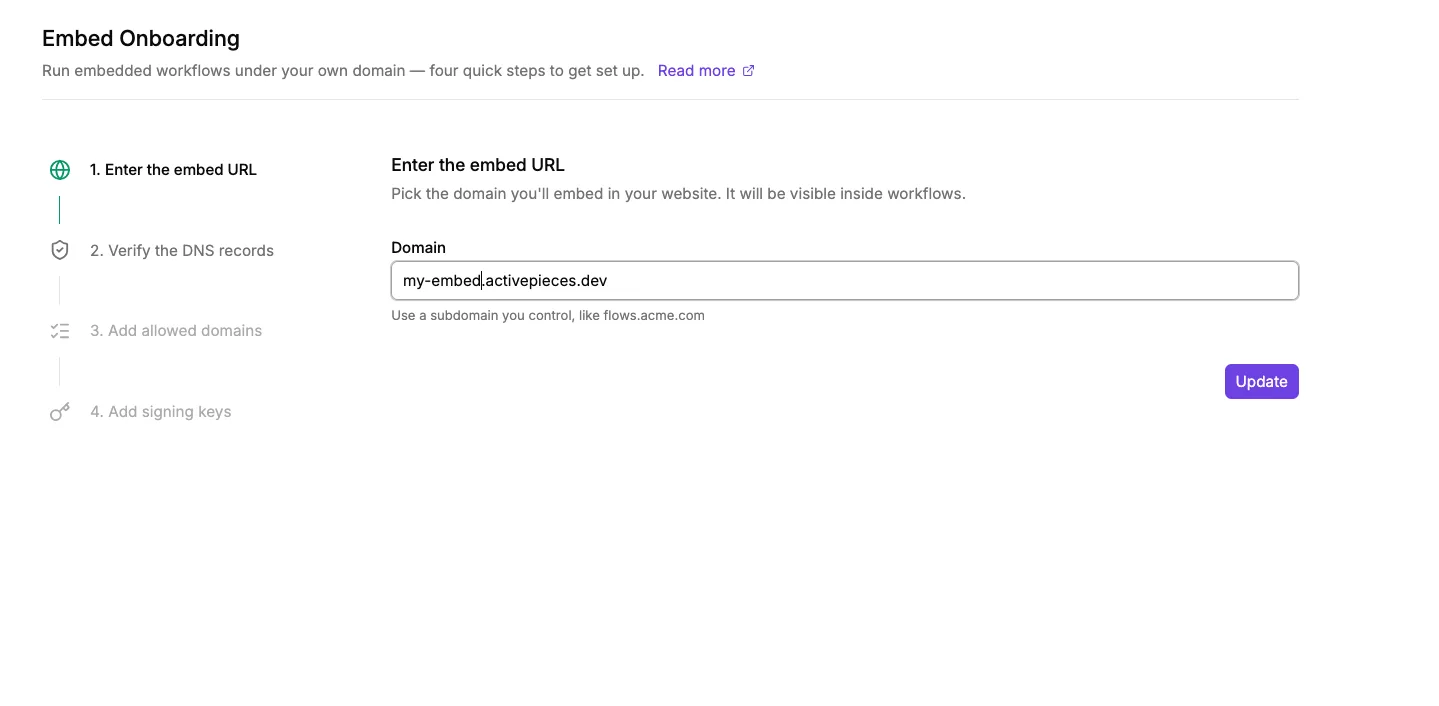
- Create a test project and open the embedding docs.
- Render the SDK builder in a test page using the signing key.
- Sign users in with a JWT issued by your app.
- Set branding and run one flow.
When a stage fails, look backwards. A failure at stage three is almost always a stage-one or stage-two mistake carried forward.
Stage 1: open a test project and the embedding docs
Start with the constraint: embedding's an Embed-tier capability, so confirm your account has it before you write any code.
Create a project used for nothing else, so test flows and test users can't mix with real customer data.
Keep the embedding docs open beside you and treat them as the authority on field names.
Stage 2: render the builder inside a test page
Build a single static page in your own app whose only job is to load the SDK and mount the builder.
Generate the signing key in the platform's settings and store it on your server, never in the page. A key shipped to the browser lets anyone mint their own sessions.
If the builder appears and then refuses to load data, the cause is usually the key or the page's allowed origin.
Stage 3: sign users in from your own app
Your backend signs a JWT for the logged-in user with the key from stage two, and the page passes that token to the SDK. The user never sees a separate login.
Test three cases on purpose: a valid token, an expired token, and a token signed with the wrong key.
Only the first should open the builder. If the other two also let someone in, stop and fix it, because your customers' access now rests on this check.
Apply white label branding and run a workflow
Set your logo, colours and name through the documented branding fields, then build the smallest useful flow: one trigger, one action.
Run it and confirm it executes under a signed-in test user, not an administrator.
When that works end to end, you have what a buying decision needs: the builder in your product, under your brand, with your authentication in front of it.
Worth checking against a plan that does not meter every step: one credit covers a whole run on Activepieces.
Mistakes teams make when white-labelling Activepieces
Team ($200 a month, 50,000 credits, 25 users, SSO) and Plus ($20 a month, 10,000 credits) are internal-use plans, so external customer access is prohibited.
White labelling's an Embed decision, from $36k a year, making it unattainable for undercapitalized organizations.
Treating the Community Edition as a licence to resell
The free Community Edition's enough when your own staff run automations on infrastructure you control and nobody outside the company sees the builder. Once the builder sits inside a product you sell, it's not enough, because embedding and rebranding sit in the Embed tier.
If a customer can open the builder, you need Embed. Otherwise you're reselling something you're not licensed to resell.
Forgetting that credits scale with your customers
Every customer you onboard draws on one credit pool, and each credit past the allowance costs $0.007, so overage charges stay modest next to the licence as you scale.
AI steps drive this most. Per SourceMyAI, a Fast-tier step costs 2 credits on managed keys and 1 on your own, a Smart step 10 versus 1, and a Frontier step 20 versus 1.

At the overage rate, one Frontier step on managed keys costs $0.14 against $0.007 on your own key. At volume, the key decision outweighs most plan decisions, so model it per customer before you set pricing.
Two further mistakes compound this. Self-hosting's not free. You still carry servers, upgrades, patching and on-call, and sales quotes the licence for self-hosted enterprise, and the quote depends on users, credits, deployment and support.

Don't skip the security review. SOC 2's in progress, not certified, so don't cite it to your own customers. Run your own review of data handling, tenant isolation and credential storage, and record the result for your audit window.
Frequently asked questions
Can I white label Activepieces on the Free or Plus plan?
No. White labelling, meaning the builder running under your own brand inside your product, sits in the Embed tier. Free and Plus are self-serve plans for using the product under its own branding, so check the tier before you commit design work to a rebrand.

If your requirement document says "customer-facing, our brand", Embed's the only line that matches it, and sales quotes it.
Is the Activepieces Community Edition enough for white labelling?
No. For running automations internally under the standard branding, the Community Edition's enough. Once the requirement is to present the builder as part of your own product, it's not.
The constraint is licensing, not capability.
You can run the free edition on your own hardware, and that may be all an internal team needs. Embedding it under your brand is a separate commercial arrangement.
Does Activepieces hold SOC 2 certification?
No. The vendor describes SOC 2 as a programme in progress, not a completed certification. If your procurement or audit window requires a report, treat the item as open.
Ask sales what stage the programme has reached and what they can supply in the meantime, and get the answer in writing. Don't copy "SOC 2" into your own security documentation until a report exists.
Can I self-host the embedded version?
You will not find the answer in the self-serve plans. Whether the embedded version can be self-hosted, and under what terms, is a deployment question for sales.
If you run with no outbound internet, or inside a restricted network, say so in your first message. Deployment model is one of the factors that shapes the quote.
What do I need ready before I talk to sales?
Before you open the sales form, have these written down.
Say where it will run: their cloud or your own infrastructure, and any network restrictions. Say how many people will build flows, and how many of your customers will see the builder.
Give the expected automation volume, since usage credits drive cost, and say whether you need SSO beyond what Team provides. Add your support expectations, including response times, and any security documentation your procurement process requires.
The pricing page lists the self-serve plans; sales handles everything else.
Your pricing page or sales form
If your own team will use it, start at the pricing page; if you're putting the builder inside your product under your brand, or need self-hosted enterprise, Ultimate or SSO beyond Team, start at the sales form.
- Decide whether this is own-team automation or white label. If customers will see the builder under your brand, it's white label, and no self-serve tier covers it.
- If it's own-team, open the pricing page and pick the plan that fits your users and monthly credits.
- If it's white label, open the sales form and state four things: users, credits, deployment and support.
- Re-check every figure against the pricing page before you commit. The figures in this article date from 27 Oct 2026 and may have moved since.
If you want self-serve plans
When the people building flows are your own staff and nobody outside the company will see the builder, use the pricing page. Read the plan limits for users and credits against your expected volume, and check whether SSO is included at the tier you're considering.
Once the monthly allowance runs out, overage is billed per credit, and that is the figure most likely to surprise you. Estimate a busy month, not an average one.
If the free Community Edition already meets your needs, you may not need a paid plan at all. It stops being enough when you need white label, or a vendor to answer for support and deployment.
If you need Embed or self-hosted enterprise
For Embed, self-hosted enterprise, Ultimate, or SSO beyond what Team provides, use the sales form. These are quoted by sales, not listed, so there's no price to plan around yet. Four inputs drive the quote:
- How many users will build or run flows
- How many credits you expect to consume
- Where it's deployed: their cloud, yours, or an isolated network
- What support and response times you need
If your environment has no outbound internet, say so in the deployment field. It changes what can be offered.
Related reading
References
Running the numbers
See what the same workload costs here.
Free forever plan, and every paid plan self-hosts at no extra cost.
See pricing Talk to sales