
Google Drive Alternatives: 7 Options to Consider in 2026

Oct 2, 202613 min read
Selecting enterprise storage requires balancing strict security protocols against the technical overhead of maintaining automated file pipelines. Google Drive often requires trade-offs in data sovereignty that lead teams toward alternatives with zero-knowledge encryption or more permissive API rate limits.
Every catalogue is a ceiling. Activepieces allows teams moving to privacy-focused storage like Proton Drive to generate missing integrations with AI and add them privately to their own instance, rather than waiting on a vendor's roadmap.
Roughly 60% of the 738+ integrations in the MIT-licensed core are community-contributed, ensuring that even niche storage providers remain part of your automated document pipeline without a ticket in a vendor queue.
Prices and plan limits checked against docs.claude.com and openai.com and gemini.google on October 2, 2026.
Criteria for Selecting Enterprise Cloud Storage
The case for Google Drive dominance
Google Drive remains the market leader because it offers the lowest barrier to entry for collaborative document creation. For teams that prioritize speed and real-time co-authoring over granular file system control, the native integration with Google Workspace is difficult to beat.
The platform excels at searchability and cross-app functionality within its own ecosystem. A user can search for a keyword inside a PDF or an image, and Google’s optical character recognition will surface the document instantly.
This deep indexing makes it the most efficient choice for organizations that prioritize information retrieval over strict directory structures.
File size limits and interface constraints
2,000 GB is the ceiling for uploads via the Dropbox desktop application, which means users must split massive datasets into smaller chunks before attempting a transfer. It's a system where a creative team can sync entire raw 8K video projects without manual partitioning.
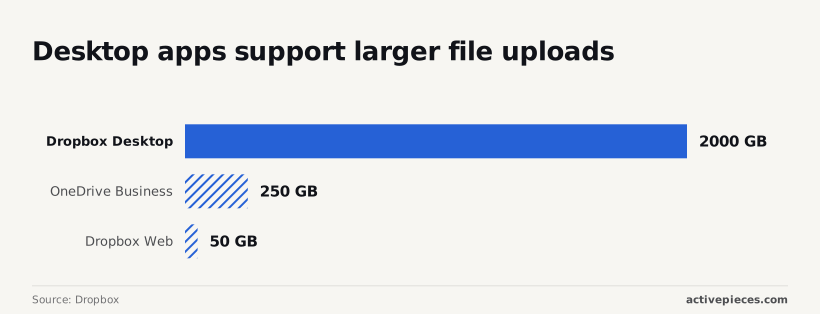
By Dropbox's own analysis, the cap for individual files on OneDrive Business sits at 250 GB, so users working with high-resolution media or large virtual disks will find their workflow restricted. That forces engineers to split large disk images or database exports before archiving.

Even within a single provider, the interface dictates capability. 50 GB is the limit for Dropbox web-based uploads, meaning browser-based users are significantly more constrained than those utilizing the desktop client. A browser-only contractor can only handle files 40 times smaller than a desktop user.
These constraints dictate which automated triggers remain viable after a migration.
Beyond file size, the intelligence of the storage layer now depends on how well it interfaces with frontier models like Gemini 3.8 Flash for instant document classification or GPT-6 Astra for complex reasoning over stored datasets.
The fastest way to settle a shortlist is to try one. Activepieces is free to try, no credit card.
Dropbox Business for high-volume media
Dropbox prioritizes block-level synchronization and high-throughput desktop performance for teams handling massive media assets. While browser-based uploads often fail during long-running sessions, the dedicated desktop client handles the heavy lifting required for raw video and high-resolution design files.
Desktop apps support larger file uploads
Transfers significantly larger than those allowed by the web interface are possible through the Dropbox desktop application. Standard browser session timeouts limit the latter.
Using the desktop client ensures that multi-gigabyte files continue uploading even if the network connection flickers. This reliability prevents the partial upload errors that force teams to restart manual transfers in Google Drive.
Smart Sync technology
Users can see and organize every file in the corporate repository without downloading the data to their local hard drive by using Smart Sync. This feature ensures that a creative director can browse a multi-terabyte project folder on a laptop with a small SSD.
They're only pulling down specific assets when opening them for editing. By offloading the storage burden while maintaining a local file path, it prevents hardware storage limits from stalling production workflows.

Creative tool integrations
Native integrations with creative suites allow for automated versioning and feedback loops without leaving the primary editing environment.
Docs reports that for teams utilizing Claude Fable 5.1 for long-horizon agentic work like automated metadata tagging, these integrations provide a stable file system for the AI to traverse.
The platform connects production software and the storage layer so that file locks and version history remain intact during collaborative edits. The following view shows how administrators manage these connections.
This granular control over installed integrations ensures that every automated step in the media pipeline remains visible to the operations team.
Microsoft OneDrive for ecosystem depth
Microsoft OneDrive is the choice for organizations built on the Microsoft 365 ecosystem because it integrates with Excel, Word, and Teams.
Choosing a storage provider that shares the same authentication layer as your productivity suite eliminates the friction of managing separate permission groups for every shared folder.
Native ecosystem and administrative controls
Co-authoring documents in real-time within the desktop versions of Word and Excel is made possible by a shared file architecture across the Microsoft 365 suite.
This native connectivity ensures that changes made in a local application sync immediately to the cloud. It prevents the version conflicts that occur when third-party sync clients fail to lock files during active editing sessions.

Governance over how data leaves the organization is centralized in the SharePoint admin center by setting global sharing policies.
Administrators can restrict file sharing to specific external domains or mandate multi-factor authentication for guest access. These settings keep sensitive project folders inaccessible to unauthorized users even if a direct link leaks.
Automated file versioning
OneDrive maintains a comprehensive version history for every file type. It allows users to restore previous states directly from the file explorer.
This safety net means a user can revert a spreadsheet corrupted by a faulty macro or an accidental deletion of a tab to a functional state. This process doesn't require a full system backup restoration from the IT department.
Comparing data retention and recovery
A provider’s safety net for accidental deletions is a critical differentiator. Standard suites often lack the extended recovery windows required to catch errors discovered months after the fact.
A provider’s safety net for accidental deletions is a critical differentiator.
Maximum file recovery windows
The duration a provider holds deleted data determines the window a business has to realize a file is missing before the system purges it permanently.
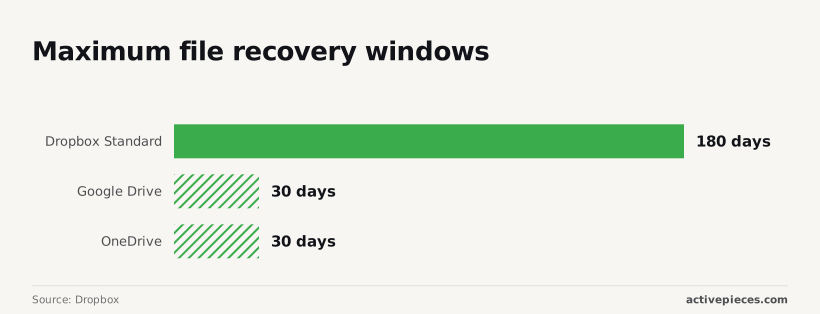
30 days is the cap for trash retention in both Google Drive and OneDrive. Dropbox Standard extends this to 180 days, providing a much wider safety net for recovering accidentally removed content.
An organization can recover a quarterly report deleted in error two seasons ago without permanent data loss. Relying on a 30-day window forces a high-frequency audit of all shared folders. Any mistake older than a month becomes unrecoverable by the user.
Version history depth
How many individual save states the system stores is defined by the version history depth. This count dictates whether you can revert a document to a specific hour or only to a specific day.
If a Gemini 3.8 Flash agent incorrectly overwrites a dataset during a long-horizon task, a shallow version history might only show the corrupted state. Dropbox maintains a full 180-day history for every change.
A team can pinpoint the exact minute a sync error occurred and roll back to the stable state.
Ransomware protection features
Mass file encryption events are identified by ransomware protection features, which allow a one-click rollback of the entire account. Google Drive alerts users to suspicious activity, but the recovery is often manual or file-by-file.
Dedicated business tiers in Dropbox include a "Rewind" feature that reverts the entire file system to a timestamp before the infection. A company avoids paying a ransom to regain access to their operational documents.
Reading a table only gets you so far. Build the same workflow in Activepieces and compare it yourself.
Nextcloud Hub and Proton Drive
Nextcloud Hub and Proton Drive provide infrastructure for organizations where data sovereignty and cryptographic privacy are non-negotiable requirements. While mainstream providers prioritize ease of access, these platforms focus on eliminating third-party visibility into corporate files.
Self-hosted data ownership
A business can maintain a private cloud on its own hardware or a chosen VPS provider using Nextcloud Hub. No external entity ever gains physical or logical access to the file system.
This architecture places the entire stack, from the database to the application layer, under the control of the company’s internal IT team.
The organization holds the keys. The central private server tower labeled 'Nextcloud Instance' connects via encrypted lines to a local laptop, a mobile phone, and a private database.
This isolation ensures that even if a global cloud provider suffers a systemic breach, the company’s specific repository remains untouched.
Zero-knowledge encryption
Proton Drive utilizes end-to-end encryption so that the service provider cannot decrypt, view, or scan the contents of any stored file.
Decryption keys are generated and stored on the user’s device rather than on the server. Consequently, a subpoena or a server-side hack yields only scrambled data. This prevents the provider from using file contents for metadata analysis or training internal models.
Swiss-based privacy laws
Proton Drive operates under the jurisdiction of Switzerland, which protects against bulk data collection requests from foreign governments. Swiss law requires a specific court order for data disclosure. As a result, a company’s records are shielded from the broad administrative subpoenas common in other jurisdictions.
This legal framework complements the technical encryption, forming a two-part defense for sensitive intellectual property.
The economics of enterprise storage
Google Drive remains the default choice for most businesses because it's bundled with existing productivity suites, though dedicated competitors often command higher premiums for specialized compliance and governance features.
While a standard Google Account provides 15 GB of storage for free, enterprise-grade alternatives require significant capital allocation, meaning businesses must budget carefully for their scaling data needs.
Median annual cost for cloud storage
34.6% of the global cloud storage market in 2026 belongs to Google Drive, with Dropbox at 22.4% and OneDrive at 18.7%. iCloud holds 10.5%, while other providers account for 13.8%. While Google leads, a third of the market opts for paid, standalone alternatives.
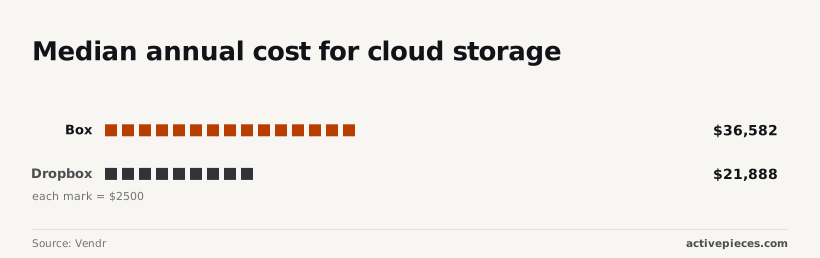
This suggests that consumers prioritize specialized features over ecosystem integration. This shift to dedicated providers carries a heavy price tag. According to data from Vendr, the median annual cost for Box is $36,582. It's a substantial overhead for mid-sized firms seeking advanced content management.
Dropbox sits at a median of $21,888 per year. A company switching from Box to Dropbox could reallocate nearly $15,000 to other operational tools. These figures reflect the reality that "default" is rarely the cheapest option once you scale past basic file sharing.
Total cost of ownership and scalability
Total cost extends beyond the base subscription to include the price of integrated intelligence and API access.
Where a flow runs should never decide whether you can leave the ecosystem. Activepieces allows teams to build automations on managed cloud and move them to a self-hosted environment using the same codebase via Git Sync.
This portability ensures that companies like FundingSocieties can maintain RBAC, SSO, and audit logs across their entire file infrastructure without being locked into a single deployment model.
Enterprise storage costs scale based on seat count, API call volume, and data residency. Most providers use per-user pricing, which causes costs to spike linearly as a department grows.
High-frequency automation workflows can trigger overage charges if they exceed monthly request limits. Storing data in specific geographic regions to meet legal requirements often incurs a surcharge over standard global hosting.
Activepieces
Activepieces links specialized storage alternatives to your existing communication and project management tools, ensuring that data remains accessible across the organization. It provides the automation infrastructure for teams that find Google Drive's native integrations too restrictive for their specific operational requirements.
Automating file uploads from email
You can program Activepieces to monitor specific Gmail labels or IMAP folders to extract attachments the moment they arrive. This automation removes the manual step of downloading vendor invoices or client assets.

Files are deposited directly into your chosen storage bucket without human intervention. By defining a trigger based on the has:attachment filter, you eliminate the risk of critical documents sitting unaddressed in an inbox where they're invisible to the rest of the team.
Syncing storage across platforms
Activepieces maintains consistency between different environments by mirroring file actions across your entire stack. If a developer pushes a technical specification to a GitHub repository, Activepieces can automatically replicate that file to a client-facing portal.
This synchronization ensures that stakeholders are always viewing the most current version of a document. It doesn't require the technical team to leave their primary coding environment to perform manual uploads.
No-code workflow triggers for files
The platform allows you to initiate complex sequences based on file activity, such as sending a notification or starting a review process.
When a new file appears in your storage, Activepieces can trigger an analysis using Gemini 3.8 Flash to summarize the content or post a direct link to a Slack channel. These triggers turn passive storage into an active participant in your business logic.
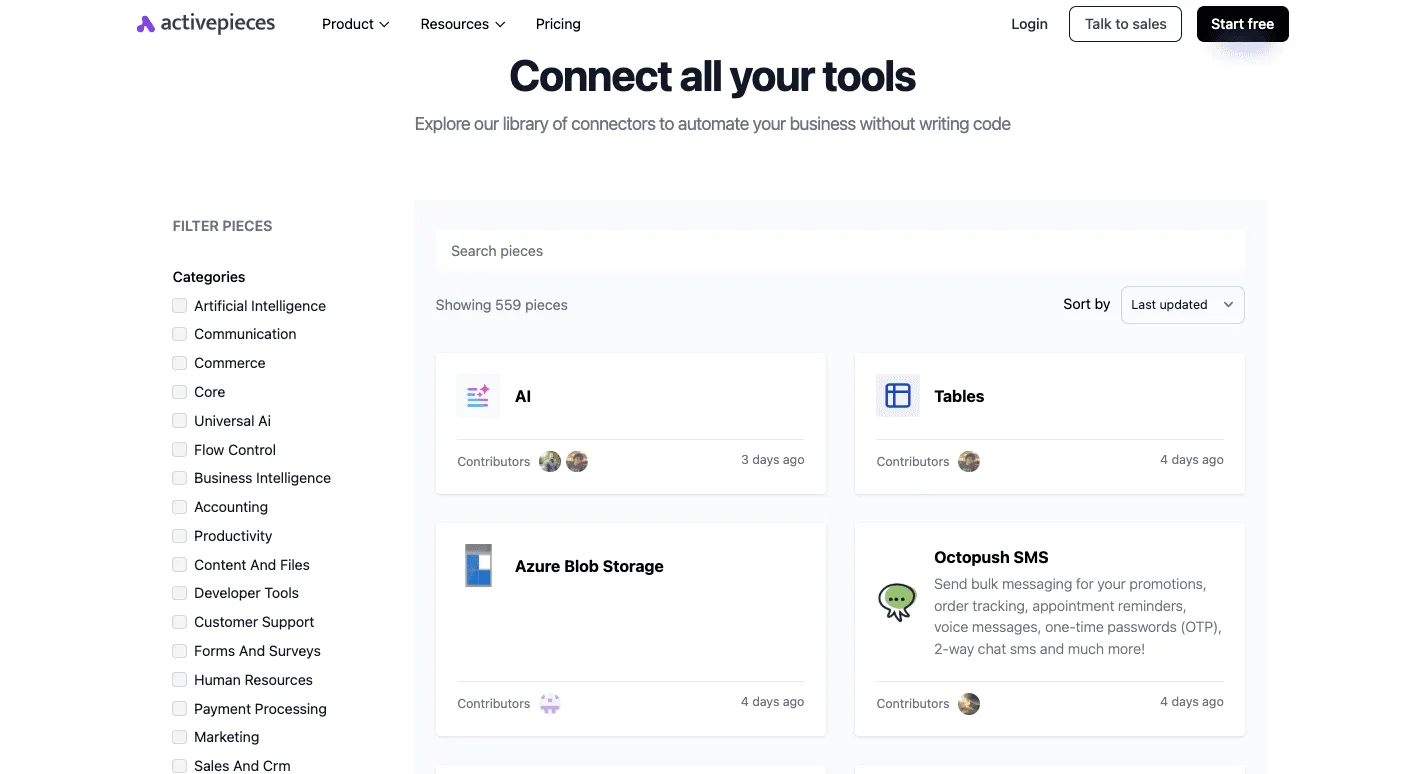
Team members are alerted to new data as soon as it's available for use.
While both platforms offer robust solutions for managing file transfers, the transparency of an open-source monorepo ensures that users are building on a foundation of verifiable, growing capabilities rather than a static marketing list.
Activepieces is the better choice for organizations that require an extensible infrastructure where the integration catalogue serves as a floor for innovation rather than a ceiling for growth.
By providing direct access to its codebase, the platform allows teams to scale their storage workflows without the limitations of a closed ecosystem.
Planning Your Migration Strategy
A successful migration requires a phased approach that prioritizes operational continuity over speed. This ensures that critical document triggers remain functional throughout the transition.
The process begins with a technical audit to distinguish between active collaborative files and cold storage. Moving stagnant data first reduces the noise during live testing.
Before any users lose access to their current environment, you must validate that the new destination’s API hooks can successfully ingest the specific metadata your scripts rely on.
The following sequence provides a framework for moving production environments without breaking the logic that powers your daily operations:
- Audit active vs. cold data
- Map existing folder permissions to new roles
- Test API sync triggers in a sandbox
- Execute phased user cutover
- Decommission
Validation and cutover
Every automated action must be verified in an isolated environment before the final switch. In a sandbox, you can run a model like Claude Sonnet 5.5 to analyze incoming JSON payloads for schema changes that would otherwise crash a production workflow.
Once the API responses are mapped and the triggers fire as expected, you can move the team in stages.
This prevents a company-wide work stoppage if a specific permission set fails to propagate. Following this structured cutover, the focus shifts to the long-term maintenance of these new connections.
Related reading
Still comparing
The fastest way to settle it is to build something.
Open source under MIT, so you can self-host the same thing later.
Start free Talk to sales