Calendly Alternatives for Sales Teams in 2026

Oct 1, 202612 min read
A Calendly alternative is a scheduling software platform that provides automated appointment booking, calendar synchronization, and workflow automation for individuals or teams seeking specific features not found in the market leader.
Calendly alternatives for modern scheduling workflows
Why users are moving away from Calendly in 2026
When the market shifted from simple link-sharing to specialized, integrated workflows, users began seeking Calendly alternatives that demand lower overhead and greater data sovereignty.
While Calendly holds a 20.7% market share according to WMTips, its dominance is being challenged by platforms that embed scheduling into broader business suites.

According to WMTips, Brevo now captures 18.4% of the market, meaning nearly a fifth of users prefer having their booking engine live inside their primary marketing and CRM stack rather than maintaining a separate SaaS silo.
Refusing to pay the "standardization tax" for basic features is what drives this fragmentation. As teams scale, the cost of rigid per-user pricing becomes a friction point for procurement.
Activepieces provides the unified governance layer where agents, workflow automation, and shared team data exist as one product rather than a collection of point tools.
By consolidating these functions under a single set of controls (including custom RBAC, SSO, SCIM, and git sync) organizations like MoneyGram and Moneypenny avoid the visibility gaps created by managing six different vendors and six separate audit logs.
One platform handles the entire span, whereas everyone else sells one piece of it.
The current market distribution reflects a move toward vertical specialization: Cal.com holds 11.4% by catering to developers who require open-source control, while Toast (7.6%) and OpenTable (5.0%) dominate the hospitality sector where scheduling must tie directly to point-of-sale inventory, suggesting that software utility is now defined by industry-specific integration rather than broad-market appeal.
One platform handles the entire span, whereas everyone else sells one piece of it.
Comparison of the top scheduling platforms by use case
| Provider | Monthly Team Cost | Primary Market Consequence |
|---|---|---|
| Doodle (Team) | 21 USD | Highest per-user cost for group polling and consensus-based scheduling according to TidyCal. |
| Calendly (Teams) | 20 USD | The baseline price for standardizing external booking across sales and success teams. |
| Acuity (Starter) | 20 USD | A matching price point for service-based businesses needing intake forms and payment processing. |
| Setmore (Pro) | 12 USD | A 40% reduction in overhead for teams prioritizing basic calendar sync over complex productivity. |

Around 20 USD is where the cost of entry for professional team scheduling has stabilized.
For high-volume workflows, the choice depends on whether you need the reasoning capabilities of Gemini 3.8 Flash to automate meeting summaries or a headless API to keep users on your own domain.
Monthly vs annual billing pricing differences explained
The higher figures in the comparison table reflect the month-to-month flexibility that many startups require during rapid scaling phases.
Paying $20 or $21 per user allows a team to add or remove seats instantly without a long-term financial commitment, which means companies can scale their software costs in lockstep with actual headcount.
Annual billing provides a significant discount for organizations with stable headcounts, often reducing the effective rate by 20% to 40%, so businesses willing to commit upfront can secure substantial long-term savings.
When reviewing the feature breakdown below, note that the lower prices represent the pre-paid annual commitment, which is the standard benchmark for enterprise budget planning.
The fastest way to settle a shortlist is to try one. Activepieces is free to try, no credit card.
SavvyCal for a frictionless invitee booking experience
By seeing their own schedule directly on the sender's booking page, recipients complete bookings faster and eliminate the mental load of toggling between browser tabs. This interface design treats the invitee as a first-class user.
Calendar overlay and visual ease of use
SavvyCal allows invitees to overlay their personal or professional calendars onto the booking screen so they can spot conflicts immediately. This reduces the "bounce rate" of scheduling links where users lack their own context.
To further streamline the choice, the platform includes ranked availability, which lets the organizer highlight preferred times, such as grouping meetings on Tuesdays to protect deep-work Wednesdays.
Pricing and team coordination features
| Feature | Calendly | SavvyCal | Cal.com | Motion |
|---|---|---|---|---|
| Annual Price (Teams) | $12/user | $12/user | $16/user | $20/user |
| Routing Logic | Advanced (Forms) | Basic (Links) | Advanced (API) | Automated AI |
| White-labeling | Minimal | Partial | Full (Headless) | None |
| Free Tier Limit | 1 Event Type | 0 Event Types | Unlimited | No Free Tier |
According to TidyCal, SavvyCal charges $12 per user per month on annual plans, matching the $12 per user entry point for Calendly, meaning users have price parity when choosing between these two primary scheduling competitors.
Cal.com prices its Team tier at $16 per user, a 33% premium that buys the right to self-host the entire scheduling infrastructure, so organizations prioritizing data sovereignty pay a clear surcharge for that control.
Linkedin observes that while Calendly and SavvyCal offer $10 entry-level individual tiers, the jump to team-wide coordination requires the higher $12 commitment to unlock shared scheduling and round-robin distribution, forcing growing teams to increase their per-user spend to access collaborative features.
Cal.com for open-source flexibility and data sovereignty
Cal.com provides the only enterprise-grade scheduling infrastructure that allows organizations to decouple their booking logic from a third-party vendor’s cloud.
Cal.com self-hosting vs cloud hosting options
Operational speed and total data sovereignty are the trade-offs. While the cloud version removes the burden of server maintenance, self-hosting ensures that sensitive meeting metadata never leaves the company’s private network.
To match specific risk profiles, the platform offers four distinct levels of data protection:
- Self-hosting on private infrastructure to keep all database traffic behind a corporate firewall.
- Database encryption at rest to prevent unauthorized access.
- GDPR and HIPAA compliance modules that provide the legal frameworks necessary for handling European citizen data and American healthcare records.
- Localized data residency for enterprise to satisfy legal requirements that data must stay within specific national borders.

The Cal.com API and developer-first customization
Because the Cal.com API enables teams to build bespoke booking experiences, scheduling can function as a native feature. Unlike Calendly, Cal.com allows for full white-labeling where the vendor’s branding is entirely stripped from the interface.
Developers can use the Cal.com App Store to connect internal tools or build custom integrations that trigger specific workflows, such as generating a summary of a technical call using Gemini 3.8 Flash to automate post-meeting documentation.
High-speed intelligence for meeting summaries
Gemini 3.8 Flash is a high-speed AI model optimized for processing large volumes of text with minimal latency. Users want this model to turn a 60-minute meeting transcript into a concise summary or a list of action items in seconds.
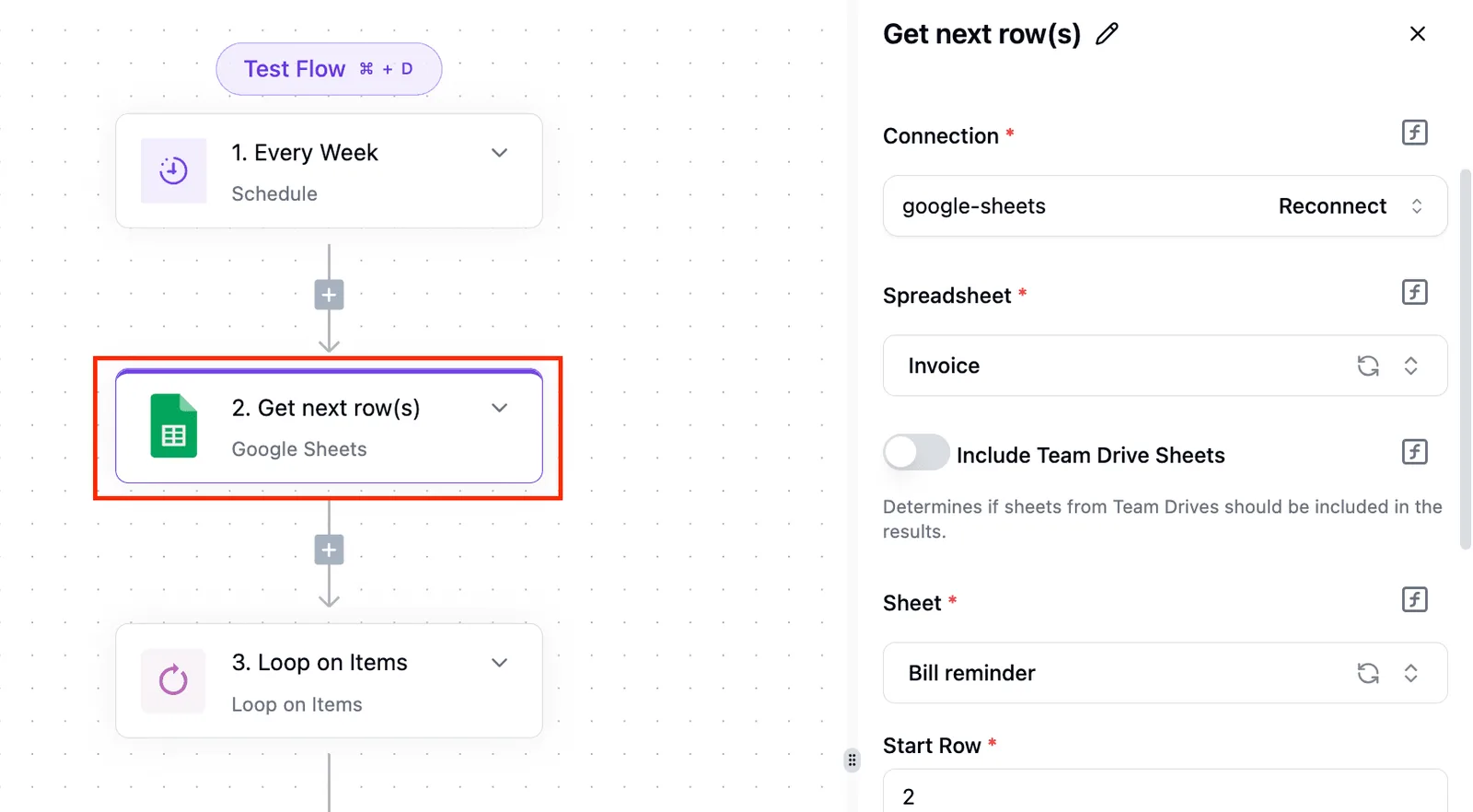
Advanced features like Gemini 3.8 Flash are not native buttons inside the Cal.com dashboard. These capabilities require an external integration layer.
By using a workflow engine to listen for new bookings, teams can pipe meeting transcripts into the AI and return the summary to their CRM.
Reading a table only gets you so far. Build the same workflow in Activepieces and compare it yourself.
Motion for AI-powered automated daily scheduling
By treating the calendar as a dynamic optimization problem, Motion functions as an automated personal assistant.
How the Intelligent Calendar handles rescheduling
The platform uses a custom algorithm to automatically shift non-fixed tasks into the most efficient available gaps. This prevents the "Swiss cheese" effect where small windows of time appear between meetings.
[A 'before and after' view of a calendar day. On the left, fragmented tasks and meetings with 15-minute gaps; on the right, Motion's AI has consolidated tasks into 'Deep Work' blocks and moved the remaining tasks to the end of the day.]

The trade-off between automation and manual control
Delegating schedule management to an algorithm requires a transition from granular control to high-level parameter setting.
- Priority Levels: Tasks are categorized as 'Urgent', 'Important', or 'Low', which dictates which items the AI will bump if a new meeting is booked.
- Deep Work Protection: A toggle that allows the system to decline incoming meeting requests if they would break a continuous block of focused time.
- Auto-Scheduling: A feature that places tasks directly onto the calendar; a task without a specific time slot will be invisible until the AI finds a gap.
Building custom scheduling engines with Activepieces
Activepieces allows teams to generate their own integrations with AI and add them privately to their own instance, ensuring that custom booking logic is never stalled by a vendor's roadmap or a missing connector.
The open-source monorepo shows that roughly 60% of the 738+ integrations are community-contributed, meaning the platform grows at the speed of its users rather than its own release cycle.
Automating complex post-booking workflows
When a booking requires conditional logic that spans multiple departments, standard scheduling tools often fail.
Activepieces solves this by treating the calendar event as a trigger for multi-step sequences, such as routing high-value leads to a specific Slack channel while simultaneously generating a unique meeting room. The builder canvas allows for granular control over these paths.

Visualizing the automation logic
By inspecting the exact JSON payload that caused the error, developers can debug failed runs rather than guessing why a notification failed.
Syncing schedule data across non-standard CRMs
Activepieces bridges the gap for industry-specific databases by offering a library of pre-built connectors and a custom HTTP integration to interface with any REST API.
This capability is critical for maintaining a single source of truth in environments where sales or project management happens outside the standard Salesforce or HubSpot ecosystems.
For organizations that require a unified infrastructure for automation, Activepieces is the better choice for teams that need comprehensive governance and custom scheduling engines in a single platform.
By providing RBAC, SSO, and git sync within a self-hosted monorepo, it ensures that complex booking workflows remain secure and extensible without the limitations of fragmented third-party tools.
Choosing your next scheduling platform this week
Immediate user friction must be balanced against long-term data governance. To determine if your current stack supports your growth, execute a systematic review of your scheduling surface area.
- Audit total active seats vs. paid licenses to identify dormant accounts that inflate monthly recurring costs.
- Run a 'Sales Friction' test using a calendar overlay link to measure if redirecting users to a third-party domain increases drop-off rates.
- Verify data residency requirements for SOC2 compliance so that meeting metadata remains within your required geographic boundaries.
- Map the flow of guest emails from the scheduling tool to your CRM to ensure no PII is stored in intermediate systems without encryption.
This audit provides the baseline metrics needed to decide between a managed service and a self-hosted alternative. Moving toward a headless architecture or an open-source core allows your team to treat scheduling as a data pipeline rather than a siloed application.
Frequently asked questions about scheduling tools?
Which Calendly alternative is best for HIPAA compliance?
By providing a self-hosted version of its scheduling engine, Cal.com gives healthcare providers physical control over their database.
This deployment method ensures that Protected Health Information (PHI) never leaves the organization’s controlled infrastructure, which simplifies the process of signing a Business Associate Agreement (BAA).
While the hosted version of Calendly offers HIPAA-compliant settings on its Enterprise plan, the requirement to use their cloud infrastructure means the provider must trust the vendor’s internal security audits.
For teams requiring strict data isolation, the open-source architecture of Cal.com allows for a private instance where scheduling logs and patient details are encrypted within the provider's own virtual private cloud.
Can I migrate my existing booking links to a new tool?
Because every scheduling platform uses a unique domain and slug structure, migrating booking links requires a manual update of your public-facing URLs.
You cannot redirect a Calendly link to a SavvyCal link at the DNS level, so you must replace the old links in your email signatures, website buttons, and social media profiles.
- Export your existing meeting data as a CSV file to preserve your historical booking records.
- Import your client contact list into the new platform to maintain your customer database.
- Update your website embeds and "Book Now" buttons to point to the new provider’s URL.
Which platform offers the best free tier for small teams?
Cal.com offers a free tier that includes unlimited event types for individuals, whereas Calendly limits its free users to a single active event type.
This allows a solo consultant to offer different durations or meeting formats without paying for a premium subscription.
For teams, SavvyCal provides a free plan that allows for basic link creation, but it includes branding that cannot be removed without upgrading.
Motion does not offer a permanent free tier, as its value relies on the continuous compute cost of its automated scheduling engine.
Teams requiring collaborative features or multiple calendars generally find that Cal.com provides the most functional overhead before requiring a per-seat monthly fee.
Related reading
References
Still comparing
The fastest way to settle it is to build something.
Open source under MIT, so you can self-host the same thing later.
Start free Talk to sales