
How Sales Automation in CRM Changes the Way Your Teams Work
Learn how sales automation in CRM works. Discover how Activepieces can help and explore some sales automation templates you can use now.

Jan 9, 202614 min read
A typical sales team spends more time updating its customer relationship management (CRM) software than speaking with potential customers. Data entry, scheduling meetings, and tracking sales activities distract you from conversations.
Sales automation in CRM handles repetitive tasks, scores leads, and updates the sales funnel as prospects engage, which improves sales productivity and keeps customer data accurate.
In this article, you’ll learn how CRM sales automation works and how it can support your operations.
Spend more time speaking with buyers, not clicking through your CRM. See what Activepieces can do!
TL;DR
- Sales automation in CRM uses rules and workflows to handle repetitive sales tasks, like data entry, lead assignment, scoring, follow-ups, and pipeline updates, so reps spend more time selling and less time managing the CRM.
- It improves performance by responding instantly to new leads, centralizing activity data, reducing manual errors, and automatically nurturing and prioritizing prospects based on engagement.
- Automation speeds up deal cycles by keeping next steps moving without waiting on manual updates.
- Activepieces supports CRM automation by connecting your CRM with the tools around it, letting you build flexible workflows that adapt when inputs change.
Everything below works on Activepieces' free plan. Start without code or a credit card.
What Is Sales Automation in CRM?
Sales automation in CRM means the system takes over parts of the process that follow the same pattern every time. Many CRM options include sales process automation features, but only help when they reflect how your team works day-to-day.
A standard CRM stores your customer data. Sales automation actually does something with that data once it enters the system.
For example, when a lead submits a form, CRM automation software can create the record, assign ownership, and prepare the next step. See how it instantly removes a large amount of data entry that you typically need to do?
To make your system work, you need rules. Certain actions trigger a response. That response can score leads, send follow-up emails, or update a deal stage. Once those rules are in place, the same steps run the same way every time.
Hence, it removes manual tasks from the sales process so you can focus on conversations, decisions, and closing deals.
How Automation in CRM Improves Sales Team Performance
In a normal day without automation, you open your inbox and see a new lead from earlier that morning. Let’s say you were in meetings, and you missed it. You reply anyway, but you’re aware that the timing is off.
Such an incident can keep happening. Not because you’re bad at your job, but because you can’t monitor everything at once.
That’s where the benefits of sales automation start to show up:
Gives Sales Reps More Opportunities
With automation, leads never have to wait. The moment they come in, the software reacts. It assigns the lead, applies rules, and scores leads based on what that person did before reaching out.
You open the CRM and see who actually wants to talk. That lets you focus on high-value activities like lead generation instead of sorting through lists.
Since the system already shows what happened, your sales managers don’t chase updates. Sales team members also don’t argue over ownership, as the rules handle it.
Centralizes Data for Deeper Analysis
Now think about a call you’re about to take. Without automation, you switch between software to remember what happened last.
With automation, everything shows up in a single platform: emails, page visits, and past notes. When it’s time to send pricing, you share custom quotes directly from your sales automation platform.
You don’t spend time building manual sales reports as well, since automation generates real-time dashboards that reflect what changed today.
Reduces Human Error in Repetitive Workflows
Typing the same details over and over can wear you down. Automation frees your team members, especially salespeople, from repetitive tasks.
It reduces manual data-entry errors by extracting information from forms, emails, and calendars. The system stays up to date even when you get busy.
Scores and Nurtures Leads in an Instant
Leads usually enter a CRM in various ways: some people show interest right away, and others arrive early, look around, then disappear for weeks.
An automation tool watches what people actually do. It notices:
- Repeated visits
- Email opens
- Pricing page views
Over time, it turns into a filter and a furnace for your sales pipeline management. High-intent leads rise to the top. Otherwise, it will remain active.
At the same time, nurture flows keep quieter leads engaged, so your marketing and sales teams can spend more time nurturing relationships and closing deals.
Personalizes Customer Interactions and Experiences
As activity builds, the system keeps track of what someone read, clicked, or ignored. When your sales professional opens a record, they see a path, which shapes the conversation before it begins.
It further extends across channels. Emails, calls, and messages connect to the same history, so outreach stays consistent even when it spans days or weeks. Personalized outreach across multiple channels can also increase sales conversion because your leads feel understood.
Speeds Up Deal Closures With Workflow Automations
Once you set up an automation, the system moves work forward even if you don’t remind it of what comes next. By automating CRM functions, you make it easier for your sales and marketing teams by removing pauses that quietly drain momentum.
As deals move forward, your administrative tasks decrease. Since you get fewer delays, you have fewer stalled deals. Conversations continue while interest stays high, which directly supports closing deals and helps boost sales.
How Activepieces Powers Real Sales Automation in CRM

You know how most automation tools are okay at first, then slowly start to disappoint? Everything works until something slightly different happens: lead replies from Gmail or form changes.
Activepieces is a workflow automation platform that doesn’t try to replace your CRM or force your team into a new way of working. Rather, it connects the tools around it, so when something changes, the system reacts the same way a person would if they were paying attention all the time.
It’s open-source, and you can adjust flows when the situation changes instead of waiting for features or building workarounds. Once you stop checking whether the system worked, it finally starts saving time.
Integrations With Sales Automation and CRM Software
Activepieces currently integrates with 586 pre-built integrations, some of which are sales, CRM, and marketing automation software, such as:
1. Salesforce
You have more accounts, more decision makers, and approvals that cannot happen informally. At that point, a basic CRM will be limiting for you. Salesforce, through Sales Cloud, delivers an enterprise-grade sales automation solution that can handle that complexity.
It organizes clients hierarchically through contact management, which is especially useful once deals have multiple roles and stakeholders. As activity builds, CRM data updates in real-time as emails, calls, and meetings happen, so your reps and managers see the same vision.
Outreach also connects to this sales automation tool. Salesforce offers email marketing and analytics tied directly to pipeline activity, which helps you see how communication affects revenue.
Key Features
- Einstein Copilot – Act on CRM data using natural language to update records, draft messages, or summarize calls.
- Predictive scoring – Rank leads and opportunities based on patterns from past wins.
- Flow builder – Design complex automation using a visual editor tied to business rules.
- AI-assisted flow setup – Create automation by describing the logic instead of building it step by step.
- Screen flows – Guide reps through required steps so records stay complete.
- Sales cadences – Organize outreach into structured sequences with next actions.
- Activity capture – Sync emails and calendar events automatically into Salesforce.
- Conversation insights – Analyze calls to surface objections and coaching signals.
2. HubSpot
In HubSpot, you open a contact record, and everything you need is in there. You see: opened emails, visited pages, and made bookings.
HubSpot can automate repetitive tasks like assigning deal owners, updating stages, or logging activity after calls. So, those sales tasks no longer depend on you remembering to do them later.
When outreach starts, it sends relevant follow-up emails for every contact based on what that person does next.
Key Features
- Visual workflow editor – Build automation step by step using a canvas that shows triggers, actions, and outcomes.
- Trigger-based enrollment – Start flows when contacts submit forms, open emails, visit pages, or change properties.
- Conditional paths – Adjust what happens next based on whether someone clicks, replies, or stays inactive.
- Sales sequences – Send one-to-one outreach that pauses automatically when a prospect responds.
- Timed delays – Control spacing between actions so messages feel natural instead of rushed.
- CRM driven personalization – Get details like role, company size, or deal stage directly into messages.
- Lead scoring – Track engagement levels and surface contacts that show stronger intent.
- Internal alerts – Notify reps when a lead takes an action that signals interest.
- Revenue attribution – Connect workflows to closed deals so results stay visible.
- Consent management – Handle subscriptions and compliance inside the same system.
3. Zoho CRM
Zoho CRM organizes your sales operations through several core modules and automated processes so those handoffs don’t rely on side chats.
It offers an AI assistant that watches activity and surfaces patterns, such as when interest drops or when a follow-up should happen. Reports update as work moves forward, so you can generate sales reports without pulling data from different tools.
Key Features
- Custom modules – Create new data structures using prompts.
- AI forecasting – Predict outcomes using activity patterns and confidence scoring.
- Sentiment detection – Flag frustrated or urgent messages before they escalate.
- Guided processes – Enforce step-by-step deal progression using blueprints.
- Cross-department stages – Support multi-module stages so a single profitable customer journey can span across different departments.
- Advanced cadences – Run follow-up sequences across email and messaging channels.
- Smart triggers – Re-engage leads based on repeated interest signals.
- Unified communications – View messages and calls in one threaded record.
Easier to see it running than to read about it: set it up free, no card.
CRM Sales Automation You Can Build on Activepieces
Check out these sales automation examples that can give you a better idea of how CRM sales automation works. You can use these ready-made templates and customize them as needed.
Lead Nurturing
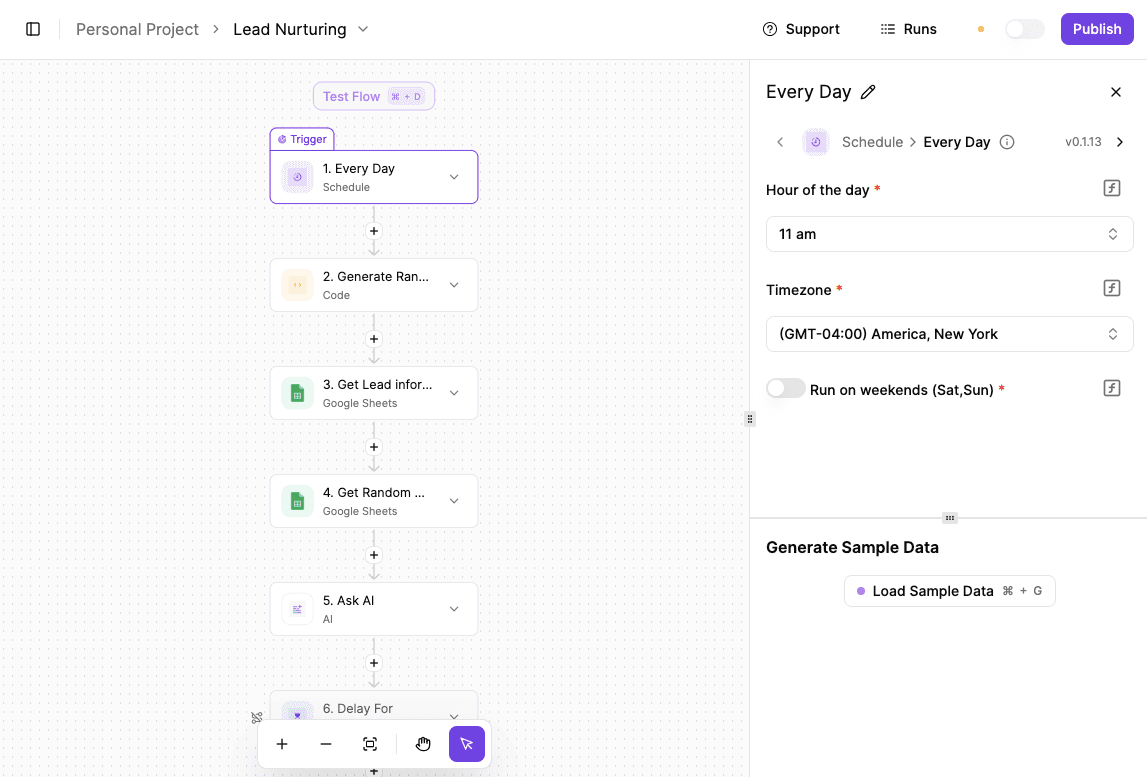
Rather than manually reviewing every form submission, AI steps in as soon as a lead comes in. It looks up the company, evaluates how strong the opportunity is, and filters out low-value or irrelevant leads.
Only the better prospects move forward with added context already attached, so your CRM stays clean, and your team stays focused.
To start:
- Set up a daily schedule trigger for your automation (every day at 11:00 AM).
- When the automation starts, generate a random number. You can use an AI assistant to create the simple code if you don’t want to deal with math.
- Use that same random number for two selections:
- Pick one lead from your lead spreadsheet.
- Pick one article or resource from a separate “articles” sheet.
- Fill the articles sheet in advance with content relevant to your industry, your work, or even light, fun reads.
- Once you have the lead and the article, use a text/AI writing feature to draft a short, casual email. The message should sound natural, like “I just came across this and thought of you,” and include the article title and link.
- Optional but recommended: add a delay. Use the same random number to delay the send by a random number of minutes, so emails don’t always go out at the exact same time.
- Test the automation to make sure the right lead, article, and email are being generated before turning it on.
Get the template here: Lead Nurturing
VIP Lead Alert

Some leads need immediate attention, and this automation makes sure they get it. AI evaluates incoming messages in real time and flags those with high intent. When that happens, your team is notified instantly, so nothing important gets missed.
To start:
- Have a trigger. In this example, it’s an incoming email, but you can use any client touchpoint:
- Form fill
- Chat
- Webhook
- When the trigger fires, use a text AI step to read the message. Extract key details like the sender’s name, company, and anything necessary.
- Enrich the lead using a research AI (like Perplexity). Have it gather company intel:
- Size
- Revenue
- Founders
- Major clients
- Once research is done, send the summary into another text AI step to score the lead. Ask it to rate the lead from 1 to 10 and include scoring rules and examples in your prompt so the AI knows what “VIP” looks like.
- Add a conditional step:
- If the score is seven or higher, send an instant alert to Slack (or another channel), so your team can respond immediately.
- Otherwise, route the lead somewhere else, like logging it in your CRM.
- Rename steps in the flow as you go to keep things easier to track.
- Test the automation with a sample email and confirm the alert fires correctly.
Get the template here: VIP Lead Alert
AI Inbound Qualification
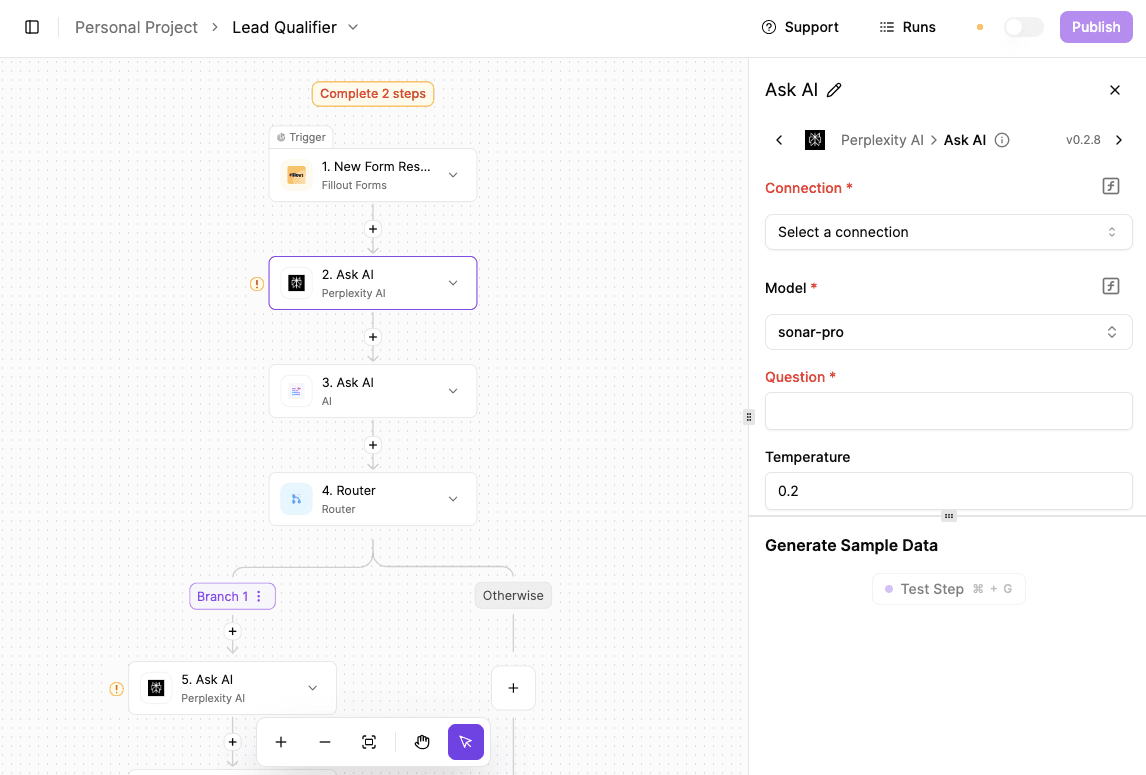
Following up doesn’t have to mean repetitive “just checking in” emails. This automation keeps conversations warm by automatically sharing relevant content with leads.
To start:
- Add an Activepieces webhook URL to the form so that every submission triggers the flow.
- When the form fires, use AI to research the company behind the inbound. Perplexity is ideal if you have Pro, but ChatGPT or Claude works fine too.
- Run an AI spam filter on the message:
- If it’s spam, route it to a separate “spam” path and just log it.
- If it’s not spam, use AI to assign a priority.
- Generate a one-sentence summary of the inbound so your team can understand it immediately.
- Have AI draft a personalized email response. You can keep it generic, fully customized, or include a Calendly link to push fast meetings.
- Send that email automatically via Gmail.
- Log everything to a Google Sheet:
- Company research
- Priority score
- Summary
- Email response
- Send a notification to Slack, Discord, or both with all the key details so your team can act immediately.
Get the template here: AI Inbound Qualification
Set Up AI Sales Automation With Activepieces

Too many sales activities depend on someone remembering what to do next. Activepieces fixes that by letting you build flows that react to real events. It can automatically create follow-ups, tasks, or internal notes.
These flows can pause and wait for approval when needed. AI agents can also read messages, summarize context, or draft replies, but they don’t send anything blindly. The human-in-the-loop design lets sales leaders obtain approvals in situations that require judgment.
Activepieces further allows non-technical users to build flows visually. Developers can add custom logic using TypeScript when the default pieces aren’t enough.
Take sales automation off autopilot and put real control back in your hands. Try Activepieces today!
FAQs About Sales Automation in CRM
What is CRM sales automation software?
CRM sales automation software helps you run sales work. It handles follow-ups, updates records, routes sales leads, and tracks activity as it happens.
Aside from that, the system reacts to actions taken by prospects or reps. That makes sales technology easier to rely on day-to-day and reduces missed steps that hurt sales performance.
What is the best CRM for sales automation?
There’s no single best option for everyone. HubSpot is for those who want speed and ease. Salesforce is for larger teams with complex rules. Zoho CRM, on the other hand, suits teams that need flexibility at a lower cost.
With Activepieces, you can integrate with these platforms.
What are CRM automations?
CRM automations are rules and workflows that run inside a CRM. They trigger actions like assigning owners, sending messages, updating deal stages, or creating tasks when something changes.
What is the difference between a sales and a marketing automation tool?
Sales automation tool focuses on reps, deals, and follow-ups. Marketing automation, in contrast, focuses on campaigns, nurturing, and audience engagement. Together, they support marketing and sales automation by connecting marketing efforts to real pipeline activity.