
Hedra Automation: Setup Guide and Pricing (2026)

Nov 21, 202614 min read
Hedra automation means starting and collecting video generations from outside the Hedra studio. The fastest route is a short script or a workflow built in a tool like Activepieces that calls the official API once per trigger.
Master Hedra automation with the fastest approach
Fastest way to automate Hedra video workflows
For people who would rather not maintain code, a workflow tool is the quickest route; otherwise calling the API directly is the quickest path. Both fail the same way if limits and credits go unchecked, so the plan below checks them before the first run.
What you will have working at the end
You'll have one chain working. A form submission or spreadsheet row starts a request, the request goes to Hedra's API, Hedra renders, and the finished MP4 lands in a folder you chose.

What Hedra's docs say is automatable today
According to Hedra's documentation, generation is something you submit, then poll for status, then fetch once it finishes. That's the shape that automates cleanly: submit, wait, download.
From that, two things follow. Your workflow needs a wait-and-retry step, because a render isn't instant. It also needs a credit check up front, because a generation that can't be paid for is the commonest silent failure.
| Route | What starts a render | Where it tends to break |
|---|---|---|
| Studio | A person clicking | Nothing is repeatable, so volume is limited by attention |
| Direct API | Your script or scheduler | Unhandled errors, since you write the retry and status logic |
| Workflow tool | A trigger such as a new sheet row, which Activepieces can start from across its 750 integrations | Mismatched fields and exhausted credits, which the tool will not warn you about |
Nothing is repeatable, so volume is limited by attention
In practice, choose the studio for one-off clips, the direct API if you already run scripts, and a workflow tool if the trigger lives in a form or sheet.
If you are running this arithmetic for your own team, see what the same workload costs on Activepieces.
Get an API key and test it
Create a key in your Hedra account, send one authenticated request, and confirm Hedra answers with a success response before you build anything around it.
Create your Hedra API key
Generate the key from the API or developer area of your Hedra account settings.
I won't guess at three things, because Hedra's key page and API reference are the source of truth for them. They are the base URL, the exact name of the auth header, and which plan or credit balance the API draws on.
Store the key in your automation tool's credential store or an environment variable. A key pasted into a workflow step ends up in exported files and run logs, and rotating it later means hunting through every copy.

Send your first Hedra API request
Keep the first call outside your automation tool, in a terminal or a plain HTTP client, so there's one variable instead of five. Choose a read-only or cheap call from the docs, not a full render.
- Build the request from the base URL in the docs.
- Add the auth header with your key, named exactly as the docs name it.
- Send it and read the status code before reading the body.
- If it fails, change one thing at a time: key, header name, URL, then account balance.
If the rejection is about authentication, look at the key or header. If it mentions payment, credits, or plan, look at the account, not your request.
What a successful Hedra API response looks like
You are looking for a successful HTTP status plus a JSON body with the data the docs promise, and for a generation request that includes an identifier you can poll later.
Save that identifier. The trigger-to-render-to-download chain depends on it, since the download step has nothing to fetch without it.
Treat an empty body or a success status with an error message inside as a failure. Fix it here, while the chain is one request long.
Stage 2: Generate and download your first video
Four calls, in order: upload the assets, create the generation, poll its status until it finishes, then download the file. Run it once by hand with a short clip before wiring in a trigger.

Upload assets and create the generation
Upload the audio and image first, because the create request refers to the uploaded assets and not to raw files.
| Field | Purpose | Permitted values | Limit |
|---|---|---|---|
| Model | Chooses the engine that renders the video | Avatar, Kling, Veo, Seedance | Priced per second, see below |
| Audio | Drives speech or soundtrack | Uploaded audio file | 0.5–600 s, 10.4 MB |
| Image | Supplies the starting frame or character | Uploaded image file | 104.8 MB per file |
| Aspect ratio | Sets the frame shape | Listed per model in the docs | Set by the model |
| Resolution | Sets output sharpness | Listed per model in the docs | Set by the model |
| Duration | Sets clip length | Seconds | Bounded by the audio, 600 s at most |
Validate file size and audio length in your trigger step, so a bad input is rejected before it uses a credit.
Choose a Hedra model by cost per second
At 2.5 cents per second, Avatar at 540p is the cheapest option, and Seedance 2.5 is the most expensive at 14.85 cents per second, according to Hedra's model pricing. That makes Seedance roughly six times the cost of a 540p Avatar clip.

Between them sit the rest:
- Avatar 720p costs 5 cents per second.
- Avatar 1080p costs 6.25 cents per second.
- Kling V3 costs 8.4 cents per second.
- Veo 3.1 costs 11.43 cents per second.
Over a 10-second clip, that comes to 25 cents at Avatar 540p and $1.485 on Seedance.
That difference is harmless in a test and a real budget problem in a loop that renders hundreds of clips. Prototype on the cheap tier, then move up only after the workflow has run cleanly.
Poll render status and download the video
Because rendering is asynchronous, the create call returns before the video exists. Poll the generation's status at a steady interval and back off if it runs long.
Stop on a terminal state, whether complete or failed, because a loop with no exit condition keeps spending API calls.
Only when the status reports complete should the workflow fetch the output URL and save the file.
Worth checking against a plan that does not meter every step: one credit covers a whole run on Activepieces.
Trigger renders from forms, sheets, and webhooks
Whether it's a form submission, a new sheet row or an incoming webhook that starts a Hedra render, the same five steps run, so render behavior is consistent regardless of entry point.
- Trigger: a form entry, a sheet row or a webhook call supplies the script, image and audio.
- Call Hedra: send the generation request with your API key and keep the returned job identifier.
- Poll: ask for the job's status on an interval until it reports finished or failed.
- Store: download the file immediately and save it to your own storage, because a link you didn't copy is a link that can expire.
- Notify: message the requester with the stored location, or with the failure reason.
Building it with a generic HTTP step
In every tool below, a plain HTTP request step is all you need. Put the API key in a stored credential, not in the step body.
Then add a wait, a status check and a branch that loops back until the job is done or a retry cap is hit.
Without the cap, a stuck job spins the loop until your task allowance runs out.
In Activepieces, nobody has to wire that loop by hand: you describe the process to the built-in chat in plain words (form entry, Hedra call, status check, saved file, notification) and it publishes a live flow, the same artifact a builder would have assembled.
It sits under the same RBAC and audit logs as every flow built by hand, and every run leaves a trace anyone can read, showing whether the loop exited or the job stalled, with no certification needed to follow it.
You don't hire for this; you describe it, then submit a throwaway input and read the trace before real submissions arrive.
Plain script alternative
If you write a script instead, the platform is out of the failure path, at the price of owning hosting and retries yourself.
On cost they differ most. Zapier Pro gives 750 tasks for $29.99 a month. Every poll or loop pass spends one, so a render that takes many checks eats the allowance fast.
For $12 a month, Make Core gives 10,000 credits, which stretches further, but each module run still draws credits, so a loop costs you there too.
| Option | Maintenance | Polling vs webhook | Cost per run |
|---|---|---|---|
| Activepieces | Low; hosted or self-run | Webhook trigger, polling by loop | Set by your plan or hosting |
| Zapier | Lowest; vendor-run | Webhook trigger, polling by delay steps | Each step is a task on the $29.99 plan |
| Make | Low; vendor-run | Webhook trigger, polling by repeat modules | Each module draws from the 10,000-credit, $12 plan |
| n8n | Moderate if self-hosted | Webhook node, polling by wait and loop | No per-task metering if self-hosted |
| Plain script | Highest; you own it | Polling in a loop, webhook if you host an endpoint | Server time only |
Pick by who will be paged when it breaks. If that's you, the script is the one with the fewest places to hide a silent failure.
Fix Hedra limits and errors
Before a job runs, you can check the four things most Hedra failures trace to: credits, request shape, blocked content and stalled renders. Each one leaves a status code or a state you can read, if the script is looking.
Hedra plan and credit limits
There is no free tier on Hedra's Play plans, and Hedra's pricing page lists four paid ones. Basic is $20 for 2,000 credits a month and Pro is $50 for 7,200, so Pro costs less per credit.

Teams is $75 for 14,400 and Ultra is $100 for 18,000, meaning you get more for your money with Teams.
Against Basic, Pro costs 2.5 times as much but gives 3.6 times the credits. Teams works out cheaper per credit than Ultra, so Ultra only pays off if you need the larger pool.
A batch job that runs out mid-month fails with a payment error, not a warning, so compare your expected renders against the monthly allowance first.
Common Hedra API errors and fixes
736 failures in a general sample of failed video jobs from PicX Studio came from blocked content. Invalid requests accounted for 251, empty output for 186 and server errors for 157, which means invalid requests are the leading type.
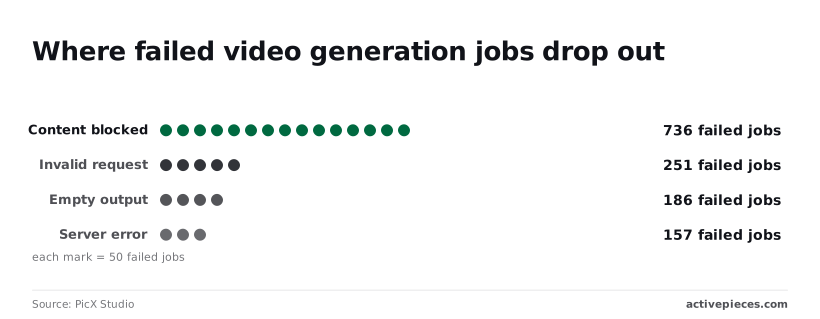
Blocked content is therefore over half of the 1,330 failures.
Screen prompts and images before submission, because retrying a blocked job just fails again. The table maps each Hedra failure to its cause and fix.
| Error | Cause | Fix |
|---|---|---|
| 400 | Malformed request or invalid parameter | Check the payload against the API reference and fix the field |
| 401 | Missing, wrong or revoked API key | Regenerate the key and confirm the header is sent |
| 402 | Credits exhausted | Top up or upgrade, then resubmit |
| 429 | Too many requests too quickly | Back off and retry with a delay |
| Stuck generation | Job never reaches a final state | Stop polling at a ceiling, then resubmit once |
| Expired URL | Download link used after it lapsed | Download immediately after completion |
| Bad file | Unsupported or corrupt input | Re-export in a supported format and re-upload |
Only 429 and a stalled job are safe to retry automatically. The rest need a change to the request, the account or the file.
Frequently asked questions
Does Hedra have an official API?
Yes, and it's the route this article recommends: you submit a generation request, wait for the render, and download the result, all without opening the editor. Use it in preference to browser scripting, which breaks whenever the interface changes.
Confirm the current endpoints and authentication in Hedra's own API documentation before you build, because I haven't reproduced every call here.
Can I automate Hedra without coding?
Yes, if your automation tool can send an HTTP request with a custom header and read a field from the response. That covers the trigger, submit, check status and download steps.
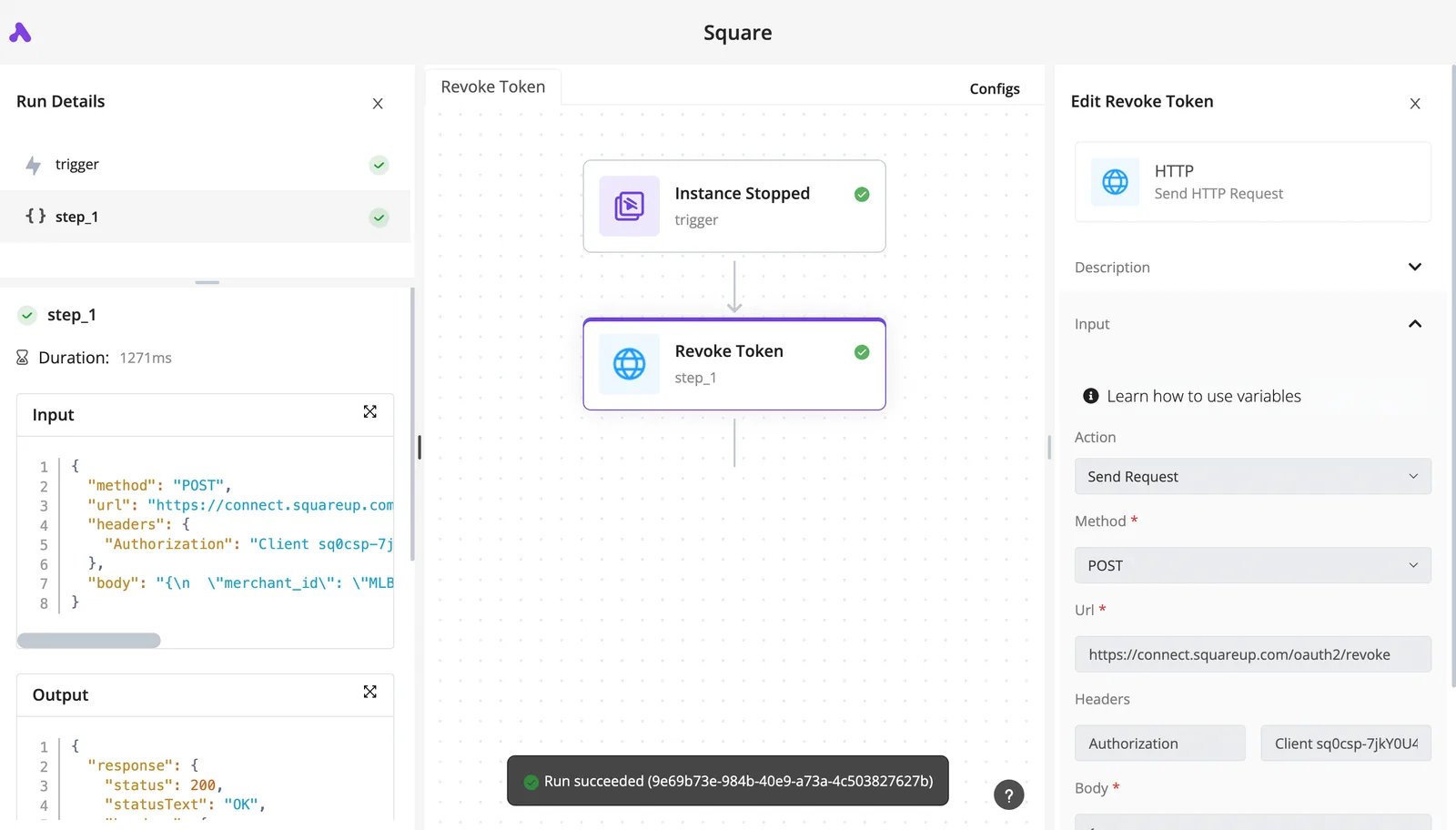
Usually the trouble is the status check, which needs a loop with a stop condition. Without one, a stuck job keeps your workflow running and your credits draining. Test the loop on one clip before you point it at a batch.
How much does Hedra automation cost per video?
You don't pay for the API call itself. Each render consumes credits, and the amount depends on your plan and on what you ask for.
Rather than quote a rate that may be out of date, run one representative clip, read the balance before and after, and multiply. Failed and retried jobs count toward that figure, so include them in your estimate.
Why does my Hedra generation keep failing?
In most failures I would trace, the cause is one of three: an exhausted credit balance, a plan limit on simultaneous renders, or a malformed input such as an unsupported file. The symptom is usually a job that never completes, not a clear error.
Check the balance and your concurrency headroom first, then the input. Log every attempt so you can see which cause you are dealing with.
Can I use automated Hedra videos commercially?
That depends on your plan's terms, not on whether a human or a script pressed the button. Read the current terms for your tier before publishing paid or client work.
Four questions remain unsettled by the body, each last checked on 21 November 2026:
- Commercial use: governed by plan terms, so read your tier's terms before you ship client work.
- Concurrency on Basic: no confirmed limit, so test by submitting parallel jobs and watching for rejections or queueing.
- Credit expiry: unconfirmed, so check your account page and avoid stockpiling credits you can't verify.
- Webhooks versus polling: polling is the documented path I can vouch for, and I haven't confirmed webhook support.
Treat each as something to verify against your own account, then record the result and its date next to your workflow.
Related reading
References
Running the numbers
See what the same workload costs here.
Free forever plan, and every paid plan self-hosts at no extra cost.
See pricing Talk to sales