Higgsfield MCP: Credit Cost by Model (2026 Guide)

Nov 16, 202614 min read
Higgsfield MCP is a server that lets Claude generate images and video from Higgsfield's models during a conversation, so you stop copying prompts between tabs. A request you type to Claude becomes a generation that spends your Higgsfield credits.

Here's what to know first:
Generate images and video with Higgsfield MCP
- The server exposes Higgsfield's image and video generation to Claude.
- MCP is the Model Context Protocol, a standard way for an AI assistant to call outside tools.
- You need a Higgsfield account and a Claude client that supports connectors.
- Most of this was checked on 16 November 2026.
What MCP means in one paragraph
Say you want an assistant to use outside tools: MCP is the open standard that lets it discover a set of tools and call them with structured requests.
Activepieces has you wire steps together in advance, across its 750 integrations, each of which is also available to an AI as a tool. With MCP, Claude reads what a server offers and chooses a tool when your request needs one.
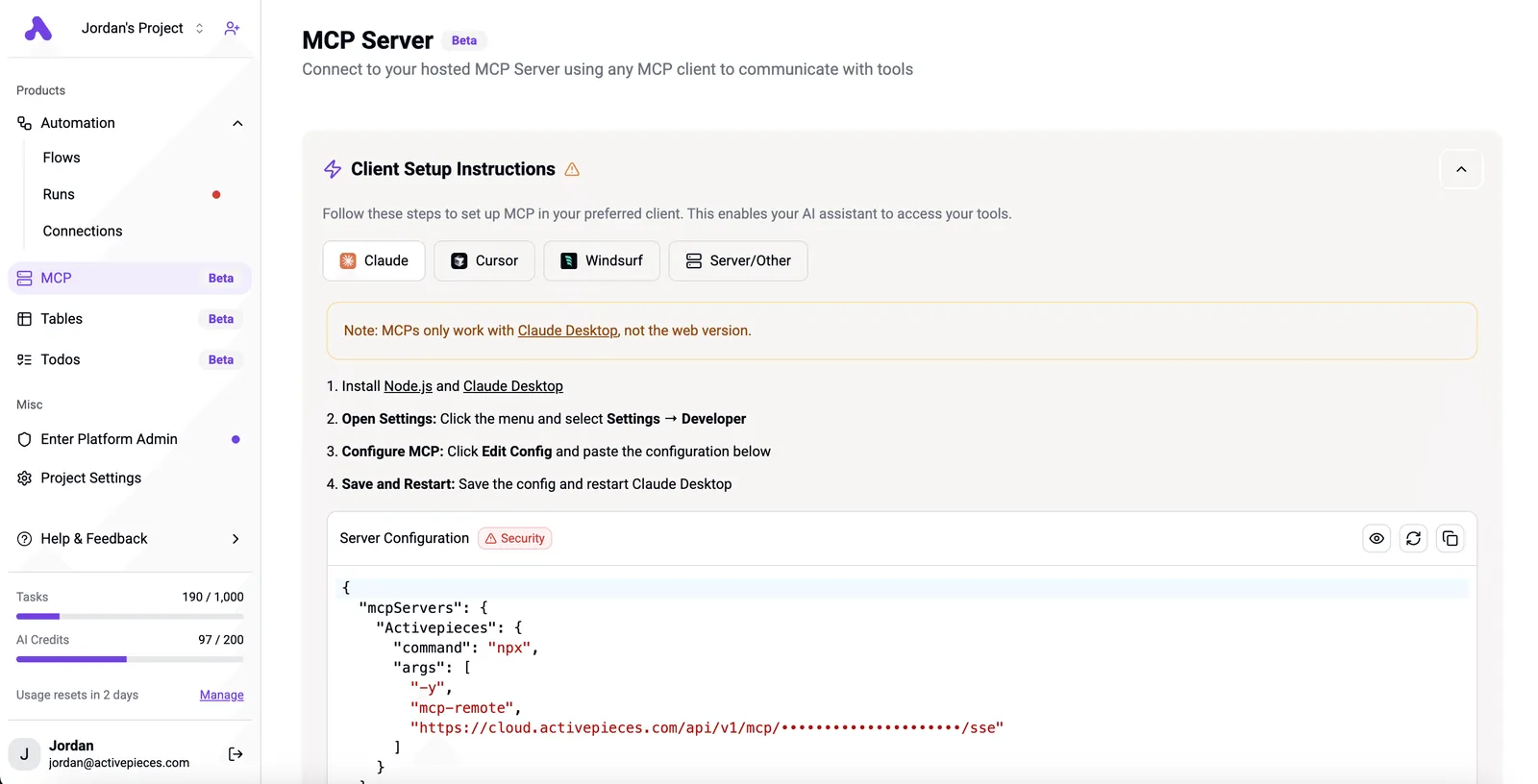
It also means Claude decides when a generation happens, which matters once every generation costs credits.
What Higgsfield MCP exposes to Claude
You describe what you want, Claude passes the request to Higgsfield, and the result comes back into the conversation. The server exposes Higgsfield's generation features, meaning images and video, as tools Claude can call.

The models differ in what each run costs. A casual "try a few versions" from Claude is therefore a spending decision, not a free draft.
Sources and date checked for Higgsfield MCP facts
Where Higgsfield's documentation, pricing page and changelog are silent, I say so rather than guess. Product facts come from those pages. Tools like this change quickly, so check the pricing page again before you commit a budget.
This takes minutes, not a project: automate it in Activepieces free.
How your requests become images and video
Once the budget is settled, the path is short:
- Claude calls Higgsfield through an MCP connector.
- Higgsfield runs the generation on its own servers.
- The finished image or video returns to your chat.
Credits are spent on Higgsfield's side of that line.
Connecting Higgsfield MCP to your Claude account
You add Higgsfield as a connector in Claude's settings and sign in to your Higgsfield account when prompted. That sign-in matters more than it looks. It ties every generation to one account's credit balance, so you can tell exactly whose work is spending what.
Use the endpoint and sign-in steps in Higgsfield's own documentation rather than a copied snippet, since those details are the part most likely to change.
What happens between prompt and result
When you send a prompt, Claude reads the tools the connector exposes, picks the one that fits your request, and fills in the parameters from your prompt.
A capable general model such as Claude Sonnet 5.5 handles this well, so you rarely need to name a tool yourself.
Because the job runs asynchronously on Higgsfield's servers, Claude hands you the result when it's ready. Higgsfield publishes its own job times, so check those instead of trusting anyone's guess, mine included.
Video takes longer than a still image, so plan your first test around a still.
Which models and modes are available
Read Higgsfield's documentation for the list of models and modes before you build anything on top, because it changes as new models arrive.
Because each model has its own cost, the model Claude picks is a budget decision. In any workflow you plan to repeat, name the model in the prompt instead of letting Claude choose.
Where people use Higgsfield MCP in real work
Once the model is named in the prompt, the same request gives you comparable output each time, and chat starts to beat the app on repeated work. Higgsfield's own list of uses falls into five groups, and chat's edge differs in each:
- Ad creative variations, where chat wins once the brief is fixed and only the hook, audience or format changes between runs.
- Storyboard and shot planning, where chat wins because you can describe the sequence in one message and have each shot generated in order.
- Product visuals, where chat wins when you have a set of products and one look to hold constant across all of them.
- Social clips, where chat wins when you are cutting several lengths or aspect ratios from one idea.
- Conversational prompt iteration, where chat wins by definition: you say "warmer, slower, less crowded" and the next generation reflects it without you rewriting the prompt.
Marketing and ad creative
It comes down to volume. One approved concept turns into a dozen versions for different audiences, and the slow part is the briefing, not the rendering. In chat you state the concept once, name the model, and ask for the variations in a batch.
Spend deserves attention as well. Variations multiply credits quickly, so ask for a small first pass, pick the direction, then expand.
Storyboards and concept work with Higgsfield MCP
Because the thinking happens in the conversation, storyboards suit chat. You can talk through a scene, have Claude break it into shots, and generate frames as you go. The payoff is speed to a shared picture: a client reacts to frames instead of a paragraph.
Keep these rough. Spending credits on polish at the concept stage is the most common waste.
When the Higgsfield app is the better tool
Use the app when the job is visual and fiddly: comparing outputs side by side, trimming a clip by eye, or making small adjustments where pointing beats describing.
Chat also gives you less to browse than the app does when you are hunting through many results.
What Higgsfield MCP costs and requires
$19 a month gets you Starter with 270 credits, which is enough to test the connection but not to run it unattended on video. Credits are the real cost, and the plan only sets how many you get.
Higgsfield plans and credit allowances
Annual billing saves nothing on Starter, which AdToolBench lists at $19 whether you pay monthly or yearly. Plus is $59 monthly or $47 yearly, and Ultra is $129 monthly or $99 yearly.

The table shows what's published and what's not; the gaps matter, because you can't budget around a zero-credit behaviour nobody has documented.
| Plan | Price per month | Credits | MCP access | At zero credits |
|---|---|---|---|---|
| Free | $0 | not published | not published | not published |
| Starter | $19 | 270 | not published | not published |
| Plus | $59 monthly, $47 yearly | not published | not published | not published |
| Ultra | $129 monthly, $99 yearly | not published | not published | not published |
| Claude plan needed | not published | not applicable | not published | not applicable |
Prices and plan limits checked against docs.claude.com and claude.com and openai.com and gemini.google on November 16, 2026.
Test a failed generation on a throwaway account before you put an automation in front of a customer.
Cost per image versus per video
On Aliteq's numbers, Veo 3.1 is 40 credits per generation and Seedance 2.5 is 35. Those two burn through Starter's 270 credits in six or seven clips. Kling 3.0 costs 7.5, so the same balance yields 36 videos.

Images are far cheaper: GPT Image 2.5 is 0.25 credits and Soul 2.0 is 0.12. One Veo clip costs as much as 160 GPT Image 2.5 stills, so the model your agent picks decides the bill more than the plan does.
What the Claude side needs in place
You can start free, but not use it continuously: Claude's free plan is $0 with limited usage every 5 hours and every week, so practical work requires a subscription.
Which Claude plan is required for connectors isn't published in the sources I could verify. Check it in your own account before you commit to a Higgsfield tier.
You can follow the rest of this with the builder open. Start free, no card.
Strongest case against generating inside Claude
Someone will say chat hides the bill, invites retry loops, offers fewer controls than the Higgsfield app, and leaves Claude unable to tell whether an output is on brand. All four hold up, and each has a fix that costs minutes, not a rebuild.
The list below gives my verdict on each, and the point is that none of them is a reason to stay out of chat, only a reason to set it up properly.
- Cost hidden in chat: true by default, fixed by instructing Claude to name the model and the expected credit cost before every generation and wait for your yes.
- Easy credit burn on retries: the real risk, because a vague brief produces a string of near-misses, so cap the attempts per brief and make Claude stop and ask instead of rerolling.
- Less control than the Higgsfield app: true for fine-tuning and visual browsing, so use chat for repeatable, briefable work and keep the app for one-off creative direction.
- Claude can't judge visual quality or brand fit: fully true, so a person approves every asset before it ships, and Claude's job is to produce and organize, never to sign off.
What follows is that the objections point at the same gap: nobody is watching the spend or the output. Credits make that gap expensive in a way a flat seat fee never would, since an unattended loop charges you for every attempt.
The answer isn't to avoid the setup. It's to put the checks into the instructions on day one: a stated cost before each call, a retry ceiling, and a human approval step before anything leaves your hands.

Write the guardrails before the first generation, not after the first surprise.
Seat fees are the other way pricing gets in the way of this work: charge per person and every new employee becomes a line item, so a few people get the tool and the rest wait in a backlog.
**Write the guardrails before the first generation, not after the first surprise.
If you want generated assets passed on to storage, publishing or approvals on a schedule or trigger, Activepieces meters by consumption instead, with unlimited flows on every plan, so adding a person costs nothing until their automation runs.
Alan and Funding Societies run production automation on it, and the credit-based structure is on its pricing page. Each team works in its own project, with only the apps an admin has allowed and credentials held centrally, and Higgsfield's MCP stays where the generating happens.
Five mistakes that waste credits with Higgsfield MCP
Treating a generation as free is where each of these mistakes starts, when every call spends credits at a rate set by the model and the media type.
The table shows what each one puts at risk and the fix to write into your agent's instructions.
| Mistake | Credit cost at stake | Fix |
|---|---|---|
| Top model by default | Every draft is billed at the premium rate | Draft on a cheaper model, finalize on the best one |
| Many video variants per message | Video is the costliest output, and it multiplies | Request one clip, review it, then branch |
| Vague prompts | Rerolls to find what you meant | Specify subject, style and camera up front |
| Skipping image-first drafts | Motion paid for before the composition is approved | Approve a still, then animate it |
| Ignoring output rights | A finished asset you can't ship | Check commercial-use terms before generating |
Look at the first four and they are all about spend per result. The last is about whether the result is usable at all.
Without a model instruction, an agent will often reach for the strongest option. That's wasteful for exploration, where you only need to know whether a concept works. Tell the agent which model to use for drafts and which one is allowed for final output.
Batch-requesting videos
"Give me a dozen variations" is easy to type and expensive to run. Video sits at the high end of the cost spread, so a batch request spends the most on the least-reviewed ideas.
Cap the count per message and make the agent stop for your approval before it branches.
Prompting without reference images
When a vague prompt makes the model guess, you pay for each wrong guess. Attach a reference image, or generate a cheap still first and approve it. Animating an approved frame costs less than rerolling video until the composition lands.

Ignoring commercial-use terms for generated output
Read the output-rights terms for your plan before a client deliverable depends on them. Credits spent on assets you can't publish are the most expensive credits you'll waste, because the work has to be redone.
Put the rights check in the agent's setup, ahead of the first generation.
Frequently asked questions
Is Higgsfield MCP free to use?
No. Every generation spends credits, and the cost varies by model, so a rights check before the first generation also stops you paying for output you can't use.
Higgsfield publishes plan details and any free allowance on its own pricing page. I haven't confirmed current terms, so check there before you budget.
Does Higgsfield MCP work in Claude Code as well as Claude chat?
Yes in principle, because both are MCP clients and can connect to a remote MCP server. The exact connection steps and authentication flow differ by client, and Higgsfield's setup documentation is the place to get them.

Test with one cheap generation first, so a misconfigured connection costs you little.
Can I use Higgsfield MCP with ChatGPT or other clients?
If a client supports remote MCP servers, it should be able to connect, since MCP is an open protocol rather than an Anthropic feature.
Whether a given client's MCP support covers what Higgsfield needs is something I can't confirm, and Higgsfield hasn't published a compatibility list that I've verified. If your client is missing, that's the gap to ask the vendor about.
Where do my generated files end up?
On the Higgsfield side, generations are tied to your account, and the agent gets results back through the MCP connection. I haven't found a published statement on storage location, retention period or download behavior, so don't assume files persist indefinitely.
Have the agent save or hand off each asset you intend to keep as part of the workflow, not as an afterthought.
Do I need Activepieces to use Higgsfield MCP?
No. Connecting Higgsfield MCP to a compatible client works on its own, and you can generate from a conversation without any other automation tool.
Activepieces only becomes relevant when you want generated assets to flow into other apps on a schedule or trigger, which its MIT-licensed core handles without replacing Higgsfield's MCP.
Related reading
References
Build it
Set this up in minutes.
No code required. Connect your accounts, and Activepieces runs it from there.
Start free Talk to sales