
Hostinger Pricing 2026: Intro vs. Renewal Costs

Nov 5, 202614 min read
Hostinger is a web host, a company that rents you space on its servers so your website stays online, whether that site is a portfolio or a small store that runs on automations like those built with Activepieces.
The price on its page is a first-term rate that rises when the term ends. Budget for the renewal figure, not the banner.
Hostinger pricing today and renewal rates
| Plan | Billed unit | Intro $/mo | Renewal $/mo | Storage | Site limit | Caps |
|---|---|---|---|---|---|---|
| Single | Prepaid term | Lowest in the lineup | Higher, set at renewal | Smallest shared allowance | One website | Tightest shared limits |
| Premium | Prepaid term | Low, above Single | Higher, set at renewal | Larger than Single | Multiple websites | Shared limits, looser than Single |
| Business | Prepaid term | Above Premium | Higher, set at renewal | Largest shared allowance | Multiple websites | Shared limits, most headroom |
| Cloud Startup | Prepaid term | Above shared | Higher, set at renewal | More than shared | Multiple websites | More resources reserved to you |
| KVM 1 | Prepaid term | Entry VPS rate | Higher, set at renewal | Fixed by plan | Whatever the server can carry | Fixed CPU, memory, bandwidth |
| KVM 2, 4, 8 | Prepaid term | Rises with each step | Higher, set at renewal | Grows with each step | Whatever the server can carry | Each step raises the fixed CPU and memory |
Shared web hosting plans
If you're on Single, Premium or Business, many customers share your server. The difference between them is how many sites you can host and how much room you get before the host throttles you.
Single suits one small site, and the step up matters once you have a second.
Cloud and managed WordPress plans
You don't maintain a server on Cloud Startup, because it's still a managed service. You pay more because fewer neighbors share your resources, which means fewer slowdowns when another site gets busy.

VPS plans
A VPS is a slice of a server that's yours alone. KVM 1 through 8 differ mainly in fixed CPU and memory.
You manage the software yourself, so you only need one if you expect sustained traffic; the other reason is that Activepieces lets you run its MIT-licensed core on your own infrastructure, with unlimited flows on every plan.
How the term length changes the monthly price
Choose the longest term and the monthly figure is lowest, though you pay for that term upfront. Pick a shorter term and the monthly rate climbs, but you can leave sooner. The renewal price doesn't depend on which term you picked.
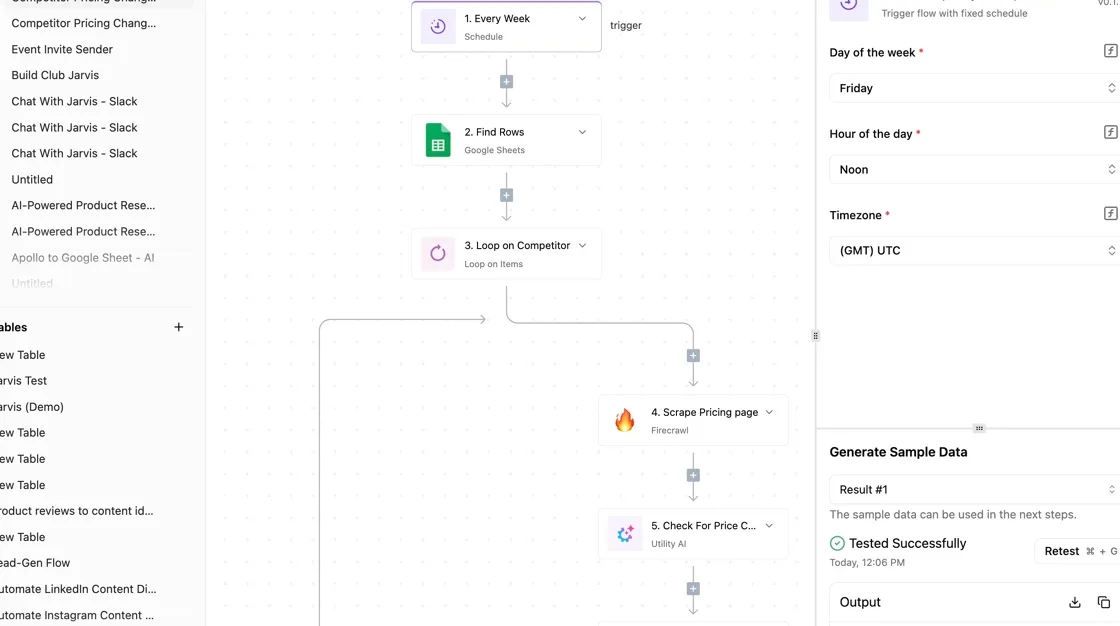
If you are running this arithmetic for your own team, see what the same workload costs on Activepieces.
Key measures for Hostinger plans
Judge every plan on the same nine measures. Put the renewal price and the limits ahead of the first-term price.
- First-term price: the monthly figure on the banner, which only holds for the first commitment period.
- Renewal price: what the same plan costs when that period ends, and the number your budget should be built on.
- 48-month total: first term plus renewals added up, so you can compare plans with different term lengths on one footing.
- Storage and site count: how much you can store and how many websites one plan may run.
- Traffic limits: monthly visitor or bandwidth caps, and what happens when you pass them.
- CPU, RAM and process caps: the share of the server your site may use at once, which is what slows a busy site down.
- Backups: how often they run, how long they're kept, and whether you can restore them yourself.
- Support: which channels you get and how fast someone answers.
- Refund window: how long you have to cancel for money back.
On shared plans, many customers sit on one server, so the limits that matter most are the process and resource caps, not raw storage. Check the site count, the backup frequency and the renewal price first.
These plans reserve more of the server for you and add WordPress-specific tooling. The question's whether the extra CPU and RAM, and any included backups or support, are worth the higher renewal price compared with the mid-tier shared plan.
You get a fixed slice of a server with your own CPU and RAM, and you manage the software yourself. Compare the allotted CPU, RAM and storage, and whether backups and support come included or cost extra.
Check the refund window, since it limits how much of a long prepayment you can get back if the plan turns out wrong.
Hostinger costs for small teams annually
In a small team's second year on the Premium shared plan, the bill is $131.88 at $10.99 a month, whichever term it prepaid, so the refund window matters most in year one. After that, the renewal rate sets the bill.
First-term total versus renewal-year total
Whichever term you pick, the renewal-year cost's identical, as the table shows. A longer term only delays the day you pay it.
| Term | Months before first renewal | Renewal-year cost at $10.99/mo |
|---|---|---|
| 12 months | 12 | $131.88 |
| 24 months | 24 | $131.88 |
| 48 months | 48 | $131.88 |
Cost per month if you leave after one year
Leaving after twelve months on a 12-month term is the cleanest exit: you have used what you paid for and owe nothing more.
Leaving a 24- or 48-month term early means you have prepaid for months you won't use. Once the refund window closes, that money is gone.
So work out your real monthly cost by dividing everything you paid by the months you actually stayed.
Where a growing site outgrows its plan
If the sites outgrow shared hosting, the next step's a VPS, a server whose resources are reserved for you alone. Hosting Pickers lists the renewal prices, and they climb quickly:

| Plan | Renewal per month | Above shared renewal per year | Extra per month | Note |
|---|---|---|---|---|
| KVM 1 | $11.99 | $12 | $1 | Only $1 above shared renewal, for reserved resources |
| KVM 2 | $14.99 | $48 | $4 | The usual first step up if the sites keep hitting limits |
| KVM 4 | $28.99 | $216 | $18 | Moving here means traffic or apps are doing real work |
| KVM 8 | $49.99 | $468 | $39 | Few small teams need this |
Worth checking against a plan that does not meter every step: one credit covers a whole run on Activepieces.
Hidden Hostinger costs and limits
After the sign-up price, Hostinger's bill grows in five places: the plan renewal, the domain, email, hard resource caps, and the VPS renewal.
- Shared Premium renews at $10.99 a month, well above the intro rate, so customers face an abrupt price jump once their promotional period ends.
- A .com domain is $0.01 the first year, then $19.99 a year, which means the low first-year price masks a much steeper ongoing cost.
- Each mailbox costs $1.59 a year, so adding several addresses barely changes your hosting budget.
- Disk space, inode counts (the number of files and folders) and process limits cap the plan.
- VPS renewal roughly doubles the intro price.
Per hostingrenewal.com, Shared Premium renews at $10.99 a month, so the mid-tier plan's the baseline your budget should use.
Shared Unlimited renews at $16.99, a $6 monthly step up for the same kind of server. That's $72 more a year while staying in the shared tier.
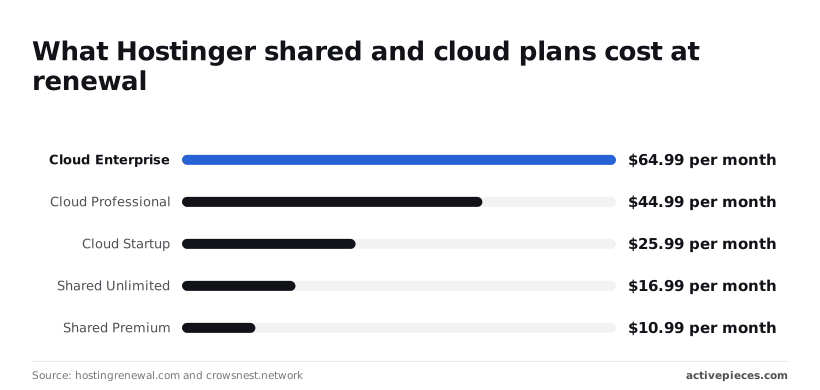
Step up to the cloud tier and it runs higher: Startup at $25.99, Professional at $44.99 and Enterprise at $64.99. Enterprise therefore costs nearly six times Shared Premium once renewed.
Hostinger domain, email and backup costs
At $0.01 the first-year .com looks free, but renewal at $19.99 a year means year two costs about two thousand times more, so that cheap domain will cost you $20 a year if you keep it.
You either abandon the domain or renew it at nearly $20 a year, which means you're committing to an annual $20 cost if you maintain the domain.
At $1.59 a year per mailbox, a ten-person team adds under $16 annually, which is cheap, but only if you budget for it. Backup tiers differ by plan, so check what your plan restores before you need it.
Hostinger resource and inode limits explained
When a site has thousands of small files, such as image thumbnails or cache folders, it can hit the inode cap long before the disk is full. The site then slows or stops accepting uploads.

Check the cap on the plan page against your file count before you commit.
Hostinger refund window and cancellation rules
Treat the first days as a real test: load your site, run your backups, send test email, and cancel inside the window if something fails. After that, the term you prepaid's the term you own.
Those checks, a renewal date, a bill compared against $10.99, an uptime ping, are small jobs, and Activepieces's published pricing page sets the charge at 1 credit per flow run, any number of steps, where Zapier's pricing page bills per task and Make's bills per module, so a longer check costs the same as a short one.
The free plan carries 1,000 credits a month with unlimited flows, so a daily check that looks up the date, compares the charge and sends an alert uses about 30 of them.
Hostinger versus Bluehost, SiteGround and Namecheap on price
Once that prepaid term ends, Hostinger's entry shared plan renews at $10.99 a month, which's the second-highest of these four hosts. The renewal bill's where the comparison is settled.
viz type=distribution title="Renewal prices of four hosts' entry shared plans" unit="$ per month" source="Getbesthost - https://getbesthost.com/blog/hosting-renewal-prices"0.99 renewal sits mid-field, above Namecheap at $4.66 and Bluehost at $9.99, and below SiteGround at
| Host | Renewal per month | Renewal per year | Against Hostinger per year |
|---|---|---|---|
| Namecheap | $4.66 | $55.92 | $75.96 less |
| Bluehost | $9.99 | $119.88 | $12.00 less |
| Hostinger | $10.99 | $131.88 | n/a |
| SiteGround | $17.99 | $215.88 | $84.00 more |
Hostinger versus Bluehost renewal price
Bluehost renews its entry plan at $9.99 a month. That's $1 a month under Hostinger, or $12 a year, which's too small a gap to decide anything on its own.
Hostinger versus SiteGround renewal price
At $17.99 a month, SiteGround's renewal is $7 a month above Hostinger. Over a year you pay $84 extra, so a small site has to get something from the plan that Hostinger's doesn't offer to justify it.
Hostinger versus Namecheap renewal price
Less than half of Hostinger's price: that's Namecheap's renewal at $4.66 a month. Across a year that's $75.96 saved. Check whether its entry limits fit your site before treating that saving as real.
Where Hostinger wins and loses
At $10.99 a month, Hostinger sits in the middle of the renewal range, meaning you could reduce hosting costs by choosing a cheaper provider. It costs less than SiteGround, roughly the same as Bluehost, and clearly more than Namecheap.
Verdict: which Hostinger plan is worth buying
Buy the mid-tier shared plan, Premium, on the 24-month term, unless heavy traffic, root access or several separate apps push you to a VPS. The low headline price's an introductory rate, so judge each plan by its renewal price and the limits you'll hit.

- Estimate how many sites you'll run and roughly how many visits each gets in a month.
- Ask whether you need root access (full control of the server) or several different apps running side by side. If yes, go to a VPS.
- If not, pick Premium.
- Choose the 24-month term.
- Set a calendar reminder ahead of the renewal date, so the higher price never surprises you.
The lowest tier caps how many sites you can host, so a small business with a second site outgrows it quickly.
The mid-tier lifts that cap and adds room for growth, which's why it suits most small sites.
If you're paying more here, it's for more resources or for WordPress being looked after for you. If you can handle updates yourself, shared hosting does the same job for less.
Pick a VPS when you need to install your own software, run several apps, or expect traffic that would strain shared hosting.
If you can handle updates yourself, shared hosting does the same job for less.
If none of those apply, you're paying for control you won't use, and you take on server upkeep that shared hosting handles for you.
The longer the commitment, the lower the monthly figure. The 24-month term gets you a long stretch at the introductory rate, which delays the jump to the renewal price. Longer terms mean a bigger upfront payment, so confirm you'll still want this host before paying.
Frequently asked questions
Is Hostinger really cheaper after the first term?
No. The headline price applies to the first term you pay for, and renewal is billed at the higher standard rate listed on Hostinger's pricing page.
So compare plans by the renewal price, because that's what you'll pay for most of the time you keep the site.
Does Hostinger offer a free plan?
Not for web hosting, as far as its published plans show. The entry plans are paid.
Anything described as free, such as a domain or extras, is usually bundled with a longer term and is paid for through that upfront bill. Read the terms for what the free item costs when it comes up for renewal.
Can I pay month to month on Hostinger?
Where a plan offers a monthly term, yes, but it's priced above the long-term rate. That's the cost of staying flexible.
If you're unsure about the host, paying more per month for a short term can be cheaper than prepaying a long term and walking away from it.
What happens when my Hostinger plan renews?
It renews automatically at the standard rate unless you turn auto-renewal off, and the card on file is charged. Your domain renews on its own schedule and bill, separate from the hosting.
Doing nothing is the expensive choice here, because the first notice you get may be the charge itself.
Can I automate renewal reminders and uptime alerts?
Yes. Hostinger's own emails are easy to miss, so a separate reminder is cheap insurance.
Activepieces, an open-source automation tool, can send these on a schedule or when a check fails. It's optional. A calendar entry does the same job for the dates. The ones worth tracking:
- Hosting renewal date
- Domain expiry date
- Cutoff of the refund window on a new purchase
- An uptime alert when the site stops responding
- A bill check, comparing what was charged with the renewal rate you expected
The first three are fixed dates you can set once.
The last two only help if you act on them: an alert is worth having only when someone is assigned to read it, and a bill check only matters if you compare it with the renewal price you wrote down at purchase.
Related reading
Running the numbers
See what the same workload costs here.
Free forever plan, and every paid plan self-hosts at no extra cost.
See pricing Talk to sales