
How Do n8n Execution Limits Work on Cloud Plans?

Oct 26, 202613 min read
On Cloud plans, n8n's execution limits are a billing meter. They count workflow runs, not steps, and nothing technical stops a self-hosted Community Edition instance from running past them.
The cost is decided at design time, by how many runs your workflows trigger, a pattern that holds for any run-metered automation tool, including Activepieces.
Treat execution limits as a billing meter
An n8n execution limit is the cap on how many workflow runs, with each run counted as one execution however many steps it contains, that a plan allows in a billing period before you must upgrade or pay for more.
However many nodes sit in between, one full run of a workflow, from trigger to the last node, is one execution. A workflow that receives a webhook, enriches the record, branches, writes to a database and posts a notification is still one execution.
The meter ticks once per run, so the unit you are budgeting is the trigger, not the node.
Seven steps cost the same as one.
The illustration below shows one workflow of seven connected nodes inside a bracket labelled "1 execution", beside a meter dial reading 1, so the expensive design is the one that splits a single job into several separately triggered workflows.
Beside it, a second panel shows a self-hosted server with no meter attached. That's the other side of the same arithmetic, covered next.
Cloud quota versus self-hosted
On n8n Cloud, each plan includes a monthly allowance of executions. Teams that never counted can find the limit in production.
Because the allowance is a contract term, it moves with the plan, not with your hardware.
Run self-hosted Community Edition and nothing caps your executions. You pay in servers, upgrades, backups and the hours someone spends keeping it alive, which is a different bill but not a per-run one.
If a vendor makes you book a call to learn what a run costs, treat that as a warning about its pricing.
Activepieces publishes its unit: a run is 1 credit however many steps it has, with 1,000 credits a month on the free plan, so compare the unit before you compare the price.
Check n8n's public pricing page on the day you budget. This section was written on 26 October 2026, drawing on that page and on the documentation for how executions are defined and which edition carries a quota.
Plan allowances and prices change, so the page itself is the authority.
This takes minutes, not a project: automate it in Activepieces free.
What each n8n Cloud plan includes and costs
For €20 billed annually, Starter gives you 2,500 executions a month. The tiers above it add volume unevenly, so the figure that matters is cost per execution, not the headline price.
Starter, Pro, Business and Enterprise compared
Read the table for allowance, price and concurrency side by side. Cells I couldn't confirm are marked, so read them as gaps, not zeros.
| Plan | Executions per month | Price per month, billed annually | Concurrency limit |
|---|---|---|---|
| Starter | 2,500 | €20 | Unconfirmed |
| Pro-1 | 10,000 | €50 | Unconfirmed |
| Pro-2 | 50,000 | Unconfirmed | Unconfirmed |
| Business | 40,000 | $800 | Unconfirmed |
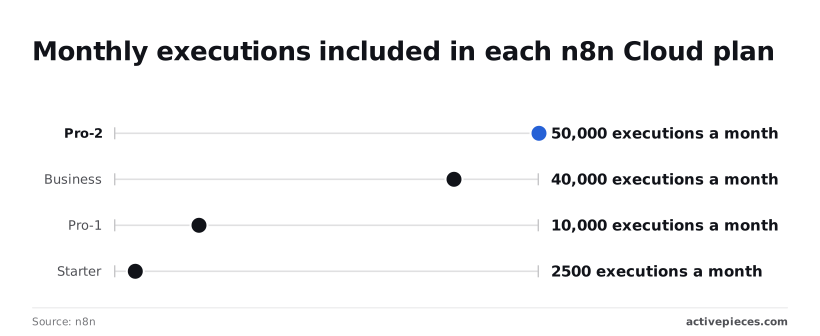
Business includes fewer executions than Pro-2, so its premium buys something other than volume.
Enterprise is not priced in the figures above, and a tier you can only price by talking to sales is one you can't budget for in advance.
I couldn't confirm the concurrency figure for any plan. Concurrency is how many executions run at the same moment.
Until you have it, assume a burst of webhooks may queue instead of running in parallel. That's harmless for nightly batches and a real delay for anything a customer is waiting on.
What happens at your n8n execution limit
I haven't confirmed what n8n does at the cap, so I won't guess at a behaviour. Read n8n's page on (source) before you commit.
The practical point's that the 2,500 on Starter is a monthly total. A workflow that fires every five minutes uses about 8,600 executions in a 30-day month, more than three times that allowance, whatever its steps do.

Arguments for fair execution pricing
Say what you like about the meter, counting runs rather than steps is the fairer way to bill automation. Its defenders have four arguments that deserve to be heard at full strength before the thesis pushes back.
Although the five-minute schedule above is a fair warning about frequency, it also shows what the meter ignores: the steps inside the run. Believers start there.
In the order they usually give it, the reasoning runs:
- One charge per run, however many steps it contains. A workflow that fetches a record, enriches it, branches, writes to three systems and posts a notification is billed once. Rivals that meter each action turn every added step into a line on the invoice.
- Complex flows cost the same as simple ones. Nobody has to trim a validation step or merge two branches to stay inside a budget, so the design follows the problem rather than the price list.
- Spend is predictable against a fixed quota. You can forecast usage from trigger frequency and expected event volume, two numbers the team already knows, without modelling how many steps each path will take.
- Self-hosting removes the cap. A team that runs the community edition on its own infrastructure pays for servers and attention, not for runs, so the meter stops mattering for them.
Anyone who has watched a twelve-step flow quietly cost twelve times a three-step one will concede that each of these holds up on its own terms. A per-task model punishes thoroughness.
Per-run billing also has the virtue of being legible: one unit, one definition, no sales call needed to learn what counts.
What this argument assumes's that the buyer already knows how many runs a workflow will produce, and that the run's the natural unit of work.
Both assumptions carry the rest of this integration, because the cheapness of a complex flow depends on whether it's built as one run or split into many.
How poor design affects execution limits
Because every execution the quota counts is a consequence of a design choice, the quota's fair: a workflow built to run often and thinly spends the allowance on work that never needed its own run.
How polling triggers waste n8n executions
Ask "anything new?" every minute and the trigger fires 60 times an hour, 24 hours a day, for 30 days. That's 43,200 executions a month, whether or not anything changed.
Most of those runs find nothing and still count. Where the source system can push a webhook, the workflow runs only when something happens, and the idle cost drops to zero.
Per-record workflows versus batching
Suppose the same job touches 3,000 records a month. Built per record, that's 3,000 executions, which already exceeds the 2,500 Starter quota and takes almost a third of the 10,000 Pro quota.

Built as one batched daily run that loops over everything collected since yesterday, it's 30 executions.
Depending on how the trigger and loop are arranged, identical work costs 30 or 3,000 executions.
Retries, sub-workflows and test runs
Quietly, each of these multiplies executions. A retry loop that restarts the whole workflow counts the failed attempt and the repeat.
A sub-workflow called once per item can turn one parent run into many, depending on how your plan counts it, so check that before you build.
While you debug a trigger, clicking "execute" repeatedly spends production allowance on rehearsal, and that is the third leak. Keep test runs on a separate instance or against manually fed sample data.
Self-hosting isn't free
Once you self-host, the execution meter leaves your bill, but the cost stays. You inherit the server, the upgrades, the backups and the 3 a.m. restart when a queue stalls.
Someone's hours pay for that, and an accountant should price those hours before declaring the cap "gone." For a small team, the hosted quota can still come out cheaper than a person on call.

You can follow the rest of this with the builder open. Start free, no card.
Calculating your monthly n8n execution counts
Before the on-call comparison means anything, you need a number. You can get one on a Monday morning with a spreadsheet: list every trigger, convert each to a monthly count, pad it, then price that total against a hosted tier and against running it yourself.
Because n8n bills one execution per workflow run, not per step, the count depends on how many times each trigger fires, not on how many nodes sit behind it. The steps below give the order of work.
- List every trigger: each schedule, webhook, and polling node. A workflow with three triggers is three sources of executions, so missing one understates the bill.
- For each scheduled trigger, multiply runs per day by the days in the month. A job that runs every few minutes dominates the total, so check it first.
- For each event-driven trigger, add the volume you expect: form submissions, incoming webhooks, new records. Estimate high, since the busiest week sets your tier, not the average one.
- Add a retry margin of 10-20% to the sum. Failed runs and manual reruns count too, so without the margin your forecast's short by exactly the runs you least want to pay for.
- Map the padded total to a plan tier. If it sits near a boundary, redesign the busiest workflow (batch records into one run, for instance) before you buy the larger tier.
- Price self-hosting against that tier: server, upkeep, and the hours of whoever answers when it breaks.
Before anything's built, those six steps give you a defensible monthly figure, so you're ready when someone questions the number. Once workflows are live, check that figure against the real count on n8n's usage page, and adjust the forecast where the two disagree.
Choose by one line: whether your padded execution count costs more than the hours it takes to host it yourself.
Where Activepieces fits if run metering is your problem
When the hours of self-hosting cost less than your padded execution count, Activepieces is worth a trial. Check its pricing page for whether it bills per flow run or per step.
That matters because pricing that rises with granularity taxes the builder for splitting work into smaller, more reliable steps. Zapier bills per task and Make per module, and their pricing pages show it; MoneyGram and Moneypenny run Activepieces in production.
When a different tool is worth a trial
In the same family as n8n, Activepieces is an MIT-licensed automation platform with 744+ integrations, offered as a hosted cloud and as a self-hostable edition, and every plan, including the free one, allows unlimited flows.

If your workloads fire often and each run is small, a per-run meter punishes you and a flat server cost doesn't.
That's the only case where a switch pays for itself.
For some teams, n8n is still the better fit. If your flows need heavy custom code, deep branching, or a mature self-hosted setup you already run, rewriting them elsewhere is a cost that can erase any metering saving.
Activepieces doesn't remove the need to count: its free plan is 1,000 credits a month, and an AI step costs 2 to 20 credits rather than 1, so a different meter isn't automatically a cheaper one.

What to verify on both pricing pages
Read the unit before the price. A plan that counts steps behaves nothing like one that counts runs, and a ten-step flow will show that gap on your first invoice.
Also confirm which features sit behind the paid or enterprise licence, since a self-hosted install is only free for the parts the open licence covers.
Compare the four options in the table on the three things that decide the bill: what's counted, what licence applies, and what hosting costs you.
| Option | How usage is metered | Licence | Hosting cost |
|---|---|---|---|
| n8n Cloud | Workflow executions against a plan allowance | Vendor-hosted service | Included in plan |
| n8n self-hosted | No vendor meter; your server's capacity is the limit | Source-available, Sustainable Use License | VPS $4-6 light, $12-20 medium |
| Activepieces Cloud | Confirm on its pricing page whether the unit is a run or a step | Vendor-hosted service | Included in plan |
| Activepieces self-hosted | No vendor meter; your server's capacity is the limit | Open-source community edition; enterprise features licensed separately | VPS $4-6 light, $12-20 medium |
Read the self-hosted rows together: the server bill's identical, so the decision rests on licence terms and how much maintenance time you can spare. Check the cloud rows against your own flow lengths before you trust either headline price.
Frequently asked questions
Does n8n self-hosted have an execution limit? No, the self-hosted Community Edition doesn't meter executions, so the cap you pay for on cloud doesn't apply there.
Your ceiling becomes your own server: memory, CPU and database size. That moves the cost from a plan fee to infrastructure and upkeep, so price your hosting and your maintenance hours before calling it free.
Do failed or test executions count toward the n8n quota?
Treat them as counting unless your plan documentation says otherwise. Metering's tied to executions that run, and a run that fails still ran.
A workflow stuck in a retry loop can therefore burn through your allowance faster than healthy traffic would. Build error handling that stops the loop, and keep test runs on a separate instance where you can.
Can I buy extra executions without changing plan?
Don't assume you can. Cloud allowances are tied to the tier, and the usual route to more headroom is a higher tier, which changes your price in one jump rather than per execution.
If your plan page doesn't list an add-on, you'll probably end up in a conversation with sales. Settle that before launch, not after the cap hits.
How long does n8n keep execution history?
Where you run decides the answer: retention's configurable on self-hosted setups and set by plan on cloud. Stored history's also a cost, because execution data accumulates in your database.
Set a pruning policy early and save only the data you would need to debug a failure. Anything you need as an audit trail belongs in your own storage.
Does a workflow with 50 nodes count as 50 executions?
No. One run of the workflow from trigger to finish is one execution, however many nodes it passes through. The meter counts runs, not steps, so a long flow costs the same as a short one if both fire once.
What multiplies your bill is triggers: a flow that fires once per record costs one execution per record. Batch the records inside a single run and the count drops with them.
Related reading
Build it
Set this up in minutes.
No code required. Connect your accounts, and Activepieces runs it from there.
Start free Talk to sales