
Inkling 2 Mini API Pricing in 2026 and Extra Costs

Nov 22, 202614 min read
The table below shows the figures we confirmed on the Tinker docs page, read on 2026-11-22, and "not published" wherever we can't confirm one, because Inkling 2 Mini's per-token price is only one line of the bill.

Treat every blank as a question to settle on the vendor's pricing page before you budget, much as you would when Activepieces or any other workflow tool sits between your model calls and the rest of your stack.
You call Inkling 2 Mini through an API and pay for it by the token, the unit of text the model reads and writes.
Inkling 2 Mini API pricing table
Every current plan and its price
The table lists each line the vendor bills a team on, with its source and a check date.
| Line item | Price per 1M tokens | Billing unit | Inclusions and limits | Source URL | Check date |
|---|---|---|---|---|---|
| Input | $0.15 | per 1M tokens | not published | Tinker docs | 2026-11-22 |
| Cached input | $0.015 | per 1M tokens | not published | Tinker docs | 2026-11-22 |
| Output | $0.50 | per 1M tokens | not published | Tinker docs | 2026-11-22 |
| Fine-tuning train rate | $0.75 (64K context), $1.50 (256K context) | per 1M tokens | not published | Tinker docs | 2026-11-22 |
| Third-party hosts | not published | not published | not published | vendor pricing page | November 2026 |
The input, cached input, output and training rates come from the Tinker docs. Tinker is the Thinking Machines service those docs describe, and we treat its listed rates as the Inkling 2 Mini rates.
Confirm that the model you would call is the one named on that page.
Every "not published" cell is a line we looked for and didn't find, including inclusions and any third-party host price. The 64K and 256K figures are training rates, not inference rates, as the billing section below explains.
Before you compare a quoted price with anything else, confirm which tier it belongs to, because plan tier can change every row.
If cached input, fine-tuning or a hosted option sits in a higher tier, the headline rate belongs to a plan your team may not be on.
Set too low, a rate limit means your product slows or fails at the busiest moment, and the fix is a bigger plan. A rate limit caps how much you can send in a given window.
Get the limits for your tier in writing, then compare them with your busiest day, not your average one.
Inkling 2 Mini changelog and recent price changes
Read the changelog before you sign and again before you renew; it's where the vendor records every move in prices and limits.
Whoever connects the model to your workflows, in code or through a workflow tool, should read it too, because a quiet change to limits can break a working setup.
If you are running this arithmetic for your own team, see what the same workload costs on Activepieces.
Inkling 2 Mini costs at realistic usage
At realistic usage, the plan your volume lands you on sets your bill, not the per-token price.
I've left out dollar amounts in these scenarios because I can't confirm what a given plan charges, so they are illustrative arithmetic, not vendor figures. Work them through with the numbers on the pricing page, read on a date you write down.
At realistic usage, the plan your volume lands you on sets your bill, not the per-token price.
To see how the same model behaves across three habits of use, take from the table the direction of each column: cost per 1,000 requests tends to fall as volume rises, until the point where the plan or the route you chose stops fitting.
| Scenario | Assumed requests per month | Tokens per request | Monthly cost | Cost per 1,000 requests | Volume at which a cheaper route wins |
|---|---|---|---|---|---|
| Prototype | Occasional, triggered by hand | Short prompts, short replies | Small, often inside an entry allowance | Highest, because the plan is barely used | Rarely; a pay-as-you-go route is usually enough |
| Small-team workflow | Steady daily use by several people | Medium, with pasted documents | Moderate, driven by the plan fee | Lower, as the fee spreads over more requests | When regular overage starts to rival the next plan's fee |
| Production volume | Continuous, automated | Long, with context added to every call | Largest, driven by usage rather than the plan | Lowest, but the most exposed to rate changes | Early; negotiate or compare other routes before launch |
For a prototype, the plan fee is most of what you pay, so it looks expensive per request even when the total is small.
For a small team, the fee spreads across enough requests to look reasonable, and the risk shifts to limits. Long pasted documents raise tokens per request quietly, so a team can hit its ceiling without sending more messages.
At production volume, usage outweighs the plan, and every call multiplies every assumption you made about prompt length.
Upgrade when your overage in a typical month approaches the gap between your plan and the next one up. Paying the difference buys the same usage more predictably.
Hidden costs and limits in Inkling 2 Mini
Expect the bill to climb above the headline rate, which sets a floor, through limits, token types priced differently and calls you pay for twice. Six items decide how far it climbs, and the pricing page documents only the price lines as of 2026-11-22:
- Rate limits can leave paid staff waiting on a queue. The page gives no figure.
- Context and output caps decide whether a long document fits in one call. The training tiers name 64K and 256K, but the page gives no inference caps.
- Billed retries could mean paying twice for one answer. The page says nothing on this.
- Repeated system prompts, the standing instructions sent with every call, have a separate cached rate.
- Support tier decides who answers when something breaks. The page says nothing on it.
- Data retention decides how long your prompts sit on the vendor's side. The page says nothing on it.
Five of the six are unpriced on the page, so budget for them as unknowns until the vendor answers in writing.
We found no published rate limit or reset schedule for Inkling 2 Mini. Until one is stated, assume a heavy afternoon could stall your team, and ask the vendor for the number before you commit.
Overage and billing rules
According to the Thinking Machines Tinker docs, input costs $0.15 per 1M tokens. Output costs $0.50, so a chatty answer costs more than three times what the question did.
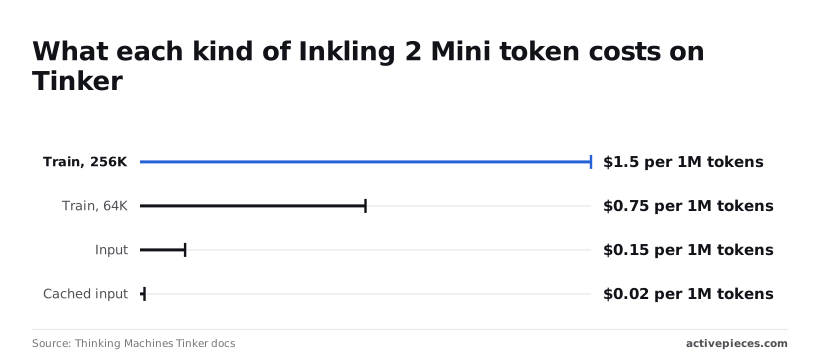
According to Thinking Machines Tinker docs, training at 64K context is $0.75 per 1M tokens and at 256K is $1.50, making the larger context window twice as expensive per token.
Quadrupling the context window therefore doubles the per-token price, on top of the extra tokens you send.
Those two figures are fine-tuning rates, what you pay to train, and not what you pay to call the model. Don't use them to estimate an inference bill; the input, cached and output lines above are the ones that apply to calls.
If the system has already seen the text, it counts as cached input and costs $0.015 per 1M tokens.
That's one tenth of the normal input rate, so a long system prompt sent with every call is cheap only if it actually lands in the cache.
Nothing on the pricing page says whether a failed or retried call is billed. Log every retry yourself for a month, because that log is the only way to learn what a failure costs you.
Worth checking against a plan that does not meter every step: one credit covers a whole run on Activepieces.
Inkling 2 Mini compared with its closest alternatives
Compare Inkling 2 Mini with GPT-6 Luna and GPT-6.2 Sol on the same six lines. Read each from the vendor's own page on the day you decide, because a comparison without dates goes stale quietly.
Price and limits side by side
I haven't read these pages for you, so the table below shows where each figure lives, not the figures themselves. A number copied from a review is how teams end up budgeting against last quarter's price.

| Input and output price per 1M | Free tier | Rate limits | Context window | Intelligence Index | Lock-in | |
|---|---|---|---|---|---|---|
| Inkling 2 Mini | Inkling pricing page | Inkling pricing page | Inkling plan terms | Inkling model page | Index publisher's page | Inkling terms and export options |
| GPT-6 Luna | OpenAI pricing page | OpenAI pricing page | OpenAI account limits page | OpenAI model page | Index publisher's page | OpenAI terms and data export |
| GPT-6.2 Sol | OpenAI pricing page | OpenAI pricing page | OpenAI account limits page | OpenAI model page | Index publisher's page | OpenAI terms and data export |
Leave the date blank and you've left the cell blank, because an undated cell is a guess. Rate limits matter most here, because they often change with your plan tier, so read them for the tier you'd actually buy.
What the benchmarks do and do not show
How it will do on your invoices, your support tickets or your contracts is something an Intelligence Index score can't tell you. It tells you how a model did on a fixed set of tests, run by whoever publishes the index.
Before you lean on a score, find out who ran the tests, how many questions were asked and whether the vendor ran its own model. A small sample or a vendor-run test is a hint, not a verdict.
Run twenty of your own real tasks through each model and count the failures. That count, priced with your retry log, beats any published ranking.
Pick Inkling 2 Mini if its limits and extras fit your volume on the page you read today. Skip it if your tier caps would force an upgrade, or if you can't find a clear way to take your data out.
GPT-6 Luna and GPT-6.2 Sol are the OpenAI models to check it against.
Cap Inkling 2 Mini spend with Activepieces
Left alone, the overrun turns up on the invoice, after you've spent it.
Activepieces can watch your Inkling 2 Mini spend at 1 credit per flow run, so a ten-step check costs what a two-step one does; the meter is the run, not the steps inside it.
It's an automation tool that connects apps through step-by-step workflows, and it can't lower the price, so set the vendor's own limits first.
Start where the money is counted. Do these in order, and check each screen against the pricing page on the date you do it, since plan rules change.
- Open the vendor's usage dashboard and read what your team consumed last month, broken out by day if it allows.
- Set a billing alert, so an email reaches you before the month closes.
- Set a hard limit, so the account stops serving requests at a ceiling you chose. Know what stops: a hard limit protects your budget, and it also means a customer-facing feature goes dark when it trips.
An alert tells you the bill is climbing. A hard limit is the only part that actually stops it, so don't skip it because the alert feels like enough.
Log usage per workflow
Here Activepieces earns its place. Its HTTP step, a block that sends a request to any web address, can call the Inkling 2 Mini API from inside a workflow.
Each API response reports how many tokens, the small chunks of text the model bills by, that call used.
Add an HTTP step to the workflow that calls the API, and log the tokens used on each call to a spreadsheet, with a column for the workflow name.
Now you can see the usual culprit, one chatty workflow hiding in a dozen, because the sheet shows which workflow is spending, which the vendor's dashboard may not split out for you.
Inkling 2 Mini spend alerts before quota limits
Add a threshold alert: a step that totals the sheet and messages you when spend crosses a line you set below the hard limit. Review the sheet weekly, five minutes, same day each week.
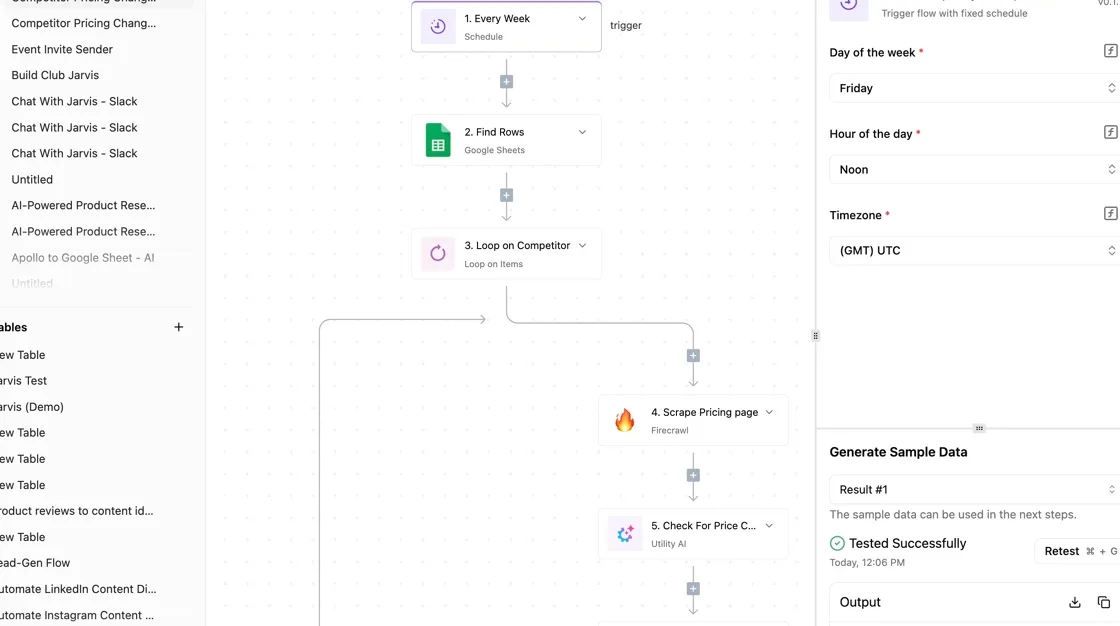
Set that line well under the hard limit, so the warning arrives while you can still change something. The weekly review catches slow drift that no single alert will.
This setup monitors the bill. It doesn't change the price, the plan tier or the usage limits. Those come from the pricing page, so check it again on the day you decide.
The logging and alert steps cost nothing extra to run, because Activepieces meters the run, not the steps inside it: 1 credit per flow run, so the free plan's 1,000 credits a month cover the flow whether it has three steps or thirty.

Zapier bills per task and Make per module, so on their pricing pages every added logging or alert step becomes a line on the bill.
Frequently asked questions
After the body, five questions come up, and the pricing page is where each gets answered; where we couldn't confirm an answer, we say so rather than guess.
Does Inkling 2 Mini have a free tier? We have no confirmed answer, so treat it as not published here.
If you assume a free tier exists and it doesn't, your pilot project starts billing on its first day. Look for a free or trial line on the pricing page and note the date you checked.
How often does Inkling 2 Mini change its prices? The vendor doesn't publish a schedule that we could confirm. Without one, a price you budgeted months ago may not be the price today.
That's why the date you checked belongs next to every figure you write down, and why a quick recheck before you sign is cheap insurance.
Can I switch plans mid-month?
Not confirmed. Whether a move takes effect at once, waits for the next billing cycle, or prorates is the sort of detail that decides whether an upgrade costs you a little or a whole extra month.
Read the billing terms on the pricing page before you move, and if they are silent, ask the vendor in writing and keep the reply.
Is there a discount for annual or committed use? We found nothing confirmed, so call it not published.
Check the pricing page for an annual option, and if there isn't one, ask sales whether a committed rate exists. Ask before you sign, because discounts are hard to win afterward.
What happens when I hit the rate limit?
Not confirmed. A rate limit might slow your requests, queue them, or reject them outright, and each one breaks a workflow differently. A job that stops halfway can leave you with half-finished work and a customer waiting.
Find the limits and the stated behavior on the pricing page or the vendor's documentation, then test with a small batch before you rely on it.
Related reading
References
Running the numbers
See what the same workload costs here.
Free forever plan, and every paid plan self-hosts at no extra cost.
See pricing Talk to sales