
Invoice Approval Workflow Template: 6 Options for 2026

Oct 15, 202615 min read
When your approvers already work in Microsoft 365, Power Automate is the best fit, even if you'd otherwise reach for an open-source tool like Activepieces. Its built-in Approvals request reaches them in Teams or Outlook with no second login or directory to maintain.
1. Microsoft Power Automate: best for Microsoft 365 teams
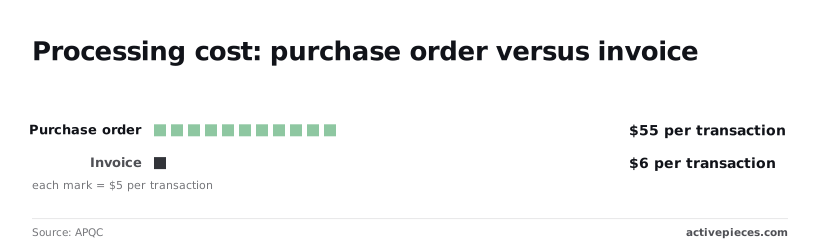
$6 is the number to hold onto. APQC puts an invoice at $6 per transaction and a purchase order at $55, which is why standardizing the flow matters.
The trigger is an invoice arriving by email in a shared Outlook mailbox, or a file landing in a SharePoint library. The sequence below is the generic flow.
- The "When a new email arrives" or "When a file is created" trigger fires and saves the attachment.
- An AI Builder invoice-processing action extracts vendor, number, date and total.
- A lookup against the purchase order list or accounting system compares the amount and vendor.
- A condition on amount or cost centre picks the approver.
- A "Start and wait for an approval" action sends the request to Teams or Outlook.
- Power Automate posts the approved invoice to the accounting system through its connector.
- Power Automate writes the outcome, approver and timestamp to a SharePoint list.
That list is the audit trail, so build it first.
Your ERP connector decides the bill. Microsoft 365 plans cover the Approvals, Outlook, Teams and SharePoint connectors, which are standard tier, while AI Builder extraction and many accounting-system connectors are premium, so organizations need additional licensing to access accounting and AI capabilities.
Confirm both against Microsoft's current pricing page before you commit.
Premium licensing can multiply quickly if every flow author and every flow needs its own plan. Extraction also fails quietly on unusual layouts, and a run that reports "Succeeded" may have captured an empty total.
If your approvers aren't on Microsoft 365, the same five stages run on Activepieces, and its air-gapped self-hosted build keeps the whole enterprise list (SSO, SCIM, custom RBAC, audit logs, release management, secret manager integration) that its managed cloud has, with regulated and public-sector teams running it in production.
Everything below works on Activepieces' free plan. Start without code or a credit card.
2. Zapier: best for the fastest no-code setup
For the fastest no-code route to a working invoice approval flow, use Zapier. Every step, from inbox trigger to accounting entry, is a pre-built connector you configure in a form rather than write.
The flow runs in this order:
- Gmail (the approver's or accounts-payable mailbox) fires on a new email with an attachment, or Google Drive (shared file storage) fires on a new file in an "Invoices" folder.
- An AI step reads the PDF and returns vendor, invoice number, date, total and due date as separate fields.
- Slack (team chat) posts the fields to an approver, or a plain email goes out, and the Zap waits for a reply.
- On approval, QuickBooks or Xero (the accounting systems) creates the bill. On rejection, the Zap logs the reason and stops.
Check extraction before going live
A bill landing in accounting with a blank total is almost always the extraction step misreading a scanned or oddly laid-out PDF, so run a handful of your ugliest invoices through before going live.
What Zapier costs
Zapier has a free plan that caps monthly tasks. Paid tiers raise the cap and unlock the multi-step and conditional features this flow leans on.
I'm not quoting prices because they change and I haven't confirmed current ones; read the live pricing page before you commit.
Each action step that runs consumes a task, so one invoice through extraction, approval and entry uses several tasks, not one.
Where Zapier fits and where it breaks
Someone who has never built an automation can have a draft running in an afternoon, because the connector library is broad enough that Most mail, storage, chat and accounting combinations already exist.
If the approver never answers, a Zap that pauses for a reply can fail silently, and nothing chases them by default. Add a timeout and a reminder, then confirm in a test run that a stalled approval gets noticed.
Also expect cost to climb with volume, since every extra step costs a task.
3. Activepieces: best for self-hosted or open-source control
If you want to inspect the code or run the flow on your own server, Activepieces has an MIT-licensed core you can read and host yourself, and it offers unlimited flows on every plan, including free, so adding steps to an approval flow doesn't add a flow-count charge.
The cost is a smaller template library, and a flow you build yourself needs testing before anyone trusts it.
Collect every credential before the first test run, because I'd expect most failures here to come from expired or under-scoped credentials.
The table shows the five stages of the flow, the integration behind each (every one drawn from the 740 integrations counted in the open source monorepo), and the credential you must have, meaning you're not limited to the integrations displayed.
| Stage | Activepieces piece used | What it does in the flow | Credential needed |
|---|---|---|---|
| Email trigger | Gmail | Fires when an invoice arrives in a watched mailbox | Google account connection |
| Extraction | OpenAI | Reads vendor, number, date and total from the attachment | API key |
| Amount branch | Built-in branch step | Sends large invoices to an approver and small ones down a lighter path | None |
| Slack or email approval | Slack or Gmail | Asks the approver and records the answer | Slack workspace connection, or the Google connection |
| Write-back | QuickBooks or Xero | Creates the bill once approved | Accounting connection for your company file |
The free plan on Activepieces Cloud costs $0 with no card needed, and gives you 1,000 credits a month, unlimited flows and up to 5 users: https://cloud.activepieces.com/sign-up
Run it against a few real invoices, including a scanned one, before you rely on it. An extraction that silently returns an empty total will route everything down the small-amount path.
Because the core is open source, you can self-host it. Hosted plans change, and I'm not quoting any here. Confirm current limits on the vendor's pricing page.
You can read the code, host it where your data policy requires, and see every run's inputs and outputs, which gives you the logged decision the workflow needs.
Expect a smaller template gallery than the larger platforms have. If your approvers and ledger live in Microsoft 365, Power Automate will likely hold both already.
4. Make: best for visual routing with many branches
How the workflow is built
If your approvers aren't in Microsoft 365, Make or Activepieces both fit. It suits invoices that must split across many routes, because its router draws every branch on one canvas where you can see it and test it.
Start from a watched mailbox or a webhook fired by your billing inbox. An extraction module reads the supplier, amount and department, and a router sends each invoice down a branch by amount band or department.

Each branch asks its approver by email or by Slack. The approved path writes the bill back to your accounting system, and every path appends a row to a decision log.

Run it in a test scenario with deliberately awkward invoices first. A router with no fallback branch drops unmatched invoices without telling anyone.
Free plans compared
Zapier Free gives 100 tasks per month, where a task is one successful action step, so continuous automation workflows will rapidly exceed the free tier's monthly limit. One invoice approval consumes one for each action after the trigger: extraction, notification, ledger write.
Make Free gives 1,000 credits per month, where a credit is one per module operation. One invoice approval consumes one for each module that runs on the branch taken.
1,000 credits is not ten times the invoices, because a long branch spends credits at every module.
Strengths and limits of Make
Branching is the point. Adding a department or a new amount threshold means adding a route, not rewriting a chain of filters.
Because credits are spent on every run, including failed ones that retry, a flaky accounting connection can drain the allowance before anyone notices.
Complex routers also get hard to read once branches nest. Connectors for niche ledgers may be thinner than the common ones, so confirm the write-back module exists before you build.
Easier to see it running than to read about it: set it up free, no card.
5. n8n: best for technical teams wanting code-level control
If your team will read, edit and version the workflow itself, n8n is the fit. That freedom puts the write-back check from the last section on your shoulders: nobody else will confirm your ledger node works.
The flow runs in this order:
- An IMAP trigger watches the AP mailbox, or a webhook receives invoices from a portal.
- An extraction step pulls supplier, number, date and amount from the attachment, using a text-extraction node or an AI model node.
- A Switch node routes on amount, sending small invoices to one approver and large ones to another.
- A Wait node pauses the run and sends the approver a form; the run resumes on submit.
- An accounting node, or an HTTP Request node if no native node exists, writes the approved invoice back to the ledger.
- A final node logs who decided, and when.
Testing and hosting n8n invoice workflows
Test with messy real invoices first. If extraction returns an empty amount, the Switch can fall to its default branch and route the invoice nowhere. Set that fallback to a human queue.

You can take n8n hosted or self-hosted, since it has a cloud plan and a self-hosted edition. I have no confirmed figures to quote, and plans change, so read the pricing page on the day you buy.
The code is under n8n's Sustainable Use License. That makes it source-available rather than open source in the OSI sense, with internal business use permitted and limits on reselling it as a service.
Check that approvals, access control or audit needs aren't among the enterprise features that sit behind paid plans.
n8n community and trade-offs for invoice approvals
You can drop into code at any step, call any API through HTTP Request, and keep workflows in version control. The community is large and still growing, which matters when your ledger has no native node.
10,000 GitHub stars in October 2020, 75,000 in April 2025: that is about 7.5 times in four and a half years. Stars measure interest, not whether your ledger's connector works.
At 2 a.m., a failed run reaches no one unless you build the alert. Self-hosting means you own upgrades, credential storage, backups and uptime. Business approvers won't edit a node graph, so every change routes through your technical staff.
6. Bill: best for dedicated accounts payable software
When you'd rather buy approvals, matching and payment as one product than build them, Bill is the pick.
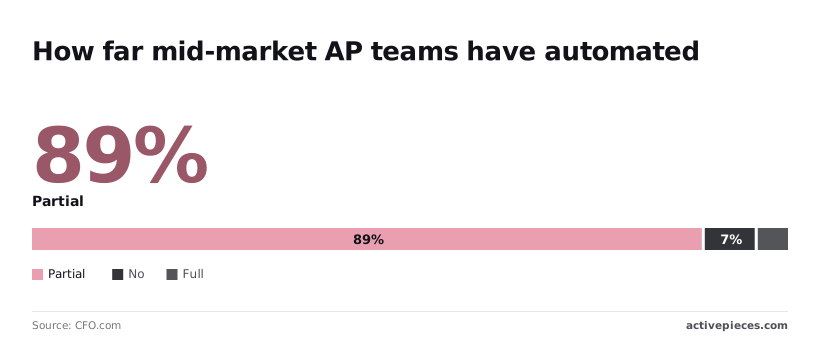
Most teams aren't there yet: CFO.com reports that 89% of mid-market respondents automate only part of AP. Another 7% automate none and just 4% automate fully, so a purchased, end-to-end flow still closes a gap most peers have left open.
The cost gap shows what that partial state leaves on the table. The best-in-class team pays $2.67 to process one invoice, against an APQC median of $6.00 and an average of $9.90, so the average team pays about 3.7 times the best.
How its built-in approval flow works
Bill approval policies, matching and payment
Inside the product, you configure approval policies: invoices route to approvers by rules, matching checks them against purchase orders, and approved bills go straight to payment.
The best-in-class team pays $2.67 to process one invoice, against an APQC median of $6.00 and an average of $9.90, so the average team pays about 3.7 times the best.
There's no separate trigger, extraction or logging step to assemble. Test your own routing rules in a trial before committing, since a policy that looks right in a demo can still misroute on your vendor data.
Bill charges per user, so the seat count, not invoice volume, drives the bill. Confirm in writing whether occasional approvers count as paid users. Check the current price list directly, because plans change.
Bill audit trail and trade-offs
The audit trail and payment are the strong points. Every approval, edit and payment sits in one record, so an auditor's question about who approved an invoice has a single place to be answered.
Paying from the same system also removes the re-keying step where approved amounts drift from paid amounts.
Cost and flexibility are the trade-offs. Per-user billing grows with headcount, and the routing logic is whatever the policy screens allow. Buying beats building when your rules are ordinary and your priority is audit and payment, not custom logic.
How to choose an invoice approval workflow template
Choose the platform that already holds your approvers and your accounting system, then test one limit before copying any template.
Matching an invoice approval template to your team
Treat the limit column as your first test case. The table maps five common situations to a pick and the single limit most likely to fail in a test run.
| Situation | Best pick | Why | Limit to check |
|---|---|---|---|
| Microsoft 365 shop | Power Automate | Approvers already live in Outlook and Teams | Whether your accounting connector is included in your licence |
| Low volume | Approval feature inside your accounting system | No second tool to maintain | Whether it supports more than one approver |
| Self-hosting | n8n | You run it on your own servers | Who patches it and watches for silent failures |
| Multi-level approval | Accounting system's approval chain, if it has one | Amount tiers sit next to the ledger | Whether tiers can route by department as well as amount |
| Payment needs | A bill-pay tool connected to your ledger | Approval and payment share one record | Whether payment status syncs back to the ledger |
Choose by row, not by gallery size.
Mistakes that break invoice approvals
Invoices are late. The cause is usually a missing rule: with no thresholds, every invoice goes to the same person, who becomes the bottleneck, and delay has a price.
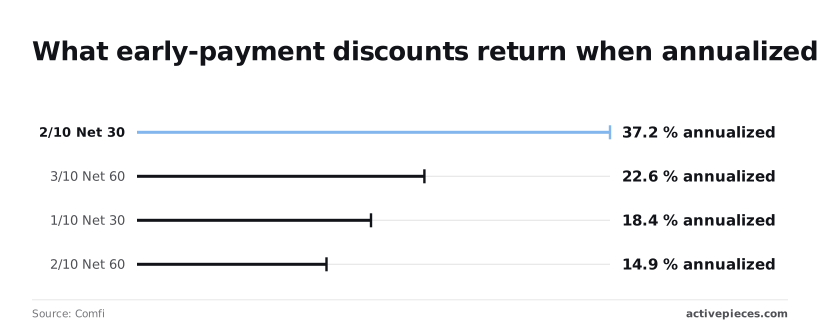
According to Comfi, 2/10 Net 30 terms return 37.2% annualized, so an approval that stalls past day 10 forfeits the best discount on the list. Next come these terms:
| Terms | Annualized return |
|---|---|
| 3/10 Net 60 | 22.6% |
| 1/10 Net 30 | 18.4% |
| 2/10 Net 60 | 14.9% |
Even a 1% discount on a 30-day term outearns 2/10 Net 60, so short terms deserve the fastest routing.
The other failures are quieter. Without PO matching, you approve invoices for goods never ordered. Without a duplicate check, the same invoice is paid twice. Without an audit log, you can't show who approved what.
On Monday, set amount thresholds and name a backup approver for each. Flag invoices on 2/10 terms for same-day routing, then add the duplicate check and PO matching.
Run ten past invoices through a test copy before going live, and confirm every decision writes a log entry.
FAQ on invoice approval workflow templates
What is an invoice approval workflow template?
It's a reusable skeleton of a trigger, an extraction step, a routing rule and a logged decision. A new invoice then reaches the right approver without anyone forwarding an email.
The log is the part to check first, because a flow that routes correctly but records nothing leaves you unable to show who approved what. Each invoice should carry these fields:
- Invoice ID and vendor
- Amount
- Approver name
- Decision, with timestamp
- The rule or threshold that routed it
Without the last field, you can see who approved an invoice but not why it went to them.
How many approval levels does an invoice need?
As few as your spending policy requires, and usually one level below a set amount and a second above it. The usual symptom of too many levels is invoices sitting in a queue because one approver is on leave.
Add a level only when a threshold or a risk, such as a new vendor, demands it, and give every level a named fallback approver.
Can a free plan run invoice approvals?
Some free plans can, but check the caps on runs, steps and users before you rely on one. A flow that hits a run cap tends to fail quietly, and the first report is an approver asking where their invoices went.
Test with realistic volume in a sandbox, and confirm that your approvers and your accounting system both connect on that tier.
When is AP software better than a template?
When you need matching against purchase orders, multiple legal entities, vendor onboarding or payment execution in one system, dedicated accounts payable software is better.
A template wins when your approvers and accounting system already sit in one platform and the routing is simple. If you find yourself bolting matching logic and exception queues onto a template, that's the signal the template has been outgrown.