
Klaviyo Composer: Features, Limits and Cross-App Use

Oct 16, 202611 min read
Klaviyo Composer is a Klaviyo-native agent that takes over some email work inside the platform, much as Activepieces handles chores in a separate automation layer.
As of 2026-10-16, Klaviyo's pages show Composer as generally available to every account, with a free plan and a paid plan.
Set against Klaviyo's own pages, each fact in the table below looks like this. Every "not stated" is a gap to close on Klaviyo's side before you plan around it.
Klaviyo Composer overview and access
| Fact | What Klaviyo's page says | Link to the Klaviyo page |
|---|---|---|
| What Composer is | An AI marketing agent that analyzes business data and completes marketing work | Klaviyo blog |
| New or not | Not stated | Not stated |
| Maker | Klaviyo | Klaviyo blog |
| Access | Available to every Klaviyo customer; free and paid access options depending on account and usage | Klaviyo Composer |
| Price | Free plan with 500 credits per cycle; $20 monthly paid plan with 2,000 credits | Stated |
Prices and plan limits checked against klaviyo.com and community.klaviyo.com and klaviyo.com and activepieces.com on October 16, 2026.
Read a blank row as an open question, not a negative. It means this article has no Klaviyo page to quote for that fact.
Klaviyo is the maker, and Composer is an agent living inside Klaviyo rather than a separate product. Klaviyo's community post, dated October 14, 2026, says Composer is generally available.
Klaviyo says Composer is available to every Klaviyo customer, with free and paid access options depending on account and usage. Check your own Klaviyo admin before promising it to a team.
If you already pass Klaviyo data to other apps through Activepieces, that flow keeps running as built, since its Klaviyo integration offers 2 triggers and 11 actions and none of them is Composer-specific.
Before you rewire anything, get the price in writing. It isn't stated, and your budget depends on whether Composer is bundled, metered or an add-on.
Everything below works on Activepieces' free plan. Start without code or a credit card.
Composer value for automation teams
If email work depends only on Klaviyo's data, Composer moves it into an agent built there. It's worth paying for only if you know where that work stops. Klaviyo describes it as an always-on AI marketing agent that knows your business.
Work that moves inside Klaviyo
Hand Composer the email tasks that need nothing from outside the platform first, because it is grounded in your Klaviyo data and business context.
Start where the money is. In Klaviyo's benchmarks, flows and campaigns split email revenue between 41% and 59% of the total, so neither channel is negligible to overall email revenue. Klaviyo's benchmarks show their share of sends runs from 5.3% to 94.7%.

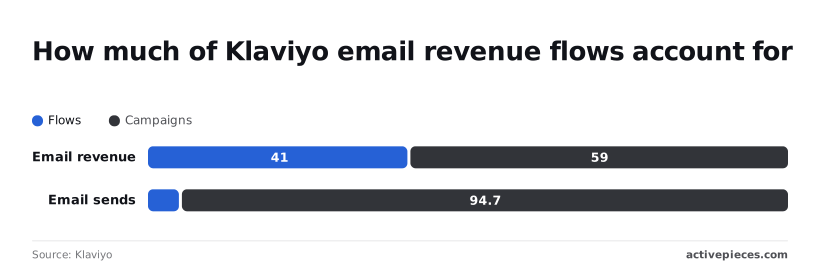
Read that way, a small slice of sends earns a large slice of revenue. Check Composer's page for the exact task list before you rely on it.
Some work lives entirely in Klaviyo and fits Composer, and some work leaves it. The line runs between the two.
Inside Klaviyo:
- Drafting and adjusting email campaigns from your Klaviyo data
- Building and tuning flows
- Reading results from your own sends
Outside Klaviyo:
- A CRM record update
- A support ticket
- A spreadsheet row
- A chat alert

Everything on the second list may be out of reach for an agent inside one platform, though Klaviyo has not said. A trigger, a field mapping and an action in a workflow layer still have to do that, so keep that layer in place.
Measurable new features in Composer
Klaviyo states what Composer does but publishes no figures for it. What's measurably new comes down to a short list of described capabilities and nothing you can benchmark. That matters when you decide how much of your stack to rewire.
What's measurably new comes down to a short list of described capabilities and nothing you can benchmark.
Capabilities Klaviyo states
Klaviyo's marketing agent blog post calls Composer "an AI marketing agent available to every Klaviyo customer that analyzes business data, identifies priorities, and completes marketing work." Each of those verbs stays inside Klaviyo's own data:
- It reads what's in your account
- It ranks what to do
- It does the work there
If a job starts in your helpdesk or ends in your ad platform, none of those verbs reaches it.
Klaviyo's community post describes Composer as a way to "explore new ways to create email and SMS campaigns with AI," and announces a dedicated community space for it.
Take the space as the place to read how other teams use it and to ask questions before you change a live flow. It's not documentation of limits.
What the pages do not say
None of the three pages gives a number: no time saved, no lift in revenue, no count of supported actions. They also don't list triggers it can receive from outside Klaviyo, or fields it can write to other apps.
Without those, you can't yet say Composer replaces any cross-app step, so check the Composer page itself before you remove anything.
Easier to see it running than to read about it: set it up free, no card.
Activepieces support for Klaviyo Composer, shipped and dated
The Activepieces catalog lists only its general Klaviyo integration, with no Composer-named release or date. That integration (@activepieces/piece-klaviyo) has 11 actions and 2 triggers.
What shipped and when
A flow built on it can be governed with role-based access, single sign-on, audit logs and git-synced environments, and MoneyGram, Moneypenny, Alan and FundingSocieties run Activepieces in production.
Two triggers means most workflows can only start from one of two Klaviyo events, so confirm one of them matches your starting event before you plan around it.
That page gives no date for Composer support, so we won't give one. We also haven't run Composer ourselves, which means we can't say how it behaves inside a workflow.
Each step below is a decision point, not a formality, and together they take a Klaviyo event into another app.
- Add the Klaviyo integration to a new flow.
- Authenticate with a Klaviyo API key. Scope the key to what the flow touches, because a broad key lets a mistake in one flow reach everything.
- Pick a trigger from the two the integration offers, and only your selection will activate the workflow, so nothing triggers until you decide.
- Add the next app's action, such as a CRM record update or a message to your support tool.
- Map fields one by one. This is where integrations usually fail: an email address that arrives empty will quietly break the action after it.
- Test with a real event, then read the output of every step, not just the last one.
Once that runs, you have a cross-app path that doesn't depend on Composer. Keep it in place until the Composer page shows it can do the same job.
Composer cost and speed versus alternatives
As of 2026-10-16, Composer has no published price or speed. The only cost you can budget today is Klaviyo's plan price, and the existing flows you would be keeping run on it.
Before moving work, you need five things for each of four options, and the table sets them side by side. Read the "not stated" cells as the finding: where Klaviyo hasn't published a figure, you can't plan around one.
| Option | What it handles | Where it runs | Cost basis | Speed | Date checked |
|---|---|---|---|---|---|
| Composer | Not stated by Klaviyo as of 2026-10-16 | Inside Klaviyo | Not stated by Klaviyo as of 2026-10-16 | Not stated by Klaviyo as of 2026-10-16 | 2026-10-16 |
| Klaviyo flows | Triggered email and SMS sequences inside Klaviyo | Inside Klaviyo | Included in the email plan, priced by profile count | Runs on trigger | 2026-10-16 |
| Activepieces | Steps that cross apps outside Klaviyo | Its own workflow layer | Not stated by Klaviyo as of 2026-10-16 | Not stated by Klaviyo as of 2026-10-16 | 2026-10-16 |
| Manual work | Anything, one task at a time | Your team's own hours | Staff time | Limited by who is free | 2026-10-16 |
Because Composer's row is mostly blank, it can't yet be compared on cost or speed with the flows you already run.
Klaviyo Composer pricing by profile count
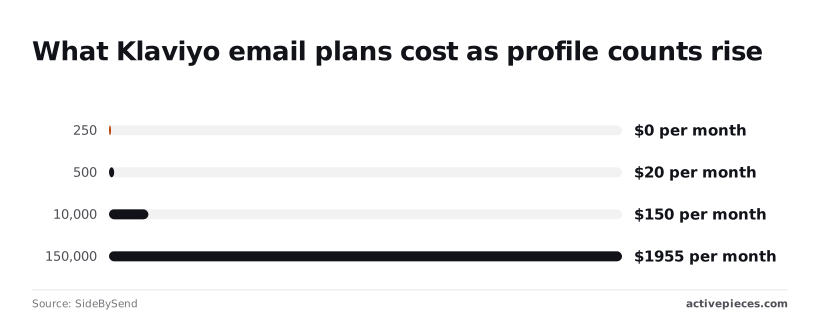
If you want a number to budget on, the plan price is the only one published, and it climbs with profile count. According to SideBySend, 250 profiles cost $0 per month, so a small list can test flows at no charge.
At 500 profiles the price is $20 per month, so the first paid step arrives quickly. At 10,000 profiles it's $150 per month, and at 150,000 profiles it's $1,955 per month, so list growth, not any one feature, drives the bill.

Say Composer lowers that bill, or runs faster than a flow, and the claim goes unsupported. Klaviyo has published neither. Until its page states a price and a speed, treat Composer as an unpriced addition and keep the cross-app work where it is.
Next steps for evaluating Klaviyo Composer
Start on Monday by reading what Klaviyo itself says about Composer, because until the page names a price and a speed, the cross-app work stays where it is.
The four steps below keep that order, and none of them rewires anything, which means you can execute them serially without rework.
- Read Klaviyo's three pages on Composer and note what each one states and what it leaves blank.
- Check your plan's access in your own account, since a launch announcement doesn't tell you whether your tier has the feature.
- List the email tasks that stay cross-app: anything that starts or ends in your CRM or helpdesk rather than inside Klaviyo.
- Try the Klaviyo connection inside a workflow, using one low-stakes task from that list.
Three checks on Klaviyo's pages
Check three things, and treat each as unanswered until the page answers it. First, what Composer costs, and whether it's bundled or billed separately. If the page is silent, you can't budget for it, so keep it out of any plan.

Second, how fast it works, meaning whether it responds in the editor or runs as a background job. A slow agent suits drafting but not a step that a customer is waiting on.
Third, which plans can use it today: Klaviyo says every customer gets a free Composer plan.
Tracking Klaviyo Composer updates and documentation
Follow only the open items that Klaviyo's pages show. Reread the Composer page and the help documentation on a set schedule, and compare them with your notes from step one.
Any line that moves from missing to stated, such as a price or a plan list, is your signal to rerun step four. Don't plan around anything the pages don't say.
Frequently asked questions
Open questions
The body leaves four questions open, and they are answered only from what Klaviyo's own pages say. Where the pages are silent, the answer is "not stated," and that's the answer to plan around.
Is Klaviyo Composer free to use?
Stated. Klaviyo says every customer automatically gets a free Composer plan with 500 credits per cycle, and a paid plan is available.
Until Klaviyo publishes that, check your account's plan details or ask your account contact before budgeting for it.
Does Composer replace Klaviyo workflows?
Not stated. Klaviyo's pages describe Composer as an agent that takes on some email work inside the platform. They don't say it retires flows or supersedes flow triggers.
Leave your existing flows running, and treat any plan to rebuild them as unsupported by the pages.
Can I use Composer with tools outside Klaviyo?
Not stated. The pages cover what Composer does inside Klaviyo. They don't list a trigger or an external connection that lets Composer hand work to your CRM or order system.
Work that spans those apps still needs a workflow layer you control.
Where does Klaviyo post Composer updates?
Reread Klaviyo's own product and help pages before you rewire anything, since they're the only place the answers above would change.
A change in availability or integration support will show up there before it shows up in anyone's summary, including this one.