Leonardo AI Pricing 2026: Plans, Tokens, and Cost

Oct 29, 202615 min read
What you actually buy is a monthly token allowance, even though Leonardo AI sells tiers by price, so the right plan is the one whose tokens cover your real output, which is easy to tally if you log each run in a spreadsheet or an Activepieces flow.
When each generation draws down a token balance, as it does on Leonardo AI, an image and video generation platform, the cost per run is the plan price divided by the generations that allowance covers.
If a tier makes that division impossible without a sales call, treat it as unpriced.
Leonardo pricing plans and token allowances
Leonardo AI plans compared in one table
As of 29 October 2026, the table lists the plans on leonardo.ai/pricing. Cells reading "Not stated" are figures we haven't confirmed. Read the page itself before you pay.
| Plan | Monthly price | Annual equivalent | Token allowance | Seats |
|---|---|---|---|---|
| Free | Not stated | Not stated | Not stated | Not stated |
| Essential | Not stated | Not stated | Not stated | Not stated |
| Higher plans | Not stated | Not stated | Not stated | Not stated |
| Team plans | Not stated | Not stated | Not stated | Not stated |
Before the cost-per-run division means anything, you must fill in every blank yourself. Do that before comparing tiers, because a cheaper headline price can still cost more per image.
What the free tier really allows
The free tier is a trial, not a workflow. Its allowance is small enough that a week of steady work can drain it, which is why the mid-month lockout in this article's case study is a plausible outcome.

Judge the free tier by a simple test: could you finish one real project's images from the free balance, with retries included? If not, you're pricing a paid tier, and the free plan is only a way to measure your burn rate.
How tokens are spent per image, video and upscale
Not every action costs the same. A still image, a video clip and an upscale each have their own token cost, and settings such as model choice or output size can change it.
Retries multiply it, since a rejected image costs the same as an accepted one.
So count your weekly outputs by type, apply the per-action cost shown in the app, and add a margin for rerolls.
If you script generations, Activepieces puts the Agent step that rewrites each prompt and the fixed steps that record that run's token cost in one flow definition, so a retried, upscaled render appears in the run trace as a single execution instead of an agent framework and a workflow tool joined by a callback, and that run is billed as 1 credit however many steps it has.
That weekly total, not the price badge, tells you which row of the table to buy.
If you are running this arithmetic for your own team, see what the same workload costs on Activepieces.
The 10:40 Lockout That Stopped a Four-Person Team
Skip that weekly count and the failure is predictable. At 10:40 on day 12 of the billing cycle, a four-person design team's token balance hit zero in the middle of a client batch.
This is a worked scenario built from published token costs, not a real customer.
Nobody was watching a meter. The batch was a set of campaign images for one client, generated at Phoenix with the team splitting the work.
Each designer ran the highest setting on the hero shots and left variations at the middle setting, because the preview looked better.
Nobody had ever divided the monthly allowance by the images the team actually makes; the plan was picked on its price badge.
It shows tokens per image at Phoenix fast, quality and ultra.
Each step up costs roughly double the one before, so the setting you choose moves your burn rate far more than the number of images you ask for.
That spread is why twelve days was enough. Four people each running a handful of top-setting images per hour will drain a month's allowance long before the month ends.
The plan page gives no warning, because it shows a price and an allowance, not your usage.
Lockout cost in hours, images and dollars
Start with hours. With the balance empty, the team had two options: wait for the cycle to reset or pay to continue. Waiting meant the rest of the month, so in practice the batch stalled while someone sorted out billing.
Next, images. The finished hero shots were useless without their variations, so the client delivery slipped even though most of the work was done. Unfinished sets are the expensive part, because a half-delivered batch still has to be reviewed, explained and rescheduled.

Last, dollars. A top-up solves today's problem at whatever the per-token rate is, usually worse than the plan rate. An upgrade fixes the rest of the month but commits the team to the higher price from then on.
Either way, the team paid more than the badge price it chose the plan for, and a few minutes of weekly arithmetic would have shown that before the lockout.
Leonardo token plans running out early
Sized on the cheapest generation but billed at the dearest one: that is how the allowance ran out early.
Scopeful lists Phoenix at 12 to 50 tokens per generation, so 100 images cost anywhere from 1,200 to 5,000 tokens depending on settings. Plan for the low end and you can overspend fourfold.
How retries and upscales multiply Leonardo token costs
Switch models and the gap widens. Nano Banana Pro runs 140 to 250 tokens per generation, so 100 images cost 14,000 to 25,000 tokens, roughly ten times Phoenix at its low setting.
At the top setting, one Veo 3 clip costs as much as 32 Phoenix images at their highest cost, since Veo 3 runs 800 to 1,600 tokens per generation, making video a choice about token allocation rather than daily output.

Without counting, teams reach for the settings that push a job toward the top of those ranges. Each retry is a new generation billed at full price, so a 3-try average triples your per-keeper cost.
A larger output setting moves a generation up its model's range.
Start a clip on Veo 3 and the floor is 800 tokens, so a single clip outweighs a whole batch of stills. You pay again for an upscale, because it is a second pass on an image you already paid for.
If several people draw on one allowance, each person's retries come out of everyone's month.
Those five compound. A retried, upscaled, high-resolution still can cost several times the number you used when choosing the plan, which is why a weekly count of finished assets, not generations, is the figure to track.
Leonardo plan rollover, concurrency and privacy limits
Each of these can turn a spare allowance into a stuck one: rollover, concurrent jobs, private versus public generations and commercial-use terms all differ by plan. Read them on Leonardo's own plan page before you buy.
Ask whether unused tokens carry over, how many jobs can run at once, whether your work stays private, and whether your use is licensed commercially. If the answer to any of these is no, price the next tier up.
If your workflow calls Leonardo through code, assume its credits are billed apart from the app's token allowance. Budget the two separately, because a full app allowance doesn't cover API calls, and an empty one doesn't mean the API is drained.
Worth checking against a plan that does not meter every step: one credit covers a whole run on Activepieces.
Leonardo Against Midjourney, Ideogram and Adobe Firefly
Of these four, Leonardo is the one that meters in tokens, so the fair comparison is cost per finished image, not price per month. That holds whether or not the monthly prices look close, and it's where a team gets caught.
Price and allowance side by side
Before comparing prices, notice that each vendor counts something different. Leonardo counts tokens, Midjourney counts fast generation time, and Ideogram and Adobe Firefly count credits.
A monthly price tells you nothing until you know how many finished images that unit buys, and each vendor spends its unit at a different rate.
If your work needs many retries, a plan that looks cheap on its pricing page can cost more per usable image.
I'm not printing a four-vendor price table here, because I have no figures checked against each vendor's own page on a stated date. A table of remembered prices is worse than none, since these pages change often.
If your work needs many retries, a plan that looks cheap on its pricing page can cost more per usable image.
Pull entry price, annual discount, free tier and commercial terms from each vendor's pricing page yourself, and write down the date you read them.
Check commercial terms first. If a plan restricts commercial use, its price is irrelevant to a team selling the output.
Which plan covers three everyday uses
Skip this arithmetic and you get the lockout. Do it in order:
- Pick three jobs you actually run, such as social graphics, product mockups and concept drafts, so you'll stop budgeting for features you'll never use.
- Generate one finished piece of each, counting every retry, and record the allowance units spent.
- Multiply by how many of each you make per week, then by four.
- Compare that total with each plan's monthly allowance.
If the total fits one tier with room to spare, buy that tier. If it overshoots, price the next tier up against the cost of running out mid-month.
A stalled team costs more than the gap between plans, so the upgrade pays for itself at the point where you would otherwise hit the ceiling before the month ends.
Distrust any tier whose allowance you can't convert into images without asking a salesperson. If the unit can't be turned into a cost per run, you can't budget it.
Tracking Leonardo Token Use with Activepieces
Before the balance runs out, Activepieces can log what each Leonardo API generation costs and warn your team in Slack. The Free plan allows unlimited flows and 1,000 credits a month, which leaves room to try the log-and-alert flow before paying for anything.

A per-run cost you can't see is a cost you can't budget, so the useful move is to record it at the moment it happens.
What a Leonardo token usage-alert workflow does
Each time your code or another automation requests a generation through Leonardo's API, the workflow fires.
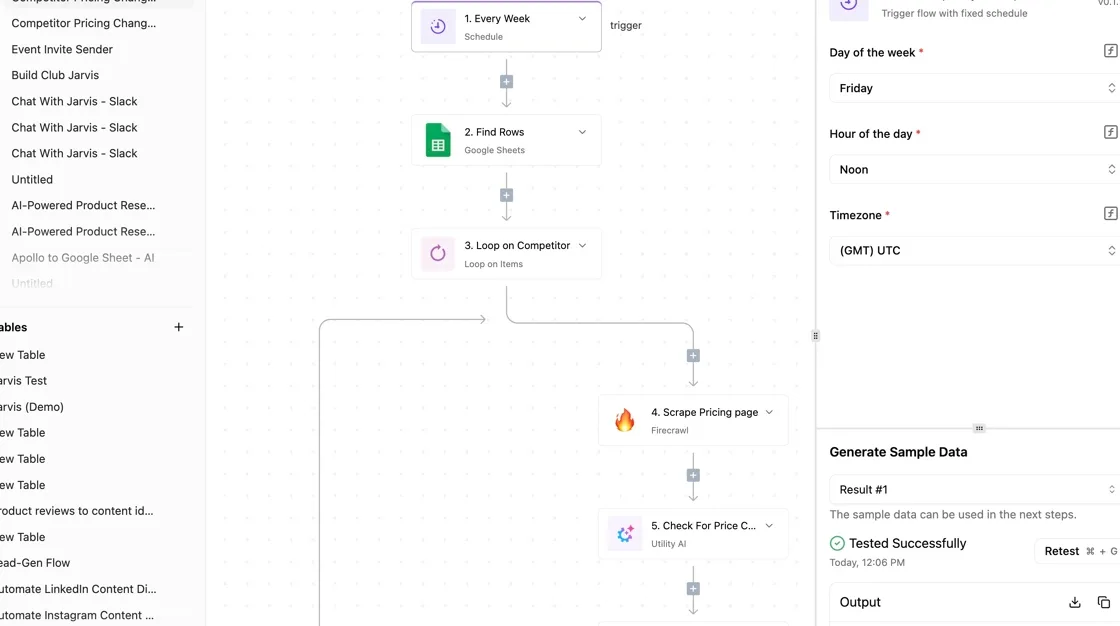
It reads the tokens that generation consumed from the response, writes one row to a spreadsheet, adds that row's tokens to a running total, and divides the total by your starting balance.

When the share crosses a threshold you set, it posts to a Slack channel. In the example below the threshold is 60 percent, which means you receive the warning while 40 percent of your balance remains.
Illustrative, not real data: the table shows what the sheet looks like as the month fills, and the point to take from it is the last column. The alert fires while there is still room to act, not after the lockout.
| Timestamp | Brief | Model | Tokens used | Running total | Percent of balance |
|---|---|---|---|---|---|
| Illustrative row | Campaign hero images | Example model | Per-run cost | Cumulative sum | Share of balance |
| Illustrative row | Product mockups | Example model | Per-run cost | Cumulative sum | Share of balance |
| Row that crosses the threshold | Revision round | Example model | Per-run cost | Cumulative sum | 60 percent or more, Slack alert sent |
Once the alert arrives, the log tells you which briefs consumed the balance. That lets you decide between trimming the heavy ones, moving them to next month, or upgrading the plan on evidence.
When a token alert workflow isn't worth building
It changes nothing about Leonardo's pricing, doesn't raise your allowance, and doesn't make a plan cheaper. It only reports what you are spending.
For people who use Leonardo only through the web app, the workflow does nothing. There's no API call for Activepieces to catch, and Leonardo's own balance display is the right tool. Check it as you would a fuel gauge.
The Free plan is $0 with no card needed, so confirming that your usage is API-driven costs nothing before you build.
If your team generates a modest amount, or one person owns every generation, a manual glance at that display costs less than building and maintaining a workflow.
When several people or scripts draw on one balance and nobody sees the total until it's gone, the build earns its place. That's the situation the lockout came from.
The Rules the Team Set After the Lockout
To stop a repeat of the mid-month lockout, the team now runs on six rules. Together they move the plan decision from the price list to the team's own burn rate.
The list below shows the order they apply in, so follow it from the top.
- Log one measured week of token burn, with every brief and every retry counted.
- Pick the plan from that log, not from the headline price.
- Set an alert at 60 percent of balance, because you can't adjust what you don't see coming.
- Cap retries per brief.
- Draft at low settings before any final render.
- Review usage every Monday, with one named owner.
Count what a normal week costs in tokens: briefs per day, average attempts per brief, and the share that go to final render. Multiply it out and you have a weekly burn you can hold against any plan's allowance.
If the allowance covers that burn with room to spare, the cheaper plan is enough. If the burn eats most of it by midweek, the dearer plan is the cheaper option, because a lockout costs you idle people, not just a missed render.
Don't use a quiet week or a launch week. Pick an ordinary one, and log it before you touch the subscription.
Token caps, alerts and a weekly review
At 60 percent of balance, the alert gives you time to change behaviour while the month still has room in it, letting you adjust without panic. The retry cap stops one stubborn brief from quietly draining the allowance.
Low-setting drafts mean the expensive final render happens once, on a direction the client already approved.
None of this holds without an owner. One named person opens the usage page every Monday, compares it with the logged week, and says whether the plan still fits.
Do three things this week. Start the log today, put the alert in place before the first brief goes out, and name the Monday owner before anyone else asks who it is.
Frequently asked questions
Is Leonardo AI free to use? Yes, Leonardo has a free tier with a small daily token allowance.
That makes it a cheap place to run the token log from the last section before you commit to a paid plan. A week of free-tier work shows how fast your real prompts burn tokens, which is the number the plan choice depends on.
Do unused Leonardo tokens roll over?
Partly. The allowance refreshes each cycle, but paid plans have Token Rollover, which carries unused tokens into a Rollover Bank up to a limit set by your plan.
If you finish the month with a surplus, you paid for capacity you never used. If you run out early, you have the lockout this article opened with. Either way, size the plan to your measured weekly burn, not to a hoped-for average.
Leonardo's API also runs on its own credits, separate from the app plan. Spending in one doesn't draw down the other, so budget them as two lines.
Can I use Leonardo images commercially on the free plan?
Leonardo's terms govern this, so read them before client work.
The practical catch is privacy: free-plan generations are public by default, while paid plans let you keep work private. For anything confidential, such as unreleased product visuals or client drafts, that difference matters more than the licence wording.
Confirm the current terms on Leonardo's site before you rely on a free-plan image in a commercial project.
Is there a discount for annual billing?
Yes, Leonardo prices annual billing below twelve months of monthly billing. Treat it as a second decision, made after the first.
Paid a year ahead, a plan chosen from the headline price repeats the mistake at a larger size, because annual billing locks you into a tier. Run a few months on monthly billing, confirm your burn is steady, and then switch.
Can I cancel or downgrade mid-cycle?
You can cancel at any time, and access generally continues to the end of the period you have paid for.
A downgrade usually takes effect at the next renewal rather than immediately. So if a quiet month is coming, make the change before the cycle closes.
Changing partway through won't return tokens or money for the days you didn't use.
Related reading
References
Running the numbers
See what the same workload costs here.
Free forever plan, and every paid plan self-hosts at no extra cost.
See pricing Talk to sales