
LinkedIn Sales Navigator Pricing 2026: All 3 Plans

Nov 9, 202614 min read
LinkedIn Sales Navigator is LinkedIn's paid prospecting product, sold as three plans:
- Core for one person
- Advanced for a team
- Advanced Plus for organizations that need CRM sync, which is often wired up through workflow tools such as Activepieces
LinkedIn Sales Navigator pricing is the set of per-seat subscription fees and usage limits LinkedIn attaches to its Core, Advanced and Advanced Plus plans, which determine how many searches, leads, messages and CRM integrations a buyer gets at each tier.
Start on Core and move up only when a limit you can name blocks real work.
LinkedIn Sales Navigator pricing by plan, checked today
The plan table with check date
Before you commit, read the table below: it lists each plan against the eight dimensions that decide an upgrade, current as of 2026-11-09.
Any cell marked "Not confirmed" wasn't read from LinkedIn's page in this check, so treat it as an open question rather than a zero.
| Plan | Monthly price | Annual price per seat | Seats | Trial | InMail credits | Saved list limits | CRM sync | Team features |
|---|---|---|---|---|---|---|---|---|
| Core | Not confirmed | Not confirmed | Individual | Not confirmed | Not confirmed | Not confirmed | Not confirmed | None; built for one user |
| Advanced | Not confirmed | Not confirmed | Team | Not confirmed | Not confirmed | Not confirmed | Not confirmed | Aimed at shared team use |
| Advanced Plus | Not confirmed | Not confirmed | Organization | Not confirmed | Not confirmed | Not confirmed | Not confirmed | Aimed at CRM-connected rollouts |
Two things are firm here: the seat model and the intended audience. The pattern to take from the table is that the plans separate by who is using them, not by how clever the search is.
Recent Sales Navigator price changes
No price change is confirmed in this check, so none is claimed. The safest habit is to record the page's figures on a date and compare them at each renewal.
If you are running this arithmetic for your own team, see what the same workload costs on Activepieces.
What Sales Navigator costs at realistic usage
On annual billing, a solo seller pays $1,079.88 a year for Sales Navigator Core, and cost scales linearly from there, so every added seller adds the same amount. Budget by headcount, not by team size bands.
Solo seller, five sellers and 25 seats
That $1,079.88 works out to $89.99 a month. The annual cost for the same headcounts on each plan:
| Sellers | Core per year | Advanced per year |
|---|---|---|
| 1 | $1,079.88 | $1,799.88 |
| 5 | $5,399.40 | $8,999.40 |
| 10 | $10,798.80 | $17,998.80 |
At every size in the table above the gap holds, so the Advanced premium is $720 per seat per year, and it only pays off if a named Core limit is blocking someone.

At 25 seats Core costs $26,997.00, so a pilot group of five, proven first, is cheaper than a full rollout.
For a yardstick, entry CRM seats are far cheaper. AIMadeFor's 2026 comparison lists:
- Pipedrive Lite at $14 per seat per month
- HubSpot Starter at $20
- Salesforce Starter at $25
At about 6.4 times Pipedrive Lite and 3.6 times Salesforce Starter, Core should be justified as a prospecting tool, not as the system that holds your pipeline.
Sales Navigator InMail credits and list limits
Credits and saved-list caps are where a seat's real capacity is set, and they're the limits most likely to push a team off Core. Read them from LinkedIn's plan page on the day you buy.
The rule is simple: upgrade when a rep actually runs out of credits or hits a list cap, and not before.
What Sales Navigator doesn't include
Sales Navigator is a prospecting layer, not a CRM. The price comparison above isn't a like-for-like swap: the CRM seats store deals, tasks and history, and Core doesn't replace them.
Most teams therefore pay for both, and the true per-seller cost is Core plus a CRM seat. Using the Pipedrive Lite price, that's $89.99 plus $14, or $103.99 a month.
viz type=stackrank title="What entry-tier CRM seats cost per month" unit="$ per seat per month" source="Salesforce, AIMadeFor, Pipedrive - https://www.aimadefor.com/blog/hubspot-vs-salesforce-vs-pipedrive-2026/" target="119.99" benchmark="Sales Navigator Core"4 a month for Pipedrive Lite to $25 for Salesforce Starter, with HubSpot Starter at $20." Pipedrive Lite: 14 HubSpot Starter: 20 Salesforce Starter: 25
Advanced tiers replace in-house tools
$103.99 a month is the price of rebuilding by hand what the higher Sales Navigator tiers include. The case for paying LinkedIn instead is that four built-in features replace the glue you would otherwise maintain yourself. You trade in-house engineering for a vendor solution.
CRM sync and data write-back
When a rep works alone, the first stage of adoption, nothing much breaks. What breaks first is the team that logs activity in a CRM (customer relationship management system) and finds LinkedIn data missing from it. The four features, each with what it replaces:
- CRM sync (Advanced Plus), which replaces the paid connector and manual copying between LinkedIn and your CRM.
- Shared lists and team sharing (Advanced), which replace spreadsheets of prospects passed around by email.
- Admin controls and SSO (Advanced Plus), which replace per-seat account setup and password handling.
- Account alerts (Core and above), which replace saved searches checked by hand.
Once a second rep joins, shared lists matter, because two people stop prospecting the same account.
Admin controls and SSO (single sign-on, one company login for every seat) matter the moment someone in security asks who holds access. If that day comes, you need Advanced Plus, not a workaround.
Does one deal pay for Sales Navigator?
To hear LinkedIn's case, start with a study it commissioned. Forrester's model, published by LinkedIn and so vendor-sourced, projects $6.25 million in benefits over three years against a $1.5 million investment.

According to LinkedIn, that's about $4.17 back per dollar spent, and it leaves a net present value of $4.7 million. Read it as an upper bound: it models a composite large organization, not a two-person team.
Still, the logic holds at small scale. If a higher tier helps close one extra deal, the fee is covered. The question is whether you can name that deal.
Why Core is the right start
Until you can name a weekly task the extra tier performs, you're paying for capacity you don't use. That is why Core wins first: an upgrade only pays for itself once that task exists.
viz type=matrix title="How CRM seat prices climb across tiers" unit="US$ per seat per month" source="Salesforce - https://www.salesforce.com/sales/pricing/" cols="Entry,Mid,Top"50 a seat and Pipedrive from
When to upgrade from Sales Navigator Core
Upgrade when a named limit blocks work you did this week, not work you might do next quarter. If an extra feature goes unused for a month, the tier was premature, and that's the result that would disprove staying on Core.
**Upgrade when a named limit blocks work you did this week, not work you might do next quarter.
Seat costs also compound. Salesforce's pricing comparison lists HubSpot at US$20, US$100 and US$150 per seat per month across its entry, mid and top tiers. A five-person team pays US$500 monthly at the mid tier against US$100 at entry.
It lists Pipedrive at US$14, US$39 and US$79. Each step up multiplies across every seat, so move one person first and measure.
For a solo user who mostly needs search and visibility, Premium Business suits; for anyone building saved lead lists, Core does. A second seller is the first reason to move off Premium Business, since it has no team lead-tracking tools.
Sales Navigator versus Apollo, ZoomInfo and Lusha
Across the four points that decide a first purchase, the table below compares all five. Read the contact data column first: Core works from LinkedIn profiles, while the other three sell their own contact databases.
| Product | Starting price per user per month | Contact data | CRM integration | Free trial |
|---|---|---|---|---|
| Sales Navigator Core | Unpublished here | LinkedIn profiles only | No | Yes |
| LinkedIn Premium Business | Unpublished here | LinkedIn profiles only | No | Yes |
| Apollo | Unpublished here | Own email and phone database | Yes | Free plan |
| ZoomInfo | Unpublished here | Own email and phone database | Yes | Unpublished |
| Lusha | Unpublished here | Own email and phone database | Yes | Free plan |
If your blocker is missing emails or phone numbers, or a CRM that must update itself, that's the named limit. One of the database tools answers it better than a higher LinkedIn tier.
Worth checking against a plan that does not meter every step: one credit covers a whole run on Activepieces.
Move Sales Navigator leads into your CRM with Activepieces
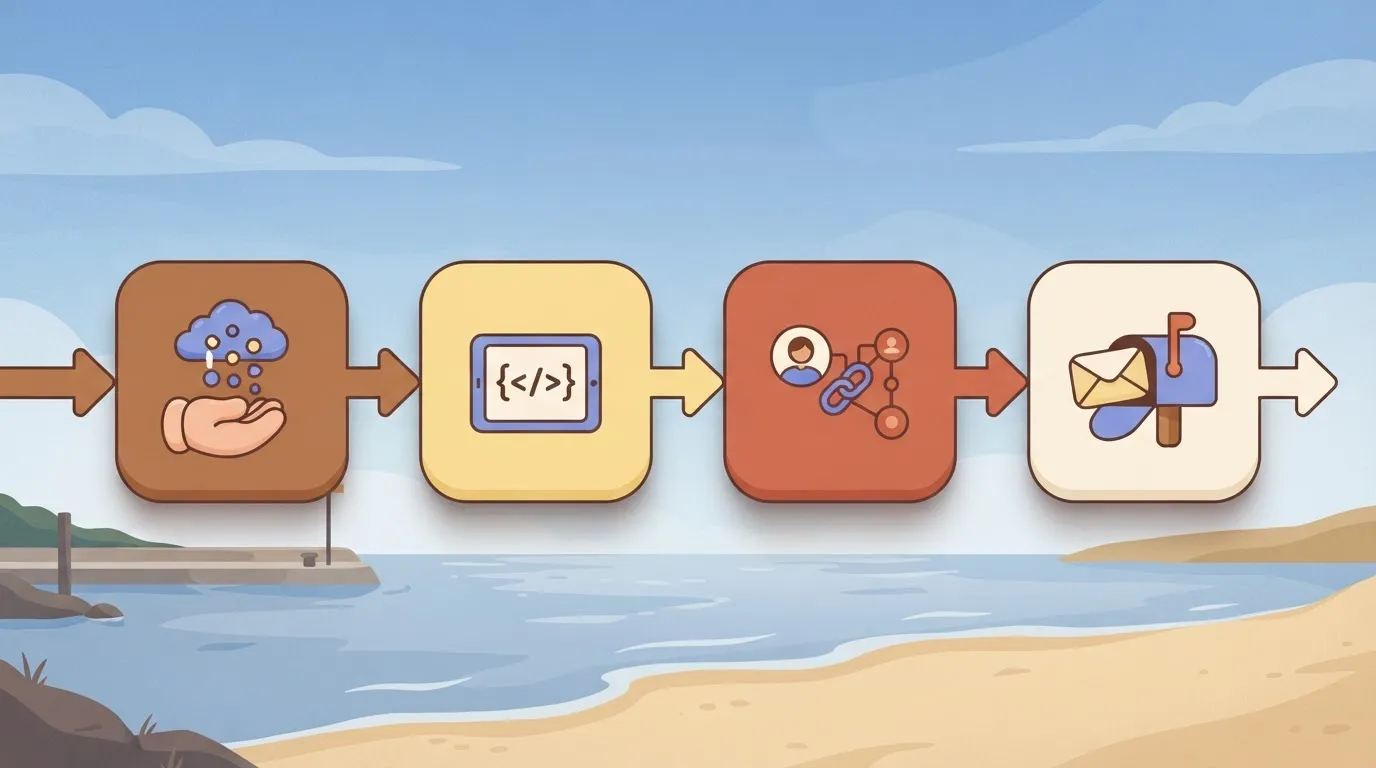
Once leads are saved or exported from Sales Navigator, Activepieces can create the CRM record, notify the owner and set a follow-up in a single run, and a run costs 1 credit however many steps it has.
The free plan includes 1,000 credits a month and unlimited flows, so the handoff costs $0 where a paid sync tier costs extra.
When a workflow beats paying for CRM sync
This fits at the early stage of adoption, when one team is handling a modest volume of leads and the handoff is the only manual step. It doesn't replace Sales Navigator.
It starts where your search and saving end, so you still pay for the plan that finds the people.
The gap it closes is the copy-and-paste between your saved list and your CRM.
A sync tier only reaches the CRMs LinkedIn decides to build for, while a missing connector in Activepieces can be generated with AI and added privately to your own instance, with no vendor release to wait on.
Roughly 60% of its 747 integrations are community-contributed, and the core is MIT-licensed, so the catalogue is open to inspect on GitHub.
If you need new contact data that LinkedIn doesn't supply, you're back at the database tools from the previous section.
What the workflow looks like
When a lead arrives from your export or form, a typical flow catches it with a "Catch Webhook" trigger. It then runs a "Code" step to tidy names and company fields, writes the CRM record and messages the account owner.
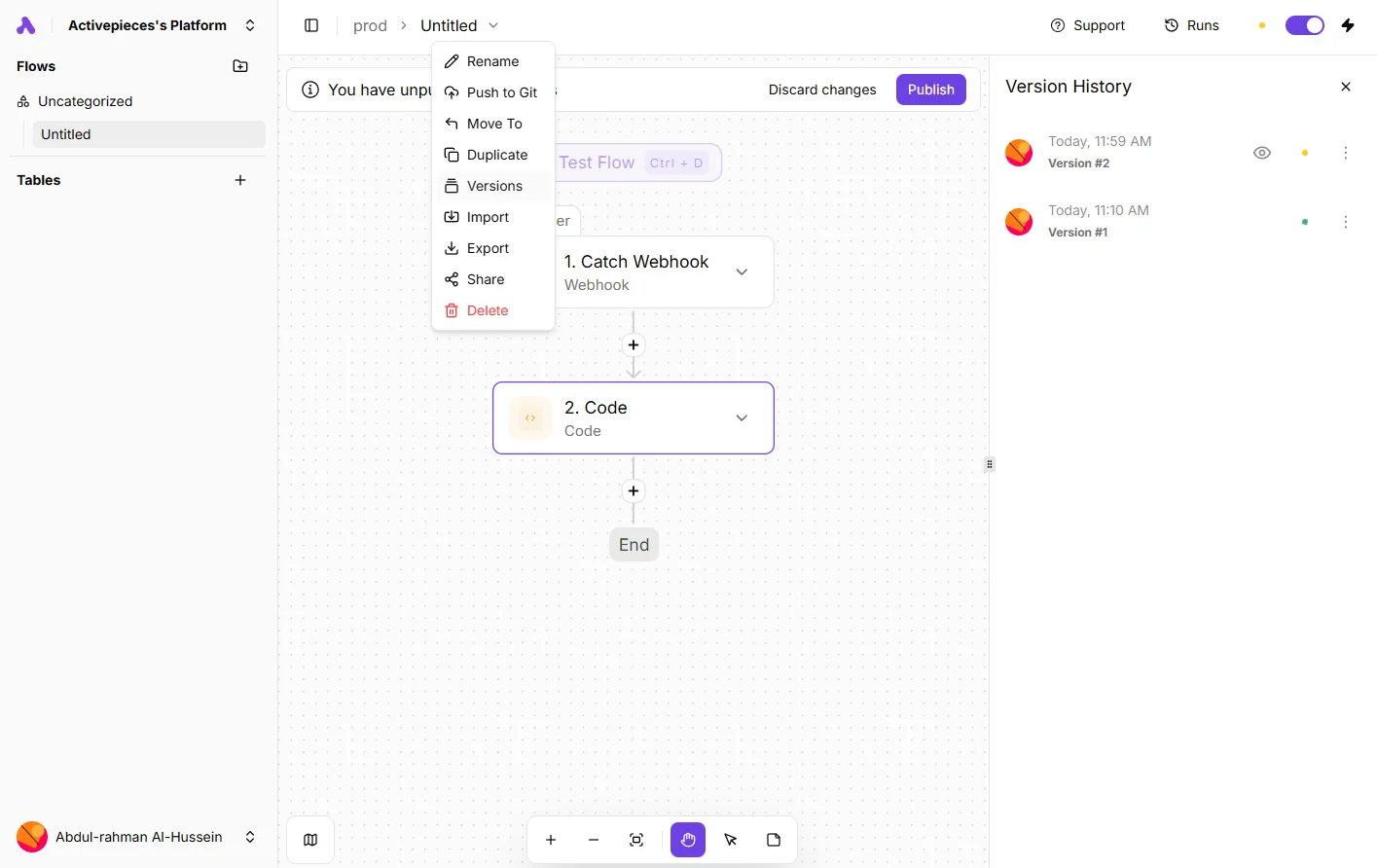
In the builder's version history panel, two saved versions of exactly this kind of flow show, each with a timestamp and status, so you can see what changed and return to the earlier one when an edit breaks something.
Open the same builder menu and you'll find Duplicate and Push to Git, which is how a working flow becomes a template for the next team, and template reuse is the lever that spreads the pattern without another build.
What not to automate on LinkedIn
Keep the automation on your side of the handoff. LinkedIn restricts scraping and automated activity on its own pages, so don't build flows that pull profiles out of Sales Navigator, click through results or send messages on your behalf.
Feed Activepieces only what you have saved or exported through the product's own features, and your account stays clear of the rules the workflow was meant to respect.
Once exported, the lead data is encrypted in transit and at rest on Activepieces Cloud, which has an EU region in Frankfurt, or it can stay on your own servers.
What to do before buying Sales Navigator
Run the Core trial as a measured test, inside the same saved-and-exported habits as before, so that any upgrade is bought against a named limit and not a hunch.
- Save LinkedIn's pricing page and write down the date you read it.
- Start the Core trial.
- Set two-week targets.
- Log each limit you hit.
- Decide: upgrade or an alternative.
- Calendar the renewal and cancellation dates.
Start a Sales Navigator Core trial
Before you click anything, save the page. LinkedIn changes prices and limits, and a dated copy is what lets you check later whether the plan changed under you.
Then start the Core trial, not a higher tier. Set targets as outcomes: how many accounts you need to research, how many saved leads you need to work, how many messages you expect to send from a template.
If one version of your outreach message performs better, you have a number to compare against, and the test tells you something.
Deciding on Sales Navigator tier by evidence
Keep a plain log. Each time the product stops you, record what you were doing, which limit blocked you, and what the delay cost. Whoever on your team works the heaviest outreach will hit the walls first, so read their log before anyone else's.
At the end of two weeks there are three outcomes. If you never hit a named limit, stay on Core. If one limit blocked real work, upgrade only to the tier that lifts it.
If the block was something no tier lifts, look at an alternative.
If a trial rolls into paid billing unnoticed, it quietly cancels the point of this whole exercise. So put the renewal date and the last day to cancel in your calendar today, with a reminder ahead of each.

Frequently asked questions
Whether a trial turns into an unwanted charge comes down to five questions. Each answer comes from LinkedIn's help pages as read on 2026-11-09. The table gives the short version, and the subsections add what each answer means for a small team's rollout.
| Question | Short answer | LinkedIn help page | Date checked |
|---|---|---|---|
| Trial length | A free trial is offered; the length is shown at sign-up | LinkedIn Sales Navigator Help Center | 2026-11-09 |
| Auto-renewal and cancel cutoff | Renews automatically; cancel before the renewal date | LinkedIn Sales Navigator Help Center | 2026-11-09 |
| Refund window | A short refund window follows a charge; eligibility depends on the terms | LinkedIn Sales Navigator Help Center | 2026-11-09 |
| Plan change mid-term | Moving up is allowed; moving down waits for renewal | LinkedIn Sales Navigator Help Center | 2026-11-09 |
| InMail credit rollover | Unused credits carry over, within a limit | LinkedIn Sales Navigator Help Center | 2026-11-09 |
Trial and cancel date
Read the table as a checklist for the first week. On day one, calendar the cancel cutoff, because that date is the only one that protects the budget.
Does LinkedIn Sales Navigator have a free trial? Yes, new subscribers can start with a free trial, and the length appears on the sign-up screen.
That makes the trial your pilot stage: assign one person to run real prospecting through it, not a demo click-through. If nobody owns the cancel date, the trial becomes the first paid month by default.
Changing plans
If you start on Core, you lose nothing in flexibility. Moving up from Core to Advanced is generally allowed during a term, while moving down usually waits until renewal.
Upgrade the day a named limit blocks a specific person, not on a hunch that the team will grow into it.
Premium, credits and discounts
No, Sales Navigator isn't included with LinkedIn Premium. It's sold as a separate subscription, and a Premium plan doesn't replace it. Anyone already paying for Premium should still start Sales Navigator on its entry plan and treat the two bills as independent.
Do unused InMail credits roll over? Partly. Unused credits carry forward, but only up to a limit, so a team that sends few messages can't bank them forever.
Spend credits on templated outreach you can measure by reply rate. That tells you whether a higher tier's allowance would ever be used.
I found no student or nonprofit discount on the help pages checked on 2026-11-09. Treat the listed price as the price. Ask LinkedIn's sales team directly before assuming an exception exists.
Related reading
References
Running the numbers
See what the same workload costs here.
Free forever plan, and every paid plan self-hosts at no extra cost.
See pricing Talk to sales