
Llama API Pricing: Per-Token Rates and Limits (2026)

Nov 9, 202615 min read
Llama API is Meta's own hosted inference service for its Llama models, billed per million tokens.
The table below lists what to read for each model, because Meta sets those figures and they change without notice, so anyone who tracks them in a Activepieces workflow should still check them against Meta's page. Third-party price aggregators are not a substitute.
Compare Llama API prices by model and plan
What Llama API is and who sells it
If you want to know what a call costs, Meta's pricing page is the only authority, since Meta sells Llama API directly.
Resellers and cloud marketplaces host the same model families under different prices and limits, so a figure quoted for "Llama" elsewhere may not be the one Meta charges.
Per-model price table with check date
Some figures below are illustrative, and a number copied today can be stale by next quarter, so check the vendor's page.
| Model | Input $/1M | Output $/1M | Free or preview status | Limits | Date you read it |
|---|---|---|---|---|---|
| Llama 3.1 8B | Read from Meta's page | Read from Meta's page | Read from Meta's page | Read from Meta's page | Your check date |
| Llama 3.3 70B | Read from Meta's page | Read from Meta's page | Read from Meta's page | Read from Meta's page | Your check date |
| Llama 4 Scout | Read from Meta's page | Read from Meta's page | Read from Meta's page | Read from Meta's page | Your check date |
| Llama 4 Maverick | Read from Meta's page | Read from Meta's page | Read from Meta's page | Read from Meta's page | Your check date |

If a cell on Meta's page is blank, write "not published" and don't borrow a number from anyone else. A gap is a reason to ask Meta, not to guess.
Free tier, preview status and rate limits
A preview model can change terms or disappear, so check whether each model is free, preview or paid.
The bootstrap version: prototype on whatever's free, but write down the rate limit before you build, since a limit you hit in production means failed calls or a forced upgrade.
Llama API batch and cached-token discounts
Look for a batch rate or a cached-input rate on each row. If Meta lists neither for a model, assume you pay the full rate and budget accordingly. Don't assume a discount that exists at other vendors exists here.
If you are running this arithmetic for your own team, see what the same workload costs on Activepieces.
Why prompt and output tokens matter
The headline rate is not what you pay. What you pay depends on how many tokens each request carries in and out. At Llama 3.3 70B prices it's mostly input.
Input versus output price ratio
At the list prices used here, $0.59 per million input tokens and $0.79 per million output tokens, output costs about 34% more per token.
That gap is narrow, so capping answer length saves less than you would expect, and the length of your prompt does most of the work.
What a request costs in practice
It covers a chat turn (1,000 tokens in, a short answer out), an extraction job (3,000 in, 500 out) and a summarisation call.
In the extraction bar, input is $0.00177 and output $0.000395, so input is roughly 82% of a $0.002165 request. Cut the prompt before you cut the answer.
Do it the bootstrap way: log input and output token counts per request for one week, then rank prompts by input spend before touching anything else.
Context length as a cost multiplier
Send a 3,000-token prompt 100,000 times and you've paid for 300 million input tokens, because every extra token of context is billed on every call.
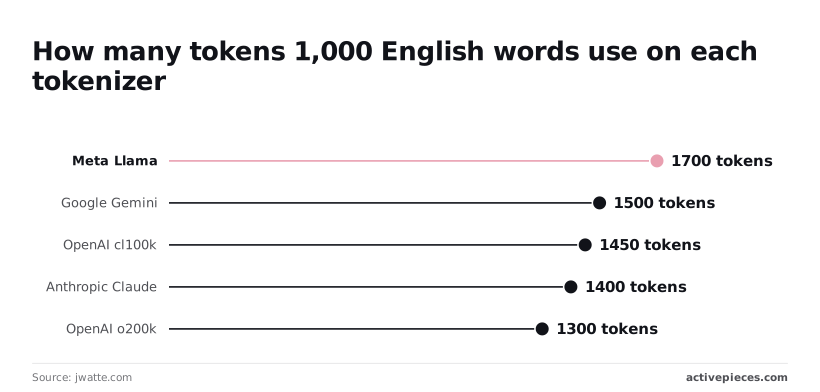
And the count depends on the tokenizer. In jwatte.com's tokenizer comparison, per Aipricing, 1,000 English words come to different token counts by model family. These are approximate, since tokens per word varies with your text.
Send a 3,000-token prompt 100,000 times and you've paid for 300 million input tokens, because every extra token of context is billed on every call.
| Tokenizer | Tokens per 1,000 English words | Llama's count is higher by |
|---|---|---|
| Meta Llama | 1,700 | n/a |
| Google Gemini | 1,500 | 13% |
| OpenAI cl100k | 1,450 | 17% |
| Anthropic Claude | 1,400 | 21% |
| OpenAI o200k | 1,300 | 31% |
Llama's 1,700, per Models, means the same article burns up to 31% more tokens than on OpenAI's o200k tokenizer. Count your own prompts with Llama's tokenizer before you compare vendors.
Worked monthly Llama API billing example for bots
Once you've counted a ticket's tokens, the Llama API bill is arithmetic: tickets times input tokens at the input price, plus output tokens at the output price, all read from Meta's page the day you check.
Take a bot that triages 20,000 support tickets a month; the only inputs you supply are your own token counts and the current prices.
Llama API billing example assumptions and math
Each ticket sends one prompt: your instructions, the customer's message and any pasted context. It gets back one short answer: a category, a priority and a one-line reason.
On the cheapest, mid and largest listed model, the table runs the same workload. The takeaway is that the model row changes the bill by the ratio of their prices, while the volume column changes it by a flat multiple.

| Model tier | Input / output tokens per ticket (illustrative) | 20,000 tickets monthly cost (illustrative) | 60,000 tickets (3x) monthly cost (illustrative) |
|---|---|---|---|
| Cheapest listed | Your measured counts | 20,000 × (input tokens × input price + output tokens × output price) | 60,000 × the same per-ticket cost |
| Mid listed | Same counts | Same formula, mid-tier prices | 60,000 × the same per-ticket cost |
| Largest listed | Same counts | Same formula, largest-tier prices | 60,000 × the same per-ticket cost |
Keeping the token counts identical across rows isolates the model choice. If the cheapest model classifies your tickets accurately, paying for the largest one buys you nothing. Test that on a sample of real tickets before you commit.
The bootstrap version is to run the cheapest model and cut the instructions to the shortest prompt that still sorts tickets correctly. Do all your prompt testing inside the free tier. Every token you trim from the prompt is saved on every ticket, every month.
Llama API costs at triple the volume
Triple the tickets to 60,000 and the bill on any single model triples too, because cost scales linearly with tickets when the prompt stays the same.
The bigger change isn't on the invoice. At 3x you may leave the free tier and run into rate limits, so check both on Meta's page before launch. If requests per minute cap you, a monthly total that looks affordable can still be undeliverable.
Worth checking against a plan that does not meter every step: one credit covers a whole run on Activepieces.
Account for hidden Llama API costs and limits
Three things never show up in the headline per-million-token rate: the rate limits that throttle you, the tokens you pay for twice, and price changes that arrive without your asking. Budget for all three.
Treat "unverified" items as questions to put to Meta, not as facts; the list below sorts each risk by whether Meta's documentation backs it.
- Rate limits of 10 requests per minute and 250,000 tokens per minute in preview: in docs
- Waitlist access to the API: unverified
- Retries billed twice: unverified
- System prompt resent on every call: unverified
- Guard-model calls billed as separate requests: unverified
- Model deprecations: unverified

Rate limits and access restrictions
At 10 requests per minute, a preview account can't serve more than one request every six seconds, so a customer-facing chat feature queues almost immediately. The 250,000 tokens-per-minute cap matters less unless your prompts are long.
If access sits behind a waitlist, your launch date belongs to Meta, not to you. The bootstrap version: build and test on one small model, and add a queue so bursts wait rather than fail.

Retries that double Llama API token costs
If your client retries a failed call and Meta bills the failed attempt, you pay twice for one answer. Cap retries at two and log every one, so you can see the cost.
A retry-and-log chain is ten small steps instead of two big ones, and per-step billing charges you for that discipline, so you pay roughly five times as much.
Activepieces, which reaches the API over HTTP, doesn't make you choose: its pricing page lists 1 credit per flow run, so the ten-step chain costs what the two-step shortcut did, while Zapier counts every task and Make every module.

Meta's per-token charge still applies to every call the chain makes.
Then there is the system prompt, sent with every request. A 1,000-token prompt across 100,000 calls is 100 million input tokens, and at the 8B input rate of $0.02 per million that costs $2, meaning massive request volumes are affordable. At Maverick's $0.35 it costs $35.
When you add a guard model to screen inputs or outputs, each screened message may be another call carrying its own tokens, so check how Meta meters it.
Model deprecations and price changes
In late 2026, prices moved in opposite directions. According to (source), Llama 3.1 8B input fell from $0.05 to $0.02 per million tokens, which means input costs dropped 60%.
Output fell from $0.08 to $0.04, halving your output costs. Your total bill falls by less than half unless input and output are balanced.
Maverick went the other way: input rose from $0.1875 to $0.35 and output from $0.6525 to $1. Its output price is up about 53%, so a Maverick-based budget set earlier now understates spend by roughly that much on output-heavy work.

Check Meta's page on the day you budget rather than trusting a figure copied here. If a deprecation notice forces a move to a pricier model, you'll want the old numbers on file to measure the jump.
Compare Llama API prices against competitors
Keep those old numbers beside a side-by-side of hosts, because the same Llama 70B model is priced differently by Llama API, Together AI, Groq and Fireworks AI. Each host's free tier and limits decide what you actually pay.
Same model, different host: price comparison table
Fill the price columns from each vendor's page on the day you check, and record that date.
| Host | Llama 70B input and output, per 1M tokens | Free tier and rate limits | Batch discount | Outgrow path |
|---|---|---|---|---|
| Llama API | Priced separately for input and output | Free tier with caps; limits set by Meta | Check the page | Move to a paid plan or another host serving the same weights |
| Together AI | Priced separately for input and output | Limits rise with account tier | Check the page | Dedicated endpoints |
| Groq | Priced separately for input and output | Free tier with caps | Check the page | Paid tier with higher limits |
| Fireworks AI | Priced separately for input and output | Limits rise with account tier | Check the page | Dedicated deployments |
| Self-hosted A100/H100 | Hourly GPU rent, not per token | None; you pay while the GPU runs | Not applicable | Add GPUs or buy hardware |
Because every host serves the same weights, your switching cost is mostly prompt testing, not code. The bootstrap version is to prototype on whichever free tier you fit inside, and to keep a second host's key ready for when you hit the limit.
When self-hosting beats an API
If your GPU isn't busy around the clock, self-hosting loses, because you pay for hours, not tokens.
Economize Cloud shows an H100 80GB renting from $2.33 to $12.29 an hour, with $4.74 in the middle. At a typical rate, that's roughly $3,460 a month for one card, so an idle H100 burns real money.
At $1.10 to $5.07 an hour, with $2.75 in the middle, an A100 80GB comes to about $2,000 a month at the typical rate, so the cheapest tier of A100 rental is the lowest entry point for a 70B model.
Down at the L40S 48GB, the range is $0.79 to $3.77, with $1.50 in the middle, or about $1,095 a month, so a midpoint GPU purchase costs over $13,000 annually.
If your traffic is bursty, stay on per-token pricing and revisit when your monthly API bill approaches one card's monthly rent.
What Activepieces does about this
The problem in this article is that the per-token price is only one input to the bill. Token counts, retries, free-tier limits and model changes decide the rest, and you only see them if you log each call. Activepieces is where we'd do that logging.
It is an open-source automation builder with an HTTP request integration, so it can call Llama API directly. The step after the call can write the response's token usage to a sheet and compare a running total against a limit you set.

The licence matters for this kind of work. The Community Edition is MIT-licensed, so you can self-host it and keep your prompts, ticket text and usage logs on your own infrastructure.
For a bot that triages 20,000 support tickets a month, that means the logging layer adds no per-task fee of its own. Meta's per-token charge still applies to every call, and Activepieces doesn't change it.
The retry-and-log pattern is where the pricing model shows. A chain that makes the call, checks the status, retries at most twice and writes a log row takes several steps.
Activepieces' pricing page lists 1 credit per flow run, so the whole chain counts as one run however many steps it has. Check that figure on our page the day you budget, as you would Meta's.

We can't tell you what Meta charges, whether a free tier exists today, or what its rate limits are. Those answers live on Meta's page. What the flow gives you is a dated record of what you actually sent and received.
When Meta changes a price, you can multiply your own measured token counts by the new rate instead of guessing.
Frequently asked questions
Is Llama API free to use?
Only if Meta's page lists a free tier on the day you check, and you should not budget on one until you've seen it. Free allowances come with rate limits, so a tier that covers a prototype can still stall a product with real traffic.
The bootstrap version is to prototype inside the free allowance, if one exists, and price the paid path before you launch.
Do I need a credit card to start with Llama API?
That depends on Meta's signup flow today, which this article can't settle for you. Read the signup page before you commit a card.
If one's required, use a virtual or prepaid card with a spending limit, so a runaway loop in your own code hits a wall instead of your bank balance.
Is the Llama model itself free while the API costs money?
Yes, in the sense that Llama is Meta's model family, and its weights have been offered for download under Meta's license. Llama API is Meta's hosted service for calling those models.
Free weights still cost money to run, because you pay either per token to a host or for GPU time yourself. Read the license terms too, since they can restrict how you use the model commercially.
How often does Llama API pricing change?
Often enough that a figure copied into a spreadsheet last quarter is a liability.
The safest habit is to re-read Meta's page whenever you budget, and the four open questions below are the ones to settle first, because each has an answer that lives on Meta's side:
- Whether the free tier still exists
- Whether Meta's API is still sold
- How to count tokens before sending a request
- Where to find the changelog
Settling the first two tells you whether the rest of your budget applies at all. The last two keep it accurate, because counting tokens first turns a guess about your prompts into a measurement, and the changelog tells you when your numbers have gone stale.
Can I automate Llama API calls and cost alerts without code?
Yes, with a no-code workflow builder that has an HTTP request step, which can call the API and log each response's token usage to a spreadsheet. Add a rule that emails you when the running total crosses a line you chose.
The bootstrap version is just the spreadsheet, filled in by hand once a week.
Check whether Meta's billing dashboard offers its own spending caps, because a cap enforced by the vendor is safer than an alert you might not read in time.
Related reading
References
Running the numbers
See what the same workload costs here.
Free forever plan, and every paid plan self-hosts at no extra cost.
See pricing Talk to sales