
MailerLite Pricing: Every Plan Compared (2026)

Nov 2, 202614 min read
MailerLite has a free tier with a hard subscriber cap and a paid entry plan above it.
The price rises with the number of subscribers on your list, not with how much you send, which means a team that wires its signup forms into other tools through something like Activepieces will still see the bill track list size rather than activity.
MailerLite pricing today: every plan, price and limit
Plan table: price, subscribers, monthly emails, features
Read the table by the subscriber column first, because that's the column that moves your price. It lays out the four tiers against the six limits that decide a bill, so pricing varies based on both your tier and your limit.

I've left out dollar figures I haven't verified against the vendor's page.
| Plan | Price at 1,000 subscribers | Subscriber cap | Monthly email cap | Automations | User seats | Check date |
|---|---|---|---|---|---|---|
| Free | No charge | Hard ceiling | Capped | Limited | 2 seats | Confirm on purchase day |
| Growing Business/Comfort | Set by list size | Tiered by list size | Set per plan | Included | Limited seats | Confirm on purchase day |
| Advanced/Power | Set by list size | Tiered by list size | Set per plan | Fuller set | More seats | Confirm on purchase day |
| Enterprise | Quoted by sales | Very large lists | Negotiated | Negotiated | Negotiated | Confirm on purchase day |
No paid row has a fixed price, so the same plan costs different amounts at different list sizes. Your plan choice is the smaller decision.
Between tiers, the gated features matter more than the sending allowance. Moving up adds more seats and fuller automation, and you pay for them on top of the subscriber tier.
Pay yearly and the same plan costs less than it does monthly. The saving only matters once you know your list size, because a list that grows past a tier mid-year changes what you owe.
Treat every limit above as valid only on the day you read it. Open mailerlite.com/pricing, enter your real subscriber count, and set the result beside your monthly send volume and the features you need before you pay.

If you are running this arithmetic for your own team, see what the same workload costs on Activepieces.
What MailerLite costs at 1,000 to 100,000 subscribers
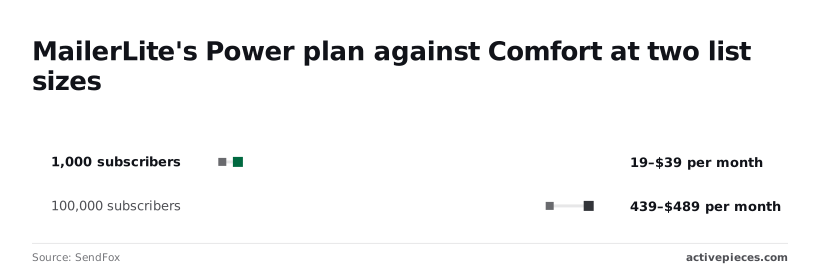
MailerLite's calculator shows a 1,000-subscriber list at $19 to $39 a month and a 100,000-subscriber list at $439 to $489, making subscriber count, not tier choice, your main cost driver.
The tier premium grows from $20 to $50 a month, but the list-size jump from $19 to $439 dwarfs it, so tier selection barely influences your total cost.
!(chart)
Newsletter creator with a small list
At 1,000 subscribers, Comfort costs $19 a month and Power $39. The $20 difference is $240 a year, though list size still matters far more than tier selection. Unless you need a feature gated to Power, the higher tier is a poor use of money at this size.

Bill yearly and Comfort drops to $17.10 a month, which saves $1.90 a month, but the incentive to commit annually is modest.
Growing store or small business
Between the two ends, the bill rises with your list, not with how often you email. A store that doubles its sending to the same subscribers pays the same, while one that doubles its list pays more even if it sends less.
So enter your real count into the calculator and check the monthly volume you plan against the tier's limits, rather than extrapolating from the two figures above.
Large list where Enterprise begins
At 100,000 subscribers, Comfort is $439 a month and Power is $489, a $50 premium that's now about 11% of the bill. Yearly billing brings Comfort to $395.10, which saves $43.90 a month, or roughly $527 over the year.
Beyond lists of this size, expect a sales conversation instead of a calculator price. At that point the quote, not the page, is your real cost.
Hidden costs and limits MailerLite users hit
Expect the quote to run higher than the page: the bill starts with stored contacts, then puts email caps, plan-gated features and separately billed extras on top of that tier.
What counts toward your subscriber tier
You are billed on active subscribers in your account, not on the person who opens your emails. A contact who hasn't opened anything in a year still occupies a slot, so a neglected list is billed the same as an engaged one.
You are billed on the contact record in your account, not on the person who opens your emails.
Unsubscribed and bounced contacts don't count toward your limit, but any address that was active during the billing cycle counts even if it is deleted later.
If removal doesn't lower the number the vendor bills on, pruning a list saves nothing, and you want to know that before you spend an afternoon cleaning.
Sending limits and feature gates by plan
A list that fit comfortably on free before may now be pushed onto a paid tier, even though the extra seat helps a small team.
Caps and gates work differently. A cap rises gradually as you pay more, but a gate is binary: if a tool you need is on a higher plan, you upgrade regardless of list size.
List the features your workflow depends on, then check each one against the plan comparison line by line. That's how you find out whether the cheaper plan covers you or only looks like it does.

MailerLite add-ons that are billed separately
Anything sold as an add-on is a second line on the invoice with its own meter, and it doesn't shrink when your subscriber count does.
Before you sign, ask for a quote that itemizes every add-on next to the base tier.
Then you can see which charges move with your list and which stay fixed, and you can compare that total against a competitor's all-in price instead of its headline number.
MailerLite against Brevo, Mailchimp and Kit on cost
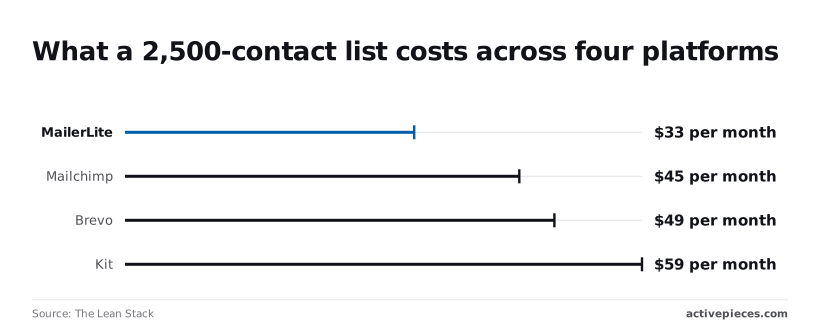
At 2,500 contacts MailerLite is the cheapest of the four. At 10,000 it only ties Brevo. Its lead depends on how big your list is and on what the platform counts.
MailerLite, Mailchimp and Kit meter contacts, the people stored on your list. Brevo's send-based plans meter emails sent.
On a contact-metered plan, mailing your list once a month or daily costs the same. On Brevo, a list that mails rarely can cost less, and a list that mails often costs more.
Price at 2,500 and 10,000 contacts
The table puts the two list sizes side by side with each platform's billing unit.
| Platform | Billing basis | 2,500 contacts | 10,000 contacts |
|---|---|---|---|
| MailerLite | Contacts | $33/month | $89/month |
| Brevo | Sends | $49/month | $89/month |
| Mailchimp | Contacts | $45/month | $110/month |
| Kit | Contacts | $59/month | $139/month |
At 2,500 contacts, The Lean Stack puts MailerLite at $33 a month. Mailchimp is at $45, Brevo at $49 and Kit at $59, making MailerLite the most affordable option. Kit's $26 premium over MailerLite is $312 a year for the same list size.
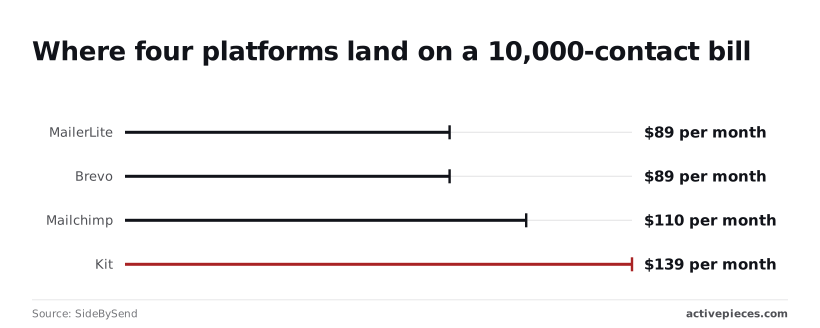
At 10,000 contacts, SideBySend shows MailerLite and Brevo both at $89. Mailchimp is at $110 and Kit at $139.
Against Brevo at that size MailerLite has no lead, so features and sending habits decide. Against Mailchimp it still saves $21 a month ($252 a year), and against Kit $50 a month ($600 a year).
Check these against your own list size and the features you need on the vendors' pricing pages, because plans and tiers change.
Which MailerLite alternative fits which sender
With a small list and any sending pattern, MailerLite has the lowest entry bill of the four, $33 at 2,500 contacts.
If your list is large and your sending volume low, Brevo ties MailerLite at $89 for 10,000 contacts and may pull ahead when you send little.
If you already use Mailchimp, staying costs $12 more a month at 2,500 contacts and $21 more at 10,000. Weigh that against the work of migrating.
At both sizes Kit costs the most, so pay for its tooling only if you'll use what the others lack.
Worth checking against a plan that does not meter every step: one credit covers a whole run on Activepieces.
Connect MailerLite to your other tools with Activepieces
You can use Activepieces, a workflow tool with an MIT-licensed core and a MailerLite integration, to move contacts from your other tools into MailerLite, but it's optional and doesn't change what MailerLite charges.
Your bill still follows subscriber count, so a workflow that adds more people to your list raises the price like any other signup.
What MailerLite already automates natively
Check what MailerLite does by itself before adding anything. It has built-in integrations with other services and an API for anything you build yourself.
That covers many setups: a signup form on your site, a connected store, or a developer who can call the API directly. Each of these adds no second tool to maintain and no second system to pay for.
If your contacts already arrive through one of them, stop here, because anything more is another moving part with no benefit.
Confirm which integrations your plan includes on MailerLite's own pricing and integrations pages, since availability can differ by plan and changes over time.
Where a separate workflow tool adds something
When your contacts originate in several systems and none of the native routes covers all of them, a workflow tool earns its place.
Activepieces lets you build one workflow that takes a record from any of those sources and sends it into a MailerLite subscriber list, so you maintain one connection rather than several separate ones.
The MailerLite integration is one of the 746 in the packages/pieces/community directory of the open-source monorepo on GitHub, where the count comes from the folders themselves and roughly 60% of them are community-contributed; the core is MIT-licensed.
On Activepieces a run is 1 credit however many steps it has, so the filtering steps described next don't add to the credit count.
Read the diagram as a consolidation point: four sources, one place where you decide what reaches your list and in what form.
That single point is also where you can apply your own rules, such as which records should become subscribers at all.
Since every contact you sync counts toward your list size, filtering before the write is the one lever that keeps the workflow from inflating your bill.
Whether the effort is worth it depends on how many sources you have. With one source, native tools are simpler.
With several, the Activepieces side is cheap to test: the free plan is $0 with unlimited flows and 1,000 credits a month, and Plus is $20 a month for 10,000 credits.

Both run on Activepieces Cloud or on your own servers, and its pricing page is the authority on current figures.
Check your own MailerLite bill on Monday
Three inputs to your bill can be read straight off your own account: active subscribers, monthly sends against the plan's cap, and the gated features you need.
Taken in the order below, the steps stop you paying for the wrong input, so the last step, reopening the pricing page, is the only point where a price enters.
- Count your active subscribers.
- Clean out the unengaged ones.
- Estimate monthly sends against the plan's cap.
- List the features you need.
- Pick the cheapest plan that includes them.
- Test the free plan against that list.
- Reopen MailerLite's pricing page and confirm the tier.
Count and clean your list
Count the subscribers MailerLite treats as active, not the rows in your spreadsheet, because the active count is the unit the tier is priced on. Unsubscribed and bounced contacts may sit in your export without being billed, so a raw total will overstate the cost.
Clean before you upgrade. Contacts who haven't opened or clicked in a long stretch still occupy tier space, so removing them can move you down a tier. Moving down lowers the bill with no change to who actually reads your emails.
Then multiply your sending frequency by your list size to estimate monthly volume. If that product sits comfortably under the cap, sends aren't what you pay for, and the subscriber count decides the tier.
Match features to the cheapest plan
Write down the features your workflow depends on, such as automations, a particular editor, or team seats, and mark each as essential or merely convenient. Then go through the plan comparison and find the lowest tier that includes every essential item.
Be strict about what is essential, because a feature behind a higher tier raises your bill whether or not your list grew.
Before committing, run the free plan against the same list.
If it covers your essentials at your current list size, you have your answer. If it falls short, you now know which missing feature is costing you, and you can judge whether it's worth the upgrade.
Finally, reopen the pricing page and check the tier, limits and feature list against your notes. Pricing pages change, and the page is the authority, not this article.
Frequently asked questions
Is MailerLite really free, and for how long?
Yes, MailerLite has a free plan, and the pricing page presents it without an expiry date, but it caps subscribers and monthly sends and withholds some gated features.
Because those caps are the metered unit, crossing the subscriber cap is what moves you onto a paid plan, so check the current caps before you import a list.
Does MailerLite charge for unsubscribed contacts?
Unsubscribed and bounced contacts don't count toward your active subscriber count, according to MailerLite's help center, and billing follows that count. That means a list you've cleaned costs less than the same list left untouched.
Confirm the counting rules in your account's billing page before relying on this, since contact statuses are what drive the bill.
Can I cancel or downgrade MailerLite at any time?
You can cancel or change a paid plan from your account settings, with no sales call required. What differs is timing.
A monthly plan ends at the next billing cycle, while an annual plan has been paid upfront, so a mid-year downgrade doesn't automatically return the unused months. Read the refund and renewal terms on the billing help page before choosing annual billing.
Does MailerLite offer a nonprofit or education discount?
If you're a registered nonprofit, MailerLite has offered a discount, and you request it through support rather than at checkout. The consequence is that the price on the pricing page isn't your price if you qualify, so ask before you budget.
Education eligibility is less clear, so check the current terms or ask support directly.
Which payment methods does MailerLite accept?
If your finance team pays by invoice or bank transfer, confirm that option exists before you commit, because a plan you can't pay for in your usual way adds work every renewal.
MailerLite takes major credit and debit cards, and has also supported PayPal. The billing help page lists what's currently accepted.
Related reading
References
Running the numbers
See what the same workload costs here.
Free forever plan, and every paid plan self-hosts at no extra cost.
See pricing Talk to sales