
Microsoft SQL Server Pricing: 2026 Cost by Edition

Nov 1, 202614 min read
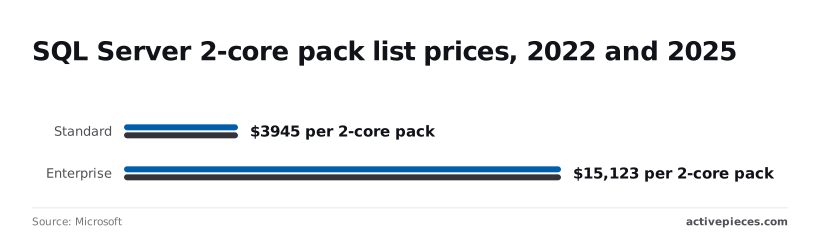
SQL Server Standard lists at $3,945 per 2-core pack and Enterprise at $15,123, both unchanged from 2022 to 2025, while Developer and Express cost nothing, which is why teams building workflows around it, whether with Activepieces or anything else, often prototype on the free editions first.
SQL Server Pricing by Edition
Microsoft SQL Server pricing is the licensing model that charges per processor core, sold in 2-core packs with a four-core minimum per server, or per server plus client access licences, with Software Assurance and virtualisation rules adjusting the total.
Those prices are only the start, because Microsoft charges by the processor core the software can use, not by the server.
The table shows how Microsoft licenses each edition, what it costs and where it stops working.
| Edition | Licensing model | List price (US) | What it includes | Hard limits |
|---|---|---|---|---|
| Enterprise | Per core, sold in 2-core packs | $15,123 per pack | Full feature set for large, always-on systems | Operating system maximum |
| Standard | Per core, or Server plus CAL | $3,945 per pack | Core database engine, basic availability | 32 cores, 128 GB buffer pool memory |
| Developer | Free | $0 | Enterprise features | Non-production use only |
| Express | Free | $0 | Small applications, embedded use | Lesser of 1 socket or 4 cores |
| Standard CAL | Per user or device | Priced separately from the server licence | The right for one user or device to connect to a Standard server | None of its own |
Edition limits: memory, database size, permitted use
At 10 GB per database, Express stops accepting data, so a growing application will hit that wall without warning. Developer carries every Enterprise feature but can't legally run a live system, which makes it a place to test, never to serve customers.

Who builds the check that keeps this straight?
You don't hire for this, you describe it: tell the built-in chat in Activepieces to read the edition and core count from each SQL Server instance, and it publishes a live flow, identical to one a builder would have assembled by hand.
Because it's an ordinary flow, it is governed like the rest: RBAC controls who can change it, audit logs record the changes, and every run leaves a trace anyone can open and read without knowing how workflows are built.

MoneyGram, Moneypenny, Alan and FundingSocieties run Activepieces in production.
Per-core versus Server plus CAL licensing
Under per-core licensing, you count the cores and any number of people can connect. Microsoft requires at least four core licenses per physical processor, which means two packs: $7,890 for Standard and $30,246 for Enterprise before you add anything else.
If you choose Server plus CAL, available for Standard only, you license the server once and then pay for each user or device, so it suits a small, known group and punishes a growing one.

If you are running this arithmetic for your own team, see what the same workload costs on Activepieces.
SQL Server licence audit exposes budget error
A reseller's true-up email arrived at 9:40 on a Monday. It showed that a budget built from a single edition's list price can miss the real three-year bill by tens of thousands of dollars. The company below, Harlow Freight, is an illustrative composite.
One 16-core server was the plan. Harlow's team found the Standard licence at $31,560, eight two-core packs at $3,945 each, and budgeted exactly that, leaving no buffer for Software Assurance, so Software Assurance was unaffordable.
Nobody priced Software Assurance, Microsoft's add-on for upgrades and rights such as failover.

SQL Server quote options and total cost
Even the cheapest option with coverage broke the budget. The reseller's email laid out four options.
Standard with three years of Software Assurance came to $55,230, which is $23,670 above the budget, so this option was unaffordable.
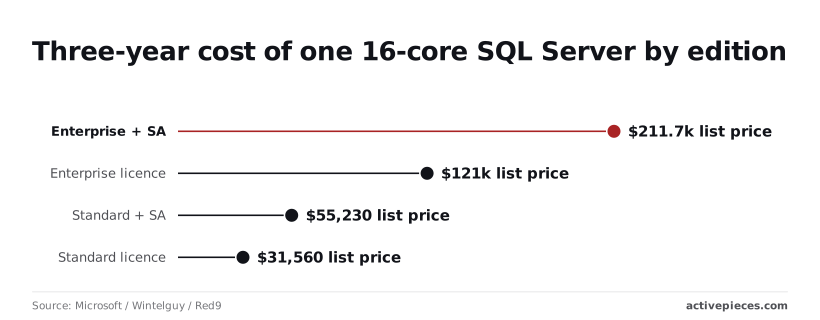
Enterprise, which the database administrator had assumed high availability required, cost $120,984 as a bare licence, and $211,728 with Software Assurance, making HA prohibitively expensive.
Standard lands at $31,560 and Enterprise at $120,984, nearly four times higher, which meant Enterprise was entirely out of reach.
Pick the wrong edition and it costs $89,424 on licences alone; add coverage to Enterprise and that is another $90,744, leaving them unable to afford errors in either choice.
Harlow's real exposure ranged from $23,670 over budget to $180,168 over, meaning none of the options fit their original allocation.
SQL Server cost in dollars and staff hours
Over the following week, the finance lead, the database administrator and the IT manager spent about 14 hours between them, an illustrative figure, reconciling the purchase order against the quote. They also checked which features the application used, and whether Standard would handle them.
That work should've come before the budget. Counting the 16 licensable cores took ten minutes. Finding out that nobody had priced coverage took a week and a re-approved budget.
By the end, the team had chosen Standard with Software Assurance, so the final bill was $55,230.
SQL Server licensing rules and hidden costs
Pricing the edition and skipping the rules around it is where the estimate failed: core minimums, client access licences, Software Assurance, virtual machine counts and edition caps.
Core minimums and virtual machines
A server with two cores is billed as four. Microsoft licenses SQL Server per core, with a minimum of four cores for each server or virtual machine, so you pay for capacity you can't use.
A server with two cores is billed as four.
If you run ten small virtual machines, you pay for 40 cores however little work they do. Microsoft counts virtual machines by virtual CPU, each with the same four-core floor.
SQL Server CALs and Software Assurance costs
You can instead license Standard edition per server plus a client access licence (CAL) for each user or device, at $230 each. Two hundred staff add $46,000 before anyone has run a query.
Then there is Software Assurance, the maintenance add-on that brings upgrade rights and, for some uses, virtualisation benefits. On Microsoft's pricing, a 16-core Enterprise deployment over three years has $120,984 in core licences.
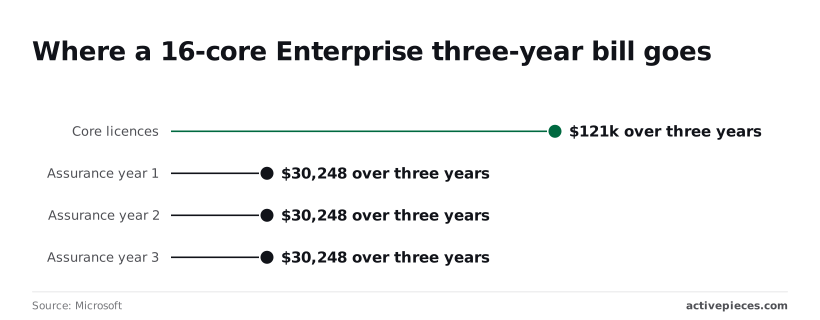
In year one Assurance adds $30,248, in year two $30,248 and in year three $30,248, so $90,744 in all.
About 43% of the $211,728 total is Assurance, so the add-on is a large share of the cost. Leave it out of the estimate and you're short by more than two-fifths.
Edition limits hit in production
At 32 cores for the database engine, Standard runs out of room. That means any database larger than 128 GB can't be fully cached in memory.
A server bigger than that is still billed for every core, but the extra capacity sits idle, and the fix is a jump to Enterprise.
When someone asks after launch for features that only Enterprise holds, finding out means a second purchase, a migration and another approval.
Worth checking against a plan that does not meter every step: one credit covers a whole run on Activepieces.
SQL Server versus database alternatives
Once cores, CALs and Assurance are counted, the alternatives differ less on licence fee than on who does the work and what leaving costs.
The table compares them on those terms. It carries no prices, because vendors change them and a stale figure is worse than none.
| Licence cost | Billing basis | Operational overhead | Lock-in or migration effort | |
|---|---|---|---|---|
| SQL Server Standard | Paid licence per core, plus CALs in the server-plus-CAL model | Bought up front, with optional yearly Assurance | Your team patches, backs up and monitors | Moderate: Microsoft-specific code and tools |
| Azure SQL | Bundled into the service rate | Metered by compute and storage | Microsoft patches and backs up | Easy to enter from SQL Server, harder to leave |
| PostgreSQL | None | Pay for servers or a managed host | Yours, or the host's | Real rewrite of SQL Server code |
| MySQL | None for the community edition | Pay for servers or a managed host | Yours, or the host's | Real rewrite of SQL Server code |
Azure SQL pricing model
Because Azure SQL folds the licence into a metered rate, you pay for capacity while it runs and the core-counting problem mostly disappears. The catch is that a database left running at full size costs the same whether anyone uses it or not.
Open-source SQL Server alternatives with no licence fee
You pay nothing to install PostgreSQL and MySQL, and that is the whole saving. Someone still has to run backups, apply security fixes and fix things at night, or you pay a managed host to do it.
The larger bill is migration: stored procedures, reports and application queries written for SQL Server must be rewritten and retested.
SQL Server wins when your applications, reporting tools and staff already speak it. In that case the rewrite bill for moving away can exceed years of licence fees.
It also wins when a well-counted core total is small, or when you already hold Assurance and its rights. Count first, then compare.
Track SQL Server Licence Inventory with Activepieces
You don't have to keep the count by hand. Activepieces can do it: a scheduled workflow asks each SQL Server instance what edition, version and core count it has, writes the answers to a sheet, and tells you when something is added or resized.
A run costs 1 credit however many steps it has, so a weekly check sits well inside the 1,000 credits a month on the free plan.
Doing nothing means the count goes stale the first time someone adds a server or more processors, and you find out at an audit.
No programming is required to assemble workflows in Activepieces, which connects steps on a canvas and ships 746 integrations in its MIT-licensed core. The screenshot shows the same pattern at work on a different job, a workflow called "Competitor Pricing Change Alert."
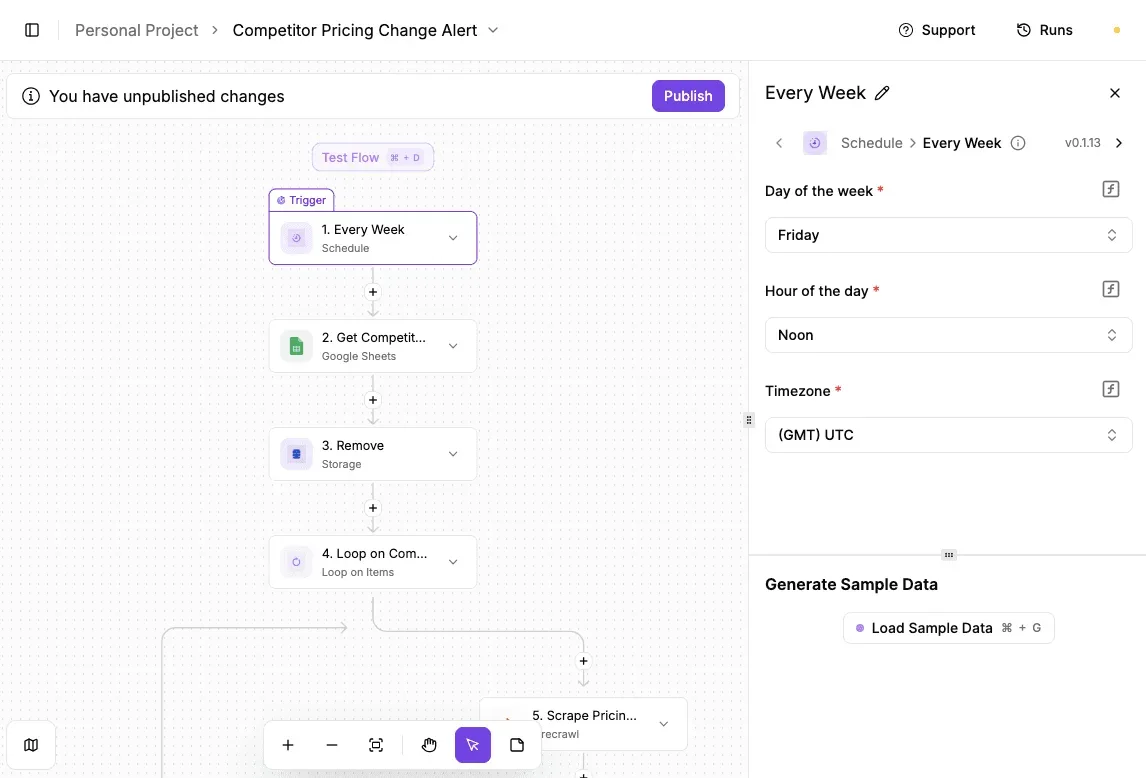
Every Friday at noon UTC, a weekly schedule starts the workflow. It then pulls a list from Google Sheets, loops through each row, and checks each one. Take from it the shape, not the subject: a timer, a list, a loop, a check.
Swap the competitor list for your list of SQL Server instances and you have the skeleton of an inventory. The weekly schedule matters because a count taken once a year is wrong for most of the year.
What the workflow checks
For each instance on your list, the workflow asks the server for its edition, its version and how many cores it sees. It writes one row per instance, with the date.
Next week the workflow compares the new answer with the old one. A new instance, a changed edition or a higher core count triggers a message to whoever owns licensing.
Because core counts drive the bill, a resize is the event you most want to catch early.
What it cannot do
It records what is running. It doesn't decide what you owe.
Microsoft's charges depend on your agreement, your core minimums, your Software Assurance and how your virtual machines are set up, and a sheet of numbers can't read your contract. It won't tell you which edition to buy or whether your setup is compliant.
For those answers, take the sheet to your licensing reseller or Microsoft adviser. What the workflow gives you is an accurate count to bring them, which is the count the rest of this article says you need first.
SQL Server licence rules to prevent drift
An accurate count only helps if it stays accurate, so we adopted three rules that keep the licence bill from drifting away from what we actually run.
Three SQL Server licence tracking rules
- No SQL Server instance is provisioned until its edition and licensable core count are written in the register. If it isn't recorded, it doesn't get built.
- Every virtual machine resize gets a licensing review first. Adding processors to a machine adds licence cost, and someone should approve that on purpose.
- Software Assurance is decided once a year, in writing. Whoever owns the budget either renews it or drops it, knowing what each choice gives up.
Monday: count cores, CALs and editions
- List every SQL Server instance and the host it runs on, including the forgotten test and reporting servers.
- Record the edition of each instance. The edition decides which licensing model applies, so this comes before any arithmetic.
- Record the virtual CPUs or physical cores each instance can use.
- Apply the four-core minimum. A small machine with fewer cores is still billed as if it had four, so your raw count will understate the cost.
- Check Microsoft's current price page and price your corrected count against it.
- Log your Software Assurance decision for each instance, with the reason beside it.
Frequently asked questions
Is SQL Server Express really free for commercial use?
Yes: Microsoft licenses Express at no charge, and its terms allow it in production and in products you sell. The catch is capacity.
Express carries hard limits on database size, memory and processor use, so a growing system can outgrow it and force a move to a paid edition.
Check the current limits in Microsoft's edition documentation before you build on it, because moving later means a migration, and that costs staff time.
Does SQL Server Developer edition cost anything?
No, Developer's free, and it has the same features as the top-tier Enterprise edition. The restriction is on use, not on price. Microsoft's terms limit it to development and testing, so a live system serving real customers or staff doesn't qualify.
If you put production data on a Developer install, you're unlicensed, and an audit would price that gap at full rates. Keep it for test machines and keep a written note of where each copy runs.
Can I run SQL Server Standard on a cloud VM and pay per hour?
Often yes, though the arrangement matters. Some cloud providers sell virtual machines with the SQL Server licence built into the hourly rate, so you pay as you use it and count nothing yourself.
The other route is bringing your own licences, which depends on your agreement and, usually, on Software Assurance.
For short or uneven workloads, hourly pricing suits. For a server that runs all year, compare the hourly total against licences you would own, using the core count from your log. Each provider's own terms decide the details, so read them before you commit.
How often does Microsoft change SQL Server prices?
Do not expect a schedule. Microsoft doesn't publish a fixed one, and prices tend to move when a new version ships rather than at regular intervals. Treat any list price you see in an article, this one included, as a snapshot.
Your actual price comes from your reseller or your agreement, and that quote is the one that counts.
Ask for it in writing, note how long it stays valid, and budget with some room, because a number that was right when you drafted the plan may not be right when you sign.
Related reading
References
Running the numbers
See what the same workload costs here.
Free forever plan, and every paid plan self-hosts at no extra cost.
See pricing Talk to sales