
No Code Web Builder: Best Options in 2026
A no code web builder choice becomes clear when you evaluate your specific needs for design control, database complexity, and long-term site scalability.

Covers scaling automation from pilot to enterprise: shared-services teams, onboarding that actually gets read, and governance that holds.
ContributorSeptember 28, 202614 min read
This article was researched and fact-checked by an advanced research system.
Framer for design-led sites, Webflow for professional scalability, and Bubble for complex web applications represent the best no-code web builders for 2026. Selecting a platform requires you to identify whether your primary bottleneck is visual fidelity, SEO-driven growth, or internal logic.
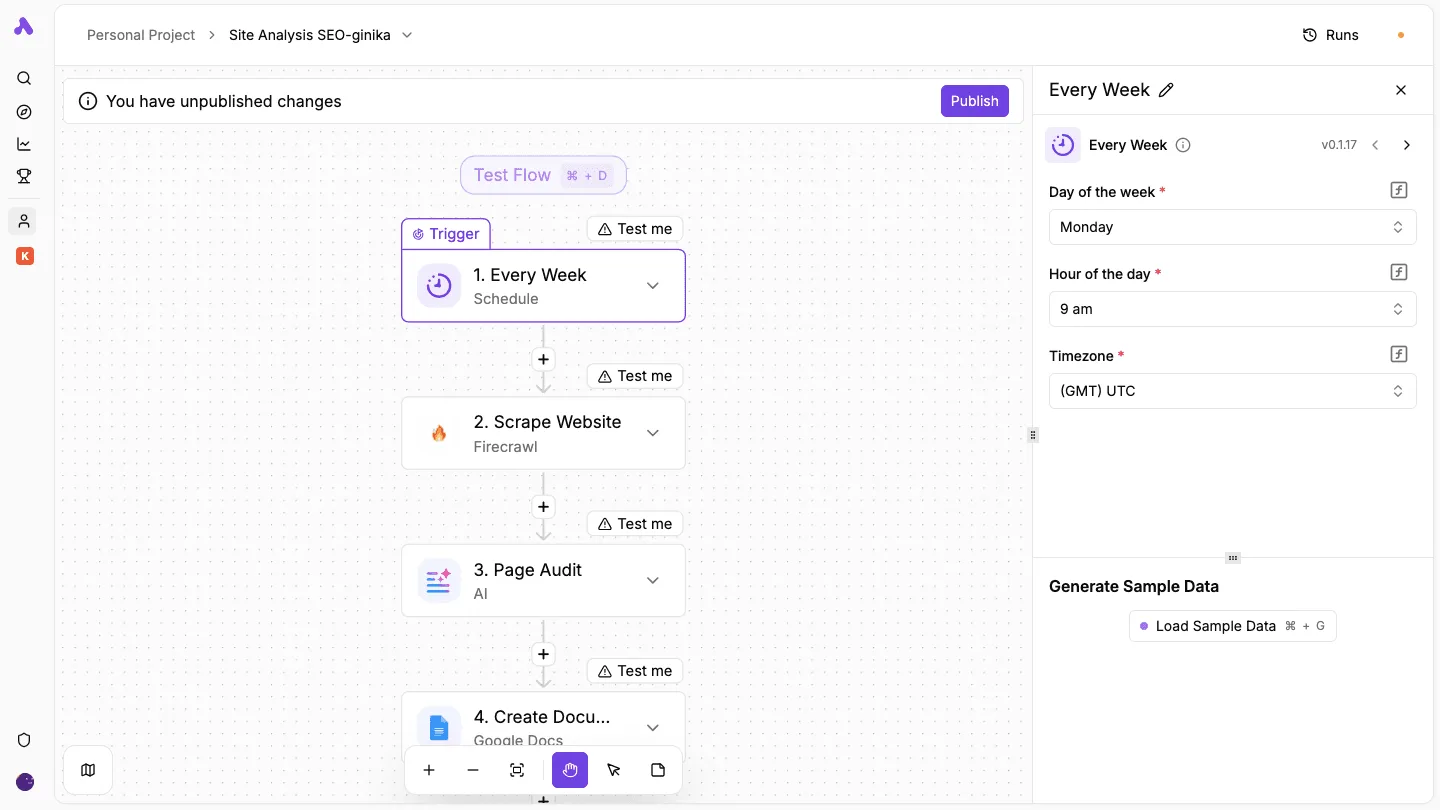
Engineering teams frequently reach their functional ceilings even while these tools offer robust native features. Activepieces removes these library constraints by allowing teams to generate missing connections with AI and deploy them privately to their own instance.
In the open-source monorepo, the 735 integrations are tracked directly from the code, with roughly 60% of the catalog community-contributed by external developers. This structure means that when a web project requires an unlisted endpoint, engineers can bypass the vendor's development queue entirely.
Top no-code web builders for 2026
Framer: The designer’s choice for high-fidelity sites
When the user interface is the main product differentiator, Framer is the primary choice for teams. By treating the canvas as a production-ready environment rather than a static mockup, it allows your designers to ship high-fidelity interactions without a handoff to front-end developers.
This eliminates the fidelity gap where subtle animations or spatial layouts are lost during the translation to code.
Webflow: The industry standard for scalable marketing sites
Marketing teams that require granular control over SEO and site performance at scale still look to Webflow as the standard. Its strength lies in its clean code export and sophisticated Content Management System (CMS).
This system allows your non-technical content editors to update site pages without risking the integrity of the underlying architecture. You'll choose this when organic search rankings and site speed are the KPIs that determine your project's success.
Bubble: The powerhouse for logic-heavy web applications
Building full-stack web applications that require complex database relationships and user authentication makes Bubble the leading platform. Unlike simple site builders, Bubble manages the entire application lifecycle, including server-side workflows and API integrations.
Startups building Minimum Viable Products (MVPs) that need to handle real-time data processing and conditional logic now treat this as the default.
Softr: the rapid interface for existing data
Softr occupies a unique niche by allowing teams to build functional web applications on top of data they already own. Rather than building a new database from scratch, it acts as a presentation layer for sources like Airtable or Google Sheets. This approach is ideal for teams that need to turn a spreadsheet into a secure, branded portal without the steep learning curve of a full-stack builder.
Softr is the most efficient solution for creating internal tools and client portals by using existing databases as the back-end. By mapping front-end components directly to spreadsheets or relational tables, it allows your operations teams to deploy functional interfaces in hours.

Internal initiatives where the goal is to provide a secure viewing layer for data rather than building a custom application from scratch rely on this speed.
Everything below works on Activepieces' free plan. Start without code or a credit card.
The rising cost of professional no-code hosting
Significant capital allocation is now required for enterprise-grade no-code adoption as platforms shift from experimental playgrounds to high-availability infrastructure. The growth of these ecosystems has moved beyond low-cost entry points.
It's turned the selection of a primary builder into a long-term financial commitment that impacts your departmental margins.
The following table illustrates the current monthly overhead for teams moving beyond basic personal plans into professional-tier environments.
| Platform | Entry-Level Professional Cost (USD) | Primary Value Driver |
|---|---|---|
| Bubble | $209 – $261 | Full-stack application logic and database scaling |
| Framer | $30 – $45 | High-fidelity design and animation performance |
| Webflow | $25 – $39 | Advanced content management and SEO control |
Between $209 and $261 is where the Bubble Growth plan now sits. That means specialized application development carries a significantly higher baseline burn rate than general web design.

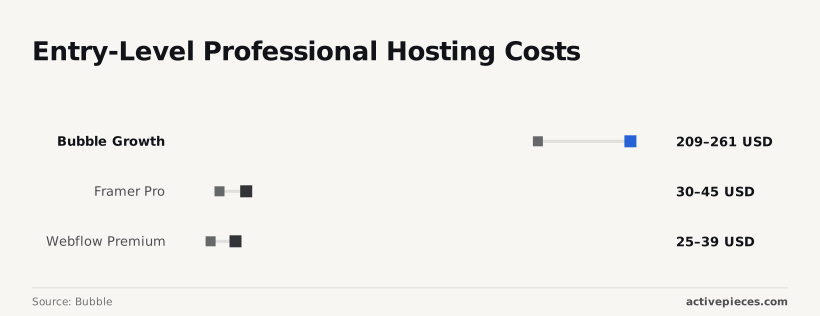
For marketing teams, Framer Pro scales from $30 to $45. It ensures that high-fidelity interactions don't degrade under increased traffic loads.
Similarly, Webflow Premium has stabilized between $25 and $39. It provides the necessary scale for content-heavy sites while increasing the fixed cost of maintaining a professional digital presence.
Engineering leads are deploying agentic workflows to automate high-volume tasks to offset these rising infrastructure costs. Your teams are currently utilizing Gemini 3.8 Flash for enterprise-grade coding assistance and GPT-6 Sol for complex agentic workflows to maximize output per seat.
By using these models, you can justify the platform premium through accelerated delivery cycles.
Scalability limits in content-heavy environments
Whether a platform can support a growing marketing engine or remains relegated to static portfolios is dictated by technical constraints on CMS items.
Tools8020 notes that while Framer Pro offers superior layout flexibility, its limit of 2,500 items means your content team will hit a hard ceiling within the first year of a daily-posting strategy.
Aggressive content archiving or a migration becomes necessary once the library exceeds this threshold. In contrast, Webflow Premium supports up to 20,000 items.

Defining the database record
A CMS item represents a single record in your site's database, functioning as a unique entry like one blog post, one product listing, or one team member profile. It is not a measure of word count or total pages, but rather the number of distinct data objects the system can index and display. Understanding this distinction is vital for planning long-term content growth.
It provides the headroom necessary for enterprise resource centers to scale without infrastructure interruptions.
Nobody noticed the ceiling until the Engineering team at Vanta reached it early. Their experience shows that "best" is often a function of database depth rather than visual polish.
When the UI builder is coupled with high-reasoning models like Gemini 3.8 Flash, which is currently the most intelligent Flash model for enterprise workflows, the bottleneck shifts from generating content to housing it.
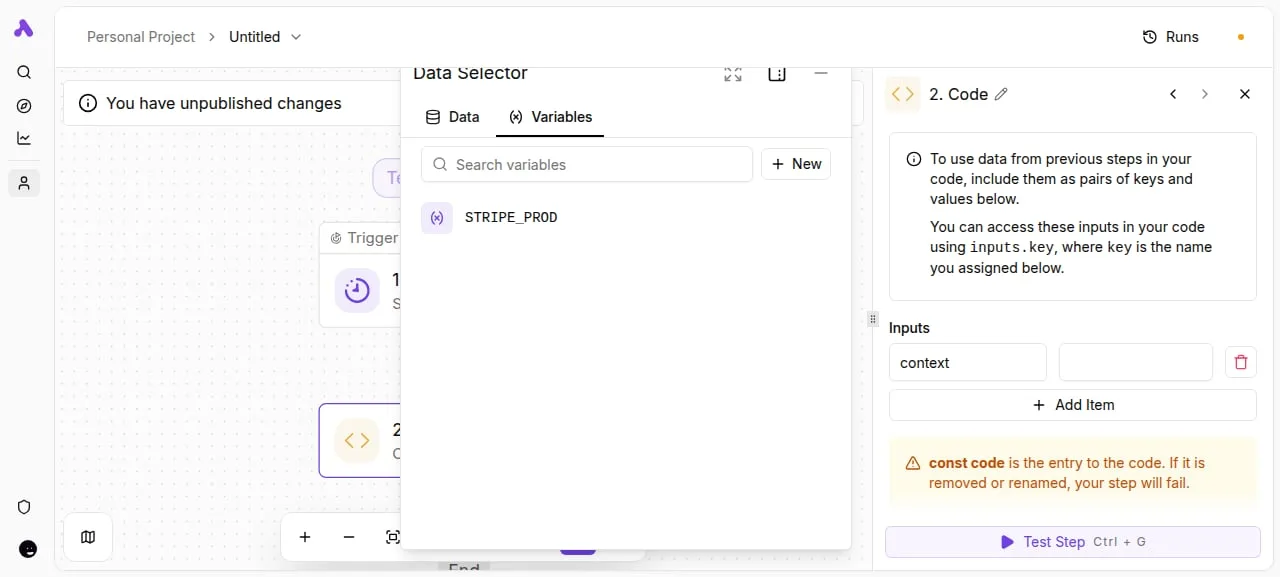
Granular control over how these data structures are populated is now provided by modern builders. The interface allows your developers to map production environment variables directly into custom code steps.
This keeps API keys for services like Stripe isolated from the design canvas. Once the data schema is defined, the workflow moves toward integrating external intelligence.
Adoption of these platforms follows a distinct curve:
- Design prototype: You'll prioritize high-fidelity visuals using Framer for rapid stakeholder sign-off.
- Content scaling: You'll migrate to Webflow to use the 8x larger CMS capacity, allowing for a much more expansive library of published articles and data entries, by which you avoid hitting storage limits that would otherwise halt your growth.
- Logic extension: You'll offload complex reasoning to Gemini 3.8 Flash to automate meta-tagging and categorization across thousands of entries.
Easier to see it running than to read about it: set it up free, no card.
Webflow for enterprise marketing websites
Ease of use versus code extensibility
A balance between ease of use and the ability to export or customize code is required for professional web building. That remains the primary tension in the no-code ecosystem.
While visual builders aim for total abstraction, enterprise-grade deployments necessitate a code-forward escape hatch to ensure that brand-specific interactions don't break under the weight of generic templates.
Utilizing Webflow as a staging environment for high-fidelity prototypes that are later audited for accessibility compliance allowed the Marketing Operations team at Vanta to pioneer this hybrid approach.
A pivot toward stability and developer-centric extensibility is indicated by the platform’s 2026 velocity. The following metrics track the release frequency of core features, including localized hosting and advanced CSS grid controls.
These dictate how quickly your design team can iterate without waiting for a sprint cycle from engineering.
Webflow Platform Velocity in 2026 shows a steady climb in feature parity with traditional IDEs, peaking at 39 updates in April and totaling 127 for the year. This sustained release cadence means that your marketing teams aren't tethered to legacy plugins for basic functional updates.
Teams are shifting toward agentic oversight for quality assurance to maintain this momentum.
Claude Opus 5.5 manages long-running agentic coding tasks to ensure that custom JavaScript embeds don't conflict with native site interactions.
GPT-6 Astra performs complex reasoning over site architecture to suggest SEO optimizations that align with evolving search engine algorithms.
Gemini 3.8 Flash provides the intelligence layer for real-time content audits, flagging non-compliant brand assets across global subdomains.
Risks and evolution of no-code platforms
Systemic "black box" risks are introduced by enterprise reliance on no-code builders. Critical business logic is obscured behind proprietary interfaces, creating a single point of failure for your entire digital supply chain.
While these platforms accelerate deployment for the growth marketing team at firms like Vanta, they often do so by trading long-term sovereignty for short-term velocity.
Critical business logic is obscured behind proprietary interfaces, creating a single point of failure for your entire digital supply chain.
The lack of transparency is where the primary tension lies. When a workflow fails, the abstraction layer that made it easy to build now prevents your engineering lead from auditing the underlying execution.
This lack of visibility manifests in four primary black box risks:
- Proprietary Data Schemas: Platforms store information in non-standard formats, making it difficult for your data teams to migrate records to an external warehouse without significant transformation overhead.
- Infrastructure Dependency: Applications run entirely on the vendor's cloud, meaning a regional outage at the provider results in immediate, unfixable downtime for your end customer.
- Limited Code Export: The visual logic and component styling remain trapped within the builder’s environment, preventing your developers from moving the project to a self-hosted stack if the vendor changes pricing or terms.
- Scaling Ceilings: Performance often degrades as record counts increase, forcing a complete rebuild in a traditional language once a certain user threshold is surpassed.
The 2026 landscape is shifting toward "open-core" no-code to counter these structural vulnerabilities. Modern builders now prioritize interoperability.
Webflow's open standards and API exports
Interoperability is achieved when builders adopt W3C standard exports and open APIs that allow data to flow freely between environments. Webflow now enables developers to export clean, semantic HTML and CSS that follows modern web standards, ensuring the site can be hosted independently if needed. This mechanism transforms the builder from a closed ecosystem into a portable design tool.
Open-core alternatives like Nocodb and Baserow provide a blueprint for this transparency by offering a self-hosted relational database that mirrors the functionality of Airtable.
Because these tools are built on top of standard SQL databases, your engineering team retains direct access to the raw data via standard query languages. This ensures that the "black box" is replaced by a transparent, auditable infrastructure that supports long-term scaling.
They allow your teams to use Claude Opus 5.5 to generate portable documentation of their visual logic. This keeps institutional knowledge accessible even if the platform subscription ends.
Building the Connected Web with Activepieces and No-Code Tools
Decoupling the orchestration layer
Activepieces runs a company's chosen AI models and automations across its own apps and data under central governance, preventing business logic from becoming trapped within the proprietary silos of individual site builders.
While platforms like Framer or Webflow excel at visual presentation, they often lack the native depth to manage complex multi-step workflows across a fragmented enterprise stack.
MoneyGram and FundingSocieties run Activepieces in production to govern these connections, ensuring that agents, integrations, and shared team data are managed under one set of controls.
By checking the documentation, you can see how RBAC, SSO, and git sync are available in one product, whether self-hosted or on cloud, to eliminate the blind spots created by stacking multiple point tools.
The website is merely one node in a larger ecosystem rather than the sole owner of the data, as this visual representation confirms.
Our engineering teams have moved beyond basic webhooks to leverage Claude Opus 5.5 within Activepieces for long-running agentic coding tasks, such as dynamically routing support tickets based on sentiment analysis before they ever reach a CRM.
The following components are essential for a scalable rollout to maintain this velocity.
Deploying on private infrastructure ensures data residency compliance for sensitive customer interactions. The ability to wrap internal APIs into reusable drag-and-drop blocks allows your non-technical staff to safely extend functionality.
Maintaining a history of automation logic enables rapid rollbacks if a third-party API update breaks a critical production sequence.
You can swap your "head," the UI builder, without losing the "brain" that powers the business by treating automation as a primary architectural layer.
Strategic roadmap for web projects
Shifting from a "feature-first" mindset to a "data-first" architecture is required to operationalize a new build and avoid mid-sprint migrations.
You can swap your "head," the UI builder, without losing the "brain" that powers the business by treating automation as a primary architectural layer.
The Engineering Team at Veltra reached the pilot phase by isolating logic from the interface. This meant a change in design requirements never forced a total database rebuild.
You can validate technical feasibility before committing to a specific vendor’s long-term licensing by following a compressed execution schedule.
The following sequence establishes a functional baseline for any stakeholder review:
- Audit core data dependencies: Identify every external source, such as a customer database or inventory manager, to determine which builder’s native connectors are sufficient.
- Build a single-page high-fidelity UI: Construct the primary user interface to test the visual constraints of the chosen platform.
- Connect one automation flow: Link a single business process to verify that data moves correctly between the front end and the back end.
- Test the end-to-end user path: Walk through the completed sprint to confirm that the technical stack supports the intended customer experience.
The value of a prototype lies in its connectivity rather than its aesthetic polish, as this framework demonstrates. Once the data flow is proven stable, the focus shifts toward scaling the intelligence of the application.
Your project leads then integrate advanced reasoning via Gemini 3.8 Flash to handle complex enterprise workflows or utilize GPT-6 Sol for agentic coding tasks that require high-reasoning capabilities.
Frequently asked questions about no-code web builders
Do I own the code if I build with a no-code tool?
A separation between the intellectual property of the content and the proprietary engine used to render it defines ownership in no-code environments.
While you own the visual assets, copy, and database schemas, the underlying source code is usually a proprietary runtime that can't be legally or technically operated outside the vendor’s infrastructure. This means you can't simply move the site to a standard web host.
Are no-code websites slower for SEO than custom sites?
Performance parity with custom builds is achievable provided the platform supports server-side rendering and granular metadata control.
Modern builders often produce clean HTML, but speed scores suffer when your non-technical users overload pages with unoptimized high-resolution images or redundant third-party tracking scripts. The platform itself is rarely the bottleneck for search rankings.
Because there is no industry-standard format for visual web components, migration between no-code platforms is a manual reconstruction process.
Images and text can be scraped or exported, requiring manual re-uploading. Structured data can move via CSV files, though relational links often break. Complex automations must be rebuilt from scratch using the new tool’s specific syntax.
When is a project too complex for no-code?
When it requires custom cryptographic protocols, high-frequency data processing, or deep integration with legacy hardware, a project exceeds no-code capabilities.
If your product roadmap requires a feature that lacks a native component or a documented API endpoint, the cost of "hacking" a workaround often exceeds the cost of a custom build. This is the point where traditional development becomes more economical.