
No-Code Application Development Platforms: Best Picks 2026
A no code application development platform allows technical teams to evaluate enterprise-grade infrastructure, database schemas, and logic engines.

Covers replacing WhatsApp and spreadsheet chaos with chat-based automation for resource-constrained small businesses, and why the fixes actually stick.
ContributorSeptember 28, 202613 min read
This article was researched and fact-checked by an advanced research system.
The best no-code platform in 2026 is a specialized environment. It has the specific infrastructure required to deploy enterprise-grade software without writing manual syntax. This includes logic engines, database schemas, or frontend builders.
Instead of general-purpose builders, teams now select tools based on the final output's complexity. The platform handles the underlying security and scaling protocols automatically.
The best no-code application development platforms for 2026
What defines a no-code application platform?
A true no-code platform replaces the traditional development stack with visual abstractions that maintain logic density. Modern platforms integrate frontier models like Claude Opus 5.5 to handle long-running agentic coding tasks.
A single non-technical user can now manage state and data relationships that previously required a dedicated engineering team. This fundamentally alters the internal economy of a department.
A single non-technical user can now manage state and data relationships that previously required a dedicated engineering team.
The cost of development
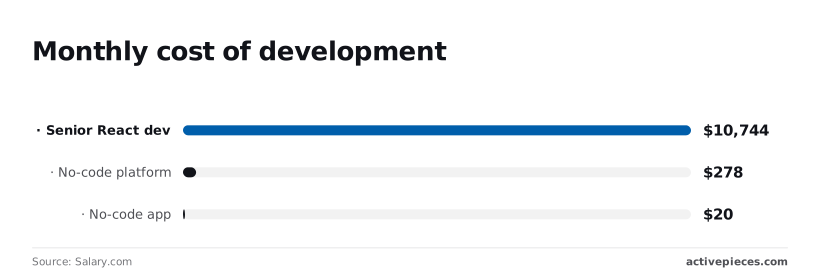
$10,744 per month is the average cost of a Senior React developer according to Salary.com. This figure forces small teams to choose between one high-value hire or a massive backlog of unfinished tools.

$278 per month is the average for a comprehensive no-code platform, which represents a predictable recurring expense for businesses scaling their digital infrastructure, allowing leadership to forecast long-term operational costs with greater precision.
It allows a manager to redirect over $10,000 of monthly budget toward market expansion rather than syntax debugging, effectively prioritizing growth initiatives over technical maintenance.
Even at the entry level, a basic no-code app builder costs just $20 per month, making the barrier to entry for software development remarkably low for individual creators who can now prototype ideas with minimal financial risk.
A prototype can live in the wild for less than the cost of a team lunch.
The following chart illustrates the dramatic gap between traditional headcount and platform-based delivery.
This financial delta is why the "build vs. buy" debate has shifted toward "configure vs. orchestrate."
The 2026 shortlist: which tool fits your team?
Choosing a platform depends on where your data lives and who needs to interact with it.
- Bubble is for complex web applications where you need control over the frontend and a built-in database to manage thousands of concurrent users, so developers can build robust platforms without needing to manage external server infrastructure.
- FlutterFlow is the standard for high-performance mobile apps. It has direct export to native iOS and Android code so your app feels responsive.
- Activepieces executes logic-heavy backends and agentic workflows across existing business systems, offering an MIT-licensed core that supports unlimited flows on every plan.
- Airtable is for internal operations tools that require a flexible, relational database interface.
- Retool is for internal admin panels that connect directly to existing SQL databases or protected enterprise APIs without exposing data to the public web.
Everything below works on Activepieces' free plan. Start without code or a credit card.
Comparing the top no-code platforms at a glance
By using a visual interface, a no-code application platform allows for building software without manual syntax writing. This setup ensures non-technical staff can deploy functional tools without waiting on a central IT backlog.
These environments abstract database and server logic into drag-and-drop components. A business analyst can modify a workflow in minutes rather than submitting a ticket for a two-week sprint.
The standard for these platforms has shifted from simple UI builders to full-stack engines that include integrated hosting, user authentication, and API connectivity. This integration ensures that the security layer is consistent across the entire application.
The standard for these platforms has shifted from simple UI builders to full-stack engines that include integrated hosting, user authentication, and API connectivity.
Specialized categories now divide the current market. The "best" tool is defined by the specific architectural constraints of your project.
| Platform | Primary Use Case |
|---|---|
| Bubble | complex web apps |
| Glide | mobile-first internal tools |
| Softr | client portals |
| Adalo | native mobile UX |
These selections represent stable foundations for enterprise-grade deployment. While a platform like Softr allows you to turn a Google Sheet into a functioning portal in an afternoon, it limits you to the data structures supported by that spreadsheet.

Teams with deep relational data often move toward Bubble. Conversely, Glide enforces a strict mobile-first layout.
Activepieces is an AI automation platform that runs agents and structured workflows across a company's apps and data.
While other platforms focus on the visual UI, Activepieces connects workflows directly to 735 integrations so that the 'application' can handle complex automated logic steps and cross-platform data syncs.
Activepieces consolidates agents, integrations, and shared team data into a single product governed by one control plane.
The platform provides RBAC, SSO, SCIM, audit logs, and git sync in one environment, whether self-hosted or on cloud, to eliminate the blind spots created by stitching together multiple point tools.
MoneyGram and FundingSocieties run Activepieces in production to maintain this level of central oversight across their automation environments.
This prevents design teams from breaking the user interface on smaller screens. Your choice here dictates the long-term maintenance burden your team will carry as the application grows.
Zapier for rapid connectivity and ecosystem breadth
When the primary goal is to connect thousands of disparate web services with minimal setup time, Zapier remains the industry benchmark for accessibility. It functions as a universal translator for the modern SaaS stack.
Zapier's integration library and app connections
Zapier supports over 7,000 integrations, which is significantly more than any other platform on this list, ensuring that users can connect virtually any combination of existing software tools in their tech stack.
This makes it the default choice for teams using niche software or specialized vertical tools that haven't yet built native connectors for other platforms.
The interface is designed for immediate productivity. A user can set up a "Zap" to move data between two apps in under sixty seconds, making it ideal for marketing teams and sales operations that need to bridge gaps between their lead sources and CRM systems.
User friendly automation for non technical teams
The platform excels at making complex logic approachable through its natural language interface and visual builder. It allows staff members with zero technical background to create multi-step automations that include conditional logic and data formatting.
While it lacks the deep infrastructure control of a full-stack builder, its strength lies in its ubiquity. Modern software products frequently launch with a Zapier integration as a standard feature, providing connectivity for the automation layer.

Zapier task-based pricing at scale
The pricing model is based on tasks, which can become a significant expense for high-volume data processing. For simple triggers and low-frequency updates, the cost is negligible, but enterprise teams must monitor their usage to avoid unexpected overages.
For organizations that prioritize speed of deployment and a "set it and forget it" user experience, Zapier provides a reliable bridge between the tools they already use every day.
Easier to see it running than to read about it: set it up free, no card.
Bubble for complex consumer web applications
When the user interface must be indistinguishable from a custom-coded product, Bubble serves as the engine for building full-stack web applications. It has a drag-and-drop canvas that maps directly to CSS properties.
Bubble's visual editor and design control
You have pixel-perfect control over every element in Bubble. Your application meets specific brand guidelines rather than relying on rigid, pre-built components.
This granular control is supported by an extensive marketplace of 5,200 community plugins and 1,400 templates.
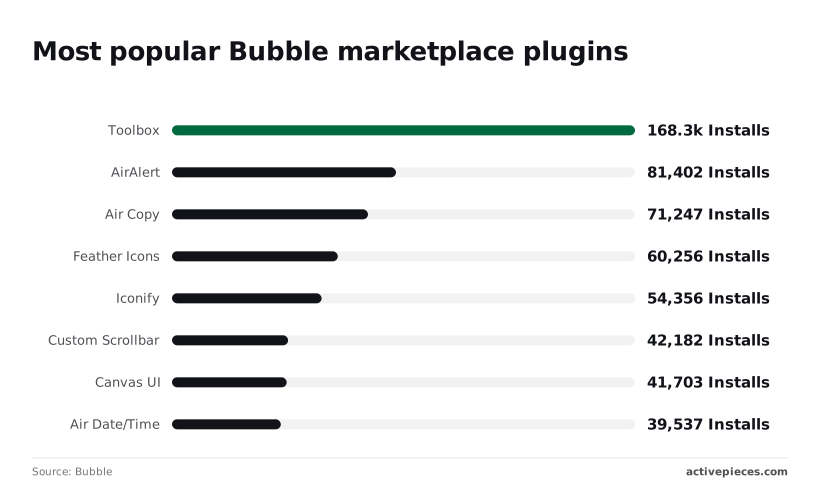
The ecosystem has specialized tools for common UX polish. Toolbox has 168,282 installs, which allows users to run custom code snippets. AirAlert has 81,402 installs, providing standardized notification UI.
Air Copy has 71,247 installs and provides "click to copy" functionality. Feather Icons (60,256 installs) and Iconify (54,356 installs) provide massive vector libraries. Custom Scrollbar has 42,182 installs.
Powerful logic and database management
The platform includes a built-in relational database and a server-side workflow engine that handles complex user permissions. When a user triggers an event, Bubble can simultaneously update the database, trigger an API call, and change the UI state.
This unified environment prevents the "sync lag" often found when connecting a separate frontend builder to a third-party database.
If your team is integrating AI, the API Connector allows these workflows to send data to Gemini 3.8 Flash or GPT-6 Astra, returning the output directly into the user's view.
Bubble pricing and workload unit limits
Workload Units (WU) are the basis for Bubble’s pricing model. The cost of your application scales directly with the frequency and complexity of your database operations.
On their Starter tier, you're limited to a single development version. Your team can't test multiple major features in parallel without upgrading.
The learning curve for performance optimization is steep. A poorly structured database will result in slow page loads as your record count climbs.
Glide for data-driven mobile and internal tools
By generating interfaces directly from your data structure, Glide offers the fastest path to turn an existing spreadsheet into a functional mobile-first application.
Building apps from Google Sheets and Airtable
You connect Glide directly to Google Sheets or Airtable to establish a real-time bi-directional sync. When a field worker modifies a status in the app, that change updates the underlying sheet automatically.
Conversely, any formulas or rows added to the source sheet propagate back to the user interface. Your application logic can remain inside the spreadsheet environment your team already understands.
Glide's responsive layouts across devices
The platform uses a system of pre-built layout components that automatically adjust their presentation based on screen size. A data list displays as a bottom-navigated stack on a smartphone, then expands into a multi-column dashboard on a desktop.
Because you can't adjust individual pixel coordinates, your design choices are constrained. This prevents non-technical staff from breaking the interface layout during updates.
Glide's updates-based pricing explained
Volume of data sync operations is how Glide determines its charges. Every row edit or form submission counts against your monthly operational limit.
If you build a high-frequency application where hundreds of users constantly update inventory, you'll exhaust your tier allotment quickly. To manage these costs, developers must use the internal Glide Tables feature for high-volume data.

Softr for spreadsheet-backed client portals
Softr is the interface layer for teams that store operational data in spreadsheets but require a secure, branded environment for external stakeholders. Softr generates functional layouts by mapping existing data sources to pre-configured components.
Building with pre-made functional blocks
By utilizing a block-based assembly system, Softr ensures each UI element is already wired for specific data interactions. These elements include searchable lists, profile cards, or file upload forms.
When a user selects a "List with Filter" block, they define the visual container and the logic for data retrieval in a single step.
The following sequence illustrates the transition from a flat data source to a live interface:
- Connect Google Sheet or Airtable;
- Map data columns to UI components (Collection, Image, Text);
- Publish to web or mobile via QR code.
Softr user groups and permissions
User groups define security in Softr, dictating exactly which rows and fields a logged-in member can view or edit. This prevents the "over-sharing" risk inherent in shared spreadsheets.
For example, a "Client" user group might be restricted to seeing only the rows where the "Company Name" matches their own login profile. This logic is handled on the server side, so sensitive data is never sent to the browser of unauthorized users.
Softr pricing tiers for business teams
The platform scales its functionality based on the volume of users and the depth of integration required.
Free includes basic blocks for personal use. Basic allows for custom domains. Professional introduces gated content for specific users. Business has advanced features like organizational charts. Enterprise is for organizations requiring formal procurement and compliance oversight.
Activepieces for automation-led internal applications
Activepieces orchestrates complex data flows across fragmented software stacks without requiring custom backend code, a capability that companies like Alan use to run automation across their departments.
Building logic-heavy apps with 735+ connectors
By linking disparate tools through a library of pre-built connectors, the platform functions as a central nervous system. If a specific connection is missing, users can generate the integration with AI and add it to their own instance.
Instead of manually exporting CSVs from a CRM like Salesforce to update Airtable, you build a flow that triggers automatically upon a status change.
To handle sophisticated decision-making, the platform integrates with Gemini 3.8 Flash for enterprise-grade reasoning within a workflow. This allows the system to categorize support tickets or summarize legal documents before they ever reach a human inbox.
Self-hosting for data privacy and security
Because enterprises often require complete control over their execution environment, Activepieces is available for self-hosting via Docker. The core is MIT-licensed, providing a transparent foundation for teams that need to audit the underlying code.
This deployment method ensures that sensitive customer data never leaves your own infrastructure, which is a requirement for industries like healthcare or finance.
Open-source flexibility vs. cloud convenience
A startup can begin on the cloud to move fast thanks to this dual-track model.
An established firm can migrate the same workflows to a private cloud later as their security requirements evolve. The Cloud version provides an immediate start with managed updates.
The Self-hosted version allows for deep customization of the platform’s behavior, meaning you can build proprietary integrations for internal legacy databases.
Activepieces is the better fit for organizations requiring a unified governance layer that encompasses RBAC, SSO, SCIM, and git sync within a single product.
While other platforms offer fragmented solutions, this comprehensive approach to security and environment management ensures that complex, logic-heavy applications remain compliant whether self-hosted or in the cloud.
By consolidating these enterprise-grade controls into one platform, it provides the necessary infrastructure for teams to scale automation-led internal applications without compromising on oversight.
Common questions about no-code platforms
What is the best no-code app builder for startups?
Bubble is generally the best for startups building a new product from scratch because it offers the most flexibility to pivot the user experience without switching platforms.
Can no-code apps scale to millions of users?
Yes, but it requires careful architecture. Platforms like Bubble and FlutterFlow can handle high traffic, but you must optimize how your app queries data to keep costs manageable.
Do I own the code for my no-code app?
With FlutterFlow, you can export the Flutter code and host it anywhere. With Bubble and Glide, you generally own the data, but the application logic remains on their respective platforms.
Is no-code secure enough for enterprise use?
Yes. Platforms like Activepieces and Retool offer self-hosting and SSO, ensuring that data stays within your company's security perimeter and meets compliance standards.