
Top 6 No-Code Automation Tools for Digital Workflow Success
Top 6 No-Code Automation Tools for Digital Workflow Success in 2026: 1. Activepieces 2. Kissflow 3. Jira 4. Whalesync 5. Pipefy 6. Bubble.

September 22, 202526 min read @ashrafsam
Simple tasks become time-consuming once you repeat them again and again across multiple apps, and the day slips away. Many people hope to speed up end-to-end processes, but stop when the software looks too technical.
Perhaps you feel the same. No-code automation tools, though, help you automate tasks, even when you don't have programming skills. These digital workflow automation platforms guide you with clear menus and blocks, so you don't deal with scripts or setup issues.
This guide will walk through the most trusted no-code workflow automation tools and the costs to expect, including starter, team, enterprise, and professional plans, as well as free plans on some platforms.
What Is No-Code Automation?
No-code automation refers to tools that let you design flows with a visual builder rather than code. Business users and citizen developers can automate tasks across apps without an IT team.
These tools also include features like logs, roles, and even version control to keep work organized.
A flow starts with a trigger, like a new row in Google Sheets or a submitted form. It then runs actions such as sending an email, creating a record, or updating a chat. You can further use conditional logic and rules to check values or branch paths.
Core parts include:
- Triggers
- Actions
- Integrations
- Logic
Unlike low-code platforms, which need more technical knowledge, no-code platforms turn repetitive tasks into smooth workflow automation and expand business process automation across the company.
Everything below works on Activepieces' free plan. Start without code or a credit card.
No-Code Automation vs Low-Code Automation Tools
Both options fall under modern development tools, and each one depends on the use of visual development tools. The difference shows up once you look at who each option serves and how much control the user needs.
A no-code automation setup offers an easy-to-use interface that guides you through each step. Many users rely on these tools when they want to fix slow parts of the day with clear menus and blocks. A simple flow lets you create tasks, move data, send updates, or handle checks.
Low-code tools broaden the reach of visual builders. You drag blocks into place and add custom code for deeper rules or links to older systems. These tools help engineers build long flows across many apps while keeping data safe and clean.
Why No-Code Automation Tools Matter for Digital Workflows
A no-code workflow automation software lets people who don't write test scripts in coding languages set up their own solutions. That means someone in sales, HR, or project management fixes a workflow problem without assistance from the IT team.
Most no-code tools come with drag-and-drop steps, templates, and marketing integrations. You can automate workflows like logging expenses, routing approvals, or updating records in Google Sheets.
Some tools even include machine learning that can suggest next steps or catch patterns humans might miss.
Quality improves because the software runs every flow the same way. Built-in checks and audit trails keep records consistent. A good example is responding to feedback in a customer relationship management system, where every response follows the same rules.
Automation means cost savings on development and fewer mistakes to clean up later. It also helps teams save time by cutting repetitive work, from payroll runs to updates in mobile apps.
Top 6 No-Code Automation Software Solutions in 2026
From small businesses to large firms, these platforms reduce reliance on an IT team, bring real cost savings, improve project management, and save time:
1. Activepieces

Activepieces is an open-source, enterprise-ready platform designed for anyone to build without extensive coding knowledge or technical skill.
Think of it as the friendliest centralized platform where your team can connect two tools for a small business or roll out automation across multiple apps for an enterprise.
The drag-and-drop interface makes it simple to design flows, and the open ecosystem means you'll find hundreds of pre-built pieces ready to go. If you want something custom, developers can write their own in TypeScript.
Unlike other no-code automation platforms' unpredictable billing, Activepieces keeps things flat-rate and transparent. Need more? There's a free community, or you can move into an enterprise plan with custom pricing.
Key Features
- Drag-and-drop interface - Build flows visually without code.
- AI-ready steps - Add providers like OpenAI or Gemini to your automations.
- Community-driven growth - 467 current integrations and rising daily.
- Custom pieces in TypeScript - Developers can extend the platform.
- Enterprise-ready controls - Branding, permissions, and security included.
- Human-in-loop - Insert approval steps or time delays when needed.
- Predictable billing - Flat-rate pricing avoids hidden task costs.
- Self-hosted edition - Run Activepieces on your own servers.
Integrations
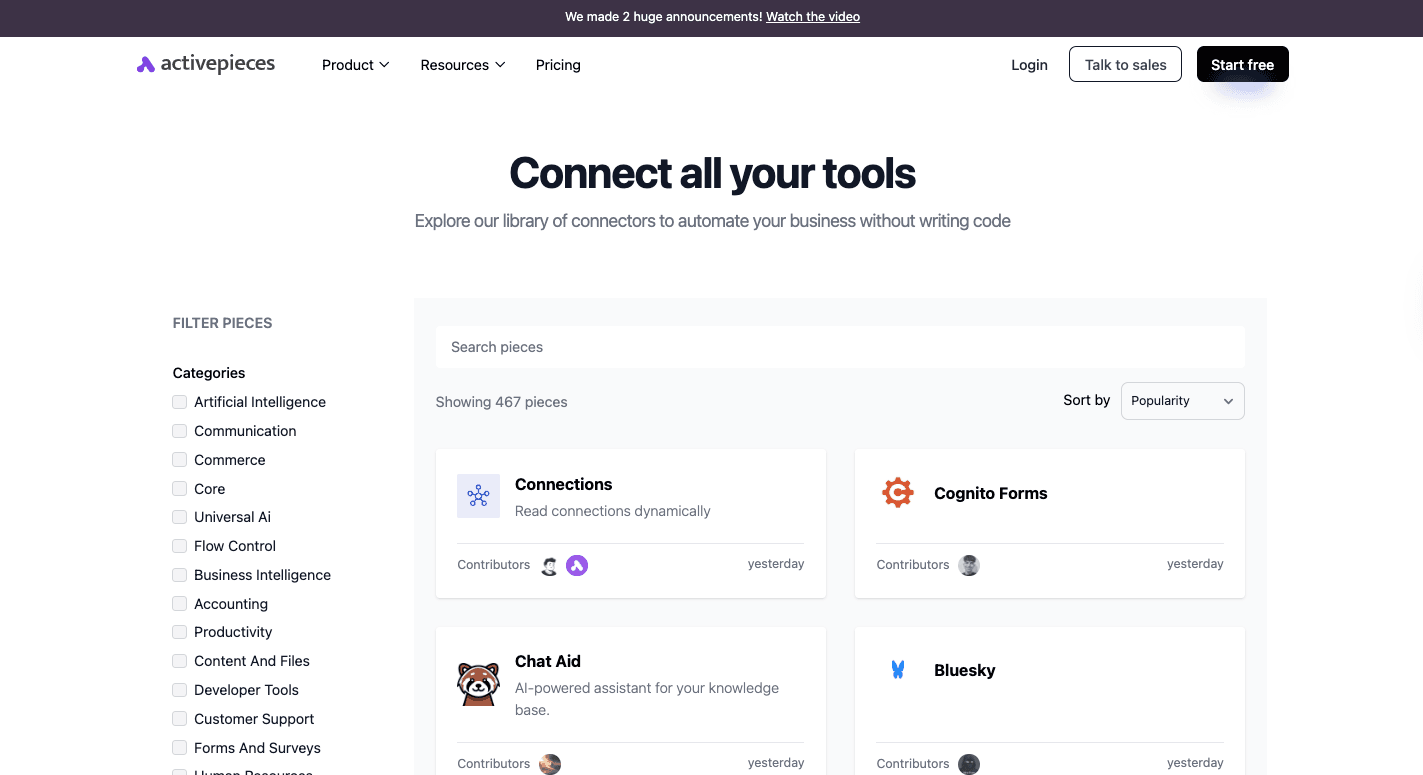
Activepieces offers data integrations, from web applications to reporting tools, that keep expanding. Currently, it connects to 467 pre-built integrations, from Google Sheets, Excel, and Slack to WordPress, ClickUp, and Zoho CRM.
On the AI side, it works with OpenAI, Gemini, and ElevenLabs. Invoice even part of the lineup. Business users can link Activepieces to Power BI or Dynamics CRM, and more services are added all the time.
The open-source model means developers can contribute new connectors, so the integration library keeps extending every week.
Use Cases
Activepieces fits into everyday business needs without requiring coding skills:
- Sync new leads from forms into CRM tools.
- Automate onboarding for each new employee, from documents to accounts.
- Process invoices and expenses automatically.
- Assign tickets and notify managers in Slack.
- Push lead updates to pipelines and follow up with AI-generated emails.
- Build internal flows that automate processes across systems.
- Save time by setting up simple flows without waiting for developers.
- Empower staff to create their own workflows and do just that without IT delays.
Pricing
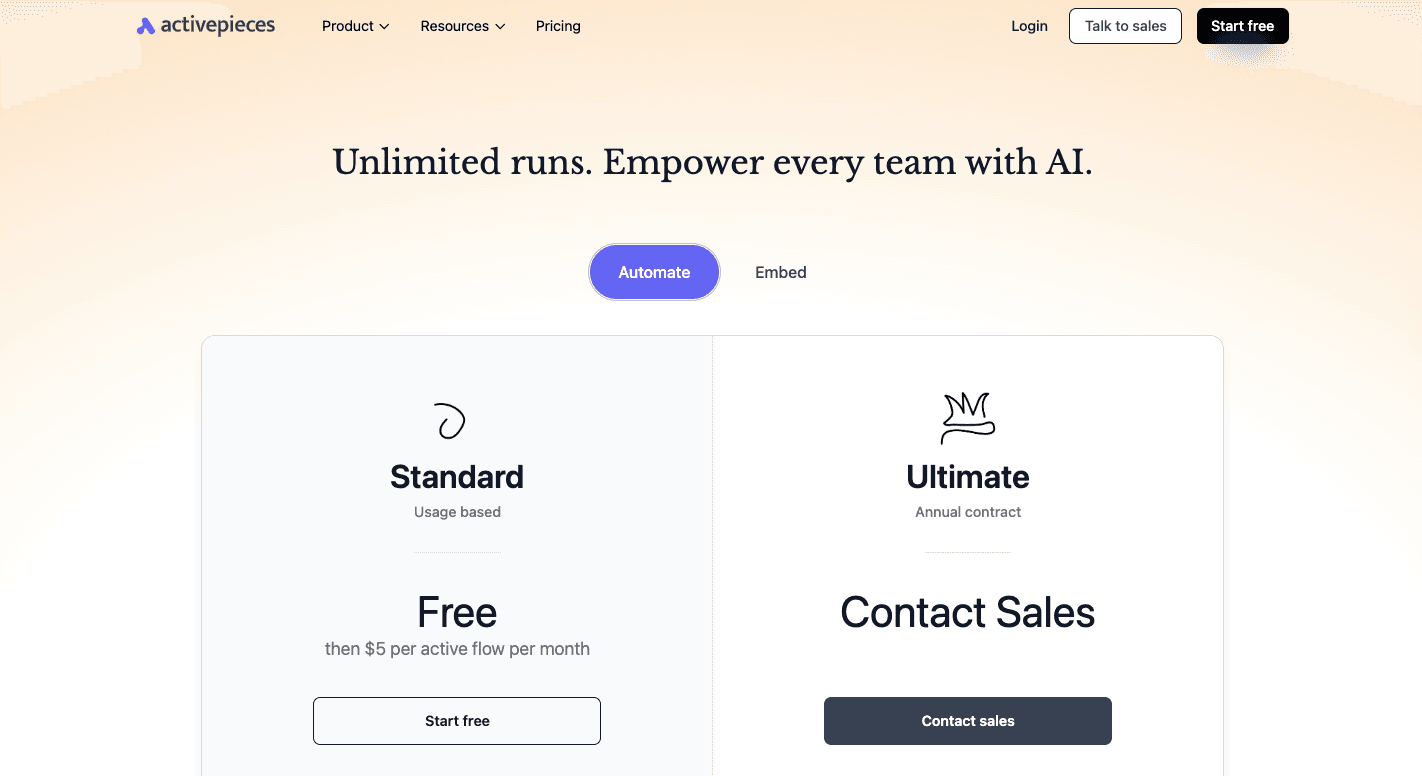
Activepieces uses a usage-based model. You can start on the Standard plan for free with 10 active flows, unlimited runs, AI agents, unlimited MCP servers, unlimited tables, and email support. Once you pass the free limit, the plan shifts to $5 per active flow per month.
You can contact sales for the Ultimate plan that runs on an annual contract and fits larger teams that need tighter security and governance. It adds piece access controls, global connections, custom RBAC, SSO, audit logs, centralized AI billing, management APIs, Git Sync, and release management.
Activepieces also offers the Embed plan starting at $30,000 per year. And unlike other tools, it has an open-source edition that's free and self-hosted.
2. Kissflow
Kissflow is a no-code platform that allows business users to set up flows without writing code. Many people call these users "citizen developers" since they create solutions on their own without leaning on an IT team.
You don't need to have any technical background or previous coding knowledge to get value from it. Staff in HR, finance, and operations often pick it up to handle common requests faster.
Besides that, it combines no-code and low-code options. You can click through simple steps for most flows, and developers extend them with extra logic when needed.
It supports project management, so you can move from structured processes like purchase orders to unstructured work such as customer requests.
Features like audit trails record every step, and mobile apps give access to tasks outside the office. The design, however, focuses on workflow and case management, opting not to include robotic process automation (RPA).
Key Features
- Visual workflow builder - Drag steps to map out approvals, onboarding, or purchase requests.
- Form builder - Create custom forms with fields and rules to collect data.
- Decision tables - Define conditions and responses for complex workflows.
- Kanban boards - Use a visual layout to improve task management across teams.
- Case management - Keep unstructured work like service tickets in one space.
- Pre-built templates - Start with ready-made flows in HR, finance, and procurement to save time.
- App builder - Design apps that combine data and rules without coding.
- System integrations - Link to CRMs, ERPs, and other services for smoother data flow.
- Analytics and reports - Use dashboards and audit trails for oversight.
- Mobile access - Manage requests and approvals through mobile apps.
Pros
- The large set of templates speeds up setup since you can test ideas and launch new steps without delay.
- It helps non-coders build flows on their own because the layout stays clear and easy to follow.
- The tool supports both structured and unstructured work, which lets you manage tasks, cases, and projects in one place.
Cons
- Kissflow struggles with large or complex flows since it can't always handle heavy rules or deeper controls.
- Costs rise as more people join your account, which makes it costly when you have a bigger group.
- Reporting stays basic, so teams that want deeper insights often feel limited by the built-in charts.
Pricing
Kissflow offers a Basic plan that starts at $2,500 per month and includes unlimited workflows, limited apps, and standard reporting.
The Enterprise plan uses custom pricing and adds advanced analytics, unlimited apps, AI support, and governance controls.
3. Jira
Jira includes a built-in engine that functions as a no-code solution. You can design rules without writing a single line of code, which helps users who don't have previous coding knowledge.
Many teams set up flows to automate repetitive tasks like assigning tickets, sending alerts, or changing statuses. It supports workflow management because everything follows triggers, conditions, and actions.
You can create simple automations, such as closing issues when sub-tasks are complete, or build more advanced rules that touch multiple projects. The system connects well with Atlassian products and outside apps, too.
Although there's a learning curve with complex logic, common cases stay easy. Jira doesn't handle bots or macros as well, since it chose not to include robotic process automation.
Key Features
- Triggers - Start a rule with events like a new issue, a field change, or a schedule.
- Conditions - Narrow the scope so actions only run when rules match.
- Actions - Carry out steps such as editing fields, adding comments, or notifying a channel.
- Branches - Apply actions to related work, like sub-tasks or linked issues.
- Audit trails - Show results of each run and help spot errors.
- Templates - Provide common flows for IT, service, and software teams.
- Integrations - Connect with Slack, Teams, GitHub, and other systems.
- Cross-project rules - Run automations across projects at higher tiers.
Pros
- Jira helps you set rules with simple blocks, which makes it easier to automate tasks inside active projects.
- You save time because Jira takes over manual steps and keeps each update consistent across all work.
- It links well with Atlassian products and outside apps, which gives you a seamless integration experience.
Cons
- Lower plans limit how many rules you can run each month, so heavy use can slow down automation during busy periods.
- New users may find the menus and options hard to follow, especially when they try to handle more advanced steps or robotic process automation ideas.
- Large sets of data can slow the system, and complex chains of rules add more pressure on performance.
Pricing
Jira has four plans. The free plan supports up to ten users with 100 rule runs per month and basic project views.
Meanwhile, the Standard costs $7.91 per user each month, raising automation runs to 1,700 and adding roles, permissions, and storage. Premium is $14.54 per user each month, with 1,000 automation runs per user, unlimited storage, approval flows, and 24/7 support.
The Enterprise plan with custom pricing includes global rules, governance, and extended support for organizations.
4. Whalesync

Whalesync focuses on one thing: keeping data in sync across apps. Unlike broader tools, it automates processes around data consistency.
You can connect two services and have them update each other instantly. That makes it useful for new employee onboarding, website updates, or any setup where information lives in more than one place.
Teams often use it to keep CRMs, spreadsheets, and content systems aligned. You can build your own workflows for syncing records and let Whalesync manage the hard parts like API limits, conflicts, and background jobs.
It also fits businesses that need task management support across apps, since changes in one system appear instantly in another. Whalesync doesn't cover general automation like Zapier or Make, but it makes up for that with advanced capabilities around data handling.
Key Features
- Two-way sync - Keep records consistent in both apps at all times.
- Real-time updates - Push changes across systems within seconds.
- Visual setup - Connect apps and map fields with a few clicks.
- Historical sync - Align existing records during setup to prevent duplicates.
- Conflict handling - Resolve clashes automatically if both apps change the same field.
- API management - Handle API rate limits and requests behind the scenes.
- Error monitoring - Notify users if a sync issue comes up.
- Advanced filters - Control which data flows between systems.
- Auto-create fields - Build missing tables or fields in the target app.
Pros
- Whalesync keeps data aligned because it updates both apps at the same time, which gives you a dependable two-way sync.
- It supports advanced features like conflict handling and complex field types.
- It handles rich fields and files with steady results, so you can trust the sync even when your data includes images or attachments.
Cons
- It has fewer integrations than general automation platforms.
- Teams that need very custom rules may outgrow Whalesync because it focuses more on simple sync builds.
- Sync filters can feel hard to update when needs change, since some edits require making a fresh setup from scratch.
Pricing
Whalesync offers multiple plans. A 14-day free trial lets you test syncing before paying. The Personal plan starts at $5 per month with 250 records and covers connectors like Airtable and Notion.
Then the Starter plan begins at $20 per month with connectors such as Webflow, while the Plus plan starts at $40 per month and includes integrations like HubSpot and chat support. The Pro plan starts at $200 per month and offers all connectors available.
5. Pipefy
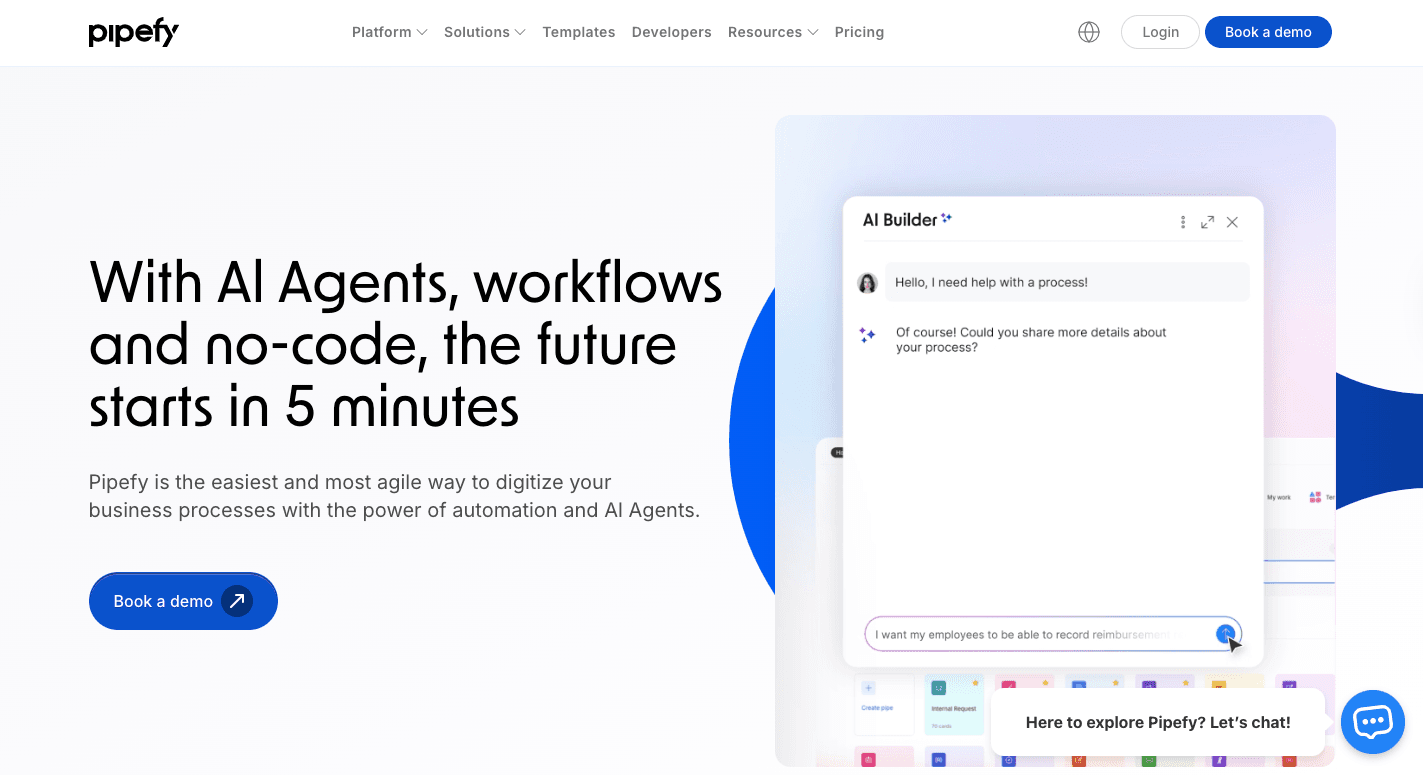
Pipefy is a centralized platform where you manage approvals, requests, and processes inside a single system.
Your work is organized into "pipes," which act like structured boards that track tasks from start to finish. Cards represent requests, forms gather information, and automation rules move things along.
Since Pipefy focuses on business process automation, it streamlines operations across HR, finance, procurement, and customer service. Someone onboarding a new employee can collect documents, route approvals, and assign steps all in one place.
Through process orchestration, you can link different workflows so that information flows smoothly across departments. It handles data movement across internal and external systems, too.
Key Features
- No-code automation - Set up trigger-and-action rules to eliminate manual steps.
- Customizable templates - Start with pre-built workflows for HR, finance, and IT.
- Form builder - Collect data with smart forms that use logic to adapt.
- Centralized portals - Group forms and requests in one accessible space.
- Data consolidation - Store and track all requests in a central database.
- AI support - Use AI to build flows, extract data, and route approvals.
- Reporting and dashboards - Track performance with built-in analytics.
- Collaboration tools - Share files, comments, and updates within workflows.
- Integrations - Connect to Slack, Google Workspace, Salesforce, and other systems.
Pros
- Pipefy provides a visual interface with pipes and cards that helps you follow each step easily.
- It supports automation rules that reduce manual work and help keep repeatable processes consistent.
- You can adjust templates or shape new workflows so the setup fits the way each group works.
Cons
- Complex builds with deep rules can feel hard to set up, and some users need more time to shape those flows.
- It limits certain custom options, which leaves some groups wanting more control for unique needs.
- Several reviewers mention that the mobile app feels weak, since it lags and lacks the functions needed for heavier tasks.
Pricing
Pipefy doesn't disclose its pricing publicly.
6. Bubble
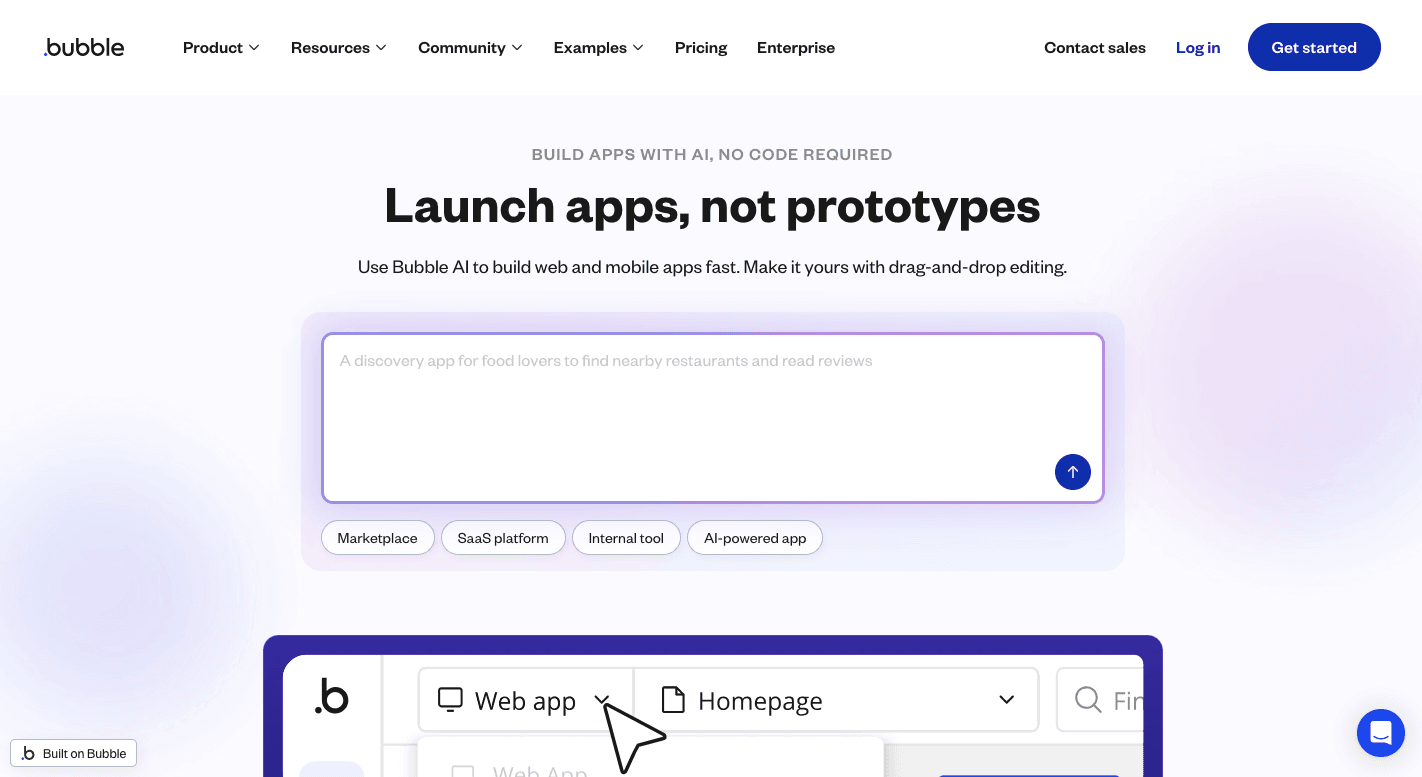
Bubble is different from many other no-code platforms since it builds complete web and mobile applications.
You can create user interfaces through a drag-and-drop editor and set up workflows that trigger actions, like sending a confirmation email when someone signs up.
These workflows allow you to automate processes within the app itself, so the system feels more like a full development environment.
It further functions as a centralized platform that combines design, hosting, security, and database management in a single system. Your teams can manage projects together, track changes, and build apps that serve real customers.
Key Features
- Visual development - Build user interfaces through a user-friendly interface with drag-and-drop components.
- Responsive design - Apps adapt to desktops, tablets, and phones automatically.
- Built-in database - Create data types and fields without SQL or code.
- Back-end workflows - Schedule jobs and manage server-side logic.
- API integrations - Connect to Stripe, SendGrid, or any REST API for more features.
- Plugin marketplace - Extend apps with thousands of plugins for payments, analytics, and more.
- Collaboration tools - Multiple people can edit and manage projects together.
- Version control - Track and manage changes safely across app updates.
- Error handling - Logs and reports help spot and fix workflow problems quickly.
Pros
- Bubble helps you build apps fast because the user-friendly interface lets you shape pages and logic without writing code.
- A single person can ship a working product, which keeps early costs low for small teams or solo founders.
- The platform covers the front end, back end, and database in one place, so you don't switch across several tools to get work done.
Cons
- Some users face a steep learning curve for advanced features, since deeper logic and data setups need more practice.
- Large or complex apps slow down once traffic grows, and tuning them for speed takes more time and care.
- You can't export the code, so moving the app to another system often means rebuilding it from scratch.
Pricing
Bubble uses a usage-based model measured in "Workload Units." The Free plan covers basic testing with one editor and limited server logs, while the Starter plan at $69 per month adds a live app, custom domains, and recurring workflows.
On the other hand, the Growth plan at $249 per month adds premium version control and two-factor authentication. The Team plan at $649 per month increases editors, adds sub apps, and expands branches.
For organizations with larger needs, an Enterprise plan with custom pricing is available that includes governance, dedicated infrastructure, and higher capacity.
Easier to see it running than to read about it: set it up free, no card.
4 Steps to Set Up No-Code Workflow Automation
To create automated workflows, you need to:
1. Identify Repetitive Tasks That Need Automation
A lot of people usually just jump straight into a platform and try to automate everything at once, which is WRONG.
Before anything else, you need to understand which actions recur. Begin with a simple work audit.
- For one full week, log every task you complete. Write the task name, the time it takes, and how often it appears.
- Give each task an “annoyance score” from 1 to 10. High annoyance and high frequency often reveal the strongest automation candidates.
- Watch for tasks that appear more than five times in one week.
- Break the process into individual steps. That exercise often exposes delays or unnecessary handoffs.
Tasks with those characteristics often become the easiest to automate. To be more specific, these are the tasks companies commonly automate:
Lead Management
Lead capture often creates the first automation opportunity.
In sales, every minute a lead waits for a response reduces the chance of continuing the conversation. Interest fades quickly when a reply takes hours.
Through automation, you can capture the form submission, create a contact in your customer relationship management (CRM) platform, tag the lead source, and send a reply immediately. The system can respond even if the lead arrives at 3 AM.
Copying names and email addresses from ads or forms into a CRM might feel manageable at first. Once those leads grow into dozens each day, the work becomes repetitive and error-prone. Automation records each lead automatically and keeps the data consistent.
No-code automation opens the door to faster responses and stronger lead tracking.
Customer Onboarding
Silence after payment creates uncertainty. Someone who completes a purchase on Friday may spend the entire weekend wondering what happens next.
Automation provides immediate reassurance. A payment trigger can launch the onboarding process right away. The system sends a welcome message, provides login instructions, and explains the next step.
Onboarding often includes many tasks that you repeat for every customer, such as creating project folders, assigning account managers, preparing documents, and scheduling kickoff calls.
Automation completes each step the same way every time, which streamlines operations and keeps the onboarding experience consistent.
Internal Task Assignment
Work often slows when teams depend on manual coordination. A project may pause until someone notices that the next task needs assignment.
However, when you use no-code automation, you remove that waiting period. For example, a trigger such as a closed deal or a submitted request can immediately generate the next task. The system assigns the work to the correct person and sends a notification.
When one task finishes, the next task appears automatically.
That’s why teams frequently use this approach to automate processes related to task management.
2. Map the Workflow Before Building Automation
After you identify the tasks you want to automate, the next step is planning how the automation should run.
To have a structured business workflow, start by writing the steps in order.
- Define the trigger that starts the automation. The trigger should be a clear digital event, such as a payment confirmation or a new form submission.
- List the actions that happen after the trigger. Use simple steps like creating a folder, assigning a task, or sending an email.
- Identify the data each step needs. For example, sending an email requires the customer’s email address and name.
- Add filters if the process should stop under certain conditions. A workflow might continue only if the customer location matches a specific region.
- Mark the final step. Define where the automation ends and your team continues the work.
3. Choose a No-Code Automation Tool
Once the workflow is mapped, the next step is selecting the no-code development tool that will run it.
Modern no-code solutions eliminate the need to write code. Most platforms use visual interfaces, so you can connect apps without deep technical knowledge. These builders rely on pre-built components that move data and trigger actions automatically.
Almost every tool in this space further operates on a simple if-then logic. A trigger happens first, and the platform then performs one or more actions.
Before choosing a tool, ask these questions:
- Does it actually connect to the tools your team already uses?
- Can it run several actions from a single trigger?
- Can it stop a workflow when certain conditions appear?
- Can it clean or format data before sending it to another tool?
What Makes Activepieces the Best No-Code Automation Solution

Activepieces is a no-code automation platform that provides a drag-and-drop functionality, which makes it easy for non-technical users to build complex workflows.
Whether hosted in the cloud or on your own servers, Activepieces gives you the flexibility to streamline your operations, which enables you to automate business processes efficiently.
Key features include:
- Simple workflow builder that lets you create automations without needing coding skills.
- Seamless integration with apps like CRMs, project management tools, and marketing platforms.
- Custom code capabilities to extend functionality for those with technical expertise.
- An open ecosystem where most data integrations are open-source and community-driven.
- Self-hosting option that offers full control over data and increases security for privacy-conscious businesses.
- Human-in-the-loop feature that requires approval or a delay before continuing.
- Enterprise-ready with advanced features like custom branding, user access management, and security controls.
4. Build the No-Code Automation Workflow
These are the popular no-code workflow automation examples from Activepieces:
Community Message Monitoring
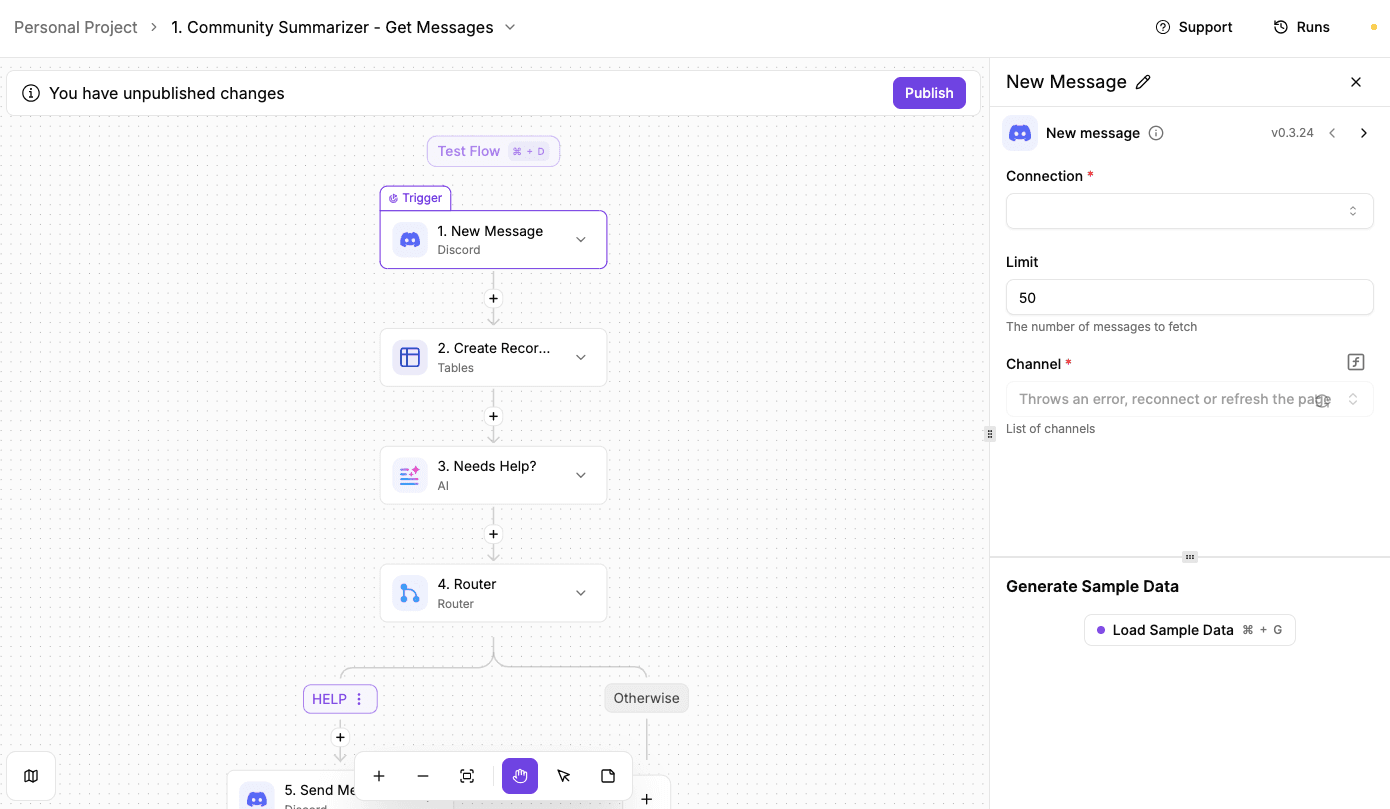
A real-time monitoring workflow collects every message posted in your community and checks whether someone needs help. Messages are stored in a table so the system can review them later, while urgent questions are surfaced immediately so your team can respond fast.
To build it:
- Create a Discord bot in the Discord Developer Portal and assign permissions such as read messages, read history, and send messages.
- Add the bot to your Discord server, then copy the bot token to connect it to Activepieces.
- Create a table in Activepieces called community feedback with two columns named message and user.
- Add a New Discord Message trigger so the workflow runs whenever a community member posts a message.
- Create a record step that stores the message text and the username in the table.
- Add an Ask AI step that checks whether the message looks urgent or asks for product help.
- Add a router step that checks the AI response and identifies urgent messages.
- Send the flagged message, username, and link to a support channel so the team can respond quickly.
Get the template here: Community Message Monitoring
Daily Facebook Ad Library Lead Finder
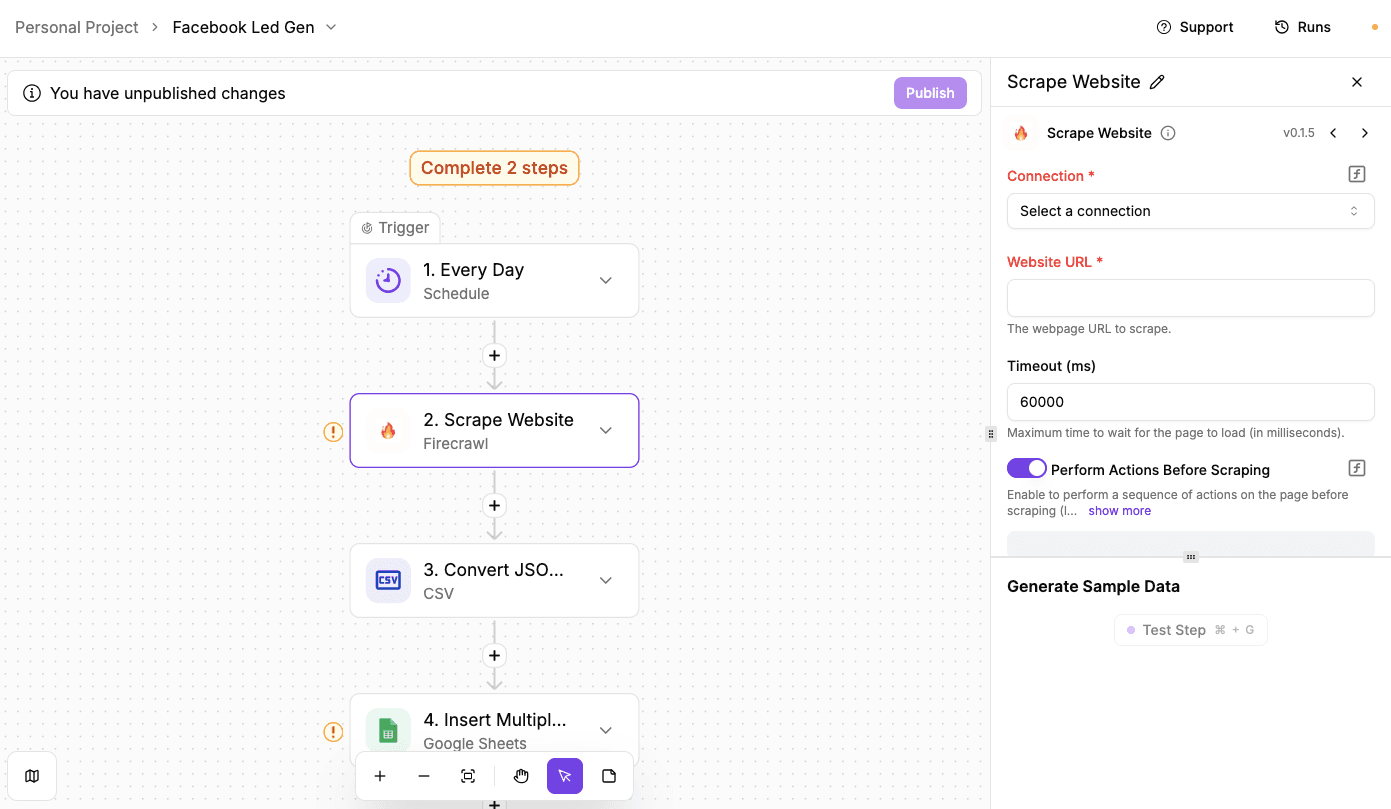
A scheduled workflow collects businesses that are actively running Facebook ads and stores them as potential warm leads. Since these companies already spend money on marketing, they are often easier prospects for service providers compared to cold outreach.
To build it:
- Add a schedule trigger that runs once per day at a specific time (e.g., 4 PM) in your preferred time zone.
- Insert a Firecrawl step that scrapes the Facebook Ad Library page.
- Configure the scraping actions so the tool selects a country, chooses the ad category, and enters your keyword or advertiser search.
- Include an action that clicks “See ad details” so the workflow can capture deeper information about each advertisement.
- Use the extraction prompt to collect the advertiser name, Facebook link, and ad description from each result.
- Test the step to confirm that Firecrawl returns structured JSON data containing the ads.
- Add a Convert JSON to CSV step so the data can be stored in spreadsheet format.
- Insert a Google Sheets step that adds rows to a spreadsheet using the CSV output.
- Enable duplicate protection by checking the ad description field before inserting new rows.
- Test the full workflow to confirm new ad data appears in the spreadsheet each day.
Get the template here: Facebook Led Gen
Automatic Receipt Expense Tracker
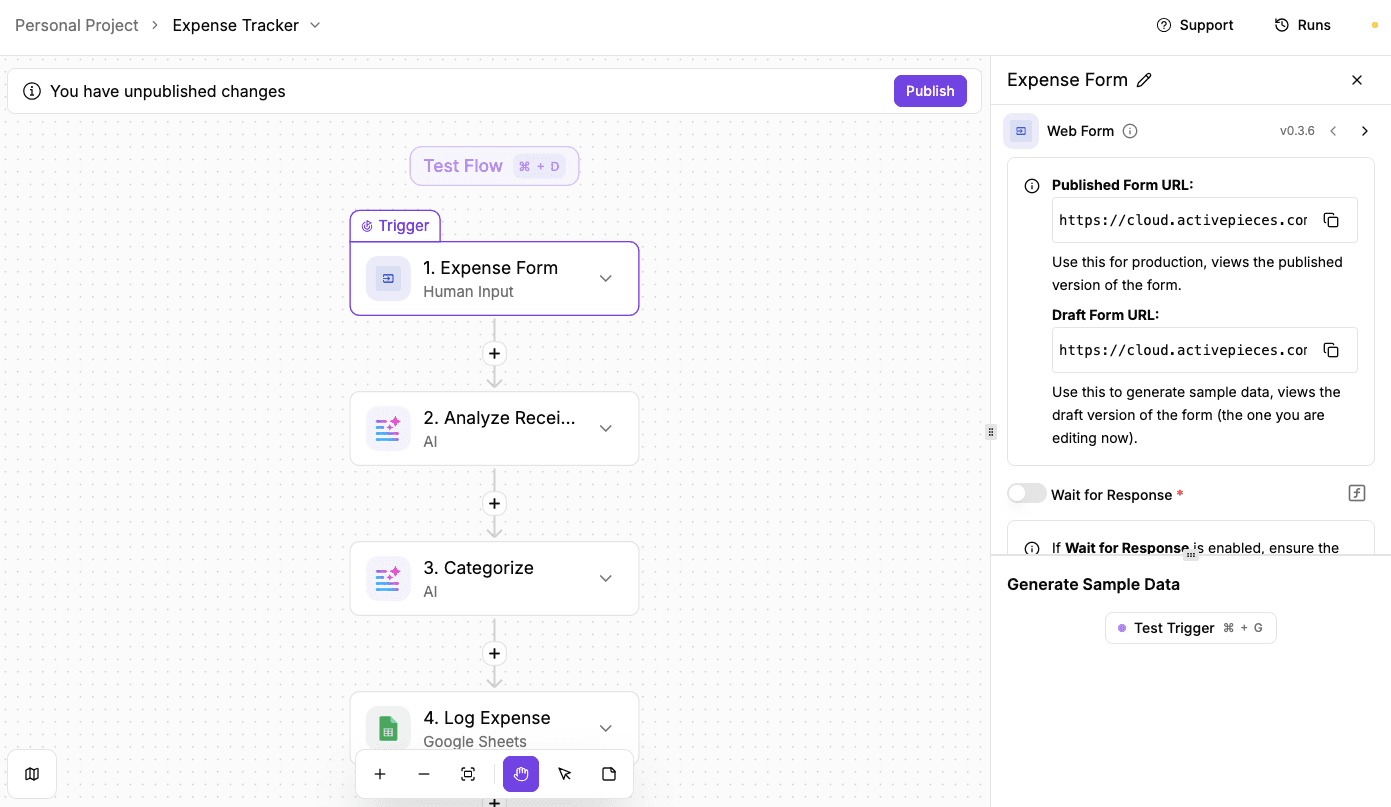
A receipt tracking workflow collects purchase receipts from a simple form, reads the information from the image, and logs the expense into a spreadsheet. Instead of manually entering every purchase, the system extracts the store name, items, and total cost automatically and organizes them into categories.
To build it:
- Add a web form trigger in Activepieces so the workflow starts whenever someone submits a receipt.
- Create form fields for the user name and a file upload field for the receipt image.
- Submit a receipt through the form to generate sample data for the workflow.
- Add a ChatGPT step that reads the uploaded receipt using optical character recognition (OCR).
- Configure the prompt to extract the store name, purchased items, and total cost from the receipt.
- Pass the extracted items into a second AI step that categorizes the expense.
- Define expense categories such as electronics, food, travel, or personal care.
- Add a Google Sheets insert row step to store the processed expense data.
- Map the extracted fields, such as name, store, items, category, and total, to the spreadsheet columns.
- Test the workflow by submitting a receipt and confirm the categorized expense appears in the sheet automatically.
Get the template here: Expense Tracker
Design Your Business Process Automation Workflow With Activepieces

Activepieces makes it simple to build workflows for technical and non-technical users. You don't have to chase five different tools or wait for developers.
You log in, drag the pieces together, and you've got a flow running in minutes. Right now, there are over 467 integrations available, and the library keeps growing every day because the community adds new ones.
That means you can hook into the apps you already use and keep expanding as your stack changes.
For business teams, you get a builder that requires no technical background. IT or developers can dig deeper, customize pieces in TypeScript, and roll out automations that fit enterprise-level needs.
Rather than patching together single-purpose software, you get powerful apps inside one platform that keep everything in sync and cut out the wasted time.
FAQs About No-Code Automation Tools
What is a no-code automation tool?
A no-code automation tool helps you set up flows with simple blocks instead of code. Some tools include natural language processing, so you can set actions with short text prompts.
These tools support work across operations, HR, sales, support, and business process management tasks that need steady results.
What are codeless automation tools?
Codeless automation tools follow the same idea. You pick a trigger, set an action, and run the flow without writing a script.
Companies often use them to reduce manual work, connect apps, and create client portals that guide customers through forms, requests, or updates. Many options protect information with strong network security controls.
How to automate without coding?
You can automate without coding by choosing a platform with visual menus. You drag parts into place, map fields, add checks, and turn the flow on.
Which is the best no-code tool?
Activepieces is the best no-code tool for most teams. The setup stays simple, the features cover many use cases, and the library grows fast.