
No-Code Application Builder: Best Options for 2026
A no-code application builder selection helps you identify the platform that fits your technical requirements and team budget for the coming year.

Covers indie SaaS workflow automation: Claude Desktop tool configs, which integrations ship fast, and which get rewritten twice.
ContributorSeptember 26, 202614 min read
This article was researched and fact-checked by an advanced research system.
The Best No-Code Application Builders for 2026
Quick Selection Guide by Use Case
Rather than a generic feature list, the specific friction point in your development cycle determines the right no-code tool for 2026.
Choosing based on your primary bottleneck, such as whether you need to automate complex workflows using Activepieces or manage large-scale data structures, ensures you don't spend months building toward a functional ceiling that requires a complete architectural rewrite.
Retool remains the standard for teams needing to connect disparate SQL databases and legacy APIs. Developers spend less time on UI components and more on query logic.
FlutterFlow is for builders who require native mobile performance and granular design control. The final app feels like a custom-coded Swift or Kotlin build rather than a sluggish web wrapper.
Bubble has a deep logic engine for web apps. Founders can build multi-sided marketplaces with user permissions without managing a separate backend.
AppSheet is the primary choice for organizations embedded in the Google Workspace ecosystem. IT departments can deploy mobile field-data solutions that inherit existing security protocols automatically.
Glide is the fastest path for turning structured spreadsheets into functional software. A non-technical manager can launch a working inventory tracker in a single afternoon.
Defining the 2026 No-Code Landscape
Modern no-code development has shifted from simple visual abstraction to sophisticated logic orchestration powered by frontier AI models. In this environment, the run is the meter, not the steps inside it.
Activepieces applies this by charging a single credit per flow execution regardless of complexity, which stands in contrast to the per-task or per-billing found on Zapier or Make's pricing pages.
This ensures that builders are not taxed for breaking a process into smaller, more reliable steps.
How these platforms integrate with agentic coding models defines the current landscape. Developers now use Gemini 3.8 Flash to generate backend schemas or GPT-6 Astra to troubleshoot visual logic flows in real-time.
The "no-code wall" (the point where a tool's limitations force a move to manual coding) has moved significantly further down the roadmap because of this synergy.
Success in 2026 is less about avoiding code entirely. It's more about using these platforms to maintain high-velocity deployment while retaining the ability to inject custom logic via AI-assisted modules when the standard components fall short.
The "no-code wall"—the point where a tool's limitations force a move to manual coding—has moved significantly further down the roadmap because of this synergy.
Everything below works on Activepieces' free plan. Start without code or a credit card.
Comparing Top App Builders on Price and Performance
Matching your specific architectural needs to a tool's inherent technical ceiling is required for selecting a platform in 2026. While basic site builders like Framer start at $5 per month, complex application logic demands platforms designed for deep data integration.
Specialized niches and pricing
Developers must look beyond entry-level pricing for backend functionality. The current market separates winners by their specialized niches:
Bubble is best for complex web applications requiring custom databases and logic. FlutterFlow is best for native mobile apps that need high-performance animations and App Store deployment.
Softr is best for internal portals and directories built directly on top of Airtable data. Glide is best for rapid, sheet-based utility apps used for field operations or inventory.
Scaling costs and maintenance
The cost of entry scales directly with the complexity of the underlying engine. FindUWebs reports that Webflow begins at $14, offering professional-grade design control for marketing sites.
Sitejet follows at $15 for agencies managing multiple client projects. General-purpose builders like Squarespace at $16 and Wix at $17 provide all-in-one stability for small businesses that can't afford to manage separate hosting or security.
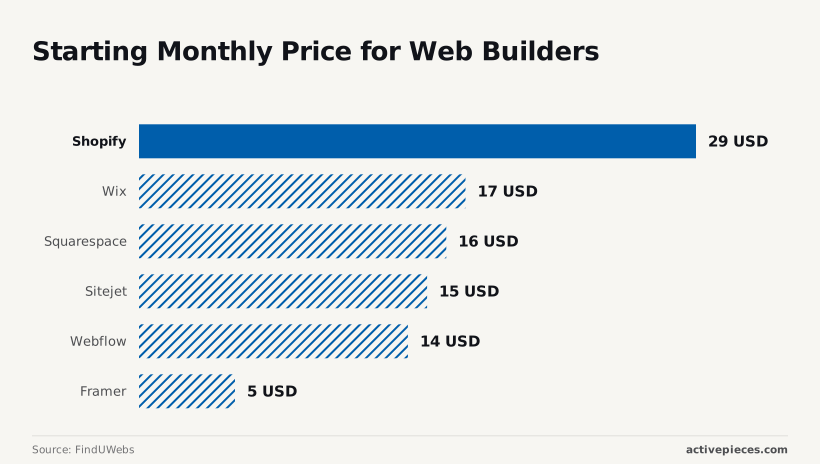
These platforms effectively offload the technical burden of maintenance to the platform provider, according to Finduwebs.
E-commerce and custom extensions
At the higher end, Shopify starts at $29, reflecting the premium paid for a specialized e-commerce infrastructure that handles global payments and logistics out of the box. This justifies the cost for merchants who need immediate, secure transaction capabilities.
To push past these native constraints, developers now use Gemini 3.8 Flash to generate custom API connectors that bridge these platforms with external services.
Bubble for Complex Web Applications and Marketplaces
Bubble is a robust choice for founders who build full-stack web applications without writing code. It provides a granular logic engine that other visual tools lack.
Bubble allows for deep customization of database triggers and API integrations, whereas competitors focus on simple data display.
Visual Programming Capabilities
Because every element on the screen can be tied to a specific database event, Bubble has a workflow editor that functions like a visual representation of standard code.
Founders can build features like real-time notifications or search filters that would otherwise require a dedicated backend engineer.
This flexibility is supported by the ability to call advanced reasoning models (such as GPT-6 Astra) directly within a workflow to handle natural language processing or automated decision-making.
Workload Units and Scaling Costs
The platform manages infrastructure costs through a system called Workload Units. This system measures the computational power used by every database search, API call, or page load.
This means a founder’s monthly bill is directly tied to the efficiency of their app’s design. To ensure a predictable budget, teams must use a structured approach to tool selection before committing to an architecture.

Identifying if data lives in a spreadsheet or a relational DB is the first step of the selection audit. You must then determine if the primary user is on a desktop browser or a mobile device.
The Learning Curve Trade-off
Mastering this platform requires a significant time commitment because the interface exposes professional-grade database concepts.
Integrating Gemini 3.5 Flash via API provides the necessary speed for agentic workflows for those managing high-throughput workloads. This integration works without sacrificing the visual control that makes the platform valuable.
Retool for database-first internal engineering
Retool is the industry standard for engineering teams who need to build internal tools that interact directly with production databases. It provides a massive library of pre-built UI components that are designed specifically for data manipulation and administrative dashboards.
Direct connection to existing infrastructure
The platform excels at connecting to PostgreSQL, MongoDB, and REST APIs without requiring a middleman layer. Developers can write raw SQL queries directly inside the editor to fetch and update data.
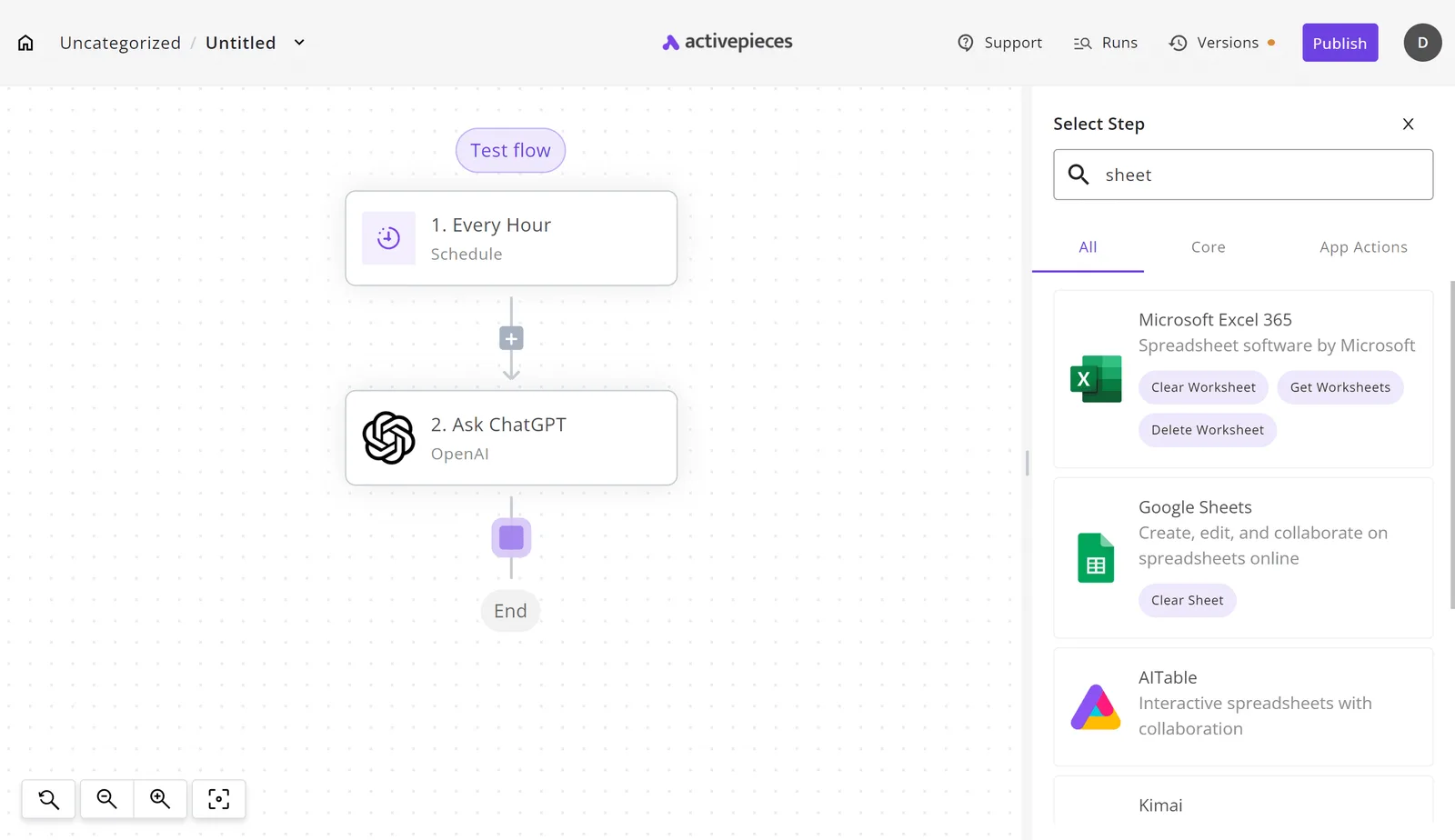
This makes it the preferred choice for fintech or logistics companies where data integrity is paramount. The interface allows for complex table views with inline editing and bulk actions that feel like a custom-coded admin panel.
Granular control for technical teams
Retool is built for people who understand how software works but want to build it faster. It allows for the injection of custom JavaScript anywhere in the application to handle complex data transformations.
While other tools hide the underlying logic, this platform embraces it by providing a debugger and a state manager. This ensures that as the internal tool grows in complexity, the developer retains full control over the execution flow.
Flutterflow for Native Mobile Performance and Code Export
FlutterFlow is a professional-grade development environment that compiles directly to native ARM code. Mobile applications maintain sixty frames per second during complex transitions.
By building on top of the Flutter framework, it avoids the performance bottlenecks of web-view wrappers, meaning your users experience the tactile responsiveness expected of a Tier 1 App Store product.
Native iOS and Android Deployment
Deployment through FlutterFlow bypasses the manual pain of managing build flavors by automating the submission pipeline for both major mobile platforms.
Because the tool generates a unified codebase, a single design iteration updates both the iOS and Android binaries simultaneously. One-click deployments are possible through this direct integration with the Apple App Store and Google Play Store.
Firebase and Supabase Integrations
The platform is a visual orchestration layer for Firebase and Supabase. It enables real-time data synchronization without writing custom listener logic.
By mapping UI components directly to backend collections, data updates reflect instantly across all active user sessions.
Firebase is the standard for authentication and cloud functions, allowing for rapid scaling under Google’s infrastructure.
Supabase offers a relational PostgreSQL alternative, which is necessary for apps requiring complex joins and strict data schemas.
Gemini 3.8 Flash integrates into these backends to power agentic features, such as automated content moderation or intelligent search, within the app’s existing data flow.
Vendor Lock-in Mitigation via Code Export
FlutterFlow eliminates the "no-code wall" by allowing teams to eject from the platform at any time with a clean, human-readable Dart codebase.
The split-screen interface demonstrates this transparency, showing the drag-and-drop UI builder alongside the production-ready code it generates.
This capability ensures that if a project outgrows the visual builder's constraints, the transition to a traditional IDE like VS Code is a seamless migration rather than a total rewrite.
Easier to see it running than to read about it: set it up free, no card.
Softr and Glide for Fast Internal Data Portals
Softr and Glide represent the fastest path to production for internal tools because they treat existing data structures as the primary driver of the user interface.
Turning Spreadsheets into Interfaces
Speed-to-deployment is the primary metric for internal portals.
According to data from WorkflowAutomation, building a standard Member Directory takes just 2 hours in Glide and 4 hours in Softr, while the time requirement for more flexible platforms is 20 hours for FlutterFlow and 35 hours for Bubble, indicating that users must choose between rapid deployment and granular control, meaning the decision hinges on whether speed or customization is the priority.
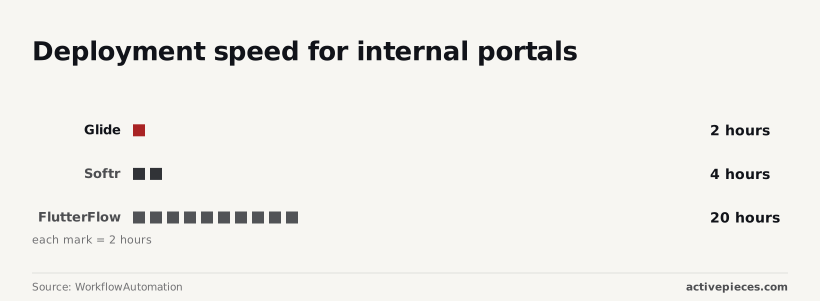
| Platform | Time to live URL |
|---|---|
| Glide | 2 hours |
| Softr | 4 hours |
| FlutterFlow | 20 hours |
| Bubble | 35 hours |
This efficiency stems from their tight integration with Google Sheets and Airtable. Instead of building a backend, you simply point the tool at your sheet, allowing the software to generate a functional CRUD interface automatically.
Permission Management and User Roles spinning up in minutes
Security in these tools is managed through "Visibility Rules," which allow non-technical managers to define data access without writing complex queries.
Because Softr and Glide inherit the structure of your linked spreadsheet, you can map user roles to specific rows in minutes. A regional manager only sees their specific territory data.
Limitations on Custom Logic and UI Design
The trade-off for this speed is a rigid "no-code wall" regarding bespoke functionality and aesthetic branding. You're restricted to a pre-defined library of blocks and layouts.
While you can extend these tools using Gemini 3.8 Flash to generate custom scripts for Google Sheets, the core UI remains locked.
Activepieces for Automation-First Internal Applications
Activepieces runs a company's chosen AI models and automations across its own apps and data under central governance, providing the logic depth required for tools where backend reliability is more valuable than aesthetic polish.
Activepieces offers unlimited flows on every plan, including the free tier, which allows developers to build out complex logic chains without hitting the arbitrary volume caps that typically force a migration to custom code.
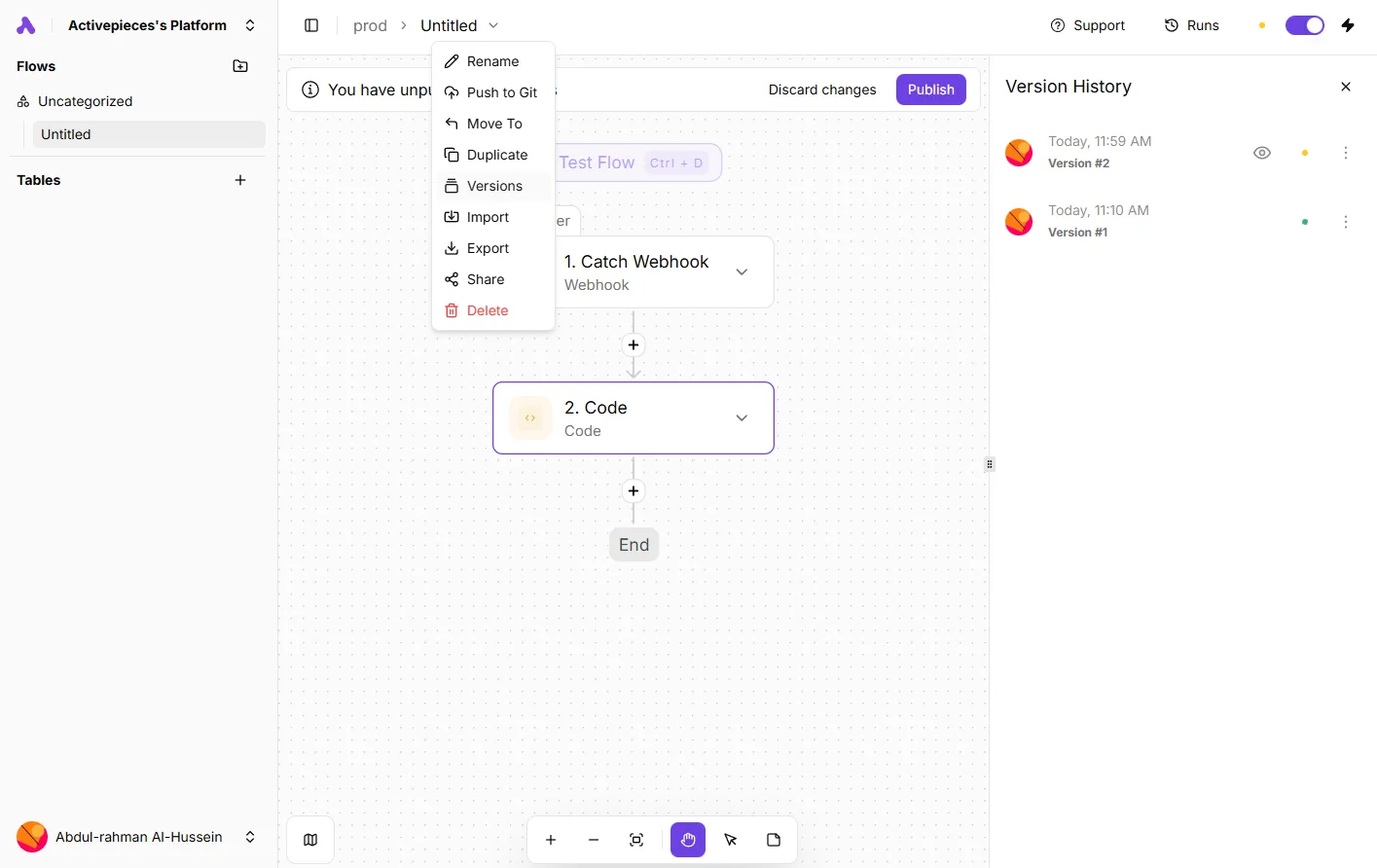
By treating the automation canvas as the source of truth, it prevents the common "no-code wall" where a visual builder cannot handle the intricate conditional branches required for enterprise workflows.
Building Apps Around Business Logic
When the primary goal is to move data between disparate systems rather than managing high-traffic consumer interactions, Activepieces prioritizes the flow over the frame.
This focus on backend integrity is why MoneyGram and FundingSocieties run Activepieces in production, using the platform to maintain high-availability business logic that would be difficult to govern in a UI-centric builder.
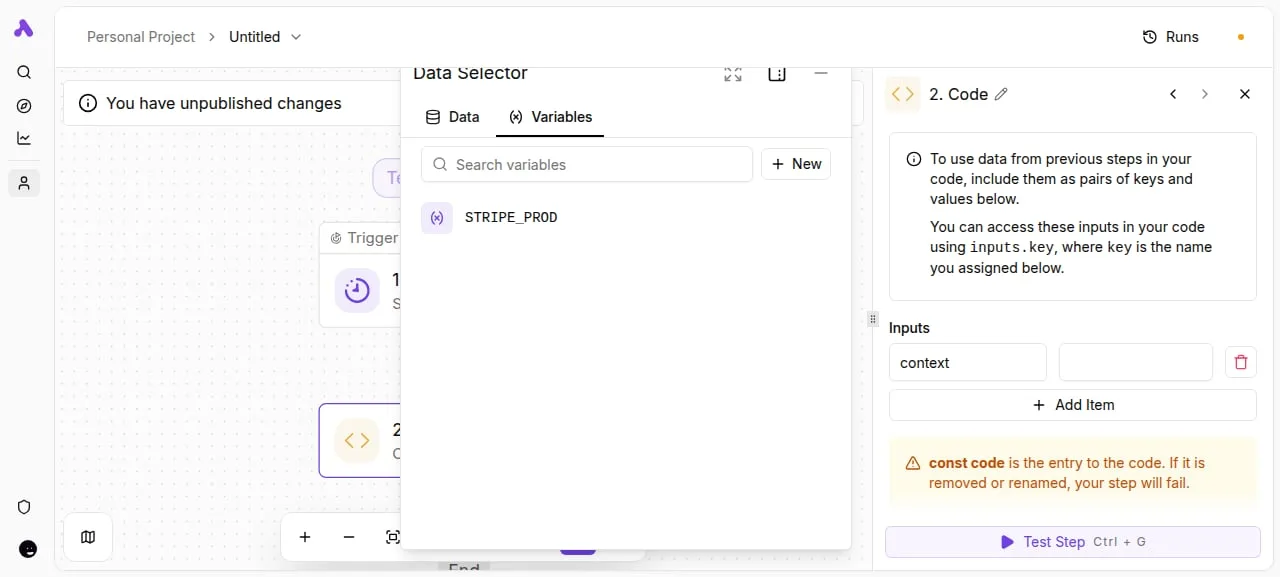
To stand up a functional internal tool by centering the logic, you first connect the trigger source such as a Webhook or CRM. You then map data through the Activepieces flow and design the minimal UI dashboard.
Self-hosting for Data Sovereignty
Activepieces is an open source AI automation platform that publishes its core under the MIT licence, allowing for complete local deployment.
This capability allows teams to keep sensitive customer data within their own virtual private cloud. Third-party vendors never have access to the raw payloads.
By removing the reliance on a proprietary cloud, companies gain complete control over their uptime and security protocols. MoneyGram and FundingSocieties run Activepieces in production to maintain this level of infrastructure control while automating core business processes.
Extending functionality with custom integrations
The platform allows developers to bypass pre-built limitations by writing custom TypeScript integrations that integrate directly into the visual flow.
When a standard connector lacks a specific API endpoint, a developer can use Gemini 3.8 Flash to generate the necessary code for a custom integration.
This integration then appears as a native block for non-technical users. The open-source monorepo on GitHub confirms this breadth, with 735+ integrations available, roughly 60% of which are community-contributed rather than vendor-locked, ensuring that the ecosystem remains adaptable and independent of any single company’s roadmap.
How to Choose Your App Builder This Week
Selecting the right app builder requires matching your technical constraints to the specific "wall" you're most likely to hit during development.
Step 1: Map Your Data Source
The longevity of your application depends on whether your builder treats data as a first-class citizen.
You must decide if your project requires a built-in proprietary database for rapid prototyping or an external connection to a managed service like PostgreSQL to ensure your information remains portable.
The longevity of your application depends on whether your builder treats data as a first-class citizen.
Step 2: Determine Your Deployment Platform
Platform choice dictates the fundamental architecture of your user experience because web-responsive layouts and native mobile components handle navigation differently.
Progressive Web Apps are best for internal tools where desktop density is required for data entry.
Native Mobile Wrappers are necessary when your workflow relies on hardware features like background location tracking or offline local storage.
Step 3: Audit Your Logic Complexity
You must identify if your app requires simple triggers or deep reasoning capabilities that necessitate frontier AI integration.
For high-volume, cost-sensitive automation, you might route tasks through Gemini 3.5 Flash-Lite, whereas complex agentic coding tasks will require the reasoning depth of GPT-6 Astra.
If your logic involves multi-step research or autonomous browsing, you should verify that your builder can natively call Antigravity Agent, Google’s autonomous coding agent.
Frequently asked questions about no-code builders?
Do I own the code for apps I build?
Ownership depends entirely on whether your chosen platform allows for source code export. While most visual builders grant you full intellectual property rights over your design and business logic, the underlying engine remains proprietary to the vendor.
If you use a tool that lacks an export feature, you're effectively renting your infrastructure. A service outage or price hike could force you to rebuild from scratch on a new platform.

Can no-code apps handle thousands of concurrent users?
Scale is achievable only if you decouple your visual interface from your database to prevent bottlenecking. Modern builders can support high traffic volumes, but they often struggle when complex logic is processed on the front end.
To maintain performance, you should offload heavy computations to a dedicated backend like DeepSeek-V4-Pro. This backend manages high-volume reasoning tasks without slowing down the user’s screen.
Is no-code secure enough for healthcare or finance?
Security compliance is a shared responsibility where the platform provides the encrypted "vault" but you must configure the access permissions.
Most enterprise-grade builders offer HIPAA-compliant tiers and SOC2 Type II certifications. The physical infrastructure meets regulatory standards.
However, the risk usually lies in "shadow IT," where a team member might accidentally expose sensitive records through an insecure third-party API connection.
Which tool is best for building a SaaS MVP?
The best tool is whichever one allows you to ship a functional prototype before your initial funding or patience runs out.
For data-heavy internal tools, platforms with deep integration hooks are superior. For consumer-facing apps, prioritize tools with high UI flexibility.
For AI-driven services, select a builder that can natively call GPT-6 Astra to handle complex user requests and agentic workflows.