Motion Pricing 2026: Plans, Per-Seat Cost, Features

Nov 23, 202613 min read
Motion sells two AI plans, Pro AI and Business AI, and both are billed per seat.
Your team's cost is seats × per-seat price × months, a calculation simple enough that even a workflow built in Activepieces could run it, so the headline figure on the pricing page is only one factor in that product.

Motion pricing across all plans
What Motion is and who it is for
Motion is a calendar and task manager that uses AI to schedule your work automatically, moving tasks around meetings as priorities change. Pro AI suits an individual who wants that scheduling for themselves.
When a team needs it across several people, Business AI is the fit, and per-seat billing starts to matter, because every added person repeats the charge.
Plan table: price, inclusions and limits
Read the current figures from Motion's pricing page on the day you buy, then run the formula above.
Pro AI and Business AI are both billed per seat, monthly or annually. For Pro AI, confirm which AI features and usage allowances are included; for Business AI, confirm the team features, admin controls and AI usage allowances.
The monthly and annual rates differ, so choose the cycle before you total anything. Any usage cap on AI features is the third input, and it decides whether your heaviest user fits inside the plan.
What the free trial covers and where it ends
Motion offers a trial, not a free plan, so treat everything you build during it as temporary. The trial ends on a fixed date, and the first charge follows.
Use the days to measure your own usage: how many tasks each person schedules, how often the AI rebuilds a calendar, and who hits a limit.
Then price your team on those numbers, and price any alternative the same way. Activepieces meters the run, not the steps inside it: its pricing page states 1 credit per flow run, so a ten-step flow costs what the two-step workaround did.
Put that comparison on paper before the trial runs out.
If you are running this arithmetic for your own team, see what the same workload costs on Activepieces.
The first invoice for a five-person team
Price five seats on Motion and year one lands anywhere from $1,140 to $2,940, depending on billing cycle and tier.
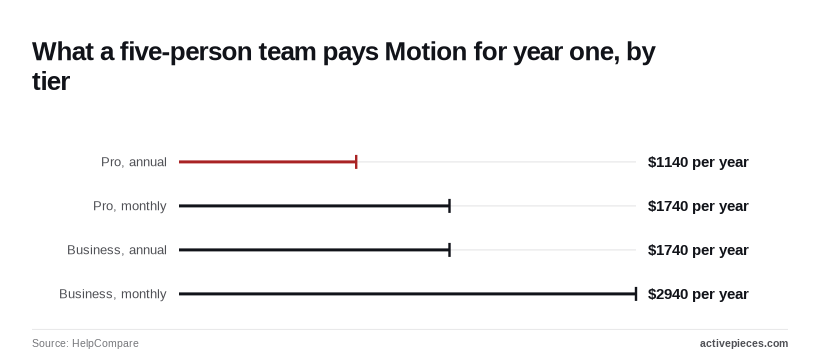
Do that arithmetic for your own headcount before the trial ends, because the gap between those two numbers is a choice you make on the checkout page.
Per-seat maths at monthly billing
Pro billed monthly comes to $1,740 over twelve months, according to HelpCompare. That works out to $29 per seat per month, or $145 a month for five seats.
The table below prices three of the four combinations side by side.
| Plan | Price per seat (month) | Seats | Total per month | Total per year | Gap to cheapest |
|---|---|---|---|---|---|
| Pro AI monthly | $29 | 5 | $145 | $1,740 | +$600 |
| Pro AI annual | $19 | 5 | $95 | $1,140 | none |
| Business AI annual | $29 | 5 | $145 | $1,740 | +$600 |

The seat prices are derived from the yearly totals divided by five seats and twelve months.
Monthly billing on Pro and annual billing on Business land on the same $1,740, so paying monthly for the lower tier costs what a year of the higher tier costs.
Annual billing: the saving and the lock-in
$600 less than monthly Pro: that is what Pro billed annually saves, at $1,140 a year. That's a 34% discount for committing twelve months up front.
The catch is that the full amount is committed before you know whether all five people will use the tool.
A seat that goes idle in month three is still paid for until month twelve, so annual billing suits a team that has already tested its real usage.
Which tier the team's usage forces
The top of the range is Business billed monthly, at $2,940 a year and $1,200 more than Pro billed annually. Business on an annual plan drops to $1,740.
Pick the tier by listing what the team needs in daily use, then check whether Pro covers it. If it does, the extra $600 to $1,800 a year buys nothing you use.
If it doesn't, price Business on annual billing, since monthly adds $1,200 to the same tier.
Month two's hidden costs and limits
By month two, it was clear that Motion's bill depends on limits the sticker price never mentions:
- A per-seat AI allowance
- Features held back by tier
- How seats change mid-cycle
- Cancellation terms
- The hours spent moving in
The list below is what surfaced, and what to confirm before the trial ends:
- The AI credit cap is per seat, and usage beyond it is metered. One heavy scheduler can generate overage while the rest of the team sits under the allowance, so the allowance doesn't pool.
- Some features sit behind higher tiers. Check the tier comparison on the pricing page against the features your team actually used during the trial.
- Seat changes mid-cycle may not be prorated. I couldn't verify this from the pricing page or docs.
- Refund terms on annual plans aren't stated clearly enough to rely on. This is also unverified.
- Migration hours cost nothing on the invoice but still cost the team time.
One heavy scheduler can generate overage while the rest of the team sits under the allowance, so the allowance doesn't pool.
The credit cap and the tier gating decide which plan fits, and they pull in opposite directions. A lower tier looks cheaper until a gated feature turns out to be one your team uses daily.
A higher tier then buys an allowance some seats will never touch. Price each seat at its own usage, not the team average.
Seat, billing and cancellation terms
Adding a seat is easy. What a seat costs for the remainder of a cycle, and what happens when you remove one, is where I found nothing firm in the docs or changelog.
Treat proration and refunds as unconfirmed until Motion states them in writing. If an answer needs a sales call, get it by email so it's on record.
Moving existing tasks, calendars and project structure into Motion took real hours, and no plan includes them. Count them at your team's hourly cost and add them to the first-year total.
Worth checking against a plan that does not meter every step: one credit covers a whole run on Activepieces.
Motion versus comparable alternatives
Run that same line on five seats and Motion Pro AI comes to $1,140 a year, the highest of the five team tools priced here, which works out to $228 per seat.

The table shows each tool's five-seat annual total and the per-seat figure behind it. Take from it the gap between Motion and the cheapest option, which is $840 a year for the same headcount.
| Tool | 5-seat annual total | Per seat, per year | Per seat, monthly equivalent |
|---|---|---|---|
| Motion Pro AI | $1,140 | $228 | $19 |
| Monday Standard | $720 | $144 | $12 |
| Asana Starter | $659.40 | $131.88 | $10.99 |
| Notion Plus | $600 | $120 | $10 |
| Trello Standard | $300 | $60 | $5 |
Reclaim and Akiflow compete on the one thing you pay Motion for, automatic calendar scheduling. Price both exactly as above: five seats on the annual plan, checked on the vendor page the day you decide.
If either lands under $1,140, the saving is real only when its scheduling covers your team's meetings and deadlines.
Sunsama is built around planning your own day by hand, not around a system that reshuffles it for you. If your people want control over their day and distrust an algorithm moving their tasks, it beats Motion.
Full project tools: when Motion is the wrong category
Asana Starter costs $659.40 a year for five seats, so you pay about $480 less than Motion. Notion Plus costs $600 and Monday Standard $720, both well below Motion, so Motion is prohibitive for budget-conscious teams.
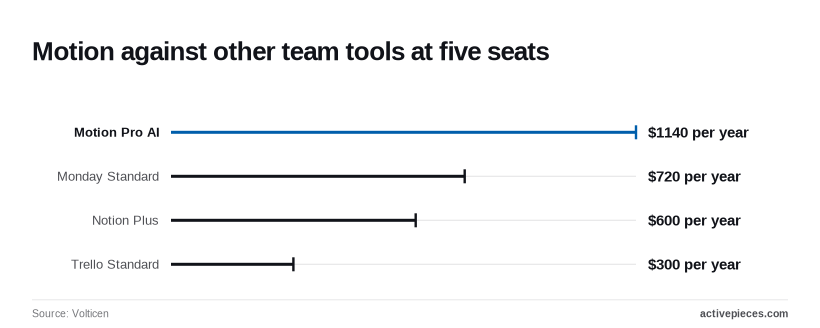
At $300, Trello Standard costs about a quarter of Motion's price, making it viable for teams with limited budgets.
If your real need is shared tasks and status, these beat Motion on cost. You give up automated scheduling, so check whether you need it before you count the saving.
The buying rules the team adopted afterwards
Apply the same check to the tool you keep: price your own seats at your own usage before the trial ends, because a saving only exists once you've counted it.
The list below is the order the team now follows, and each step closes off a way the bill drifted.
- Count the seats that will actually log in, estimate their usage, and price that total on each tier before the trial ends.
- Put the trial end date in a shared calendar, with a reminder well ahead of it.
- Choose the billing cycle deliberately, comparing the monthly and annual totals for your seat count.
- Name one person who owns the subscription.
- Review the seat list every quarter and remove anyone who has stopped using it.
- Re-check the public pricing page before each renewal.
Each step replaces a decision that used to happen by default, and defaults are where per-seat bills grow.
Steps to take before the Motion trial ends
Steps one to three belong here. Price the team as it will really work, not as the trial did, because trial usage is usually one enthusiastic person.
If the trial rolls into a paid plan, the choice gets made for you, at whatever tier and cycle the checkout preselected, which is why the calendar entry matters.
Decide the cycle with both totals side by side, and treat the annual discount as a commitment you're buying, not a free reduction.
Steps five and six belong at renewal. Because a seat nobody uses costs the same as a seat everybody uses, the quarterly review is the cheapest saving available.
Before renewing, open the pricing page again and compare it against what you pay. Tiers and per-seat rates change, and a renewal is the moment you pay the new version without noticing.
Without a named owner, the calendar reminder goes to nobody and the seat review never happens. That is why step four holds the rest together.
The owner doesn't need to be senior. They need access to billing, a standing reminder, and authority to remove a seat without a meeting.
Connecting Motion to the rest of your stack with Activepieces
Activepieces is worth adding only if Motion's own integrations leave a manual copy-and-paste step in your process, and it does nothing to replace Motion's scheduling. That distinction keeps this from becoming one more subscription you pay for per seat and then forget to cancel.
What Motion connects to natively
Start by listing what your team does outside Motion and checking each item against Motion's own integrations list. Calendar sync is the core of the product, and it's the connection you would be paying Motion for anyway.
If your intake, billing and project tracking all live in tools Motion already talks to, there's no gap, and an automation layer is a second bill with nothing to show for it.
Do this check before the trial ends, with the same discipline as the seat count. Every connection you rely on should be one you've seen work on your own data, not one you read about on a feature page.
Where a workflow tool fills the gap
The gap usually shows up at the edge: a form submission, a CRM deal changing stage, a signed contract.
Someone has to turn that event into a task, and if no native connection does it, a person does it by hand and the cost is their time.
Activepieces handles that hand-off across its 750 integrations, and it keeps unlimited flows on every plan, including the free one. The flow below is a client onboarding example. A Typeform submission triggers it, an agent step runs, and an Asana task is created.
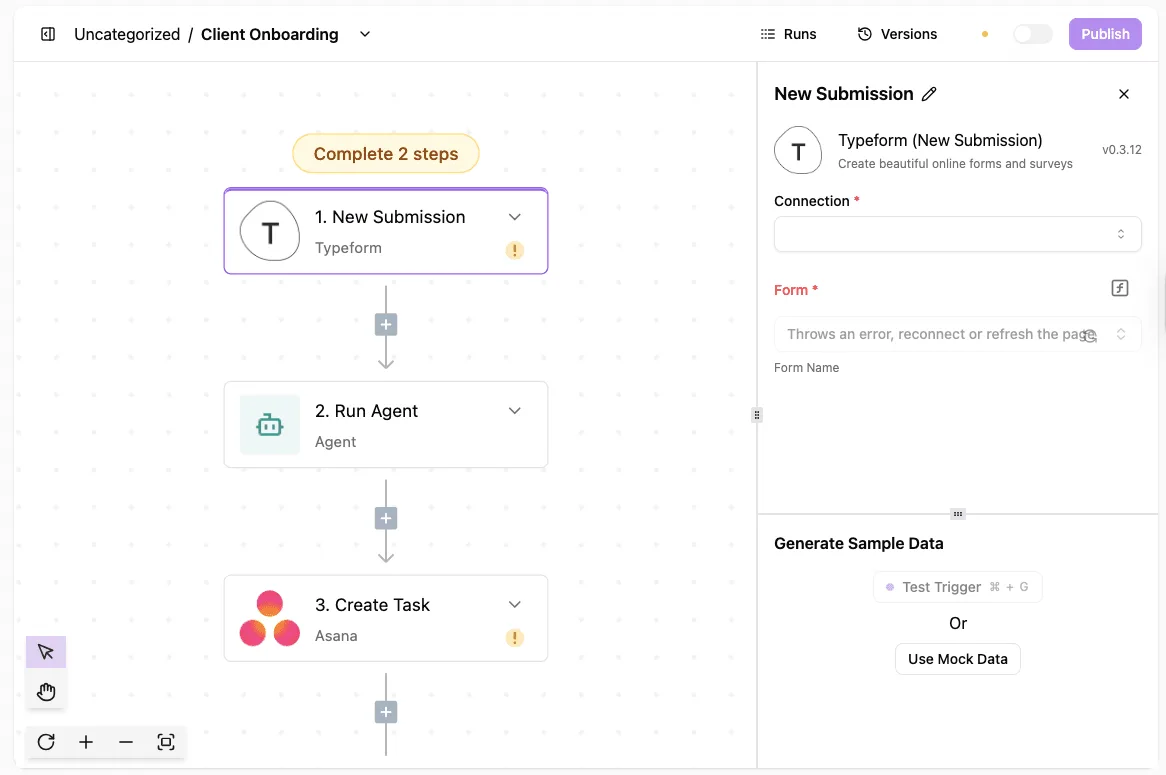
On the right, the trigger is selected, and it asks for a connection and a form. It also offers a test run and mock data, so you can see the trigger fire before you publish anything.
The yellow warning icon on that trigger shows it's not fully configured yet, so the flow wouldn't run as it stands.
The takeaway is the shape, not the tools: an event arrives, a step interprets it, and a task appears somewhere.
You would swap the destination for Motion where a connection to it is available, and you should confirm that in the builder before relying on it.
What follows from this is a pricing question. Treat any automation as another line in your cost model, and price it against the hours it saves.
Frequently asked questions
Each answer below is another input to your cost model, so confirm it against Motion's own pricing and terms pages on the day you buy, because plans and terms change.
Motion's entry route is a time-limited trial, not a free plan. Treat the trial as the only free period you get, and use it to run your real calendar and tasks. Once it ends, every seat is billed.
If you pay annually, you get a discount against paying month to month. The discount applies per seat, so it grows with team size.
The trade-off is commitment: you pay for a full year of every seat up front, including seats you may drop. Price both cycles for your headcount and compare the totals.
You should not assume any refund, because I have no confirmed refund terms to quote. Cancelling stops future billing, but whether you get money back for an unused period is a question for Motion's terms.
Read them before you enter a card, and get any exception in writing. This matters most on annual billing, where a mistake is a year of seats.
Does Motion charge per user?
Yes. Cost lands per seat, and the rate depends on your tier and billing cycle. The sticker price is one seat at one tier on one cycle, so your bill is that rate times every person who needs access.
If only some of the team will use it daily, count only those seats in the model. Then find out how Motion handles a seat added or removed mid-cycle, because that changes what the first invoice looks like.
Is Motion worth it for a solo freelancer?
It can be, because a single seat removes the multiplication that makes team pricing painful. What remains is the same test as any automation: does it save more hours than it costs?
Run the trial on a real working week, count the hours it gives back, and price those hours at your own rate. If the saving doesn't clearly exceed the subscription, a cheaper tool priced the same way may serve you better.
Related reading
References
Running the numbers
See what the same workload costs here.
Free forever plan, and every paid plan self-hosts at no extra cost.
See pricing Talk to sales