Best Low-Code App Development Platform? Picks for 2026

Oct 25, 202614 min read
Activepieces is an open-source workflow automation platform that builds the plumbing behind an app, not the app's screens. A ten-step approval flow costs the same as the two-step workaround it replaced: 1 credit per run, where Zapier charges per task.
Pricing that rises with each step taxes the builder for splitting work into smaller, more reliable integrations, whereas here the run is the meter and what happens inside it isn't billed.
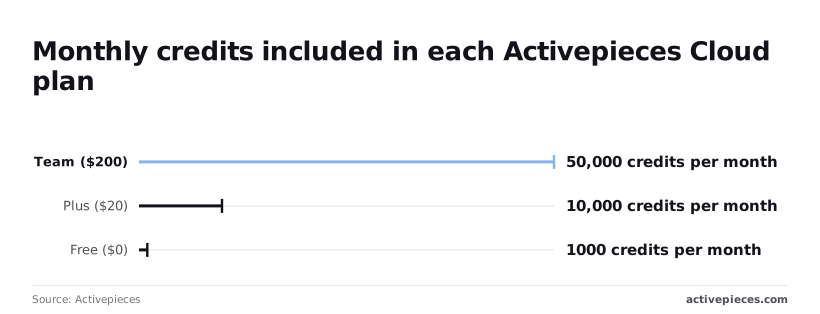
On Activepieces pricing, Free ($0) includes 1,000 credits per month, which is enough to prove a workflow works but not to run one that fires all day.
Plus ($20) includes 10,000, ten times the credits for $20, so a modest approval flow or a few syncs fit comfortably.
At Team ($200) you get 50,000 credits. That's ten times the price of Plus for five times the credits. On those headline numbers each credit costs twice as much at Team. Check what else Team adds before assuming you're paying for volume alone.

1. Activepieces
You can step off the cloud credit meter by self-hosting the open-source edition. You then own the servers, upgrades, backups and capacity planning. Heavy workflows are your problem to scale, not a vendor's.
Read the right-hand column of the table as the point where you should stop stretching Activepieces. Every plan, including Free, has unlimited flows, so the limit is never how many flows you build.
It is the missing interface, and that is where the other tool takes over.
| Job | Activepieces fit | Better pick |
|---|---|---|
| Approval flow | Strong: triggers, routing and notifications are its core work | Power Apps, if approvers need a polished form inside Microsoft 365 |
| Internal dashboard | Weak: it moves data and doesn't draw interfaces | Retool, for tables and controls over your databases |
| Customer portal | Poor: no customer-facing front end or user accounts | Bubble, for logins, pages and a public app |
| Integration between systems | Strong: this is the job it was built for | None needed unless you outgrow the credits |
So use Activepieces for the glue and approvals, and pair it with one of the other three when users need to see and click something.
Its cost depends on how often your workflows run, not on how many people use them: Plus's 10,000 credits for $20 cover 10,000 plain runs a month, however many steps each one has, which means headcount won't drive your automation costs.
Activepieces is the better fit for teams building multi-step workflows who want their bill to follow how often a workflow runs, not how many steps it contains.
Because its pricing page charges 1 credit per flow run regardless of step count, a ten-step approval flow costs the same as a two-step one, whereas Zapier bills per task and Make per module, so splitting work into smaller, more reliable steps costs more on those platforms.
The caveat is that the Team tier gives five times the credits of Plus for ten times the price, so high-volume buyers should check what else Team adds before assuming the per-run advantage holds at that scale.
Everything below works on Activepieces' free plan. Start without code or a credit card.
How to choose a low-code platform
Choose by what you're building first, then by how the price climbs with users or usage, and finally by the limit that ends the plan.
Every claim below was checked on 25 October 2026 against each vendor's own pricing or documentation page, and none of it comes from reviews or reseller summaries.
What you are building
There are three build types, and each fails in a different place. An internal tool has a known, fixed set of users, so seat pricing is predictable. A customer-facing app has an unknown number of users, so seat pricing can become your largest cost.
When the work is a process, there is no screen and everything runs on triggers, so the metered unit is usually runs or tasks rather than people.
Match the type before comparing anything else, because a platform priced for one shape punishes you when you use it for another.
Entry price and per-user scaling
Month twelve is not something the entry paid price can tell you. It is the cheapest plan that removes the free tier's restrictions, and what matters is the axis that grows:
- seats
- app usage
- workflow runs
If your department is a fixed size, a per-seat model suits it. If you can't cap the audience, a usage-metered model suits better. Exact amounts change often, so confirm them on the vendor's page before committing.
Before you compare prices, look at which platforms suit your shape of work. The table below sorts the four platforms by build type, pricing axis and ceiling.
| Platform | Build type | Entry paid price | How price scales | Hard limit | Best for |
|---|---|---|---|---|---|
| Power Apps | Internal tool | Per-user licence | By seat, with premium connectors licensed separately | Service request limits tied to each licence | Teams already working in Microsoft's ecosystem |
| Retool | Internal tool | Per-user plan | By seat, with different rates for builders and end users | Built around internal use, so external audiences are priced differently | Admin panels over existing databases and APIs |
| Bubble | Customer-facing app | Subscription plan | By plan tier and usage of its workload allowance | Performance and capacity bound to the plan's allowance | Public web apps with custom logic |
| Activepieces | Process | Plus, $20 a month | By plan and credits: 1 credit per run, however many steps | No built-in front-end builder | Workflows triggered by events across other systems |
Low-code platform plan limits that cap growth
At some point more money stops fixing the problem. That is the hard limit. For a seat-based tool, it's a request or connector cap that throttles you regardless of headcount. For a usage-metered app, it's a capacity ceiling that appears under load.
For a process tool, it's the absence of an interface for the people who need one.
Read the limits page before the pricing page, because it tells you whether the cheap plan can survive your busiest day.
Next, each build type is tested against these limits in turn.
Microsoft Power Apps
Power Apps suits organisations already on Microsoft 365 and Dataverse. It stops being cheap or simple at licensing, where per-user versus per-app plans and premium connectors decide the bill.
Underneath Power Apps sits Dataverse, Microsoft's managed database. It holds:
- tables
- relationships
- row-level security
It's where the governance story comes from.
Power Apps licence limits and Dataverse storage
Start with the ceilings. The plan you pick decides how much Dataverse storage comes with it, and storage is where a cheap pilot turns into a surprise invoice. Prices below are from Microsoft's own pricing page, checked 25 October 2026.
According to Goodspeed, the per-user plan costs $20 per user per month and includes 250 MB of database capacity. The per-app plan costs $5 per user per app per month and includes 50 MB, which means costs scale multiplicatively across users and apps.
A team that picks the per-app plan for its low headline price is buying a fifth of the database room. Any app that stores attachments, audit history or years of records will reach the limit early.
If an employee uses three internal tools, that is three licences, not one. The per-app plan scales differently from the per-user plan because its price multiplies by the number of apps each person opens.

Whether per-user or per-app is cheaper depends on how many apps your people actually touch, and that count tends to grow after launch. Model it against the app portfolio you expect in a year, not the one you're building this quarter.
Power Apps premium connectors explained
Next comes the second constraint: connectors. A connector is the prebuilt link between an app and an outside system. Microsoft classes some of them as premium, and an app that uses one can't run on the connectors bundled with a Microsoft 365 licence.
The first time someone adds a link to an external system, an app that looked free to build on existing seats can need a paid plan for every user. Check each connector's classification before you commit to a design.

In return you get integration and control. Apps inherit Microsoft Entra sign-in, sit alongside SharePoint and Teams, and can be governed through environments that separate development from production. That's a strong position for internal tools.
If the people using your app are outside your Microsoft tenant, the fit matters less, a case the customer-facing section picks up.
Easier to see it running than to read about it: set it up free, no card.
Retool low-code platform for internal tools
Retool is a fit for engineering-adjacent teams building internal tools on databases and APIs, and a weaker one for apps customers log in to. It has no tenant to sit inside.
Start with where it stops being cheap.
Retool charges by user type, and the gap between plans is the constraint.
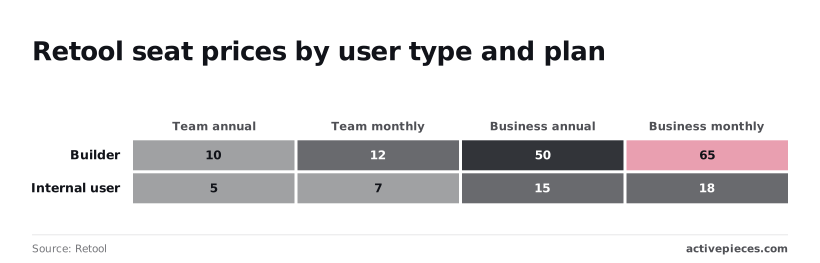
According to Retool, builder seats cost $10 to $12 per user per month on Team and $50 to $65 on Business, so moving up a plan multiplies the cost of every person who edits an app by roughly five.
Retool pricing at scale by tier
Per Retool, internal users, who only run apps, go from $5 to $7 on Team to $15 to $18 on Business, which means Business tier costs roughly 2-3 times as much. That's roughly a tripling.
With 20 builders and 200 internal users, the low end of Team comes to $1,200 a month, so annual Retool spending alone exceeds $14,000.
Plus is $20 a month and Team is $200 a month, both self-serve. Ultimate and Embed are quoted through sales.
If a feature you need sits behind Business, you pay that multiple on every seat of both types, not just the seats that need it.
Because every person who logs in is a seat, the pricing also explains the weakness with customer-facing apps. The per-seat rates above are priced for staff headcount, not a public user base.
A tool for 200 employees is a modest line item. The same model applied to thousands of customers is not.
Retool database and API connectivity
What you get for the money is connectivity. Retool talks directly to:
- SQL databases
- REST APIs
- GraphQL APIs
A tool for 200 employees is a modest line item. The same model applied to thousands of customers is not.
And queries run with JavaScript where the visual layer runs out. That escape hatch is why engineers tolerate it: when a transformation doesn't fit a drag-and-drop block, you write it.
The cost is that the people maintaining these apps need to read code, so "citizen developer" is the wrong expectation.
Connecting to third-party services such as Google Sheets, Slack or Microsoft Excel often means registering your own OAuth2 app and entering its client ID and client secret by hand. The screen below walks through that setup.
Treat that as a one-time cost per integration. Once credentials are in place, it's the seat count that moves your bill, so model your builder-to-user ratio before choosing a plan.
Bubble.io for customer-facing apps
Bubble suits teams building customer-facing web apps without code. Its bill follows usage, not seats: the meter is workload units (WU), Bubble's measure of the server work your app does.
Check the ceilings before the features. Every plan includes a WU allowance, and every page load, database search and workflow run draws it down. A screen that runs several unfiltered searches costs more on each visit than one that fetches only what it displays.
When traffic grows, the bill climbs harder if the app was built carelessly, and performance tuning becomes a cost task as well as a speed task.
Bubble also caps how much capacity an app can use, so a heavy app eventually needs deliberate optimisation as well as a bigger plan.
What you get for that is full-stack visual building. The database, the page editor, the logic workflows and user accounts all live in one place. A founder can ship a marketplace or client portal without wiring a separate backend.
Leave Bubble and you rebuild the app. That is the trade-off, lock-in: you can export your data, but the pages and workflows don't convert into code you can host elsewhere.
Bubble overage rates for workload units
Once a plan's allowance is spent, Bubble charges $0.30 per 1,000 WU, and that is where the budget surprises come from.
It sounds small until a traffic spike or a badly built recurring workflow burns through units: a million extra WU would cost $300 in one cycle, which means a single workflow mistake can cost hundreds of dollars.
Bubble add-on tiers to lower overage
You have two levers on the rate. A Tier 1 add-on at $29/month lowers it, so it pays for itself only if your overage regularly runs past what that fee saves.
Websites2know's Tier 2 sets overage at $0.14 per 1,000 WU, less than half the base rate, so the same million extra units would cost $140.
Figure 1. Here's how a Bubble overage bill builds up, per Goodspeed: plan workload units run out and overage is charged at $0.30 per 1,000 WU. A Tier 1 add-on ($29/month) cuts it, and Tier 2 sets it at $0.14 per 1,000 WU.
Before you pick a plan, estimate your monthly WU. Build the busiest screen, run it with realistic data, and read the usage in Bubble's logs. That tells you whether you'll sit inside the allowance or live on the overage rate.
3. Next steps: run a one-week trial
Build one real use case on the platform that matches your build type before you buy anything. Each vendor meters something different, so a week of real usage tells you more than any pricing page.
You only find your ceiling by loading your own workload, and internal tools, customer-facing apps and process automation each hit a different one.
Scalability limits come first in this trial, because features rarely cause a migration. A row cap, a run quota or a per-user fee does.
To keep the trial honest, follow the order below. Each step produces something you can write down and show to whoever signs the invoice.
- Pick one real use case that your team would actually use, such as an approvals flow or a customer portal. A demo app tells you nothing about the limits you'll hit.
- Build the same slice on the matching platform. Take one vertical integration: a form, one integration, one permission rule. If you trial two platforms, build the identical slice on both, so differences come from the vendor and not from scope.
- Load real data and real users. Import your actual records and invite the people who'll use it. Synthetic data hides slow queries, and a small test group hides seat-based pricing.
- Record cost and limits hit. Keep a running log of every quota warning, throttled call, feature locked to a higher tier and charge on the usage page. This log is your forecast for month six.
- Test export. Pull your data, workflows and app definitions out. Check whether the output is usable elsewhere or only readable by the vendor's own tooling. This tells you what leaving would cost.
- Re-check prices. Open each vendor's pricing page on the last day and compare it to your notes. Plans, limits and overage rules change, so a figure from an old comparison, including the ones in this article, is a starting point and not a quote.
Treat the log from steps four and five as the deliverable.
If the platform survived real data, stayed inside its limits at your expected usage, and let you take your work with you, it has earned a longer commitment. If it failed any of those, you found out in a week, not after a contract.