
Marketing Automation in B2B Industries: How It Works
Learn how marketing automation in B2B industries work. Discover how Activepieces can help you automate common marketing workflows with ease.

Dec 24, 202514 min read
Teams often decide to use B2B marketing automation after work starts piling up. Leads arrive from forms, ads, and email campaigns, yet no one feels sure what should run on its own and what still needs a human.
Every tool claims it can help, but none explain where to begin. That lack of clarity slows progress and creates hesitation.
A focused starting point will help you reduce manual work and act with confidence. In this article, you’ll learn what to automate first and why those areas matter most.
Build B2B marketing automation that actually runs end-to-end. Get started with Activepieces!
TL;DR
- B2B marketing automation helps manage marketing processes through automated follow-up emails, lead handling, and handoffs.
- It streamlines key marketing activities like lead capture, segmentation, scoring, and CRM sync.
- Activepieces connects your existing B2B marketing stack into one workflow.
- Common automations include lead routing, nurturing, onboarding, and meeting-to-task flows that improve customer retention.
Everything below works on Activepieces' free plan. Start without code or a credit card.
What Is B2B Marketing Automation?
B2B marketing automation helps you manage marketing tasks with the use of software, which minimizes the risk of human error and allows your managers to focus on more important tasks. Automation is great for long buying cycles that involve many people on the same account.
B2B marketing automation software tracks how prospects interact with pages, content, and messages, then reacts based on those actions. That approach gives marketing teams signals about interest.
In practice, B2B marketing automation relies on platforms to automate various marketing tasks, such as:
- Lead capture
- Segmentation
- Lead scoring
- Follow-ups tied to email campaigns
Unlike consumer setups built around quick purchases, B2B automation supports complex marketing processes that can span months and involve multiple decision-makers.
Each interaction triggers a response: a download creates a profile, segmentation groups leads by role or company size, and lead scoring adjusts as behavior changes.
How Marketing Automation Software Works
B2B marketing automation platforms control how prospects receive messages and move through buying cycles. It supports your marketing efforts by tying actions and timing together inside one system.
These platforms manage campaign activities, including lead generation, customer segmentation, data aggregation, and cross-channel campaign management.
Common capabilities include:
- Workflow builders that react to page visits, downloads, and email activity
- Rule-based logic that creates specific audience segments based on their behavior and preferences
- Central tools for managing multi-channel campaigns from one place
- Dynamic content that supports personalized customer interactions
Why Activepieces Is the Best Automation Tool for B2B Marketing

Activepieces is an AI workflow automation platform that serves as a connective layer for your B2B stack.
You’re likely already relying on multiple tools for lead generation, email marketing, analytics, and CRM, and those tools rarely work together well. Instead of replacing platforms, Activepieces coordinates them.
You can also design the workflow logic visually, connect triggers to actions, and adjust flows as needed. AI agents are another essential feature that adds another layer by reviewing context and choosing the next steps.
That setup supports aligning marketing and sales activity without forcing both teams into the same interface. Data moves once and remains consistent across tools through reliable CRM integration, which reduces manual fixes and missed handoffs.
Key Integration Categories Supported by Activepieces
As of now, Activepieces supports 556 pre-built integrations used for automating workflows:
- Customer relationship management tools: HubSpot, Salesforce, Microsoft Dynamics, Zoho CRM
- Email marketing: ActiveCampaign, Mailchimp, Brevo, EmailOctopus
- Lead capture and forms: Facebook Lead Ads, Google Forms, Typeform
- E-commerce platforms: Shopify, WooCommerce, BigCommerce
- Team communication: Slack, Discord, Microsoft Teams
Bring your entire B2B stack together without limits. Talk to the Activepieces team today!
Tools Commonly Integrated in B2B Marketing
Marketing automation can help you streamline processes by integrating tools your team uses daily. Common tools include:
CRM Systems
Customer relationship management platforms provide a shared view of each account. They store the relationship history once a lead turns into an active deal.
Marketing and sales teams can work better together when their foundational systems are also in sync, since both sides work from the same records. Leads move from automation into CRM with full context intact.
Then, deal stages remain visible within a defined sales funnel, such as: Discovery, Demo, Proposal, Negotiation, and Closed. That structure lets you review pipeline health and forecast revenue.
Common CRM platforms include:
- Salesforce
- HubSpot CRM
- Microsoft Dynamics 365
- Pipedrive
Each option also integrates with CRM for better data management, which keeps customer data consistent within systems.
Advanced Analytics Tools
Robust analytics tools explain which actions influence revenue over time. Rather than focusing on surface metrics, these platforms connect behavior from channels and people.
Modern platforms rely on data analytics to track long paths involving several contacts at one company. Attribution models spread credit to early research, lead creation, and closed deals.
In addition, it helps you analyze data and metrics regularly to optimize campaigns and adjust spend based on results.
Common tools include:
- Google Analytics 4
- HockeyStack
- Dreamdata
- Adobe Analytics
AI Tools and AI Agents
AI tools and agents change how work moves through modern marketing technology stacks. AI tools support individual tasks, while AI agents operate with more independence after receiving goals.
AI tools often help with:
- Drafting content, emails, and marketing messages
- Creating social media posts from short briefs
- Predicting deal outcomes from past data
Examples include Jasper, Copy.ai, and built-in AI features inside HubSpot.
Marketing AI agents, on the other hand, research accounts, update CRM records, send outreach, and book meetings. Platforms such as Artisan and OpenAI Operator support these setups.
Both categories reduce manual work when connected to existing systems.
Easier to see it running than to read about it: set it up free, no card.
Marketing Automation in B2B Industries: What to Automate First
These are what you should automate first:
1. Inbound Lead Management
Inbound lead management covers everything that happens after someone shows interest but before a sales conversation starts. It helps you manage leads throughout the buying process by tracking actions, assigning ownership, and keeping records up to date.
Form to CRM Sync
Form to CRM sync connects every form submission directly to your CRM the moment it happens. Sources may include lead forms from landing pages, lead magnets, social media ads, or cold emails.
In B2B, response rates drop fast after the first few minutes. Automation removes waiting and manual entry, which keeps interest alive.
The record further tells your sales team exactly which marketing campaign brought the lead in, whether that came from ads, a blog post, or a webinar. With this setup, you’ll have a proper lead tracking system that shows intent, history, and source in one place.
Lead to CRM in Activepieces
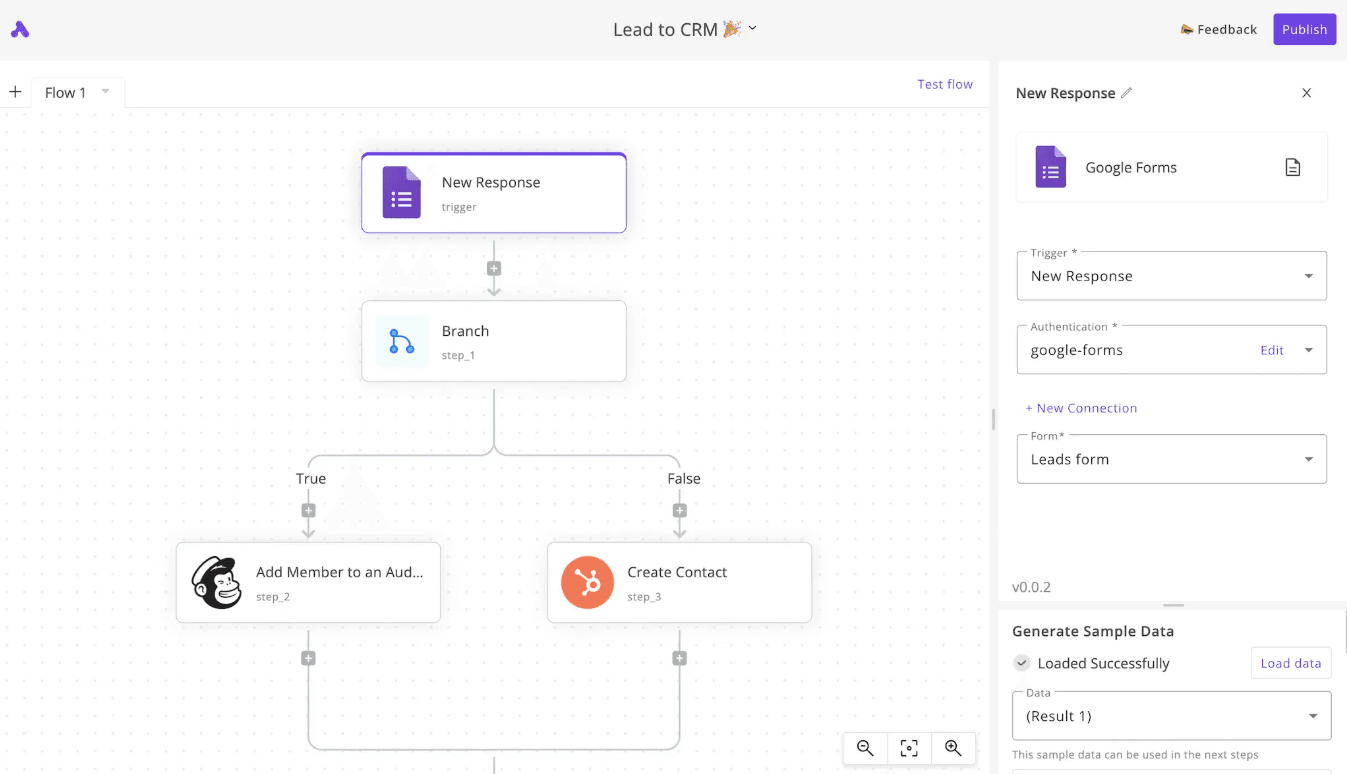
Lead to CRM captures new Google Form submissions and routes each lead to the right destination automatically.
To get started:
- Create an Activepieces account, then click “Start Building” to open the automation builder. Name your flow like “Lead to CRM”.
- Add “Google Forms” as the first step and select the “New Response” trigger. Connect your Google account and choose the form you want to monitor. Click “Load Data” so you can access form fields such as email, first name, and last name.
- Add a “Branch” step to classify leads. Select the email field from the form, set the condition to “Text Ends With “, and enter @gmail.com. This determines how each lead is handled.
- Under the “True” path, add a “Mailchimp” step using “Add Member to an Audience.” Connect Mailchimp, map the email from the form, select the audience, and set the status to “Subscribed.”
- Under the “False” path, add a “HubSpot” step with “Create Contact.” Map first name, last name, and email from the form, then test to confirm the contact is created.
- After the branches rejoin, add a “Gmail” step with “Send Email.” Enter your notification email address and include lead details in the message.
- Run “Test Flow,” submit a form response, and once everything succeeds, click “Publish” to go live.
2. Behavioral Nurturing
Behavioral nurturing supports prospects who show interest but are not ready to speak with sales.
Most B2B buyers spend weeks or months researching before they reach out, often involving several people inside the same company. Behavioral nurturing keeps those prospects engaged during that time.
Lead Nurturing
Lead nurturing focuses on guiding prospects through the buying journey using behaviors. For instance, emails, ads, or messages change depending on what the prospect reads, clicks, or ignores.
A typical behavioral setup works like this:
- A target audience visits a specific product or topic page
- The system recognizes repeated interest in that topic
- The workflow shifts the lead into a more focused track
- The system sends relevant content based on what the prospect actually does
That approach replaces generic education with targeted guidance.
Daily Lead Nurturing Automation in Activepieces

Lead nurturing workflow in Activepieces sends one thoughtful, value-driven email to one of your leads every day. It shares a relevant article or resource, so you naturally stay top of mind.
- Start by adding a “Schedule” trigger in Activepieces. Set it to run every day at a specific time (e.g., 11:00 AM).
- Add “Ask AI” and have it generate a random number. You’ll reuse this same number throughout the flow to keep everything randomized and human-like.
- Now connect a “Google Sheet” or another data source where your leads live. You can use the random number to select one lead from the sheet. The sheet should include:
- Lead name
- Email address
- Connect another “Google Sheet” that contains your curated content. Use the same random number to select one article or resource. The sheet should include:
- Article or resource title
- Short description
- Link
- Add “Text AI” to draft the email. Pass in the qualified leads’ names and the selected article details. Ask AI to write a friendly, conversational message that sounds like you.
- Include a “Delay” step and use the same random number to set the delay in minutes. That way, the email doesn’t always send exactly at 11:00 AM. It might go out at 11:14 or 11:26, which feels much more natural.
- Add your email action and send the AI-written message to the selected lead. The email should include the article link and end with a soft prompt inviting them to share their thoughts.
- Click “Test Flow” and watch it run. Check your inbox to confirm the email looks right, sounds human, and includes the correct article and personalization.
3. Sales Enablement
You lose time when records stay incomplete, or conversations disappear after meetings. Sales enablement automation reduces that friction by enriching data and capturing conversations automatically.
Meeting Note Sync
Meeting note sync captures sales calls and stores structured summaries in the CRM. AI tools record meetings, convert speech to text, and extract key points for you.
Each synced meeting produces:
- A full transcript is attached to the correct deal
- Action items with owners and deadlines
- Tagged buying signals, such as budget or objections
- Optional Slack summaries for team visibility
Meeting to Asana Tasks Automation in Activepieces

Once a call ends, Fireflies transcribes the meeting, Activepieces processes the transcript, and tasks appear in Asana with owners and due dates already set.
- Click “Start Building” or clone the provided flow template.
- Set up the “Fireflies” connection by opening the Fireflies app, going to “Integrations,” copying the API key, and pasting it into the Fireflies piece in Activepieces.
- Enable “Google Drive” from the Fireflies integrations page and keep the default settings, so every transcript is saved as a PDF.
- Connect “Asana” by logging into your account when prompted in Activepieces.
- Open the flow and confirm the trigger listens for a new PDF file added to Google Drive when Fireflies finishes transcribing.
- Add or verify a “Google Drive Search” step to locate the new transcript, then use a “Read File” step to load the PDF contents.
- Add the “Utility AI” step and configure it to extract tasks in JSON format, including:
- Task name
- Description
- Assignee email
- Due date
- Add a “Loop” step to process each task.
- Create an “Activepieces Table” as a team directory with email and Asana user ID columns, and populate it once using each teammate’s Asana profile ID.
- Inside the loop, add a “Find Record” step to match emails to Asana IDs, then add an “Asana Create Task” step.
- Test the flow and publish it to run automatically after every meeting.
4. Customer Lifecycle
Customer lifecycle automation supports customers after a deal closes. Early experiences and renewal timing strongly affect long-term revenue. You can automate:
Onboarding
Automated onboarding starts the moment a deal closes, which raises customer satisfaction since they don’t need to wait for a long time. The system sends welcome messages, assigns owners, and tracks early usage. Communication adjusts based on actions rather than fixed schedules.
Common steps include:
- Immediate welcome emails with access details
- Setup guidance during the first day
- Usage checks during the first week
- Meeting links once setup completes
Fast value reduces anxiety after purchase and raises customer satisfaction. Tracking early behavior shows where customers struggle, so you can fix issues before frustration grows.
Automated Client Onboarding in Activepieces

Automated client onboarding removes manual follow-ups and gives every new client the same polished first experience. After a client submits your onboarding form, emails are sent, records are created, tasks are assigned, and your team is notified automatically.
- Log in and click the purple “New Flow” button in the top right to begin.
- Select “Jotform” and set the trigger to “New Submission.” Connect your Jotform account, choose your onboarding form, and test the trigger by submitting a sample response.
- Click the plus icon, select “Gmail,” choose “Send Email,” and connect your Gmail account. Write a short thank-you message that explains what happens next, then test the step.
- Select “Pipedrive” or another CRM, choose “Add Person,” connect your account, and map the client’s name and information from the form. Test to confirm the record is created.
- Create onboarding tasks for your team by adding “ClickUp” as the next action. Choose “Create Task,” select the correct space and list, and define the task details.
- Finish by adding “Slack.” Send a message to a channel with the task information so your team knows what to do next.
Set Up Your B2B Marketing Automation Flows With Activepieces

Activepieces is a workflow automation platform that lets you connect complex B2B stacks with your existing tools.
Most organizations use separate systems for CRM, email, ads, analytics, and internal operations, which often leads to broken workflows and delayed actions. Activepieces sits between those apps and coordinates how data and logic flow across them, so you work within a single connected flow.
Currently, there are 556 data integrations, called pieces, that cover marketing, sales, operations, finance, and AI services. A large part of that integration capability comes from the open-source community, which keeps integrations current and expanding.
Developers can also create custom pieces in TypeScript, which removes limits when workflows grow more complex.
It also gives you:
- A visual no-code builder that non-technical users pick up quickly
- Native AI agents that research context and choose next actions
- Human approval steps for sensitive workflows
- Self-hosted or cloud deployment with strong security controls
Make your B2B marketing automation connected and easier to manage. Try Activepieces today!
FAQs About Marketing Automation B2B
How does B2B marketing automation improve lead quality?
B2B marketing automation improves lead quality by tracking real behavior and reacting based on intent. Scoring and segmentation help teams improve customer engagement while removing low-interest leads early. Systems also automate repetitive tasks, which keeps data accurate and raises engagement and conversion rates.
How do AI agents fit into B2B marketing automation?
AI agents act inside workflows and choose next steps based on context. They support personalized communication at scale and keep follow-ups moving without delays.
What is the best B2B marketing automation strategy?
A strong strategy focuses on buyer behavior, clean handoffs, and effective marketing strategies that support long-term business growth rather than short-term volume.
What are the benefits of implementing marketing automation?
Marketing automation reduces manual work, improves targeting, delivers personalized experiences, and supports drip campaigns that lead to sustained revenue growth.