
Mux Pricing in 2026 Is Cheap Until Delivery Minutes Add Up

Nov 8, 202616 min read
Mux has four plans: Free, which suits anyone wiring up a side project or testing a workflow built in a tool like Activepieces; Launch at $20 a month with $100 of usage credit; Scale at $500 a month with $1,000 of credit; and Enterprise by quote.
The monthly fee is only a credit against metered usage, so it's not your bill.
What Mux is and how it bills
Mux is a video API that charges mainly for usage:
- minutes encoded
- minutes stored
- minutes delivered
You pay for encoding once per upload, but storage and delivery recur. Delivery also scales with every view.
Activepieces charges 1 credit per flow run however many steps the run contains, so a ten-step upload flow costs the same as the two-step shortcut it replaced, whereas Zapier bills per task and Make per module.

Mux's three meters stay on Mux's side either way, and only the automation around them is priced by the run.
Mux describes entry as $20 for $100 of usage, or free with pay as you go, so the plan fee buys a credit ratio and not a capacity limit.
The plan table, checked against Mux's pricing page
Read the credit column as the amount of usage the fee pre-pays, not as a cap on what you can consume. The table lists each plan's fee and credit.
| Plan | Price | Credit | Inclusions | Usage limits | Link |
|---|---|---|---|---|---|
| Free | $0 | None; pay as you go | Start without a card commitment on the fee | Metered per minute on each line | Mux |
| Launch | $20/mo | $100 | Usage drawn from the credit first | Metered per minute beyond the credit | Mux |
| Scale | $500/mo | $1,000 | Usage drawn from the credit first | Metered per minute beyond the credit | Mux |
| Enterprise | Contact sales | Negotiated | Custom terms | Set in contract | Mux |
Caption: checked 2026-11-08.
Five times its fee comes back as credit on Launch and twice on Scale, so the choice between them depends on how much usage you expect to spend, not on features.
When Mux dropped prices in its July 2025 price drop, it cut:
- storage by 23%
- encoding by 22%
- delivery by 17%
Delivery fell least, and it's the line that grows with viewers. Storage and encoding fell furthest, which helps catalogue-heavy apps. An app with a small library and a large audience therefore saw the smallest relief on its biggest cost.
You can upload and prototype without a fee, since Mux lists on-demand input at starting at $0. The cost shows up once you store and watch videos.
A free-tier prototype is a fair test of the integration but a poor predictor of the bill, which is why the modelling later in this article matters.
First invoice breakdown for a small video app
At 50,000 minutes delivered in a month, a small video app pays nothing for delivery, because the free allowance absorbs the whole line. That's why the first invoice says so little about the tenth.
Assumptions in the Mux pricing example
This is a modelled app, not a real customer. According to Costuse, it uses Basic-quality encoding, which costs $0, so encoding contributes nothing however many videos you upload. Viewers watch 50,000 minutes in the month.
Because storage depends on how much video you keep, this model leaves it out rather than guess at a library size, so treat the totals below as excluding storage.
Encoding, storage and delivery, priced separately
The free allowance is 100,000 minutes.
The delivery bill is therefore $0, so you owe nothing for video delivery. The app is at half its allowance, with room for the audience to double before Mux charges anything.

| Line | Quantity | Rate | Line cost | Month total (Free) |
|---|---|---|---|---|
| Encoding (Basic) | Any | $0 | $0 | $0 |
| Delivery, list | 50,000 min | $0.0008/min | $40 | $40 |
| Free allowance | 100,000 min | $0.0008/min | −$40 | −$40 |
| Total, excluding storage | $0 |
Look at the zero in the table: it is a credit, not a missing charge. The $40 is still calculated, and the allowance cancels it, so no charge appears on your bill for those minutes.
Judging a plan by this month alone would hide how close the app sits to the point where the credit runs out.
Why Mux delivery minutes grow fastest
Only one line moves, and it's delivery. Encoding is fixed at $0 on Basic, and storage grows with the library, not with viewers.
Once viewers pass 100,000 minutes, Mux bills extra minutes at $0.0008 per minute at 720p, so each additional 10,000 minutes adds $8. The meter is invisible while the allowance lasts, then runs continuously, and the growth tracks audience size.

That's the line to model before choosing a plan, which the next section does.
If you are running this arithmetic for your own team, see what the same workload costs on Activepieces.
Hidden costs and limits that surprise Mux customers
Expect four surprises: resolution tiers that multiply per-minute rates, add-ons metered separately, free-plan ceilings, and assets that keep billing after anyone stops watching them.
How resolution changes Mux delivery pricing
According to Price Timeline, 720p costs $0.0024 per minute and 1080p costs $0.003, so the common jump to full HD adds 25%. At 1440p the rate is $0.0048, double 720p, so choosing higher resolution delivery doubles your per-minute cost.

At 4K it's $0.0032, four times 720p. A catalogue served at 4K by default therefore costs four times what the same viewing would at 720p.
Add-on features billed on their own meter
Don't expect the base rate to cover add-ons. Plus quality encoding runs $0.03125 per minute, where Basic is free, so a one-hour upload adds $1.875 before anyone presses play.
A 10,000-play month of DRM comes to $130, since it's $100 a month plus $0.003 per play. Premium captions consume 500 Robots units per minute, so a one-hour video draws 30,000 units from your balance.
Limits on the free and entry plans
On a free account the caps are operational rather than financial. A prototype that works in testing can hit a ceiling on its first real traffic, and by then the fix is an upgrade made under deadline rather than one chosen after modelling usage.
Read the limits for your plan before launch, and treat any ceiling you would reach within a month as already crossed.
Mux storage costs for idle assets
Whether or not an asset is ever played, storage bills for it until you delete it. Test uploads, abandoned drafts, and superseded encodes accumulate quietly, and the charge grows with each one.
Whether or not an asset is ever played, storage bills for it until you delete it.
Because storage is metered per minute of video, a library of forgotten 4K test files costs more than the same count at 720p. A monthly cleanup, or a deletion rule tied to your upload workflow, keeps this line near zero.
Mux against Cloudflare Stream, API.video and Bunny Stream
At the month where the plan's included usage, priced against your modelled minutes, costs less than the same minutes billed pay-as-you-go, a bigger Mux plan wins. You can only find that month by running the usage lines from the previous section through both price lists.
The point where a bigger Mux plan wins
When you pay as you go, each usage line bills at its own rate, so the bill climbs in step with minutes encoded, minutes stored and minutes delivered. A paid plan swaps part of that for a fixed fee plus an included allowance.

That produces a crossover: below it, the fee buys allowance you never use, and you pay for headroom. Above it, every included minute displaces a metered one, and the fee pays for itself.
Delivery is the line that moves you across, because it scales with viewers while encoding and storage scale with what you upload.
An app that publishes little but gains audience will cross the threshold on delivery alone. An app that uploads heavily to a small audience may never cross it.
So the check is to compute your monthly total on both bases at your expected viewing minutes, then again at double that, and see whether the ordering flips.
If it flips inside your growth horizon, choose the plan that wins at the higher figure and accept a small overpayment now.
Mux alternatives priced for the same app
To see which charge each vendor makes you carry and which it folds in, put the same example app through each pricing model in the table.
Read the encoding and analytics columns first: they show where a vendor's headline rate leaves a separate line on the invoice.
| Pricing model | Cost of the same example app | Free tier | Encoding charge | Analytics charge | |
|---|---|---|---|---|---|
| Mux | Usage-based lines, with plans above them | Modelled in the next section | Limited free allowance | Metered | Metered separately |
| Cloudflare Stream | Prepaid storage plus delivery per minute | Modelled in the next section | None for Stream | Folded into storage | Included at basic level |
| api.video | Per-minute usage with plan tiers | Modelled in the next section | Sandbox for testing | Metered | Varies by plan |
| Bunny Stream | Storage and bandwidth rates | Modelled in the next section | Trial period | Not billed separately | Included |
Mux details checked November 2026; confirm against the live price page before committing, as usage rates are revised.
Don't read those cells as final amounts; they describe how each vendor structures its bill. The totals come from running your own viewing minutes through each model.
When a Mux alternative fits better
Choose an alternative when the line Mux meters separately is one you can't avoid. If your app uploads a large library and encoding dominates, a vendor that doesn't bill encoding on its own changes the result.
If you need per-view quality analytics, Mux's separate metering buys depth the cheaper options don't match, so exclude that charge only if you won't use it.
Worth checking against a plan that does not meter every step: one credit covers a whole run on Activepieces.
Catching a Mux usage spike with Activepieces
Before a viewer spike turns into a surprise invoice, Activepieces, whose core is MIT-licensed, can watch your Mux usage on a schedule and warn you. It only reports the bill and never changes it.
If you keep a metered feature such as per-view analytics, the cost of that choice still moves with traffic, which is why the distinction matters after the last section. Nothing in the plan itself will tell you when it has moved too far.
One fact carries the mechanism: Mux exposes usage through its API, so the numbers behind your invoice can be fetched without opening the dashboard.
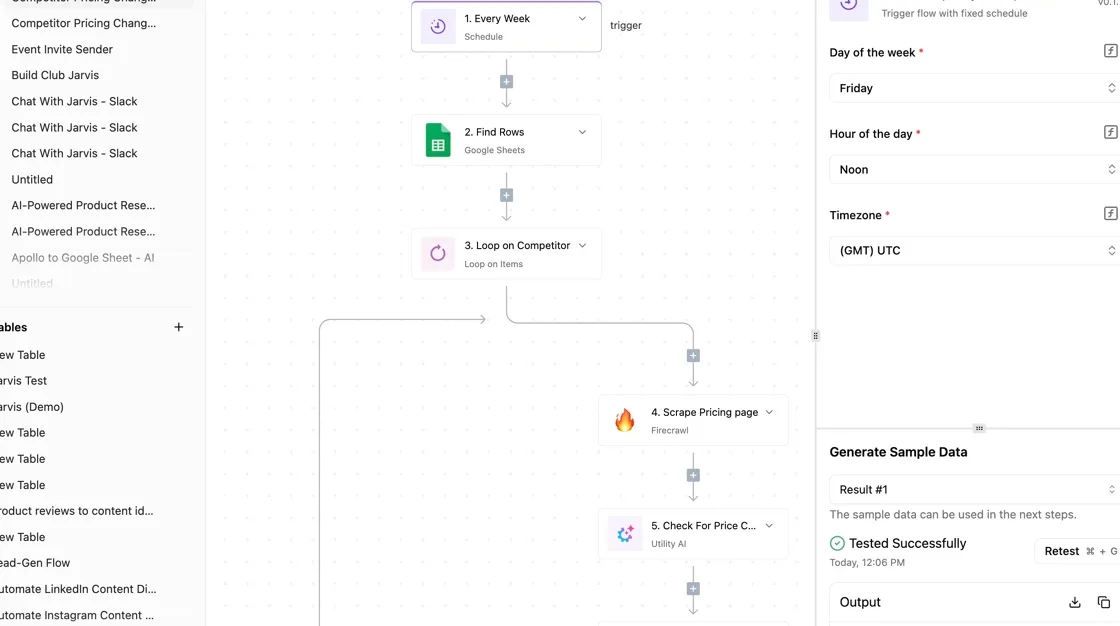
Running on a timer, the workflow below pulls the usage figures for encoding, storage and delivery, projects them to the end of the month, and then either pings a channel or appends a row to a sheet.

Trace the path in the diagram from trigger to branch: the eye icon marks it as observation only. No step touches your Mux configuration, so a bad estimate costs you a false alarm, not an outage.
What the workflow checks and when it alerts
Start with the trigger: it's a schedule, and its frequency is your first real decision. Delivery is the line that grows with viewers, so a daily check catches a spike while it's still a small share of the month.
A weekly check can let one viral video run for days unseen.
After the usage fetch, the estimate step takes month-to-date totals and extrapolates them across the remaining days. Be aware of the limit of that arithmetic: a straight-line projection assumes the rest of the month looks like the days so far.
An early spike overstates the total and a late one understates it.
Set the branch threshold from your own model, ideally the point where the next plan becomes cheaper, and compare projected spend with it. Above it, the workflow posts to Slack.
Below it, the workflow writes a row to a sheet, which builds a record of how usage tracks against your forecast. That record is what lets you revise the model rather than guess again.
Alternatives that need no extra tool
You don't need Activepieces for this, though cost isn't the reason to skip it: a daily check is about 30 runs a month against the free plan's 1,000 credits.
Mux's own dashboard alerts can notify you on usage thresholds, which suits a team that wants no extra moving parts, though you accept whatever conditions the dashboard offers.
If you already have cron, a scheduled script calling the same API does the identical job in a few lines. The trade-off is maintenance: a script has no visual run history, while a workflow tool gives you one and adds a service to host.
Monday work before the next Mux bill
Whether you automate this with a script or a workflow tool, the Monday work is the same six steps, and none of them needs new infrastructure:
- Pull last month's usage for encoding, storage, and delivery.
- Price those quantities against the current plan table.
- Set a spend threshold and an alert.
- Delete test assets.
- Choose resolution tiers deliberately.
- Set a recheck date for the crossover.
Do the first two steps and you have the bill you would have paid on each plan, which is the only comparison that matters.
Price last month's usage
Export the three usage lines for the last full month, then multiply each by the rate on every plan's pricing page. Don't start from the headline plan price.
Start from the quantities, because delivery scales with viewers while the plan fee doesn't. If one plan's included allowance covers your storage but not your delivery, the total will show it, and the cheaper plan is often not the one with the lower sticker.
Set a Mux spending cap and alert
Set the threshold a little above your modelled bill, so an alert means something changed rather than that the month ran normally.
Check whether your account supports a hard limit or only notifications. If it's notification-only, a runaway embed or a crawler hitting your player can outrun you before anyone reads the email.
Then clean up. Test uploads keep accruing storage until someone deletes them, and a forgotten staging library quietly adds to every bill.
Finally, review which resolutions you actually encode. Every tier you generate adds encoding and storage cost, and a tier few viewers ever reach is cost with no audience. Limit tiers to what your player and your typical connection can use.

Write the date in your calendar when you finish, not "sometime later." The crossover, where the next plan becomes cheaper than paying usage fees on the current one, moves whenever your audience grows or the vendor changes its rates.
Reopen the live pricing pages, rerun step two with fresh usage, and switch only if the numbers say so.
Frequently asked questions
After the modelling is done, four questions come up, and each has a short answer here, with the vendor page that settles it.
Is Mux free for a hobby project?
For development and small experiments, Mux has offered a free plan. Its caps on stored and delivered minutes change, so read them on the live pricing page rather than from this article.
Treat the free plan as a place to test playback, not as a forecast of your bill, because a hobby project that gains viewers hits the caps on delivery first.
Does Mux charge when nobody watches?
Nobody has to press play for Mux to charge you, because of storage. Encoding is billed once when a video is ingested, and storage accrues for as long as the asset exists.
Delivery is the only line that stays at zero when nobody presses play. A large back catalogue of unwatched videos therefore costs you every month, so delete assets you no longer need.
Can you leave Mux without re-uploading?
You can move off Mux without re-uploading everything only if you kept your own copies of the originals. Mux's encoded outputs are tied to its delivery setup, so a new vendor will re-encode from source files, and you pay that vendor's encoding fee again.
Keep originals in your own storage from the first upload, and check Mux's documentation on downloading originals before you rely on it.
Is committed-use pricing available to small apps?
Don't expect committed-use pricing as a small app: Mux offers it only to larger accounts, which negotiate contracts instead of paying the published rates, and those terms aren't public. Plan against the listed rates and treat any negotiated rate as an improvement you earn later.
Where are the open questions answered?
Below, four pointers show where each open question is answered:
- Which free-tier limits apply today? The free plan section of mux.com/pricing.
- What does DRM add to the bill? The DRM add-on listing in Mux's pricing and product documentation.
- What would Enterprise terms cost? Mux's sales contact route, since contract pricing is quoted rather than posted.
- Would a rival be cheaper at my volume? Each competing video vendor's own pricing page, run through the same usage model.
Related reading
References
Running the numbers
See what the same workload costs here.
Free forever plan, and every paid plan self-hosts at no extra cost.
See pricing Talk to sales