n8n Environments: How to Set Them Up (2026 Guide)

Oct 26, 202614 min read
What n8n environments are and are not
What an n8n environment actually is
An n8n environment is a separate n8n instance, one for development and one for production, linked through source control; it's not a switch you flip inside a single instance. Nothing in the editor changes which "world" a workflow runs in.
It shows two boxes, each holding its own workflows and its own credentials, joined only through a Git repository, much as an Activepieces setup might be split between environments, with a crossed-out toggle inside one of them.

That's the usual failure path. Someone builds a change in the only instance they have, activates it to "test," and the trigger fires against production data.
What n8n builds in versus what you assemble
You get one thing from n8n itself: the mechanism for moving workflows between instances through a connected Git repository. It sits in a paid feature rather than the free self-hosted edition, and everything around it is yours to assemble.
You provide the second instance, either self-hosted or on a hosted plan. You provide the credentials for each side, which must be separate, so that development points at test systems and production points at real ones.
You provide the review habits: who approves a change, and who may push to the production branch.
"It worked in staging" is an unfinished sentence until you can say which credentials, which data and which instance it worked against.
Before you commit to an architecture that depends on it, confirm the source-control entitlement on the current pricing page, because plan names, feature placement and limits change.
This takes minutes, not a project: automate it in Activepieces free.
How n8n environments work with source control
In n8n, an environment is a separate instance wired to its own Git branch. The source-control feature moves workflow definitions between those branches while leaving secrets and run history behind.
Whether that entitlement is on your plan is the first thing to settle; what follows assumes it's.
Branch per instance
Changes move in one fixed order: edit on development, push to its branch, merge through your Git host, then pull on production.
Each instance connects to one repository and one branch, usually a development instance on a dev branch and a production instance on a production branch.
If someone edits a workflow directly on production, that change exists only there until someone pushes it, and the next pull from the branch can collide with it. The failure is rarely the pull itself; it's the earlier step where someone edited production by hand.
What travels is whatever defines behaviour:
- workflows
- tags
- variables
- credential stubs, meaning the name and type of each credential without its secret
Because stubs travel, a workflow pulled onto production arrives referencing a credential that exists by name. That's useful and also a trap.
The stub is a placeholder until someone fills it in on that instance, so a pulled workflow can look ready while holding no working login.
What n8n source control leaves out
You will not find a credential secret in the repository, because none is ever written there. Each instance holds its own, which is what lets development point at a test account while production points at the real one.

Execution data stays local too, so run history, inputs and outputs on development tell you nothing about production.
Check the production credentials by hand, because a clean test run there is an unfinished sentence until you do.
Put plainly, Git carries the logic and you carry the secrets, instance by instance.
Where teams use dev, staging and production setups
There are three places to draw the boundary: tags inside one instance, a dev and a production instance, or a third staging instance between them. Only the last two give secrets a separate home.
Git carries the logic and you carry the secrets, instance by instance.
Read the middle column as the place where a broken edit reaches customers. The table shows what each layout costs in instances and in exposure.
| Layout | Instances to run | Risk of editing live workflows | Plan requirement per n8n pricing page |
|---|---|---|---|
| Single instance with tags | One | Highest: every edit lands on the workflow that is running | No source-control feature needed |
| Two instances (dev and prod) | Two | Lower: edits happen in dev and reach prod only through a push and pull | Paid plan with source control |
| Three instances with staging | Three | Lowest: a change is exercised in staging before prod sees it | Paid plan with source control |
Treat tags such as "dev" and "prod" as labels, not walls. A workflow tagged dev shares credentials, executions and webhook infrastructure with everything else.
With dev plus production, the second instance carries the isolation. Workflows are built and broken in dev, committed to a Git branch, then pulled into production.
The pipeline step that fails is rarely the push. It's the credential on the production side, which nobody copied because Git never carried it.
When someone says "it worked in dev," staging answers with a run against production-shaped credentials and data. Its cost is a third set of secrets to maintain. Teams adopt it when a failed run in production costs more than that upkeep.
What n8n environments cost and require
To get the source-control feature that moves changes between instances, you need the Business plan, $800 a month billed annually.
A bare second instance starts at €20 on Cloud or $11.99 on a VPS, making it trivial to add capacity without budgeting for the management overhead to come.
Plan requirements per n8n's pricing page
On n8n's pricing page, Cloud billed annually runs Starter at $20 a month, Pro at $50 and Business at $800. The self-hosted Community edition carries no licence fee, so you pay only for the server.
Source control appears only on Business and Enterprise, so Starter and Pro buy you a second instance with no supported way to promote workflows into it. You'd be exporting and importing by hand, which is where production edits get lost.
Activepieces replaces that hand-carrying with git sync: it moves flows from a test environment to production through Release Management, so every change is versioned and reviewed like code rather than sitting in an app's own history.
Promotion is a step with its own destination instead of a stray click on publish, and the same product runs self-hosted or on cloud. MoneyGram, Moneypenny, Alan and FundingSocieties run it in production.
For self-hosting, every environment is its own server. Hostinger's KVM 1 VPS (a small virtual server) costs $11.99 a month and KVM 2 costs $14.99 at renewal rates.
Two instances therefore cost roughly $24 to $30 a month in hosting, and you operate backups and upgrades on both yourself, meaning every 3 AM outage is yours to fix.
Cloud pricing for extra instances
Cloud Starter is €20, KVM 1 is $11.99 and KVM 2 is $14.99.
The VPS options are cheapest, but the chart mixes euros and dollars without conversion, so the gap is approximate. Cloud Pro at €50 is the next step up.
Next to Business at €667, the entry options are small change. The real cost of a safe setup is the source-control tier, not the second instance.

I haven't re-verified these figures against the vendors' pages as of 26 October 2026, so check current prices before budgeting.
You can follow the rest of this with the builder open. Start free, no card.
Where single instances make the most sense
For a small team, budget is the whole case for one instance, and it's a real one: a second server and a paid tier can cost more than the failures they prevent. Believers make it in four claims:
- "A second instance plus the paid tier costs more than it saves."
- "I can duplicate the workflow and edit the copy."
- "A JSON export is my backup."
- "A manual execution tests it safely."
Each claim holds until the step it skips, which the next two subsections trace.
What n8n environments cost in overhead
At 10 active workflows, Anaroq sizes a self-hosted instance as light; at 50 it is medium and at 200 heavy.
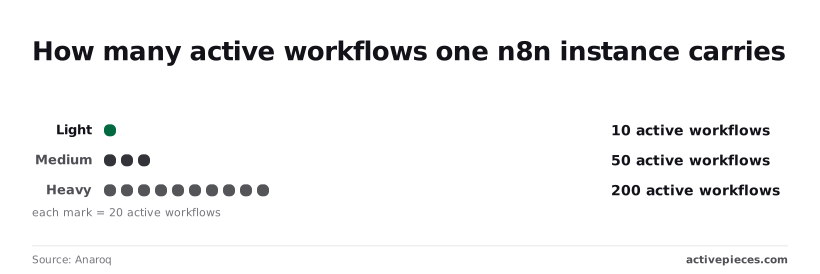
A team at the light end has ten things to protect, so a second instance means doubling the servers, upgrades and credential sets to guard a handful of automations.
Even at 200 active workflows, one instance is still within a recognised load, so capacity gives nobody a reason to split.
Why n8n exports and test runs fall short
Duplicating a workflow gives a copy to edit, and the original keeps running. An exported JSON file gives a restore point. A manual execution runs the workflow once, on demand, before anyone activates it.
Each step looks like a safeguard, and none of them separates the experiment from production.
Because the duplicate shares the instance's credentials, a manual run that writes to a CRM or sends an email touches live systems. The export holds the workflow definition, not the state around it, so restoring from it means rebuilding whatever else changed.
Nothing in the sequence records who changed what, or which version is live.
What separate instances do for active workflows
Every active workflow on a shared instance sits behind the same bad edit, and n8n has no switch that fences test work off from live work, which is why separate instances win.
The list below pairs each mistake with the symptom that exposes it. Read it as a sequence of failures that surface only after production has already been touched.
- Editing a live workflow: customers see half-finished behavior within minutes of a save.
- Shared credentials hitting production data: a test run writes real records or sends real emails.
- Mixing up test and production webhook URLs: the sender fires at an endpoint that isn't listening.
- Version drift between instances: a workflow passes in one place and errors in the other.
- Unpinned data: a rerun fetches fresh records, so the failure you were debugging no longer reproduces.
Each of the first four needs its own treatment.
When a workflow is copied, it reuses whatever the credential name resolves to, because a credential belongs to one instance. On a single instance there is only one "CRM" credential, so the test run authenticates against the live CRM.

The symptom is a duplicate customer record created by a workflow you believed was in draft.
How n8n webhook URLs differ by environment
Every webhook node exposes two URLs: a test URL, which listens only while you run the workflow in the editor, and a production URL, which listens only once the workflow is activated.
Paste the wrong one into the sending system and the sender gets silence or a not-registered error.
Separate instances give each URL a different host, so the mix-up is visible in the address itself.
Version drift between instances
Once you have two instances, they can run different n8n versions, and a node that behaves one way in development may behave another way in production. Drift is the cost of separation, and the source-control feature plus a pinned version is how you pay it.

A single instance is acceptable only when nothing on it is live: a personal sandbox with throwaway credentials and no inbound webhooks.
What to do on Monday with n8n environments
If it is live, it needs a second instance beside it, and the order below gets you there without touching production until the last step.
Skipping ahead is how a draft ends up holding a production credential, because each step depends on the one before. The sequence runs from inventory to promotion.
- Open production and note every workflow that reads or writes customer records, sends messages to customers, or listens on an inbound webhook. These are the ones whose failure someone outside your team will notice, so they move first.
- Deploy a separate n8n with its own database and its own URL. Pointing a second tab at the same instance gives you no isolation at all, because a workflow edited there is edited in production.
- Production tracks the main branch and the new instance tracks a development branch. This is where the paid source-control feature is required: without it, you're exporting JSON by hand and hoping nobody forgets.
- Give development test accounts, sandbox API keys and a test database. A credential that is shared across both instances is a live key sitting in a place where people are meant to experiment.
- Write down that changes reach production only by merging the development branch into main and pulling that merge into the production instance. Nobody edits a workflow directly on production, and the rule names who approves the merge.
What to ask about n8n environments
Can I use n8n environments on the free self-hosted edition?
You can run separate dev and production instances on the free edition, but the built-in push and pull between them is a paid feature. Without it, you move workflows by exporting and importing JSON, usually through the command line.
That works, but every handoff is a manual step, and a skipped or repeated step is where production drifts from what was tested.
Do credentials move between n8n environments?
No, credential secrets stay in the instance where they were created. Source control carries workflow definitions and, at most, placeholders for credentials, so each instance needs its own keys, pointed at its own systems.
Development should hold sandbox keys and production the real ones. If a workflow arrives in production and the credential name matches but the secret belongs to a test account, the failure is silent until the first live run.
How many n8n environments do I need?
Two is the working minimum: one instance where people build and break things, and one that only receives reviewed changes. Add a staging instance when a workflow touches systems that can't be safely faked in development, such as billing or customer email.
Staging earns its place by running against production-shaped data and credentials of the same kind. A staging instance that shares credentials with development only repeats the development check under a different name.
Can I roll back a workflow after pushing to production?
Yes, if the previous version exists somewhere other than the instance you just overwrote. With source control, you revert the commit in the repository and pull it into production. Without it, you re-import the last exported JSON, so keep one for every workflow you ship.
Neither path undoes what the bad version already did. Records it wrote and messages it sent stay written and sent, so check the execution history before you assume the rollback finished the job.
What Activepieces does about this
Activepieces treats the boundary this article argues for as a product feature. Release Management moves flows from a test environment to production, so promotion is a deliberate step with its own destination, and nobody edits live flows to "test" them.
The same workflow runs self-hosted or on cloud. The community edition is open source under the MIT licence, so a second environment costs a server, not a tier.
You still keep separate connections and credentials on each side, because that discipline belongs to you on any tool.
MoneyGram, Moneypenny, Alan and FundingSocieties run it in production. Before choosing, check which plan includes Release Management on the current pricing page, as you would for n8n's source control.
Related reading
Build it
Set this up in minutes.
No code required. Connect your accounts, and Activepieces runs it from there.
Start free Talk to sales