n8n Review 2026: Pricing, Licence, and Limits

Oct 16, 202614 min read
n8n suits technical teams that want code-level control and the option to self-host. It's the wrong pick for non-technical teams who want to build without engineering help, a gap that tools like Activepieces are also trying to close.
The reasons are operational: how it bills, how it's licensed, and how much skill it assumes.
n8n Review Verdict and What the Tool Is
- It suits technical teams and self-hosters: people who write JavaScript or Python inside workflows, read error traces, and want data to stay on their own infrastructure.
- It doesn't suit non-technical builders, who will stall the first time a workflow needs custom logic or debugging.
- Pricing is execution-based, so cost follows how often workflows run rather than how many steps each contains, and a busy workflow can get expensive quickly.
- The licence is source-available, not open source in the strict sense, and its terms limit some commercial uses, which matters if you plan to resell or embed n8n.
- The learning curve is technical, so the time saved by automation is partly spent learning the tool.
What n8n is and who builds on it
n8n is a workflow automation platform. You connect apps and services on a visual canvas, and you can drop into code when a built-in node falls short.
It runs as a managed cloud service or on servers you operate yourself, as described in the official documentation.
The people who get the most from n8n are developers, DevOps staff and technical operations teams.
Check anything cost-critical against n8n's own documentation, pricing page and licence terms before you commit. The claims here rest on those pages, all checked on 16 October 2026, and vendors revise plans and terms without notice.

If you are running this arithmetic for your own team, see what the same workload costs on Activepieces.
n8n Features That Matter in Daily Use
Whether n8n fits your team depends on whether someone can read a stack trace. The table below shows which plan each feature sits on.
Whether n8n fits your team depends on whether someone can read a stack trace.
| Feature | What it does | Plan it sits on | Docs page |
|---|---|---|---|
| Canvas | Visual editor for wiring triggers and nodes into workflows | All plans, including Community | docs.n8n.io |
| Code node | Runs custom JavaScript or Python inside a workflow | All plans, including Community | docs.n8n.io |
| AI agent/LLM nodes | Connects language models, memory and tools to agent workflows | All plans, including Community | docs.n8n.io |
| Error workflows | Triggers a separate workflow when an execution fails | All plans, including Community | docs.n8n.io |
| Self-hosting | Runs n8n on your own infrastructure | Community is the free self-hosted edition | docs.n8n.io |
| Version control | Syncs workflows with a Git repository | Higher paid tiers | docs.n8n.io |
| Permissions | Controls who can view and edit workflows and credentials | Granular roles on higher paid tiers | docs.n8n.io |
n8n Features Gated by Plan
Building is broadly available, while governance (Git sync, role-based access) is gated. A team that wants reviewable changes and restricted credentials will pay for that, and should check the pricing page for the exact tier.
Code and AI agent nodes
Wire nodes together on the canvas and most integration work is done; the code node covers what no prebuilt node does.
That escape hatch is the strength for engineers and the trap for everyone else: the moment a workflow needs reshaping data, someone must write and maintain JavaScript or Python.
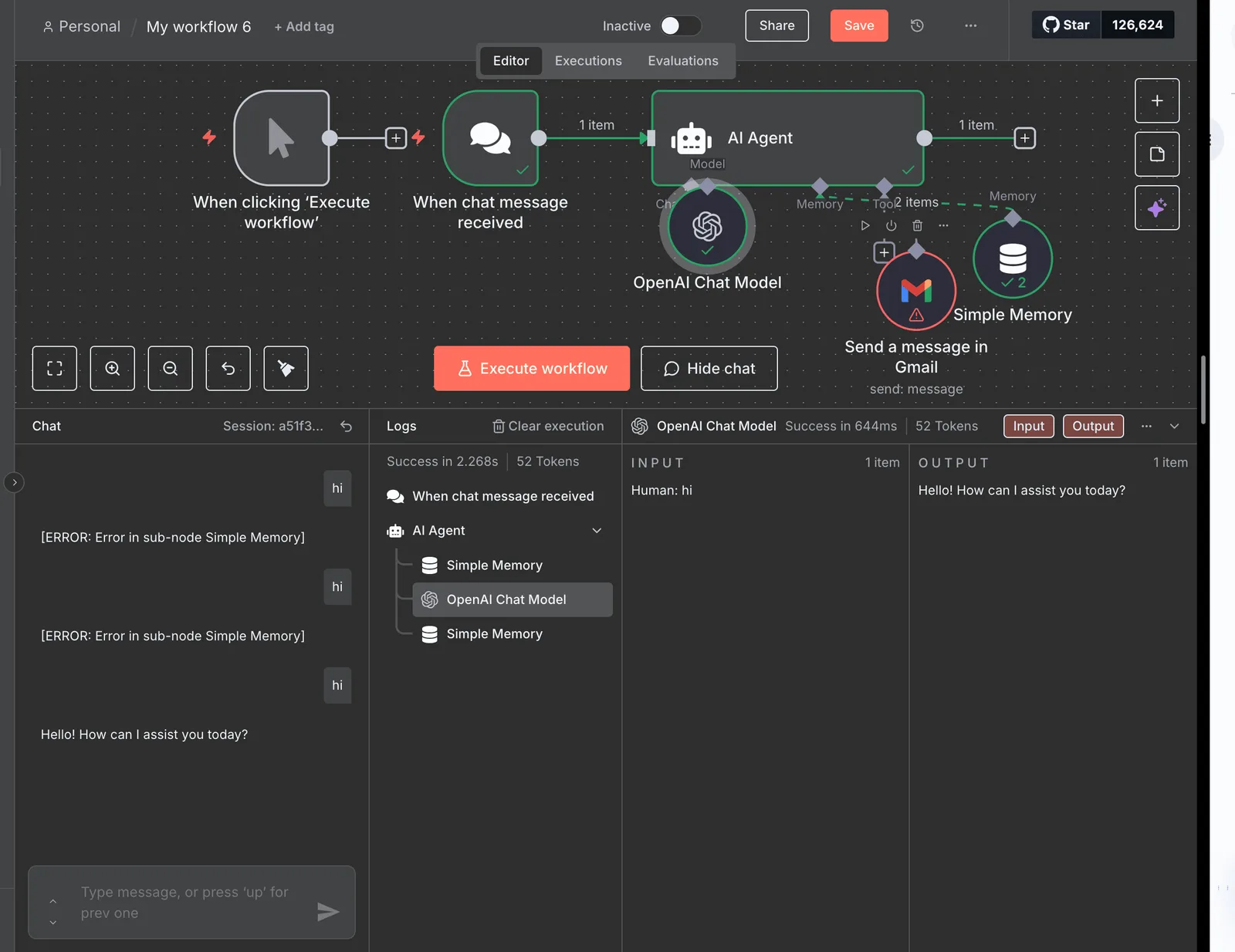
You can attach a model, memory and tools to a workflow with the agent nodes, so you can build agentic flows without a separate framework.
The operational consequence is that you own the prompts, the tool definitions and the failure behaviour.
Self-hosting and error handling
Run it yourself and you get data residency and control over the runtime. You also become responsible for upgrades, backups, scaling and uptime. Review the licence terms before embedding or reselling anything, because the free edition isn't unrestricted open source.
Instead of discovering failures later, you can route them to alerts or retry logic with error workflows. Execution history shows what each node received and returned, which makes diagnosis fast for someone who understands the data.
n8n Pricing and Plans
Your bill follows run volume more than headcount: n8n's Cloud pricing, checked on 2026-10-16, starts at $20 a month and scales with workflow executions rather than seats.
n8n Cloud Plans Compared
Pick a plan by what you can't work without, not by the entry price, because the table shows that each step up buys a larger execution allowance and moves governance controls behind a higher tier.
| Plan | Monthly price | Execution allowance | Active workflow limit | Users | Gated features |
|---|---|---|---|---|---|
| Community self-hosted | Free | Bounded by your server | None imposed | Per instance | Paid-tier collaboration and access controls |
| Cloud Starter | $20 annual, $24 monthly | 2.5K | Capped by plan | 1 shared project | Most team features |
| Cloud Pro | $50 annual, $60 monthly | Above Starter | Higher cap | More projects | Some admin controls |
| Business | Above Pro | Above Pro | Higher cap | Larger teams | Governance features |
| Enterprise | Custom quote | Negotiated | Negotiated | Negotiated | Full feature set |
Per SelfHostBR, Starter runs $20 to $24 and Pro $50 to $60, so annual billing saves about 17% on both. That discount is a 12-month commitment, so a team still piloting n8n pays the higher monthly rate.
Self-hosted editions and what they cost to run
You pay nothing for the licence, but the server isn't free. Sinqra lists DigitalOcean 1GB at $6, Hetzner CX21 at $6.50, Lightsail 2GB at $10, DigitalOcean 2GB at $12 and DigitalOcean 4GB at $24 a month.
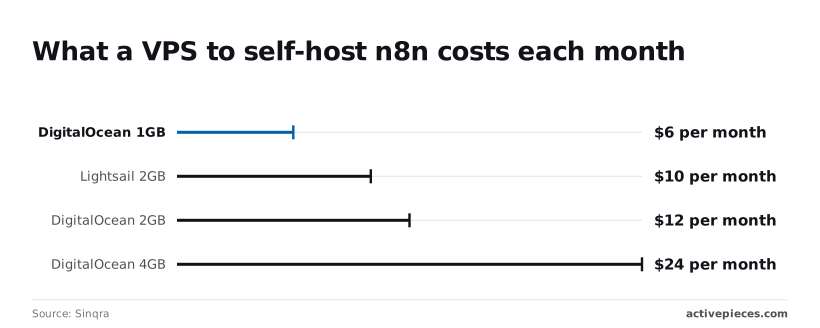
The cheapest options suit light testing. A 4GB machine, the size heavier workloads need, costs more than Starter's $20 annual price, and you also take on patching, backups and uptime, so self-hosting isn't the bargain it initially appears.

Count the schedules and Starter's 2.5K executions stop looking generous. One workflow polling every 15 minutes fires 96 times a day, about 2,880 a month, which already exceeds the allowance.
A non-technical team adding a handful of scheduled automations will move to Pro quickly, and its cost rises with every new trigger.
Real Limits of n8n From Its Own Documentation
Past cost, n8n's own documentation also records a restrictive licence, gated features, a developer-level learning curve, self-hosting upkeep and breaking changes between releases. Taken together, these are the cons a non-technical team would inherit, and each can be checked against a specific docs page:
- The Sustainable Use Licence isn't OSI open source: (the "Sustainable Use License" page in the n8n docs)
- Paid plans unlock some features (the docs page on community edition features)
- The learning curve is at developer level (the docs pages on expressions and the Code node)
- Self-hosting leaves upkeep with you (the self-hosting installation and configuration docs)
- Releases can contain breaking changes (the "Breaking changes" page and the release notes)
You can read and modify the code under the Sustainable Use Licence, which is source-available, but it limits use to internal business purposes and bars selling n8n as a hosted service.
Anyone who needs OSI-approved open source, for procurement or for embedding in a product, should read the licence page before committing.
Check the docs list of paid-plan capabilities against your requirements before building on the free tier, because a missing feature means a migration or a workaround later.
However visual the canvas is, real workflows quickly require expressions, JSON handling and often the Code node. Someone who can't read a data structure will stall at the first API response that needs reshaping, and will end up asking an engineer for help.

If you self-host, your team handles upgrades, backups, scaling and security patching. The docs describe configuration options but don't run the instance for you, so the control you gain comes with an on-call burden.
That burden includes reading the breaking-changes page before every upgrade, since an unreviewed version bump can silently break production workflows.
Worth checking against a plan that does not meter every step: one credit covers a whole run on Activepieces.
Who Should Pick Something Other Than n8n
If a team can't assign someone to own that upgrade burden, it should look elsewhere; so should non-technical builders, teams that need the widest app coverage, and enterprises that want contractual vendor support.
Choose n8n if you have an engineer who will read changelogs, can run a server, and wants to drop into JavaScript or Python when a node falls short. If that person doesn't exist, the self-hosting advantage becomes a maintenance liability.
Choose a simpler no-code tool if
When the builders are operations or marketing staff, a tool that removes configuration friction recovers more value than extra flexibility.
MESA, a Shopify automation app, counted 1,374 workflows started, 897 built and 455 in production. Roughly a third of what people begin ever runs live, so most of the loss happens after the canvas is open.

For that reader, Zapier and Make are the better fit, with the trade-off of higher per-run cost and no self-hosting.
Teams that like n8n's self-hosting but want non-technical colleagues to build can use Activepieces, where nobody has to learn expressions or the Code node first: you describe the process in the built-in chat and it publishes the same flow a builder would have assembled by hand.
That flow sits under the same RBAC, audit logs and run traces as every human-built one, so an operations lead can read what a run did without an engineer translating. MoneyGram, Moneypenny, Alan and FundingSocieties run it.
Describe a process that touches your connected apps and what comes back is a live flow in your account with a run trace to open. The table below compares licence, pricing model and fit, so you can see which constraint decides your choice.
| Tool | Licence | Pricing model | Self-hosting | App coverage | Best-fit reader |
|---|---|---|---|---|---|
| n8n | Sustainable Use License (source-available) | Per workflow execution on cloud | Yes | Broad, plus HTTP and code nodes | Engineers wanting control |
| Activepieces | MIT for the community edition | Cloud plans and self-hosted | Yes | Large, growing catalogue (741 integrations), roughly 60% community-contributed, each usable as an AI tool; systems with no integration can have one generated | Teams needing permissive open source |
| Zapier | Proprietary | Per task | No | Widest of the four | Non-technical teams |
| Make | Proprietary | Per operation or credit | No | Broad, visual | Operations builders |
| Plain code | Your own | Hosting and engineering time | Anywhere | Whatever you integrate | Teams with a few stable integrations |
Read the table by your binding constraint. Licence tolerance points to Activepieces or code, app breadth to Zapier, and engineering depth to n8n.
A One-Week n8n Trial Plan for Monday
Run one real workflow through n8n for a week, against criteria you wrote down before you started, and the trade-off between engineering depth, pricing and licence stops being abstract.
- Pick one real workflow that your team runs today.
- Build it in local Docker or on a trial instance.
- Count executions per run and per day.
- Break it on purpose to test the error workflow and credential handling.
- Check the licence against how you intend to use it.
- Score the result against the pass/fail criteria you set in step one.
Pick one real workflow
Choose a process that already runs somewhere, with a known owner and a known failure history. A lead-routing flow or an invoice-matching job works. A toy example doesn't, because it hides the branching, retries and awkward payloads that decide whether the tool fits.
Write the pass/fail criteria now, before you build. Examples: a non-engineer can modify a node without help, failures reach a named person, and the monthly cost model holds at your real volume.
Measuring n8n Executions and Failures in a Trial
Build it in Docker or on a trial, then count executions.
Check how n8n counts a run that loops over many items, since billing is per workflow execution and a single fan-out design can behave very differently from a step-by-step one. This tells you whether the pricing model suits your volume.
Then break it. Revoke a credential, return a malformed response, and time out an upstream call. Confirm that the error workflow fires, that the alert reaches a person, and that a failed run can be replayed without duplicating side effects.
If a non-technical colleague can't read the failure and act on it, record that as a fail.
Check licence and hosting fit
Read the licence against your actual use: embedding in a product, offering it to clients, or running it only for internal automation. Each can fall under different terms, and the self-hosted route also makes you responsible for upgrades, backups and secrets storage.
If legal review or ownership of that upkeep is unresolved by Friday, the answer is fail, however well the workflow ran.
Frequently asked questions
You pay no licence fee for the self-hosted Community Edition, but you pay for the server, upkeep and security patching yourself.
n8n's cloud service is a paid product, and n8n's pricing page bills it by workflow executions. A free install therefore moves the cost from the invoice to your infrastructure and staff time.
Can n8n be used commercially without paying?
Yes, for internal business use, but the Sustainable Use License restricts resale and hosting n8n as a service for others. Using it to automate your own company's operations is generally permitted.
Embedding it in a product you sell, or running it for clients as a hosted offering, requires a separate commercial agreement. The licence text in n8n's repository and docs is the authority here, and your legal reviewer should read it directly.
If a procurement policy requires an approved open-source licence, the difference matters: n8n describes itself as fair-code rather than open source in the OSI sense.
Is n8n harder to learn than Zapier?
For non-technical builders, yes. n8n's canvas exposes data as JSON, expressions and node-level settings that Zapier mostly hides behind form fields. That exposure is what gives engineers fine control, and it's also what makes a first workflow slower for someone without a scripting background.
Teams with a developer on hand usually find the trade worthwhile. Teams without one tend to stall at the first branching or error-handling requirement.
Does n8n have a SOC 2 report or enterprise security features?
On the cloud service, n8n publishes security information, and its higher plans add single sign-on, role-based access control and audit logging. Confirm the current report status on n8n's trust and security pages and request the document itself under NDA.
Self-hosting changes the picture: your own infrastructure sits outside any report n8n holds, so your auditors will assess your deployment, not theirs.
Because n8n releases frequently, shipping regular minor releases and distinguishing beta from stable builds in its release notes, self-hosters need someone to own upgrade testing, pin versions deliberately and read changelogs for breaking changes before pulling a new image.

Related reading
References
Running the numbers
See what the same workload costs here.
Free forever plan, and every paid plan self-hosts at no extra cost.
See pricing Talk to sales